AutoCAD
Architecture
Content
 Adding and modifying walls
 Creating wall openings
 Working with custom and standard column grids
 Ceiling plans
 Stairs and railings
 Floors and roofs
 Furnishings and fixtures
 Setting up projects
 Creating views
 Annotating a drawing
 Adding schedules and tags
 Creating details
 Cameras, lights, and rendering
 Plotting your project sheets
Types of Drafters?
Three types of drafters:
Mechanical drafter: Mechanical engineers ,which create a plan
of our project,and he is prepare a plan of his device.
Architectural Drafters:
Architectural drafters draw a plan of
our residence and industrial
building. Civil engineer draw a
plans for make bridge and road
design and building of sewer
method and other major projects.
Electrical Drafters:
Electrical engineer work up
electricity to prepare drawing of wiring
electrical device
demonstration.Electrical engineer also
create a wiring plan for making,
installing and repairing of electronic
gadgets. Electrical engineer deep study
and application for electricity.
Who is
AutoCAD
Designer?
CAD designer are
professional who make a
2D plan and 3D modeling.
Another designers as civil,
machanical, architecture he
make a building
design.Sourly, CAD
designers work an
engineer, architect and
interior designers to design
a home design, electric or
room designs. Most
important, they help to
create plans that can be
used by an- other
architecture professional.
Where is
AutoCAD
Used?
 Auto-CAD is used
athwart a broad range
of industries, by as
architectures, project
managers, civil
engineers, graphic
designers, and other
professionals and
electrical engineer
which make a good
plan for our projects.
 Auto-CAD is engineer
prepare a good plan
and use it.
 Cad desingner
prepare a
building,bridge and
roadways , flyover and
another things .
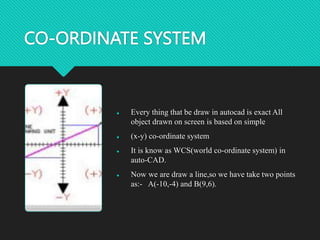
CO-ORDINATE SYSTEM
 Every thing that be draw in autocad is exact All
object drawn on screen is based on simple
 (x-y) co-ordinate system
 It is know as WCS(world co-ordinate system) in
auto-CAD.
 Now we are draw a line,so we have take two points
as:- A(-10,-4) and B(9,6).
Comparison
between 2D
and 3D?
 2D is a single view.
 3D is a six view and four isometric
view. it is explain under of page.
2D is two dimensions "level", use
the horizontal and vertical (X and
Y) dimensions, but 3d is the three
dimensions (X and Y and Z),
 It is show in 3d six view .
 Top view and Bottom view, Left
view and Right view, Front view
and Back view
 And 4 Isometric view:-
 South-East AND North-East AND
North-West , South-West
Mouse functions
Right click
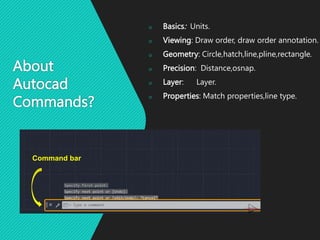
About
Autocad
Commands?
 Basics: Units.
 Viewing: Draw order, draw order annotation.
 Geometry: Circle,hatch,line,pline,rectangle.
 Precision: Distance,osnap.
 Layer: Layer.
 Properties: Match properties,line type.
Command bar
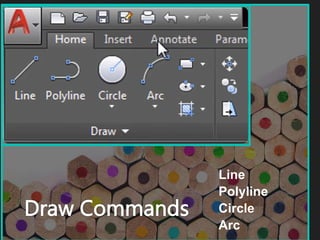
Draw Commands
Line
Polyline
Circle
Arc
Line
1- Use the icon Line.
Or L + enter
For horizontal or vertical line
press F8
2- enter the length of the line+
enter
For NON horizontal
or vertical line press
F8
Write length+ shift+ , + angle
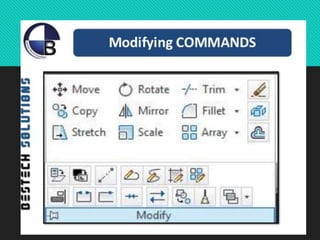
 Modifying: Trim, Stretch, Rotate, Pedit, Offset, Move,
Mirror, Fillet, Extend, Explode, Erase, Copy, Align,
Champher.
 Block: Insert, Block.
 Layouts: Mview.
 Notes and labels: Style, Mtext, Multileader Style,
Multileader.
 Dimensions:
 Dimaligned, Dimangular, Dimcontinue,
Dimdiameter, Dimradius, Dimstyle.
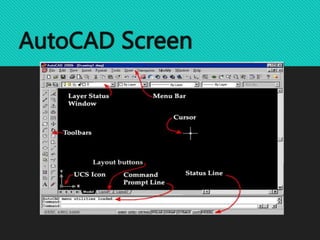
AutoCAD Screen

AutoCAD-Architecture.8367704.powerpoint.pptx

  • 1.
  • 2.
    Content  Adding andmodifying walls  Creating wall openings  Working with custom and standard column grids  Ceiling plans  Stairs and railings  Floors and roofs  Furnishings and fixtures  Setting up projects  Creating views  Annotating a drawing  Adding schedules and tags  Creating details  Cameras, lights, and rendering  Plotting your project sheets
  • 3.
    Types of Drafters? Threetypes of drafters: Mechanical drafter: Mechanical engineers ,which create a plan of our project,and he is prepare a plan of his device.
  • 4.
    Architectural Drafters: Architectural draftersdraw a plan of our residence and industrial building. Civil engineer draw a plans for make bridge and road design and building of sewer method and other major projects.
  • 5.
    Electrical Drafters: Electrical engineerwork up electricity to prepare drawing of wiring electrical device demonstration.Electrical engineer also create a wiring plan for making, installing and repairing of electronic gadgets. Electrical engineer deep study and application for electricity.
  • 7.
    Who is AutoCAD Designer? CAD designerare professional who make a 2D plan and 3D modeling. Another designers as civil, machanical, architecture he make a building design.Sourly, CAD designers work an engineer, architect and interior designers to design a home design, electric or room designs. Most important, they help to create plans that can be used by an- other architecture professional.
  • 8.
    Where is AutoCAD Used?  Auto-CADis used athwart a broad range of industries, by as architectures, project managers, civil engineers, graphic designers, and other professionals and electrical engineer which make a good plan for our projects.  Auto-CAD is engineer prepare a good plan and use it.  Cad desingner prepare a building,bridge and roadways , flyover and another things .
  • 9.
    CO-ORDINATE SYSTEM  Everything that be draw in autocad is exact All object drawn on screen is based on simple  (x-y) co-ordinate system  It is know as WCS(world co-ordinate system) in auto-CAD.  Now we are draw a line,so we have take two points as:- A(-10,-4) and B(9,6).
  • 10.
    Comparison between 2D and 3D? 2D is a single view.  3D is a six view and four isometric view. it is explain under of page. 2D is two dimensions "level", use the horizontal and vertical (X and Y) dimensions, but 3d is the three dimensions (X and Y and Z),  It is show in 3d six view .  Top view and Bottom view, Left view and Right view, Front view and Back view  And 4 Isometric view:-  South-East AND North-East AND North-West , South-West
  • 11.
  • 12.
    About Autocad Commands?  Basics: Units. Viewing: Draw order, draw order annotation.  Geometry: Circle,hatch,line,pline,rectangle.  Precision: Distance,osnap.  Layer: Layer.  Properties: Match properties,line type. Command bar
  • 14.
  • 15.
    Line 1- Use theicon Line. Or L + enter For horizontal or vertical line press F8 2- enter the length of the line+ enter
  • 16.
    For NON horizontal orvertical line press F8 Write length+ shift+ , + angle
  • 17.
     Modifying: Trim,Stretch, Rotate, Pedit, Offset, Move, Mirror, Fillet, Extend, Explode, Erase, Copy, Align, Champher.  Block: Insert, Block.  Layouts: Mview.  Notes and labels: Style, Mtext, Multileader Style, Multileader.  Dimensions:  Dimaligned, Dimangular, Dimcontinue, Dimdiameter, Dimradius, Dimstyle.
  • 19.