
Last Updated on 18-September-2012
 Review of Object Selection
 Erase, Extend, Trim
 Duplication: Copy, Offset, Mirror
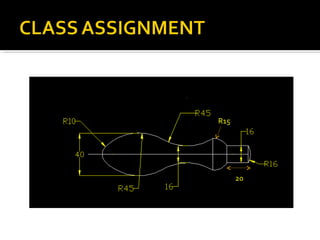
   Class assignment
 Move, Rotate
   Home assignment
 Arrays
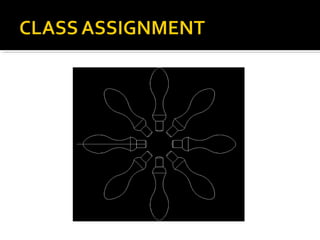
   Class assignment
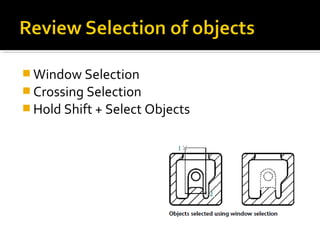
 Window Selection
 Crossing Selection
 Hold Shift + Select Objects
 Any Idea what do these commands do?
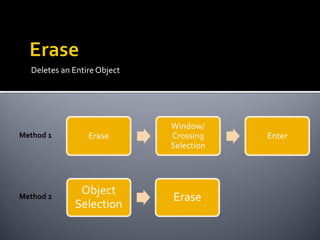
Deletes an Entire Object


Method 1


Method 2
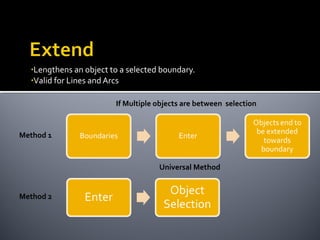
•Lengthens an object to a selected boundary.
  •Valid for Lines and Arcs


                          If Multiple objects are between selection


Method 1


                                      Universal Method


Method 2
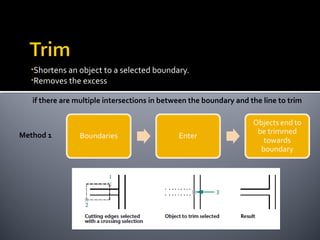
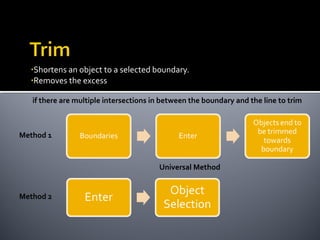
•Shortens an object to a selected boundary.
  •Removes the excess

   if there are multiple intersections in between the boundary and the line to trim


Method 1
•Shortens an object to a selected boundary.
  •Removes the excess

   if there are multiple intersections in between the boundary and the line to trim


Method 1


                                        Universal Method


Method 2
 Copy
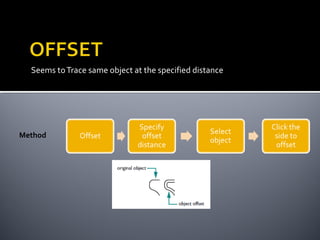
 Offset
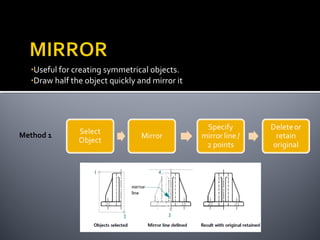
 Mirror
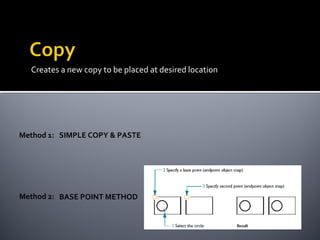
Creates a new copy to be placed at desired location


Method 1: SIMPLE COPY & PASTE


Method 2: BASE POINT METHOD
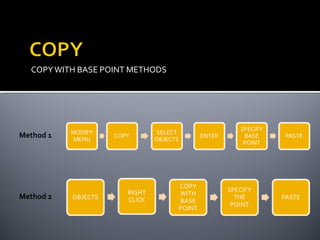
COPY WITH BASE POINT METHODS


Method 1


Method 2
Seems to Trace same object at the specified distance


Method
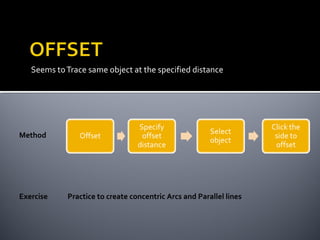
Seems to Trace same object at the specified distance


Method


Exercise    Practice to create concentric Arcs and Parallel lines
•Useful for creating symmetrical objects.
  •Draw half the object quickly and mirror it


Method 1
R15


      20
Create Object then place it
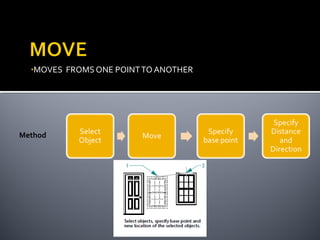
•MOVES   FROMS ONE POINT TO ANOTHER


Method
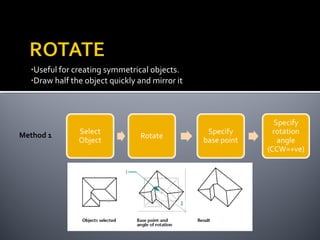
•Useful for creating symmetrical objects.
  •Draw half the object quickly and mirror it


Method 1
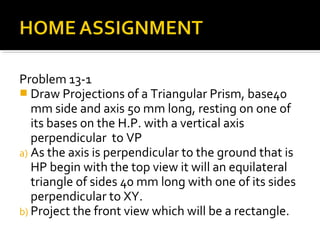
Problem 13-1
 Draw Projections of a Triangular Prism, base40
   mm side and axis 50 mm long, resting on one of
   its bases on the H.P. with a vertical axis
   perpendicular to VP
a) As the axis is perpendicular to the ground that is
   HP begin with the top view it will an equilateral
   triangle of sides 40 mm long with one of its sides
   perpendicular to XY.
b) Project the front view which will be a rectangle.
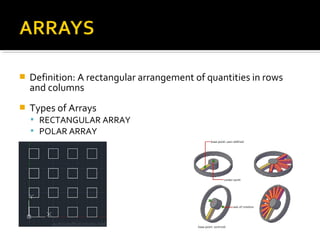
   Definition: A rectangular arrangement of quantities in rows
    and columns
   Types of Arrays
     RECTANGULAR ARRAY
     POLAR ARRAY
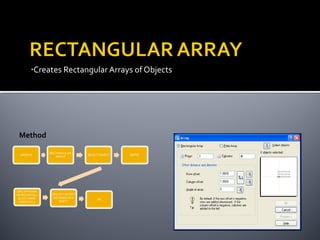
•Creates Rectangular Arrays of Objects


Method
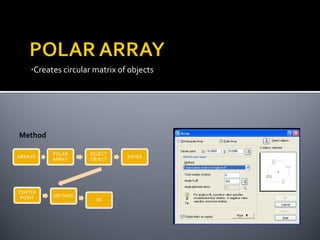
•Creates circular matrix of objects


Method
 Sulaiman Dawood Barry
  sd_barry@yahoo.com
  +92-321-8707987

AutoCAD - Using modify commands

  • 1.
    Last Updated on18-September-2012
  • 2.
     Review ofObject Selection  Erase, Extend, Trim  Duplication: Copy, Offset, Mirror  Class assignment  Move, Rotate  Home assignment  Arrays  Class assignment
  • 3.
     Window Selection Crossing Selection  Hold Shift + Select Objects
  • 4.
     Any Ideawhat do these commands do?
  • 5.
    Deletes an EntireObject Method 1 Method 2
  • 6.
    •Lengthens an objectto a selected boundary. •Valid for Lines and Arcs If Multiple objects are between selection Method 1 Universal Method Method 2
  • 7.
    •Shortens an objectto a selected boundary. •Removes the excess if there are multiple intersections in between the boundary and the line to trim Method 1
  • 8.
    •Shortens an objectto a selected boundary. •Removes the excess if there are multiple intersections in between the boundary and the line to trim Method 1 Universal Method Method 2
  • 9.
  • 10.
    Creates a newcopy to be placed at desired location Method 1: SIMPLE COPY & PASTE Method 2: BASE POINT METHOD
  • 11.
    COPY WITH BASEPOINT METHODS Method 1 Method 2
  • 12.
    Seems to Tracesame object at the specified distance Method
  • 13.
    Seems to Tracesame object at the specified distance Method Exercise Practice to create concentric Arcs and Parallel lines
  • 14.
    •Useful for creatingsymmetrical objects. •Draw half the object quickly and mirror it Method 1
  • 15.
    R15 20
  • 16.
  • 17.
    •MOVES FROMS ONE POINT TO ANOTHER Method
  • 18.
    •Useful for creatingsymmetrical objects. •Draw half the object quickly and mirror it Method 1
  • 19.
    Problem 13-1  DrawProjections of a Triangular Prism, base40 mm side and axis 50 mm long, resting on one of its bases on the H.P. with a vertical axis perpendicular to VP a) As the axis is perpendicular to the ground that is HP begin with the top view it will an equilateral triangle of sides 40 mm long with one of its sides perpendicular to XY. b) Project the front view which will be a rectangle.
  • 20.
    Definition: A rectangular arrangement of quantities in rows and columns  Types of Arrays  RECTANGULAR ARRAY  POLAR ARRAY
  • 21.
  • 22.
    •Creates circular matrixof objects Method
  • 24.
     Sulaiman DawoodBarry  sd_barry@yahoo.com  +92-321-8707987