Electronic Authentication
More Than Just a Password
Nicholas Davis, CISSP, CISA
Email: ndavis1@wisc.edu
May 15, 2014
Department Information Services Council
Session Overview
• What electronic authentication is
and why it is important
• Definitions
• Different types of authentication
factors (username/password)
• Benefits and drawbacks of various
authentication technologies
• Strong Authentication
• Question and Answer Session
Presentation Style
• Blue = Topic
• Black = Informational Details
• Red = Discussion
• Audience participation is
encouraged. Anytime you see red,
you can begin to think about the
discussion topic at hand
Authentication Defined
Authentication is the process of providing
proof to a person or system that you are
indeed who you claim to be.
Can you think of some examples?
Electronic authentication is similar in that
provides a level of assurance as to
whether someone or something is who or
what it claims to be in a digital
environment.
Can you think of some examples?
Authentication Factors
• Three types of electronic authentication
• Something you know –
username/password
• Something you have – One time
password device
• Something you are – Voiceprint or
retinal scan
• Let’s examine these in detail!
Username and Password
Something that you know
• Sometimes has rules associated
with it, such as length, or has an
expiration date.
• Can you think of some other
password rules?
• Why do you think password rules
are enforced?
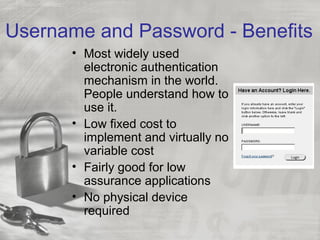
Username and Password - Benefits
• Most widely used
electronic authentication
mechanism in the world.
People understand how to
use it.
• Low fixed cost to
implement and virtually no
variable cost
• Fairly good for low
assurance applications
• No physical device
required
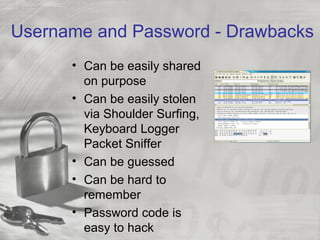
Username and Password - Drawbacks
• Can be easily shared
on purpose
• Can be easily stolen
via Shoulder Surfing,
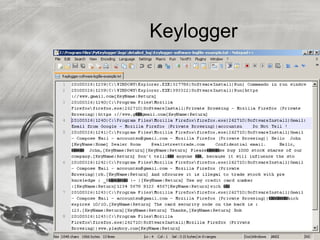
Keyboard Logger
Packet Sniffer
• Can be guessed
• Can be hard to
remember
• Password code is
easy to hack
Keylogger
Make Your Passwords Strong
• Be as long as possible (never shorter than 8
characters, should be at least 10, 12 is better).
• Include mixed-case letters, if possible.
• Include digits and punctuation marks, if possible.
• Not be based on any personal information.
• Not be based on any dictionary word, in any
language.
• Expire on a regular basis and may not be reused
• May not contain any portion of your name,
birthday, address or other publicly available
information
• May not be easily guessed
• What do you think is the most popular PIN?
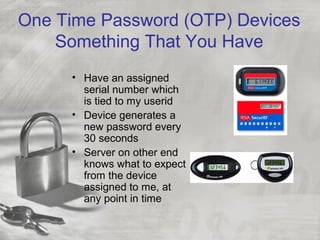
One Time Password (OTP) Devices
Something That You Have
• Have an assigned
serial number which
is tied to my userid
• Device generates a
new password every
30 seconds
• Server on other end
knows what to expect
from the device
assigned to me, at
any point in time
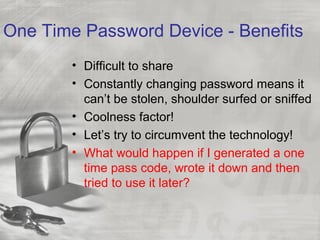
One Time Password Device - Benefits
• Difficult to share
• Constantly changing password means it
can’t be stolen, shoulder surfed or sniffed
• Coolness factor!
• Let’s try to circumvent the technology!
• What would happen if I generated a one
time pass code, wrote it down and then
tried to use it later?
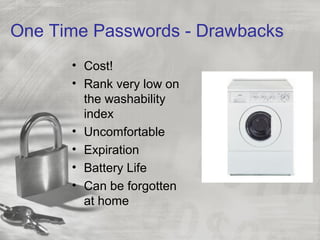
One Time Passwords - Drawbacks
• Cost!
• Rank very low on
the washability
index
• Uncomfortable
• Expiration
• Battery Life
• Can be forgotten
at home
Biometrics
Something That You Are
• Use a unique part
of your body to
authenticate you,
such as your voice
pattern, your
retina, or your
fingerprint
Biometrics Benefits
• Harder to steal than even a One
Time Password since it is part of the
user, not simply in their possession
like and OTP device
• Absolute uniqueness of
authentication factor
• Coolness factor
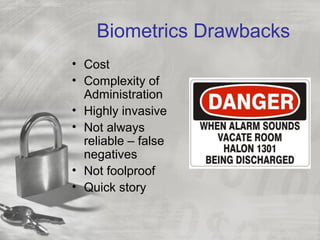
Biometrics Drawbacks
• Cost
• Complexity of
Administration
• Highly invasive
• Not always
reliable – false
negatives
• Not foolproof
• Quick story
Single Factor vs. Multifactor vs Dual
Factor
• Single Factor – Using one method to
authenticate.
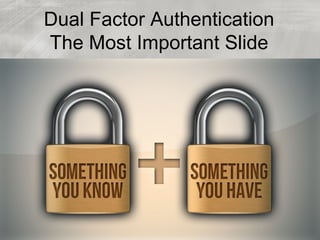
• Dual Factor – Using two different types of
authentication mechanism to authenticate
• Multifactor – Using multiple forms of the
same factor. (Password + identifying an
image that only you would know)
• Some people claim multi factor is just a
way around industry regulations. Good
test is to ask, could I memorize both of
these?
Key Concepts
• Current online password based
authentication techniques are weak at
best: Most rely on multiple single factors
• Password Credentials are easily stolen
from consumers, and rarely change
• Lack of consistency in authentication
processes confuse consumers
Summary
• There are three types of
authentication technologies:
– Something you know
– Something you have
– Something you are
Password is the weakest
Biometrics is the strongest
Audience Discussion and
Q&A
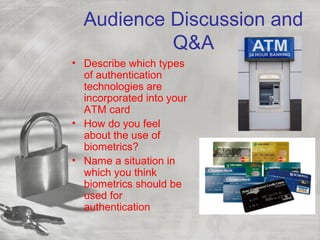
• Describe which types
of authentication
technologies are
incorporated into your
ATM card
• How do you feel
about the use of
biometrics?
• Name a situation in
which you think
biometrics should be
used for
authentication
Dual Factor Authentication
At UW-Madison
• Many of our systems contain
“sensitive” information. For
purposes of discussion, “sensitive” =
information which we do not want to
be accessed by the general public
• Three large systems come to mind:
• HRS, SFS, and ISIS
Dual Factor Rollout
• Internal desire for best practices
• Audit findings
• HRS, across all UW-System
• 2000 users
• Now going live on SFS
• Other systems may follow
• What this means for you
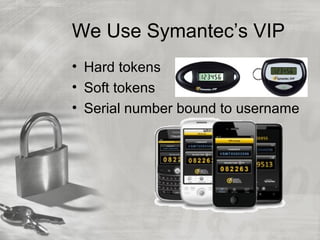
We Use Symantec’s VIP
• Hard tokens
• Soft tokens
• Serial number bound to username
Concerns
• Forgot token at home
• Drove over token
• Accidently dropped token in
bathroom
• Shared token with my BFF (Best
Friend Forever)
• Battery died
• Support system
Dual Factor Authentication
The Most Important Slide
Q&A Session
• If you have questions, comments,
concerns, suggestions, contact:
• Nicholas Davis
• Email ndavis1@wisc.edu
• http://facebook.com/nicholas.a.davis

Electronic Authentication, More Than Just a Password

  • 1.
    Electronic Authentication More ThanJust a Password Nicholas Davis, CISSP, CISA Email: ndavis1@wisc.edu May 15, 2014 Department Information Services Council
  • 2.
    Session Overview • Whatelectronic authentication is and why it is important • Definitions • Different types of authentication factors (username/password) • Benefits and drawbacks of various authentication technologies • Strong Authentication • Question and Answer Session
  • 3.
    Presentation Style • Blue= Topic • Black = Informational Details • Red = Discussion • Audience participation is encouraged. Anytime you see red, you can begin to think about the discussion topic at hand
  • 4.
    Authentication Defined Authentication isthe process of providing proof to a person or system that you are indeed who you claim to be. Can you think of some examples? Electronic authentication is similar in that provides a level of assurance as to whether someone or something is who or what it claims to be in a digital environment. Can you think of some examples?
  • 5.
    Authentication Factors • Threetypes of electronic authentication • Something you know – username/password • Something you have – One time password device • Something you are – Voiceprint or retinal scan • Let’s examine these in detail!
  • 6.
    Username and Password Somethingthat you know • Sometimes has rules associated with it, such as length, or has an expiration date. • Can you think of some other password rules? • Why do you think password rules are enforced?
  • 7.
    Username and Password- Benefits • Most widely used electronic authentication mechanism in the world. People understand how to use it. • Low fixed cost to implement and virtually no variable cost • Fairly good for low assurance applications • No physical device required
  • 8.
    Username and Password- Drawbacks • Can be easily shared on purpose • Can be easily stolen via Shoulder Surfing, Keyboard Logger Packet Sniffer • Can be guessed • Can be hard to remember • Password code is easy to hack
  • 9.
  • 10.
    Make Your PasswordsStrong • Be as long as possible (never shorter than 8 characters, should be at least 10, 12 is better). • Include mixed-case letters, if possible. • Include digits and punctuation marks, if possible. • Not be based on any personal information. • Not be based on any dictionary word, in any language. • Expire on a regular basis and may not be reused • May not contain any portion of your name, birthday, address or other publicly available information • May not be easily guessed • What do you think is the most popular PIN?
  • 11.
    One Time Password(OTP) Devices Something That You Have • Have an assigned serial number which is tied to my userid • Device generates a new password every 30 seconds • Server on other end knows what to expect from the device assigned to me, at any point in time
  • 12.
    One Time PasswordDevice - Benefits • Difficult to share • Constantly changing password means it can’t be stolen, shoulder surfed or sniffed • Coolness factor! • Let’s try to circumvent the technology! • What would happen if I generated a one time pass code, wrote it down and then tried to use it later?
  • 13.
    One Time Passwords- Drawbacks • Cost! • Rank very low on the washability index • Uncomfortable • Expiration • Battery Life • Can be forgotten at home
  • 14.
    Biometrics Something That YouAre • Use a unique part of your body to authenticate you, such as your voice pattern, your retina, or your fingerprint
  • 15.
    Biometrics Benefits • Harderto steal than even a One Time Password since it is part of the user, not simply in their possession like and OTP device • Absolute uniqueness of authentication factor • Coolness factor
  • 16.
    Biometrics Drawbacks • Cost •Complexity of Administration • Highly invasive • Not always reliable – false negatives • Not foolproof • Quick story
  • 17.
    Single Factor vs.Multifactor vs Dual Factor • Single Factor – Using one method to authenticate. • Dual Factor – Using two different types of authentication mechanism to authenticate • Multifactor – Using multiple forms of the same factor. (Password + identifying an image that only you would know) • Some people claim multi factor is just a way around industry regulations. Good test is to ask, could I memorize both of these?
  • 18.
    Key Concepts • Currentonline password based authentication techniques are weak at best: Most rely on multiple single factors • Password Credentials are easily stolen from consumers, and rarely change • Lack of consistency in authentication processes confuse consumers
  • 19.
    Summary • There arethree types of authentication technologies: – Something you know – Something you have – Something you are Password is the weakest Biometrics is the strongest
  • 20.
    Audience Discussion and Q&A •Describe which types of authentication technologies are incorporated into your ATM card • How do you feel about the use of biometrics? • Name a situation in which you think biometrics should be used for authentication
  • 21.
    Dual Factor Authentication AtUW-Madison • Many of our systems contain “sensitive” information. For purposes of discussion, “sensitive” = information which we do not want to be accessed by the general public • Three large systems come to mind: • HRS, SFS, and ISIS
  • 22.
    Dual Factor Rollout •Internal desire for best practices • Audit findings • HRS, across all UW-System • 2000 users • Now going live on SFS • Other systems may follow • What this means for you
  • 23.
    We Use Symantec’sVIP • Hard tokens • Soft tokens • Serial number bound to username
  • 24.
    Concerns • Forgot tokenat home • Drove over token • Accidently dropped token in bathroom • Shared token with my BFF (Best Friend Forever) • Battery died • Support system
  • 25.
    Dual Factor Authentication TheMost Important Slide
  • 26.
    Q&A Session • Ifyou have questions, comments, concerns, suggestions, contact: • Nicholas Davis • Email ndavis1@wisc.edu • http://facebook.com/nicholas.a.davis