Acceptance Test Driven Development
Mike Douglas
Mikedouglas *AT* Deliveron.com
@mikedouglasdev
Kim Dietz
Kimdietz *AT* Deliveron.com
ABOUT DELIVERON
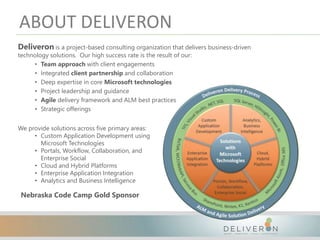
Deliveron is a project-based consulting organization that delivers business-driven
technology solutions. Our high success rate is the result of our:
• Team approach with client engagements
• Integrated client partnership and collaboration
• Deep expertise in core Microsoft technologies
• Project leadership and guidance
• Agile delivery framework and ALM best practices
• Strategic offerings
We provide solutions across five primary areas:
• Custom Application Development using
Microsoft Technologies
• Portals, Workflow, Collaboration, and
Enterprise Social
• Cloud and Hybrid Platforms
• Enterprise Application Integration
• Analytics and Business Intelligence
Nebraska Code Camp Gold Sponsor
Acceptance Test Driven Development
Mike Douglas
mikedouglas@Deliveron.com
@mikedouglasdev
Kim Dietz
kimdietz@Deliveron.com
AGENDA
• What is Agile Testing?
• Differentiating TDD, ATDD, and BDD
• Why use ATDD?
• Understanding the Process
WHAT IS AGILE TESTING?
• Traditional / Waterfall
– Huge Word documents, well protected
– Documents don’t work so well…
• Too expensive = time to create and maintain
• What if the unspeakable happens…There’s a change!?!
• Out of date as soon as it is signed off
• Can’t use to prove the intent of the spec is met
• No run / test button in Word
WHAT IS AGILE TESTING?
• Traditional / Waterfall
– Waiting until development is complete
• Testing time is often compressed because development
took longer than planned
• Typically this is the first time the users get to see the
application
• Usually what they asked for, less often it is what they
want
WHAT IS AGILE TESTING?
• Agile
– We have user stories…
• Expressing desirements
• User stories represent needed conversations
• User Stories are the requirements, but only until done, done.
– Need something to document that the conversation took place
• Written as the functionality is now done and this is how it
should work
• Testable outcome can be verified
• To become executable specifications
TDD, ATDD, AND BDD
TDD, ATDD, AND BDD
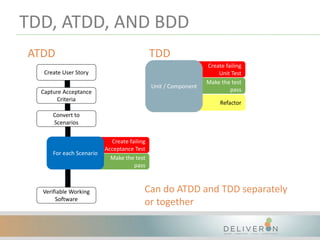
• 2 levels of Test First Development
– TDD (Test Driven Development)
– ATDD (Acceptance Test Driven Development)
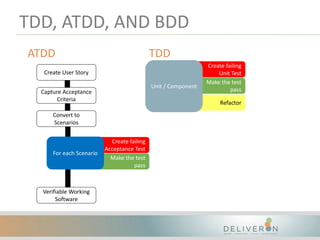
Create failing
Unit Test
Make the test
pass
Refactor
Unit / Component
TDD, ATDD, AND BDD
ATDD TDD
Convert to
Scenarios
Create failing
Acceptance Test
Make the test
pass
For each Scenario
Capture Acceptance
Criteria
Create User Story
Verifiable Working
Software
TDD, ATDD, AND BDD
• TDD
– Developer focused – Unit / Component Level
– Validates “building the code right”
– “Encourages simple designs and inspires software” - Kent
Beck
– Usually tests code in isolation (Dependency Injection and
Mocking frameworks)
– Advantages
• Enables you to take small steps when writing software
• Prevents gold plated software
TDD, ATDD, AND BDD
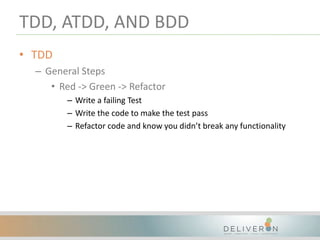
• TDD
– General Steps
• Red -> Green -> Refactor
– Write a failing Test
– Write the code to make the test pass
– Refactor code and know you didn’t break any functionality
TDD, ATDD, AND BDD
• TDD Demo
– Dependency Injection
• Ninject
– Mocking Framework
• Moq
TDD, ATDD, AND BDD
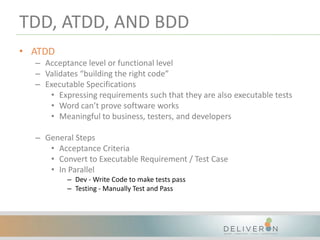
• ATDD
– Acceptance level or functional level
– Validates “building the right code”
– Executable Specifications
• Expressing requirements such that they are also executable tests
• Word can’t prove software works
• Meaningful to business, testers, and developers
– General Steps
• Acceptance Criteria
• Convert to Executable Requirement / Test Case
• In Parallel
– Dev - Write Code to make tests pass
– Testing - Manually Test and Pass
TDD, ATDD, AND BDD
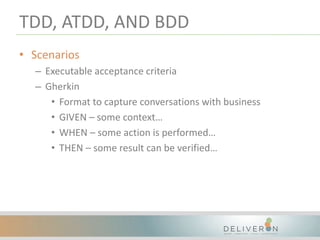
• Scenarios
– Executable acceptance criteria
– Gherkin
• Format to capture conversations with business
• GIVEN – some context…
• WHEN – some action is performed…
• THEN – some result can be verified…
TDD, ATDD, AND BDD
• BDD
– Behavior Driven Development
– Specific implementation of ATDD / TDD using Gherkin
language
– Creates the executable scenario with automated tests
– Dependent on a tool such as Cucumber for Java/Perl
(others) or SpecFlow for .NET
– Functional level (xBehave) or developer level (xSpec)
TDD, ATDD, AND BDD
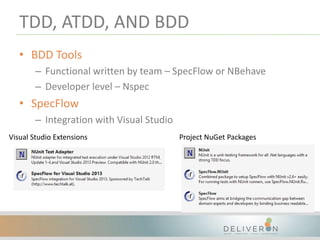
• BDD Tools
– Functional written by team – SpecFlow or NBehave
– Developer level – Nspec
• SpecFlow
– Integration with Visual Studio
Visual Studio Extensions Project NuGet Packages
Create failing
Unit Test
Make the test
pass
Refactor
Unit / Component
TDD, ATDD, AND BDD
ATDD TDD
Convert to
Scenarios
Create failing
Acceptance Test
Make the test
pass
For each Scenario
Capture Acceptance
Criteria
Create User Story
Verifiable Working
Software
Can do ATDD and TDD separately
or together
WHY ATDD?
• Test maintainability
– Refactor code with minimal impact on the tests
• Avoid misunderstood requirements
– Common language so that business, testers, and developers can
better understand the requirements
• Automated regression testing is delivered as part of the
project
– Automated Executable Specifications
• Reporting of ATDD progress
– Provides great insight of progress during Sprints
• Testing the functionality that has been requested
– Preventing the gold plated code
UNDERSTANDING THE PROCESS
• Customer Maintenance application
UNDERSTANDING THE PROCESS
• Requirement Definition (User Story Statement)
– UINVEST
• U = Understandable – story must make sense
• I = Independent – self contained
• N = Negotiable – can be changed until added to an
iteration
• V = Valuable – deliver value
• E = Estimatable – estimate a size of the story
• S = Small – stories should not be too big
• T = Testable – we must be able to test it
UNDERSTANDING THE PROCESS
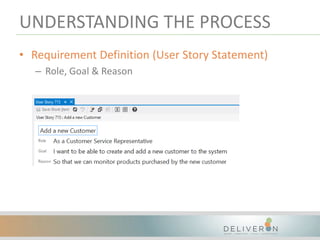
• Requirement Definition (User Story Statement)
– Role, Goal & Reason
UNDERSTANDING THE PROCESS
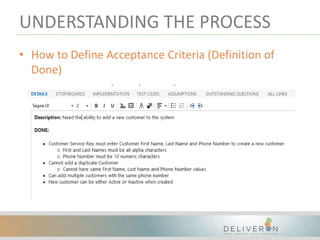
• How to Define Acceptance Criteria (Definition of
Done)
– Defined for each User Story during the Iteration Planning
meeting
– Conditions that must be met to consider the Story “Done”
• Includes Functional & Non-Functional Requirements
– High level definition of what is acceptable and what is not
– Actionable in order to translate into Test Case(s)
– Either everything is “Done” or the Story is incomplete
UNDERSTANDING THE PROCESS
• How to Define Acceptance Criteria (Definition of
Done)
UNDERSTANDING THE PROCESS
• Converting Acceptance Criteria to Scenario/Test Case
– Test Case creation for each User Story takes place during
the Iteration Planning or Iteration Definition meeting
– Involves the Development Team and the Business
– Test Cases are the executable specifications of the
Acceptance Criteria
– Gherkin
• Format to capture conversations with business
• GIVEN – some context…
• WHEN – some action is performed…
• THEN – some result can be verified…
UNDERSTANDING THE PROCESS
• Implementing test cases as part of the development
process
– Developer creates the failing SpecFlow tests
– BA/QA defines the test case steps, input values and
expected outcomes that will be used for the execution of
the test cases
UNDERSTANDING THE PROCESS
• Implementing test cases as part of the development
process
– Developer makes the appropriate code changes until the
SpecFlow scenario passes
– The Developer updates the User Story state to Resolved
and the BA/QA executes any remaining manual test cases
– When all test cases are in a Passing state, the User Story is
then handed off to the appropriate business user to
complete UAT and Close the User Story.
UNDERSTANDING THE PROCESS
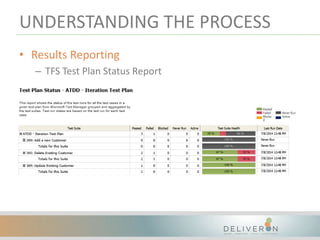
• Results Reporting
– TFS Test Plan Status Report
UNDERSTANDING THE PROCESS
• Regression Tests Delivered During Iteration
– Not only has the Team delivered the User Story, they now
also have a repository of regression test cases!
– Benefits the team whether the Test Cases are Automated
or executed manually.
UNDERSTANDING THE PROCESS
• BA/QA Demo
– User Story in Visual Studio
• Linked Test Cases
– Open MTM
• Iteration Test Plans
– Test Suites
– Test Cases
UNDERSTANDING THE PROCESS
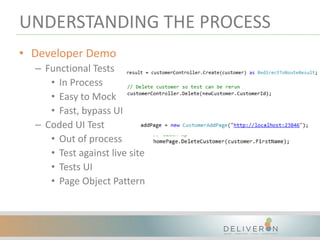
• Developer Demo
– Functional Tests
• In Process
• Easy to Mock
• Fast, bypass UI
– Coded UI Test
• Out of process
• Test against live site
• Tests UI
• Page Object Pattern
UNDERSTANDING THE PROCESS
• Options
– QA members replacing their manual testing with writing
SpecFlow tests
– Linking between the test cases and automated provide
automation from Test Manager
– Automated Tests can be run as part of nightly
UNDERSTANDING THE PROCESS
• Call to Action
– Try ATDD in your process
– Try TDD in your process
– Let us know if you would like any help or have questions
– Let us know if you want us to come talk to your teams
1 1 5 1 6 M i r a c l e H i l l s D r i v e S u i t e 2 0 1 O m a h a , N E 6 8 1 5 4
4 0 2 . 2 3 8 . 1 3 9 9 | w w w . d e l i v e r o n . c o m | c o n t a c t u s @ d e l i v e r o n . c o m

Acceptance Test Driven Development

  • 1.
    Acceptance Test DrivenDevelopment Mike Douglas Mikedouglas *AT* Deliveron.com @mikedouglasdev Kim Dietz Kimdietz *AT* Deliveron.com
  • 2.
    ABOUT DELIVERON Deliveron isa project-based consulting organization that delivers business-driven technology solutions. Our high success rate is the result of our: • Team approach with client engagements • Integrated client partnership and collaboration • Deep expertise in core Microsoft technologies • Project leadership and guidance • Agile delivery framework and ALM best practices • Strategic offerings We provide solutions across five primary areas: • Custom Application Development using Microsoft Technologies • Portals, Workflow, Collaboration, and Enterprise Social • Cloud and Hybrid Platforms • Enterprise Application Integration • Analytics and Business Intelligence Nebraska Code Camp Gold Sponsor
  • 3.
    Acceptance Test DrivenDevelopment Mike Douglas mikedouglas@Deliveron.com @mikedouglasdev Kim Dietz kimdietz@Deliveron.com
  • 4.
    AGENDA • What isAgile Testing? • Differentiating TDD, ATDD, and BDD • Why use ATDD? • Understanding the Process
  • 5.
    WHAT IS AGILETESTING? • Traditional / Waterfall – Huge Word documents, well protected – Documents don’t work so well… • Too expensive = time to create and maintain • What if the unspeakable happens…There’s a change!?! • Out of date as soon as it is signed off • Can’t use to prove the intent of the spec is met • No run / test button in Word
  • 6.
    WHAT IS AGILETESTING? • Traditional / Waterfall – Waiting until development is complete • Testing time is often compressed because development took longer than planned • Typically this is the first time the users get to see the application • Usually what they asked for, less often it is what they want
  • 7.
    WHAT IS AGILETESTING? • Agile – We have user stories… • Expressing desirements • User stories represent needed conversations • User Stories are the requirements, but only until done, done. – Need something to document that the conversation took place • Written as the functionality is now done and this is how it should work • Testable outcome can be verified • To become executable specifications
  • 8.
  • 9.
    TDD, ATDD, ANDBDD • 2 levels of Test First Development – TDD (Test Driven Development) – ATDD (Acceptance Test Driven Development)
  • 10.
    Create failing Unit Test Makethe test pass Refactor Unit / Component TDD, ATDD, AND BDD ATDD TDD Convert to Scenarios Create failing Acceptance Test Make the test pass For each Scenario Capture Acceptance Criteria Create User Story Verifiable Working Software
  • 11.
    TDD, ATDD, ANDBDD • TDD – Developer focused – Unit / Component Level – Validates “building the code right” – “Encourages simple designs and inspires software” - Kent Beck – Usually tests code in isolation (Dependency Injection and Mocking frameworks) – Advantages • Enables you to take small steps when writing software • Prevents gold plated software
  • 12.
    TDD, ATDD, ANDBDD • TDD – General Steps • Red -> Green -> Refactor – Write a failing Test – Write the code to make the test pass – Refactor code and know you didn’t break any functionality
  • 13.
    TDD, ATDD, ANDBDD • TDD Demo – Dependency Injection • Ninject – Mocking Framework • Moq
  • 14.
    TDD, ATDD, ANDBDD • ATDD – Acceptance level or functional level – Validates “building the right code” – Executable Specifications • Expressing requirements such that they are also executable tests • Word can’t prove software works • Meaningful to business, testers, and developers – General Steps • Acceptance Criteria • Convert to Executable Requirement / Test Case • In Parallel – Dev - Write Code to make tests pass – Testing - Manually Test and Pass
  • 15.
    TDD, ATDD, ANDBDD • Scenarios – Executable acceptance criteria – Gherkin • Format to capture conversations with business • GIVEN – some context… • WHEN – some action is performed… • THEN – some result can be verified…
  • 16.
    TDD, ATDD, ANDBDD • BDD – Behavior Driven Development – Specific implementation of ATDD / TDD using Gherkin language – Creates the executable scenario with automated tests – Dependent on a tool such as Cucumber for Java/Perl (others) or SpecFlow for .NET – Functional level (xBehave) or developer level (xSpec)
  • 17.
    TDD, ATDD, ANDBDD • BDD Tools – Functional written by team – SpecFlow or NBehave – Developer level – Nspec • SpecFlow – Integration with Visual Studio Visual Studio Extensions Project NuGet Packages
  • 18.
    Create failing Unit Test Makethe test pass Refactor Unit / Component TDD, ATDD, AND BDD ATDD TDD Convert to Scenarios Create failing Acceptance Test Make the test pass For each Scenario Capture Acceptance Criteria Create User Story Verifiable Working Software Can do ATDD and TDD separately or together
  • 19.
    WHY ATDD? • Testmaintainability – Refactor code with minimal impact on the tests • Avoid misunderstood requirements – Common language so that business, testers, and developers can better understand the requirements • Automated regression testing is delivered as part of the project – Automated Executable Specifications • Reporting of ATDD progress – Provides great insight of progress during Sprints • Testing the functionality that has been requested – Preventing the gold plated code
  • 20.
    UNDERSTANDING THE PROCESS •Customer Maintenance application
  • 21.
    UNDERSTANDING THE PROCESS •Requirement Definition (User Story Statement) – UINVEST • U = Understandable – story must make sense • I = Independent – self contained • N = Negotiable – can be changed until added to an iteration • V = Valuable – deliver value • E = Estimatable – estimate a size of the story • S = Small – stories should not be too big • T = Testable – we must be able to test it
  • 22.
    UNDERSTANDING THE PROCESS •Requirement Definition (User Story Statement) – Role, Goal & Reason
  • 23.
    UNDERSTANDING THE PROCESS •How to Define Acceptance Criteria (Definition of Done) – Defined for each User Story during the Iteration Planning meeting – Conditions that must be met to consider the Story “Done” • Includes Functional & Non-Functional Requirements – High level definition of what is acceptable and what is not – Actionable in order to translate into Test Case(s) – Either everything is “Done” or the Story is incomplete
  • 24.
    UNDERSTANDING THE PROCESS •How to Define Acceptance Criteria (Definition of Done)
  • 25.
    UNDERSTANDING THE PROCESS •Converting Acceptance Criteria to Scenario/Test Case – Test Case creation for each User Story takes place during the Iteration Planning or Iteration Definition meeting – Involves the Development Team and the Business – Test Cases are the executable specifications of the Acceptance Criteria – Gherkin • Format to capture conversations with business • GIVEN – some context… • WHEN – some action is performed… • THEN – some result can be verified…
  • 26.
    UNDERSTANDING THE PROCESS •Implementing test cases as part of the development process – Developer creates the failing SpecFlow tests – BA/QA defines the test case steps, input values and expected outcomes that will be used for the execution of the test cases
  • 27.
    UNDERSTANDING THE PROCESS •Implementing test cases as part of the development process – Developer makes the appropriate code changes until the SpecFlow scenario passes – The Developer updates the User Story state to Resolved and the BA/QA executes any remaining manual test cases – When all test cases are in a Passing state, the User Story is then handed off to the appropriate business user to complete UAT and Close the User Story.
  • 28.
    UNDERSTANDING THE PROCESS •Results Reporting – TFS Test Plan Status Report
  • 29.
    UNDERSTANDING THE PROCESS •Regression Tests Delivered During Iteration – Not only has the Team delivered the User Story, they now also have a repository of regression test cases! – Benefits the team whether the Test Cases are Automated or executed manually.
  • 30.
    UNDERSTANDING THE PROCESS •BA/QA Demo – User Story in Visual Studio • Linked Test Cases – Open MTM • Iteration Test Plans – Test Suites – Test Cases
  • 31.
    UNDERSTANDING THE PROCESS •Developer Demo – Functional Tests • In Process • Easy to Mock • Fast, bypass UI – Coded UI Test • Out of process • Test against live site • Tests UI • Page Object Pattern
  • 32.
    UNDERSTANDING THE PROCESS •Options – QA members replacing their manual testing with writing SpecFlow tests – Linking between the test cases and automated provide automation from Test Manager – Automated Tests can be run as part of nightly
  • 33.
    UNDERSTANDING THE PROCESS •Call to Action – Try ATDD in your process – Try TDD in your process – Let us know if you would like any help or have questions – Let us know if you want us to come talk to your teams
  • 34.
    1 1 51 6 M i r a c l e H i l l s D r i v e S u i t e 2 0 1 O m a h a , N E 6 8 1 5 4 4 0 2 . 2 3 8 . 1 3 9 9 | w w w . d e l i v e r o n . c o m | c o n t a c t u s @ d e l i v e r o n . c o m

Editor's Notes

  • #2 How many of you teams are doing TDD where you are unit tests before writing code? How many are teams are doing ATDD? Using scenarios with Given, When, Then? Software project? Without bug? With bugs found at the end?
  • #4 How many of you teams are doing TDD where you are unit tests before writing code? How many are teams are doing ATDD? Using scenarios with Given, When, Then? Software project? Without bug? With bugs found at the end?
  • #5 End to end to show the full process from the testing standpoint and developer standpoint
  • #9 Probably wouldn’t be here if not Agile fixes all of the problems, right?  If something breaks in the application, where is the first place you look to see how the application performs? Most would say the code. Requirements might not be up to date. Need something closer to the code. Rule should be validated as a test, if it isn’t there, add it. Therefore your tests become the truth center for requirements.
  • #10 This is where our acronyms come in
  • #13 Who knows what gold plated software is? Sounds awesome, I want some! But like many (maybe most) of you know it is bad. Gold plated means there is a lot of extra code to make sure it can do anything, not just the requirements. We want barely sufficient code that does just what we asked it to do…
  • #16 Right code – testing to make sure it work but also making sure it is what they really want
  • #21 Why do we so strongly believe in ATDD? Kim will show some of the reporting in more details in just a bit
  • #23 Process starts with defining the desirements of the users by creating user stories Defined during Release and/or Iteration Planning Acronym used to help process of creating User Stories
  • #24 Many tools to use to support the Agile methodology - we use TFS on the majority of our Client projects Example of User Story work item in TFS – Deliveron Template has been updated to include the Role, Goal & Reason Deliveron’s ALM Guidance?
  • #25 Functional – Clicking the “Continue” button takes the user to the next page Non-Functional – The Button is Green Use clear, simple language that is clear to the business and Dev team Actionable = Testable. Words such as “Engaging” or “Fun” should not be used. These are not testable attributes.
  • #26 Example shows how we recommend documenting the Definition of Done for each User Story in TFS Description is a high level explanation of the User Story – usually provided by the Business to add more context around the purpose of the story
  • #27 This is where a lot of teams struggle – converting the acceptance criteria into pieces that are testable Acceptance Criteria was the high level requirements of the story – Test Cases are going to become the detailed requirements Test Cases will be a reflection of the Definition of Done as it applies to real life scenarios Test cases are the definition of the application as it is intended to be used Test Cases should cover both the positive and negative scenarios There is not always a one to one relationship between the Acceptance Criteria and Test Cases Can be one to many, many to one so on and so forth You should always have at a minimum of one test case for each user story If there is a not enough time during the Planning/Definition meetings to complete the initial Test Case creation (Given, When & Then – not steps).. As part of the Deliveron ALM Guidance, we recommend at least getting through the top 3-5 stack ranked stories that the team has committed to for the Iteration Are any teams currently using this process? (and then go into Gherkin) We strongly recommend using the Gherkin format as it allow teams to describe the details of the user story in a way that is consistent and understood by both Development Teams and the business
  • #28 Sometimes the actual expected steps are a bit unknown until the feature is delivered to test – that’s alright, the steps can always be updated/modified when appropriate
  • #34 Using ATDD to write our test cases and perform the manual testing, recently we have be introducing SpecFlow to add automation. Additionally we are looking at these options to continue to mature our process.
  • #35 Using ATDD to write our test cases and perform the manual testing, recently we have be introducing SpecFlow to add automation. Additionally we are looking at these options to continue to mature our process.