How Agile and Continuous Deployment
disrupt traditional functional testing process!
Learn about new testing techniques
Laurent PY
CEO, Smartesting
Laurent.py@smartesting.com
@py_laurent
Session 1279
© 2013 IBM Corporation
Agenda
 Introduction
 New testing challenges
 Language of the tester
 Demo
 Perspectives
 Q&A
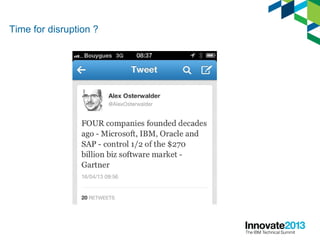
Time for disruption ?
Testing: Time for disruption ?
Software testing vendors:
N°1: HP (QC, QTP, BPT)
N°2: IBM (RQM, RTW)
N°3: Micro Focus (SilkCentral,
SilkTest)
Where do we find the best practices?
Do you think they use Quality Center?
Smartesting engineering process (early years 2004-2006)
 Water fall process
–Very few tests made by developers (No TDD)
–1 release every 6 months
–1 month (x5 engineers) spent on acceptance testing before
rolling out
–Very poor QA impacting customers feedback
Introducing agile development (2006)
 Introduction of agile: Scrum, TDD (unit &
integration testing), pair programming…
–Continuous integration
–1 release every 3 months
–4 man/days spent on acceptance testing before
rolling out
–Very good Quality
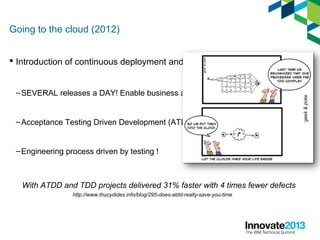
Going to the cloud (2012)
 Introduction of continuous deployment and DevOps
–SEVERAL releases a DAY! Enable business agility
–Acceptance Testing Driven Development (ATDD)
–Engineering process driven by testing !
http://www.thucydides.info/blog/295-does-atdd-really-save-you-time
With ATDD and TDD projects delivered 31% faster with 4 times fewer defects
Agenda
 Introduction
 New testing challenges
 Language of the tester
 Demo
 Perspectives
 Q&A
9
Req Management &
Definition
Test Planning Execution Defect management
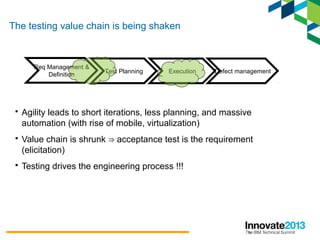
 Agility leads to short iterations, less planning, and massive
automation (with rise of mobile, virtualization)
 Value chain is shrunk acceptance test is the requirement⇒
(elicitation)
 Testing drives the engineering process !!!
The testing value chain is being shaken
10
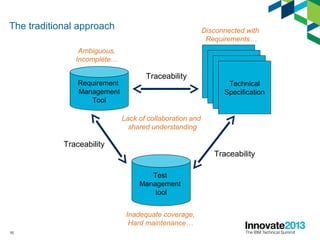
The traditional approach
Requirement
Management
Tool
Test
Management
tool
Technical
Specification
Traceability
Traceability
Traceability
Ambiguous,
Incomplete…
Inadequate coverage,
Hard maintenance…
Lack of collaboration and
shared understanding
Disconnected with
Requirements…
11
Define
ExecuteMeasure
Test automation
Test virtualization
Mobile testing
Scanner (capture & replay)
Analytics
Model Driven
Testing
Exploratory testing
ATDD
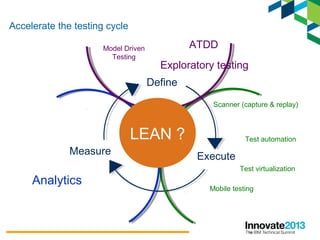
Accelerate the testing cycle
LEAN ?
12
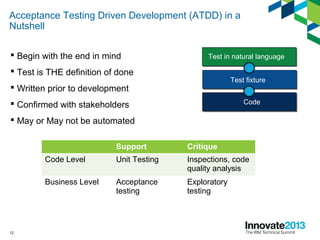
Acceptance Testing Driven Development (ATDD) in a
Nutshell
 Begin with the end in mind
 Test is THE definition of done
 Written prior to development
 Confirmed with stakeholders
 May or May not be automated
Support Critique
Code Level Unit Testing Inspections, code
quality analysis
Business Level Acceptance
testing
Exploratory
testing
Test in natural language
Test fixture
Code
13
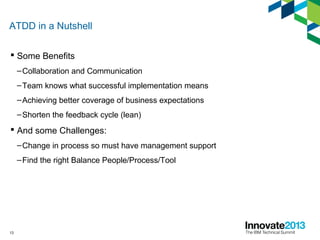
ATDD in a Nutshell
 Some Benefits
–Collaboration and Communication
–Team knows what successful implementation means
–Achieving better coverage of business expectations
–Shorten the feedback cycle (lean)
 And some Challenges:
–Change in process so must have management support
–Find the right Balance People/Process/Tool
14
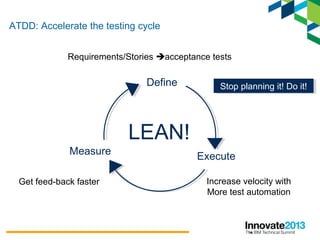
Define
ExecuteMeasure
LEAN!
Get feed-back faster
Stop planning it! Do it!Stop planning it! Do it!
Increase velocity with
More test automation
Requirements/Stories acceptance tests
ATDD: Accelerate the testing cycle
15
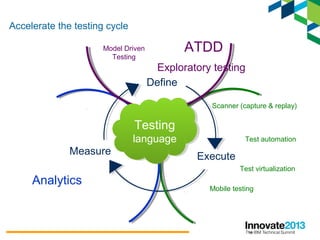
Define
ExecuteMeasure
Test automation
Test virtualization
Mobile testing
Scanner (capture & replay)
Analytics
Model Driven
Testing
Exploratory testing
ATDD
Testing
language
Testing
language
Accelerate the testing cycle
Agenda
 Introduction
 New testing challenges
 Language of the tester
 Demo
 Perspectives
 Q&A
17
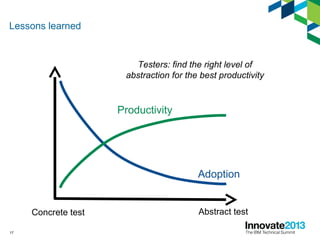
Lessons learned
Concrete test Abstract test
Adoption
Productivity
Testers: find the right level of
abstraction for the best productivity
18
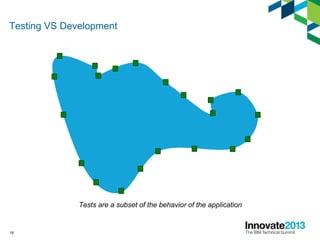
Testing VS Development
Tests are a subset of the behavior of the application
20
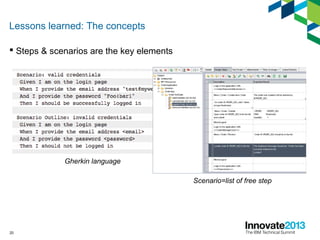
Lessons learned: The concepts
 Steps & scenarios are the key elements
Gherkin language
Scenario=list of free step
21
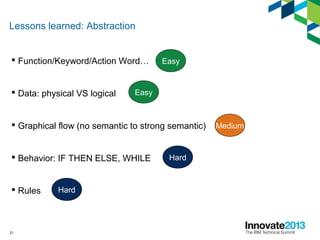
Lessons learned: Abstraction
 Function/Keyword/Action Word…
 Data: physical VS logical
 Graphical flow (no semantic to strong semantic)
 Behavior: IF THEN ELSE, WHILE
 Rules
Easy
Easy
Medium
Hard
Hard
22
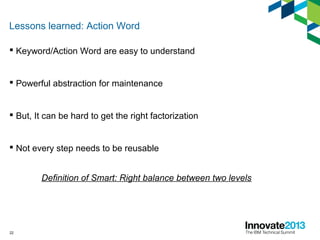
Lessons learned: Action Word
 Keyword/Action Word are easy to understand
 Powerful abstraction for maintenance
 But, It can be hard to get the right factorization
 Not every step needs to be reusable
Definition of Smart: Right balance between two levels
23
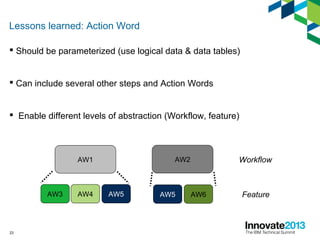
 Should be parameterized (use logical data & data tables)
 Can include several other steps and Action Words
 Enable different levels of abstraction (Workflow, feature)
Lessons learned: Action Word
AW1 AW2
AW3 AW4 AW5 AW5 AW6
Workflow
Feature
24
Lessons learned: Scenario, Action Word, Step, data
With these simple concepts you can get:
Flexibility to describe business domain
Powerful refactoring capabilities
25
26
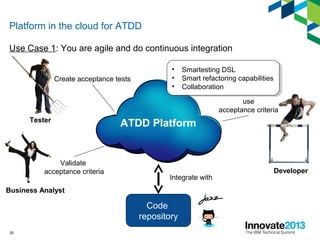
Platform in the cloud for ATDD
Use Case 1: You are agile and do continuous integration
ATDD Platform
Create acceptance tests
Tester
Validate
acceptance criteria
Business Analyst
use
acceptance criteria
Developer
Code
repository
Integrate with
• Smartesting DSL
• Smart refactoring capabilities
• Collaboration
• Smartesting DSL
• Smart refactoring capabilities
• Collaboration
27
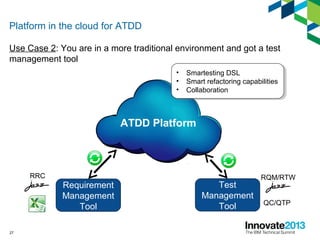
Platform in the cloud for ATDD
Use Case 2: You are in a more traditional environment and got a test
management tool
ATDD Platform
• Smartesting DSL
• Smart refactoring capabilities
• Collaboration
• Smartesting DSL
• Smart refactoring capabilities
• Collaboration
Test
Management
Tool QC/QTP
RQM/RTW
Requirement
Management
Tool
RRC
28
Platform in the cloud for ATDD
Setup your project and be ready to start in
60 Seconds
Agenda
 Introduction
 New testing challenges
 Language of the tester
 Demo
 Perspectives
 Q&A
30
ALM market dynamic
 New software delivery models
 Testing is the biggest ALM segment
 Distributed Testing segment represents more than $2b in
2013 10% (http://www.gartner.com/id=2098416)
 Increasingly focused on Web & mobile
 Security testing is the fastest growing segment
31
More Cloud
 ALM paas: $315m in 2016 (http://www.gartner.com/id=2188816)
 Started by defect management, load tests, dev or test lab provisioning
 Drivers
–Agile development
–Speed of deployment and business agility
 Inhibitors
–Managing the transition
–Lack of integration (OSLC)
32
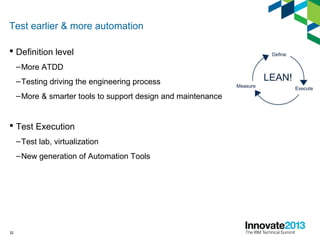
Test earlier & more automation
 Definition level
–More ATDD
–Testing driving the engineering process
–More & smarter tools to support design and maintenance
 Test Execution
–Test lab, virtualization
–New generation of Automation Tools
33
Laurent PY
CEO, Smartesting
Laurent.py@smartesting.com
@py_laurent
34
Daily Apple TV giveaway
 Complete your session surveys online each day at a conference kiosk or on
your Innovate 2013 Portal!
 Each day that you complete all of that day’s session surveys, your name will
be entered to win the daily Apple TV!
 On Wednesday be sure to complete your full conference evaluation to receive
your free conference t-shirt!
35
© Copyright IBM Corporation 2013. All rights reserved. The information
contained in these materials is provided for informational purposes only, and is
provided AS IS without warranty of any kind, express or implied. IBM shall not be
responsible for any damages arising out of the use of, or otherwise related to,
these materials. Nothing contained in these materials is intended to, nor shall
have the effect of, creating any warranties or representations from IBM or its
suppliers or licensors, or altering the terms and conditions of the applicable license
agreement governing the use of IBM software. References in these materials to
IBM products, programs, or services do not imply that they will be available in all
countries in which IBM operates. Product release dates and/or capabilities
referenced in these materials may change at any time at IBM’s sole discretion
based on market opportunities or other factors, and are not intended to be a
commitment to future product or feature availability in any way. IBM, the IBM logo,
Rational, the Rational logo, Telelogic, the Telelogic logo, and other IBM products
and services are trademarks of the International Business Machines Corporation,
in the United States, other countries or both. Other company, product, or service
names may be trademarks or service marks of others.

Acceptance Testing Driven Development, TDD

  • 1.
    How Agile andContinuous Deployment disrupt traditional functional testing process! Learn about new testing techniques Laurent PY CEO, Smartesting Laurent.py@smartesting.com @py_laurent Session 1279 © 2013 IBM Corporation
  • 2.
    Agenda  Introduction  Newtesting challenges  Language of the tester  Demo  Perspectives  Q&A
  • 3.
  • 4.
    Testing: Time fordisruption ? Software testing vendors: N°1: HP (QC, QTP, BPT) N°2: IBM (RQM, RTW) N°3: Micro Focus (SilkCentral, SilkTest) Where do we find the best practices? Do you think they use Quality Center?
  • 5.
    Smartesting engineering process(early years 2004-2006)  Water fall process –Very few tests made by developers (No TDD) –1 release every 6 months –1 month (x5 engineers) spent on acceptance testing before rolling out –Very poor QA impacting customers feedback
  • 6.
    Introducing agile development(2006)  Introduction of agile: Scrum, TDD (unit & integration testing), pair programming… –Continuous integration –1 release every 3 months –4 man/days spent on acceptance testing before rolling out –Very good Quality
  • 7.
    Going to thecloud (2012)  Introduction of continuous deployment and DevOps –SEVERAL releases a DAY! Enable business agility –Acceptance Testing Driven Development (ATDD) –Engineering process driven by testing ! http://www.thucydides.info/blog/295-does-atdd-really-save-you-time With ATDD and TDD projects delivered 31% faster with 4 times fewer defects
  • 8.
    Agenda  Introduction  Newtesting challenges  Language of the tester  Demo  Perspectives  Q&A
  • 9.
    9 Req Management & Definition TestPlanning Execution Defect management  Agility leads to short iterations, less planning, and massive automation (with rise of mobile, virtualization)  Value chain is shrunk acceptance test is the requirement⇒ (elicitation)  Testing drives the engineering process !!! The testing value chain is being shaken
  • 10.
  • 11.
    11 Define ExecuteMeasure Test automation Test virtualization Mobiletesting Scanner (capture & replay) Analytics Model Driven Testing Exploratory testing ATDD Accelerate the testing cycle LEAN ?
  • 12.
    12 Acceptance Testing DrivenDevelopment (ATDD) in a Nutshell  Begin with the end in mind  Test is THE definition of done  Written prior to development  Confirmed with stakeholders  May or May not be automated Support Critique Code Level Unit Testing Inspections, code quality analysis Business Level Acceptance testing Exploratory testing Test in natural language Test fixture Code
  • 13.
    13 ATDD in aNutshell  Some Benefits –Collaboration and Communication –Team knows what successful implementation means –Achieving better coverage of business expectations –Shorten the feedback cycle (lean)  And some Challenges: –Change in process so must have management support –Find the right Balance People/Process/Tool
  • 14.
    14 Define ExecuteMeasure LEAN! Get feed-back faster Stopplanning it! Do it!Stop planning it! Do it! Increase velocity with More test automation Requirements/Stories acceptance tests ATDD: Accelerate the testing cycle
  • 15.
    15 Define ExecuteMeasure Test automation Test virtualization Mobiletesting Scanner (capture & replay) Analytics Model Driven Testing Exploratory testing ATDD Testing language Testing language Accelerate the testing cycle
  • 16.
    Agenda  Introduction  Newtesting challenges  Language of the tester  Demo  Perspectives  Q&A
  • 17.
    17 Lessons learned Concrete testAbstract test Adoption Productivity Testers: find the right level of abstraction for the best productivity
  • 18.
    18 Testing VS Development Testsare a subset of the behavior of the application
  • 19.
    20 Lessons learned: Theconcepts  Steps & scenarios are the key elements Gherkin language Scenario=list of free step
  • 20.
    21 Lessons learned: Abstraction Function/Keyword/Action Word…  Data: physical VS logical  Graphical flow (no semantic to strong semantic)  Behavior: IF THEN ELSE, WHILE  Rules Easy Easy Medium Hard Hard
  • 21.
    22 Lessons learned: ActionWord  Keyword/Action Word are easy to understand  Powerful abstraction for maintenance  But, It can be hard to get the right factorization  Not every step needs to be reusable Definition of Smart: Right balance between two levels
  • 22.
    23  Should beparameterized (use logical data & data tables)  Can include several other steps and Action Words  Enable different levels of abstraction (Workflow, feature) Lessons learned: Action Word AW1 AW2 AW3 AW4 AW5 AW5 AW6 Workflow Feature
  • 23.
    24 Lessons learned: Scenario,Action Word, Step, data With these simple concepts you can get: Flexibility to describe business domain Powerful refactoring capabilities
  • 24.
  • 25.
    26 Platform in thecloud for ATDD Use Case 1: You are agile and do continuous integration ATDD Platform Create acceptance tests Tester Validate acceptance criteria Business Analyst use acceptance criteria Developer Code repository Integrate with • Smartesting DSL • Smart refactoring capabilities • Collaboration • Smartesting DSL • Smart refactoring capabilities • Collaboration
  • 26.
    27 Platform in thecloud for ATDD Use Case 2: You are in a more traditional environment and got a test management tool ATDD Platform • Smartesting DSL • Smart refactoring capabilities • Collaboration • Smartesting DSL • Smart refactoring capabilities • Collaboration Test Management Tool QC/QTP RQM/RTW Requirement Management Tool RRC
  • 27.
    28 Platform in thecloud for ATDD Setup your project and be ready to start in 60 Seconds
  • 28.
    Agenda  Introduction  Newtesting challenges  Language of the tester  Demo  Perspectives  Q&A
  • 29.
    30 ALM market dynamic New software delivery models  Testing is the biggest ALM segment  Distributed Testing segment represents more than $2b in 2013 10% (http://www.gartner.com/id=2098416)  Increasingly focused on Web & mobile  Security testing is the fastest growing segment
  • 30.
    31 More Cloud  ALMpaas: $315m in 2016 (http://www.gartner.com/id=2188816)  Started by defect management, load tests, dev or test lab provisioning  Drivers –Agile development –Speed of deployment and business agility  Inhibitors –Managing the transition –Lack of integration (OSLC)
  • 31.
    32 Test earlier &more automation  Definition level –More ATDD –Testing driving the engineering process –More & smarter tools to support design and maintenance  Test Execution –Test lab, virtualization –New generation of Automation Tools
  • 32.
  • 33.
    34 Daily Apple TVgiveaway  Complete your session surveys online each day at a conference kiosk or on your Innovate 2013 Portal!  Each day that you complete all of that day’s session surveys, your name will be entered to win the daily Apple TV!  On Wednesday be sure to complete your full conference evaluation to receive your free conference t-shirt!
  • 34.
    35 © Copyright IBMCorporation 2013. All rights reserved. The information contained in these materials is provided for informational purposes only, and is provided AS IS without warranty of any kind, express or implied. IBM shall not be responsible for any damages arising out of the use of, or otherwise related to, these materials. Nothing contained in these materials is intended to, nor shall have the effect of, creating any warranties or representations from IBM or its suppliers or licensors, or altering the terms and conditions of the applicable license agreement governing the use of IBM software. References in these materials to IBM products, programs, or services do not imply that they will be available in all countries in which IBM operates. Product release dates and/or capabilities referenced in these materials may change at any time at IBM’s sole discretion based on market opportunities or other factors, and are not intended to be a commitment to future product or feature availability in any way. IBM, the IBM logo, Rational, the Rational logo, Telelogic, the Telelogic logo, and other IBM products and services are trademarks of the International Business Machines Corporation, in the United States, other countries or both. Other company, product, or service names may be trademarks or service marks of others.

Editor's Notes

  • #2 I am delighted to share with you some thoughts Smartesting 10+ years old company: - push quality upfront with early test design - speed up test design and maintenance by a factor of ten! We are at the stone age compared to what developers do. - Testing is not a pain. This is cool and testing is THE opportunity to streamline
  • #3 As introduction I will share with you our own experience in testing our product Then I will present the traditional testing process and the testing value chain to show you the way it s being disrupted. One of the main conclusion we ’ ve come to is that, as tester, we need a language If we still write tests as free text, we will never be able to Handle very quickly, to iterate and be agile! So not only we ’ ve come to this conclusion I will end up with the perspectives and different trends we foresee in the testing market.
  • #4 So Let ’ s start by an interesting tweet from Alex Osterwalder The next tweet was about the disruption that ’ s happening
  • #5 Let ’ s focus on testing. The 3 leaders (for testing tool) of this market Now let me ask you a question: where do we find the best practices? Do these guys use a test management tool? BTW how many of you use QC or RQM You can raise your hand that ’ s not a shame
  • #6 Now let ’ s have a look at our own history as software vendor We were developing a MDT solution. So quite complex develoments… Testing was a nightmare=> Poor Quality I remember the feedback of a customer
  • #7 So we made the decision to be more agile, do ExP, deploy scrum One of the key building block was continuous integration Doing the acceptance testing is no more a pain and and we can roll out rapidly with a good quality. So that ’ s fine. Our developers enjoy extreme programming and scrum even if there are some drawbacks to pair programming
  • #8 we made the decision to develop a platform in the cloud Implement 3 missions: testing upfront & enabling ATDD… So we had to go one step further and do DevOps and continuous deployment (SciFi) To achieve continuous delivery of valuable software => testing has to be “ continuous We start every feature by… and I DO TEST
  • #10 What is agility about? If we have to iterate very quicly, we don t have time to synch 3 repo: Ex, Test, Dev with 3 different owners I will mainly focus on the last 2points.
  • #11 This is another way to see the pb. For big project we usualy have Just to mention some of the problem
  • #12 Gartner predicted that mobile App dev will outnumber native PC projects by a ratio of 4:1 by 2015.  I will not mention in this pres: security & performance to focus on functional. Continuous testing: “ Our highest priority is to satisfy the customer through early and  continuous delivery  of valuable software.
  • #13 An acceptance test is a formal description of the behavior of an application, generally expressed as an example or usage scenario Tests are the requirements. TEST ARE THE DEFINITION OF DONE Testing is no more the last step of the development process before moving into production, it is the first one! Focus developments efforts on acceptance tests Use acceptance tests to facilitate discussion about future change requests Brian Marick’s Agile Testing Quadrant
  • #14 Use Test to build a shared understanding of the domain and of the objectives : YOU know what successful implementation means Focus developments efforts on acceptance tests You increase you quality and efficiently support continous delivery of valuable software
  • #15 Accelerate the testing cycle at the business level! At smartesting we have automated 100% of our test so that we have an immediate feed-back, we can deploy de build and more importantly, we get the feed-back directly from the end user and can iterate quickly
  • #16 So acceptance test is a formal description of the behavior of an application , formal description we use to build a shared understanding of the business domain. What we need now to be really lean is a test language. Not just free text. But Some concepts to handle. The same concepts will be used for the test automation and to do some analytics. I cannot iterate rapidly trough this loop if I have just text like in QC or Excel.  
  • #17 Author Notes: This template has been created in PowerPoint 2003 Depending on how the source file was formatted, some slides will not ideally reformat once the template is applied. Therefore, some reformatting will be necessary. Reapply slide layouts: Task Pane / Slide Layout Can be applied thru normal or slide sorter view May have to reapply the layouts more than once in order to take effect Limit altering slide layout attributes on your slide (fonts, positioning, text box anchoring, positioning, etc.), this will create less reformatting rework when switching templates in the future or repurposing this slide in other presentations. Use “shift returns” if text wraps are needed to wrap around imagery. If slide layout customization is needed, it ’s advised to break the customized text box from the slide layout by selecting the bounding box of the altered text box and cutting it from the slide, apply either the title slide layout or the blank layout, and then paste the text box back onto the slide. Your custom-formatting of the text layout will then be retained for future repurposing in other presentations. Recolor graphics if needed by using the embedded color palette swatches already in this template. Slide text: Don ’t create long sentences or paragraphs on slides. Use concise bulleted list format. Use speaker notes for supporting bulleted content to avoid slides that are too text heavy. Use sentence case capitalization for presentation titles, slide titles, category labels and bullets: Format / Change Case / Sentence Case. Initial capitalization is limited to our products and offerings. When referring to IBM products, use the correct full name, do not abbreviate. Imagery Avoid using cartoon like clip-art, use photo-art instead. Third party material cannot be used in a presentation without written permission (this includes product and Web page screen shots). Images must be acquired from a ‘ royalty-free to use ’ source such as: Microsoft or Lotus Symphony Clip Art library http://www.freebyte.com/clipart_images_photos_icons/#freevectorgraphics http://www.freedigitalphotos.net/ IBMers can use images from IBM approved image libraries: https://w3-03.ibm.com/software/marketing/marksite.nsf/AllMarketingPages/Brand-Rational-rt_rtb?OpenDocument&ExpandSection=4#_Section2 Close each presentation with the mandatory “Rational ThankYou Slide” located in the back of this file.
  • #18 Position the MBT Make comparison with development language
  • #19 The needs are different compared to the dev Testing is made by some examples that helps to capture the behavior of the App
  • #23 Smart testing tool should help me to build the right level of abstraction and factorization. Help me to build action word when I need reuse and factorization, not before, not after.
  • #24 2 levels is good. 3 levels becomes hard to maintain
  • #26 Optional slide. Graphic is available in English only.
  • #27 Testing is made by some examples that helps to capture the behavior of the App
  • #28 Testing is made by some examples that helps to capture the behavior of the App
  • #29 Testing is made by some examples that helps to capture the behavior of the App
  • #30 Author Notes: This template has been created in PowerPoint 2003 Depending on how the source file was formatted, some slides will not ideally reformat once the template is applied. Therefore, some reformatting will be necessary. Reapply slide layouts: Task Pane / Slide Layout Can be applied thru normal or slide sorter view May have to reapply the layouts more than once in order to take effect Limit altering slide layout attributes on your slide (fonts, positioning, text box anchoring, positioning, etc.), this will create less reformatting rework when switching templates in the future or repurposing this slide in other presentations. Use “shift returns” if text wraps are needed to wrap around imagery. If slide layout customization is needed, it ’s advised to break the customized text box from the slide layout by selecting the bounding box of the altered text box and cutting it from the slide, apply either the title slide layout or the blank layout, and then paste the text box back onto the slide. Your custom-formatting of the text layout will then be retained for future repurposing in other presentations. Recolor graphics if needed by using the embedded color palette swatches already in this template. Slide text: Don ’t create long sentences or paragraphs on slides. Use concise bulleted list format. Use speaker notes for supporting bulleted content to avoid slides that are too text heavy. Use sentence case capitalization for presentation titles, slide titles, category labels and bullets: Format / Change Case / Sentence Case. Initial capitalization is limited to our products and offerings. When referring to IBM products, use the correct full name, do not abbreviate. Imagery Avoid using cartoon like clip-art, use photo-art instead. Third party material cannot be used in a presentation without written permission (this includes product and Web page screen shots). Images must be acquired from a ‘ royalty-free to use ’ source such as: Microsoft or Lotus Symphony Clip Art library http://www.freebyte.com/clipart_images_photos_icons/#freevectorgraphics http://www.freedigitalphotos.net/ IBMers can use images from IBM approved image libraries: https://w3-03.ibm.com/software/marketing/marksite.nsf/AllMarketingPages/Brand-Rational-rt_rtb?OpenDocument&ExpandSection=4#_Section2 Close each presentation with the mandatory “Rational ThankYou Slide” located in the back of this file.
  • #31 In the middle of a revolution Even if we say testing is the last thing we do … when we have time, it is the place whete the biggest investment are done Inside testing market, segment that are growing very fast
  • #32 ALM paas grows at 23% CAGR
  • #33 These is my humble experience of test practitioner and as manager. The trends I strongly believes in, and that will go mainstream Beta tester Booth T19
  • #34 Optional slide. Graphic is available in English only.
  • #35 Giveaway Slide
  • #36 Mandatory closing slide (2 of 2) Thank You Slide (available in English only).
  • #37 Optional slide. Graphic is available in English only.
  • #38 Author Notes: This template has been built in PowerPoint 2003. If you ’re using PowerPoint 2007 or above, you may experience different usability results than what is provided as guidance here. Depending on how the source file was formatted, some slides will not ideally reformat once the template is applied. Therefore, some reformatting will be necessary. Reapply slide layouts: Task Pane / Slide Layout Can be applied thru normal or slide sorter view May have to reapply the layouts more than once in order to take effect Limit altering slide layout attributes on your slide (fonts, positioning, text box anchoring, positioning, etc.), this will create less reformatting rework when switching templates in the future or repurposing this slide in other presentations. Use “shift returns” if text wraps are needed to wrap around imagery. If slide layout customization is needed, it ’s advised to break the customized text box from the slide layout by selecting the bounding box of the altered text box and cutting it from the slide, apply either the title slide layout or the blank layout, and then paste the text box back onto the slide. Your custom-formatting of the text layout will then be retained for future repurposing in other presentations. Slide numbers may be duplicated in the footer of your slides. You ’ll have to delete the page numbers on the left manually for each slide. Recolor graphics if needed by using the embedded color palette swatches already in this template. The color palette is also specified on the slide above. Slide text: Don ’t create long sentences or paragraphs on slides. Use concise bulleted list format. Use speaker notes for supporting bulleted content to avoid slides that are too text heavy. Use sentence case capitalization for presentation titles, slide titles, category labels and bullets: Format / Change Case / Sentence Case. Initial capitalization is limited to our products and offerings. When referring to IBM products, use the correct full name, do not abbreviate. Imagery guidelines: Avoid using cartoon like clip-art, use photo-art instead. Third party material cannot be used in a presentation without written permission (this includes product and Web page screen shots, and photos). Images must be acquired from a ‘ royalty-free to use ’ source such as: Microsoft or Lotus Symphony Clip Art library http://www.freebyte.com/clipart_images_photos_icons/#freevectorgraphics http://www.freedigitalphotos.net/ IBMers can use royalty-free images from the following repositories : IBM Brand Systems Center / Assets / Photography Login instructions: https://w3-connections.ibm.com/forums/html/topic?id=c1082624-e54c-4e04-bad1-ddb150ac7540 IBM Software Story Images https://w3-connections.ibm.com/files/app#/collection/b7570645-b2f8-4450-a27f-9269a163fc2d IBM Rational Presentation Image Library: https://w3-connections.ibm.com/wikis/home?lang=en_US#!/wiki/Rational%20Presentation%20Templates,%20Guidelines,%20and%20Resources/page/Presentation%20Image%20Library