]
SHERRYANNE MEYER[
ASUG INSTALLATION MEMBER
MEMBER SINCE: 2000
ANUP MAHESHWARI[
ASUG INSTALLATION MEMBER
MEMBER SINCE: 2008
AJAY VONKARERY[
ASUG INSTALLATION MEMBER
MEMBER SINCE: 1999
Ensuring a Successful Data Migration
Todd Conrad
Data Migration Lead
St. Jude Medical, Inc
Real Experience. Real Advantage.
[
2
Agenda
 St. Jude’s Journey with Data Migration
 Data Verification Process
 Technology Requirements
 Leading Knowledge Workers
Real Experience. Real Advantage.
[
3
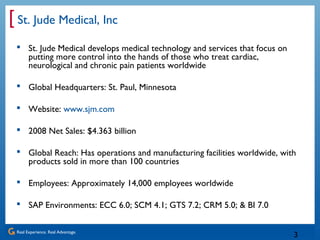
St. Jude Medical, Inc
 St. Jude Medical develops medical technology and services that focus on
putting more control into the hands of those who treat cardiac,
neurological and chronic pain patients worldwide
 Global Headquarters: St. Paul, Minnesota
 Website: www.sjm.com
 2008 Net Sales: $4.363 billion
 Global Reach: Has operations and manufacturing facilities worldwide, with
products sold in more than 100 countries
 Employees: Approximately 14,000 employees worldwide
 SAP Environments: ECC 6.0; SCM 4.1; GTS 7.2; CRM 5.0; & BI 7.0
Real Experience. Real Advantage.
[
4
St. Jude’s First Data Migration Experience
 Project goals missed
 Business frustrated with results
 Project team morale declined
 Project and SAP image tarnished
Real Experience. Real Advantage.
[
5
St. Jude’s Recent Data Migration Experience
 Three successful data migrations and go-lives to date
 Most recent was considered “boring” by Project Management
Office (PMO)
 More than 35 million records loaded and with just 1,390
failures (99.996% successful)
 $140 million inventory load with less than $5 variance
 Data Migration Process was removed as a top concern for a
successful SAP implementation
Real Experience. Real Advantage.
[
6
Data Migration Learning Points
Verification
Selection
Leadership
Technology Process
People
Real Experience. Real Advantage.
[
7
Data Migration Process
Developers build process to transform
the data and manage the flow into SAP
Business and SAP
Expert determines
requirements
Legacy Term = 45
SAP Term= Z300
SAP Expert explains
how the data will
work in SAP
Business verifies data
Real Experience. Real Advantage.
[
8
Data Verification Key Elements
 Business owners’ involvement critical as they own the data
 Take a risk-based approach as not all data requires the same
verification activities
 Used one document to verify the migration process and the
data
Real Experience. Real Advantage.
[
9
Business Verifies the Data
1. Business verifies source data
was pulled correctly
2. Business verifies data was
staged correctly
3. Business verifies target data
was loaded correctly
Business verifies
data was loaded
correctly
Business verifies
source
Real Experience. Real Advantage.
[
10
Risk Based Approach
Real Experience. Real Advantage.
[
11
Sample of Data Verification Form
Legacy Customer Number SAP Partner Number Legacy Terms Code SAP Payment Terms
89070573 1000038776 1 Z300
89001362 1000038698 11 Z300
89055346 1000039442 19 Z600
89000405 1000040089 45 Z300
66004177 1000040021 75 Z750
89000241 1000039961 85 Z120
88005529 1000039253 90 Z900
89067484 1000038905   Z300
Real Experience. Real Advantage.
[
12
Data Verification: Lesson Learned
 The business signing verification documents dramatically
improves the actual verification activity
 The verification process needs to be practiced and
documented
 There are other opportunities for feedback, so load good data
in as many environments as you can
 Modeling
 Business Day in the Life
 Training
Real Experience. Real Advantage.
[
13
Technology Checklist
 Support the golden rule that the business owns the data
 How can you get the business comfortable with the data migration process
and it meets their requirements?
 How will it help identify issues?
 Support a Repeatability Extraction, Translation, and Load Process
 How will the data be extracted from the legacy system?
 How will you construct missing data?
 Can you identify data that will not load?
 What load techniques will you use?
 How will you determine the load was successful?
 Reusable code?
 Change control tracking?
 Is flexible and allows for late discoveries?
 Easy to Learn and Support
 Does it use standard development languages?
Real Experience. Real Advantage.
[
14
Technology: Lesson Learned
 The balancing act between
cost and benefits
 Verification Reports
 Number and Timing of
Loads
 Late Changes
 Cleansing Activities
Real Experience. Real Advantage.
[
15
People: Managing Geeks
 Their personalities
 Their work
 Your leadership model
Real Experience. Real Advantage.
[
16
Their Personalities
Problem Solver
Independent
Competitive
Sense of Humor
Real Experience. Real Advantage.
[
17
Their Work
 Failure is the Norm
 Ambiguity Rules
 Creativity Required
Real Experience. Real Advantage.
[
18
Your Leadership Model
 Create a sub-culture: “The Flying Pigs”
 Short straw, but important work
 Determine when the solution is done
 Perfection limits
 Know when to manage the Ends and
when to manage the Means
 Load and defect communication process
Real Experience. Real Advantage.
[
19
Key Learning Points
Business Ownership
key in verification
process
Technology that
supports your migration
model
Leadership required
for people to succeed
Technology Process
People
Real Experience. Real Advantage.
[
20
Data Migration Journey
Real Experience. Real Advantage.
[
21
[
]
 Thank you for participating.
SESSION CODE:
1709
Please remember to complete and return your
evaluation form following this session.
For ongoing education on this area of focus, visit the Year-Round
Community page at www.asug.com/yrc
Real Experience. Real Advantage.
[
22
APPENDIX
 Todd Conrad Contact Information
 BackOffice Associates Contact Information
 Data Migration Truths
 Data Success Factors
 Data Verification Activities – Low Risk
 Data Verification Activities – High Risk
 ANSI Standards
Real Experience. Real Advantage.
[
23
Todd Conrad
St. Jude Medical, Inc
Data Migration Lead
14900 Minnetonka Industrial Road
Minnetonka, MN 55345
tconrad@sjm.com
651-756-6041
Real Experience. Real Advantage.
[
24
Todd Kyle
BackOffice Associates, LLC
Account Executive
South Harwich, MA 02661
T 774-408-3482
C 978-766-7617
www.boaweb.com
Real Experience. Real Advantage.
[
25
Data Migration Truths
 The business owns the data through the entire migration
process
 Data loads are not about data, but the whole cutover activity
 Data is required to run SAP and poor data can lead to
catastrophic failure
 Business knows how their data runs in legacy, but not in SAP
 SAP Experts (Functional Team) know SAP data requirements,
but do not know legacy data
 Data migration is an iterative process
 How many data loads do you want before Go-live?
 Learning must occur after each load to improve the migration
 Legacy data has gaps, inconsistencies and redundancies
 Data Cleansing and Consolidating project will cause data migration
scope creep
Real Experience. Real Advantage.
[
26
Data Migration Success Factors
John Morris – Practical Data Migration
 Experienced Staff (People)
 Standardized Method (Process)
 Flexible, business-driven migration solution (Technology)
 Four Golden Rule
 Data migration is a business issue
 The business knows best
 No one can afford perfect data
 If you can’t count it, it doesn’t count
Real Experience. Real Advantage.
[
27
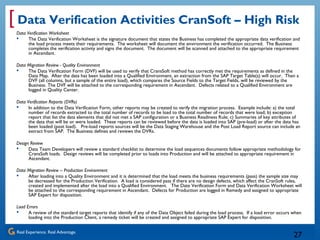
Data Verification Activities CranSoft – High Risk
Data Verification Worksheet
 The Data Verification Worksheet is the signature document that states the Business has completed the appropriate data verification and
the load process meets their requirements. The worksheet will document the environment the verification occurred. The Business
completes the verification activity and signs the document. The document will be scanned and attached to the appropriate requirement
in Ascendant.
Data Migration Review - Quality Environment
 The Data Verification Form (DVF) will be used to verify that CransSoft method has correctly met the requirements as defined in the
Data Map. After the data has been loaded into a Qualified Environment, an extraction from the SAP Target Table(s) will occur. Then a
DVF (all columns, but a sample of the entire load), which compares the Source Fields to the Target Fields, will be reviewed by the
Business. The DVF will be attached to the corresponding requirement in Ascendant. Defects related to a Qualified Environment are
logged in Quality Center.
Data Verification Reports (DVRs)
 In addition to the Data Verification Form, other reports may be created to verify the migration process. Example include: a) the total
number of records extracted to the total number of records to be load to the total number of records that were load; b) exception
report that list the data elements that did not met a SAP configuration or a Business Readiness Rule; c) Summaries of key attributes of
the data that will be or were loaded. These reports can be reviewed before the data is loaded into SAP (pre-load) or after the data has
been loaded (post load). Pre-load reports sources will be the Data Staging Warehouse and the Post Load Report source can include an
extract from SAP. The Business defines and reviews the DVRs.
Design Review
 Data Team Developers will review a standard checklist to determine the load sequences documents follow appropriate methodology for
CransSoft loads. Design reviews will be completed prior to loads into Production and will be attached to appropriate requirement in
Ascendant.
Data Migration Review – Production Environment
 After loading into a Quality Environment and it is determined that the load meets the business requirements (pass) the sample size may
be decreased for the Production Verification. A load is considered pass if there are no design defects, which affect the CranSoft rules,
created and implemented after the load into a Qualified Environment. The Date Verification Form and Data Verification Worksheet will
be attached to the corresponding requirement in Ascendant. Defects for Production are logged in Remedy and assigned to appropriate
SAP Expert for disposition.
Load Errors
 A review of the standard target reports that identify if any of the Data Object failed during the load process. If a load error occurs when
loading into the Production Client, a remedy ticket will be created and assigned to appropriate SAP Expert for disposition.
Real Experience. Real Advantage.
[
28
Data Verification Activities CranSoft – Low Risk
Data Verification Worksheet
 The Data Verification Worksheet is the signature document that states the Business has completed the appropriate data
verification and the load process meets their requirements. The worksheet will document the environment the verification
occurred. The Business completes the verification activity and signs the document. The document will be scanned and
attached to the appropriate requirement in Ascendant.
Data Migration Review
 The Data Verification Form (DVF) will be used to verify that CransSoft method has correctly met the requirements as
defined in the Data Map. After the data has been loaded into a Qualified Environment, an extraction from the SAP Target
Table(s) will occur. Then a DVF (all columns, but a sample of the entire load), which compares the Source Fields to the
Target Fields, will be reviewed by the Business. If the load does not pass in a Qualified Environment, then a DVF must also
be completed in the Production Environment. A load is considered pass if there are no design defects, which affect the
CranSoft rules, created and implemented after the load into a Qualified Environment. The DVF will be attached to the
corresponding requirement in Ascendant. Defects related to a Qualified Environment are logged in Quality Center. Defects
for Production are logged in Remedy and assigned to appropriate Functional Team for disposition.
Data Verification Reports (DVRs)
 In addition to the Data Verification Form, other reports may be created to verify the migration process. Example include: a)
the total number of records extracted to the total number of records to be load to the total number of records that were
load; b) exception report that list the data elements that did not met a SAP configuration or a Business Readiness Rule; c)
Summaries of key attributes of the data that will be or were loaded. These reports can be reviewed before the data is
loaded into SAP (pre-load) or after the data has been loaded (post load). Pre-load reports sources will be the Data Staging
Warehouse and the Post Load Report source can include an extract from SAP. The Business defines and reviews the DVRs.
Load Errors
 A review of the standard target reports that identify if any of the Data Object failed during the load process. If a load error
occurs when loading into the Production Client, a remedy ticket will be created and assigned to appropriate SAP Expert for
disposition.
Real Experience. Real Advantage.
[
29
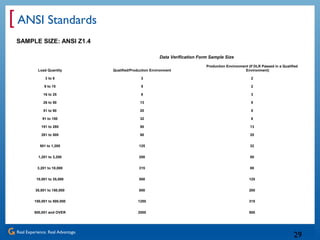
ANSI Standards
SAMPLE SIZE: ANSI Z1.4
Data Verification Form Sample Size
Load Quantity Qualified/Production Environment
Production Environment (If DLR Passed in a Qualified
Environment)
3 to 8 3 2
9 to 15 5 2
16 to 25 8 3
26 to 50 13 5
51 to 90 20 5
91 to 150 32 8
151 to 280 50 13
281 to 500 80 20
501 to 1,200 125 32
1,201 to 3,200 200 50
3,201 to 10,000 315 80
10,001 to 35,000 500 125
35,001 to 150,000 800 200
150,001 to 500,000 1250 315
500,001 and OVER 2000 500

ASUG PPT Ensuring a Successful Data Migration_Final

  • 1.
    ] SHERRYANNE MEYER[ ASUG INSTALLATIONMEMBER MEMBER SINCE: 2000 ANUP MAHESHWARI[ ASUG INSTALLATION MEMBER MEMBER SINCE: 2008 AJAY VONKARERY[ ASUG INSTALLATION MEMBER MEMBER SINCE: 1999 Ensuring a Successful Data Migration Todd Conrad Data Migration Lead St. Jude Medical, Inc
  • 2.
    Real Experience. RealAdvantage. [ 2 Agenda  St. Jude’s Journey with Data Migration  Data Verification Process  Technology Requirements  Leading Knowledge Workers
  • 3.
    Real Experience. RealAdvantage. [ 3 St. Jude Medical, Inc  St. Jude Medical develops medical technology and services that focus on putting more control into the hands of those who treat cardiac, neurological and chronic pain patients worldwide  Global Headquarters: St. Paul, Minnesota  Website: www.sjm.com  2008 Net Sales: $4.363 billion  Global Reach: Has operations and manufacturing facilities worldwide, with products sold in more than 100 countries  Employees: Approximately 14,000 employees worldwide  SAP Environments: ECC 6.0; SCM 4.1; GTS 7.2; CRM 5.0; & BI 7.0
  • 4.
    Real Experience. RealAdvantage. [ 4 St. Jude’s First Data Migration Experience  Project goals missed  Business frustrated with results  Project team morale declined  Project and SAP image tarnished
  • 5.
    Real Experience. RealAdvantage. [ 5 St. Jude’s Recent Data Migration Experience  Three successful data migrations and go-lives to date  Most recent was considered “boring” by Project Management Office (PMO)  More than 35 million records loaded and with just 1,390 failures (99.996% successful)  $140 million inventory load with less than $5 variance  Data Migration Process was removed as a top concern for a successful SAP implementation
  • 6.
    Real Experience. RealAdvantage. [ 6 Data Migration Learning Points Verification Selection Leadership Technology Process People
  • 7.
    Real Experience. RealAdvantage. [ 7 Data Migration Process Developers build process to transform the data and manage the flow into SAP Business and SAP Expert determines requirements Legacy Term = 45 SAP Term= Z300 SAP Expert explains how the data will work in SAP Business verifies data
  • 8.
    Real Experience. RealAdvantage. [ 8 Data Verification Key Elements  Business owners’ involvement critical as they own the data  Take a risk-based approach as not all data requires the same verification activities  Used one document to verify the migration process and the data
  • 9.
    Real Experience. RealAdvantage. [ 9 Business Verifies the Data 1. Business verifies source data was pulled correctly 2. Business verifies data was staged correctly 3. Business verifies target data was loaded correctly Business verifies data was loaded correctly Business verifies source
  • 10.
    Real Experience. RealAdvantage. [ 10 Risk Based Approach
  • 11.
    Real Experience. RealAdvantage. [ 11 Sample of Data Verification Form Legacy Customer Number SAP Partner Number Legacy Terms Code SAP Payment Terms 89070573 1000038776 1 Z300 89001362 1000038698 11 Z300 89055346 1000039442 19 Z600 89000405 1000040089 45 Z300 66004177 1000040021 75 Z750 89000241 1000039961 85 Z120 88005529 1000039253 90 Z900 89067484 1000038905   Z300
  • 12.
    Real Experience. RealAdvantage. [ 12 Data Verification: Lesson Learned  The business signing verification documents dramatically improves the actual verification activity  The verification process needs to be practiced and documented  There are other opportunities for feedback, so load good data in as many environments as you can  Modeling  Business Day in the Life  Training
  • 13.
    Real Experience. RealAdvantage. [ 13 Technology Checklist  Support the golden rule that the business owns the data  How can you get the business comfortable with the data migration process and it meets their requirements?  How will it help identify issues?  Support a Repeatability Extraction, Translation, and Load Process  How will the data be extracted from the legacy system?  How will you construct missing data?  Can you identify data that will not load?  What load techniques will you use?  How will you determine the load was successful?  Reusable code?  Change control tracking?  Is flexible and allows for late discoveries?  Easy to Learn and Support  Does it use standard development languages?
  • 14.
    Real Experience. RealAdvantage. [ 14 Technology: Lesson Learned  The balancing act between cost and benefits  Verification Reports  Number and Timing of Loads  Late Changes  Cleansing Activities
  • 15.
    Real Experience. RealAdvantage. [ 15 People: Managing Geeks  Their personalities  Their work  Your leadership model
  • 16.
    Real Experience. RealAdvantage. [ 16 Their Personalities Problem Solver Independent Competitive Sense of Humor
  • 17.
    Real Experience. RealAdvantage. [ 17 Their Work  Failure is the Norm  Ambiguity Rules  Creativity Required
  • 18.
    Real Experience. RealAdvantage. [ 18 Your Leadership Model  Create a sub-culture: “The Flying Pigs”  Short straw, but important work  Determine when the solution is done  Perfection limits  Know when to manage the Ends and when to manage the Means  Load and defect communication process
  • 19.
    Real Experience. RealAdvantage. [ 19 Key Learning Points Business Ownership key in verification process Technology that supports your migration model Leadership required for people to succeed Technology Process People
  • 20.
    Real Experience. RealAdvantage. [ 20 Data Migration Journey
  • 21.
    Real Experience. RealAdvantage. [ 21 [ ]  Thank you for participating. SESSION CODE: 1709 Please remember to complete and return your evaluation form following this session. For ongoing education on this area of focus, visit the Year-Round Community page at www.asug.com/yrc
  • 22.
    Real Experience. RealAdvantage. [ 22 APPENDIX  Todd Conrad Contact Information  BackOffice Associates Contact Information  Data Migration Truths  Data Success Factors  Data Verification Activities – Low Risk  Data Verification Activities – High Risk  ANSI Standards
  • 23.
    Real Experience. RealAdvantage. [ 23 Todd Conrad St. Jude Medical, Inc Data Migration Lead 14900 Minnetonka Industrial Road Minnetonka, MN 55345 tconrad@sjm.com 651-756-6041
  • 24.
    Real Experience. RealAdvantage. [ 24 Todd Kyle BackOffice Associates, LLC Account Executive South Harwich, MA 02661 T 774-408-3482 C 978-766-7617 www.boaweb.com
  • 25.
    Real Experience. RealAdvantage. [ 25 Data Migration Truths  The business owns the data through the entire migration process  Data loads are not about data, but the whole cutover activity  Data is required to run SAP and poor data can lead to catastrophic failure  Business knows how their data runs in legacy, but not in SAP  SAP Experts (Functional Team) know SAP data requirements, but do not know legacy data  Data migration is an iterative process  How many data loads do you want before Go-live?  Learning must occur after each load to improve the migration  Legacy data has gaps, inconsistencies and redundancies  Data Cleansing and Consolidating project will cause data migration scope creep
  • 26.
    Real Experience. RealAdvantage. [ 26 Data Migration Success Factors John Morris – Practical Data Migration  Experienced Staff (People)  Standardized Method (Process)  Flexible, business-driven migration solution (Technology)  Four Golden Rule  Data migration is a business issue  The business knows best  No one can afford perfect data  If you can’t count it, it doesn’t count
  • 27.
    Real Experience. RealAdvantage. [ 27 Data Verification Activities CranSoft – High Risk Data Verification Worksheet  The Data Verification Worksheet is the signature document that states the Business has completed the appropriate data verification and the load process meets their requirements. The worksheet will document the environment the verification occurred. The Business completes the verification activity and signs the document. The document will be scanned and attached to the appropriate requirement in Ascendant. Data Migration Review - Quality Environment  The Data Verification Form (DVF) will be used to verify that CransSoft method has correctly met the requirements as defined in the Data Map. After the data has been loaded into a Qualified Environment, an extraction from the SAP Target Table(s) will occur. Then a DVF (all columns, but a sample of the entire load), which compares the Source Fields to the Target Fields, will be reviewed by the Business. The DVF will be attached to the corresponding requirement in Ascendant. Defects related to a Qualified Environment are logged in Quality Center. Data Verification Reports (DVRs)  In addition to the Data Verification Form, other reports may be created to verify the migration process. Example include: a) the total number of records extracted to the total number of records to be load to the total number of records that were load; b) exception report that list the data elements that did not met a SAP configuration or a Business Readiness Rule; c) Summaries of key attributes of the data that will be or were loaded. These reports can be reviewed before the data is loaded into SAP (pre-load) or after the data has been loaded (post load). Pre-load reports sources will be the Data Staging Warehouse and the Post Load Report source can include an extract from SAP. The Business defines and reviews the DVRs. Design Review  Data Team Developers will review a standard checklist to determine the load sequences documents follow appropriate methodology for CransSoft loads. Design reviews will be completed prior to loads into Production and will be attached to appropriate requirement in Ascendant. Data Migration Review – Production Environment  After loading into a Quality Environment and it is determined that the load meets the business requirements (pass) the sample size may be decreased for the Production Verification. A load is considered pass if there are no design defects, which affect the CranSoft rules, created and implemented after the load into a Qualified Environment. The Date Verification Form and Data Verification Worksheet will be attached to the corresponding requirement in Ascendant. Defects for Production are logged in Remedy and assigned to appropriate SAP Expert for disposition. Load Errors  A review of the standard target reports that identify if any of the Data Object failed during the load process. If a load error occurs when loading into the Production Client, a remedy ticket will be created and assigned to appropriate SAP Expert for disposition.
  • 28.
    Real Experience. RealAdvantage. [ 28 Data Verification Activities CranSoft – Low Risk Data Verification Worksheet  The Data Verification Worksheet is the signature document that states the Business has completed the appropriate data verification and the load process meets their requirements. The worksheet will document the environment the verification occurred. The Business completes the verification activity and signs the document. The document will be scanned and attached to the appropriate requirement in Ascendant. Data Migration Review  The Data Verification Form (DVF) will be used to verify that CransSoft method has correctly met the requirements as defined in the Data Map. After the data has been loaded into a Qualified Environment, an extraction from the SAP Target Table(s) will occur. Then a DVF (all columns, but a sample of the entire load), which compares the Source Fields to the Target Fields, will be reviewed by the Business. If the load does not pass in a Qualified Environment, then a DVF must also be completed in the Production Environment. A load is considered pass if there are no design defects, which affect the CranSoft rules, created and implemented after the load into a Qualified Environment. The DVF will be attached to the corresponding requirement in Ascendant. Defects related to a Qualified Environment are logged in Quality Center. Defects for Production are logged in Remedy and assigned to appropriate Functional Team for disposition. Data Verification Reports (DVRs)  In addition to the Data Verification Form, other reports may be created to verify the migration process. Example include: a) the total number of records extracted to the total number of records to be load to the total number of records that were load; b) exception report that list the data elements that did not met a SAP configuration or a Business Readiness Rule; c) Summaries of key attributes of the data that will be or were loaded. These reports can be reviewed before the data is loaded into SAP (pre-load) or after the data has been loaded (post load). Pre-load reports sources will be the Data Staging Warehouse and the Post Load Report source can include an extract from SAP. The Business defines and reviews the DVRs. Load Errors  A review of the standard target reports that identify if any of the Data Object failed during the load process. If a load error occurs when loading into the Production Client, a remedy ticket will be created and assigned to appropriate SAP Expert for disposition.
  • 29.
    Real Experience. RealAdvantage. [ 29 ANSI Standards SAMPLE SIZE: ANSI Z1.4 Data Verification Form Sample Size Load Quantity Qualified/Production Environment Production Environment (If DLR Passed in a Qualified Environment) 3 to 8 3 2 9 to 15 5 2 16 to 25 8 3 26 to 50 13 5 51 to 90 20 5 91 to 150 32 8 151 to 280 50 13 281 to 500 80 20 501 to 1,200 125 32 1,201 to 3,200 200 50 3,201 to 10,000 315 80 10,001 to 35,000 500 125 35,001 to 150,000 800 200 150,001 to 500,000 1250 315 500,001 and OVER 2000 500

Editor's Notes

  • #2 WATCH MY S2S SPEAK. GMP, DLR, DVF, etc.
  • #4 We also have HCM run on it’s own client and project Question: how many of you have managed or worked on data migration in the past?
  • #5 Return on Investment: Cost of Poor Data Migration According to Bloor’s Phil Howard, Forbes 2,000 companies spend at least $5 billion per year on migrations, yet 80 percent of them still go over time or over budget Can go live with out functionality, but going live with out data is tough Data migration noted as a top concern for successful SAP implementation A lot of hard work with less than desirable outcomes Story: Person who made a comment that they wanted no part of “data” work
  • #6 Isn’t this close to Six Sigma quality? Tie the 99.996% load success in recent issue versus the load rate in Release 1.
  • #7 Defined a risk based data verification process focusing on data elements with significant business impact: Used a technology that ensured consistent migration process and supported our data validation approach Engaged people will improve outcomes and work together to fix problems
  • #8 Business verifies the data meets their requirements Who owns the data before the migration? Who will own the data after the migration? Who will use the data after the migration? Who should own the data during the migration process? Data Team owned the technology and had the responsibility to perform the data load SAP Experts were single point of contact and SAP data experts
  • #9 In first release post survey, business noted the process needed to be improved St. Jude is a Food and Drug Administration regulated company Roles and Responsibility definition help in planning resources
  • #10 The business had several opportunities to review and verify data. Using Pre and post load reports and standard SAP functionality
  • #11 Good Manufacturing Practice Data that is associated with our ability to track product and/or is covered by this FDA regulation Complexity of the ETL process The number of Translation Rules and number of Source Tables Priority rating is a measure of the relative importance of the data for a successful go-live. Data that impacts the organizations ability to take an order, to ship product, and to make product within the first 2 weeks after go-live Only two possibilities: High or Low
  • #12 Key document used for data verification Legacy values compared to SAP values Benefits: Did not have to review the translation rules Documented the data verification activity: State the plan, Execute the plan, Provide evidence the plan was executed Increased SAP learning
  • #13 Explain Business Day in the Life Testing Question: what are some of your lessons learned?
  • #14 Different environments have different configuration and thus load errors can occur. An error log is not good enough and is not a report at all.
  • #15 Not only with reports, but also other opportunities Early and Often for loads to get the variation out of the process to improve success rate. We tracked by the number of defects created.
  • #17 Question: what else have you noticed about these workers?
  • #18 Estimate mean Nothing Failure but you have to have the spirit to keep on trying and improving. Ambiguity: The business does not know the rules early sometimes: Map Legacy field Name to SAP Name, Map Legacy Address to SAP Address. Map Legacy Product Hierarchy Structure to TBD Manager don’t know much Question: does this make sense to you?
  • #19 Question: what have some of you done to create an environment for this work to happen successfully? Big head Todd and the Monsters Know when fixing one issue causes risk to others Cost of fixing small issues Build process around behaviors that impact the whole team Look for sign when creativity is not possible and call a time out Leading geeks is different We needed to defined a communication process for data load defects Visibility Accountability Independently verified
  • #20 Defined a risk based data verification process focusing on data elements with significant business impact: Used a technology that ensured consistent migration process and supported our data validation approach Engaged people will improve outcomes and work together to fix problems Data Verification Ensuring data migration meets the business requirements Reports comparing Legacy and SAP fields Ownership: Business A business-centric data verification process: Business owns the data You must get them comfortable with verifying the data The right technology to support your process Iterative nature of data conversion Report flexibility Leadership required
  • #21 Pull the story together: I wished you good luck on our data migration journey. At St Jude, we went down the wrong path at first and then found by combining People, Process and Technology you can ensure a successful data migration and Go-live Learn from our mistakes. The successes we had can be achieved by others.