ASP.NET Core 6.0 全新功能探索
多奇數位創意有限公司
技術總監 黃保翕(Will 保哥)
Visual Studio 2022
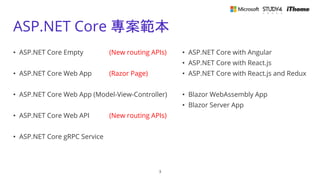
ASP.NET Core 專案範本
3
• ASP.NET Core Empty (New routing APIs)
• ASP.NET Core Web App (Razor Page)
• ASP.NET Core Web App (Model-View-Controller)
• ASP.NET Core Web API (New routing APIs)
• ASP.NET Core gRPC Service
• ASP.NET Core with Angular
• ASP.NET Core with React.js
• ASP.NET Core with React.js and Redux
• Blazor WebAssembly App
• Blazor Server App
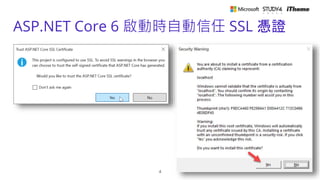
ASP.NET Core 6 啟動時自動信任 SSL 憑證
4
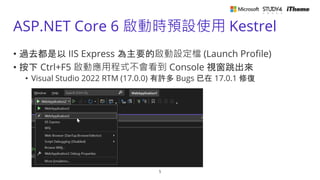
ASP.NET Core 6 啟動時預設使用 Kestrel
5
• 過去都是以 IIS Express 為主要的啟動設定檔 (Launch Profile)
• 按下 Ctrl+F5 啟動應用程式不會看到 Console 視窗跳出來
• Visual Studio 2022 RTM (17.0.0) 有許多 Bugs 已在 17.0.1 修復
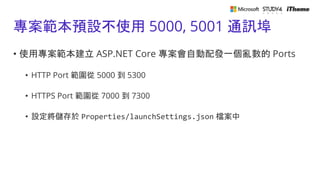
專案範本預設不使用 5000, 5001 通訊埠
• 使用專案範本建立 ASP.NET Core 專案會自動配發一個亂數的 Ports
• HTTP Port 範圍從 5000 到 5300
• HTTPS Port 範圍從 7000 到 7300
• 設定將儲存於 Properties/launchSettings.json 檔案中
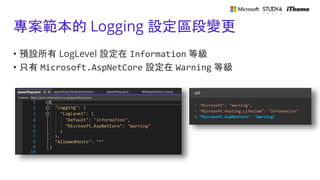
專案範本的 Logging 設定區段變更
• 預設所有 LogLevel 設定在 Information 等級
• 只有 Microsoft.AspNetCore 設定在 Warning 等級
ASP.NET Core 6 內建的分析器
• Code analysis in ASP.NET Core apps
• Overview of .NET source code analysis
Hot Reload
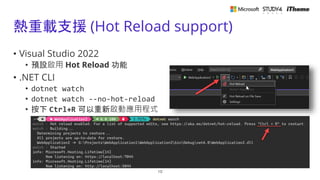
熱重載支援 (Hot Reload support)
• Visual Studio 2022
• 預設啟用 Hot Reload 功能
• .NET CLI
• dotnet watch
• dotnet watch --no-hot-reload
• 按下 Ctrl+R 可以重新啟動應用程式
10
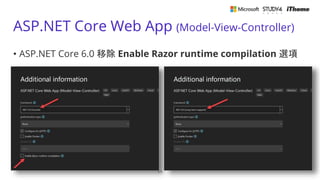
ASP.NET Core Web App (Model-View-Controller)
• ASP.NET Core 6.0 移除 Enable Razor runtime compilation 選項
11
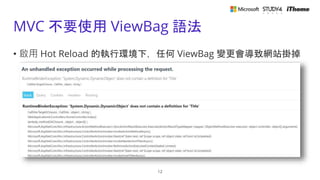
MVC 不要使用 ViewBag 語法
• 啟用 Hot Reload 的執行環境下,任何 ViewBag 變更會導致網站掛掉
12
Minimal APIs
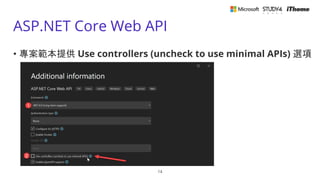
ASP.NET Core Web API
• 專案範本提供 Use controllers (uncheck to use minimal APIs) 選項
14
關於 minimal APIs 包含的內容
• Minimal APIs overview
• New hosting APIs
• WebApplication and WebApplicationBuilder
• New routing APIs
15
全新的 Hosting APIs
• WebApplication
• Properties
• Configuration
• Environment
• Lifetime
• Logger
• Services
• Urls
• Methods
• Create(args)
• Run(url)
• WebApplicationBuilder
• Properties
• Configuration
• Environment
• Host
• Logging
• Services
• WebHost
• Methods
• Build()
16
SPA
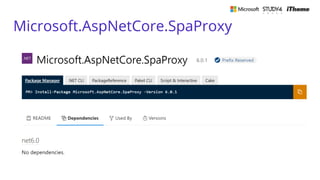
Microsoft.AspNetCore.SpaProxy
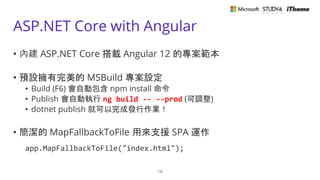
ASP.NET Core with Angular
• 內建 ASP.NET Core 搭載 Angular 12 的專案範本
• 預設擁有完美的 MSBuild 專案設定
• Build (F6) 會自動包含 npm install 命令
• Publish 會自動執行 ng build -- --prod (可調整)
• dotnet publish 就可以完成發行作業!
• 簡潔的 MapFallbackToFile 用來支援 SPA 運作
app.MapFallbackToFile("index.html");
19
C# 10
Top-level statements
• ASP.NET Core 6.0 Minimal APIs 的基礎
• 大幅簡化 ASP.NET Core 初始化的過程
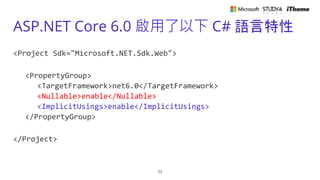
ASP.NET Core 6.0 啟用了以下 C# 語言特性
<Project Sdk="Microsoft.NET.Sdk.Web">
<PropertyGroup>
<TargetFramework>net6.0</TargetFramework>
<Nullable>enable</Nullable>
<ImplicitUsings>enable</ImplicitUsings>
</PropertyGroup>
</Project>
22
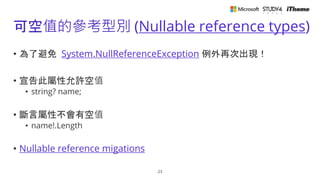
可空值的參考型別 (Nullable reference types)
• 為了避免 System.NullReferenceException 例外再次出現!
• 宣告此屬性允許空值
• string? name;
• 斷言屬性不會有空值
• name!.Length
• Nullable reference migations
23
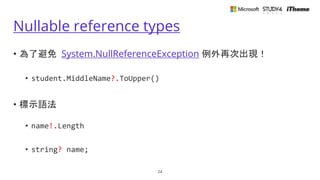
Nullable reference types
• 為了避免 System.NullReferenceException 例外再次出現!
• student.MiddleName?.ToUpper()
• 標示語法
• name!.Length
• string? name;
24
Attributes for null-state analysis
• 回傳型別允許空值
• T? 或 [MaybeNull]T
• 傳入參數允許空值
• T? 或 [AllowNull]T
25
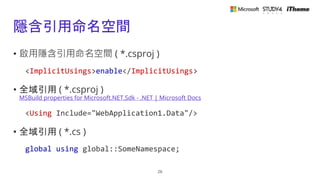
隱含引用命名空間
• 啟用隱含引用命名空間 ( *.csproj )
<ImplicitUsings>enable</ImplicitUsings>
• 全域引用 ( *.csproj )
MSBuild properties for Microsoft.NET.Sdk - .NET | Microsoft Docs
<Using Include="WebApplication1.Data"/>
• 全域引用 ( *.cs )
global using global::SomeNamespace;
26
ASP.NET Core 6.0 核心變更
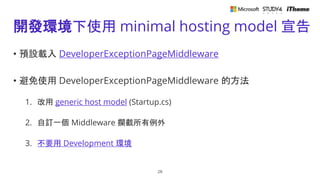
開發環境下使用 minimal hosting model 宣告
• 預設載入 DeveloperExceptionPageMiddleware
• 避免使用 DeveloperExceptionPageMiddleware 的方法
1. 改用 generic host model (Startup.cs)
2. 自訂一個 Middleware 攔截所有例外
3. 不要用 Development 環境
28
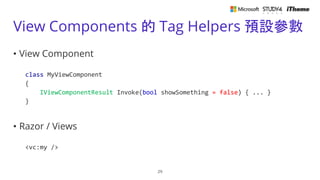
View Components 的 Tag Helpers 預設參數
• View Component
class MyViewComponent
{
IViewComponentResult Invoke(bool showSomething = false) { ... }
}
• Razor / Views
<vc:my />
29
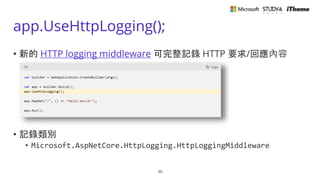
app.UseHttpLogging();
• 新的 HTTP logging middleware 可完整記錄 HTTP 要求/回應內容
• 記錄類別
• Microsoft.AspNetCore.HttpLogging.HttpLoggingMiddleware
30
Shadow copying in IIS
• 新版 ASP.NET Core Module (ANCM) 支援陰影複製功能
• 如何啟用 ASP.NET Core 6 部署到 IIS 的陰影複製 (Shadow-copying) 功能
31
Razor 編譯器
• 改用 Source Generators 編譯,執行效能大幅提昇!
• 不再產生額外的 *.Views.dll 組件 (assembly)
32
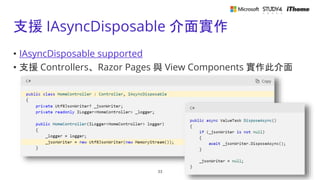
支援 IAsyncDisposable 介面實作
• IAsyncDisposable supported
• 支援 Controllers、Razor Pages 與 View Components 實作此介面
33
Kestrel 支援 HTTP/3 預覽
• Use HTTP/3 with the ASP.NET Core Kestrel web server
• HTTP/3 support in .NET 6
34
內建認證伺服器 (Authentication servers)
• .NET 3 到 .NET 5 專案範本使用 IdentityServer4
• .NET 6 專案範本支援 Duende Identity Server
• 升級
• 命名空間 IdentityServer4.IdentityServer 改成 Duende.IdentityServer
• Upgrading :: Duende IdentityServer Documentation
35
一堆肉眼看不見的變更
• ASP.NET Core performance and API improvements
• Reduced memory footprint for idle TLS connections
• Reduce the size of System.IO.Pipelines.Pipe
• Pool SocketSender
• Zero bytes reads with SslStream
• Zero byte reads with PipeReader
• Remove slabs from the SlabMemoryPool
36

Thanks for joining!
相關連結
• 體驗全新 ASP.NET Core 6.0 專案範本與 C# 10 語言特性 (文章)
• 深入 ASP․NET Core 6.0 專案範本的各種技術細節 (直播錄影)
• Breaking changes in .NET 6
• Migrate from ASP.NET Core 5.0 to 6.0
38

ASP.NET Core 6.0 全新功能探索

  • 1.
    ASP.NET Core 6.0全新功能探索 多奇數位創意有限公司 技術總監 黃保翕(Will 保哥)
  • 2.
  • 3.
    ASP.NET Core 專案範本 3 •ASP.NET Core Empty (New routing APIs) • ASP.NET Core Web App (Razor Page) • ASP.NET Core Web App (Model-View-Controller) • ASP.NET Core Web API (New routing APIs) • ASP.NET Core gRPC Service • ASP.NET Core with Angular • ASP.NET Core with React.js • ASP.NET Core with React.js and Redux • Blazor WebAssembly App • Blazor Server App
  • 4.
    ASP.NET Core 6啟動時自動信任 SSL 憑證 4
  • 5.
    ASP.NET Core 6啟動時預設使用 Kestrel 5 • 過去都是以 IIS Express 為主要的啟動設定檔 (Launch Profile) • 按下 Ctrl+F5 啟動應用程式不會看到 Console 視窗跳出來 • Visual Studio 2022 RTM (17.0.0) 有許多 Bugs 已在 17.0.1 修復
  • 6.
    專案範本預設不使用 5000, 5001通訊埠 • 使用專案範本建立 ASP.NET Core 專案會自動配發一個亂數的 Ports • HTTP Port 範圍從 5000 到 5300 • HTTPS Port 範圍從 7000 到 7300 • 設定將儲存於 Properties/launchSettings.json 檔案中
  • 7.
    專案範本的 Logging 設定區段變更 •預設所有 LogLevel 設定在 Information 等級 • 只有 Microsoft.AspNetCore 設定在 Warning 等級
  • 8.
    ASP.NET Core 6內建的分析器 • Code analysis in ASP.NET Core apps • Overview of .NET source code analysis
  • 9.
  • 10.
    熱重載支援 (Hot Reloadsupport) • Visual Studio 2022 • 預設啟用 Hot Reload 功能 • .NET CLI • dotnet watch • dotnet watch --no-hot-reload • 按下 Ctrl+R 可以重新啟動應用程式 10
  • 11.
    ASP.NET Core WebApp (Model-View-Controller) • ASP.NET Core 6.0 移除 Enable Razor runtime compilation 選項 11
  • 12.
    MVC 不要使用 ViewBag語法 • 啟用 Hot Reload 的執行環境下,任何 ViewBag 變更會導致網站掛掉 12
  • 13.
  • 14.
    ASP.NET Core WebAPI • 專案範本提供 Use controllers (uncheck to use minimal APIs) 選項 14
  • 15.
    關於 minimal APIs包含的內容 • Minimal APIs overview • New hosting APIs • WebApplication and WebApplicationBuilder • New routing APIs 15
  • 16.
    全新的 Hosting APIs •WebApplication • Properties • Configuration • Environment • Lifetime • Logger • Services • Urls • Methods • Create(args) • Run(url) • WebApplicationBuilder • Properties • Configuration • Environment • Host • Logging • Services • WebHost • Methods • Build() 16
  • 17.
  • 18.
  • 19.
    ASP.NET Core withAngular • 內建 ASP.NET Core 搭載 Angular 12 的專案範本 • 預設擁有完美的 MSBuild 專案設定 • Build (F6) 會自動包含 npm install 命令 • Publish 會自動執行 ng build -- --prod (可調整) • dotnet publish 就可以完成發行作業! • 簡潔的 MapFallbackToFile 用來支援 SPA 運作 app.MapFallbackToFile("index.html"); 19
  • 20.
  • 21.
    Top-level statements • ASP.NETCore 6.0 Minimal APIs 的基礎 • 大幅簡化 ASP.NET Core 初始化的過程
  • 22.
    ASP.NET Core 6.0啟用了以下 C# 語言特性 <Project Sdk="Microsoft.NET.Sdk.Web"> <PropertyGroup> <TargetFramework>net6.0</TargetFramework> <Nullable>enable</Nullable> <ImplicitUsings>enable</ImplicitUsings> </PropertyGroup> </Project> 22
  • 23.
    可空值的參考型別 (Nullable referencetypes) • 為了避免 System.NullReferenceException 例外再次出現! • 宣告此屬性允許空值 • string? name; • 斷言屬性不會有空值 • name!.Length • Nullable reference migations 23
  • 24.
    Nullable reference types •為了避免 System.NullReferenceException 例外再次出現! • student.MiddleName?.ToUpper() • 標示語法 • name!.Length • string? name; 24
  • 25.
    Attributes for null-stateanalysis • 回傳型別允許空值 • T? 或 [MaybeNull]T • 傳入參數允許空值 • T? 或 [AllowNull]T 25
  • 26.
    隱含引用命名空間 • 啟用隱含引用命名空間 (*.csproj ) <ImplicitUsings>enable</ImplicitUsings> • 全域引用 ( *.csproj ) MSBuild properties for Microsoft.NET.Sdk - .NET | Microsoft Docs <Using Include="WebApplication1.Data"/> • 全域引用 ( *.cs ) global using global::SomeNamespace; 26
  • 27.
    ASP.NET Core 6.0核心變更
  • 28.
    開發環境下使用 minimal hostingmodel 宣告 • 預設載入 DeveloperExceptionPageMiddleware • 避免使用 DeveloperExceptionPageMiddleware 的方法 1. 改用 generic host model (Startup.cs) 2. 自訂一個 Middleware 攔截所有例外 3. 不要用 Development 環境 28
  • 29.
    View Components 的Tag Helpers 預設參數 • View Component class MyViewComponent { IViewComponentResult Invoke(bool showSomething = false) { ... } } • Razor / Views <vc:my /> 29
  • 30.
    app.UseHttpLogging(); • 新的 HTTPlogging middleware 可完整記錄 HTTP 要求/回應內容 • 記錄類別 • Microsoft.AspNetCore.HttpLogging.HttpLoggingMiddleware 30
  • 31.
    Shadow copying inIIS • 新版 ASP.NET Core Module (ANCM) 支援陰影複製功能 • 如何啟用 ASP.NET Core 6 部署到 IIS 的陰影複製 (Shadow-copying) 功能 31
  • 32.
    Razor 編譯器 • 改用Source Generators 編譯,執行效能大幅提昇! • 不再產生額外的 *.Views.dll 組件 (assembly) 32
  • 33.
    支援 IAsyncDisposable 介面實作 •IAsyncDisposable supported • 支援 Controllers、Razor Pages 與 View Components 實作此介面 33
  • 34.
    Kestrel 支援 HTTP/3預覽 • Use HTTP/3 with the ASP.NET Core Kestrel web server • HTTP/3 support in .NET 6 34
  • 35.
    內建認證伺服器 (Authentication servers) •.NET 3 到 .NET 5 專案範本使用 IdentityServer4 • .NET 6 專案範本支援 Duende Identity Server • 升級 • 命名空間 IdentityServer4.IdentityServer 改成 Duende.IdentityServer • Upgrading :: Duende IdentityServer Documentation 35
  • 36.
    一堆肉眼看不見的變更 • ASP.NET Coreperformance and API improvements • Reduced memory footprint for idle TLS connections • Reduce the size of System.IO.Pipelines.Pipe • Pool SocketSender • Zero bytes reads with SslStream • Zero byte reads with PipeReader • Remove slabs from the SlabMemoryPool 36

  • 37.
  • 38.
    相關連結 • 體驗全新 ASP.NETCore 6.0 專案範本與 C# 10 語言特性 (文章) • 深入 ASP․NET Core 6.0 專案範本的各種技術細節 (直播錄影) • Breaking changes in .NET 6 • Migrate from ASP.NET Core 5.0 to 6.0 38