Angular 7
全新功能探索
多奇數位創意有限公司
技術總監 黃保翕 ( Will 保哥 )
http://blog.miniasp.com/
本日大綱
• Angular CLI v7
• Angular Material / CDK
• Angular Elements
• The Ivy Render Engine
• ng update
• Breaking Changes
Angular CLI v7
改善前端開發環境的終極武器
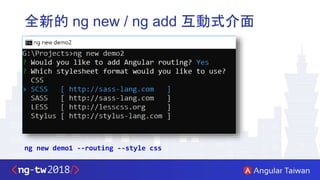
全新的 ng new / ng add 互動式介面
ng new demo1 --routing --style css
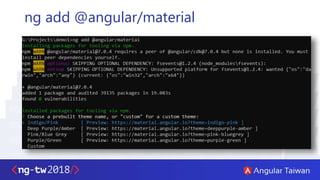
ng add @angular/material
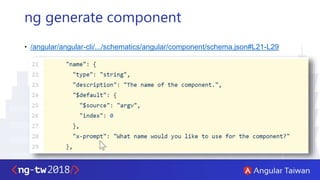
ng generate component
• /angular/angular-cli/.../schematics/angular/component/schema.json#L21-L29
全新的 Angular CLI 官方文件
• https://angular.io/cli
• CLI Command Reference
• 使用說明已整合進 angular.io 官方網站
更小的 bundle size 推出
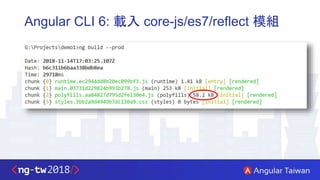
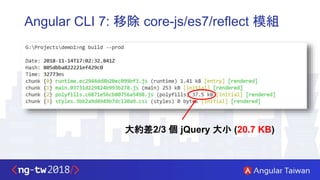
• Angular v6 以前,預設會從 srcpolyfills.ts 載入 reflect-metadata 套件
import 'core-js/es7/reflect';
• 但是預設 reflect-metadata 套件只會在 JIT 模式使用到
• 大部分 Angular 網站都是以 AOT 模式編譯執行,所以不需要載入這個套件!
• 從 Angular CLI v7 開始,會 全自動判斷 何時該載入這個 Polyfills!
Angular CLI 6: 載入 core-js/es7/reflect 模組
Angular CLI 7: 移除 core-js/es7/reflect 模組
大約差2/3 個 jQuery 大小 (20.7 KB)
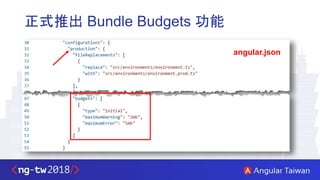
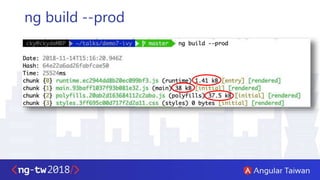
正式推出 Bundle Budgets 功能
angular.json
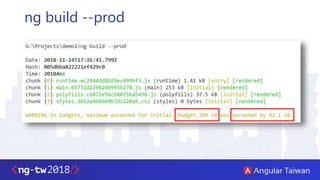
ng build --prod
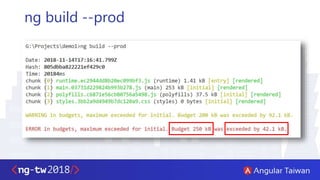
ng build --prod
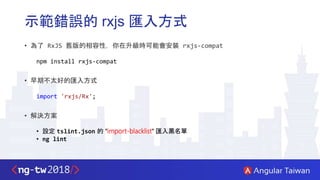
示範錯誤的 rxjs 匯入方式
• 為了 RxJS 舊版的相容性,你在升級時可能會安裝 rxjs-compat
npm install rxjs-compat
• 早期不太好的匯入方式
import 'rxjs/Rx';
• 解決方案
• 設定 tslint.json 的 "import-blacklist" 匯入黑名單
• ng lint
Angular Material 與 CDK
全新功能:虛擬捲動 與 拖曳功能
虛擬捲動 (Virtual Scrolling)
• 匯入 ScrollingModule 模組
• https://material.angular.io/cdk/scrolling/overview
• PrimeNG 也正是內建 VirtualScroller ( 內建延遲載入、排序、篩選 )
https://twitter.com/cagataycivici/status/1063031348745650176
拖曳功能 (Drag and Drop)
• 匯入 DragDropModule 模組
• https://material.angular.io/cdk/drag-drop/overview
下拉選單 ( select / mat-form-field )
• 允許在 <mat-form-field> 標籤中使用 HTML 原生的 <select> 標籤
• https://material.angular.io/components/select/overview
Angular Elements
實現 "微前端" 的利器
Angular Elements 是什麼?
• https://angular.io/guide/elements ( 中文版 )
• 能將 Angular 元件封裝成 自訂元素 (Custom elements)
• 自訂元素 可以執行在 Chrome, Opera, 與 Safari 瀏覽器 (Edge?) (相容性)
• 推薦影片:Elements in v6 and Beyond - Rob Wormald
• Upgrading With Web Components: From AngularJS To Angular
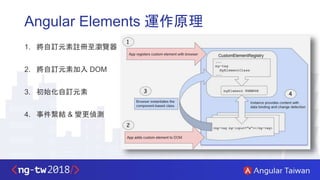
Angular Elements 運作原理
1. 將自訂元素註冊至瀏覽器
2. 將自訂元素加入 DOM
3. 初始化自訂元素
4. 事件繫結 & 變更偵測
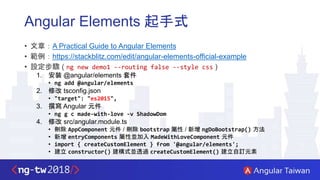
Angular Elements 起手式
• 文章:A Practical Guide to Angular Elements
• 範例:https://stackblitz.com/edit/angular-elements-official-example
• 設定步驟 ( ng new demo1 --routing false --style css )
1. 安裝 @angular/elements 套件
• ng add @angular/elements
2. 修改 tsconfig.json
• "target": "es2015",
3. 撰寫 Angular 元件
• ng g c made-with-love -v ShadowDom
4. 修改 src/angular.module.ts
• 刪除 AppComponent 元件 / 刪除 bootstrap 屬性 / 新增 ngDoBootstrap() 方法
• 新增 entryComponents 屬性並加入 MadeWithLoveComponent 元件
• import { createCustomElement } from '@angular/elements';
• 建立 constructor() 建構式並透過 createCustomElement() 建立自訂元素
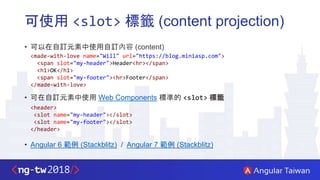
可使用 <slot> 標籤 (content projection)
• 可以在自訂元素中使用自訂內容 (content)
• 可在自訂元素中使用 Web Components 標準的 <slot> 標籤
• Angular 6 範例 (Stackblitz) / Angular 7 範例 (Stackblitz)
<made-with-love name="Will" url="https://blog.miniasp.com">
<span slot="my-header">Header<hr></span>
<h1>OK</h1>
<span slot="my-footer"><hr>Footer</span>
</made-with-love>
<header>
<slot name="my-header"></slot>
<slot name="my-footer"></slot>
</header>
The Ivy Render Engine
劃時代的 Angular 渲染引擎
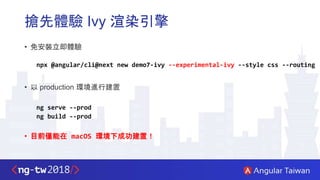
搶先體驗 Ivy 渲染引擎
• 免安裝立即體驗
npx @angular/cli@next new demo7-ivy --experimental-ivy --style css --routing
• 以 production 環境進行建置
ng serve --prod
ng build --prod
• 目前僅能在 macOS 環境下成功建置!
ng build --prod
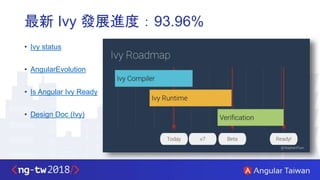
最新 Ivy 發展進度:93.96%
• Ivy status
• AngularEvolution
• Is Angular Ivy Ready
• Design Doc (Ivy)
ng update
更新與升級 Angular 應用程式
更新與升級 Angular 應用程式
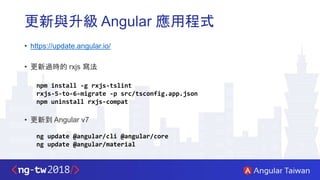
• https://update.angular.io/
• 更新過時的 rxjs 寫法
npm install -g rxjs-tslint
rxjs-5-to-6-migrate -p src/tsconfig.app.json
npm uninstall rxjs-compat
• 更新到 Angular v7
ng update @angular/cli @angular/core
ng update @angular/material
取得 Angular 版本資訊
• 查詢目前專案的 Angular CLI 版本
• ng version ( 早期的 ng -v 現在已經棄用 )
• 查詢 @angular/cli 套件的最新版本
• npm info @angular/cli dist-tags
Breaking Changes
關於升級時可能面臨的破壞性更新
關於破壞性更新的幾點提醒
• Angular v6:表單元素 <ngForm> 已棄用,請改用 <ng-form> 或繼續用 <form> 即可
• 預計 Angular v9 (2019-11) 會移除 <ngForm> 這種用法!
• Angular v6:雙向繫結的 [(ngModel)] 不要跟 Reactive Forms 的寫法一起使用
• <input [formControl]="control" [(ngModel)]="value">
• 預計 Angular v7 會移除這種使用方式,升級前請先行調整寫法!
• Angular v4:不要再用 <template> 標籤,改用 <ng-template> 為主!
Q & A
相關連結
• Version 7 of Angular — CLI Prompts, Virtual Scroll, Drag and Drop and more
• Angular CLI Command Reference
• How Did Angular CLI Budgets Save My Day And How They Can Save Yours
• Angular Elements Overview
• Is Angular Ivy Ready
• Angular Update Guide
THANK YOU
Angular 7 全新功能探索 (Angular Taiwan 2018)

Angular 7 全新功能探索 (Angular Taiwan 2018)

  • 1.
  • 2.
    本日大綱 • Angular CLIv7 • Angular Material / CDK • Angular Elements • The Ivy Render Engine • ng update • Breaking Changes
  • 3.
  • 4.
    全新的 ng new/ ng add 互動式介面 ng new demo1 --routing --style css
  • 5.
  • 6.
    ng generate component •/angular/angular-cli/.../schematics/angular/component/schema.json#L21-L29
  • 7.
    全新的 Angular CLI官方文件 • https://angular.io/cli • CLI Command Reference • 使用說明已整合進 angular.io 官方網站
  • 8.
    更小的 bundle size推出 • Angular v6 以前,預設會從 srcpolyfills.ts 載入 reflect-metadata 套件 import 'core-js/es7/reflect'; • 但是預設 reflect-metadata 套件只會在 JIT 模式使用到 • 大部分 Angular 網站都是以 AOT 模式編譯執行,所以不需要載入這個套件! • 從 Angular CLI v7 開始,會 全自動判斷 何時該載入這個 Polyfills!
  • 9.
    Angular CLI 6:載入 core-js/es7/reflect 模組
  • 10.
    Angular CLI 7:移除 core-js/es7/reflect 模組 大約差2/3 個 jQuery 大小 (20.7 KB)
  • 11.
    正式推出 Bundle Budgets功能 angular.json
  • 12.
  • 13.
  • 14.
    示範錯誤的 rxjs 匯入方式 •為了 RxJS 舊版的相容性,你在升級時可能會安裝 rxjs-compat npm install rxjs-compat • 早期不太好的匯入方式 import 'rxjs/Rx'; • 解決方案 • 設定 tslint.json 的 "import-blacklist" 匯入黑名單 • ng lint
  • 15.
    Angular Material 與CDK 全新功能:虛擬捲動 與 拖曳功能
  • 16.
    虛擬捲動 (Virtual Scrolling) •匯入 ScrollingModule 模組 • https://material.angular.io/cdk/scrolling/overview • PrimeNG 也正是內建 VirtualScroller ( 內建延遲載入、排序、篩選 ) https://twitter.com/cagataycivici/status/1063031348745650176
  • 17.
    拖曳功能 (Drag andDrop) • 匯入 DragDropModule 模組 • https://material.angular.io/cdk/drag-drop/overview
  • 18.
    下拉選單 ( select/ mat-form-field ) • 允許在 <mat-form-field> 標籤中使用 HTML 原生的 <select> 標籤 • https://material.angular.io/components/select/overview
  • 19.
  • 20.
    Angular Elements 是什麼? •https://angular.io/guide/elements ( 中文版 ) • 能將 Angular 元件封裝成 自訂元素 (Custom elements) • 自訂元素 可以執行在 Chrome, Opera, 與 Safari 瀏覽器 (Edge?) (相容性) • 推薦影片:Elements in v6 and Beyond - Rob Wormald • Upgrading With Web Components: From AngularJS To Angular
  • 21.
    Angular Elements 運作原理 1.將自訂元素註冊至瀏覽器 2. 將自訂元素加入 DOM 3. 初始化自訂元素 4. 事件繫結 & 變更偵測
  • 22.
    Angular Elements 起手式 •文章:A Practical Guide to Angular Elements • 範例:https://stackblitz.com/edit/angular-elements-official-example • 設定步驟 ( ng new demo1 --routing false --style css ) 1. 安裝 @angular/elements 套件 • ng add @angular/elements 2. 修改 tsconfig.json • "target": "es2015", 3. 撰寫 Angular 元件 • ng g c made-with-love -v ShadowDom 4. 修改 src/angular.module.ts • 刪除 AppComponent 元件 / 刪除 bootstrap 屬性 / 新增 ngDoBootstrap() 方法 • 新增 entryComponents 屬性並加入 MadeWithLoveComponent 元件 • import { createCustomElement } from '@angular/elements'; • 建立 constructor() 建構式並透過 createCustomElement() 建立自訂元素
  • 23.
    可使用 <slot> 標籤(content projection) • 可以在自訂元素中使用自訂內容 (content) • 可在自訂元素中使用 Web Components 標準的 <slot> 標籤 • Angular 6 範例 (Stackblitz) / Angular 7 範例 (Stackblitz) <made-with-love name="Will" url="https://blog.miniasp.com"> <span slot="my-header">Header<hr></span> <h1>OK</h1> <span slot="my-footer"><hr>Footer</span> </made-with-love> <header> <slot name="my-header"></slot> <slot name="my-footer"></slot> </header>
  • 24.
    The Ivy RenderEngine 劃時代的 Angular 渲染引擎
  • 25.
    搶先體驗 Ivy 渲染引擎 •免安裝立即體驗 npx @angular/cli@next new demo7-ivy --experimental-ivy --style css --routing • 以 production 環境進行建置 ng serve --prod ng build --prod • 目前僅能在 macOS 環境下成功建置!
  • 26.
  • 27.
    最新 Ivy 發展進度:93.96% •Ivy status • AngularEvolution • Is Angular Ivy Ready • Design Doc (Ivy)
  • 28.
  • 29.
    更新與升級 Angular 應用程式 •https://update.angular.io/ • 更新過時的 rxjs 寫法 npm install -g rxjs-tslint rxjs-5-to-6-migrate -p src/tsconfig.app.json npm uninstall rxjs-compat • 更新到 Angular v7 ng update @angular/cli @angular/core ng update @angular/material
  • 30.
    取得 Angular 版本資訊 •查詢目前專案的 Angular CLI 版本 • ng version ( 早期的 ng -v 現在已經棄用 ) • 查詢 @angular/cli 套件的最新版本 • npm info @angular/cli dist-tags
  • 31.
  • 32.
    關於破壞性更新的幾點提醒 • Angular v6:表單元素<ngForm> 已棄用,請改用 <ng-form> 或繼續用 <form> 即可 • 預計 Angular v9 (2019-11) 會移除 <ngForm> 這種用法! • Angular v6:雙向繫結的 [(ngModel)] 不要跟 Reactive Forms 的寫法一起使用 • <input [formControl]="control" [(ngModel)]="value"> • 預計 Angular v7 會移除這種使用方式,升級前請先行調整寫法! • Angular v4:不要再用 <template> 標籤,改用 <ng-template> 為主!
  • 33.
  • 34.
    相關連結 • Version 7of Angular — CLI Prompts, Virtual Scroll, Drag and Drop and more • Angular CLI Command Reference • How Did Angular CLI Budgets Save My Day And How They Can Save Yours • Angular Elements Overview • Is Angular Ivy Ready • Angular Update Guide
  • 35.

Editor's Notes

  • #4  Try latest Angular CLI Beta / RC, with Angular v7 and the new Ivy compiler, no install required thanks to npm and npx https://www.gurustop.net/blog/2018/10/11/4258/npm-npx-angular-beta-rc-next-angular-cli-ivy-compiler
  • #12 How Did Angular CLI Budgets Save My Day And How They Can Save Yours https://medium.com/dailyjs/how-did-angular-cli-budgets-save-my-day-and-how-they-can-save-yours-300d534aae7a
  • #23 [Bug] angular/elements: Failed to construct 'HTMLElement': Please use the 'new' operator · Issue #24556 · angular/angular https://github.com/angular/angular/issues/24556
  • #24 Angular 6 Example: https://stackblitz.com/edit/angular-elements-official-example-onmjxi?file=index.html Angular 7 Example: https://stackblitz.com/edit/angular-elements-example-with-slot?file=src%2Findex.html ng-content, slot and content elements don't work with nested Angular custom elements · Issue #24536 · angular/angular https://github.com/angular/angular/issues/24536 Add support for Shadow DOM V1 · Issue #23636 · angular/angular https://github.com/angular/angular/issues/23636

  • #33 https://github.com/angular/angular/blob/master/CHANGELOG.md