ASP OBJECTS
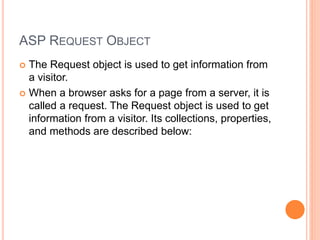
ASP REQUEST OBJECT
 The Request object is used to get information from
a visitor.
 When a browser asks for a page from a server, it is
called a request. The Request object is used to get
information from a visitor. Its collections, properties,
and methods are described below:
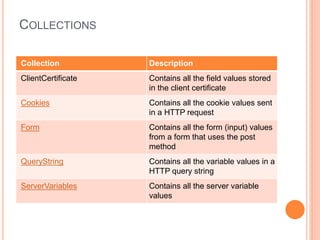
COLLECTIONS
Collection Description
ClientCertificate Contains all the field values stored
in the client certificate
Cookies Contains all the cookie values sent
in a HTTP request
Form Contains all the form (input) values
from a form that uses the post
method
QueryString Contains all the variable values in a
HTTP query string
ServerVariables Contains all the server variable
values
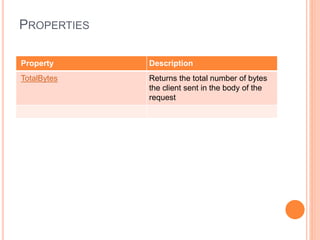
PROPERTIES
Property Description
TotalBytes Returns the total number of bytes
the client sent in the body of the
request
COOKIE EXAMPLE
 <%
dim numvisits
response.cookies("NumVisits").Expires=date+365
numvisits=request.cookies("NumVisits")
if numvisits="" then
response.cookies("NumVisits")=1
response.write("Welcome! This is the first time you are visiting this Web page.")
else
response.cookies("NumVisits")=numvisits+1
response.write("You have visited this ")
response.write("Web page " & numvisits)
if numvisits=1 then
response.write " time before!"
else
response.write " times before!"
end if
end if
%>
<!DOCTYPE html>
<html>
<body>
</body>
</html>
METHODS
Method Description
BinaryRead Retrieves the data sent to the
server from the client as part of a
post request and stores it in a safe
array
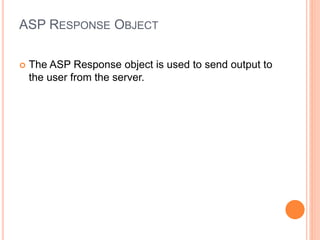
ASP RESPONSE OBJECT
 The ASP Response object is used to send output to
the user from the server.
COLLECTIONS
Collection Description
Cookies Sets a cookie value. If the cookie
does not exist, it will be created,
and take the value that is specified
PROPERTIES
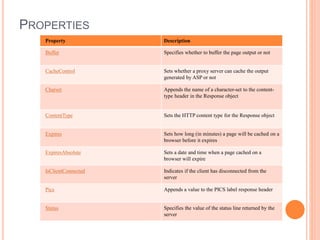
Property Description
Buffer Specifies whether to buffer the page output or not
CacheControl Sets whether a proxy server can cache the output
generated by ASP or not
Charset Appends the name of a character-set to the content-
type header in the Response object
ContentType Sets the HTTP content type for the Response object
Expires Sets how long (in minutes) a page will be cached on a
browser before it expires
ExpiresAbsolute Sets a date and time when a page cached on a
browser will expire
IsClientConnected Indicates if the client has disconnected from the
server
Pics Appends a value to the PICS label response header
Status Specifies the value of the status line returned by the
server
METHODS
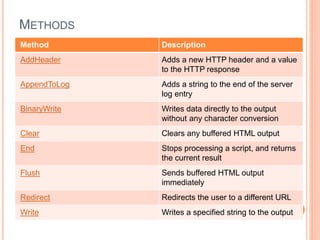
Method Description
AddHeader Adds a new HTTP header and a value
to the HTTP response
AppendToLog Adds a string to the end of the server
log entry
BinaryWrite Writes data directly to the output
without any character conversion
Clear Clears any buffered HTML output
End Stops processing a script, and returns
the current result
Flush Sends buffered HTML output
immediately
Redirect Redirects the user to a different URL
Write Writes a specified string to the output
APPLICATION OBJECT
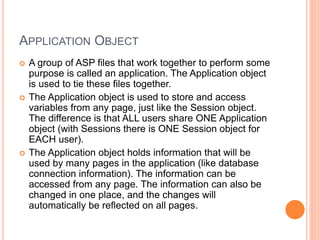
 A group of ASP files that work together to perform some
purpose is called an application. The Application object
is used to tie these files together.
 The Application object is used to store and access
variables from any page, just like the Session object.
The difference is that ALL users share ONE Application
object (with Sessions there is ONE Session object for
EACH user).
 The Application object holds information that will be
used by many pages in the application (like database
connection information). The information can be
accessed from any page. The information can also be
changed in one place, and the changes will
automatically be reflected on all pages.
COLLECTIONS
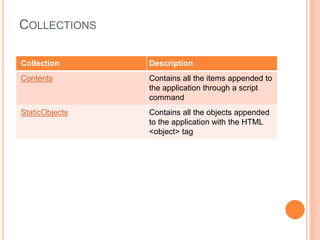
Collection Description
Contents Contains all the items appended to
the application through a script
command
StaticObjects Contains all the objects appended
to the application with the HTML
<object> tag
METHODS
Method Description
Contents.Remove Deletes an item from the Contents
collection
Contents.RemoveAll() Deletes all items from the Contents
collection
Lock Prevents other users from
modifying the variables in the
Application object
Unlock Enables other users to modify the
variables in the Application object
(after it has been locked using the
Lock method)
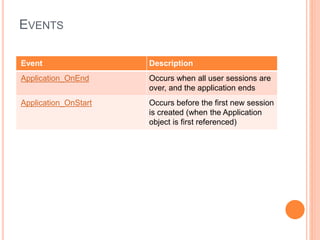
EVENTS
Event Description
Application_OnEnd Occurs when all user sessions are
over, and the application ends
Application_OnStart Occurs before the first new session
is created (when the Application
object is first referenced)
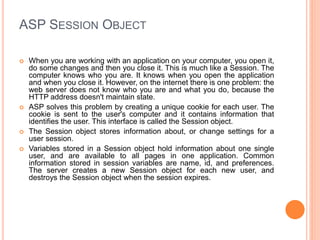
ASP SESSION OBJECT
 When you are working with an application on your computer, you open it,
do some changes and then you close it. This is much like a Session. The
computer knows who you are. It knows when you open the application
and when you close it. However, on the internet there is one problem: the
web server does not know who you are and what you do, because the
HTTP address doesn't maintain state.
 ASP solves this problem by creating a unique cookie for each user. The
cookie is sent to the user's computer and it contains information that
identifies the user. This interface is called the Session object.
 The Session object stores information about, or change settings for a
user session.
 Variables stored in a Session object hold information about one single
user, and are available to all pages in one application. Common
information stored in session variables are name, id, and preferences.
The server creates a new Session object for each new user, and
destroys the Session object when the session expires.
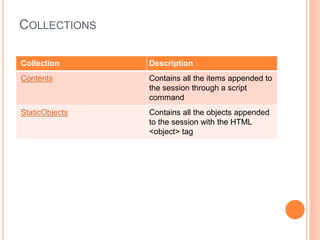
COLLECTIONS
Collection Description
Contents Contains all the items appended to
the session through a script
command
StaticObjects Contains all the objects appended
to the session with the HTML
<object> tag
PROPERTIES
Property Description
CodePage Specifies the character set that will
be used when displaying dynamic
content
LCID Sets or returns an integer that
specifies a location or region.
Contents like date, time, and
currency will be displayed
according to that location or region
SessionID Returns a unique id for each user.
The unique id is generated by the
server
Timeout Sets or returns the timeout period
(in minutes) for the Session object
in this application
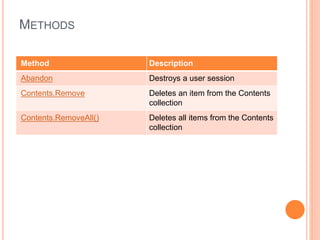
METHODS
Method Description
Abandon Destroys a user session
Contents.Remove Deletes an item from the Contents
collection
Contents.RemoveAll() Deletes all items from the Contents
collection
EVENTS
Event Description
Session_OnEnd Occurs when a session ends
Session_OnStart Occurs when a session starts
ASP SERVER OBJECT
 The ASP Server object is used to access properties
and methods on the server.
PROPERTIES
Property Description
ScriptTimeout Sets or returns the maximum
number of seconds a script can run
before it is terminated
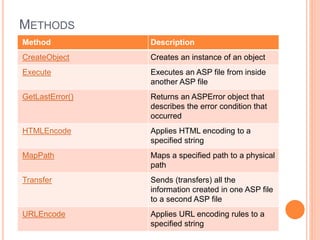
METHODS
Method Description
CreateObject Creates an instance of an object
Execute Executes an ASP file from inside
another ASP file
GetLastError() Returns an ASPError object that
describes the error condition that
occurred
HTMLEncode Applies HTML encoding to a
specified string
MapPath Maps a specified path to a physical
path
Transfer Sends (transfers) all the
information created in one ASP file
to a second ASP file
URLEncode Applies URL encoding rules to a
specified string

Asp objects

  • 1.
  • 2.
    ASP REQUEST OBJECT The Request object is used to get information from a visitor.  When a browser asks for a page from a server, it is called a request. The Request object is used to get information from a visitor. Its collections, properties, and methods are described below:
  • 3.
    COLLECTIONS Collection Description ClientCertificate Containsall the field values stored in the client certificate Cookies Contains all the cookie values sent in a HTTP request Form Contains all the form (input) values from a form that uses the post method QueryString Contains all the variable values in a HTTP query string ServerVariables Contains all the server variable values
  • 4.
    PROPERTIES Property Description TotalBytes Returnsthe total number of bytes the client sent in the body of the request
  • 5.
    COOKIE EXAMPLE  <% dimnumvisits response.cookies("NumVisits").Expires=date+365 numvisits=request.cookies("NumVisits") if numvisits="" then response.cookies("NumVisits")=1 response.write("Welcome! This is the first time you are visiting this Web page.") else response.cookies("NumVisits")=numvisits+1 response.write("You have visited this ") response.write("Web page " & numvisits) if numvisits=1 then response.write " time before!" else response.write " times before!" end if end if %> <!DOCTYPE html> <html> <body> </body> </html>
  • 6.
    METHODS Method Description BinaryRead Retrievesthe data sent to the server from the client as part of a post request and stores it in a safe array
  • 7.
    ASP RESPONSE OBJECT The ASP Response object is used to send output to the user from the server.
  • 8.
    COLLECTIONS Collection Description Cookies Setsa cookie value. If the cookie does not exist, it will be created, and take the value that is specified
  • 9.
    PROPERTIES Property Description Buffer Specifieswhether to buffer the page output or not CacheControl Sets whether a proxy server can cache the output generated by ASP or not Charset Appends the name of a character-set to the content- type header in the Response object ContentType Sets the HTTP content type for the Response object Expires Sets how long (in minutes) a page will be cached on a browser before it expires ExpiresAbsolute Sets a date and time when a page cached on a browser will expire IsClientConnected Indicates if the client has disconnected from the server Pics Appends a value to the PICS label response header Status Specifies the value of the status line returned by the server
  • 10.
    METHODS Method Description AddHeader Addsa new HTTP header and a value to the HTTP response AppendToLog Adds a string to the end of the server log entry BinaryWrite Writes data directly to the output without any character conversion Clear Clears any buffered HTML output End Stops processing a script, and returns the current result Flush Sends buffered HTML output immediately Redirect Redirects the user to a different URL Write Writes a specified string to the output
  • 11.
    APPLICATION OBJECT  Agroup of ASP files that work together to perform some purpose is called an application. The Application object is used to tie these files together.  The Application object is used to store and access variables from any page, just like the Session object. The difference is that ALL users share ONE Application object (with Sessions there is ONE Session object for EACH user).  The Application object holds information that will be used by many pages in the application (like database connection information). The information can be accessed from any page. The information can also be changed in one place, and the changes will automatically be reflected on all pages.
  • 12.
    COLLECTIONS Collection Description Contents Containsall the items appended to the application through a script command StaticObjects Contains all the objects appended to the application with the HTML <object> tag
  • 13.
    METHODS Method Description Contents.Remove Deletesan item from the Contents collection Contents.RemoveAll() Deletes all items from the Contents collection Lock Prevents other users from modifying the variables in the Application object Unlock Enables other users to modify the variables in the Application object (after it has been locked using the Lock method)
  • 14.
    EVENTS Event Description Application_OnEnd Occurswhen all user sessions are over, and the application ends Application_OnStart Occurs before the first new session is created (when the Application object is first referenced)
  • 15.
    ASP SESSION OBJECT When you are working with an application on your computer, you open it, do some changes and then you close it. This is much like a Session. The computer knows who you are. It knows when you open the application and when you close it. However, on the internet there is one problem: the web server does not know who you are and what you do, because the HTTP address doesn't maintain state.  ASP solves this problem by creating a unique cookie for each user. The cookie is sent to the user's computer and it contains information that identifies the user. This interface is called the Session object.  The Session object stores information about, or change settings for a user session.  Variables stored in a Session object hold information about one single user, and are available to all pages in one application. Common information stored in session variables are name, id, and preferences. The server creates a new Session object for each new user, and destroys the Session object when the session expires.
  • 16.
    COLLECTIONS Collection Description Contents Containsall the items appended to the session through a script command StaticObjects Contains all the objects appended to the session with the HTML <object> tag
  • 17.
    PROPERTIES Property Description CodePage Specifiesthe character set that will be used when displaying dynamic content LCID Sets or returns an integer that specifies a location or region. Contents like date, time, and currency will be displayed according to that location or region SessionID Returns a unique id for each user. The unique id is generated by the server Timeout Sets or returns the timeout period (in minutes) for the Session object in this application
  • 18.
    METHODS Method Description Abandon Destroysa user session Contents.Remove Deletes an item from the Contents collection Contents.RemoveAll() Deletes all items from the Contents collection
  • 19.
    EVENTS Event Description Session_OnEnd Occurswhen a session ends Session_OnStart Occurs when a session starts
  • 20.
    ASP SERVER OBJECT The ASP Server object is used to access properties and methods on the server.
  • 21.
    PROPERTIES Property Description ScriptTimeout Setsor returns the maximum number of seconds a script can run before it is terminated
  • 22.
    METHODS Method Description CreateObject Createsan instance of an object Execute Executes an ASP file from inside another ASP file GetLastError() Returns an ASPError object that describes the error condition that occurred HTMLEncode Applies HTML encoding to a specified string MapPath Maps a specified path to a physical path Transfer Sends (transfers) all the information created in one ASP file to a second ASP file URLEncode Applies URL encoding rules to a specified string