


ARCHITECTING .NET SOLUTIONS
IN A DOCKER ECOSYSTEM
ALEXTHISSEN
3
Agenda
A story on creating .NET applications
using container technology
Featuring Docker and Visual Studio
With highlights and some emphasis on .NET Core
4
Task: Fit your application into a container
5
Making progress. It will fit. It must…
6
There I fixed it!
7
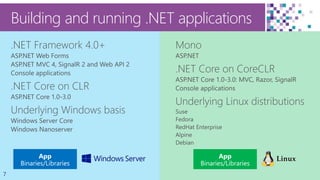
Building and running .NET applications
8
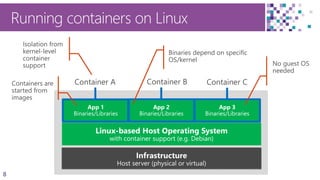
Running containers on Linux
9
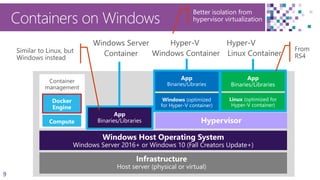
Containers on Windows
Better isolation from
hypervisor virtualization
Container
management
Docker
Engine
Compute
10
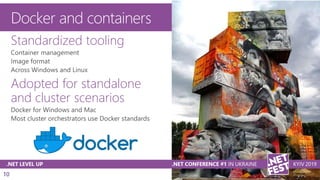
Docker and containers
Standardized tooling
Adopted for standalone
and cluster scenarios
11
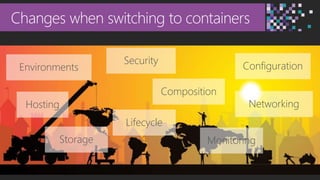
Changes when switching to containers
Environments Configuration
Security
Networking
Storage
Composition
Lifecycle
Hosting
Monitoring
12
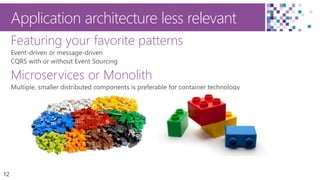
Application architecture less relevant
Featuring your favorite patterns
Microservices or Monolith
13
Container application lifecycle
14
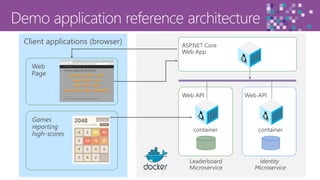
Web APIWeb API
containercontainer
Leaderboard
Microservice
Identity
Microservice
ASP.NET Core
Web App
Client applications (browser)
Web
Page
Games
reporting
high-scores
15
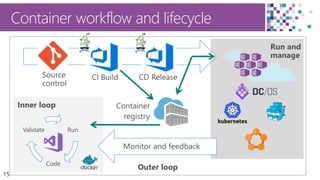
Container workflow and lifecycle
Inner loop
Run
Code
Validate
Outer loop
16
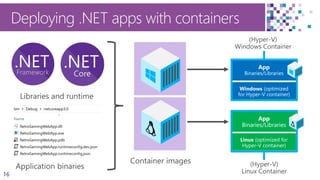
Deploying .NET apps with containers
17
VS2019 container building
Multi-stage Dockerfile per project
Can be built without VS2019
FROM mcr.microsoft.com/dotnet/core/aspnet:3.0-buster-slim AS base
WORKDIR /app
EXPOSE 13995
EXPOSE 44369
…
FROM base AS final
WORKDIR /app
COPY --from=publish /app .
ENTRYPOINT ["dotnet", "Leaderboard.WebAPI.dll"]
18
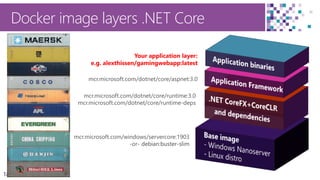
mcr.microsoft.com/windows/servercore:1903
-or- debian:buster-slimdebian:buster-slim
Docker image layers .NET Core
mcr.microsoft.com/dotnet/core/runtime:3.0
mcr.microsoft.com/dotnet/core/runtime-deps
mcr.microsoft.com/dotnet/core/aspnet:3.0
Your application layer:
e.g. alexthissen/gamingwebapp:latest
19
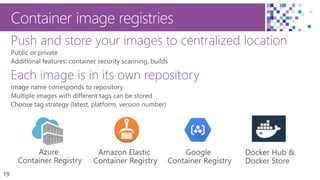
Container image registries
Push and store your images to centralized location
Each image is in its own repository
20
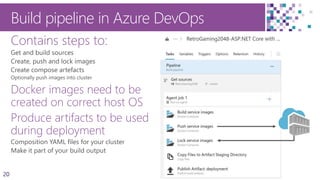
Build pipeline in Azure DevOps
Contains steps to:
Docker images need to be
created on correct host OS
Produce artifacts to be used
during deployment
21
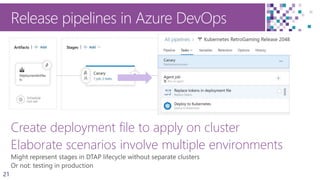
Release pipelines in Azure DevOps
Create deployment file to apply on cluster
Elaborate scenarios involve multiple environments
Demo: Lifecycle
A new development lifecycle
for Docker based solutions
Visual Studio 2019
Azure DevOps
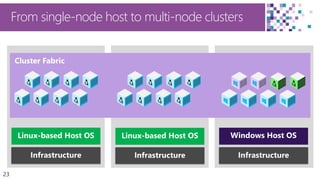
23
From single-node host to multi-node clusters
24
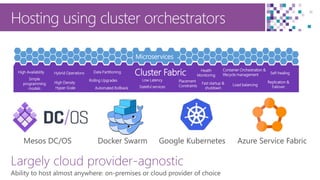
Hosting using cluster orchestrators
Cluster FabricHigh Availability
Hyper-Scale
Hybrid Operations
High Density
Rolling Upgrades
Stateful services
Low Latency
Fast startup &
shutdown
Container Orchestration &
lifecycle management
Replication &
Failover
Simple
programming
models
Load balancing
Self-healingData Partitioning
Automated Rollback
Health
Monitoring
Placement
Constraints
Microservices
Mesos DC/OS Docker Swarm Google Kubernetes Azure Service Fabric
Largely cloud provider-agnostic
25
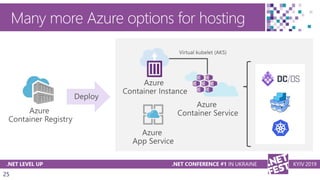
Many more Azure options for hosting
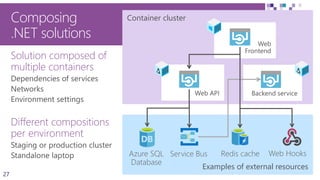
Composing applications
27
Container cluster
Examples of external resources
Solution composed of
multiple containers
Different compositions
per environment
Web
Frontend
Web API
Composing
.NET solutions
Backend service
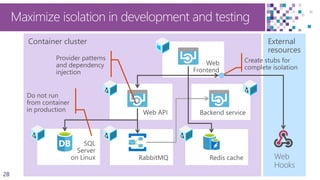
28
Container cluster
Redis cache
External
resources
Web
Frontend
Web API Backend service
SQL
Server
on Linux RabbitMQ
Maximize isolation in development and testing
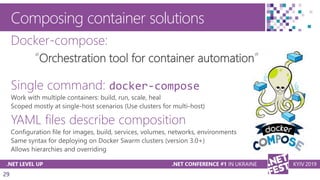
29
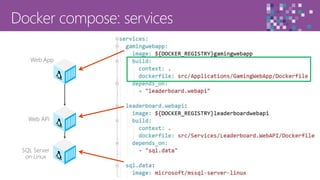
Composing container solutions
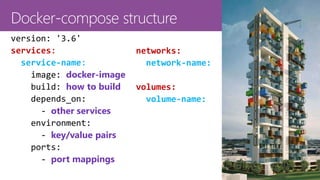
Docker-compose:
“Orchestration tool for container automation”
Single command: docker-compose
YAML files describe composition
30
services:
service-name:
docker-image
how to build
other services
key/value pairs
port mappings
networks:
network-name:
volumes:
volume-name:
31
Web API
Web App
SQL Server
on Linux
32
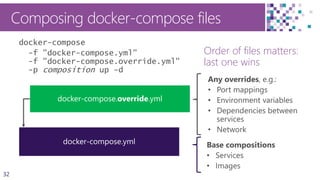
Composing docker-compose files
Order of files matters:
last one wins
docker-compose
-f "docker-compose.yml"
-f "docker-compose.override.yml"
-p composition up -d
33
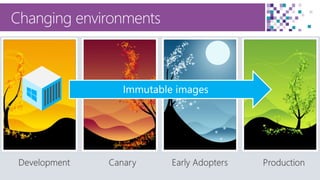
Changing environments
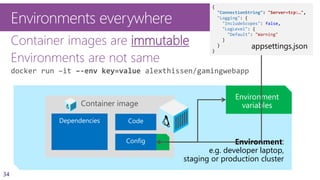
34
Environment:
e.g. developer laptop,
staging or production cluster
Environments everywhere
Container images are immutable
Environments are not same
docker run –it –-env key=value alexthissen/gamingwebapp
Container image
{
"ConnectionString": "Server=tcp:…",
"Logging": {
"IncludeScopes": false,
"LogLevel": {
"Default": "Warning"
}
}
}
appsettings.json
35
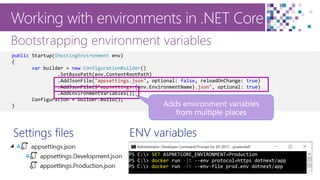
Working with environments in .NET Core
Bootstrapping environment variables
public Startup(IHostingEnvironment env)
{
var builder = new ConfigurationBuilder()
.SetBasePath(env.ContentRootPath)
.AddJsonFile("appsettings.json", optional: false, reloadOnChange: true)
.AddJsonFile($"appsettings.{env.EnvironmentName}.json", optional: true)
.AddEnvironmentVariables();
Configuration = builder.Build();
}
ENV variablesSettings files
36
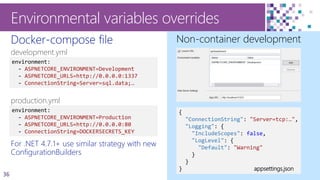
Docker-compose file
development.yml
production.yml
For .NET 4.7.1+ use similar strategy with new
ConfigurationBuilders
Environmental variables overrides
Non-container development
environment:
- ASPNETCORE_ENVIRONMENT=Development
- ASPNETCORE_URLS=http://0.0.0.0:1337
- ConnectionString=Server=sql.data;…
environment:
- ASPNETCORE_ENVIRONMENT=Production
- ASPNETCORE_URLS=http://0.0.0.0:80
- ConnectionString=DOCKERSECRETS_KEY
{
"ConnectionString": "Server=tcp:…",
"Logging": {
"IncludeScopes": false,
"LogLevel": {
"Default": "Warning"
}
}
} appsettings.json
37
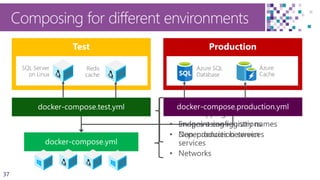
Base compositions
• Services
• Images using registry names
• Dependencies between
services
• Networks
Composing for different environments
Environmental overrides:
• Port mappings
• Endpoint configurations
• Non-production services
SQL Server
on Linux
Redis
cache
Azure SQL
Database
Azure
Cache
39
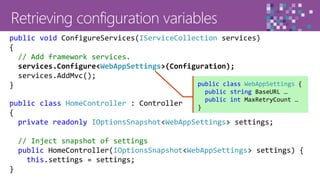
public class HomeController : Controller
{
private readonly IOptionsSnapshot<WebAppSettings> settings;
// Inject snapshot of settings
public HomeController(IOptionsSnapshot<WebAppSettings> settings) {
this.settings = settings;
}
public void ConfigureServices(IServiceCollection services)
{
// Add framework services.
services.Configure<WebAppSettings>(Configuration);
services.AddMvc();
} public class WebAppSettings {
public string BaseURL …
public int MaxRetryCount …
}
40
Security and secrets
41
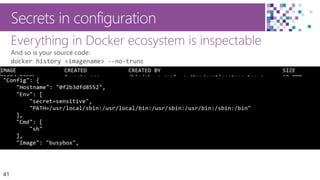
Everything in Docker ecosystem is inspectable
Secrets in configuration
42
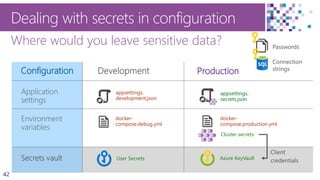
Configuration
Dealing with secrets in configuration
Where would you leave sensitive data?
Production
appsettings.
development.json
Cluster secrets
docker-
compose.debug.yml
docker-
compose.production.yml
User Secrets Azure KeyVault
appsettings.
secrets.json
Connection
strings
Passwords
appsettings.
secrets.json
44
Reading secrets from Azure Key Vault
Available from IConfiguration in ASP.NET Core
Key and secret names
Connecting to KeyVault securely
if (env.IsProduction())
{
builder.AddAzureKeyVault(
$"https://{Configuration["azurekeyvault_vault"]}.vault.azure.net/",
Configuration["azurekeyvault_clientid"],
Configuration["azurekeyvault_clientsecret"]);
Configuration = builder.Build();
}
Demo: Secrets
Creating and reading secrets
in a Kubernetes cluster
Mounting secret settings in volume
Reading individual secrets
Read from Azure KeyVault
Building resilient applications
47
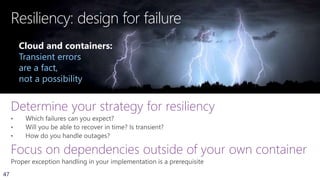
Resiliency: design for failure
Determine your strategy for resiliency
Focus on dependencies outside of your own container
Cloud and containers:
Transient errors
are a fact,
not a possibility
48
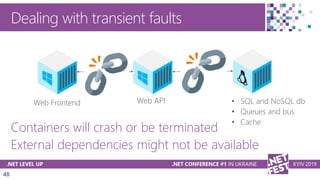
Dealing with transient faults
Containers will crash or be terminated
External dependencies might not be available
49
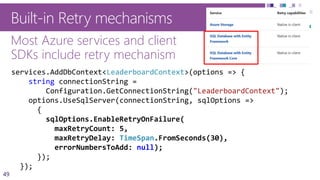
Built-in Retry mechanisms
Most Azure services and client
SDKs include retry mechanism
Patterns and Practices
TFH Application Block (.NET FX)
Roll your own for container
connectivity
services.AddDbContext<LeaderboardContext>(options => {
string connectionString =
Configuration.GetConnectionString("LeaderboardContext");
options.UseSqlServer(connectionString, sqlOptions =>
{
sqlOptions.EnableRetryOnFailure(
maxRetryCount: 5,
maxRetryDelay: TimeSpan.FromSeconds(30),
errorNumbersToAdd: null);
});
});
50
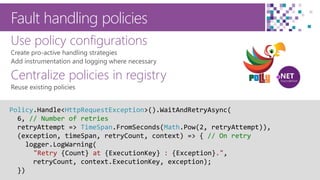
Fault handling policies
Use policy configurations
Centralize policies in registry
Policy.Handle<HttpRequestException>().WaitAndRetryAsync(
6, // Number of retries
retryAttempt => TimeSpan.FromSeconds(Math.Pow(2, retryAttempt)),
(exception, timeSpan, retryCount, context) => { // On retry
logger.LogWarning(
"Retry {Count} at {ExecutionKey} : {Exception}.",
retryCount, context.ExecutionKey, exception);
})
51
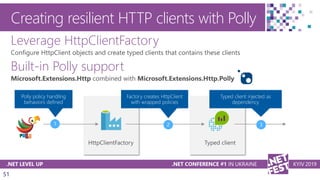
Creating resilient HTTP clients with Polly
Leverage HttpClientFactory
Built-in Polly support
Demo: Resiliency
Preparing for failures
Typed Clients
Polly support
53
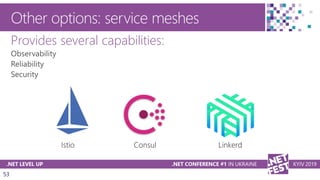
Other options: service meshes
Provides several capabilities:
54
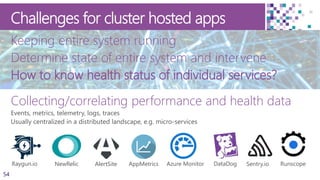
Challenges for cluster hosted apps
Keeping entire system running
Determine state of entire system and intervene
How to know health status of individual services?
Collecting/correlating performance and health data
Sentry.ioRaygun.io RunscopeNewRelic AlertSite DataDogAppMetrics Azure Monitor
55
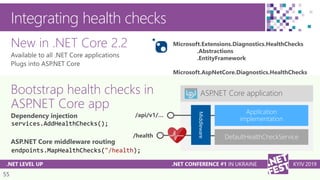
ASP.NET Core application
/api/v1/… Middle
ware
Integrating health checks
New in .NET Core 2.2
Bootstrap health checks in
ASP.NET Core app
services.AddHealthChecks();
endpoints.MapHealthChecks("/health);
/health DefaultHealthCheckService
Microsoft.Extensions.Diagnostics.HealthChecks
.Abstractions
.EntityFramework
Microsoft.AspNetCore.Diagnostics.HealthChecks
56
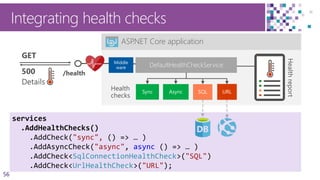
Integrating health checks
services
.AddHealthChecks()
.AddCheck("sync", () => … )
.AddAsyncCheck("async", async () => … )
.AddCheck<SqlConnectionHealthCheck>("SQL")
.AddCheck<UrlHealthCheck>("URL");
ASP.NET Core application
/health
DefaultHealthCheckService
57
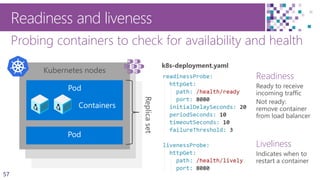
Probing containers to check for availability and health
Readiness and liveness
Kubernetes node
Kubernetes node
Kubernetes nodes
Containers
Readiness
Liveliness
58
Implementing readiness and liveliness
1. Add health checks with tags
2. Register multiple endpoints
with filter using
Options predicate
/api/v1/…
/health
/health/ready
/health/lively
app.UseHealthChecks("/health/ready",
new HealthCheckOptions() {
Predicate = reg => reg.Tags.Contains("ready")
});
services.AddHealthChecks()
.AddCheck<CircuitBreakerHealthCheck>(
"circuitbreakers",
tags: new string[] { "ready" });
app.UseHealthChecks("/health/lively",
new HealthCheckOptions() {
Predicate = _ => true
});
59
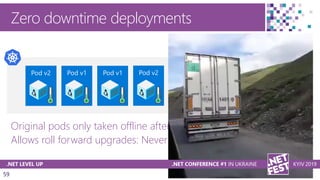
Zero downtime deployments
Original pods only taken offline after new healthy one is up
Allows roll forward upgrades: Never roll back to previous version
60
Networking
61
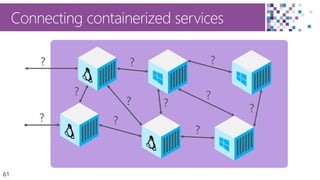
Connecting containerized services
62
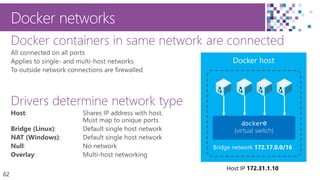
Docker containers in same network are connected
Drivers determine network type
Docker networks
Bridge network 172.17.0.0/16
Host IP 172.31.1.10
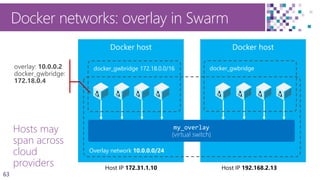
63
Hosts may
span across
cloud
providers
Docker networks: overlay in Swarm
Overlay network 10.0.0.0/24
Host IP 172.31.1.10 Host IP 192.168.2.13
docker_gwbridge 172.18.0.0/16 docker_gwbridge
64
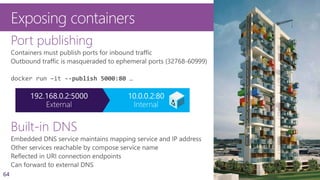
Exposing containers
Port publishing
Built-in DNS
65
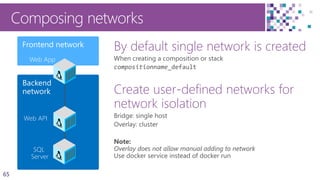
Composing networks
By default single network is created
Create user-defined networks for
network isolation
Backend
network
Frontend network
Web API
Web App
SQL
Server
66
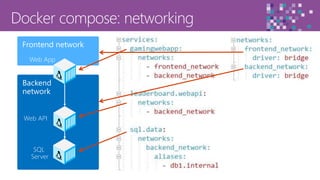
Backend
network
Frontend network
Web API
Web App
SQL
Server
67
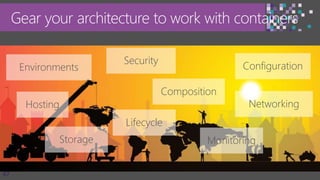
Gear your architecture to work with containers
Environments Configuration
Security
Networking
Storage
Composition
Lifecycle
Hosting
Monitoring
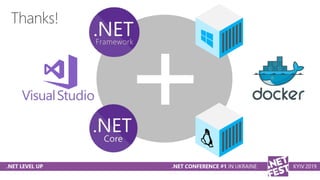
Thanks!
Resources
https://dot.net/
https://www.visualstudio.com
https://github.com/microsoft/dotnet
https://xpirit.com/inspiration/#downloads

Architecting .NET solutions in a Docker ecosystem - .NET Fest Kyiv 2019