Panelists: Linda Gorman, Director, Communications & Public Affairs,  AAA Arizona www.twitter.com/AAA_Arizona Michelle Olson, President of Olson Communications www.twitter.com/OlsonComm Liam O’Mahony, Chandler Recreation Information Specialist www.twitter.com/ChandlerRec Traci Tenkely, Chandler Aquatics Coordinator  www.twitter.com/ChandlerAquatic
Panelist Web Sites AAA Arizona:  www.aaaaz.org Olson Communications: www.olsoncomm.com Chandler Aquatics: www.chandleraz.gov/aquatics Chandler Recreation: www.chandleraz.gov/recreation
Liam O’Mahony, MBA, APR Information Specialist  City of Chandler  Community Services Department & Recreation Division
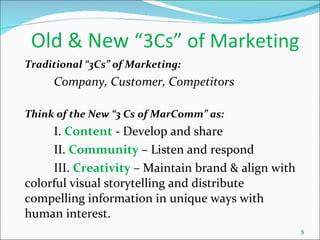
Old & New  “3Cs” of Marketing  Traditional “3Cs” of Marketing: Company, Customer, Competitors Think of the New “3 Cs of MarComm” as: I.  Content  - Develop and share  II.  Community  – Listen and respond III.  Creativity   – Maintain brand & align with colorful visual storytelling and distribute compelling information in unique ways with human interest.
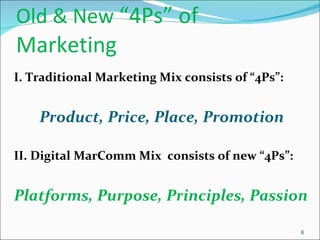
Old & New  “4Ps” of Marketing I. Traditional Marketing Mix consists of “4Ps”:    Product, Price, Place, Promotion II. Digital MarComm Mix  consists of new “4Ps”:  Platforms, Purpose, Principles, Passion
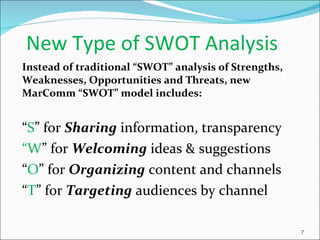
New Type of SWOT Analysis Instead of traditional “SWOT” analysis of Strengths, Weaknesses, Opportunities and Threats, new MarComm “SWOT” model includes: “ S ” for  Sharing  information, transparency “ W ” for  Welcoming  ideas & suggestions “ O ” for  Organizing  content and channels “ T ” for  Targeting  audiences by channel
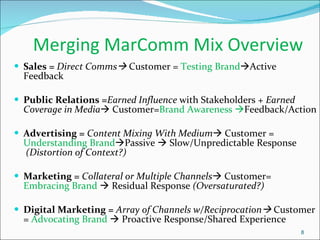
Merging MarComm Mix Overview Sales =  Direct Comms    Customer =  Testing Brand  Active Feedback Public Relations = Earned Influence  with Stakeholders +  Earned Coverage in Media   Customer= Brand Awareness   Feedback/Action Advertising =   Content Mixing With Medium   Customer =  Understanding Brand  Passive    Slow/Unpredictable Response   (Distortion of Context?) Marketing =  Collateral or Multiple Channels   Customer=  Embracing Brand    Residual Response  (Oversaturated?) Digital Marketing =  Array of Channels w/Reciprocation    Customer =  Advocating Brand    Proactive Response/Shared Experience
MarComm Discipline   Strategies & Tactics to Support Brand Media Relations Relationship building with media – tours, press releases, pitching Maintaining online press room – fact sheets, logos/photos, history Spokesperson training and knowledge of programs and facilities Free TV /newspaper online event calendars Advertising Newspapers, magazines; shift to web ads Developing web video, virtual tours Direct Marketing Subscription lists for customer collateral Promotional card mailers Coupons in publications
MarComm Strategies & Tactics to    Support Brand …c ontinued Digital Marketing Web site design and registration user appeal Functions and features – photo galleries, video integration, customer feedback  E-newsletters – list development, acquisition, content format and graphics Social Media Marketing Developing brand across all channels Dedicating resources for daily or weekly content management Customer Service Communications Social media show & tell at events; enews sign-up at kiosks  Special event participation –expos, health fairs, summer camp fairs Open houses for instructors to showcase classes  Annual staff training and review of web site, materials, customer messaging Developing brand ambassadors among employees and spokespersons
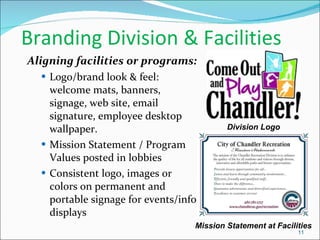
Branding Division & Facilities Aligning facilities or programs: Logo/brand look & feel:  welcome mats, banners, signage, web site, email signature, employee desktop wallpaper. Mission Statement / Program Values posted in lobbies Consistent logo, images or colors on permanent and portable signage for events/info displays Division Logo Mission Statement at Facilities
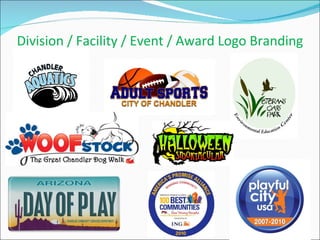
Division / Facility / Event / Award Logo Branding
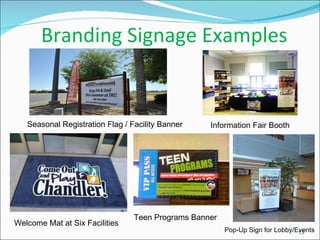
Branding Signage Examples Welcome Mat at Six Facilities Teen Programs Banner Information Fair Booth Pop-Up Sign for Lobby/Events Seasonal Registration Flag / Facility Banner
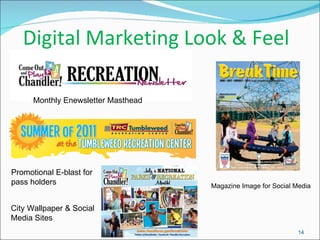
Digital Marketing Look & Feel Monthly Enewsletter Masthead Magazine Image for Social Media Promotional E-blast for pass holders City Wallpaper & Social Media Sites
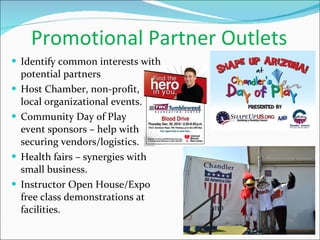
Promotional Partner Outlets Identify common interests with potential partners Host Chamber, non-profit,  local organizational events. Community Day of Play  event sponsors – help with securing vendors/logistics. Health fairs – synergies with small business.  Instructor Open House/Expo free class demonstrations at facilities.
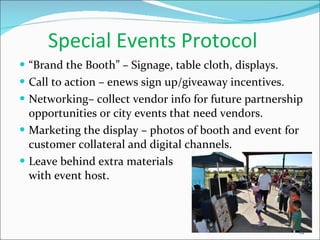
Special Events Protocol “ Brand the Booth” – Signage, table cloth, displays. Call to action – enews sign up/giveaway incentives. Networking– collect vendor info for future partnership opportunities or city events that need vendors. Marketing the display – photos of booth and event for customer collateral and digital channels. Leave behind extra materials    with event host.
Web Site Audit & Enhancements General welcome message Event previews or periodic blogs Incorporating social media widgets Enewsletter sign-up button / link to latest edition Video elements Special events calendar Highlighting awards or honors
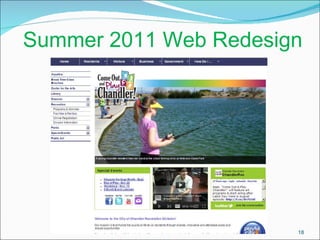
Summer 2011 Web Redesign
Marketing Professional Development Continuing education and networking with marketing and public relations associations Capitalize on free or low-cost marketing webinars “ Harvest” industry and local business publications Attend marketing presentations, luncheons, events Collaboration    other agency peers, best practices sharing at lunches or local conferences. Leadership    association board involvement Mentoring    student, participate in career days Volunteering    events for different perspectives on promotions and logistics
Reporting & Targeting Annual/seasonal customer satisfaction/awareness surveys Registration forms  -  “How did you hear about this program/class/event?” Periodic web measurement (IT internal/free web tools) Google Business Listing – traffic, action steps from search Annual marketing or public relations report for department heads or city leaders. CRM (Customer Relationship Management) Database:  using data to segment / target communications and offers. Electronic discounts / specials / reminders Registration reminders / pass renewals Referral incentives
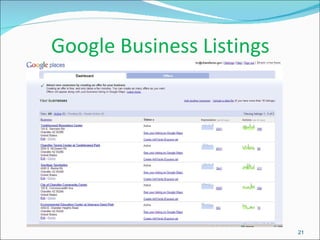
Google Business Listings
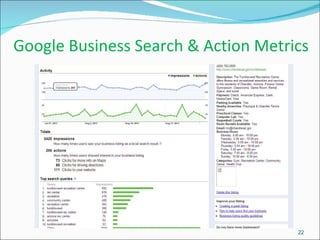
Google Business Search & Action Metrics
Linda Gorman, APR Director of Communications &  Public Affairs AAA Arizona
Goal Discuss techniques to promote programs and services via community partnerships and public relations strategies and tactics.
PR Planning: Things to Consider Goals What is the purpose of the program/service event? For ex. “To reduce child drownings in AZ by 5 percent in 2012 via community water safety classes” Objectives What broad objectives will be used to reach goal?  May have more that one objective Tactics Specific tasks/initiatives to be implemented for each objective, i.e. “hold water safety days every Saturday in May” Measurement How will you measure each? If possible, use outcome vs. output metrics.  Important but often overlooked
Things to Consider  …continued Don’t forget: Budget Hard and soft costs Audience Common mistake is objectives are often targeted to “general public”.  No such thing.  Targeted audience will inform tactics
Public Relations Tactics Examples of public relations tactics include, but are not limited to: Targeted press releases to media Include expert sources Video and B-roll or photos to accompany Morning and weekend news “lives” Decide visuals before sending to the media…how can they tell the story? Media preview day? Victim or attendee interviews? Editorials/guest columns in community papers Social media, including blogs, Facebook, Twitter, etc.
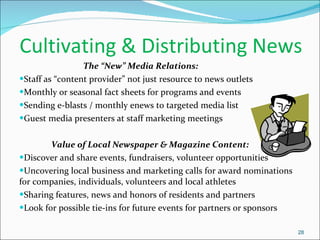
Cultivating & Distributing News  The “New” Media Relations:  Staff as “content provider” not just resource to news outlets Monthly or seasonal fact sheets for programs and events Sending e-blasts / monthly enews to targeted media list Guest media presenters at staff marketing meetings Value of Local Newspaper & Magazine Content: Discover and share events, fundraisers, volunteer opportunities Uncovering local business and marketing calls for award nominations for companies, individuals, volunteers and local athletes Sharing features, news and honors of residents and partners Look for possible tie-ins for future events for partners or sponsors
Tactics: Remember The goal/strategy should always  inform the tactics —not the other way around Don’t use social media because it’s cool. Use it because your objective has shown that this will be effective Don’t need to use all tactics and doesn’t need to be expensive Your BEST asset is your  Public Information Officer! Engage this department early to develop the most effective tactics and ensure measurement
Don’t Neglect the Power of Partnerships Community partners can be your best allies to help you reach your target audiences and reach goals When reviewing goals, objectives & audiences, determine: What organizations or associations have influence with this demographic? Where does this demographic go to find trusted information?
Michelle Olson, APR President Olson Communications
What is Content Marketing? Creating useful or desirable content, distributing it to those that can benefit most from it and personalizing it to encourage engagement. How do you market your content? Virally. Digitally. Socially.  Utilizing social media to disseminate your message can reach a variety of consumers in fast, free and effective ways. What’s better yet -  they can reach back at you.  Engaging your audience in your message helps humanize your brand.  And getting there is easier than you think…
Developing Content  Provide community and organization facts, saving tips, trivia Historical information or milestones to highlight programs  Develop editorial calendar, i.e. Tuesday Tip” or Friday Fun Fact” Ask for ideas and involve employees; creates support system Find passionate customers or residents and interact regularly Customers & employees control your message, make sure they understand what to say Brand is embraced if everyone understands goal of social media Measure what you can and set priorities of your channels.
Why Go Social? How to make it work for you! Fast Facts:  7 in 10 Americans use web for news & even more for info gathering TV & print media outlets are losing market share 97% of journalists search sources online Benefits to You:  Better Brand awareness Immediate customer service & reputation management – “in real time” Highly Targeted audiences – micro-persuasion Increased Community involvement Measurement! Improved Employee relations
Social Media: Conversational Style Designate a couple employees to be “community managers” to lead conversation & drive content Unify your brand “look and feel” across different channels Create content with casual tones, conversational feedback and regular updates Respond to customer feedback in some fashion if feasible
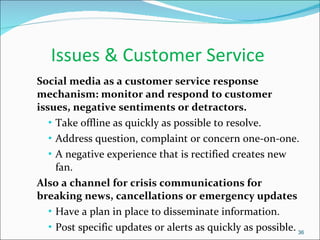
Issues & Customer Service  Social media as a customer service response mechanism: monitor and respond to customer issues, negative sentiments or detractors. Take offline as quickly as possible to resolve. Address question, complaint or concern one-on-one. A negative experience that is rectified creates new fan. Also a channel for crisis communications for breaking news, cancellations or emergency updates Have a plan in place to disseminate information.  Post specific updates or alerts as quickly as possible.
Facebook Tips Fact: Facebook is the top social media platform with 500 million+ active users Quick ways to use Facebook effectively:  Event Widget : create events on Facebook and inform people about them directly through the site.  Keeping your events updated makes your page the go-to for anyone who wants to know what’s going on and who will be there.  :-(
Facebook Tip … continued Tabs : sectioning your content into sub-tabs makes finding information easier for your users. Utilizing a bit of Facebook Markup Language (FBML) can turn your page from ordinary to extraordinary. Like this!
Twitter Tips Fact: Fastest growing social media platform (200 million users) Tweet helpful information: Industry information Updates, events Personal anecdotes, experiences  Links to resources Use Twitter to be seen, Include: Web links Twitpics  #hashtags to make your content more interesting and easier to find (events/meetings) Quick ways to use Twitter effectively:
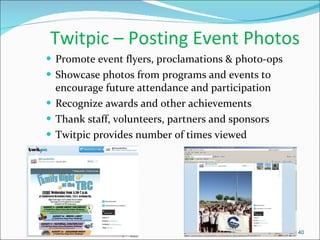
Twitpic – Posting Event Photos Promote event flyers, proclamations & photo-ops Showcase photos from programs and events to encourage future attendance and participation Recognize awards and other achievements Thank staff, volunteers, partners and sponsors Twitpic provides number of times viewed
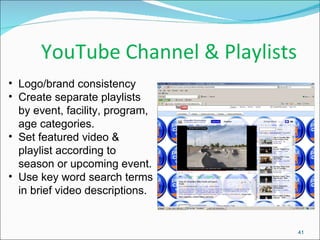
YouTube Channel & Playlists  Logo/brand consistency  Create separate playlists by event, facility, program, age categories. Set featured video & playlist according to season or upcoming event. Use key word search terms in brief video descriptions.
  Other Resources Free & low cost ways to get your word out and hear what others are saying about you You don’t have to author a blog to get involved Small audiences of the right people - micro-persuasion Creates thought leadership Trend-focused information brings readers Search engines like active blogs Benefits of Blogging www.wordpress.com www.typepad.com www.blogger.com Resource Links:
  Other Resources Free & low cost ways to get your word out and hear what others are saying about you Social Media Monitoring www.google.com/alerts www.viralheat.com www.twilert.com Keep an eye, and ear,  on what others are saying automatically Monitor a variety of sites from one location Be alerted quickly, via email Allows opportunity for you to respond, fast Resource Links:
Other Resources Free & low cost ways to get your word out and hear what others are saying about you Social Media Management Social media is a 24/7 media Schedule posts ahead of time to keep up with the constant conversation Keep an eye on what is being said about your brand in one place Allow updating of multiple sites from one location  Allows opportunity for you to respond, fast Resource Links: www.tweetdeck.com www.hootsuite.com www.tweetpo.st
Other Resources Free & low cost ways to get your word out and hear what others are saying about you Analytics Tools See what people are searching for that leads them to your site Learn demographics of your consumer Help plan keywords and content topics Aide in creating highly targeted content Use findings to improve SEO  www.google.com/analytics web.analytics.yahoo.com Resource Links:
  Other Resources Free & low cost ways to get your word out and hear what others are saying about you Get your news out, digitally Distribute press releases virally as social media releases your Information is more widely seen and easier to find Include multimedia elements that are unavailable in traditional press releases Social Media Releases Resource Links: www.pitchengine.com www.pressit.com
Writing An Effective Social Media Release -Keywords:  Always include the top words that people associate with your brand in all writing that you do. What words are they searching when they land on your page?   -Links:  Use hyperlinks to connect back to your organization’s website. Highlight key words and phrases as links to give readers a place to go to find more information. -Tags:  Pull key words and phrases out to be used as tags. These tags will be picked up through Google, Technorati, Digg and other social media release monitoring sites.  -Multimedia:  Use your social media release to highlight photos, videos and audio clips that you cannot include in traditional print media materials.  Keeping your brand’s Search Engine Optimization (SEO) in mind is the key to making sure your message gets seen. When writing a social media release, include the following to maximize visibility:
Training and Communication Traci Tenkely Recreation Coordinator City of Chandler Aquatics Division
Objectives Define Wiki: how to, uses, example Google: calendars, docs & forms Blogger: public & internal use
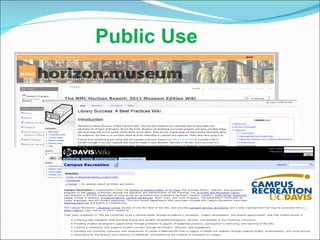
Wiki Collaborative Software Public Uses: seek community input & share ideas Private/Internal Uses: company intranet, collaborative group work
Public Use
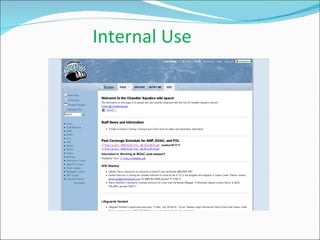
Internal Use
Going
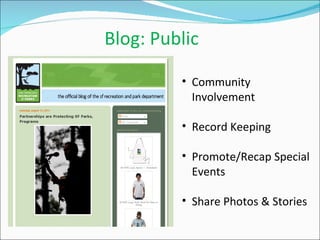
Blog: Public Community Involvement Record Keeping Promote/Recap Special Events Share Photos & Stories
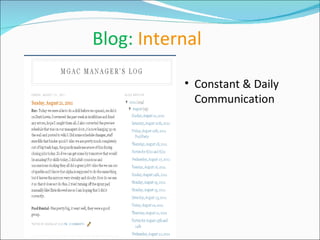
Blog:  Internal Constant & Daily Communication
 
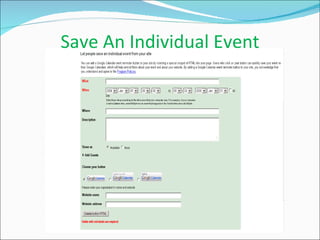
Save An Individual Event
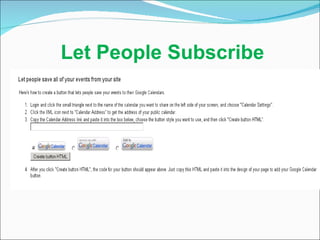
Let People Subscribe Let People Subscribe
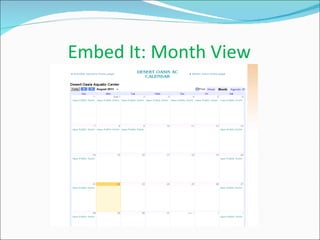
Embed It: Month View
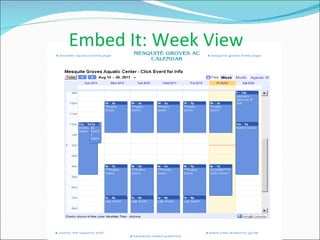
Embed It: Week View
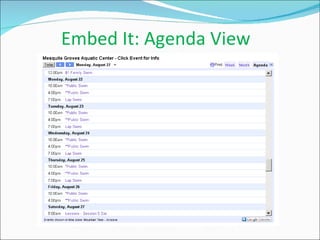
Embed It: Agenda View
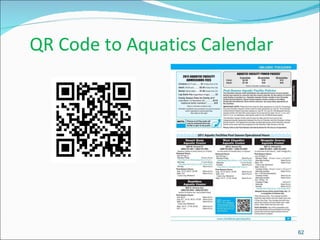
QR Code to Aquatics Calendar
 
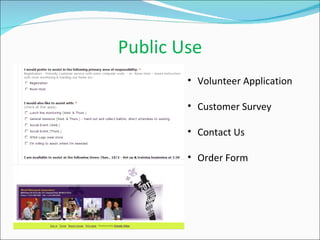
Public Use Volunteer Application Customer Survey Contact Us Order Form
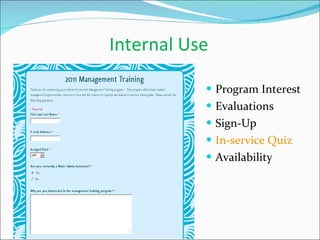
Internal Use Program Interest Evaluations Sign-Up In-service Quiz Availability
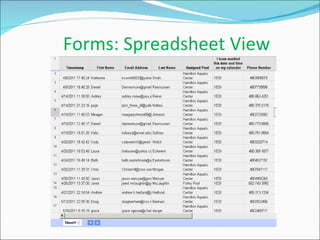
  Forms: Spreadsheet View
APRA Marketing Panel 8-31-11

APRA Marketing Panel 8-31-11

  • 2.
    Panelists:Linda Gorman, Director, Communications & Public Affairs, AAA Arizona www.twitter.com/AAA_Arizona Michelle Olson, President of Olson Communications www.twitter.com/OlsonComm Liam O’Mahony, Chandler Recreation Information Specialist www.twitter.com/ChandlerRec Traci Tenkely, Chandler Aquatics Coordinator www.twitter.com/ChandlerAquatic
  • 3.
    Panelist Web SitesAAA Arizona: www.aaaaz.org Olson Communications: www.olsoncomm.com Chandler Aquatics: www.chandleraz.gov/aquatics Chandler Recreation: www.chandleraz.gov/recreation
  • 4.
    Liam O’Mahony, MBA,APR Information Specialist City of Chandler Community Services Department & Recreation Division
  • 5.
    Old & New “3Cs” of Marketing Traditional “3Cs” of Marketing: Company, Customer, Competitors Think of the New “3 Cs of MarComm” as: I. Content - Develop and share II. Community – Listen and respond III. Creativity – Maintain brand & align with colorful visual storytelling and distribute compelling information in unique ways with human interest.
  • 6.
    Old & New “4Ps” of Marketing I. Traditional Marketing Mix consists of “4Ps”: Product, Price, Place, Promotion II. Digital MarComm Mix  consists of new “4Ps”: Platforms, Purpose, Principles, Passion
  • 7.
    New Type ofSWOT Analysis Instead of traditional “SWOT” analysis of Strengths, Weaknesses, Opportunities and Threats, new MarComm “SWOT” model includes: “ S ” for Sharing information, transparency “ W ” for Welcoming ideas & suggestions “ O ” for Organizing content and channels “ T ” for Targeting audiences by channel
  • 8.
    Merging MarComm MixOverview Sales = Direct Comms  Customer = Testing Brand  Active Feedback Public Relations = Earned Influence with Stakeholders + Earned Coverage in Media  Customer= Brand Awareness  Feedback/Action Advertising = Content Mixing With Medium  Customer = Understanding Brand  Passive  Slow/Unpredictable Response   (Distortion of Context?) Marketing = Collateral or Multiple Channels  Customer= Embracing Brand  Residual Response (Oversaturated?) Digital Marketing = Array of Channels w/Reciprocation  Customer =  Advocating Brand  Proactive Response/Shared Experience
  • 9.
    MarComm Discipline Strategies & Tactics to Support Brand Media Relations Relationship building with media – tours, press releases, pitching Maintaining online press room – fact sheets, logos/photos, history Spokesperson training and knowledge of programs and facilities Free TV /newspaper online event calendars Advertising Newspapers, magazines; shift to web ads Developing web video, virtual tours Direct Marketing Subscription lists for customer collateral Promotional card mailers Coupons in publications
  • 10.
    MarComm Strategies &Tactics to Support Brand …c ontinued Digital Marketing Web site design and registration user appeal Functions and features – photo galleries, video integration, customer feedback E-newsletters – list development, acquisition, content format and graphics Social Media Marketing Developing brand across all channels Dedicating resources for daily or weekly content management Customer Service Communications Social media show & tell at events; enews sign-up at kiosks Special event participation –expos, health fairs, summer camp fairs Open houses for instructors to showcase classes Annual staff training and review of web site, materials, customer messaging Developing brand ambassadors among employees and spokespersons
  • 11.
    Branding Division &Facilities Aligning facilities or programs: Logo/brand look & feel: welcome mats, banners, signage, web site, email signature, employee desktop wallpaper. Mission Statement / Program Values posted in lobbies Consistent logo, images or colors on permanent and portable signage for events/info displays Division Logo Mission Statement at Facilities
  • 12.
    Division / Facility/ Event / Award Logo Branding
  • 13.
    Branding Signage ExamplesWelcome Mat at Six Facilities Teen Programs Banner Information Fair Booth Pop-Up Sign for Lobby/Events Seasonal Registration Flag / Facility Banner
  • 14.
    Digital Marketing Look& Feel Monthly Enewsletter Masthead Magazine Image for Social Media Promotional E-blast for pass holders City Wallpaper & Social Media Sites
  • 15.
    Promotional Partner OutletsIdentify common interests with potential partners Host Chamber, non-profit, local organizational events. Community Day of Play event sponsors – help with securing vendors/logistics. Health fairs – synergies with small business. Instructor Open House/Expo free class demonstrations at facilities.
  • 16.
    Special Events Protocol“ Brand the Booth” – Signage, table cloth, displays. Call to action – enews sign up/giveaway incentives. Networking– collect vendor info for future partnership opportunities or city events that need vendors. Marketing the display – photos of booth and event for customer collateral and digital channels. Leave behind extra materials with event host.
  • 17.
    Web Site Audit& Enhancements General welcome message Event previews or periodic blogs Incorporating social media widgets Enewsletter sign-up button / link to latest edition Video elements Special events calendar Highlighting awards or honors
  • 18.
  • 19.
    Marketing Professional DevelopmentContinuing education and networking with marketing and public relations associations Capitalize on free or low-cost marketing webinars “ Harvest” industry and local business publications Attend marketing presentations, luncheons, events Collaboration  other agency peers, best practices sharing at lunches or local conferences. Leadership  association board involvement Mentoring  student, participate in career days Volunteering  events for different perspectives on promotions and logistics
  • 20.
    Reporting & TargetingAnnual/seasonal customer satisfaction/awareness surveys Registration forms - “How did you hear about this program/class/event?” Periodic web measurement (IT internal/free web tools) Google Business Listing – traffic, action steps from search Annual marketing or public relations report for department heads or city leaders. CRM (Customer Relationship Management) Database: using data to segment / target communications and offers. Electronic discounts / specials / reminders Registration reminders / pass renewals Referral incentives
  • 21.
  • 22.
    Google Business Search& Action Metrics
  • 23.
    Linda Gorman, APRDirector of Communications & Public Affairs AAA Arizona
  • 24.
    Goal Discuss techniquesto promote programs and services via community partnerships and public relations strategies and tactics.
  • 25.
    PR Planning: Thingsto Consider Goals What is the purpose of the program/service event? For ex. “To reduce child drownings in AZ by 5 percent in 2012 via community water safety classes” Objectives What broad objectives will be used to reach goal? May have more that one objective Tactics Specific tasks/initiatives to be implemented for each objective, i.e. “hold water safety days every Saturday in May” Measurement How will you measure each? If possible, use outcome vs. output metrics. Important but often overlooked
  • 26.
    Things to Consider …continued Don’t forget: Budget Hard and soft costs Audience Common mistake is objectives are often targeted to “general public”. No such thing. Targeted audience will inform tactics
  • 27.
    Public Relations TacticsExamples of public relations tactics include, but are not limited to: Targeted press releases to media Include expert sources Video and B-roll or photos to accompany Morning and weekend news “lives” Decide visuals before sending to the media…how can they tell the story? Media preview day? Victim or attendee interviews? Editorials/guest columns in community papers Social media, including blogs, Facebook, Twitter, etc.
  • 28.
    Cultivating & DistributingNews The “New” Media Relations: Staff as “content provider” not just resource to news outlets Monthly or seasonal fact sheets for programs and events Sending e-blasts / monthly enews to targeted media list Guest media presenters at staff marketing meetings Value of Local Newspaper & Magazine Content: Discover and share events, fundraisers, volunteer opportunities Uncovering local business and marketing calls for award nominations for companies, individuals, volunteers and local athletes Sharing features, news and honors of residents and partners Look for possible tie-ins for future events for partners or sponsors
  • 29.
    Tactics: Remember Thegoal/strategy should always inform the tactics —not the other way around Don’t use social media because it’s cool. Use it because your objective has shown that this will be effective Don’t need to use all tactics and doesn’t need to be expensive Your BEST asset is your Public Information Officer! Engage this department early to develop the most effective tactics and ensure measurement
  • 30.
    Don’t Neglect thePower of Partnerships Community partners can be your best allies to help you reach your target audiences and reach goals When reviewing goals, objectives & audiences, determine: What organizations or associations have influence with this demographic? Where does this demographic go to find trusted information?
  • 31.
    Michelle Olson, APRPresident Olson Communications
  • 32.
    What is ContentMarketing? Creating useful or desirable content, distributing it to those that can benefit most from it and personalizing it to encourage engagement. How do you market your content? Virally. Digitally. Socially. Utilizing social media to disseminate your message can reach a variety of consumers in fast, free and effective ways. What’s better yet - they can reach back at you. Engaging your audience in your message helps humanize your brand. And getting there is easier than you think…
  • 33.
    Developing Content Provide community and organization facts, saving tips, trivia Historical information or milestones to highlight programs Develop editorial calendar, i.e. Tuesday Tip” or Friday Fun Fact” Ask for ideas and involve employees; creates support system Find passionate customers or residents and interact regularly Customers & employees control your message, make sure they understand what to say Brand is embraced if everyone understands goal of social media Measure what you can and set priorities of your channels.
  • 34.
    Why Go Social?How to make it work for you! Fast Facts: 7 in 10 Americans use web for news & even more for info gathering TV & print media outlets are losing market share 97% of journalists search sources online Benefits to You: Better Brand awareness Immediate customer service & reputation management – “in real time” Highly Targeted audiences – micro-persuasion Increased Community involvement Measurement! Improved Employee relations
  • 35.
    Social Media: ConversationalStyle Designate a couple employees to be “community managers” to lead conversation & drive content Unify your brand “look and feel” across different channels Create content with casual tones, conversational feedback and regular updates Respond to customer feedback in some fashion if feasible
  • 36.
    Issues & CustomerService Social media as a customer service response mechanism: monitor and respond to customer issues, negative sentiments or detractors. Take offline as quickly as possible to resolve. Address question, complaint or concern one-on-one. A negative experience that is rectified creates new fan. Also a channel for crisis communications for breaking news, cancellations or emergency updates Have a plan in place to disseminate information. Post specific updates or alerts as quickly as possible.
  • 37.
    Facebook Tips Fact:Facebook is the top social media platform with 500 million+ active users Quick ways to use Facebook effectively: Event Widget : create events on Facebook and inform people about them directly through the site. Keeping your events updated makes your page the go-to for anyone who wants to know what’s going on and who will be there. :-(
  • 38.
    Facebook Tip …continued Tabs : sectioning your content into sub-tabs makes finding information easier for your users. Utilizing a bit of Facebook Markup Language (FBML) can turn your page from ordinary to extraordinary. Like this!
  • 39.
    Twitter Tips Fact:Fastest growing social media platform (200 million users) Tweet helpful information: Industry information Updates, events Personal anecdotes, experiences Links to resources Use Twitter to be seen, Include: Web links Twitpics #hashtags to make your content more interesting and easier to find (events/meetings) Quick ways to use Twitter effectively:
  • 40.
    Twitpic – PostingEvent Photos Promote event flyers, proclamations & photo-ops Showcase photos from programs and events to encourage future attendance and participation Recognize awards and other achievements Thank staff, volunteers, partners and sponsors Twitpic provides number of times viewed
  • 41.
    YouTube Channel &Playlists Logo/brand consistency Create separate playlists by event, facility, program, age categories. Set featured video & playlist according to season or upcoming event. Use key word search terms in brief video descriptions.
  • 42.
    OtherResources Free & low cost ways to get your word out and hear what others are saying about you You don’t have to author a blog to get involved Small audiences of the right people - micro-persuasion Creates thought leadership Trend-focused information brings readers Search engines like active blogs Benefits of Blogging www.wordpress.com www.typepad.com www.blogger.com Resource Links:
  • 43.
    OtherResources Free & low cost ways to get your word out and hear what others are saying about you Social Media Monitoring www.google.com/alerts www.viralheat.com www.twilert.com Keep an eye, and ear, on what others are saying automatically Monitor a variety of sites from one location Be alerted quickly, via email Allows opportunity for you to respond, fast Resource Links:
  • 44.
    Other Resources Free& low cost ways to get your word out and hear what others are saying about you Social Media Management Social media is a 24/7 media Schedule posts ahead of time to keep up with the constant conversation Keep an eye on what is being said about your brand in one place Allow updating of multiple sites from one location Allows opportunity for you to respond, fast Resource Links: www.tweetdeck.com www.hootsuite.com www.tweetpo.st
  • 45.
    Other Resources Free& low cost ways to get your word out and hear what others are saying about you Analytics Tools See what people are searching for that leads them to your site Learn demographics of your consumer Help plan keywords and content topics Aide in creating highly targeted content Use findings to improve SEO www.google.com/analytics web.analytics.yahoo.com Resource Links:
  • 46.
    OtherResources Free & low cost ways to get your word out and hear what others are saying about you Get your news out, digitally Distribute press releases virally as social media releases your Information is more widely seen and easier to find Include multimedia elements that are unavailable in traditional press releases Social Media Releases Resource Links: www.pitchengine.com www.pressit.com
  • 47.
    Writing An EffectiveSocial Media Release -Keywords: Always include the top words that people associate with your brand in all writing that you do. What words are they searching when they land on your page? -Links: Use hyperlinks to connect back to your organization’s website. Highlight key words and phrases as links to give readers a place to go to find more information. -Tags: Pull key words and phrases out to be used as tags. These tags will be picked up through Google, Technorati, Digg and other social media release monitoring sites. -Multimedia: Use your social media release to highlight photos, videos and audio clips that you cannot include in traditional print media materials. Keeping your brand’s Search Engine Optimization (SEO) in mind is the key to making sure your message gets seen. When writing a social media release, include the following to maximize visibility:
  • 48.
    Training and CommunicationTraci Tenkely Recreation Coordinator City of Chandler Aquatics Division
  • 49.
    Objectives Define Wiki:how to, uses, example Google: calendars, docs & forms Blogger: public & internal use
  • 50.
    Wiki Collaborative SoftwarePublic Uses: seek community input & share ideas Private/Internal Uses: company intranet, collaborative group work
  • 51.
  • 52.
  • 53.
  • 54.
    Blog: Public CommunityInvolvement Record Keeping Promote/Recap Special Events Share Photos & Stories
  • 55.
    Blog: InternalConstant & Daily Communication
  • 56.
  • 57.
  • 58.
    Let People SubscribeLet People Subscribe
  • 59.
  • 60.
  • 61.
  • 62.
    QR Code toAquatics Calendar
  • 63.
  • 64.
    Public Use VolunteerApplication Customer Survey Contact Us Order Form
  • 65.
    Internal Use ProgramInterest Evaluations Sign-Up In-service Quiz Availability
  • 66.
    Forms:Spreadsheet View

Editor's Notes

  • #51 A wikis is a collaborative software that allows the user to edit, make changes, comment, organize or work together in an online environment. Rules of play can be decided by the administrator and rights granted to the user. Or a wiki can be created where everyone involved has access to change at will. Uses as a public wiki: Museum or Public History program – using a wiki to solicit history from the community or input on the next exhibit.
  • #52 Horizon Project: This space is a place for the members of the Horizon. Museum Advisory Board to manage the process of selecting the topics for the NMC Horizon Report: 2011 Museum Edition . The homepage includes a project timeline, introduction to the project, press clippings, research questions, and the direction of the project. Library Success: A Best Practices Wiki for librarians to share ideas and information UC Davis: This project is an interconnected community effort to explore, discuss and compile anything and everything about Davis — especially the little, enjoyable things. This entire site is maintained by the people who use it: Everyone can edit this website!
  • #53 Wikispaces.com Internal staff webpage for use of our six aquatic centers. Each facility has a page dedicated to communication with the staff assigned to that facility. Management has a page dedicated to resources and information and a page for the recreation swim team coaches as well as swim instructors. Security: Log-in, page modification notifications, ability to restore pages (disgruntled employee example)
  • #57 Organize your life – keep a calendar for yourself, share calendars with your friends, and subscribe to public calendars to stay on top of events on campus.
  • #58 Special events; registration dates, reminders, concerts, free admission days.
  • #59 People will gmail accounts can subscribe to your public calendar. This allows the user to “toggle” on or “toggle” off the calendar events. This will overlay events onto their own personal calendar and then allow them the option to add the event to their own calendar. Non gmail users can also subscribe to calendar feed and receive updated information through their own mail service. Updating the calendar is simple and provides real time access to your facility’s activities and events. A change in hours or other information updates the feed automatically so no need to reprint your facility schedule.
  • #62 No matter what view you choose – the user can select an alternate view.