YOUR VISION...
   WE DELIVER....


       IIR Solutions Pty Ltd.
Different Techniques to rollback apps
               patches

   Different types of patches like:
        small patches eg. Specific bug fixes, once-off,
        customizations etc...
       Big patches eg. Maintenance Packs, Family
        Packs, Mini Packs, Roll-Up, Consolidated
        Updates, Security Patches etc...
SMALL PATCHES

   Traditional way for applying Small patches
    1.   Backup of application files before applying the
         patch.
    2.   Backup of Database before applying patch.
    3.   Apply patch.
SMALL PATCHES

   Traditional way for restore from faulty patch.
          2 options available for restoring the database part.
            1.    Rollback script available in the patch, if available.
            2.    Restore whole database from the last backup.


          Apps
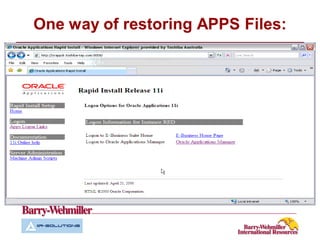
            1.    Locate the files and restore them from another
                  environment/backup of files. - Clip
One way of restoring APPS Files:
BIG PATCHES

   Traditional way for restore from faulty patch.
          Database
            1.    Restore whole database from the last backup.


          Apps
            1.    Restore all your files from another backup of files.
Better way to restore APPS and DB in
           short period 
   Database :
       Before you apply the patches, enable the flash
        back DB and create a restore point.

   Application:
       Backup all the apps files.
       Snapshots of deltas of apps files.(eg. NetApps
        snapshots, TrueCopy-HDS, Oracle 11g disk
        snapshots)
   Apply Patch
Better way to restore APPS and DB in
               short period 

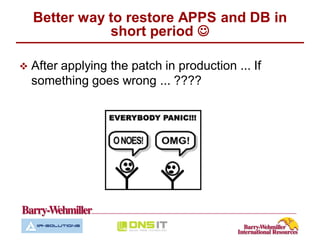
   After applying the patch in production ... If
    something goes wrong ... ????
Better way to restore APPS and DB in
           short period 


    Stop    the application.
    Flashback    the database to the restore point created before.
    Restore    the apps files that has been changed.
          Small patch we can locate the files as we saw in the clip.
          Big patch restore all the files which have been backed up.
          Restore the delta files from the last snapshot if you are using
           disk snapshot technology. (eg. NetApps snapshots,
           TrueCopy-HDS, Oracle 11g disk snapshots)
    Start   the application.
Better way to restore APPS and DB in
           short period 

   Depending on the patch window.. Generally
    weekends.....
    Eg. 1hr to patch window
          15 mins to apply patch
          25 mins test after patch application.
          Here if you find the patch isn't working properly then
           you flashback to the restore point which will be very
           quick as the data was for only 25 mins .. .
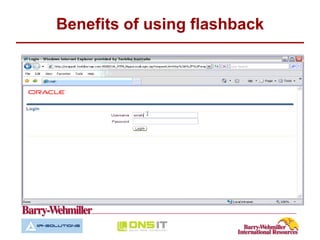
Benefits of using flashback
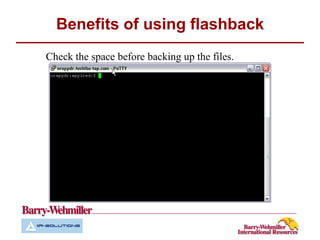
Check the space before backing up the files.
Benefits of using flashback
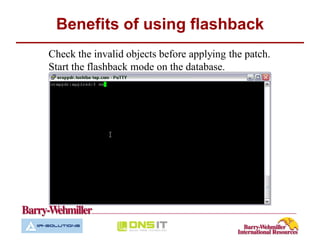
Check the invalid objects before applying the patch.
Start the flashback mode on the database.
Benefits of using flashback
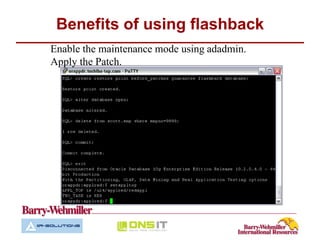
Enable the maintenance mode using adadmin.
Apply the Patch.
Benefits of using flashback
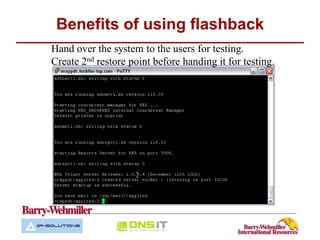
Hand over the system to the users for testing.
Create 2nd restore point before handing it for testing.
Benefits of using flashback
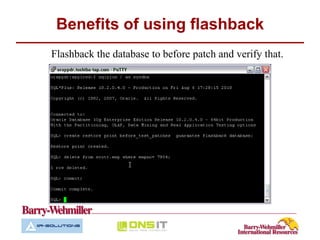
Flashback the database to before patch and verify that.
Benefits of using flashback

   Copy the application files.
Benefits of using flashback
Benefits of using this method.

   You can roll back Oracle E-biz patches in no time .
   Test patches on your production system before
    releasing to users.
   With Flashback there’s no need to worry about
    recovering from archive logs
   Reduces risk in a applying new patches in production
   This also works with Dataguard for a DR
    database
“It’s not just business – It’s a partnership”

                        For more information please contact:
                        Shaily Choksi
                        Technical Director.
                        Phone: +61 433 050 345
                        e-mail: shaily@iirsolutions.com
                        Division Website: www.iirsolutions.com

Apps rollback patches1

  • 1.
    YOUR VISION... WE DELIVER.... IIR Solutions Pty Ltd.
  • 3.
    Different Techniques torollback apps patches  Different types of patches like:  small patches eg. Specific bug fixes, once-off, customizations etc...  Big patches eg. Maintenance Packs, Family Packs, Mini Packs, Roll-Up, Consolidated Updates, Security Patches etc...
  • 4.
    SMALL PATCHES  Traditional way for applying Small patches 1. Backup of application files before applying the patch. 2. Backup of Database before applying patch. 3. Apply patch.
  • 5.
    SMALL PATCHES  Traditional way for restore from faulty patch.  2 options available for restoring the database part. 1. Rollback script available in the patch, if available. 2. Restore whole database from the last backup.  Apps 1. Locate the files and restore them from another environment/backup of files. - Clip
  • 6.
    One way ofrestoring APPS Files:
  • 7.
    BIG PATCHES  Traditional way for restore from faulty patch.  Database 1. Restore whole database from the last backup.  Apps 1. Restore all your files from another backup of files.
  • 8.
    Better way torestore APPS and DB in short period   Database :  Before you apply the patches, enable the flash back DB and create a restore point.  Application:  Backup all the apps files.  Snapshots of deltas of apps files.(eg. NetApps snapshots, TrueCopy-HDS, Oracle 11g disk snapshots)  Apply Patch
  • 9.
    Better way torestore APPS and DB in short period   After applying the patch in production ... If something goes wrong ... ????
  • 10.
    Better way torestore APPS and DB in short period   Stop the application.  Flashback the database to the restore point created before.  Restore the apps files that has been changed.  Small patch we can locate the files as we saw in the clip.  Big patch restore all the files which have been backed up.  Restore the delta files from the last snapshot if you are using disk snapshot technology. (eg. NetApps snapshots, TrueCopy-HDS, Oracle 11g disk snapshots)  Start the application.
  • 11.
    Better way torestore APPS and DB in short period   Depending on the patch window.. Generally weekends..... Eg. 1hr to patch window  15 mins to apply patch  25 mins test after patch application.  Here if you find the patch isn't working properly then you flashback to the restore point which will be very quick as the data was for only 25 mins .. .
  • 13.
    Benefits of usingflashback Check the space before backing up the files.
  • 14.
    Benefits of usingflashback Check the invalid objects before applying the patch. Start the flashback mode on the database.
  • 15.
    Benefits of usingflashback Enable the maintenance mode using adadmin. Apply the Patch.
  • 16.
    Benefits of usingflashback Hand over the system to the users for testing. Create 2nd restore point before handing it for testing.
  • 17.
    Benefits of usingflashback Flashback the database to before patch and verify that.
  • 18.
    Benefits of usingflashback  Copy the application files.
  • 19.
  • 20.
    Benefits of usingthis method.  You can roll back Oracle E-biz patches in no time .  Test patches on your production system before releasing to users.  With Flashback there’s no need to worry about recovering from archive logs  Reduces risk in a applying new patches in production  This also works with Dataguard for a DR database
  • 21.
    “It’s not justbusiness – It’s a partnership” For more information please contact: Shaily Choksi Technical Director. Phone: +61 433 050 345 e-mail: shaily@iirsolutions.com Division Website: www.iirsolutions.com