1
Flashback Logging
Internals
Julian Dyke
Independent Consultant
Web Version - December 2007
juliandyke.com
© 2007 Julian Dyke
juliandyke.com
© 2007 Julian Dyke
2
Agenda
 Extended Clusters versus Fast Start Failover
 Flashback Database
 Flashback Logging Internals
juliandyke.com
© 2007 Julian Dyke
3
Extended Clusters
versus
Fast Start Failover
juliandyke.com
© 2007 Julian Dyke
4
Extended Clusters
Overview
Storage
Network
Public Network
Database Database
Storage
Networks
Site2
Site1
Private Network
Instance 2
Node 2
Quorum
Site3
Instance 1
Node 1
juliandyke.com
© 2007 Julian Dyke
5
Extended Clusters
Overview
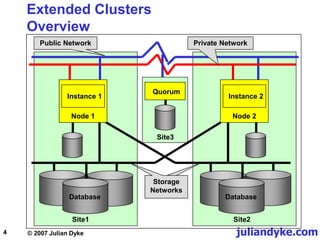
 Currently the Holy Grail of high availability
 RAC nodes located at physically separate sites
 In-built disaster recovery
 In the event of a site failure, database is still available
 Active / Active configuration
 Users can access database via either site
 Storage is duplicated at each site
 Can use ASM or vendor-supplied storage technology to
ensure all writes are replicated to storage on each site
juliandyke.com
© 2007 Julian Dyke
6
Extended Clusters
Advantages and Disadvantages
 Advantages
 Disaster recovery - all changes written to both sites
 Active / Active - both sites available
 Disadvantages
 Complexity
 Cache fusion traffic between sites
 Requires Enterprise Edition licences + RAC option
 Cost of inter-site fibre network
juliandyke.com
© 2007 Julian Dyke
7
Fast Start Failover
Overview
Storage
Network
Public Network
Database Database
Storage
Networks
Site2 - Standby
Site1 - Primary
Private Network
Instance 2
Node 2
Quorum
Site3
Instance 1
Node 1
Observer
juliandyke.com
© 2007 Julian Dyke
8
Fast Start Failover
Overview
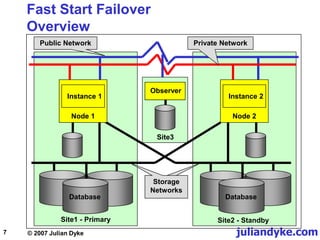
 Target standby database must be nominated
 Failure of primary database can be detected and automatically
failed over to nominated standby database
 Primary database can potentially be reinstated automatically
 Requires flashback logging
 Requires DGMGRL configuration
 Must configure MAXIMUM AVAILABILITY protection mode
 Standby database archive log destination must be
configured as LGWR SYNC
juliandyke.com
© 2007 Julian Dyke
9
Fast Start Failover
Advantages & Disadvantages
 Advantages
 No interconnect network required between sites
 No fibre network required between sites
 RAC licences not required if each site is a single-instance
 Disadvantages
 Active / Passive
 Requires Enterprise Edition licence
juliandyke.com
© 2007 Julian Dyke
10
Fast Start Failover
Observer
 Requires third independent site with:
 Oracle client installation (administrative user)
 Oracle Net configuration to primary and standby
 On third site:
 DGMGRL starts observer
 Observer monitors state of primary database
 If primary database fails observer initiates failover to target
standby database
 Observer checks if standby database can still see primary
database before initiating failover
 Performance impact of observer process on primary / standby
is minimal
juliandyke.com
© 2007 Julian Dyke
11
Flashback
Database
juliandyke.com
© 2007 Julian Dyke
12
Flashback Database
Introduction
 Introduced in Oracle 10.1
 Uses past block images to back out changes to a database
 Allows database to be recovered to a previous time to correct
problems caused by:
 logical data corruptions
 user errors
 Amount of time required to flashback a database is
proportional to how far back database must be reverted
 Time to restore and recover entire database could be much
longer
juliandyke.com
© 2007 Julian Dyke
13
Flashback Database
Introduction
 During normal database operation, Oracle occasionally logs
past block images in flashback logs
 Flashback logs are
 written sequentially
 not archived
 Oracle automatically creates, resizes and deletes flashback
logs in the flash recovery area
 DBA should be aware of flashback logs
 To monitor performance
 To decide how much space to allocate to flash recovery
area
juliandyke.com
© 2007 Julian Dyke
14
Flashback Database
Flashing Back
 Before images are used to restore database to a point in the
past
 Forward recovery is then used to bring the database to a
consistent state
 Oracle returns datafiles to previous point in time
 Not auxiliary files such as initialization parameter files
juliandyke.com
© 2007 Julian Dyke
15
Flashback Database
Applications
 Flashback recovery of database to earlier SCN
 Testing
 Application / User errors
 Recovery through resetlogs
 Opening standby database with write access
 Fast start failover
 Automatic reinstantiation of old primary following fast start
failover to standby
 Alternative to delayed redo application for physical or logical
standby databases
juliandyke.com
© 2007 Julian Dyke
16
Flashback Database
What do we already know?
 Introduced in Oracle 10.1
 Requires flash recovery area
 Maintains before image logs for block changes
 Records are appended to flashback logs
 Uses RVWR background process
juliandyke.com
© 2007 Julian Dyke
17
Flashback Database
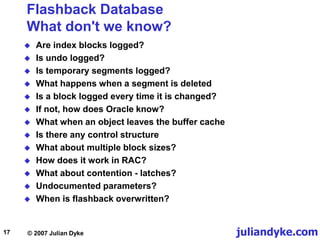
What don't we know?
 Are index blocks logged?
 Is undo logged?
 Is temporary segments logged?
 What happens when a segment is deleted
 Is a block logged every time it is changed?
 If not, how does Oracle know?
 What when an object leaves the buffer cache
 Is there any control structure
 What about multiple block sizes?
 How does it work in RAC?
 What about contention - latches?
 Undocumented parameters?
 When is flashback overwritten?
juliandyke.com
© 2007 Julian Dyke
18
Flash Recovery Area
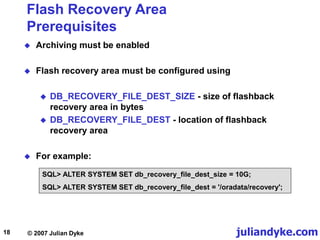
Prerequisites
 Archiving must be enabled
 Flash recovery area must be configured using
 DB_RECOVERY_FILE_DEST_SIZE - size of flashback
recovery area in bytes
 DB_RECOVERY_FILE_DEST - location of flashback
recovery area
 For example:
SQL> ALTER SYSTEM SET db_recovery_file_dest_size = 10G;
SQL> ALTER SYSTEM SET db_recovery_file_dest = '/oradata/recovery';
juliandyke.com
© 2007 Julian Dyke
19
Flashback Database
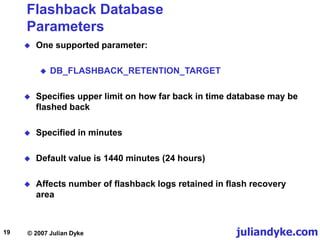
Parameters
 One supported parameter:
 DB_FLASHBACK_RETENTION_TARGET
 Specifies upper limit on how far back in time database may be
flashed back
 Specified in minutes
 Default value is 1440 minutes (24 hours)
 Affects number of flashback logs retained in flash recovery
area
juliandyke.com
© 2007 Julian Dyke
20
Flashback Database
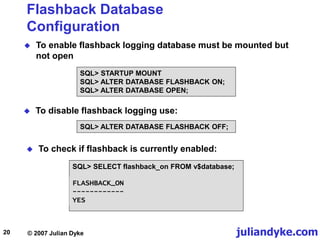
Configuration
 To enable flashback logging database must be mounted but
not open
SQL> STARTUP MOUNT
SQL> ALTER DATABASE FLASHBACK ON;
SQL> ALTER DATABASE OPEN;
 To check if flashback is currently enabled:
SQL> SELECT flashback_on FROM v$database;
 To disable flashback logging use:
SQL> ALTER DATABASE FLASHBACK OFF;
FLASHBACK_ON
------------
YES
juliandyke.com
© 2007 Julian Dyke
21
Flashback Database
System Change Numbers and Times
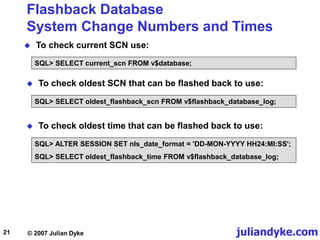
 To check current SCN use:
SQL> SELECT current_scn FROM v$database;
 To check oldest SCN that can be flashed back to use:
SQL> SELECT oldest_flashback_scn FROM v$flashback_database_log;
 To check oldest time that can be flashed back to use:
SQL> ALTER SESSION SET nls_date_format = 'DD-MON-YYYY HH24:MI:SS';
SQL> SELECT oldest_flashback_time FROM v$flashback_database_log;
juliandyke.com
© 2007 Julian Dyke
22
Flashback Database
Operation
 To flashback the database use the following syntax:
SQL> FLASHBACK [ STANDBY ] DATABASE [ database ]
{ TO { { SCN | TIMESTAMP } expr | RESTORE POINT restore_point }
| TO BEFORE { SCN | TIMESTAMP } expr | RESETLOGS} };
 Database must be mounted and not open to flashback
 For example
SQL> SHUTDOWN IMMEDIATE
SQL> STARTUP MOUNT
SQL> FLASHBACK DATABASE TO SCN 461918;
Flashback complete.
SQL> ALTER DATABASE OPEN READ ONLY;
SQL> ALTER DATABASE OPEN RESETLOGS
juliandyke.com
© 2007 Julian Dyke
23
Flashback Database
Restrictions
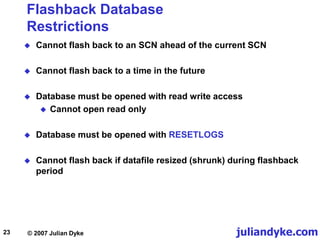
 Cannot flash back to an SCN ahead of the current SCN
 Cannot flash back to a time in the future
 Database must be opened with read write access
 Cannot open read only
 Database must be opened with RESETLOGS
 Cannot flash back if datafile resized (shrunk) during flashback
period
juliandyke.com
© 2007 Julian Dyke
24
Flashback Database
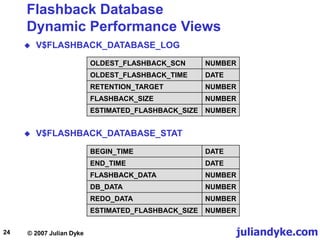
Dynamic Performance Views
 V$FLASHBACK_DATABASE_LOG
OLDEST_FLASHBACK_SCN NUMBER
OLDEST_FLASHBACK_TIME DATE
RETENTION_TARGET NUMBER
FLASHBACK_SIZE NUMBER
ESTIMATED_FLASHBACK_SIZE NUMBER
 V$FLASHBACK_DATABASE_STAT
BEGIN_TIME DATE
END_TIME DATE
FLASHBACK_DATA NUMBER
DB_DATA NUMBER
REDO_DATA NUMBER
ESTIMATED_FLASHBACK_SIZE NUMBER
juliandyke.com
© 2007 Julian Dyke
25
Flashback Database
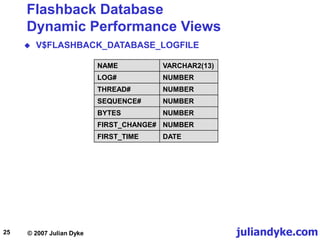
Dynamic Performance Views
 V$FLASHBACK_DATABASE_LOGFILE
NAME VARCHAR2(13)
LOG# NUMBER
THREAD# NUMBER
SEQUENCE# NUMBER
BYTES NUMBER
FIRST_CHANGE# NUMBER
FIRST_TIME DATE
juliandyke.com
© 2007 Julian Dyke
26
Flashback
Logging
Internals
juliandyke.com
© 2007 Julian Dyke
27
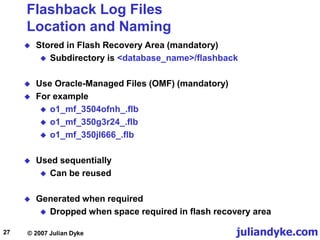
Flashback Log Files
Location and Naming
 Stored in Flash Recovery Area (mandatory)
 Subdirectory is <database_name>/flashback
 Use Oracle-Managed Files (OMF) (mandatory)
 For example
 o1_mf_3504ofnh_.flb
 o1_mf_350g3r24_.flb
 o1_mf_350jl666_.flb
 Used sequentially
 Can be reused
 Generated when required
 Dropped when space required in flash recovery area
juliandyke.com
© 2007 Julian Dyke
28
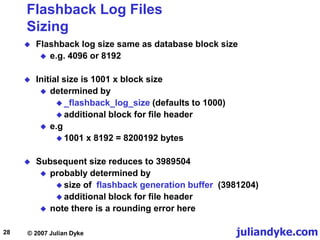
Flashback Log Files
Sizing
 Flashback log size same as database block size
 e.g. 4096 or 8192
 Initial size is 1001 x block size
 determined by
 _flashback_log_size (defaults to 1000)
 additional block for file header
 e.g
 1001 x 8192 = 8200192 bytes
 Subsequent size reduces to 3989504
 probably determined by
 size of flashback generation buffer (3981204)
 additional block for file header
 note there is a rounding error here
juliandyke.com
© 2007 Julian Dyke
29
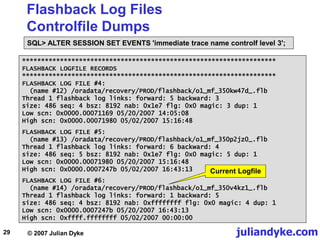
Flashback Log Files
Controlfile Dumps
SQL> ALTER SESSION SET EVENTS 'immediate trace name controlf level 3';
*******************************************************************
FLASHBACK LOGFILE RECORDS
*******************************************************************
FLASHBACK LOG FILE #4:
(name #12) /oradata/recovery/PROD/flashback/o1_mf_350kw47d_.flb
Thread 1 flashback log links: forward: 5 backward: 3
size: 486 seq: 4 bsz: 8192 nab: 0x1e7 flg: 0x0 magic: 3 dup: 1
Low scn: 0x0000.00071169 05/20/2007 14:05:08
High scn: 0x0000.00071980 05/02/2007 15:16:48
FLASHBACK LOG FILE #5:
(name #13) /oradata/recovery/PROD/flashback/o1_mf_350p2jz0_.flb
Thread 1 flashback log links: forward: 6 backward: 4
size: 486 seq: 5 bsz: 8192 nab: 0x1e7 flg: 0x0 magic: 5 dup: 1
Low scn: 0x0000.00071980 05/20/2007 15:16:48
High scn: 0x0000.0007247b 05/02/2007 16:43:13
FLASHBACK LOG FILE #6:
(name #14) /oradata/recovery/PROD/flashback/o1_mf_350v4kz1_.flb
Thread 1 flashback log links: forward: 1 backward: 5
size: 486 seq: 4 bsz: 8192 nab: 0xffffffff flg: 0x0 magic: 4 dup: 1
Low scn: 0x0000.0007247b 05/20/2007 16:43:13
High scn: 0xffff.ffffffff 05/02/2007 00:00:00
Current Logfile
juliandyke.com
© 2007 Julian Dyke
30
Flashback Logging
Recovery Writer Process
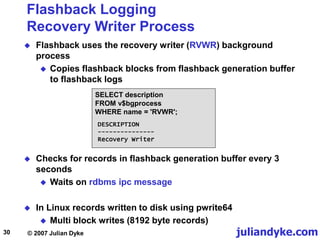
 Flashback uses the recovery writer (RVWR) background
process
 Copies flashback blocks from flashback generation buffer
to flashback logs
 Checks for records in flashback generation buffer every 3
seconds
 Waits on rdbms ipc message
 In Linux records written to disk using pwrite64
 Multi block writes (8192 byte records)
SELECT description
FROM v$bgprocess
WHERE name = 'RVWR';
DESCRIPTION
---------------
Recovery Writer
juliandyke.com
© 2007 Julian Dyke
31
Flashback Logging
Recovery Writer Process
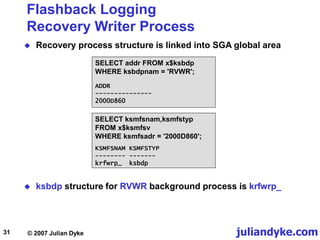
 Recovery process structure is linked into SGA global area
SELECT ksmfsnam,ksmfstyp
FROM x$ksmfsv
WHERE ksmfsadr = '2000D860';
SELECT addr FROM x$ksbdp
WHERE ksbdpnam = 'RVWR';
ADDR
---------------
2000D860
 ksbdp structure for RVWR background process is krfwrp_
KSMFSNAM KSMFSTYP
-------- -------
krfwrp_ ksbdp
juliandyke.com
© 2007 Julian Dyke
32
Flashback Generation Buffer
Sizing
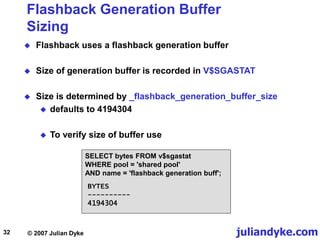
 Flashback uses a flashback generation buffer
 Size of generation buffer is recorded in V$SGASTAT
 Size is determined by _flashback_generation_buffer_size
 defaults to 4194304
 To verify size of buffer use
SELECT bytes FROM v$sgastat
WHERE pool = 'shared pool'
AND name = 'flashback generation buff';
BYTES
----------
4194304
juliandyke.com
© 2007 Julian Dyke
33
Flashback Generation Buffer
Granules
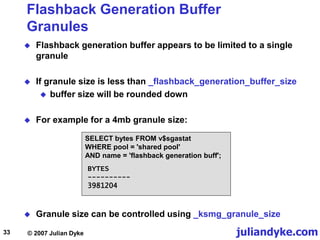
 Flashback generation buffer appears to be limited to a single
granule
 If granule size is less than _flashback_generation_buffer_size
 buffer size will be rounded down
 For example for a 4mb granule size:
SELECT bytes FROM v$sgastat
WHERE pool = 'shared pool'
AND name = 'flashback generation buff';
BYTES
----------
3981204
 Granule size can be controlled using _ksmg_granule_size
juliandyke.com
© 2007 Julian Dyke
34
Flashback Generation Buffer
Location
 To determine location of flashback generation buffer use:
ALTER SYSTEM SET EVENTS 'immediate trace name global_area level 2';
krfwb krfwbf_ [2000D8DC 2000D970) = 000001E5 00002000 003C7288 00001FE8 ...
Dump of memory from 0x2000D8CC to 0x2000D9F0
2000D8C0 27834200
2000D8D0 003CBD94 000001E6 000001E6 00000003
2000D8E0 29A1B71C 00000002 00037D60 00000001
etc..
Location of
flashback
generation buffer
ksbdp krfwrp_ [2000D860, 2000D88C) = 0000007B 2AE1C924 00000000 00000000 ...
Dump of memory from 0x2000D870 to 0x2000D88C
2000D870 52575652 00000200 00006723 0005A080 [RVWR....#g......]
2000D880 00000001 199DC5EA 00040081
KSBDPPRO = 0X2AE1C924
KSBDPSER = 1
KSBDPERR = 0
KSBDPNAM = 'RVWR'
KSBDPFLG = 2
Location of RVWR
background
process
 In this 32 bit example location is 0x27834200
juliandyke.com
© 2007 Julian Dyke
35
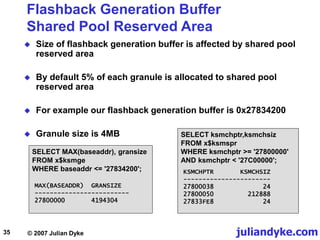
Flashback Generation Buffer
Shared Pool Reserved Area
 Size of flashback generation buffer is affected by shared pool
reserved area
 By default 5% of each granule is allocated to shared pool
reserved area
 For example our flashback generation buffer is 0x27834200
 Granule size is 4MB SELECT ksmchptr,ksmchsiz
FROM x$ksmspr
WHERE ksmchptr >= '27800000'
AND ksmchptr < '27C00000';
SELECT MAX(baseaddr), gransize
FROM x$ksmge
WHERE baseaddr <= '27834200';
MAX(BASEADDR) GRANSIZE
-------------------------
27800000 4194304
KSMCHPTR KSMCHSIZ
-----------------------
27800038 24
27800050 212888
27833FE8 24
juliandyke.com
© 2007 Julian Dyke
36
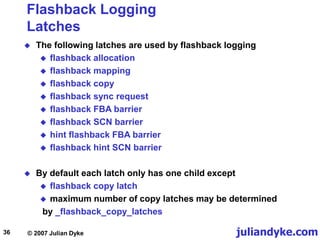
Flashback Logging
Latches
 The following latches are used by flashback logging
 flashback allocation
 flashback mapping
 flashback copy
 flashback sync request
 flashback FBA barrier
 flashback SCN barrier
 hint flashback FBA barrier
 flashback hint SCN barrier
 By default each latch only has one child except
 flashback copy latch
 maximum number of copy latches may be determined
by _flashback_copy_latches
juliandyke.com
© 2007 Julian Dyke
37
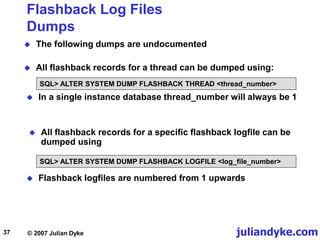
Flashback Log Files
Dumps
 The following dumps are undocumented
 All flashback records for a thread can be dumped using:
SQL> ALTER SYSTEM DUMP FLASHBACK THREAD <thread_number>
SQL> ALTER SYSTEM DUMP FLASHBACK LOGFILE <log_file_number>
 In a single instance database thread_number will always be 1
 All flashback records for a specific flashback logfile can be
dumped using
 Flashback logfiles are numbered from 1 upwards
juliandyke.com
© 2007 Julian Dyke
38
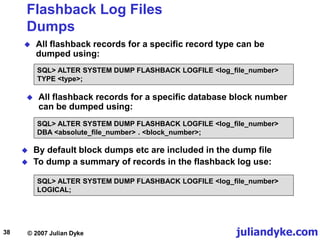
Flashback Log Files
Dumps
 All flashback records for a specific record type can be
dumped using:
 All flashback records for a specific database block number
can be dumped using:
 By default block dumps etc are included in the dump file
 To dump a summary of records in the flashback log use:
SQL> ALTER SYSTEM DUMP FLASHBACK LOGFILE <log_file_number>
DBA <absolute_file_number> . <block_number>;
SQL> ALTER SYSTEM DUMP FLASHBACK LOGFILE <log_file_number>
LOGICAL;
SQL> ALTER SYSTEM DUMP FLASHBACK LOGFILE <log_file_number>
TYPE <type>;
juliandyke.com
© 2007 Julian Dyke
39
Flashback Log Files
Dumps
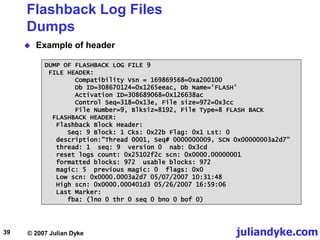
 Example of header
DUMP OF FLASHBACK LOG FILE 9
FILE HEADER:
Compatibility Vsn = 169869568=0xa200100
Db ID=308670124=0x1265eeac, Db Name='FLASH'
Activation ID=308689068=0x126638ac
Control Seq=318=0x13e, File size=972=0x3cc
File Number=9, Blksiz=8192, File Type=8 FLASH BACK
FLASHBACK HEADER:
Flashback Block Header:
Seq: 9 Block: 1 Cks: 0x22b Flag: 0x1 Lst: 0
description:"Thread 0001, Seq# 0000000009, SCN 0x00000003a2d7"
thread: 1 seq: 9 version 0 nab: 0x3cd
reset logs count: 0x25102f2c scn: 0x0000.00000001
formatted blocks: 972 usable blocks: 972
magic: 5 previous magic: 0 flags: 0x0
Low scn: 0x0000.0003a2d7 05/07/2007 10:31:48
High scn: 0x0000.000401d3 05/26/2007 16:59:06
Last Marker:
fba: (lno 0 thr 0 seq 0 bno 0 bof 0)
juliandyke.com
© 2007 Julian Dyke
40
Flashback Database
Dumps
 Example of block image
**** Record at fba: (lno 9 thr 1 seq 9 bno 966 bof 692) ****
RECORD HEADER:
Type: 1 (Block Image) Size: 28
RECORD DATA (Block Image):
file#: 1 rdba: 0x00406efc
Next scn: 0x0000.00000000 [0.0]
Flag: 0x0
Block Size: 8192
BLOCK IMAGE:
buffer rdba: 0x00406efc
scn: 0x0000.00034d8e seq: 0x01 flg: 0x06 tail: 0x4d8e0601
frmt: 0x02 chkval: 0xf52b type: 0x06=trans data
Hex dump of block: st=0, typ_found=1
Dump of memory from 0xB56CDC00 to 0xB56CFC00
B56CDC00 0000A206 00406EFC 00034D8E 06010000 [.....n@..M......]
B56CDC10 0000F52B 00000001 0000023D 00034D8C [+.......=....M..]
<hex block dump>
.....
<symbolic block dump>
juliandyke.com
© 2007 Julian Dyke
41
Flashback Records
Record Types
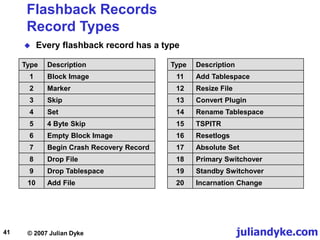
 Every flashback record has a type
Type Description
1 Block Image
2 Marker
3 Skip
4 Set
5 4 Byte Skip
6 Empty Block Image
7 Begin Crash Recovery Record
8 Drop File
9 Drop Tablespace
10 Add File
Type Description
11 Add Tablespace
12 Resize File
13 Convert Plugin
14 Rename Tablespace
15 TSPITR
16 Resetlogs
17 Absolute Set
18 Primary Switchover
19 Standby Switchover
20 Incarnation Change
juliandyke.com
© 2007 Julian Dyke
42
Flashback Logging
RVWR Background Process Dumps
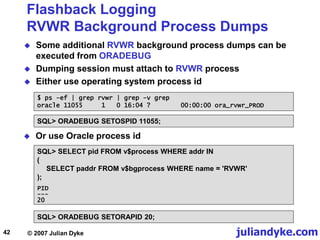
 Some additional RVWR background process dumps can be
executed from ORADEBUG
 Dumping session must attach to RVWR process
 Either use operating system process id
$ ps -ef | grep rvwr | grep -v grep
oracle 11055 1 0 16:04 ? 00:00:00 ora_rvwr_PROD
SQL> ORADEBUG SETOSPID 11055;
 Or use Oracle process id
SQL> SELECT pid FROM v$process WHERE addr IN
(
SELECT paddr FROM v$bgprocess WHERE name = 'RVWR'
);
SQL> ORADEBUG SETORAPID 20;
PID
---
20
juliandyke.com
© 2007 Julian Dyke
43
Flashback Logging
RVWR Background Process Dumps
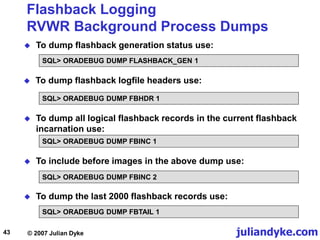
 To dump flashback generation status use:
SQL> ORADEBUG DUMP FLASHBACK_GEN 1
 To dump flashback logfile headers use:
SQL> ORADEBUG DUMP FBHDR 1
 To dump all logical flashback records in the current flashback
incarnation use:
SQL> ORADEBUG DUMP FBINC 1
 To include before images in the above dump use:
SQL> ORADEBUG DUMP FBINC 2
SQL> ORADEBUG DUMP FBTAIL 1
 To dump the last 2000 flashback records use:
juliandyke.com
© 2007 Julian Dyke
44
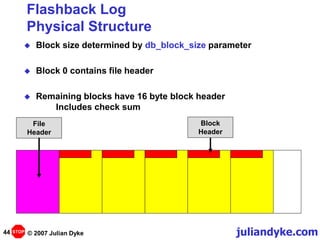
Flashback Log
Physical Structure
 Block size determined by db_block_size parameter
 Block 0 contains file header
 Remaining blocks have 16 byte block header
Includes check sum
Block
Header
File
Header
STOP
juliandyke.com
© 2007 Julian Dyke
45
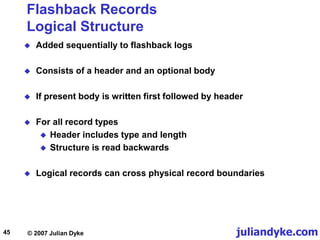
Flashback Records
Logical Structure
 Added sequentially to flashback logs
 Consists of a header and an optional body
 If present body is written first followed by header
 For all record types
 Header includes type and length
 Structure is read backwards
 Logical records can cross physical record boundaries
juliandyke.com
© 2007 Julian Dyke
46
Flashback Records
Logical Structure
Record# 1
Record# 2
Record# 3
Record# 4
Record# 5
Body
Body
Body
Header
Body
Header
Header
Header
Header
STOP
juliandyke.com
© 2007 Julian Dyke
47
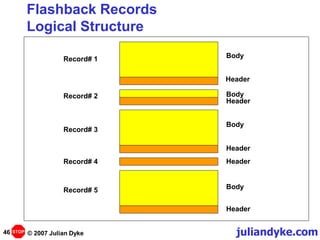
Flashback Records
Physiological Structure
File Header
Flashback
Records
Empty Space
STOP
juliandyke.com
© 2007 Julian Dyke
48
Flashback Records
Block Images
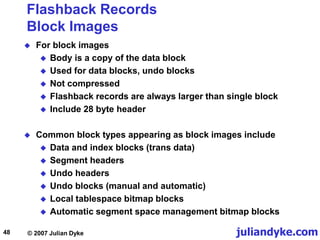
 For block images
 Body is a copy of the data block
 Used for data blocks, undo blocks
 Not compressed
 Flashback records are always larger than single block
 Include 28 byte header
 Common block types appearing as block images include
 Data and index blocks (trans data)
 Segment headers
 Undo headers
 Undo blocks (manual and automatic)
 Local tablespace bitmap blocks
 Automatic segment space management bitmap blocks
juliandyke.com
© 2007 Julian Dyke
49
Flashback Logs
Flashback log tail
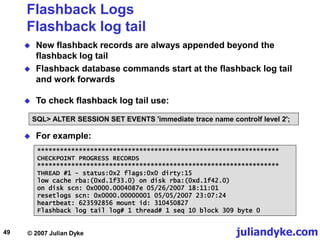
 New flashback records are always appended beyond the
flashback log tail
 Flashback database commands start at the flashback log tail
and work forwards
SQL> ALTER SESSION SET EVENTS 'immediate trace name controlf level 2';
****************************************************************
CHECKPOINT PROGRESS RECORDS
****************************************************************
THREAD #1 - status:0x2 flags:0x0 dirty:15
low cache rba:(0xd.1f33.0) on disk rba:(0xd.1f42.0)
on disk scn: 0x0000.0004087e 05/26/2007 18:11:01
resetlogs scn: 0x0000.00000001 05/05/2007 23:07:24
heartbeat: 623592856 mount id: 310450827
Flashback log tail log# 1 thread# 1 seq 10 block 309 byte 0
 For example:
 To check flashback log tail use:
juliandyke.com
© 2007 Julian Dyke
50
krfwb krfwbf_ [2000D8BC, 2000D9F0) = 000001E5 00002000 003C7288 00001FE8
Dump of memory from 0x2000D8CC to 0x2000D9F0
2000D8C0 28434200 [.BC(]
2000D8D0 003CBD94 000001E6 000001E6 00000003 [..<.............]
2000D8E0 2A61B71C 00000002 003C7288 00000001 [..a*.....r<.....]
2000D8F0 00000001 002A21F0 00000002 00000000 [.....!*.........]
2000D900 00000001 00000000 00000000 00000002 [................]
2000D910 00000000 002A01D4 003C6C3C 00000001 [......*.<l<.....]
2000D920 00000000 00000000 00000002 00000001 [................]
2000D930 00000000 00000000 00000152 00000002 [........R.......]
2000D940 0000000A 00000135 00000001 000002B4 [....5...........]
2000D950 000001E5 00000000 00000000 00000000 [................]
2000D960 00000000 24ACC246 00000030 00000001 [....F..$0.......]
2000D970 00000001 0000000A 00000009 000003E8 [................]
2000D980 00002000 00000000 2A4976FC 2BBBA220 [. .......vI* ..+]
2000D990 2A567EEC 00000047 0000000A 00000001 [.~V*G...........]
2000D9A0 00000000 00000001 00000009 00000000 [................]
2000D9B0 00000001 00000080 00000800 00000000 [................]
2000D9C0 00000000 00000000 00000000 00000000 [................]
2000D9D0 00000001 00000000 00000000 00000000 [................]
2000D9E0 001E5ECA 002A2050 00000000 00000000 [.^..P *.........]
Flashback Logs
Flashback log tail
 Current pointer is also maintained in SGA. For example:
SQL> ALTER SESSION SET EVENTS 'immediate trace name global_area level 2';
Block Number
0x135=309
Log Number
0x1=1
Sequence Number
0xA = 10
juliandyke.com
© 2007 Julian Dyke
51
Flashback Logging
Conclusions
 Very similar design to LGWR
 Changes initially written to memory buffer
 RVWR subsequently flushes flashback records to disk
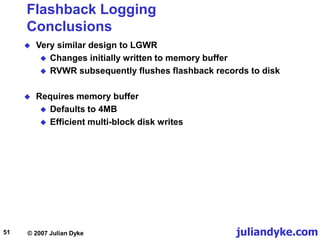
 Requires memory buffer
 Defaults to 4MB
 Efficient multi-block disk writes
juliandyke.com
© 2007 Julian Dyke
52
Flashback Logging
Conclusions
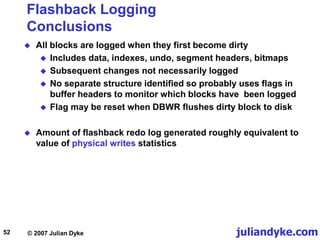
 All blocks are logged when they first become dirty
 Includes data, indexes, undo, segment headers, bitmaps
 Subsequent changes not necessarily logged
 No separate structure identified so probably uses flags in
buffer headers to monitor which blocks have been logged
 Flag may be reset when DBWR flushes dirty block to disk
 Amount of flashback redo log generated roughly equivalent to
value of physical writes statistics
juliandyke.com
© 2007 Julian Dyke
53
Thank you for listening
info@juliandyke.com

FlashbackLoggingInternals.ppt

  • 1.
    1 Flashback Logging Internals Julian Dyke IndependentConsultant Web Version - December 2007 juliandyke.com © 2007 Julian Dyke
  • 2.
    juliandyke.com © 2007 JulianDyke 2 Agenda  Extended Clusters versus Fast Start Failover  Flashback Database  Flashback Logging Internals
  • 3.
    juliandyke.com © 2007 JulianDyke 3 Extended Clusters versus Fast Start Failover
  • 4.
    juliandyke.com © 2007 JulianDyke 4 Extended Clusters Overview Storage Network Public Network Database Database Storage Networks Site2 Site1 Private Network Instance 2 Node 2 Quorum Site3 Instance 1 Node 1
  • 5.
    juliandyke.com © 2007 JulianDyke 5 Extended Clusters Overview  Currently the Holy Grail of high availability  RAC nodes located at physically separate sites  In-built disaster recovery  In the event of a site failure, database is still available  Active / Active configuration  Users can access database via either site  Storage is duplicated at each site  Can use ASM or vendor-supplied storage technology to ensure all writes are replicated to storage on each site
  • 6.
    juliandyke.com © 2007 JulianDyke 6 Extended Clusters Advantages and Disadvantages  Advantages  Disaster recovery - all changes written to both sites  Active / Active - both sites available  Disadvantages  Complexity  Cache fusion traffic between sites  Requires Enterprise Edition licences + RAC option  Cost of inter-site fibre network
  • 7.
    juliandyke.com © 2007 JulianDyke 7 Fast Start Failover Overview Storage Network Public Network Database Database Storage Networks Site2 - Standby Site1 - Primary Private Network Instance 2 Node 2 Quorum Site3 Instance 1 Node 1 Observer
  • 8.
    juliandyke.com © 2007 JulianDyke 8 Fast Start Failover Overview  Target standby database must be nominated  Failure of primary database can be detected and automatically failed over to nominated standby database  Primary database can potentially be reinstated automatically  Requires flashback logging  Requires DGMGRL configuration  Must configure MAXIMUM AVAILABILITY protection mode  Standby database archive log destination must be configured as LGWR SYNC
  • 9.
    juliandyke.com © 2007 JulianDyke 9 Fast Start Failover Advantages & Disadvantages  Advantages  No interconnect network required between sites  No fibre network required between sites  RAC licences not required if each site is a single-instance  Disadvantages  Active / Passive  Requires Enterprise Edition licence
  • 10.
    juliandyke.com © 2007 JulianDyke 10 Fast Start Failover Observer  Requires third independent site with:  Oracle client installation (administrative user)  Oracle Net configuration to primary and standby  On third site:  DGMGRL starts observer  Observer monitors state of primary database  If primary database fails observer initiates failover to target standby database  Observer checks if standby database can still see primary database before initiating failover  Performance impact of observer process on primary / standby is minimal
  • 11.
    juliandyke.com © 2007 JulianDyke 11 Flashback Database
  • 12.
    juliandyke.com © 2007 JulianDyke 12 Flashback Database Introduction  Introduced in Oracle 10.1  Uses past block images to back out changes to a database  Allows database to be recovered to a previous time to correct problems caused by:  logical data corruptions  user errors  Amount of time required to flashback a database is proportional to how far back database must be reverted  Time to restore and recover entire database could be much longer
  • 13.
    juliandyke.com © 2007 JulianDyke 13 Flashback Database Introduction  During normal database operation, Oracle occasionally logs past block images in flashback logs  Flashback logs are  written sequentially  not archived  Oracle automatically creates, resizes and deletes flashback logs in the flash recovery area  DBA should be aware of flashback logs  To monitor performance  To decide how much space to allocate to flash recovery area
  • 14.
    juliandyke.com © 2007 JulianDyke 14 Flashback Database Flashing Back  Before images are used to restore database to a point in the past  Forward recovery is then used to bring the database to a consistent state  Oracle returns datafiles to previous point in time  Not auxiliary files such as initialization parameter files
  • 15.
    juliandyke.com © 2007 JulianDyke 15 Flashback Database Applications  Flashback recovery of database to earlier SCN  Testing  Application / User errors  Recovery through resetlogs  Opening standby database with write access  Fast start failover  Automatic reinstantiation of old primary following fast start failover to standby  Alternative to delayed redo application for physical or logical standby databases
  • 16.
    juliandyke.com © 2007 JulianDyke 16 Flashback Database What do we already know?  Introduced in Oracle 10.1  Requires flash recovery area  Maintains before image logs for block changes  Records are appended to flashback logs  Uses RVWR background process
  • 17.
    juliandyke.com © 2007 JulianDyke 17 Flashback Database What don't we know?  Are index blocks logged?  Is undo logged?  Is temporary segments logged?  What happens when a segment is deleted  Is a block logged every time it is changed?  If not, how does Oracle know?  What when an object leaves the buffer cache  Is there any control structure  What about multiple block sizes?  How does it work in RAC?  What about contention - latches?  Undocumented parameters?  When is flashback overwritten?
  • 18.
    juliandyke.com © 2007 JulianDyke 18 Flash Recovery Area Prerequisites  Archiving must be enabled  Flash recovery area must be configured using  DB_RECOVERY_FILE_DEST_SIZE - size of flashback recovery area in bytes  DB_RECOVERY_FILE_DEST - location of flashback recovery area  For example: SQL> ALTER SYSTEM SET db_recovery_file_dest_size = 10G; SQL> ALTER SYSTEM SET db_recovery_file_dest = '/oradata/recovery';
  • 19.
    juliandyke.com © 2007 JulianDyke 19 Flashback Database Parameters  One supported parameter:  DB_FLASHBACK_RETENTION_TARGET  Specifies upper limit on how far back in time database may be flashed back  Specified in minutes  Default value is 1440 minutes (24 hours)  Affects number of flashback logs retained in flash recovery area
  • 20.
    juliandyke.com © 2007 JulianDyke 20 Flashback Database Configuration  To enable flashback logging database must be mounted but not open SQL> STARTUP MOUNT SQL> ALTER DATABASE FLASHBACK ON; SQL> ALTER DATABASE OPEN;  To check if flashback is currently enabled: SQL> SELECT flashback_on FROM v$database;  To disable flashback logging use: SQL> ALTER DATABASE FLASHBACK OFF; FLASHBACK_ON ------------ YES
  • 21.
    juliandyke.com © 2007 JulianDyke 21 Flashback Database System Change Numbers and Times  To check current SCN use: SQL> SELECT current_scn FROM v$database;  To check oldest SCN that can be flashed back to use: SQL> SELECT oldest_flashback_scn FROM v$flashback_database_log;  To check oldest time that can be flashed back to use: SQL> ALTER SESSION SET nls_date_format = 'DD-MON-YYYY HH24:MI:SS'; SQL> SELECT oldest_flashback_time FROM v$flashback_database_log;
  • 22.
    juliandyke.com © 2007 JulianDyke 22 Flashback Database Operation  To flashback the database use the following syntax: SQL> FLASHBACK [ STANDBY ] DATABASE [ database ] { TO { { SCN | TIMESTAMP } expr | RESTORE POINT restore_point } | TO BEFORE { SCN | TIMESTAMP } expr | RESETLOGS} };  Database must be mounted and not open to flashback  For example SQL> SHUTDOWN IMMEDIATE SQL> STARTUP MOUNT SQL> FLASHBACK DATABASE TO SCN 461918; Flashback complete. SQL> ALTER DATABASE OPEN READ ONLY; SQL> ALTER DATABASE OPEN RESETLOGS
  • 23.
    juliandyke.com © 2007 JulianDyke 23 Flashback Database Restrictions  Cannot flash back to an SCN ahead of the current SCN  Cannot flash back to a time in the future  Database must be opened with read write access  Cannot open read only  Database must be opened with RESETLOGS  Cannot flash back if datafile resized (shrunk) during flashback period
  • 24.
    juliandyke.com © 2007 JulianDyke 24 Flashback Database Dynamic Performance Views  V$FLASHBACK_DATABASE_LOG OLDEST_FLASHBACK_SCN NUMBER OLDEST_FLASHBACK_TIME DATE RETENTION_TARGET NUMBER FLASHBACK_SIZE NUMBER ESTIMATED_FLASHBACK_SIZE NUMBER  V$FLASHBACK_DATABASE_STAT BEGIN_TIME DATE END_TIME DATE FLASHBACK_DATA NUMBER DB_DATA NUMBER REDO_DATA NUMBER ESTIMATED_FLASHBACK_SIZE NUMBER
  • 25.
    juliandyke.com © 2007 JulianDyke 25 Flashback Database Dynamic Performance Views  V$FLASHBACK_DATABASE_LOGFILE NAME VARCHAR2(13) LOG# NUMBER THREAD# NUMBER SEQUENCE# NUMBER BYTES NUMBER FIRST_CHANGE# NUMBER FIRST_TIME DATE
  • 26.
    juliandyke.com © 2007 JulianDyke 26 Flashback Logging Internals
  • 27.
    juliandyke.com © 2007 JulianDyke 27 Flashback Log Files Location and Naming  Stored in Flash Recovery Area (mandatory)  Subdirectory is <database_name>/flashback  Use Oracle-Managed Files (OMF) (mandatory)  For example  o1_mf_3504ofnh_.flb  o1_mf_350g3r24_.flb  o1_mf_350jl666_.flb  Used sequentially  Can be reused  Generated when required  Dropped when space required in flash recovery area
  • 28.
    juliandyke.com © 2007 JulianDyke 28 Flashback Log Files Sizing  Flashback log size same as database block size  e.g. 4096 or 8192  Initial size is 1001 x block size  determined by  _flashback_log_size (defaults to 1000)  additional block for file header  e.g  1001 x 8192 = 8200192 bytes  Subsequent size reduces to 3989504  probably determined by  size of flashback generation buffer (3981204)  additional block for file header  note there is a rounding error here
  • 29.
    juliandyke.com © 2007 JulianDyke 29 Flashback Log Files Controlfile Dumps SQL> ALTER SESSION SET EVENTS 'immediate trace name controlf level 3'; ******************************************************************* FLASHBACK LOGFILE RECORDS ******************************************************************* FLASHBACK LOG FILE #4: (name #12) /oradata/recovery/PROD/flashback/o1_mf_350kw47d_.flb Thread 1 flashback log links: forward: 5 backward: 3 size: 486 seq: 4 bsz: 8192 nab: 0x1e7 flg: 0x0 magic: 3 dup: 1 Low scn: 0x0000.00071169 05/20/2007 14:05:08 High scn: 0x0000.00071980 05/02/2007 15:16:48 FLASHBACK LOG FILE #5: (name #13) /oradata/recovery/PROD/flashback/o1_mf_350p2jz0_.flb Thread 1 flashback log links: forward: 6 backward: 4 size: 486 seq: 5 bsz: 8192 nab: 0x1e7 flg: 0x0 magic: 5 dup: 1 Low scn: 0x0000.00071980 05/20/2007 15:16:48 High scn: 0x0000.0007247b 05/02/2007 16:43:13 FLASHBACK LOG FILE #6: (name #14) /oradata/recovery/PROD/flashback/o1_mf_350v4kz1_.flb Thread 1 flashback log links: forward: 1 backward: 5 size: 486 seq: 4 bsz: 8192 nab: 0xffffffff flg: 0x0 magic: 4 dup: 1 Low scn: 0x0000.0007247b 05/20/2007 16:43:13 High scn: 0xffff.ffffffff 05/02/2007 00:00:00 Current Logfile
  • 30.
    juliandyke.com © 2007 JulianDyke 30 Flashback Logging Recovery Writer Process  Flashback uses the recovery writer (RVWR) background process  Copies flashback blocks from flashback generation buffer to flashback logs  Checks for records in flashback generation buffer every 3 seconds  Waits on rdbms ipc message  In Linux records written to disk using pwrite64  Multi block writes (8192 byte records) SELECT description FROM v$bgprocess WHERE name = 'RVWR'; DESCRIPTION --------------- Recovery Writer
  • 31.
    juliandyke.com © 2007 JulianDyke 31 Flashback Logging Recovery Writer Process  Recovery process structure is linked into SGA global area SELECT ksmfsnam,ksmfstyp FROM x$ksmfsv WHERE ksmfsadr = '2000D860'; SELECT addr FROM x$ksbdp WHERE ksbdpnam = 'RVWR'; ADDR --------------- 2000D860  ksbdp structure for RVWR background process is krfwrp_ KSMFSNAM KSMFSTYP -------- ------- krfwrp_ ksbdp
  • 32.
    juliandyke.com © 2007 JulianDyke 32 Flashback Generation Buffer Sizing  Flashback uses a flashback generation buffer  Size of generation buffer is recorded in V$SGASTAT  Size is determined by _flashback_generation_buffer_size  defaults to 4194304  To verify size of buffer use SELECT bytes FROM v$sgastat WHERE pool = 'shared pool' AND name = 'flashback generation buff'; BYTES ---------- 4194304
  • 33.
    juliandyke.com © 2007 JulianDyke 33 Flashback Generation Buffer Granules  Flashback generation buffer appears to be limited to a single granule  If granule size is less than _flashback_generation_buffer_size  buffer size will be rounded down  For example for a 4mb granule size: SELECT bytes FROM v$sgastat WHERE pool = 'shared pool' AND name = 'flashback generation buff'; BYTES ---------- 3981204  Granule size can be controlled using _ksmg_granule_size
  • 34.
    juliandyke.com © 2007 JulianDyke 34 Flashback Generation Buffer Location  To determine location of flashback generation buffer use: ALTER SYSTEM SET EVENTS 'immediate trace name global_area level 2'; krfwb krfwbf_ [2000D8DC 2000D970) = 000001E5 00002000 003C7288 00001FE8 ... Dump of memory from 0x2000D8CC to 0x2000D9F0 2000D8C0 27834200 2000D8D0 003CBD94 000001E6 000001E6 00000003 2000D8E0 29A1B71C 00000002 00037D60 00000001 etc.. Location of flashback generation buffer ksbdp krfwrp_ [2000D860, 2000D88C) = 0000007B 2AE1C924 00000000 00000000 ... Dump of memory from 0x2000D870 to 0x2000D88C 2000D870 52575652 00000200 00006723 0005A080 [RVWR....#g......] 2000D880 00000001 199DC5EA 00040081 KSBDPPRO = 0X2AE1C924 KSBDPSER = 1 KSBDPERR = 0 KSBDPNAM = 'RVWR' KSBDPFLG = 2 Location of RVWR background process  In this 32 bit example location is 0x27834200
  • 35.
    juliandyke.com © 2007 JulianDyke 35 Flashback Generation Buffer Shared Pool Reserved Area  Size of flashback generation buffer is affected by shared pool reserved area  By default 5% of each granule is allocated to shared pool reserved area  For example our flashback generation buffer is 0x27834200  Granule size is 4MB SELECT ksmchptr,ksmchsiz FROM x$ksmspr WHERE ksmchptr >= '27800000' AND ksmchptr < '27C00000'; SELECT MAX(baseaddr), gransize FROM x$ksmge WHERE baseaddr <= '27834200'; MAX(BASEADDR) GRANSIZE ------------------------- 27800000 4194304 KSMCHPTR KSMCHSIZ ----------------------- 27800038 24 27800050 212888 27833FE8 24
  • 36.
    juliandyke.com © 2007 JulianDyke 36 Flashback Logging Latches  The following latches are used by flashback logging  flashback allocation  flashback mapping  flashback copy  flashback sync request  flashback FBA barrier  flashback SCN barrier  hint flashback FBA barrier  flashback hint SCN barrier  By default each latch only has one child except  flashback copy latch  maximum number of copy latches may be determined by _flashback_copy_latches
  • 37.
    juliandyke.com © 2007 JulianDyke 37 Flashback Log Files Dumps  The following dumps are undocumented  All flashback records for a thread can be dumped using: SQL> ALTER SYSTEM DUMP FLASHBACK THREAD <thread_number> SQL> ALTER SYSTEM DUMP FLASHBACK LOGFILE <log_file_number>  In a single instance database thread_number will always be 1  All flashback records for a specific flashback logfile can be dumped using  Flashback logfiles are numbered from 1 upwards
  • 38.
    juliandyke.com © 2007 JulianDyke 38 Flashback Log Files Dumps  All flashback records for a specific record type can be dumped using:  All flashback records for a specific database block number can be dumped using:  By default block dumps etc are included in the dump file  To dump a summary of records in the flashback log use: SQL> ALTER SYSTEM DUMP FLASHBACK LOGFILE <log_file_number> DBA <absolute_file_number> . <block_number>; SQL> ALTER SYSTEM DUMP FLASHBACK LOGFILE <log_file_number> LOGICAL; SQL> ALTER SYSTEM DUMP FLASHBACK LOGFILE <log_file_number> TYPE <type>;
  • 39.
    juliandyke.com © 2007 JulianDyke 39 Flashback Log Files Dumps  Example of header DUMP OF FLASHBACK LOG FILE 9 FILE HEADER: Compatibility Vsn = 169869568=0xa200100 Db ID=308670124=0x1265eeac, Db Name='FLASH' Activation ID=308689068=0x126638ac Control Seq=318=0x13e, File size=972=0x3cc File Number=9, Blksiz=8192, File Type=8 FLASH BACK FLASHBACK HEADER: Flashback Block Header: Seq: 9 Block: 1 Cks: 0x22b Flag: 0x1 Lst: 0 description:"Thread 0001, Seq# 0000000009, SCN 0x00000003a2d7" thread: 1 seq: 9 version 0 nab: 0x3cd reset logs count: 0x25102f2c scn: 0x0000.00000001 formatted blocks: 972 usable blocks: 972 magic: 5 previous magic: 0 flags: 0x0 Low scn: 0x0000.0003a2d7 05/07/2007 10:31:48 High scn: 0x0000.000401d3 05/26/2007 16:59:06 Last Marker: fba: (lno 0 thr 0 seq 0 bno 0 bof 0)
  • 40.
    juliandyke.com © 2007 JulianDyke 40 Flashback Database Dumps  Example of block image **** Record at fba: (lno 9 thr 1 seq 9 bno 966 bof 692) **** RECORD HEADER: Type: 1 (Block Image) Size: 28 RECORD DATA (Block Image): file#: 1 rdba: 0x00406efc Next scn: 0x0000.00000000 [0.0] Flag: 0x0 Block Size: 8192 BLOCK IMAGE: buffer rdba: 0x00406efc scn: 0x0000.00034d8e seq: 0x01 flg: 0x06 tail: 0x4d8e0601 frmt: 0x02 chkval: 0xf52b type: 0x06=trans data Hex dump of block: st=0, typ_found=1 Dump of memory from 0xB56CDC00 to 0xB56CFC00 B56CDC00 0000A206 00406EFC 00034D8E 06010000 [.....n@..M......] B56CDC10 0000F52B 00000001 0000023D 00034D8C [+.......=....M..] <hex block dump> ..... <symbolic block dump>
  • 41.
    juliandyke.com © 2007 JulianDyke 41 Flashback Records Record Types  Every flashback record has a type Type Description 1 Block Image 2 Marker 3 Skip 4 Set 5 4 Byte Skip 6 Empty Block Image 7 Begin Crash Recovery Record 8 Drop File 9 Drop Tablespace 10 Add File Type Description 11 Add Tablespace 12 Resize File 13 Convert Plugin 14 Rename Tablespace 15 TSPITR 16 Resetlogs 17 Absolute Set 18 Primary Switchover 19 Standby Switchover 20 Incarnation Change
  • 42.
    juliandyke.com © 2007 JulianDyke 42 Flashback Logging RVWR Background Process Dumps  Some additional RVWR background process dumps can be executed from ORADEBUG  Dumping session must attach to RVWR process  Either use operating system process id $ ps -ef | grep rvwr | grep -v grep oracle 11055 1 0 16:04 ? 00:00:00 ora_rvwr_PROD SQL> ORADEBUG SETOSPID 11055;  Or use Oracle process id SQL> SELECT pid FROM v$process WHERE addr IN ( SELECT paddr FROM v$bgprocess WHERE name = 'RVWR' ); SQL> ORADEBUG SETORAPID 20; PID --- 20
  • 43.
    juliandyke.com © 2007 JulianDyke 43 Flashback Logging RVWR Background Process Dumps  To dump flashback generation status use: SQL> ORADEBUG DUMP FLASHBACK_GEN 1  To dump flashback logfile headers use: SQL> ORADEBUG DUMP FBHDR 1  To dump all logical flashback records in the current flashback incarnation use: SQL> ORADEBUG DUMP FBINC 1  To include before images in the above dump use: SQL> ORADEBUG DUMP FBINC 2 SQL> ORADEBUG DUMP FBTAIL 1  To dump the last 2000 flashback records use:
  • 44.
    juliandyke.com © 2007 JulianDyke 44 Flashback Log Physical Structure  Block size determined by db_block_size parameter  Block 0 contains file header  Remaining blocks have 16 byte block header Includes check sum Block Header File Header STOP
  • 45.
    juliandyke.com © 2007 JulianDyke 45 Flashback Records Logical Structure  Added sequentially to flashback logs  Consists of a header and an optional body  If present body is written first followed by header  For all record types  Header includes type and length  Structure is read backwards  Logical records can cross physical record boundaries
  • 46.
    juliandyke.com © 2007 JulianDyke 46 Flashback Records Logical Structure Record# 1 Record# 2 Record# 3 Record# 4 Record# 5 Body Body Body Header Body Header Header Header Header STOP
  • 47.
    juliandyke.com © 2007 JulianDyke 47 Flashback Records Physiological Structure File Header Flashback Records Empty Space STOP
  • 48.
    juliandyke.com © 2007 JulianDyke 48 Flashback Records Block Images  For block images  Body is a copy of the data block  Used for data blocks, undo blocks  Not compressed  Flashback records are always larger than single block  Include 28 byte header  Common block types appearing as block images include  Data and index blocks (trans data)  Segment headers  Undo headers  Undo blocks (manual and automatic)  Local tablespace bitmap blocks  Automatic segment space management bitmap blocks
  • 49.
    juliandyke.com © 2007 JulianDyke 49 Flashback Logs Flashback log tail  New flashback records are always appended beyond the flashback log tail  Flashback database commands start at the flashback log tail and work forwards SQL> ALTER SESSION SET EVENTS 'immediate trace name controlf level 2'; **************************************************************** CHECKPOINT PROGRESS RECORDS **************************************************************** THREAD #1 - status:0x2 flags:0x0 dirty:15 low cache rba:(0xd.1f33.0) on disk rba:(0xd.1f42.0) on disk scn: 0x0000.0004087e 05/26/2007 18:11:01 resetlogs scn: 0x0000.00000001 05/05/2007 23:07:24 heartbeat: 623592856 mount id: 310450827 Flashback log tail log# 1 thread# 1 seq 10 block 309 byte 0  For example:  To check flashback log tail use:
  • 50.
    juliandyke.com © 2007 JulianDyke 50 krfwb krfwbf_ [2000D8BC, 2000D9F0) = 000001E5 00002000 003C7288 00001FE8 Dump of memory from 0x2000D8CC to 0x2000D9F0 2000D8C0 28434200 [.BC(] 2000D8D0 003CBD94 000001E6 000001E6 00000003 [..<.............] 2000D8E0 2A61B71C 00000002 003C7288 00000001 [..a*.....r<.....] 2000D8F0 00000001 002A21F0 00000002 00000000 [.....!*.........] 2000D900 00000001 00000000 00000000 00000002 [................] 2000D910 00000000 002A01D4 003C6C3C 00000001 [......*.<l<.....] 2000D920 00000000 00000000 00000002 00000001 [................] 2000D930 00000000 00000000 00000152 00000002 [........R.......] 2000D940 0000000A 00000135 00000001 000002B4 [....5...........] 2000D950 000001E5 00000000 00000000 00000000 [................] 2000D960 00000000 24ACC246 00000030 00000001 [....F..$0.......] 2000D970 00000001 0000000A 00000009 000003E8 [................] 2000D980 00002000 00000000 2A4976FC 2BBBA220 [. .......vI* ..+] 2000D990 2A567EEC 00000047 0000000A 00000001 [.~V*G...........] 2000D9A0 00000000 00000001 00000009 00000000 [................] 2000D9B0 00000001 00000080 00000800 00000000 [................] 2000D9C0 00000000 00000000 00000000 00000000 [................] 2000D9D0 00000001 00000000 00000000 00000000 [................] 2000D9E0 001E5ECA 002A2050 00000000 00000000 [.^..P *.........] Flashback Logs Flashback log tail  Current pointer is also maintained in SGA. For example: SQL> ALTER SESSION SET EVENTS 'immediate trace name global_area level 2'; Block Number 0x135=309 Log Number 0x1=1 Sequence Number 0xA = 10
  • 51.
    juliandyke.com © 2007 JulianDyke 51 Flashback Logging Conclusions  Very similar design to LGWR  Changes initially written to memory buffer  RVWR subsequently flushes flashback records to disk  Requires memory buffer  Defaults to 4MB  Efficient multi-block disk writes
  • 52.
    juliandyke.com © 2007 JulianDyke 52 Flashback Logging Conclusions  All blocks are logged when they first become dirty  Includes data, indexes, undo, segment headers, bitmaps  Subsequent changes not necessarily logged  No separate structure identified so probably uses flags in buffer headers to monitor which blocks have been logged  Flag may be reset when DBWR flushes dirty block to disk  Amount of flashback redo log generated roughly equivalent to value of physical writes statistics
  • 53.
    juliandyke.com © 2007 JulianDyke 53 Thank you for listening info@juliandyke.com