Applying a  Blockcentric Approach to Oracle Tuning Daniel W. Fink www.optimaldba.com
Overview What is Blockcentric Approach? Shifting Focus for Architectural and Tuning Decisions Myths and Fallacies “Burn him at the stake!” Applying the Method Will be addressed throughout the presentation
Trust, But Verify Information presented is general It will not cover all scenarios all databases Only covers 1 aspect of tuning and architecture
“ Scientists are by definition highly rational beings who pursue truths supported by hard data.” - Alisa Smith
What is the Blockcentric Approach? Closely tied to Oracle I/O subsystem Protecting memory structures Single and Multiple Read operations Shifts focus from Rows to Blocks Many traditional methods focus on rows I/O system understands blocks
Oracle’s I/O Subsytem Blocks not Rows Logical v. Physical I/O Full Scans
Blocks not Rows Blocks are read, not rows Larger block sizes means more rows per block
Logical I/O Not just memory access Accessing Block in memory Requires locking of various memory structures
Physical I/O Not always disk access Block not found in memory Could be found in os buffer cache or prefetched from disk
Full Scans Able to read multiple blocks at one time Full Table Scan Read all blocks up to the High Water Mark Fast Full Index Scan Can access non-leading columns in concatenated indexes
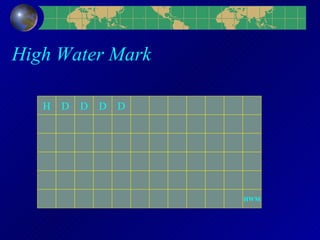
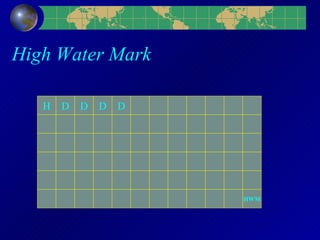
High Water Mark The High Water Mark is the last block ever formatted to contain data. If the table has experienced high delete activity, the HWM may be set artificially high If indicated, the only solution is to reorganize the table
High Water Mark H D D D D HWM
Myths and Fallacies 99.999% Buffer Cache Hit Ratio is GOOD % of Rows Returned determines index usage Index all WHERE columns Full Table Scans are BAD DUAL is a low cost, useful table
Buffer Cache Hit Ratio Higher is not always better What happens when 99% is not good enough? Memory Speed Fallacy Determining Statement Cost
Higher Is Not Always Better It is an indication of hard work, not necessarily smart work 99.999% BCHR requires 100,000 I/Os Not a good response to user performance problems
BCHR Method Statement #1 – 98% BCHR 5000 Logical I/Os 100 Physical I/Os Statement #2 – 50% BCHR 400 Logical I/Os 200 Physical I/Os
What Happens When 99% Is Not Good Enough? Everything is tuned, but the system is still slow… Add More Memory Faster CPU Faster Disk Faster Network Makes hardware sales reps happy…
Memory Speed Fallacy Disk access is 10,000 times more expensive than Memory Access Measured in a ‘pure’ environment In practice, the ratio is closer to 40 Request does not go directly to block in cache The requested block must be located Memory structures must be accessed and manipulated Disk access may not be actual disk access
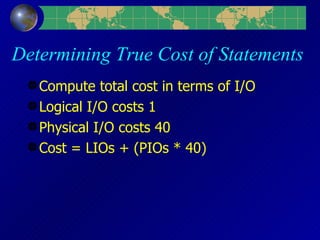
Determining True Cost of Statements Compute total cost in terms of I/O Logical I/O costs 1 Physical I/O costs 40 Cost = LIOs + (PIOs * 40)
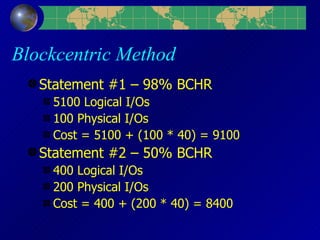
Blockcentric Method Statement #1 – 98% BCHR 5100 Logical I/Os 100 Physical I/Os Cost = 5100 + (100 * 40) = 9100 Statement #2 – 50% BCHR 400 Logical I/Os 200 Physical I/Os Cost = 400 + (200 * 40) = 8400
% Of Rows Returned Index usage Number of Blocks Returned Data Considerations
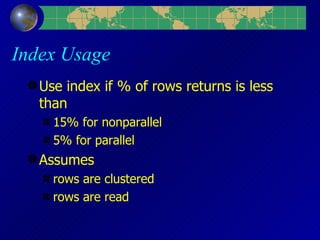
Index Usage Use index if % of rows returns is less than 15% for nonparallel 5% for parallel Assumes  rows are clustered rows are read
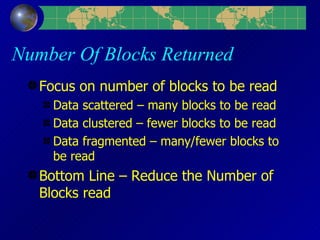
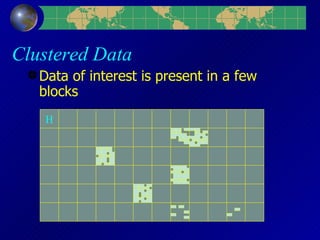
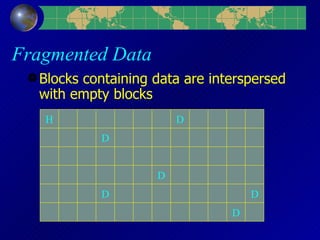
Number Of Blocks Returned Focus on number of blocks to be read Data scattered – many blocks to be read Data clustered – fewer blocks to be read Data fragmented – many/fewer blocks to be read Bottom Line – Reduce the Number of Blocks read
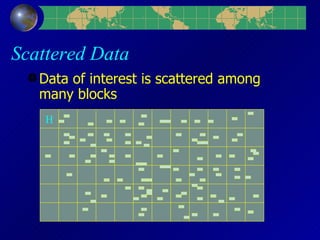
Scattered Data Data of interest is scattered among many blocks H
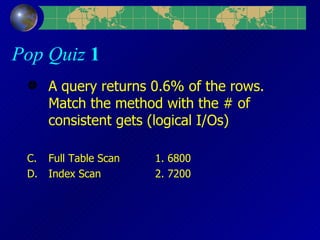
Pop Quiz  1 A query returns 0.6% of the rows. Match the method with the # of consistent gets (logical I/Os) Full Table Scan 1. 6800 Index Scan 2. 7200
Clustered Data Data of interest is present in a few blocks H
Fragmented Data Blocks containing data are interspersed with empty blocks H D D D D D D
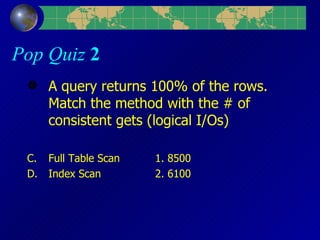
Pop Quiz  2 A query returns 100% of the rows. Match the method with the # of consistent gets (logical I/Os) Full Table Scan 1. 8500 Index Scan 2. 6100
High Water Mark H D D D D HWM
Pop Quiz  3 A query returns 100% of the rows. Match the method with the # of consistent gets (logical I/Os) Full Table Scan 1. 1500 Index Scan 2. 7100
Continued Data Rows are migrated or chained Multiple I/O operations
Index all WHERE Columns Indexes may speed queries But will always slow other operations Unique constraints require indexes Index Foreign Keys Locking problems Join column
Full Table Scans are BAD It depends Focus on # of I/O operations Multiblock reads Data and Block clustering Focus on ends, not means
Determining Block Selectivity Identify the data to be returned by focusing on the WHERE clause Calculate the Actual Blocks to be accessed # of blocks below HWM # of blocks containing data Determine how many block selectivity # of Rows with value / # of Blocks with Row # of Rows with value / # of Blocks below HWM
DUAL Table often used for non-SELECT operations Very expensive, Very few I/Os per access May actually comprise the largest I/O consumer Solutions Rewrite code Create virtual table
Miscellaneous Tuning Tips Focus on overall length of operations Reduce the I/Os Identify resource intensive SQL, tune it first Table and Index Maintenance Make extent sizes multiples of  db_block_size * db_file_multiblock_read_count
Focus on overall length of operations Record ‘Bad’ time Decide on ‘Good’ time Identify where statement is spending most time and tune accordingly When Good time is achieved, stop and move on to the next one
Reduce the I/Os Avoid the BCHR Myth BCHR is not useless, it may indicate problems Excessively High Excessively Low Identify the most expensive statements Find most I/O Intensive Reduce Logical I/Os…Physical will follow Reorganize tables when needed High Water Mark Data or Blocks Not clustered
Identify resource intensive SQL –  tune it first Look for statements consuming most I/O Logical Reads + Physical Reads Identify tables with most activity Don’t tune 1 query to the detriment of 9 others
Table and Index Maintenance ‘Sort tables according to primary key value’ – Fallacy Sort tables to achieve common clustering Rebuild tables and indexes to Reduce storage requirements Reset high water mark
Extent Sizing Extent sizes should be multiples of multi block read configuration Multiblock read configuration should match hardware limitations If extent is 1 block less, multiple I/O calls will be executed Even if ‘extra’ blocks are empty, it may be more efficient
Sources “ Oracle Performance Tuning 101” Vaidyanatha, Deshpande, Kostelac, Jr. “ Oracle SQL Tuning Pocket Reference” Gurry Performance Sites www.hotsos.com  - Cary Millsap www.orapub.com  - Craig Shallahamer www.evdbt.com  - Tim Gorman and Jeff Maresh www.oraperf.com  - Anjo Kolk
Training Days 2003 Rocky Mountain Oracle User Group Training Days 2003 Wednesday, March 5 & Thursday, March 6 Denver Colorado Stay and Ski information available on website Scheduled speakers include Tim Gorman, Craig Shallahamer, Anjo Kolk, Gary Dodge, Stephan Haisley, John King, Brad Brown, Rachel Carmichael Details available at  www.rmoug.org  NYOUG members eligible for Member Rate
It is not important to  find  the  right   answers . It is important to  ask  the  right   questions .

Applyinga blockcentricapproachtotuning

  • 1.
    Applying a Blockcentric Approach to Oracle Tuning Daniel W. Fink www.optimaldba.com
  • 2.
    Overview What isBlockcentric Approach? Shifting Focus for Architectural and Tuning Decisions Myths and Fallacies “Burn him at the stake!” Applying the Method Will be addressed throughout the presentation
  • 3.
    Trust, But VerifyInformation presented is general It will not cover all scenarios all databases Only covers 1 aspect of tuning and architecture
  • 4.
    “ Scientists areby definition highly rational beings who pursue truths supported by hard data.” - Alisa Smith
  • 5.
    What is theBlockcentric Approach? Closely tied to Oracle I/O subsystem Protecting memory structures Single and Multiple Read operations Shifts focus from Rows to Blocks Many traditional methods focus on rows I/O system understands blocks
  • 6.
    Oracle’s I/O SubsytemBlocks not Rows Logical v. Physical I/O Full Scans
  • 7.
    Blocks not RowsBlocks are read, not rows Larger block sizes means more rows per block
  • 8.
    Logical I/O Notjust memory access Accessing Block in memory Requires locking of various memory structures
  • 9.
    Physical I/O Notalways disk access Block not found in memory Could be found in os buffer cache or prefetched from disk
  • 10.
    Full Scans Ableto read multiple blocks at one time Full Table Scan Read all blocks up to the High Water Mark Fast Full Index Scan Can access non-leading columns in concatenated indexes
  • 11.
    High Water MarkThe High Water Mark is the last block ever formatted to contain data. If the table has experienced high delete activity, the HWM may be set artificially high If indicated, the only solution is to reorganize the table
  • 12.
    High Water MarkH D D D D HWM
  • 13.
    Myths and Fallacies99.999% Buffer Cache Hit Ratio is GOOD % of Rows Returned determines index usage Index all WHERE columns Full Table Scans are BAD DUAL is a low cost, useful table
  • 14.
    Buffer Cache HitRatio Higher is not always better What happens when 99% is not good enough? Memory Speed Fallacy Determining Statement Cost
  • 15.
    Higher Is NotAlways Better It is an indication of hard work, not necessarily smart work 99.999% BCHR requires 100,000 I/Os Not a good response to user performance problems
  • 16.
    BCHR Method Statement#1 – 98% BCHR 5000 Logical I/Os 100 Physical I/Os Statement #2 – 50% BCHR 400 Logical I/Os 200 Physical I/Os
  • 17.
    What Happens When99% Is Not Good Enough? Everything is tuned, but the system is still slow… Add More Memory Faster CPU Faster Disk Faster Network Makes hardware sales reps happy…
  • 18.
    Memory Speed FallacyDisk access is 10,000 times more expensive than Memory Access Measured in a ‘pure’ environment In practice, the ratio is closer to 40 Request does not go directly to block in cache The requested block must be located Memory structures must be accessed and manipulated Disk access may not be actual disk access
  • 19.
    Determining True Costof Statements Compute total cost in terms of I/O Logical I/O costs 1 Physical I/O costs 40 Cost = LIOs + (PIOs * 40)
  • 20.
    Blockcentric Method Statement#1 – 98% BCHR 5100 Logical I/Os 100 Physical I/Os Cost = 5100 + (100 * 40) = 9100 Statement #2 – 50% BCHR 400 Logical I/Os 200 Physical I/Os Cost = 400 + (200 * 40) = 8400
  • 21.
    % Of RowsReturned Index usage Number of Blocks Returned Data Considerations
  • 22.
    Index Usage Useindex if % of rows returns is less than 15% for nonparallel 5% for parallel Assumes rows are clustered rows are read
  • 23.
    Number Of BlocksReturned Focus on number of blocks to be read Data scattered – many blocks to be read Data clustered – fewer blocks to be read Data fragmented – many/fewer blocks to be read Bottom Line – Reduce the Number of Blocks read
  • 24.
    Scattered Data Dataof interest is scattered among many blocks H
  • 25.
    Pop Quiz 1 A query returns 0.6% of the rows. Match the method with the # of consistent gets (logical I/Os) Full Table Scan 1. 6800 Index Scan 2. 7200
  • 26.
    Clustered Data Dataof interest is present in a few blocks H
  • 27.
    Fragmented Data Blockscontaining data are interspersed with empty blocks H D D D D D D
  • 28.
    Pop Quiz 2 A query returns 100% of the rows. Match the method with the # of consistent gets (logical I/Os) Full Table Scan 1. 8500 Index Scan 2. 6100
  • 29.
    High Water MarkH D D D D HWM
  • 30.
    Pop Quiz 3 A query returns 100% of the rows. Match the method with the # of consistent gets (logical I/Os) Full Table Scan 1. 1500 Index Scan 2. 7100
  • 31.
    Continued Data Rowsare migrated or chained Multiple I/O operations
  • 32.
    Index all WHEREColumns Indexes may speed queries But will always slow other operations Unique constraints require indexes Index Foreign Keys Locking problems Join column
  • 33.
    Full Table Scansare BAD It depends Focus on # of I/O operations Multiblock reads Data and Block clustering Focus on ends, not means
  • 34.
    Determining Block SelectivityIdentify the data to be returned by focusing on the WHERE clause Calculate the Actual Blocks to be accessed # of blocks below HWM # of blocks containing data Determine how many block selectivity # of Rows with value / # of Blocks with Row # of Rows with value / # of Blocks below HWM
  • 35.
    DUAL Table oftenused for non-SELECT operations Very expensive, Very few I/Os per access May actually comprise the largest I/O consumer Solutions Rewrite code Create virtual table
  • 36.
    Miscellaneous Tuning TipsFocus on overall length of operations Reduce the I/Os Identify resource intensive SQL, tune it first Table and Index Maintenance Make extent sizes multiples of db_block_size * db_file_multiblock_read_count
  • 37.
    Focus on overalllength of operations Record ‘Bad’ time Decide on ‘Good’ time Identify where statement is spending most time and tune accordingly When Good time is achieved, stop and move on to the next one
  • 38.
    Reduce the I/OsAvoid the BCHR Myth BCHR is not useless, it may indicate problems Excessively High Excessively Low Identify the most expensive statements Find most I/O Intensive Reduce Logical I/Os…Physical will follow Reorganize tables when needed High Water Mark Data or Blocks Not clustered
  • 39.
    Identify resource intensiveSQL – tune it first Look for statements consuming most I/O Logical Reads + Physical Reads Identify tables with most activity Don’t tune 1 query to the detriment of 9 others
  • 40.
    Table and IndexMaintenance ‘Sort tables according to primary key value’ – Fallacy Sort tables to achieve common clustering Rebuild tables and indexes to Reduce storage requirements Reset high water mark
  • 41.
    Extent Sizing Extentsizes should be multiples of multi block read configuration Multiblock read configuration should match hardware limitations If extent is 1 block less, multiple I/O calls will be executed Even if ‘extra’ blocks are empty, it may be more efficient
  • 42.
    Sources “ OraclePerformance Tuning 101” Vaidyanatha, Deshpande, Kostelac, Jr. “ Oracle SQL Tuning Pocket Reference” Gurry Performance Sites www.hotsos.com - Cary Millsap www.orapub.com - Craig Shallahamer www.evdbt.com - Tim Gorman and Jeff Maresh www.oraperf.com - Anjo Kolk
  • 43.
    Training Days 2003Rocky Mountain Oracle User Group Training Days 2003 Wednesday, March 5 & Thursday, March 6 Denver Colorado Stay and Ski information available on website Scheduled speakers include Tim Gorman, Craig Shallahamer, Anjo Kolk, Gary Dodge, Stephan Haisley, John King, Brad Brown, Rachel Carmichael Details available at www.rmoug.org NYOUG members eligible for Member Rate
  • 44.
    It is notimportant to find the right answers . It is important to ask the right questions .

Editor's Notes

  • #2 This is a very high level presentation. Intended to offer new ideas, a new approach. This
  • #6 Use the ideas here to begin to examine your systems. Each db system will have nuances that need to be addressed.
  • #7 A request for a single byte column in a single row will result in the entire block being accessed.
  • #8 A request for a single byte column in a single row will result in the entire block being accessed.
  • #12 Try this. Insert 1 million rows into an empty table, but rollback. Then do a select * from the table. Then truncate the table and rerun the query. Truncate resets the HWM.
  • #17 Statement 1 - Cost = 5100 + (100 * 10000) = 1,005,100 Statement 2 - Cost = 400 + (200 * 10000) = 2,000,400
  • #25 65 blocks below HWM 200 rows per block 13,000 rows Query selects 100 rows or .77% of the rows Query reads 53 blocks or 82% of the blocks
  • #27 65 blocks below HWM 200 rows per block 13,000 rows Query selects 100 rows or .77% of the rows Query reads 7 blocks or 11% of the blocks
  • #28 65 blocks below HWM, but only 6 contain data 200 rows per block 1200 rows Query selects 1200 rows or 100% of the rows Query reads 6 blocks or 10% of the blocks
  • #35 How do you determine the # of blocks containing data? Not straightforward, if rows are chained or have migrated. Using dbms_rowid only returns the ‘head’ piece for a continued row.