COPYRIGHT APPLICATION
P R O C E D U R E
By- Dr. MUZAHID
SHEIKH(PT)
BY-
Dr.Muzahid
Sheikh
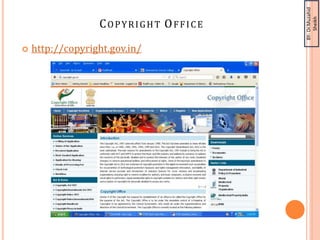
COPYRIGHT OFFICE
 http://copyright.gov.in/
BY-
Dr.Muzahid
Sheikh
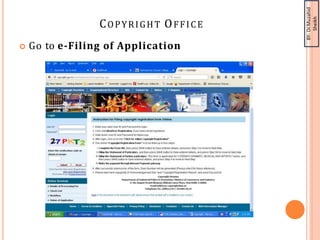
COPYRIGHT OFFICE
 Go to e-Filing of Application
BY-
Dr.Muzahid
Sheikh
INSTRUCTION F O R FI L I N G COPYRIGHT
REGISTRATION F ORM ONLINE:
 Enter your valid User ID and Password to login.
 Click onto New User Registration, if you have not
yet registered.
 Note down User ID and Password for future use.
• User ID : name_surname
•Password : DMCOP_PT@123
•Ex:- User ID : MUZAHID_SHEIKH
Password : DMCOP_PT@123
 After login, click on to link “Click for online
Copyright Registration”.
BY-
Dr.Muzahid
Sheikh
INSTRUCTION FOR FILIN G COPYRIGHT
REGISTRATION FORM ONLINE:
 The online “Copyright Registration Form” is to be filled
up in four steps
1. Complete the Form XIV, then press SAVE button to Save
entered details, and press Step 2 to move to Next Step.
2. Fillup the Statement of Particulars, and then press
SAVE button to Save entered details, and press Step 3/4 to
move to Next step
3. Fillup the Statement of Further particulars. This form
is applicable for “LITERARY/ DRAMATIC, MUSICAL AND
ARTISTIC” works, and then press SAVE button to Save
entrered details, and press Step 4 to move to Next Step.
4. Make the payment through Internet Payment
gateway
 After successful submission of the form, Diary Number will
be generated (Please note it for future reference).
 Please take hard copy(print) of “Acknowledgement Slip”
and “Copyright Registration Report”, and send it by post to
Copyright Division Office within 30 days
BY-
Dr.Muzahid
Sheikh
STEPS FOR COPYRIGHT
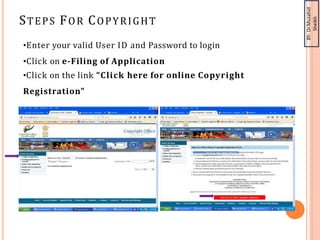
•Enter your valid User ID and Password to login
•Click on e-Filing of Application
•Click on the link “Click here for online Copyright
Registration”
BY-
Dr.Muzahid
Sheikh
STEP 1 :FORM XIV APPLICATION FOR
REGISTRATION OF COPYRIGHT
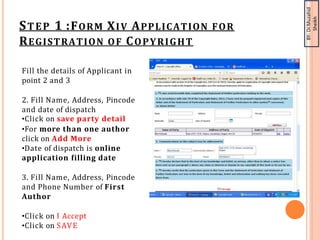
Fill the details of Applicant in
point 2 and 3
2. Fill Name, Address, Pincode
and date of dispatch
•Click on save party detail
•For more than one author
click on Add More
•Date of dispatch is online
application filling date
3. Fill Name, Address, Pincode
and Phone Number of First
Author
•Click on I Accept
•Click on SAVE
BY-
Dr.Muzahid
Sheikh
STEP 2: STATEMENT OF PARTICULARS
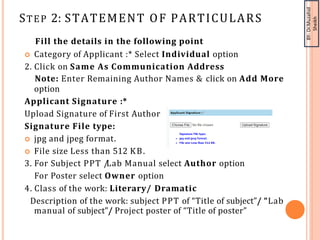
Fill the details in the following point
 Category of Applicant :* Select Individual option
2. Click on Same As Communication Address
Note: Enter Remaining Author Names & click on Add More
option
Applicant Signature :*
Upload Signature of First Author
Signature File type:
 jpg and jpeg format.
 File size Less than 512 KB.
3. For Subject PPT /Lab Manual select Author option
For Poster select Owner option
4. Class of the work: Literary/ Dramatic
Description of the work: subject PPT of “Title of subject”/ “Lab
manual of subject”/ Project poster of “Title of poster”
BY-
Dr.Muzahid
Sheikh
STEP 2: STATEMENT OF PARTICULARS
Fill the details in the following point
5. Title of the Work: Subject Name/Title of poster
6. Language of the Work: English
7. Click on Same as applicant
(Note: All Author Names Should be appear in this point)
8. Whether work is Published or unpublished: Unpublished
9. Not Applicable (N/A)
10. Not Applicable (N/A)
11. Click on Same as applicant
(Note: All Author Names Should be appear in this point)
12 ,13, 14,15,16. Not Applicable (N/A)
17. Remarks, if any: NIL
Click on SAVE
BY-
Dr.Muzahid
Sheikh
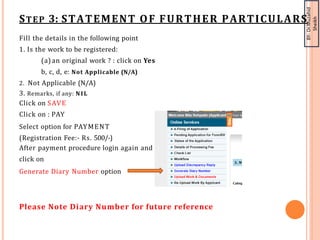
STEP 3: STATEMENT OF FURTHER PARTICULARS
Fill the details in the following point
1. Is the work to be registered:
(a) an original work ? : click on Yes
b, c, d, e: Not Applicable (N/A)
2. Not Applicable (N/A)
3. Remarks, if any: NIL
Click on SAVE
Click on : PAY
Select option for PAYMENT
(Registration Fee:- Rs. 500/-)
After payment procedure login again and
click on
Generate Diary Number option
Please Note Diary Number for future reference
BY-
Dr.Muzahid
Sheikh
MANDATORY
DOCUMENTS
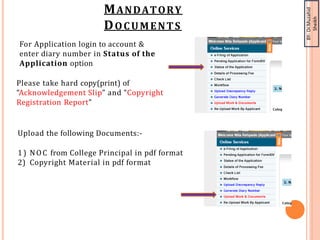
For Application login to account &
enter diary number in Status of the
Application option
Please take hard copy(print) of
“Acknowledgement Slip” and “Copyright
Registration Report”
Upload the following Documents:-
1) NOC from College Principal in pdf format
2) Copyright Material in pdf format
BY-
Dr.Muzahid
Sheikh
MANDATORY
DOCUMENTS
Enclosures:-
 Acknowledgement Slip
 Three copies of Form XIV(signed by all Author on every
page)
 2 copies (CDs) of work (Paste only copyright material in
the PDF format)
 No Objection Certificate from college Principal
 Covering letter (Note: Mention mail Id of First Author in
covering letter)
send it by post to Copyright Division Office
Address:-Refer Address from cite
BY-
Dr.Muzahid
Sheikh
INSTRUCTION FOR COPYRIGHT MATERIAL
 Citation of references is must in copyright
material
 Check the plagiarism
 Sign application form XIV by all author on all
page
 Take outward number on covering letter from
dispatch department of college
 Send all documents in cotton envelope to
copyright office through dispatch department of
college within 30 days of online application date.
BY-
Dr.Muzahid
Sheikh
THANK YOU

APPLICATION PROCEDURE FOR COPYRIGHT FILING.pptx

  • 1.
    COPYRIGHT APPLICATION P RO C E D U R E By- Dr. MUZAHID SHEIKH(PT)
  • 2.
  • 3.
  • 4.
    BY- Dr.Muzahid Sheikh INSTRUCTION F OR FI L I N G COPYRIGHT REGISTRATION F ORM ONLINE:  Enter your valid User ID and Password to login.  Click onto New User Registration, if you have not yet registered.  Note down User ID and Password for future use. • User ID : name_surname •Password : DMCOP_PT@123 •Ex:- User ID : MUZAHID_SHEIKH Password : DMCOP_PT@123  After login, click on to link “Click for online Copyright Registration”.
  • 5.
    BY- Dr.Muzahid Sheikh INSTRUCTION FOR FILING COPYRIGHT REGISTRATION FORM ONLINE:  The online “Copyright Registration Form” is to be filled up in four steps 1. Complete the Form XIV, then press SAVE button to Save entered details, and press Step 2 to move to Next Step. 2. Fillup the Statement of Particulars, and then press SAVE button to Save entered details, and press Step 3/4 to move to Next step 3. Fillup the Statement of Further particulars. This form is applicable for “LITERARY/ DRAMATIC, MUSICAL AND ARTISTIC” works, and then press SAVE button to Save entrered details, and press Step 4 to move to Next Step. 4. Make the payment through Internet Payment gateway  After successful submission of the form, Diary Number will be generated (Please note it for future reference).  Please take hard copy(print) of “Acknowledgement Slip” and “Copyright Registration Report”, and send it by post to Copyright Division Office within 30 days
  • 6.
    BY- Dr.Muzahid Sheikh STEPS FOR COPYRIGHT •Enteryour valid User ID and Password to login •Click on e-Filing of Application •Click on the link “Click here for online Copyright Registration”
  • 7.
    BY- Dr.Muzahid Sheikh STEP 1 :FORMXIV APPLICATION FOR REGISTRATION OF COPYRIGHT Fill the details of Applicant in point 2 and 3 2. Fill Name, Address, Pincode and date of dispatch •Click on save party detail •For more than one author click on Add More •Date of dispatch is online application filling date 3. Fill Name, Address, Pincode and Phone Number of First Author •Click on I Accept •Click on SAVE
  • 8.
    BY- Dr.Muzahid Sheikh STEP 2: STATEMENTOF PARTICULARS Fill the details in the following point  Category of Applicant :* Select Individual option 2. Click on Same As Communication Address Note: Enter Remaining Author Names & click on Add More option Applicant Signature :* Upload Signature of First Author Signature File type:  jpg and jpeg format.  File size Less than 512 KB. 3. For Subject PPT /Lab Manual select Author option For Poster select Owner option 4. Class of the work: Literary/ Dramatic Description of the work: subject PPT of “Title of subject”/ “Lab manual of subject”/ Project poster of “Title of poster”
  • 9.
    BY- Dr.Muzahid Sheikh STEP 2: STATEMENTOF PARTICULARS Fill the details in the following point 5. Title of the Work: Subject Name/Title of poster 6. Language of the Work: English 7. Click on Same as applicant (Note: All Author Names Should be appear in this point) 8. Whether work is Published or unpublished: Unpublished 9. Not Applicable (N/A) 10. Not Applicable (N/A) 11. Click on Same as applicant (Note: All Author Names Should be appear in this point) 12 ,13, 14,15,16. Not Applicable (N/A) 17. Remarks, if any: NIL Click on SAVE
  • 10.
    BY- Dr.Muzahid Sheikh STEP 3: STATEMENTOF FURTHER PARTICULARS Fill the details in the following point 1. Is the work to be registered: (a) an original work ? : click on Yes b, c, d, e: Not Applicable (N/A) 2. Not Applicable (N/A) 3. Remarks, if any: NIL Click on SAVE Click on : PAY Select option for PAYMENT (Registration Fee:- Rs. 500/-) After payment procedure login again and click on Generate Diary Number option Please Note Diary Number for future reference
  • 11.
    BY- Dr.Muzahid Sheikh MANDATORY DOCUMENTS For Application loginto account & enter diary number in Status of the Application option Please take hard copy(print) of “Acknowledgement Slip” and “Copyright Registration Report” Upload the following Documents:- 1) NOC from College Principal in pdf format 2) Copyright Material in pdf format
  • 12.
    BY- Dr.Muzahid Sheikh MANDATORY DOCUMENTS Enclosures:-  Acknowledgement Slip Three copies of Form XIV(signed by all Author on every page)  2 copies (CDs) of work (Paste only copyright material in the PDF format)  No Objection Certificate from college Principal  Covering letter (Note: Mention mail Id of First Author in covering letter) send it by post to Copyright Division Office Address:-Refer Address from cite
  • 13.
    BY- Dr.Muzahid Sheikh INSTRUCTION FOR COPYRIGHTMATERIAL  Citation of references is must in copyright material  Check the plagiarism  Sign application form XIV by all author on all page  Take outward number on covering letter from dispatch department of college  Send all documents in cotton envelope to copyright office through dispatch department of college within 30 days of online application date.
  • 14.