Application Maps &
Techniques to Generate Them
by
Arvind Soni
@soniarvind
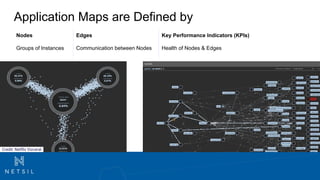
Application Maps are Defined by
Credit: Netflix Vizceral
Nodes Edges Key Performance Indicators (KPIs)
Groups of Instances Communication between Nodes Health of Nodes & Edges
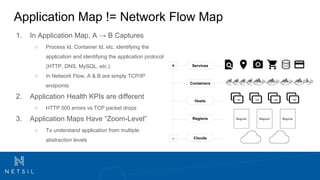
Application Map != Network Flow Map
1. In Application Map, A → B Captures
○ Process Id, Container Id, etc, identifying the
application and identifying the application protocol
(HTTP, DNS, MySQL, etc.)
○ In Network Flow, A & B are simply TCP/IP
endpoints
2. Application Health KPIs are different
○ HTTP 500 errors vs TCP packet drops
3. Application Maps Have “Zoom-Level”
○ To understand application from multiple
abstraction levels
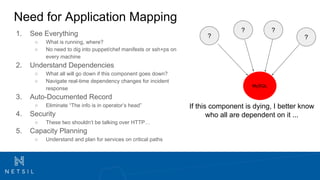
Need for Application Mapping
1. See Everything
○ What is running, where?
○ No need to dig into puppet/chef manifests or ssh+ps on
every machine
2. Understand Dependencies
○ What all will go down if this component goes down?
○ Navigate real-time dependency changes for incident
response
3. Auto-Documented Record
○ Eliminate “The info is in operator’s head”
4. Security
○ These two shouldn’t be talking over HTTP…
5. Capacity Planning
○ Understand and plan for services on critical paths
?
MySQL
If this component is dying, I better know
who all are dependent on it ...
?
??
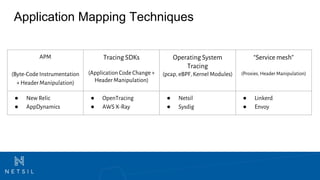
Application Mapping Techniques
APM
(Byte-Code Instrumentation
+ Header Manipulation)
Tracing SDKs
(Application Code Change +
Header Manipulation)
Operating System
Tracing
(pcap, eBPF, Kernel Modules)
“Service mesh”
(Proxies, Header Manipulation)
● New Relic
● AppDynamics
● OpenTracing
● AWS X-Ray
● Netsil
● Sysdig
● Linkerd
● Envoy
APM - Code Instrumentation & Header Manipulation
How does it work
● Capture incoming request at instrumented
application
● Add context to the header
● Preserve the context across instrumented
services.
A Pro and A Con
+ Doesn’t require any application code change
(instrumentation is run time)
- Requires instrumentation and a lot of
components are hard to instrument -
External Services, DNS, LB, Service Discovery,
Unsupported Languages, Unsupported
Language Versions, ...
Credit: AppDynamics
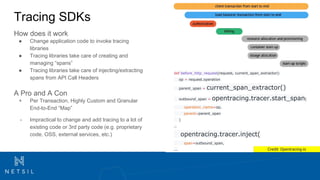
Tracing SDKs
How does it work
● Change application code to invoke tracing
libraries
● Tracing libraries take care of creating and
managing “spans”
● Tracing libraries take care of injecting/extracting
spans from API Call Headers
A Pro and A Con
+ Per Transaction, Highly Custom and Granular
End-to-End “Map”
- Impractical to change and add tracing to a lot of
existing code or 3rd party code (e.g. proprietary
code, OSS, external services, etc.)
def before_http_request(request, current_span_extractor):
op = request.operation
parent_span = current_span_extractor()
outbound_span = opentracing.tracer.start_span(
operation_name=op,
parent=parent_span
)
…
opentracing.tracer.inject(
span=outbound_span,
... Credit: Opentracing.io
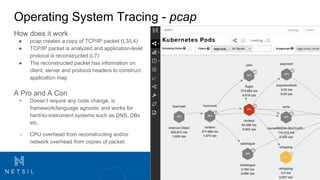
Operating System Tracing - pcap
How does it work
● pcap creates a copy of TCP/IP packet (L3/L4)
● TCP/IP packet is analyzed and application-level
protocol is reconstructed (L7)
● The reconstructed packet has information on
client, server and protocol headers to construct
application map
A Pro and A Con
+ Doesn’t require any code change, is
framework/language agnostic and works for
hard-to-instrument systems such as DNS, DBs
etc.
- CPU overhead from reconstructing and/or
network overhead from copies of packet
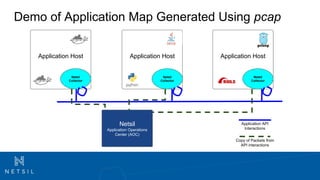
Demo of Application Map Generated Using pcap
Application Host
Copy of Packets from
API interactions
Application API
Interactions
Netsil
Collector
Netsil
Application Operations
Center (AOC)
Application Host
Netsil
Collector
Application Host
Netsil
Collector
Learn More
Observability and Analytics for
Modern Cloud Applications

Application Mapping & Techniques

  • 1.
    Application Maps & Techniquesto Generate Them by Arvind Soni @soniarvind
  • 2.
    Application Maps areDefined by Credit: Netflix Vizceral Nodes Edges Key Performance Indicators (KPIs) Groups of Instances Communication between Nodes Health of Nodes & Edges
  • 3.
    Application Map !=Network Flow Map 1. In Application Map, A → B Captures ○ Process Id, Container Id, etc, identifying the application and identifying the application protocol (HTTP, DNS, MySQL, etc.) ○ In Network Flow, A & B are simply TCP/IP endpoints 2. Application Health KPIs are different ○ HTTP 500 errors vs TCP packet drops 3. Application Maps Have “Zoom-Level” ○ To understand application from multiple abstraction levels
  • 4.
    Need for ApplicationMapping 1. See Everything ○ What is running, where? ○ No need to dig into puppet/chef manifests or ssh+ps on every machine 2. Understand Dependencies ○ What all will go down if this component goes down? ○ Navigate real-time dependency changes for incident response 3. Auto-Documented Record ○ Eliminate “The info is in operator’s head” 4. Security ○ These two shouldn’t be talking over HTTP… 5. Capacity Planning ○ Understand and plan for services on critical paths ? MySQL If this component is dying, I better know who all are dependent on it ... ? ??
  • 5.
    Application Mapping Techniques APM (Byte-CodeInstrumentation + Header Manipulation) Tracing SDKs (Application Code Change + Header Manipulation) Operating System Tracing (pcap, eBPF, Kernel Modules) “Service mesh” (Proxies, Header Manipulation) ● New Relic ● AppDynamics ● OpenTracing ● AWS X-Ray ● Netsil ● Sysdig ● Linkerd ● Envoy
  • 6.
    APM - CodeInstrumentation & Header Manipulation How does it work ● Capture incoming request at instrumented application ● Add context to the header ● Preserve the context across instrumented services. A Pro and A Con + Doesn’t require any application code change (instrumentation is run time) - Requires instrumentation and a lot of components are hard to instrument - External Services, DNS, LB, Service Discovery, Unsupported Languages, Unsupported Language Versions, ... Credit: AppDynamics
  • 7.
    Tracing SDKs How doesit work ● Change application code to invoke tracing libraries ● Tracing libraries take care of creating and managing “spans” ● Tracing libraries take care of injecting/extracting spans from API Call Headers A Pro and A Con + Per Transaction, Highly Custom and Granular End-to-End “Map” - Impractical to change and add tracing to a lot of existing code or 3rd party code (e.g. proprietary code, OSS, external services, etc.) def before_http_request(request, current_span_extractor): op = request.operation parent_span = current_span_extractor() outbound_span = opentracing.tracer.start_span( operation_name=op, parent=parent_span ) … opentracing.tracer.inject( span=outbound_span, ... Credit: Opentracing.io
  • 8.
    Operating System Tracing- pcap How does it work ● pcap creates a copy of TCP/IP packet (L3/L4) ● TCP/IP packet is analyzed and application-level protocol is reconstructed (L7) ● The reconstructed packet has information on client, server and protocol headers to construct application map A Pro and A Con + Doesn’t require any code change, is framework/language agnostic and works for hard-to-instrument systems such as DNS, DBs etc. - CPU overhead from reconstructing and/or network overhead from copies of packet
  • 9.
    Demo of ApplicationMap Generated Using pcap Application Host Copy of Packets from API interactions Application API Interactions Netsil Collector Netsil Application Operations Center (AOC) Application Host Netsil Collector Application Host Netsil Collector
  • 10.
    Learn More Observability andAnalytics for Modern Cloud Applications