BOARDING PASS
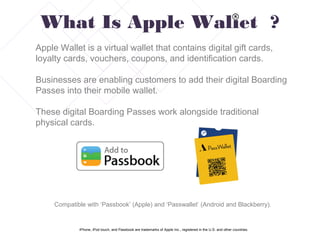
Apple Wallet is a virtual wallet that contains digital gift cards,
loyalty cards, vouchers, coupons, and identification cards.
Businesses are enabling customers to add their digital Boarding
Passes into their mobile wallet.
These digital Boarding Passes work alongside traditional
physical cards.
What Is Apple Wallet ?
Compatible with ‘Passbook’ (Apple) and ‘Passwallet’ (Android and Blackberry).
iPhone, iPod touch, and Passbook are trademarks of Apple Inc., registered in the U.S. and other countries.
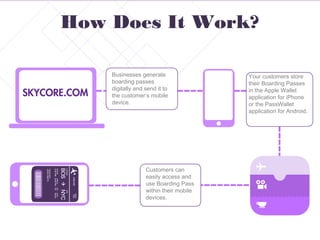
Businesses generate
boarding passes
digitally and send it to
the customer’s mobile
device.
Your customers store
their Boarding Passes
in the Apple Wallet
application for iPhone
or the PassWallet
application for Android.
How Does It Work?
Customers can
easily access and
use Boarding Pass
within their mobile
devices.
Designing The Pass
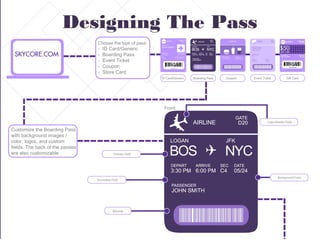
Customize the Boarding Pass
with background images /
color, logos, and custom
fields. The back of the passes
are also customizable
Choose the type of pass:
- ID Card/Generic
- Boarding Pass
- Event Ticket
- Coupon
- Store Card
ID Card/Generic Boarding Pass Coupon Event Ticket Gift Card
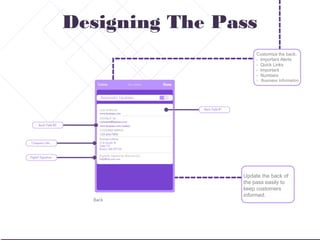
Customize the back:
- Important Alerts
- Quick Links
- Important
- Numbers
- Business Information
Update the back of
the pass easily to
keep customers
informed.
Designing The Pass
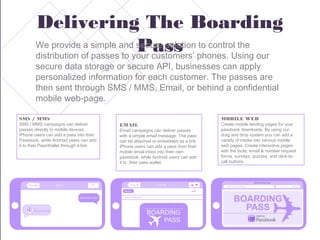
Delivering The Boarding
PassWe provide a simple and secure solution to control the
distribution of passes to your customers’ phones. Using our
secure data storage or secure API, businesses can apply
personalized information for each customer. The passes are
then sent through SMS / MMS, Email, or behind a confidential
mobile web-page.
MOBILE WEB
Create mobile landing pages for your
passbook downloads. By using our
drag and drop system you can add a
variety of media into various mobile
web pages. Create interactive pages
with the tools; email & number request
forms, surveys, quizzes, and click-to-
call buttons.
SMS / MMS
SMS / MMS campaigns can deliver
passes directly to mobile devices.
iPhone users can add a pass into their
Passbook, while Android users can add
it to their PassWallet through a link.
EMAIL
Email campaigns can deliver passes
with a simple email message. The pass
can be attached or embedded as a link.
iPhone users can add a pass from their
mobile email inbox into their own
passbook, while Android users can add
it to their pass wallet.
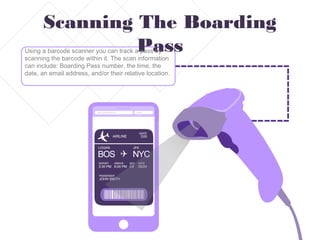
Scanning The Boarding
PassUsing a barcode scanner you can track a pass by
scanning the barcode within it. The scan information
can include: Boarding Pass number, the time, the
date, an email address, and/or their relative location.
Design Apple wallet boarding passes for passbook

Design Apple wallet boarding passes for passbook

  • 1.
  • 2.
    Apple Wallet isa virtual wallet that contains digital gift cards, loyalty cards, vouchers, coupons, and identification cards. Businesses are enabling customers to add their digital Boarding Passes into their mobile wallet. These digital Boarding Passes work alongside traditional physical cards. What Is Apple Wallet ? Compatible with ‘Passbook’ (Apple) and ‘Passwallet’ (Android and Blackberry). iPhone, iPod touch, and Passbook are trademarks of Apple Inc., registered in the U.S. and other countries.
  • 3.
    Businesses generate boarding passes digitallyand send it to the customer’s mobile device. Your customers store their Boarding Passes in the Apple Wallet application for iPhone or the PassWallet application for Android. How Does It Work? Customers can easily access and use Boarding Pass within their mobile devices.
  • 4.
    Designing The Pass Customizethe Boarding Pass with background images / color, logos, and custom fields. The back of the passes are also customizable Choose the type of pass: - ID Card/Generic - Boarding Pass - Event Ticket - Coupon - Store Card ID Card/Generic Boarding Pass Coupon Event Ticket Gift Card
  • 5.
    Customize the back: -Important Alerts - Quick Links - Important - Numbers - Business Information Update the back of the pass easily to keep customers informed. Designing The Pass
  • 6.
    Delivering The Boarding PassWeprovide a simple and secure solution to control the distribution of passes to your customers’ phones. Using our secure data storage or secure API, businesses can apply personalized information for each customer. The passes are then sent through SMS / MMS, Email, or behind a confidential mobile web-page. MOBILE WEB Create mobile landing pages for your passbook downloads. By using our drag and drop system you can add a variety of media into various mobile web pages. Create interactive pages with the tools; email & number request forms, surveys, quizzes, and click-to- call buttons. SMS / MMS SMS / MMS campaigns can deliver passes directly to mobile devices. iPhone users can add a pass into their Passbook, while Android users can add it to their PassWallet through a link. EMAIL Email campaigns can deliver passes with a simple email message. The pass can be attached or embedded as a link. iPhone users can add a pass from their mobile email inbox into their own passbook, while Android users can add it to their pass wallet.
  • 7.
    Scanning The Boarding PassUsinga barcode scanner you can track a pass by scanning the barcode within it. The scan information can include: Boarding Pass number, the time, the date, an email address, and/or their relative location.