Alloy
MVC Framework for Titanium mobile
About Me


•   Karthi Ponnusamy
•   Mobile Developer @anubavam
•   Titanium Certified Mobile Developer(TCMD)
•   Twitter @karthi_nkl
•   Blog http://www.titaniumtutorial.com/
Agenda


   Appcelerator Titanium Mobile - Intro
   CodeStrong 2012
   Alloy
Appcelerator Titanium Mobile


   Framework for build native mobile, desktop and web
    apps
   Support multiple platform in single code base
   Develop native mobile apps using your web skills
   Open source
   Extend Titanium
   Tons of Features
CodeStrong


   Mobile developer conference
   Meet other mobile developers and companies
   Meet Appcelerator executives and engineers
   Boot camp for mobile developers
Moments of CodeStrong 2012


   Windows 8 Platform support
   Appc Partnership with DENSO Corporation and AT&T
   One-year anniversary of Open Marketplace
   Titanium SDK 3.0
   Alloy MVC framework
   Lanica Platino - Game engine for Titanium
What is Alloy?


   Model-View-Controller (MVC) pattern
    Model      -   Database interface
    View       -   User interface
               -   Presentation Layer
    Controller -   Interacts with data and updates the view
               -   Respond to user interaction
   Component-oriented application framework
   Create reusable components
   Open source
Why Alloy?


   Structure your Titanium applications
   Separates presentation layer
   Speed up development
   Code organization - Easy to maintain
   Code re-use
Requirements & Supported Platform


 Titanium SDK 2.1 or greater
 Node.js 0.6.3 or greater


 Development support - OSX and Windows (Linux support in
  progress)
 Android - 2.2 (API8) or greater
 iPad - 4.2 or greater
 iPhone - 4.2 or greater
Getting Start


   Alloy Quick start Guide - http://bit.ly/alloyqs
   Alloy Google Group - http://bit.ly/alloy_group
   Alloy on Github -
    https://github.com/appcelerator/alloy
   Wiki Docs - http://bit.ly/alloy_docs
Install Alloy


   Download or update Titanium Studio to V3.0
    http://bit.ly/alloy_development


   Install from terminal
    $sudo npm install alloy -g
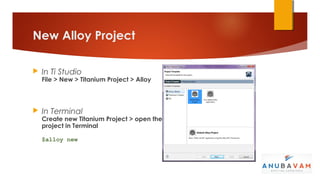
New Alloy Project

   In Ti Studio
    File > New > Titanium Project > Alloy


   In Terminal
    Create new Titanium Project > open the
    project in Terminal

    $alloy new
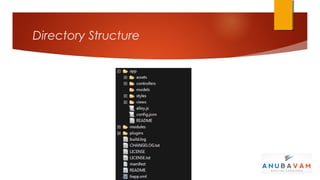
Directory Structure


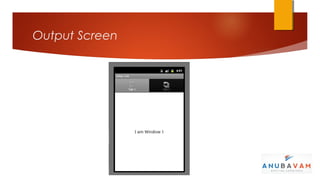
Output Screen
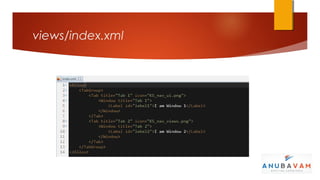
views/index.xml
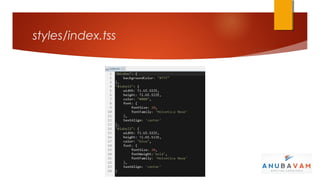
styles/index.tss
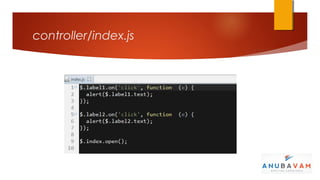
controller/index.js
Create Controller


   In Ti Studio
    (Right-click on a your project > New > Alloy Controller )


   In Terminal
    $alloy generate controller [controller name]
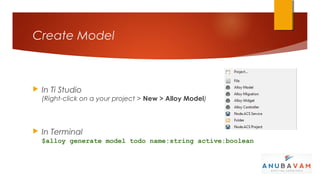
Create Model


   In Ti Studio
    (Right-click on a your project > New > Alloy Model)


   In Terminal
    $alloy generate model todo name:string active:boolean
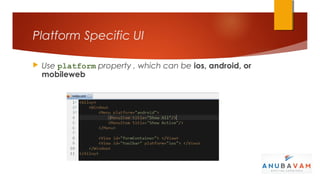
Platform Specific UI

   Use platform property , which can be ios, android, or
    mobileweb
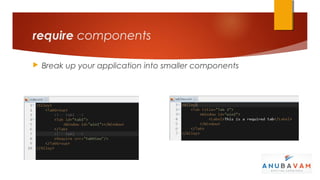
require components

   Break up your application into smaller components
Shared TSS and Global function


   Declare your styles at
    [project root]/app/styles/app.tss

   Declare your global functions/variables at
    [project root]/app/alloy.js
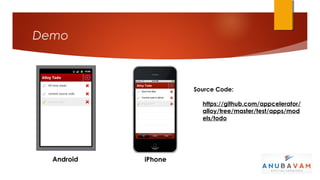
Demo


                     Source Code:

                       https://github.com/appcelerator/
                       alloy/tree/master/test/apps/mod
                       els/todo


  Android   iPhone

Titanium Alloy Framework

  • 1.
    Alloy MVC Framework forTitanium mobile
  • 2.
    About Me • Karthi Ponnusamy • Mobile Developer @anubavam • Titanium Certified Mobile Developer(TCMD) • Twitter @karthi_nkl • Blog http://www.titaniumtutorial.com/
  • 3.
    Agenda  Appcelerator Titanium Mobile - Intro  CodeStrong 2012  Alloy
  • 4.
    Appcelerator Titanium Mobile  Framework for build native mobile, desktop and web apps  Support multiple platform in single code base  Develop native mobile apps using your web skills  Open source  Extend Titanium  Tons of Features
  • 5.
    CodeStrong  Mobile developer conference  Meet other mobile developers and companies  Meet Appcelerator executives and engineers  Boot camp for mobile developers
  • 6.
    Moments of CodeStrong2012  Windows 8 Platform support  Appc Partnership with DENSO Corporation and AT&T  One-year anniversary of Open Marketplace  Titanium SDK 3.0  Alloy MVC framework  Lanica Platino - Game engine for Titanium
  • 7.
    What is Alloy?  Model-View-Controller (MVC) pattern Model - Database interface View - User interface - Presentation Layer Controller - Interacts with data and updates the view - Respond to user interaction  Component-oriented application framework  Create reusable components  Open source
  • 8.
    Why Alloy?  Structure your Titanium applications  Separates presentation layer  Speed up development  Code organization - Easy to maintain  Code re-use
  • 9.
    Requirements & SupportedPlatform  Titanium SDK 2.1 or greater  Node.js 0.6.3 or greater  Development support - OSX and Windows (Linux support in progress)  Android - 2.2 (API8) or greater  iPad - 4.2 or greater  iPhone - 4.2 or greater
  • 10.
    Getting Start  Alloy Quick start Guide - http://bit.ly/alloyqs  Alloy Google Group - http://bit.ly/alloy_group  Alloy on Github - https://github.com/appcelerator/alloy  Wiki Docs - http://bit.ly/alloy_docs
  • 11.
    Install Alloy  Download or update Titanium Studio to V3.0 http://bit.ly/alloy_development  Install from terminal $sudo npm install alloy -g
  • 12.
    New Alloy Project  In Ti Studio File > New > Titanium Project > Alloy  In Terminal Create new Titanium Project > open the project in Terminal $alloy new
  • 13.
  • 14.
  • 15.
  • 16.
  • 17.
  • 18.
    Create Controller  In Ti Studio (Right-click on a your project > New > Alloy Controller )  In Terminal $alloy generate controller [controller name]
  • 19.
    Create Model  In Ti Studio (Right-click on a your project > New > Alloy Model)  In Terminal $alloy generate model todo name:string active:boolean
  • 20.
    Platform Specific UI  Use platform property , which can be ios, android, or mobileweb
  • 21.
    require components  Break up your application into smaller components
  • 22.
    Shared TSS andGlobal function  Declare your styles at [project root]/app/styles/app.tss  Declare your global functions/variables at [project root]/app/alloy.js
  • 23.
    Demo Source Code: https://github.com/appcelerator/ alloy/tree/master/test/apps/mod els/todo Android iPhone