HTML5 
App Cache vs. Local Storage 
senthil | @senthil_hi
Application Cache 
A caching mechanism that enables web-based 
applications run offline
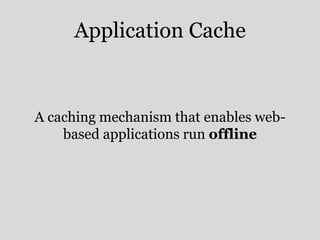
<html manifest=“appcache.mf”>* 
* Same origin as application 
* MIME type text/cache-manifest
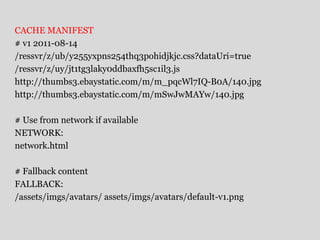
CACHE MANIFEST 
# v1 2011-08-14 
/ressvr/z/ub/y255yxpns254thq3pohidjkjc.css?dataUri=true 
/ressvr/z/uy/jt1tg3laky0ddbaxfh5sc1il3.js 
http://thumbs3.ebaystatic.com/m/m_pqcWl7IQ-B0A/140.jpg 
http://thumbs3.ebaystatic.com/m/mSwJwMAYw/140.jpg 
# Use from network if available 
NETWORK: 
network.html 
# Fallback content 
FALLBACK: 
/assets/imgs/avatars/ assets/imgs/avatars/default-v1.png
www.spritecow.com
Modern Browsers 
& 
IE10
Local Storage 
A storage mechanism through which string 
key/value pairs can be securely stored and 
later retrieved for use.
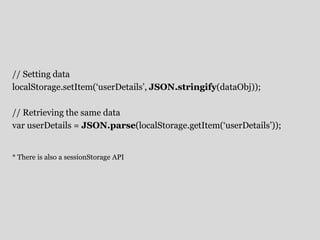
// Setting data 
localStorage.setItem(‘userDetails’, JSON.stringify(dataObj)); 
// Retrieving the same data 
var userDetails = JSON.parse(localStorage.getItem(‘userDetails’)); 
* There is also a sessionStorage API
Follow same-origin rules
Limited to ~5MB/domain
!IE7
It’s not that simple
#1 
Files always come from App Cache, 
even if you are ONLINE 
Tip: Listen to updateready event and notify user
#2 
The App Cache only updates if the content of 
the MANIFEST itself changes 
Tip: Use version number commenting
#3 
App Cache honors HTTP Cache headers 
Tip: Check the Cache-Control & Expires headers for static resources
#4 
App Cache manifest file caches itself 
Tip: Never ever use Far-Future cache headers for manifest files. no-cache 
or 1 day expiry works best
#5 
Other non-cached resources will NOT load 
on a app cached page, even when ONLINE 
Tip: Use wildcard * in NETWORK section of manifest
Why cant we use localStorage for 
everything?
#6 
localStorage operation is 
SYNCHRONOUS
What is the perfect solution?
First Step 
Move to client side rendering
FALLBACK section of manifest is 
your friend!
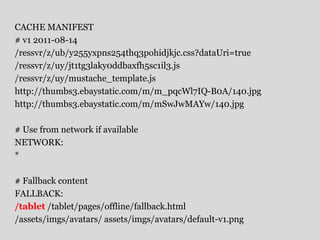
CACHE MANIFEST 
# v1 2011-08-14 
/ressvr/z/ub/y255yxpns254thq3pohidjkjc.css?dataUri=true 
/ressvr/z/uy/jt1tg3laky0ddbaxfh5sc1il3.js 
/ressvr/z/uy/mustache_template.js 
http://thumbs3.ebaystatic.com/m/m_pqcWl7IQ-B0A/140.jpg 
http://thumbs3.ebaystatic.com/m/mSwJwMAYw/140.jpg 
# Use from network if available 
NETWORK: 
* 
# Fallback content 
FALLBACK: 
/tablet /tablet/pages/offline/fallback.html 
/assets/imgs/avatars/ assets/imgs/avatars/default-v1.png
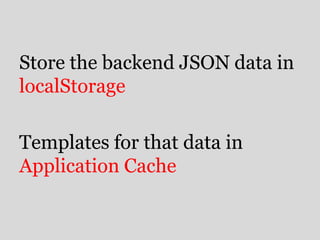
Store the backend JSON data in 
localStorage 
Templates for that data in 
Application Cache
Demo
finally…
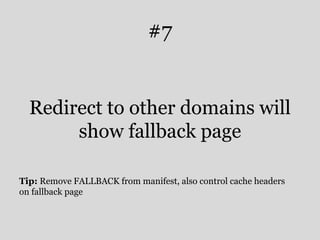
#7 
Redirect to other domains will 
show fallback page 
Tip: Remove FALLBACK from manifest, also control cache headers 
on fallback page
Again… 
Store the backend JSON data in 
localStorage 
Templates for that data in 
Application Cache
Thank You

App cache vs localStorage

  • 1.
    HTML5 App Cachevs. Local Storage senthil | @senthil_hi
  • 2.
    Application Cache Acaching mechanism that enables web-based applications run offline
  • 3.
    <html manifest=“appcache.mf”>* *Same origin as application * MIME type text/cache-manifest
  • 4.
    CACHE MANIFEST #v1 2011-08-14 /ressvr/z/ub/y255yxpns254thq3pohidjkjc.css?dataUri=true /ressvr/z/uy/jt1tg3laky0ddbaxfh5sc1il3.js http://thumbs3.ebaystatic.com/m/m_pqcWl7IQ-B0A/140.jpg http://thumbs3.ebaystatic.com/m/mSwJwMAYw/140.jpg # Use from network if available NETWORK: network.html # Fallback content FALLBACK: /assets/imgs/avatars/ assets/imgs/avatars/default-v1.png
  • 5.
  • 6.
  • 7.
    Local Storage Astorage mechanism through which string key/value pairs can be securely stored and later retrieved for use.
  • 8.
    // Setting data localStorage.setItem(‘userDetails’, JSON.stringify(dataObj)); // Retrieving the same data var userDetails = JSON.parse(localStorage.getItem(‘userDetails’)); * There is also a sessionStorage API
  • 9.
  • 10.
  • 11.
  • 12.
  • 13.
    #1 Files alwayscome from App Cache, even if you are ONLINE Tip: Listen to updateready event and notify user
  • 14.
    #2 The AppCache only updates if the content of the MANIFEST itself changes Tip: Use version number commenting
  • 15.
    #3 App Cachehonors HTTP Cache headers Tip: Check the Cache-Control & Expires headers for static resources
  • 16.
    #4 App Cachemanifest file caches itself Tip: Never ever use Far-Future cache headers for manifest files. no-cache or 1 day expiry works best
  • 17.
    #5 Other non-cachedresources will NOT load on a app cached page, even when ONLINE Tip: Use wildcard * in NETWORK section of manifest
  • 18.
    Why cant weuse localStorage for everything?
  • 19.
  • 20.
    What is theperfect solution?
  • 21.
    First Step Moveto client side rendering
  • 22.
    FALLBACK section ofmanifest is your friend!
  • 23.
    CACHE MANIFEST #v1 2011-08-14 /ressvr/z/ub/y255yxpns254thq3pohidjkjc.css?dataUri=true /ressvr/z/uy/jt1tg3laky0ddbaxfh5sc1il3.js /ressvr/z/uy/mustache_template.js http://thumbs3.ebaystatic.com/m/m_pqcWl7IQ-B0A/140.jpg http://thumbs3.ebaystatic.com/m/mSwJwMAYw/140.jpg # Use from network if available NETWORK: * # Fallback content FALLBACK: /tablet /tablet/pages/offline/fallback.html /assets/imgs/avatars/ assets/imgs/avatars/default-v1.png
  • 24.
    Store the backendJSON data in localStorage Templates for that data in Application Cache
  • 25.
  • 26.
  • 27.
    #7 Redirect toother domains will show fallback page Tip: Remove FALLBACK from manifest, also control cache headers on fallback page
  • 28.
    Again… Store thebackend JSON data in localStorage Templates for that data in Application Cache
  • 29.

Editor's Notes

  • #5 Cache manifest should be the first line The main URL is part of the cache Allows other domains
  • #20 Everything will be JS based, big JS & CSS reading, eval is a problem, also image handling
  • #28 Offline - 404, 500 etc. Original connection needs to fail – flaky connection