Apache Samza 0.10.0
What’s coming up in the next Samza release
LinkedIn
Navina R
Committer @ Apache
Samza
New Features in Samza
0.10.0
 Dynamic Configuration & Control
◦ Coordinator Stream
◦ Broadcast Stream
 Host affinity in Samza
 New Consumer: Kinesis
 New Producers: Kinesis, HDFS,
ElasticSearch
 Upgraded RocksDB
Dynamic Configuration &
Control
1. Coordinator Stream
2. Broadcast Stream
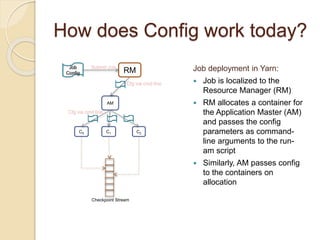
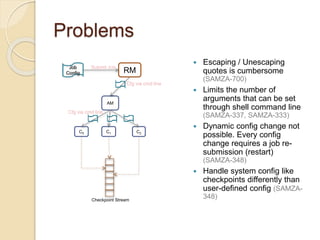
How does Config work today?
Job
Config RM
AM
C0 C1 C2
Submit Job
Cfg via cmd line
Cfg via cmd line
Job deployment in Yarn:
 Job is localized to the
Resource Manager (RM)
 RM allocates a container for
the Application Master (AM)
and passes the config
parameters as command-
line arguments to the run-
am script
 Similarly, AM passes config
to the containers on
allocation
Checkpoint Stream
Problems
Job
Config RM
AM
C0 C1 C2
Submit Job
Cfg via cmd line
Cfg via cmd line
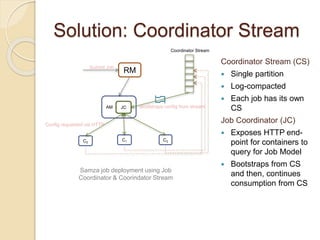
 Escaping / Unescaping
quotes is cumbersome
(SAMZA-700)
 Limits the number of
arguments that can be set
through shell command line
(SAMZA-337, SAMZA-333)
 Dynamic config change not
possible. Every config
change requires a job re-
submission (restart)
(SAMZA-348)
 Handle system config like
checkpoints differently than
user-defined config (SAMZA-
348)Checkpoint Stream
Solution: Coordinator Stream
RM
AM
C0
C1 C2
Submit Job
JC
Coordinator Stream
Config requested via HTTP
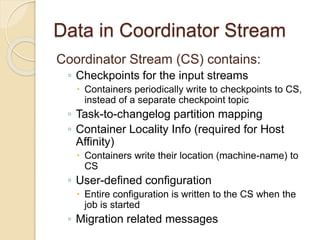
Coordinator Stream (CS)
 Single partition
 Log-compacted
 Each job has its own
CS
Job Coordinator (JC)
 Exposes HTTP end-
point for containers to
query for Job Model
 Bootstraps from CS
and then, continues
consumption from CS
Samza job deployment using Job
Coordinator & Coorindator Stream
Bootstraps config from stream
Data in Coordinator Stream
Coordinator Stream (CS) contains:
◦ Checkpoints for the input streams
 Containers periodically write to checkpoints to CS,
instead of a separate checkpoint topic
◦ Task-to-changelog partition mapping
◦ Container Locality Info (required for Host
Affinity)
 Containers write their location (machine-name) to
CS
◦ User-defined configuration
 Entire configuration is written to the CS when the
job is started
◦ Migration related messages
Coordinator Stream: Benefits
RM
AM
C0
C1 C2
Submit Job
JC
Coordinator Stream
Config requested via HTTP
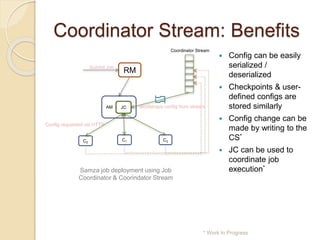
 Config can be easily
serialized /
deserialized
 Checkpoints & user-
defined configs are
stored similarly
 Config change can be
made by writing to the
CS*
 JC can be used to
coordinate job
execution*
* Work In Progress
Samza job deployment using Job
Coordinator & Coorindator Stream
Bootstraps config from stream
Coordinator Stream: Tools /
Migration
Tools:
 Command-line tool to write config
changes to coordinator stream
Migration:
 JobRunner in 0.10.0 automatically
migrates checkpoints and changelog
mappings in 0.9.1 to Coordinator
Stream in 0.10.0
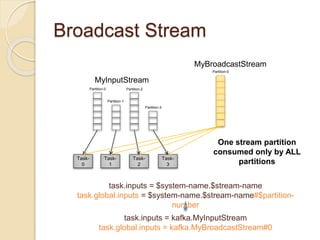
Broadcast Stream
Stream consumed by all Tasks in the job
Motivation
 Dynamically configure job behavior
 Acts a custom control channel for an
application
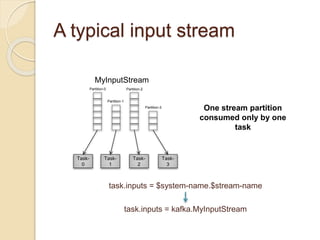
A typical input stream
Task-
0
Task-
1
Task-
2
Task-
3
MyInputStream
Partition-0
Partition-1
Partition-2
Partition-3
task.inputs = $system-name.$stream-name
task.inputs = kafka.MyInputStream
One stream partition
consumed only by one
task
Broadcast Stream
Task-
0
Task-
1
Task-
2
Task-
3
MyInputStream
Partition-0
Partition-1
Partition-2
Partition-3
MyBroadcastStream
Partition-0
task.inputs = $system-name.$stream-name
task.global.inputs = $system-name.$stream-name#$partition-
number
task.inputs = kafka.MyInputStream
task.global.inputs = kafka.MyBroadcastStream#0
One stream partition
consumed only by ALL
partitions
Broadcast Stream
Task-
0
Task-
1
Task-
2
Task-
3
MyInputStream
Partition-0
Partition-1
Partition-2
Partition-3
MyBroadcastStream
Partition-0 Partition-1 Partition-2
task.inputs = $system-name.$stream-name
task.global.inputs = $system-name.$stream-name#[$partition-
range]
task.inputs = kafka.MyInputStream
task.global.inputs = kafka.MyBroadcastStream#[0-1]
Host-Affinity
Making Samza aware of container locality
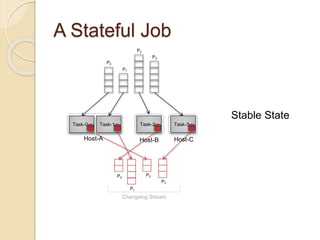
A Stateful Job
P0
P1
P2
P3
Task-0 Task-1 Task-2 Task-3
P0
P1
P2
P3
Host-A Host-B Host-C
Changelog Stream
Stable State
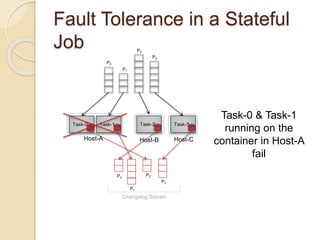
Fault Tolerance in a Stateful
Job
P0
P1
P2
P3
Task-0 Task-1 Task-2 Task-3
P0
P1
P2
P3
Host-A Host-B Host-C
Changelog Stream
Task-0 & Task-1
running on the
container in Host-A
fail
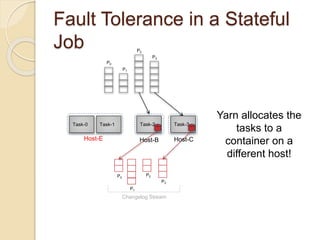
Fault Tolerance in a Stateful
Job
P0
P1
P2
P3
Task-0 Task-1 Task-2 Task-3
P0
P1
P2
P3
Host-E Host-B Host-C
Changelog Stream
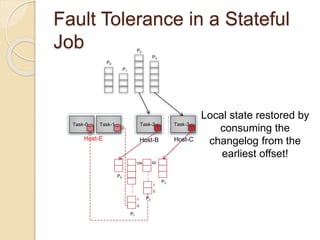
Yarn allocates the
tasks to a
container on a
different host!
Fault Tolerance in a Stateful
Job
P0
P1
P2
P3
Task-0 Task-1 Task-2 Task-3
P0
P1
P2
P3
Host-E Host-B Host-C
:
:
0
1
159
:
:
0
1
82
Local state restored by
consuming the
changelog from the
earliest offset!
Fault Tolerance in a Stateful
Job
P0
P1
P2
P3
Task-0 Task-1 Task-2 Task-3
P0
P1
P2
P3
Host-E Host-B Host-C
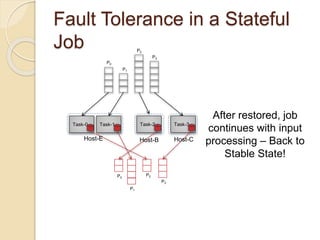
After restored, job
continues with input
processing – Back to
Stable State!
Problems
P0
P1
P2
P3
Task-0 Task-1 Task-2 Task-3
P0
P1
P2
P3
Host-E Host-B Host-C
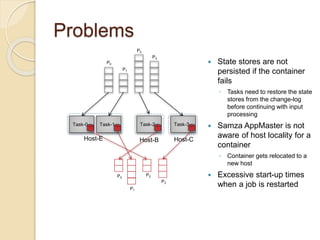
 State stores are not
persisted if the container
fails
◦ Tasks need to restore the state
stores from the change-log
before continuing with input
processing
 Samza AppMaster is not
aware of host locality for a
container
◦ Container gets relocated to a
new host
 Excessive start-up times
when a job is restarted
Motivation
 During upgrades and job failures,
◦ Local state built in the task is lost
◦ Samza is not aware of the container
locality
◦ Job start-up time is large (hours)
 Job is no longer “near-realtime”
 Multiple stateful jobs starting up at the
same time will DDoS kafka –
saturating the Kafka clusters
Solution: Host Affinity in
Samza
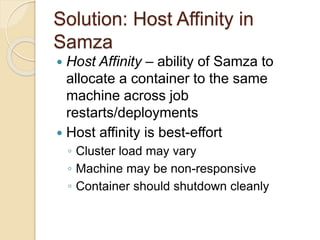
 Host Affinity – ability of Samza to
allocate a container to the same
machine across job
restarts/deployments
 Host affinity is best-effort
◦ Cluster load may vary
◦ Machine may be non-responsive
◦ Container should shutdown cleanly
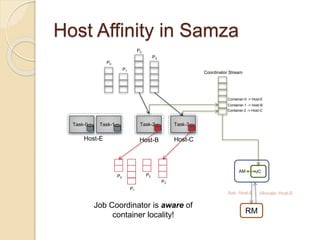
Host Affinity in Samza
P0
P1
P2
P3
Task-0 Task-1 Task-2 Task-3
P0
P1
P2
P3
Host-E Host-B Host-C
Coordinator Stream
Container-0 -> Host-E
Container-1 -> Host-B
Container-2 -> Host-C
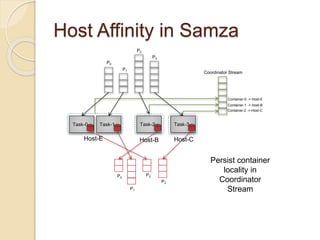
Persist container
locality in
Coordinator
Stream
Host Affinity in Samza
P0
P1
P2
P3
Task-0 Task-1 Task-2 Task-3
P0
P1
P2
P3
Host-E Host-B Host-C
Coordinator Stream
Container-0 -> Host-E
Container-1 -> Host-B
Container-2 -> Host-C
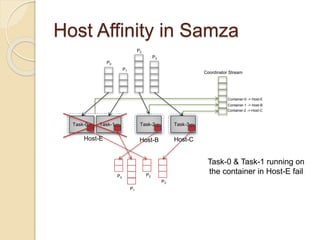
Task-0 & Task-1 running on
the container in Host-E fail
Host Affinity in Samza
P0
P1
P2
P3
Task-0 Task-1 Task-2 Task-3
P0
P1
P2
P3
Host-E Host-B Host-C
Coordinator Stream
Container-0 -> Host-E
Container-1 -> Host-B
Container-2 -> Host-C
AM JC
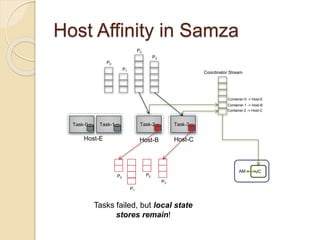
Tasks failed, but local state
stores remain!
Host Affinity in Samza
P0
P1
P2
P3
Task-0 Task-1 Task-2 Task-3
P0
P1
P2
P3
Host-E Host-B Host-C
Coordinator Stream
Container-0 -> Host-E
Container-1 -> Host-B
Container-2 -> Host-C
AM JC
RM
Ask: Host-E Allocate: Host-E
Job Coordinator is aware of
container locality!
Host Affinity in Samza
P0
P1
P2
P3
Task-0 Task-1 Task-2 Task-3
P0
P1
P2
P3
Host-E Host-B Host-C
:
:
0
1
159
:
:
0
1
82
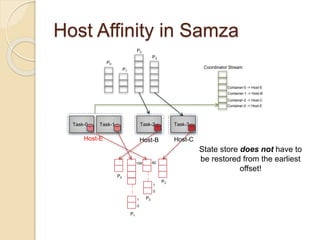
Coordinator Stream
Container-0 -> Host-E
Container-1 -> Host-B
Container-2 -> Host-C
Container-0 -> Host-E
State store does not have to
be restored from the earliest
offset!
Host Affinity in Samza
P0
P1
P2
P3
Task-0 Task-1 Task-2 Task-3
P0
P1
P2
P3
Host-E Host-B Host-C
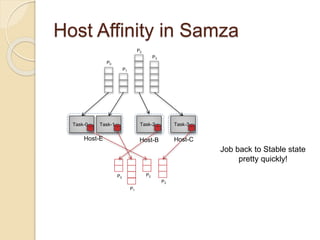
Job back to Stable state
pretty quickly!
Host Affinity in Samza
 Enable host-affinity
◦ yarn.samza.host-affinity.enabled=true
 Enable continuous scheduling in Yarn
 Useful for stateful jobs
 Does not affect stateless jobs
Upgraded RocksDB
Upgraded RocksDB
 New RocksDb JNI 3.13.1+ version
supports TTL
 Impact:
◦ Removes the need to write customized
code to delete expired records
New Features in Samza
0.10.0
 Dynamic Configuration & Control
◦ Coordinator Stream
◦ Broadcast Stream
 Host affinity in Samza
 New Consumer: Kinesis
 New Producers: Kinesis, HDFS,
ElasticSearch
 Upgraded RocksDB
Thanks!
 Expected release date – Nov 2015
 Thanks to all the contributors!
 Contact Us:
◦ Mailing List – dev@samza.apache.org
◦ Twitter - #samza, @samzastream
Questions?

Apache Samza - New features in the upcoming Samza release 0.10.0

  • 1.
    Apache Samza 0.10.0 What’scoming up in the next Samza release LinkedIn Navina R Committer @ Apache Samza
  • 2.
    New Features inSamza 0.10.0  Dynamic Configuration & Control ◦ Coordinator Stream ◦ Broadcast Stream  Host affinity in Samza  New Consumer: Kinesis  New Producers: Kinesis, HDFS, ElasticSearch  Upgraded RocksDB
  • 3.
    Dynamic Configuration & Control 1.Coordinator Stream 2. Broadcast Stream
  • 4.
    How does Configwork today? Job Config RM AM C0 C1 C2 Submit Job Cfg via cmd line Cfg via cmd line Job deployment in Yarn:  Job is localized to the Resource Manager (RM)  RM allocates a container for the Application Master (AM) and passes the config parameters as command- line arguments to the run- am script  Similarly, AM passes config to the containers on allocation Checkpoint Stream
  • 5.
    Problems Job Config RM AM C0 C1C2 Submit Job Cfg via cmd line Cfg via cmd line  Escaping / Unescaping quotes is cumbersome (SAMZA-700)  Limits the number of arguments that can be set through shell command line (SAMZA-337, SAMZA-333)  Dynamic config change not possible. Every config change requires a job re- submission (restart) (SAMZA-348)  Handle system config like checkpoints differently than user-defined config (SAMZA- 348)Checkpoint Stream
  • 6.
    Solution: Coordinator Stream RM AM C0 C1C2 Submit Job JC Coordinator Stream Config requested via HTTP Coordinator Stream (CS)  Single partition  Log-compacted  Each job has its own CS Job Coordinator (JC)  Exposes HTTP end- point for containers to query for Job Model  Bootstraps from CS and then, continues consumption from CS Samza job deployment using Job Coordinator & Coorindator Stream Bootstraps config from stream
  • 7.
    Data in CoordinatorStream Coordinator Stream (CS) contains: ◦ Checkpoints for the input streams  Containers periodically write to checkpoints to CS, instead of a separate checkpoint topic ◦ Task-to-changelog partition mapping ◦ Container Locality Info (required for Host Affinity)  Containers write their location (machine-name) to CS ◦ User-defined configuration  Entire configuration is written to the CS when the job is started ◦ Migration related messages
  • 8.
    Coordinator Stream: Benefits RM AM C0 C1C2 Submit Job JC Coordinator Stream Config requested via HTTP  Config can be easily serialized / deserialized  Checkpoints & user- defined configs are stored similarly  Config change can be made by writing to the CS*  JC can be used to coordinate job execution* * Work In Progress Samza job deployment using Job Coordinator & Coorindator Stream Bootstraps config from stream
  • 9.
    Coordinator Stream: Tools/ Migration Tools:  Command-line tool to write config changes to coordinator stream Migration:  JobRunner in 0.10.0 automatically migrates checkpoints and changelog mappings in 0.9.1 to Coordinator Stream in 0.10.0
  • 10.
    Broadcast Stream Stream consumedby all Tasks in the job
  • 11.
    Motivation  Dynamically configurejob behavior  Acts a custom control channel for an application
  • 12.
    A typical inputstream Task- 0 Task- 1 Task- 2 Task- 3 MyInputStream Partition-0 Partition-1 Partition-2 Partition-3 task.inputs = $system-name.$stream-name task.inputs = kafka.MyInputStream One stream partition consumed only by one task
  • 13.
    Broadcast Stream Task- 0 Task- 1 Task- 2 Task- 3 MyInputStream Partition-0 Partition-1 Partition-2 Partition-3 MyBroadcastStream Partition-0 task.inputs =$system-name.$stream-name task.global.inputs = $system-name.$stream-name#$partition- number task.inputs = kafka.MyInputStream task.global.inputs = kafka.MyBroadcastStream#0 One stream partition consumed only by ALL partitions
  • 14.
    Broadcast Stream Task- 0 Task- 1 Task- 2 Task- 3 MyInputStream Partition-0 Partition-1 Partition-2 Partition-3 MyBroadcastStream Partition-0 Partition-1Partition-2 task.inputs = $system-name.$stream-name task.global.inputs = $system-name.$stream-name#[$partition- range] task.inputs = kafka.MyInputStream task.global.inputs = kafka.MyBroadcastStream#[0-1]
  • 15.
    Host-Affinity Making Samza awareof container locality
  • 16.
    A Stateful Job P0 P1 P2 P3 Task-0Task-1 Task-2 Task-3 P0 P1 P2 P3 Host-A Host-B Host-C Changelog Stream Stable State
  • 17.
    Fault Tolerance ina Stateful Job P0 P1 P2 P3 Task-0 Task-1 Task-2 Task-3 P0 P1 P2 P3 Host-A Host-B Host-C Changelog Stream Task-0 & Task-1 running on the container in Host-A fail
  • 18.
    Fault Tolerance ina Stateful Job P0 P1 P2 P3 Task-0 Task-1 Task-2 Task-3 P0 P1 P2 P3 Host-E Host-B Host-C Changelog Stream Yarn allocates the tasks to a container on a different host!
  • 19.
    Fault Tolerance ina Stateful Job P0 P1 P2 P3 Task-0 Task-1 Task-2 Task-3 P0 P1 P2 P3 Host-E Host-B Host-C : : 0 1 159 : : 0 1 82 Local state restored by consuming the changelog from the earliest offset!
  • 20.
    Fault Tolerance ina Stateful Job P0 P1 P2 P3 Task-0 Task-1 Task-2 Task-3 P0 P1 P2 P3 Host-E Host-B Host-C After restored, job continues with input processing – Back to Stable State!
  • 21.
    Problems P0 P1 P2 P3 Task-0 Task-1 Task-2Task-3 P0 P1 P2 P3 Host-E Host-B Host-C  State stores are not persisted if the container fails ◦ Tasks need to restore the state stores from the change-log before continuing with input processing  Samza AppMaster is not aware of host locality for a container ◦ Container gets relocated to a new host  Excessive start-up times when a job is restarted
  • 22.
    Motivation  During upgradesand job failures, ◦ Local state built in the task is lost ◦ Samza is not aware of the container locality ◦ Job start-up time is large (hours)  Job is no longer “near-realtime”  Multiple stateful jobs starting up at the same time will DDoS kafka – saturating the Kafka clusters
  • 23.
    Solution: Host Affinityin Samza  Host Affinity – ability of Samza to allocate a container to the same machine across job restarts/deployments  Host affinity is best-effort ◦ Cluster load may vary ◦ Machine may be non-responsive ◦ Container should shutdown cleanly
  • 24.
    Host Affinity inSamza P0 P1 P2 P3 Task-0 Task-1 Task-2 Task-3 P0 P1 P2 P3 Host-E Host-B Host-C Coordinator Stream Container-0 -> Host-E Container-1 -> Host-B Container-2 -> Host-C Persist container locality in Coordinator Stream
  • 25.
    Host Affinity inSamza P0 P1 P2 P3 Task-0 Task-1 Task-2 Task-3 P0 P1 P2 P3 Host-E Host-B Host-C Coordinator Stream Container-0 -> Host-E Container-1 -> Host-B Container-2 -> Host-C Task-0 & Task-1 running on the container in Host-E fail
  • 26.
    Host Affinity inSamza P0 P1 P2 P3 Task-0 Task-1 Task-2 Task-3 P0 P1 P2 P3 Host-E Host-B Host-C Coordinator Stream Container-0 -> Host-E Container-1 -> Host-B Container-2 -> Host-C AM JC Tasks failed, but local state stores remain!
  • 27.
    Host Affinity inSamza P0 P1 P2 P3 Task-0 Task-1 Task-2 Task-3 P0 P1 P2 P3 Host-E Host-B Host-C Coordinator Stream Container-0 -> Host-E Container-1 -> Host-B Container-2 -> Host-C AM JC RM Ask: Host-E Allocate: Host-E Job Coordinator is aware of container locality!
  • 28.
    Host Affinity inSamza P0 P1 P2 P3 Task-0 Task-1 Task-2 Task-3 P0 P1 P2 P3 Host-E Host-B Host-C : : 0 1 159 : : 0 1 82 Coordinator Stream Container-0 -> Host-E Container-1 -> Host-B Container-2 -> Host-C Container-0 -> Host-E State store does not have to be restored from the earliest offset!
  • 29.
    Host Affinity inSamza P0 P1 P2 P3 Task-0 Task-1 Task-2 Task-3 P0 P1 P2 P3 Host-E Host-B Host-C Job back to Stable state pretty quickly!
  • 30.
    Host Affinity inSamza  Enable host-affinity ◦ yarn.samza.host-affinity.enabled=true  Enable continuous scheduling in Yarn  Useful for stateful jobs  Does not affect stateless jobs
  • 31.
  • 32.
    Upgraded RocksDB  NewRocksDb JNI 3.13.1+ version supports TTL  Impact: ◦ Removes the need to write customized code to delete expired records
  • 33.
    New Features inSamza 0.10.0  Dynamic Configuration & Control ◦ Coordinator Stream ◦ Broadcast Stream  Host affinity in Samza  New Consumer: Kinesis  New Producers: Kinesis, HDFS, ElasticSearch  Upgraded RocksDB
  • 34.
    Thanks!  Expected releasedate – Nov 2015  Thanks to all the contributors!  Contact Us: ◦ Mailing List – dev@samza.apache.org ◦ Twitter - #samza, @samzastream
  • 35.

Editor's Notes

  • #3 We have come up with a way to dynamically configure and control your Samza jobs. The 2 features relevant to this are coordinator stream and broadcast stream. I will discuss the motivation and design for these in the next few slides. We will also illustrate what we mean by host-affinity in Samza and why it is important. There have been many new contributors since the last release and have added significant value to our codebase such as new system producers and consumers. We have verified and merged producers for 2 systems – HDFS (Eli Reisman) and ElasticSearch (Dan Harvey). Kinesis producer/consumer is a very popular ask among Samza users that are predominantly based on AWS. This was recently prototyped as a part of a Google Summer of Code. We are eagerly looking forward for the patch and are planning to release it as a beta version in 0.10.0 0.10.0 will use can upgraded version of RocksDb. I will be discussing the design details of Coordinator stream, broadcast stream and host affinity. Rest of feature-adds should be straight-forward from the website docs!
  • #5 Let’s look at how a Samza job configuration works today. When a Samza job is deployed on Yarn, we submit a application request to the RM. Job tar, which includes the config is localized on the RM. RM passes the config to the AM when executing “run-am” on AM container start-up Similarly, AM starts each container using “run-container.sh” command with the config included in the command line
  • #6 Passing the config as apart of the command line has certain drawbacks. * Escaping / unescaping quotes becomes tedious, preventing us from using any complicated config values * Size limit on varargs when Yarn exports configuration – When yarn launches a container using launch_container.sh, it exports all envt variables, including the samza config, as a variables on the command line. There is limit to the size to the varargs length on the machine, usually ~128KB. This is problematic for jobs with large configuration. No support for dynamic configuration changes – Config is immutable once the job starts; Features such as auto-scaling require dynamic reconfiguration of the job. User defined and programmatic configuration are handled differently – checkpoint configuration is in a stream and can be over-written, where as user-defined config is actionable only during job start-up Lack of persistent configuration between job executions – Cannot validate a configuration for a job without persistent configuration. Certain changes to job configuration may be equivalent to resetting the job itself.
  • #7 Coordinator Stream is basically a single partitioned , log-compacted stream that acts as a “config log”. Each job has its own CS. Job Coordinator – A component that reads the entire config from the bootstrap stream and exposes the config to the container through a HTTP end-point. The term “Coordinator Stream” is kind of overloaded, in the sense that it carries a lot of job and system related configuration and can be potentially used by the JC to make more smart decisions about container execution/ placement. For example, it will now contain checkpoint information. Containers write checkpoints directly to the coordinator stream. When the container comes up , it queries the JC for the “JobModel”, which basically defines the hierarchy of the job execution. JobModel is composed of one or more ContainerModel, and each ContainerModel is composed of a bunch of TaskModel. Each TaskModel contains the checkpoint information related to the input streams being processed by that task instance. In this way, JC exposes the job topology using a uniform data model. So now, when you deploy a job, the RM brings up the AM container which contains the JC embedded within it. The JC bootstrap from the CS and builds a Job model.
  • #8 Callout -> Container Locality Information -> will be explained as a part of host-affinity.
  • #9 Serialized/Deserialized – can support more complex config definitions ; Currently, use Json serde. Gives more flexibility in terms of parsing configs. No distinction between system and job related configuration. Make config change by writing directly to the CS. We already have a command line tool to that. -> Dynamic config change for the job. In future, we want to enable to JC to control the container life-cycle and the job execution instead of the AM.
  • #10 CALL OUT: Migration works for Kafka based systems ONLY! If there are Samza jobs that use different stream system for checkpoints, then the checkpoint / changelog migration has to be performed manually and also, remove the “task.checkpoint.factory” configuration before restarting the job successfully with 0.10.0
  • #11 Trident in Storm allows you to perform a broadcast function, where every tuple is replicated to all target partitions. Broadcast streams in Samza is analogous to the broadcast function in Storm. Here, we allow a stream partition to be consumed by all task instances in the job.
  • #12 Use Cases - Change the algorithm or tests that are run in the Samza job such as PMML - Acts as a custom control channel for an application - Trigger global behavior change in a job
  • #13 Today, in Samza, we have modeled Tasks such that each stream partition is consumed by only one task instance in the job. This ensures that you don’t process the same message partition multiple times. Explain the diagram & config statement
  • #14 Explain the diagram and config
  • #15 Call Out -> Can broadcast more than 1 partition in the stream
  • #16 Deployment Modes Local – Single container process which handles all input partitions, running on a machine Standalone* - Developer/deployment tool starts the containers in a set of machines Yarn – SamzaAppMaster interacts with the Resource Manager (RM) and the Node Manager (NM) in order to manage resource-allocation and provide fault tolerance Before getting into the details of host-affinity, I want to provide an overview of how stateful jobs behave and fault tolerance is handled using Yarn.
  • #17 Explain the diagram
  • #19 Call Out -> * Container allocated on a different host * State needs to be restored
  • #23 This impact is amplified not only when a container is lost of a host or is pre-empted from a host by Yarn. But also, during job upgrades. The job is no more “near-realtime” -> since it needs to catch-up with a large backlog of input messages that was accumulated while the state was being restored Multiple stateful jobs starting up at the same time (let’s say, you just upgraded Yarn and that bounced all the running jobs).. It will DDoS kafka – saturating the Kafka clusters.  ATC job at LinkedIn recently faced this issue
  • #24 If the container does not shutdown cleanly, the OFFSET file with checksum is not generated and hence, local store state will not get re-used.
  • #25 Containers write task checkpoints to Coordinator Stream directly Additionally, when the container starts-up , it writes the machine name to the CS.
  • #27 Call out -> * Local state remains in the machine (for a period of time) * JC has a global view of the locality of the container AM knows that it has to try placing the container on Host-E before defaulting to some other available host.
  • #28 Now , the AM knows to specifically ask for Host-E from the RM. As long as the RM can allocate a container on the same host, host-affinity is successful. In scenarios where the machine cannot allocate the requested number of resources, the AM brings it up on any other free host returned by the RM.
  • #29 Note: New container again writes the locality to the coordinator stream An “OFFSET” file is stored on the failed disk with a checksum to ensure that the data is not corrupted.
  • #31 In Yarn, we leverage the continuous scheduling feature in the Fair Scheduler to make this work. This requires some configuration on the Yarn cluster.