Angular Basics
What is Angular
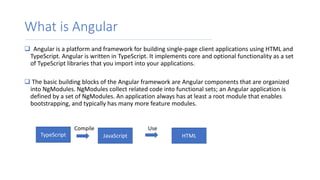
 Angular is a platform and framework for building single-page client applications using HTML and
TypeScript. Angular is written in TypeScript. It implements core and optional functionality as a set
of TypeScript libraries that you import into your applications.
 The basic building blocks of the Angular framework are Angular components that are organized
into NgModules. NgModules collect related code into functional sets; an Angular application is
defined by a set of NgModules. An application always has at least a root module that enables
bootstrapping, and typically has many more feature modules.
TypeScript JavaScript HTML
Compile Use
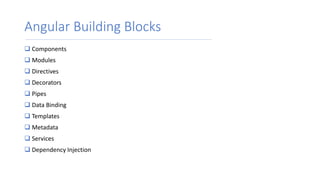
Angular Building Blocks
 Components
 Modules
 Directives
 Decorators
 Pipes
 Data Binding
 Templates
 Metadata
 Services
 Dependency Injection
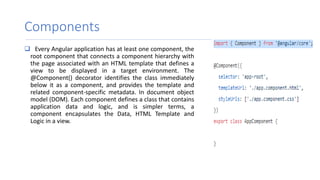
Components
 Every Angular application has at least one component, the
root component that connects a component hierarchy with
the page associated with an HTML template that defines a
view to be displayed in a target environment. The
@Component() decorator identifies the class immediately
below it as a component, and provides the template and
related component-specific metadata. In document object
model (DOM). Each component defines a class that contains
application data and logic, and is simpler terms, a
component encapsulates the Data, HTML Template and
Logic in a view.
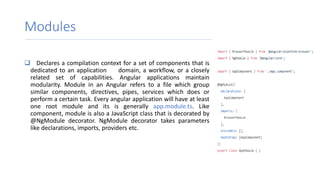
Modules
 Declares a compilation context for a set of components that is
dedicated to an application domain, a workflow, or a closely
related set of capabilities. Angular applications maintain
modularity. Module in an Angular refers to a file which group
similar components, directives, pipes, services which does or
perform a certain task. Every angular application will have at least
one root module and its is generally app.module.ts. Like
component, module is also a JavaScript class that is decorated by
@NgModule decorator. NgModule decorator takes parameters
like declarations, imports, providers etc.
Directives
 Directives in angular, helps us to add dynamic content
the DOM elements. Angular has two types of directives.
 Structural Directives
Structural directives are the one, that modifies the
structure of the DOM elements like presence/removing
an element from the DOM. These directives are added
along with * (asterisk).
*ngIf, *ngFor, ngSwitch & *ngSwitchCase are examples
of structural directives.
 Attribute Directives
Attribute directives are the one’s that alters the
appearance or behavior of an existing element in a
DOM.
ngClass, ngStyle, ngModel, formGroup, and
formControlName are some of the examples of
attribute directives
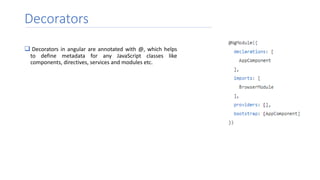
Decorators
 Decorators in angular are annotated with @, which helps
to define metadata for any JavaScript classes like
components, directives, services and modules etc.
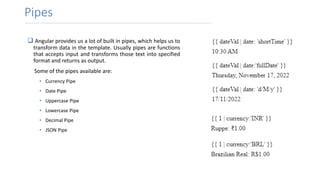
Pipes
 Angular provides us a lot of built in pipes, which helps us to
transform data in the template. Usually pipes are functions
that accepts input and transforms those text into specified
format and returns as output.
Some of the pipes available are:
• Currency Pipe
• Date Pipe
• Uppercase Pipe
• Lowercase Pipe
• Decimal Pipe
• JSON Pipe
Data Binding
 Interpolation
 Property Binding
 Event Binding
 Two way Binding
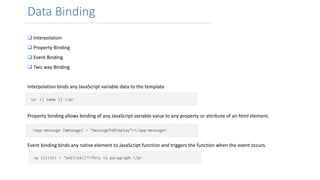
Interpolation binds any JavaScript variable data to the template
Property binding allows binding of any JavaScript variable value to any property or attribute of an html element.
Event binding binds any native element to JavaScript function and triggers the function when the event occurs.
Data Binding
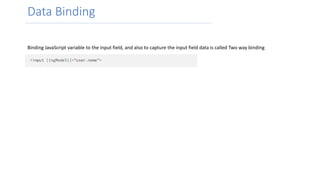
Binding JavaScript variable to the input field, and also to capture the input field data is called Two way binding
Templates
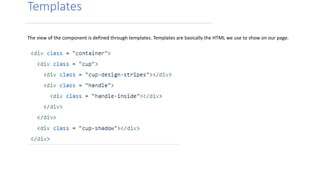
The view of the component is defined through templates. Templates are basically the HTML we use to show on our page.
Services
A service is a class containing any function, feature with a defined, and specific purposes like
performing side effects like HTTP requests. This makes our angular app more modular, means
instead of writing same code in different components we will inject the service and calls the
method in the service that triggers HTTP requests.
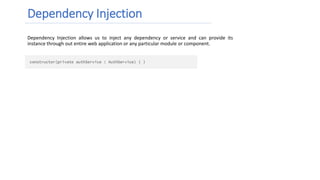
Dependency Injection
Dependency Injection allows us to inject any dependency or service and can provide its
instance through out entire web application or any particular module or component.
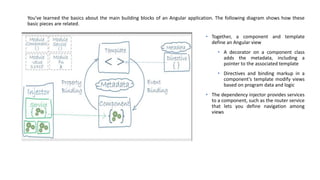
You've learned the basics about the main building blocks of an Angular application. The following diagram shows how these
basic pieces are related.
• Together, a component and template
define an Angular view
• A decorator on a component class
adds the metadata, including a
pointer to the associated template
• Directives and binding markup in a
component's template modify views
based on program data and logic
• The dependency injector provides services
to a component, such as the router service
that lets you define navigation among
views
Installation & Configuration
 Node.js development environment can be set up in windows, Mac, Linux
 Following development environment and editor are required to develop a node application
o Node.js
o Node Package Manager
o IDE (Integrated Development Environment) or TextEdit
 Download Installer and editor from
o https://node.org : install node and npm
o https://code.visualstudio.com Visual Studio Code
 You can check npm versio y following command
o npm -v
Install Angular CLI
 You can run the following command to install Angular CLI
 npm install @angular/cli -g
 After installation you can check version of Angular by running the
following command
 ng-version
Create Project
 Angular project is created using the command
o ng new project-name
 We are assuming project name is angular
o ng new angular
 Run the following command to run the angular project
o ng serve -o
 It will start the angular server at default port number #4200 and make the
application accessible using http://localhost:4200
Questions ?
Thank You

Angular Basics.pptx

  • 1.
  • 2.
    What is Angular Angular is a platform and framework for building single-page client applications using HTML and TypeScript. Angular is written in TypeScript. It implements core and optional functionality as a set of TypeScript libraries that you import into your applications.  The basic building blocks of the Angular framework are Angular components that are organized into NgModules. NgModules collect related code into functional sets; an Angular application is defined by a set of NgModules. An application always has at least a root module that enables bootstrapping, and typically has many more feature modules. TypeScript JavaScript HTML Compile Use
  • 3.
    Angular Building Blocks Components  Modules  Directives  Decorators  Pipes  Data Binding  Templates  Metadata  Services  Dependency Injection
  • 4.
    Components  Every Angularapplication has at least one component, the root component that connects a component hierarchy with the page associated with an HTML template that defines a view to be displayed in a target environment. The @Component() decorator identifies the class immediately below it as a component, and provides the template and related component-specific metadata. In document object model (DOM). Each component defines a class that contains application data and logic, and is simpler terms, a component encapsulates the Data, HTML Template and Logic in a view.
  • 5.
    Modules  Declares acompilation context for a set of components that is dedicated to an application domain, a workflow, or a closely related set of capabilities. Angular applications maintain modularity. Module in an Angular refers to a file which group similar components, directives, pipes, services which does or perform a certain task. Every angular application will have at least one root module and its is generally app.module.ts. Like component, module is also a JavaScript class that is decorated by @NgModule decorator. NgModule decorator takes parameters like declarations, imports, providers etc.
  • 6.
    Directives  Directives inangular, helps us to add dynamic content the DOM elements. Angular has two types of directives.  Structural Directives Structural directives are the one, that modifies the structure of the DOM elements like presence/removing an element from the DOM. These directives are added along with * (asterisk). *ngIf, *ngFor, ngSwitch & *ngSwitchCase are examples of structural directives.  Attribute Directives Attribute directives are the one’s that alters the appearance or behavior of an existing element in a DOM. ngClass, ngStyle, ngModel, formGroup, and formControlName are some of the examples of attribute directives
  • 7.
    Decorators  Decorators inangular are annotated with @, which helps to define metadata for any JavaScript classes like components, directives, services and modules etc.
  • 8.
    Pipes  Angular providesus a lot of built in pipes, which helps us to transform data in the template. Usually pipes are functions that accepts input and transforms those text into specified format and returns as output. Some of the pipes available are: • Currency Pipe • Date Pipe • Uppercase Pipe • Lowercase Pipe • Decimal Pipe • JSON Pipe
  • 9.
    Data Binding  Interpolation Property Binding  Event Binding  Two way Binding Interpolation binds any JavaScript variable data to the template Property binding allows binding of any JavaScript variable value to any property or attribute of an html element. Event binding binds any native element to JavaScript function and triggers the function when the event occurs.
  • 10.
    Data Binding Binding JavaScriptvariable to the input field, and also to capture the input field data is called Two way binding
  • 11.
    Templates The view ofthe component is defined through templates. Templates are basically the HTML we use to show on our page.
  • 12.
    Services A service isa class containing any function, feature with a defined, and specific purposes like performing side effects like HTTP requests. This makes our angular app more modular, means instead of writing same code in different components we will inject the service and calls the method in the service that triggers HTTP requests.
  • 13.
    Dependency Injection Dependency Injectionallows us to inject any dependency or service and can provide its instance through out entire web application or any particular module or component.
  • 14.
    You've learned thebasics about the main building blocks of an Angular application. The following diagram shows how these basic pieces are related. • Together, a component and template define an Angular view • A decorator on a component class adds the metadata, including a pointer to the associated template • Directives and binding markup in a component's template modify views based on program data and logic • The dependency injector provides services to a component, such as the router service that lets you define navigation among views
  • 15.
    Installation & Configuration Node.js development environment can be set up in windows, Mac, Linux  Following development environment and editor are required to develop a node application o Node.js o Node Package Manager o IDE (Integrated Development Environment) or TextEdit  Download Installer and editor from o https://node.org : install node and npm o https://code.visualstudio.com Visual Studio Code  You can check npm versio y following command o npm -v
  • 16.
    Install Angular CLI You can run the following command to install Angular CLI  npm install @angular/cli -g  After installation you can check version of Angular by running the following command  ng-version
  • 17.
    Create Project  Angularproject is created using the command o ng new project-name  We are assuming project name is angular o ng new angular  Run the following command to run the angular project o ng serve -o  It will start the angular server at default port number #4200 and make the application accessible using http://localhost:4200
  • 18.
  • 19.