
Page 1
Android M has arrived:
here's what you need to know
VINOD BEDA
Page 2
ANDROID M:
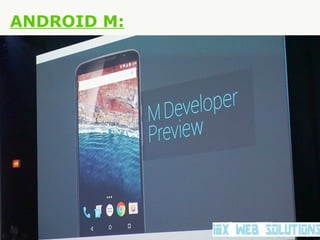
The Android M developer preview was launched today at
Google I/O 2015 in San Francisco. Sundar Pichai, senior vice
president of products at Google, introduced the conference
and said that the company had "gone back to basics" with the
new version of Android. While Android Lollipop introduced a
brand new design and aesthetic, Android M is bringing some
much-needed stability and usability improvements, which
might not be as immediately exciting, but may prove to be
strong long-term additions.
Page 3
ANDROID M:
The Android M developer preview was launched today at
Google I/O 2015 in San Francisco. Sundar Pichai, senior vice
president of products at Google, introduced the conference
and said that the company had "gone back to basics" with the
new version of Android. While Android Lollipop introduced a
brand new design and aesthetic, Android M is bringing some
much-needed stability and usability improvements, which
might not be as immediately exciting, but may prove to be
strong long-term additions.
Dave Burke, vice president of engineering at Google,
followed Pichai on stage to outline six of the major new
features you can expect to see in Android M.
Which phones will get the Android M update first?
Page 4
ANDROID M:
Page 5
ANDROID M:
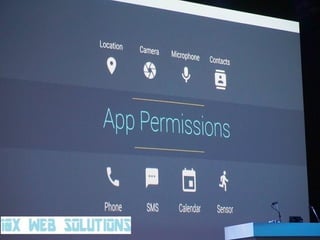
1. App permissions
First up, app permissions. As had previously been
speculated, app permissions have been overhauled in
Android M, with users now being able to choose to accept or
deny individual permissions as they see fit. Permissions have
also been simplified.
Permissions will now be requested the first time you try to
use a feature, not at the point of installation. "You don't have
to agree to permissions that don't make sense to you," Burke
said, and used WhatsApp to give an example of how this
works.
Page 6
ANDROID M:
If you want to record a voice message, WhatsApp
will prompt you with a one-time request for permission to use
your mic: if you still wish to give it access and record the
message, you can, but you don't have to. Android M is giving
users greater control of the information apps can access, and
this is a truly positive step forward for Android.
You can modify the permissions granted to apps at a later
date in your Settings, or you can view permissions by type
and see which apps have that permission granted. It's all
about giving the user complete control over their Android.
Page 7
ANDROID M:
If you want to record a voice message, WhatsApp
will prompt you with a one-time request for permission to use
your mic: if you still wish to give it access and record the
message, you can, but you don't have to. Android M is giving
users greater control of the information apps can access, and
this is a truly positive step forward for Android.
You can modify the permissions granted to apps at a later
date in your Settings, or you can view permissions by type
and see which apps have that permission granted. It's all
about giving the user complete control over their Android.
Page 8
Page 9
ANDROID M:
2. Web experience
Google has been exploring trends in the way web content is
consumed to provide a better user-experience when
interacting with websites and apps. "Chrome Custom Tabs is
a new feature that gives developers a way to harness all of
Chrome's capabilities, while still keeping control of the look
and feel of the experience," said Burke.
Chrome Custom Tabs will allow apps to open a
customized Chrome window on top of the active app, instead
of launching the Chrome app separately. This will provide a
faster and more intuitive user-experience when navigating
between apps and the web.
Page 10
ANDROID M:
Chrome Custom Tabs supports automatic sign-in, saved
passwords, autofill, and multi-process security to assist the
integration of the app and web experience. So, for example,
a Pinterest custom tab will have a Pinterest share button
embedded in it, can include custom overflow menu options
and doesn't require the Pinterest developers to build their
own web browser.
Page 11
Page 12
ANDROID M:
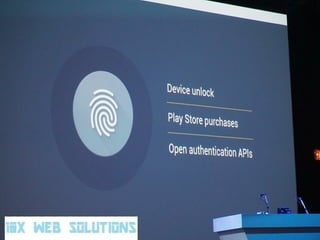
3. Fingerprint support
Google will "standardize support" for fingerprint scanners on
phones running Android M. The new functionality will allow
the scanner to be used not only to unlock phones, but also to
make purchases while shopping in real-life or within Play
Store apps.
Page 13
ANDROID M:
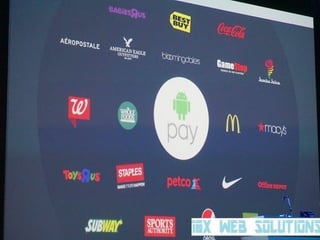
4. Mobile payments
Android Pay is Google's new mobile payments system
designed to make the checkout process easier and faster. It
will work in more than 700,000 stores in the US, and is being
supported by American Express, Visa, Mastercard, and
Discovery. AT&T, Verizon and T-Mobile are also on board for
the new system.
The best thing? Any Android phone with NFC can make use
of Android Pay. Android Pay will work with Android devices
running Android 4.4 KitKat and above, but fingerprint support
for authorizing payments with Android Pay will be an Android
M (and onwards) feature.
Page 14
Page 15
ANDROID M:
5. App links
App links are being changed so that apps can open content
directly, instead of stopping users every time with a dialog
box in which the user has to select the app with which to
open the link. How does this work? If you click a Twitter link
in an email, for example, the Twitter app will now open
directly instead of asking if you want to use Twitter to view it.
Clever.
Page 16
ANDROID M:
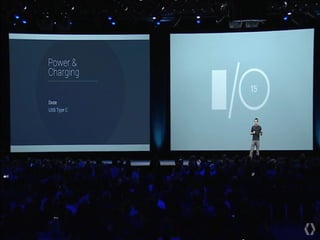
6. Power and charging
Android M makes use of a new function known as Doze to
improve device standby time. By using motion detectors,
Android will recognize when devices haven’t been interacted
with for a while, such as when a person is asleep or a device
has been left on a table, to reduce background processes.
Burke said that Google tested two Nexus 9 devices, one
running Lollipop and one running the Android M preview, and
learned that M will provide up to two-times longer standby
time. Even in Doze mode, your Android can still start alarms
or notify you of priority notifications.
Page 17
Page 18
WHAT ELSE IN ANDROID M:
Google Now - Google Now has been improved upon once
again in Android M. Focusing on three key ares: being aware
of different contexts, providing answers and helping you take
action, Google Now is now smarter than ever.
Google Now's context awareness understand over 100
million different places, so when you ask ''How far is it to
there?'' Google Now know exactly which ''there'' you're
referring to. This awareness is compunded by Google's
Knowledge Graph, which understands one billion different
entities, from sports teams to gas stations, TV shows to
recipes.
Page 19
Page 20
WHAT ELSE IN ANDROID M:
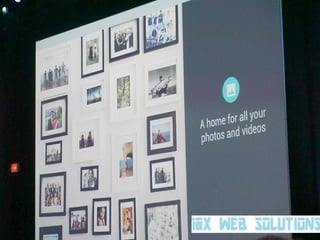
Google Photos - As expected, Google pulled the wraps off 
its new Google Photos service. Previously a part of Google+, 
Google Photos is now standalone photo and video storage 
and sharing service that provides unlimited free storage for 
up to 16 MP photos and 1080p video. That is seriously 
impressive.
The Google Photos service stores high-quality compressed 
versions of your photos and movies but doesn't store 
anything on your device, so you can search through 
thousands of photos at high speed and without bogging your 
device down with gigabytes of photos.  
Page 21
Page 22
Thank you
All the best developers

Android M Google I/0 2015

  • 1.
    Page 1 Android Mhas arrived: here's what you need to know VINOD BEDA
  • 2.
    Page 2 ANDROID M: TheAndroid M developer preview was launched today at Google I/O 2015 in San Francisco. Sundar Pichai, senior vice president of products at Google, introduced the conference and said that the company had "gone back to basics" with the new version of Android. While Android Lollipop introduced a brand new design and aesthetic, Android M is bringing some much-needed stability and usability improvements, which might not be as immediately exciting, but may prove to be strong long-term additions.
  • 3.
    Page 3 ANDROID M: TheAndroid M developer preview was launched today at Google I/O 2015 in San Francisco. Sundar Pichai, senior vice president of products at Google, introduced the conference and said that the company had "gone back to basics" with the new version of Android. While Android Lollipop introduced a brand new design and aesthetic, Android M is bringing some much-needed stability and usability improvements, which might not be as immediately exciting, but may prove to be strong long-term additions. Dave Burke, vice president of engineering at Google, followed Pichai on stage to outline six of the major new features you can expect to see in Android M. Which phones will get the Android M update first?
  • 4.
  • 5.
    Page 5 ANDROID M: 1.App permissions First up, app permissions. As had previously been speculated, app permissions have been overhauled in Android M, with users now being able to choose to accept or deny individual permissions as they see fit. Permissions have also been simplified. Permissions will now be requested the first time you try to use a feature, not at the point of installation. "You don't have to agree to permissions that don't make sense to you," Burke said, and used WhatsApp to give an example of how this works.
  • 6.
    Page 6 ANDROID M: Ifyou want to record a voice message, WhatsApp will prompt you with a one-time request for permission to use your mic: if you still wish to give it access and record the message, you can, but you don't have to. Android M is giving users greater control of the information apps can access, and this is a truly positive step forward for Android. You can modify the permissions granted to apps at a later date in your Settings, or you can view permissions by type and see which apps have that permission granted. It's all about giving the user complete control over their Android.
  • 7.
    Page 7 ANDROID M: Ifyou want to record a voice message, WhatsApp will prompt you with a one-time request for permission to use your mic: if you still wish to give it access and record the message, you can, but you don't have to. Android M is giving users greater control of the information apps can access, and this is a truly positive step forward for Android. You can modify the permissions granted to apps at a later date in your Settings, or you can view permissions by type and see which apps have that permission granted. It's all about giving the user complete control over their Android.
  • 8.
  • 9.
    Page 9 ANDROID M: 2.Web experience Google has been exploring trends in the way web content is consumed to provide a better user-experience when interacting with websites and apps. "Chrome Custom Tabs is a new feature that gives developers a way to harness all of Chrome's capabilities, while still keeping control of the look and feel of the experience," said Burke. Chrome Custom Tabs will allow apps to open a customized Chrome window on top of the active app, instead of launching the Chrome app separately. This will provide a faster and more intuitive user-experience when navigating between apps and the web.
  • 10.
    Page 10 ANDROID M: ChromeCustom Tabs supports automatic sign-in, saved passwords, autofill, and multi-process security to assist the integration of the app and web experience. So, for example, a Pinterest custom tab will have a Pinterest share button embedded in it, can include custom overflow menu options and doesn't require the Pinterest developers to build their own web browser.
  • 11.
  • 12.
    Page 12 ANDROID M: 3.Fingerprint support Google will "standardize support" for fingerprint scanners on phones running Android M. The new functionality will allow the scanner to be used not only to unlock phones, but also to make purchases while shopping in real-life or within Play Store apps.
  • 13.
    Page 13 ANDROID M: 4.Mobile payments Android Pay is Google's new mobile payments system designed to make the checkout process easier and faster. It will work in more than 700,000 stores in the US, and is being supported by American Express, Visa, Mastercard, and Discovery. AT&T, Verizon and T-Mobile are also on board for the new system. The best thing? Any Android phone with NFC can make use of Android Pay. Android Pay will work with Android devices running Android 4.4 KitKat and above, but fingerprint support for authorizing payments with Android Pay will be an Android M (and onwards) feature.
  • 14.
  • 15.
    Page 15 ANDROID M: 5.App links App links are being changed so that apps can open content directly, instead of stopping users every time with a dialog box in which the user has to select the app with which to open the link. How does this work? If you click a Twitter link in an email, for example, the Twitter app will now open directly instead of asking if you want to use Twitter to view it. Clever.
  • 16.
    Page 16 ANDROID M: 6.Power and charging Android M makes use of a new function known as Doze to improve device standby time. By using motion detectors, Android will recognize when devices haven’t been interacted with for a while, such as when a person is asleep or a device has been left on a table, to reduce background processes. Burke said that Google tested two Nexus 9 devices, one running Lollipop and one running the Android M preview, and learned that M will provide up to two-times longer standby time. Even in Doze mode, your Android can still start alarms or notify you of priority notifications.
  • 17.
  • 18.
    Page 18 WHAT ELSEIN ANDROID M: Google Now - Google Now has been improved upon once again in Android M. Focusing on three key ares: being aware of different contexts, providing answers and helping you take action, Google Now is now smarter than ever. Google Now's context awareness understand over 100 million different places, so when you ask ''How far is it to there?'' Google Now know exactly which ''there'' you're referring to. This awareness is compunded by Google's Knowledge Graph, which understands one billion different entities, from sports teams to gas stations, TV shows to recipes.
  • 19.
  • 20.
    Page 20 WHAT ELSEIN ANDROID M: Google Photos - As expected, Google pulled the wraps off  its new Google Photos service. Previously a part of Google+,  Google Photos is now standalone photo and video storage  and sharing service that provides unlimited free storage for  up to 16 MP photos and 1080p video. That is seriously  impressive. The Google Photos service stores high-quality compressed  versions of your photos and movies but doesn't store  anything on your device, so you can search through  thousands of photos at high speed and without bogging your  device down with gigabytes of photos.  
  • 21.
  • 22.