
A Venture of SEO Web Services
SEO Web Services
www.seowebservices.us
info@seowebservices.us
Mob: +91-9582515180, +91-8447359030
Add: 11/393 Laxmi Nagar, Delhi, 110092
What is Android?
Android is a software bunch comprising not only operating system
but also middleware and key applications. Android Inc was founded in
Palo Alto of California, U.S. by Andy Rubin, Rich miner, Nick sears and
hris White in 2003. Later Android Inc. was acquired by Google in 2005.
After original release there have been number of updates in the original
version of Android.
Starting from black and white phones to recent smart phones or mini
computers, mobile OS has come far away. Especially for smart phones,
Mobile OS has greatly evolved from Palm OS in 1996 to Windows pocket
PC in 2000 then to Blackberry OS and Android.
Android is a software stack for mobile devices that includes an
operating system, middleware and key applications.
Android Version…
OHA (Open Handset Alliance)
A business alliance consisting of 47 companies to develop
open standards for mobile devices
Android is a software stack for mobile devices that includes an
operating system, middleware and key applications.
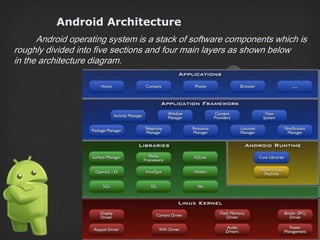
Android Architecture
Android operating system is a stack of software components which is
roughly divided into five sections and four main layers as shown below
in the architecture diagram.
Features & Specifications
Android is a powerful Operating System supporting a large
number of applications in Smart Phones. These applications make life
more comfortable and advanced for the users. Hardware that support
Android are mainly based on ARM architecture platform.
Some of the current features and specifications of android are:
Android S/W Stack - Application
Android provides a set of core applications:
 Email Client
 SMS Program
 Calendar
 Maps
 Browser
 Contacts
 Etc
All applications are written using the Java language.
Android S/W Stack – App Framework
Enabling and simplifying the reuse of components:
 Developers have full access to the same framework APIs used by
the core applications.
 Users are allowed to replace components.
Android S/W Stack – App Framework (Cont)
Features:
Feature Role
View
System
Used to build an application, including lists, grids, text
boxes, buttons, and embedded web browser
Content
Provider
Enabling applications to access data from other
applications or to share their own data
Resource
Manager
Providing access to non-code resources (localized strings,
graphics, and layout files)
Notification
Manager
Enabling all applications to display customer alerts in the
status bar
Activity
Manager
Managing the lifecycle of applications and providing
a common navigation back stack
Android S/W Stack - Libraries
 Including a set of C/C++ libraries used by components of the
Android system
 Exposed to developers through the Android application framework
Android S/W Stack - Runtime
Core Libraries:
 Providing most of the functionality available in the core libraries of the
Java language
 APIs
 Data Structures
 Utilities
 File Access
 Network Access
 Graphics
 Etc
Android S/W Stack – Runtime (Cont)
 Dalvik Virtual Machine:
 Providing environment on which every Android application runs
Each Android application runs in its own process, with its own
instance of the Dalvik VM.
Dalvik has been written such that a device can run multiple VMs
efficiently.
Register-based virtual machine
Android S/W Stack – Runtime (Cont)
Dalvik Virtual Machine (Cont):
 Executing the Dalvik Executable (.dex) format
 .dex format is optimized for minimal memory footprint.
 Compilation
Relying on the Linux Kernel for:
Threading
Low-level memory management
Android S/W Stack – Linux Kernel
 Relying on Linux Kernel 2.6 for core system services
 Memory and Process Management
 Network Stack
 Driver Model
 Security
 Providing an abstraction layer between the H/W and the rest of the S/
W stack
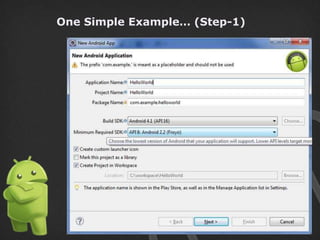
One Simple Example… (Step-1)
One Simple Example… (Step-2)
One Simple Example… (Step-3)
One Simple Example… (Step-4)
Program Complete!!!
Thanks
SEO Web Services
www.seowebservices.us
www.weblearninginfo.com
info@seowebservices.us
M: +91-9250033105
Add: 11/393 Laxmi Nagar, Delhi, 110092

Android apps

  • 1.
    A Venture ofSEO Web Services SEO Web Services www.seowebservices.us info@seowebservices.us Mob: +91-9582515180, +91-8447359030 Add: 11/393 Laxmi Nagar, Delhi, 110092
  • 3.
    What is Android? Androidis a software bunch comprising not only operating system but also middleware and key applications. Android Inc was founded in Palo Alto of California, U.S. by Andy Rubin, Rich miner, Nick sears and hris White in 2003. Later Android Inc. was acquired by Google in 2005. After original release there have been number of updates in the original version of Android. Starting from black and white phones to recent smart phones or mini computers, mobile OS has come far away. Especially for smart phones, Mobile OS has greatly evolved from Palm OS in 1996 to Windows pocket PC in 2000 then to Blackberry OS and Android. Android is a software stack for mobile devices that includes an operating system, middleware and key applications.
  • 4.
  • 5.
    OHA (Open HandsetAlliance) A business alliance consisting of 47 companies to develop open standards for mobile devices Android is a software stack for mobile devices that includes an operating system, middleware and key applications.
  • 6.
    Android Architecture Android operatingsystem is a stack of software components which is roughly divided into five sections and four main layers as shown below in the architecture diagram.
  • 7.
    Features & Specifications Androidis a powerful Operating System supporting a large number of applications in Smart Phones. These applications make life more comfortable and advanced for the users. Hardware that support Android are mainly based on ARM architecture platform. Some of the current features and specifications of android are:
  • 8.
    Android S/W Stack- Application Android provides a set of core applications:  Email Client  SMS Program  Calendar  Maps  Browser  Contacts  Etc All applications are written using the Java language.
  • 9.
    Android S/W Stack– App Framework Enabling and simplifying the reuse of components:  Developers have full access to the same framework APIs used by the core applications.  Users are allowed to replace components.
  • 10.
    Android S/W Stack– App Framework (Cont) Features: Feature Role View System Used to build an application, including lists, grids, text boxes, buttons, and embedded web browser Content Provider Enabling applications to access data from other applications or to share their own data Resource Manager Providing access to non-code resources (localized strings, graphics, and layout files) Notification Manager Enabling all applications to display customer alerts in the status bar Activity Manager Managing the lifecycle of applications and providing a common navigation back stack
  • 11.
    Android S/W Stack- Libraries  Including a set of C/C++ libraries used by components of the Android system  Exposed to developers through the Android application framework
  • 12.
    Android S/W Stack- Runtime Core Libraries:  Providing most of the functionality available in the core libraries of the Java language  APIs  Data Structures  Utilities  File Access  Network Access  Graphics  Etc
  • 13.
    Android S/W Stack– Runtime (Cont)  Dalvik Virtual Machine:  Providing environment on which every Android application runs Each Android application runs in its own process, with its own instance of the Dalvik VM. Dalvik has been written such that a device can run multiple VMs efficiently. Register-based virtual machine
  • 14.
    Android S/W Stack– Runtime (Cont) Dalvik Virtual Machine (Cont):  Executing the Dalvik Executable (.dex) format  .dex format is optimized for minimal memory footprint.  Compilation Relying on the Linux Kernel for: Threading Low-level memory management
  • 15.
    Android S/W Stack– Linux Kernel  Relying on Linux Kernel 2.6 for core system services  Memory and Process Management  Network Stack  Driver Model  Security  Providing an abstraction layer between the H/W and the rest of the S/ W stack
  • 16.
  • 17.
  • 18.
  • 19.
    One Simple Example…(Step-4) Program Complete!!!
  • 20.