Downloaded 25 times

![Source Code
using System;
using System.Collections.Generic;
using System.ComponentModel;
using System.Data;
using System.Drawing;
using System.Linq;
using System.Text;
using System.Threading.Tasks;
using System.Windows.Forms;
namespace clock
{
public partial class Form1 : Form
{
Point[,] hands_coord = new Point[3, 2]
{
{new Point(0,0),new Point (0,120)},
{new Point (0,0),new Point (0,140)},
{new Point (0,0),new Point (0,140)}
};
DateTime cur;
DateTime prev;
Boolean change;
Graphics g;](https://image.slidesharecdn.com/omidmustefaanalogclock-190815155210/85/analog-clock-C-3-320.jpg)
![public Form1()
{
InitializeComponent();
}
private void RotatePoint(Point[] pt,
int iRotate, int iangle)
{
Point ptTemp = new Point(0, 0);
for (int i = 0; i < iRotate; i++)
{
ptTemp.X = (int)(pt[i].X *
Math.Cos(2 * Math.PI * iangle / 360) - pt[i].Y
* Math.Sin(2 * Math.PI * iangle / 360));
ptTemp.Y = (int)(pt[i].Y *
Math.Cos(2 * Math.PI * iangle / 360) + pt[i].X
* Math.Sin(2 * Math.PI * iangle / 360));
pt[i] = ptTemp;
}
}
private void Form1_Load(object sender,
EventArgs e)
{
}](https://image.slidesharecdn.com/omidmustefaanalogclock-190815155210/85/analog-clock-C-4-320.jpg)
![private void Form1_Paint(object sender,
PaintEventArgs e)
{
e.Graphics.TranslateTransform(this.Size.Width /
2, this.Size.Height / 2);
e.Graphics.RotateTransform(150);
DrawClock(e.Graphics);
DrawHands(e.Graphics, prev, true,
Color.FromArgb(250, 0, 0, 0));
}
private void DrawClock(Graphics e)
{
Point[] pt = new Point[2];
for (int iangle = 0; iangle < 360;
iangle += 6)
{
pt[0].X = 0;
pt[0].Y = 150;
RotatePoint(pt, 1, iangle);
pt[1].X = pt[1].Y = (iangle % 5 ==
0 ? 10 : 5);
pt[0].X -= pt[1].X / 2;
pt[0].Y -= pt[1].Y / 2;
Pen p = new
Pen(Color.FromArgb(255, 0, 0, 0));
e.DrawEllipse(p, pt[0].X, pt[0].Y,
pt[1].X, pt[1].Y);
e.FillEllipse(new
SolidBrush(Color.FromArgb(255, 0, 0, 0)), pt[0].X,
pt[0].Y, pt[1].X, pt[1].Y);
}
}](https://image.slidesharecdn.com/omidmustefaanalogclock-190815155210/85/analog-clock-C-5-320.jpg)
![private void DrawHands(Graphics e,
DateTime dt, bool change, Color c)
{
Point[,] temmppt = new Point[3, 2];
int[] iangle = new int[3];
iangle[0] = (int)((dt.Hour * 30) %
360 + dt.Minute / 2);
iangle[1] = (int)(dt.Minute * 6);
iangle[2] = (int)(dt.Second * 6);
temmppt =
(Point[,])hands_coord.Clone();
for (int i = change ? 0 : 2; i < 3;
i++)
{
Point[] tt = { temmppt[i, 0],
temmppt[i, 1] };
RotatePoint(tt, 2, iangle[i]);
Pen p = new Pen(c);
e.DrawLine(p, tt[0], tt[1]);
}
}
private void Form1_Resize(object
sender, EventArgs e)
{
Invalidate(); //position in center
}](https://image.slidesharecdn.com/omidmustefaanalogclock-190815155210/85/analog-clock-C-6-320.jpg)
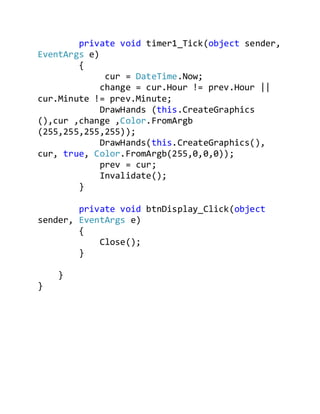


This document contains source code for creating an analog clock application in C# using computer graphics. It includes code to draw the clock face, rotate clock hands based on the current time, and update the display every second using a timer tick event. The clock displays the current time with the hour, minute and second hands.


