An Integrated Approach to Teaching Introductory Programming
Wayne Pullan, Steven Drew, Steven Tucker
School of Information and Communication Technology
Griffith University, Queensland, Australia
w.pullan@griffith.edu.au, s.drew@griffith.edu.au, s.tucker@griffith.edu.au
Abstract— Java Programming Laboratory (JPL) is a cloud
based, integrated learning environment used for teaching
introductory Java programming at Griffith University, Australia. JPL
incorporates a number of features found in other successful
programming learning environments and builds upon them with a
range of innovative features. Learning to program is a threshold
concept area for ICT students and success in this endeavour is
paramount for student progression and retention. JPL provides a
database that tracks individual students’ successes and progression
through scaffolded programming exercises and assessment items and
gives students immediate feedback on their use of programming
language syntax and correctness of problem solutions. A data
querying and visualisation facility allows analysis of the database to
provide real-time performance indicators from the overall course /
problem level down to the individual student / specific problem level.
Programming instructors and curriculum designers will find that this
facility allows a responsive approach to student engagement,
assistance and progression; as well as course problem tuning in a
just-in-time manner.
Keywords— Java Programming; Problem-Based Learning; Real-
Time Progress Tracking; Scaffolded Development;
I. INTRODUCTION
Learning computer programming is identified as a key
threshold concept area [14] for all ICT degree programs [19]. It
contains difficult knowledge but, once mastered, it is
transformative in that it provides a means to represent and
solve a range of computing related problems in many
application areas. Compounding the difficulty in learning
programming is the fact that it is normally taught, in first year,
to a cohort of students with a considerable range of academic
abilities and experiences. During the pre-2000 dot.com boom,
by far the majority of ICT students at the authors’ university
were high achievers who had studied relevant preparatory
courses at high school and were motivated by the prospect of a
relatively highly paid career in an industry where they were in
high demand. More recent moves towards massification of
higher education [1] and a local reduction in popularity of
many ICT related professions has resulted in the lowering of
entry requirements for ICT programs to maintain budget
quotas. This lowering of entry requirements for ICT courses
has lead to the situation, at the authors university, where a
higher percentage of ICT students are non-traditional students,
characterised by at least one of: low Socio-Economic Status;
being first-in-family to attend university; having lower entry
levels with regard to high school qualifications; and, being full-
time students who are also working part-time to fund their
studies. Within the Australian university context, the
proportion of non-traditional ICT students now ranges from
10% to 70% of first year students and, typically, most of first-
year students can be characterized by at least one of the
following: poor time management skills; taking a strategic
approach to learning (only motivated by assessment items)
[13]; lack of focus in lectures; lack of method/organization in
their approach to study; lack of suitable study environments
outside of class; not taking the initiative and seeking help early;
and tending to give up easily when it becomes too difficult.
An understanding of what the student is, as outlined in the
paragraphs above remains very important for the design of
effective teaching and learning activities that support the tasks
that students are to engage with in their learning journey. In
the professional setting, where most academics are untrained in
educational theory, a simple and effective approach is provided
by the university’s focus on “active learning” strategies. Biggs
[3, 4] strata of conceptions of teaching progress from
concentration on student as recipient of the teacher’s wisdom,
or what the student is, to a concentration on executing the act
of teaching, or what the teacher does, and ultimately a focus on
what the student does in the quest for knowledge and eventual
understanding. It is this final conceptual level of teaching that
leads to a focus on active learning [2, 7, 21, 24] and student
learning through experience [5, 12]. Active learning, in the
context of teaching introductory programming, where a student
is to learn a programming language and the tools of
programming they must write programs so task setting is not
difficult. However, the best effect will be obtained in an
environment that facilitates and motivates them to write
programs and, with a wide range in student ability, this is
where the challenge arises - how to keep the poorer students
progressing while not causing the more able students to lose
interest.
This combination of the difficulty in teaching introductory
programming and the opening of university programs to more
non-traditional students has inevitably lead to higher fail and
drop-out rates in introductory programming courses. A large
number of responses to this issue [16, 18] have been
implemented, ranging from no longer requiring programming
as a compulsory course to, as in this study, developing new
teaching tools and methods to support students to learn
programming.
This paper presents the results of a project that addresses
these challenges by implementing a successful learning and
teaching system based on engagement theory [10] and
constructivist design philosophy [8, 9].
II. JAVA PROGRAMMING LABORATORY
An introductory programming learning environment, Java
Programming Laboratory (JPL) was developed to address the
design criterion of providing scaled levels of challenge to
maintain student engagement with learning for a cohort of
varied ability. An active learning approach allows teaching
staff to concentrate on what the student does on their journey to
ISBN: 978-1-4673-5094-5/13/$31.00 ©2013 IEEE 81
learning programming in an immersive software development
environment. There are a number of key design features of the
JPL learning environment to address relevant instructional
design theory. Firstly, it presents a component approach [17,
4] that is as ‘concrete’ conceptually as possible with students
having to focus only on the topic currently being taught.
Secondly, it presents a problem-based learning approach [20]
and provides a large range and number of problems, selected
from an even larger range of problems available for each topic.
Problems are designed to scaffold development [22] to cater
for the wide range of student abilities, providing multiple entry
points into each topic, and additional problems for better
students. Thirdly, it promotes responsive, formative feedback
[15] with continuous access to personal and class (group)
performance measures, and access to just-in-time assistance.
Fourthly, it provides a consistent, simple environment
available for any computing platform; and flexible access to the
learning environment that is available in university computer
laboratories or off campus via the Internet. Fifthly, as a client-
based application it ensures students can maintain learning
momentum and time-on-task even while the Internet may not
be accessible. Finally, to maintain originality of student
learning it does not allow solutions to problems to be passed
from year to year which mitigates the learning process.
JPL provides a software-based environment, available on
both the universities and students computers, that allows
students to develop their programming skills by starting with
simple, targeted, Java code fragments and slowly transitioning
to complete Java programs. The fundamental concept
underlying JPL is – “you can learn basic programming skills
by writing many, small, targeted code fragments”. Within JPL,
learning a programming language is devolved into smaller
steps of learning and practicing computer-based problem
solving techniques. This simultaneously aids learning of
programming language constructs, their syntax and semantics.
Problems available in JPL are designed to scaffold student
learning through a number of stages ranging from ‘fill in the
blanks’ type exercises, developing Java code fragments and
finally developing full Java programs. All student work in JPL
is automatically tested and, as each student performs work on a
problem, all activity is logged to a central fileserver. This
enables the course convenor to monitor class and student
performance and investigate any potential issues immediately.
The overall system structure of JPL is shown in Figure 1 and the
components of this are described in the following sub-sections.
A. Lecture / Workshops
The lectures / workshops are very much a “teach by
example, learn by doing” exercise in that the lectures are a
50/50 combination of topic discussions and joint (lecturer /
students) JPL problem solving and implementations. The on-
campus workshops are solely based on the student working in
JPL with tutorial assistance to solve a specific issue directly
available if required. As experience has shown that a large
percentage (> 50%) of student JPL activity occurs away from
campus, a Remote Assistance feature, explained below, has
also been implemented. Another side-effect of the JPL
approach has been that students now have a preference to use
their own laptops on campus, even when laboratory computers
are available.
Figure 1 : JPL System Overview
B. JPL Videotutes
An integral part of JPL is the use of short (~10 minutes)
video tutorials explaining key programming concepts and
problem solving techniques. In effect the student is able to
‘look over the shoulder’ at the computer screen as an
experienced programmer demonstrates both programming
language features and computer based problem solving from
problem analysis to program implementation. Shorter versions
of video-tutes are also used to provide hints to solve problems.
These video micro-tutorials that support student learning of
individual constructs provide an indexed system of instruction
and reviewable examples to support incremental development
of problem solving and programming knowledge through
guided practice.
C. JPL Website
The JPL website contains a number of interactive learning
tools, some of which were originally created by Bradley Kjell,
Central Connecticut State University [11]. For the first
programming course in Java, these include 24 multiple choice
quizzes (10 questions), each with correct answers supplied on
completion, 10 fill-in-the-blank review sessions and 37, multi-
page interactive topic discussions. As an example, the
interactive learning tools for the Java if-else statement includes
the interactive resources shown in Table 1.
Of particular note is the JPL PROBLEM where, using
multi-choice questions, the student is lead, line by line, through
the development of a Java code fragment which reads 3
integers and prints them in ascending order. Also shown in
Table 1 is the direct access to the relevant JPL Videotute.
Table 1 : JPL Java if-else Interactive Learning Resources
D. JPL Fileserver
The JPL Fileserver acts as the central repository for all JPL
related files. When JPLIDE is initiated, if needed and the
internet is available, a merge of the local copy of the student’s
log and the student’s log on the JPL Fileserver is performed
and a new copy of the JPL Course Control File downloaded
from the JPL Fileserver. As the student performs JPL activities,
both copies of the student’s log are kept up to date. If the
ISBN: 978-1-4673-5094-5/13/$31.00 ©2013 IEEE 82
internet is not available, the student is still able to use JPLIDE
and the logs will be merged when the internet does become
available.
E. JPLIDE
Students perform all programming activities completely
within the JPLIDE which is based on the DrJava open source
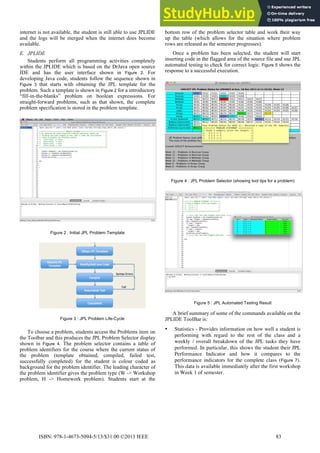
IDE and has the user interface shown in Figure 2. For
developing Java code, students follow the sequence shown in
Figure 3 that starts with obtaining the JPL template for the
problem. Such a template is shown in Figure 2 for a introductory
“fill-in-the-blanks” problem on boolean expressions. For
straight-forward problems, such as that shown, the complete
problem specification is stored in the problem template.
Figure 2 : Initial JPL Problem Template
Figure 3 : JPL Problem Life-Cycle
To choose a problem, students access the Problems item on
the Toolbar and this produces the JPL Problem Selector display
shown in Figure 4. The problem selector contains a table of
problem identifiers for the course where the current status of
the problem (template obtained, compiled, failed test,
successfully completed) for the student is colour coded as
background for the problem identifier. The leading character of
the problem identifier gives the problem type (W -> Workshop
problem, H -> Homework problem). Students start at the
bottom row of the problem selector table and work their way
up the table (which allows for the situation where problem
rows are released as the semester progresses).
Once a problem has been selected, the student will start
inserting code in the flagged area of the source file and use JPL
automated testing to check for correct logic. Figure 5 shows the
response to a successful execution.
Figure 4 : JPL Problem Selector (showing tool tips for a problem)
Figure 5 : JPL Automated Testing Result
A brief summary of some of the commands available on the
JPLIDE ToolBar is:
• Statistics - Provides information on how well a student is
performing with regard to the rest of the class and a
weekly / overall breakdown of the JPL tasks they have
performed. In particular, this shows the student their JPL
Performance Indicator and how it compares to the
performance indicators for the complete class (Figure 7).
This data is available immediately after the first workshop
in Week 1 of semester.
ISBN: 978-1-4673-5094-5/13/$31.00 ©2013 IEEE 83
• Problems - Presents the JPL Problem Selector (Figure 4)
that displays all the problem identifiers, the current status
of the problems for this student and allows a problem to
be selected.
• Compile - Compiles the current Java program and saves a
copy to the JPL Fileserver.
• Test - Using the current Java program, performs the JPL
automated testing which uses test data and expected
outputs stored in the JPL Course Control File.
• Run - Executes the current Java program outside the JPL
testing (i.e. with manual input and normal output).
• Solutions - Provides, via a problem selector, solutions to
selected problems. These are released after the relevant
topic has been covered and students are unable to access a
solution until they have made a reasonable effort at
solving the problem.
• Assistance - Allows a student to request assistance with a
problem. This results in an automatic email being sent to
the course convenor who, working in Admin mode, is
able to take over the student’s JPL environment, make
code corrections or just insert suggestions into the java
source files. Once help has been given, the course
convenor returns to their own JPL environment and an
email is automatically generated for the student.
• Assessed - Causes JPLIDE to enter Assessed Mode so
that an Assessed Workshop can be performed. In
Assessed Mode, most JPLIDE commands are disabled.
F. JPLADMIN
The JPL Admin interface allows the course convener to
create the workshop contents and also update the
News/Workshop display. Generation of course content is
performed by editing a simple text file from which the Course
Control File is generated. Once the text file has been created
then a Build Workshop command followed by Update Server
command releases the new version of the Course Control File
to the students.
G. JPLANALYSIS
JPLAnalysis is a stand-alone program that performs
analysis of all student logs held on the JPL Fileserver. Statistics
can be obtained at the course, student, problem level and any
combination of these through a command line interface.
1) Course level reports
A sample course level report is shown in Figure 6 which
displays the total student JPL activity on a week by week basis.
Week 7 was the break week during semester while the slow
decline in activity during semester is mostly due to the fact that
the JPL problems became more difficult as the semester
progressed so the rate at which students were inputting
commands decreased.
2) Student level reports
As an example of tracking an individual student, Figure 7
and Figure 8 show some of the statistics available at the student
level. The first graph in Figure 7 shows how this students JPL
Performance Indicator (horizontal blue line) compares with the
performance indicators for all the class (red columns). This
graph is constantly available to students from Week 1 of
semester and gives them constant feedback on their
performance in the course. Obviously this student is
performing very well however the second graph shows the
students work pattern and clearly they were able to work ahead
during the first portion of the semester and then able to make
less effort during the latter part of semester.
Figure 6 : Total student activity for each week of the semester
Figure 7 : JPL Performance Indicator and activity for a particular
student
Figure 8 : JPL Problem Selector for the same student as in Figure 7
Tracking individual student activity within JPL has a
number of uses in the university context. These range from
identifying points in the course where students ‘switch-off’ to
evaluating the amount of effort a student has put into producing
an assignment so as to flag possible plagiarism cases.
ISBN: 978-1-4673-5094-5/13/$31.00 ©2013 IEEE 84
III. COURSE RESULTS
The analysis of the effectiveness of JPL has been performed
on a group of 150 first year Griffith University students,
almost all of whom were doing their first programming course
(Introduction to Programming). The topics covered in this
course are shown on the left-hand side of the JPL Problem
Selector in Figure 4 and a summary of student activity is given
in Table 2. A survey of students was performed at Weeks 5 and
12 of the semester and the results are summarised in
Table 3. In Table 4 a comparative survey results are
presented for 2011 and 2012 Introduction to Programming
courses which both covered the same Java topics. The 2011
course did not use JPL while the 2012 course used JPL
extensively. What can be seen from these graphs is that the
modal response for each student evaluation criterion moved
significantly to the “agreement” end of each scale. With the
Likert responses enumerated from 1 for “Strongly Disagree”
to 5 for “Strongly Agree” the mean responses in each criterion
increased by more than 10% which is a statistically significant
improvement in each category.
Table 2 : JPL Usage Counts for the 2012 Introduction to Programming
course with 150 Students
JPL Activity Semester Total
Number of On-line Quizzes performed 1,472
Number of Videos viewed 1,547
JPLIDE Starts 9,434
Total JPLIDE Commands 300,999
Open a new JPL Template 26,544
Compiles 162,265
Failed Tests 49,516
Passed Tests 17,838
Total JPLIDE Dev. Commands 262,419 (87.18%)
Home activity is 45.00% of total activity
Table 3 : JPL Survey Statistics for the 2012 Introduction to
Programming course (mean value of responses, on a scale 1- 5 with
greater than 100 of 150 student responding).
Question Week 5 Week 12
The resources provided for this course help me to
learn.
3.93 4.29
The problem-based learning activities have
provided an effective learning experience.
3.94 4.27
The use of online technologies helped me to
learn in this course.
4.05 4.10
This course has engaged me in learning. 3.89 4.11
My skills in analysis and problem solving have
increased as a consequence of doing this course.
3.80 4.19
I am satisfied with the teaching facilities
available for this course.
3.93 4.31
A frequency analysis of constructs derived from student
survey responses under the headings of “what worked well”
and “what needs improvement” in the JPL based course
revealed constructive information. Most popularly, JPL was
perceived as helpful to students learning programming and that
they appreciated the learning environment as being easy to use.
Next most popular responses relate to the instructor facilitated
laboratory learning experience based around practical
exercises. Here students appreciated the quality of the tutorial
assistance, the tutorial/laboratory learning experience, and the
level and access to help that they found most effective.
Frequent mentions were made of the flexible access to JPL
from outside of laboratory classes and the appreciation of the
lecturer and lecture/workshop classes. Interestingly, students
found that JPL assisted them in understanding the curriculum
and course structure and that the curriculum design assisted
their learning. Several other lower frequency constructs were
mentioned relating to various JPL and course design features.
In the area of what students felt needed most improvement
there was a wide range of issues of low frequency suggesting a
range of mainly individual learning needs that could be
addressed.
Table 4 : Introduction to Programming Post Course Survey (Scale 1 –
5 with ~55 responses from ~150 students) for 2011 (light shading)
without JPL and 2012 (dark shading) with JPL.
IV. CONCLUSION
JPL is based on the premise ‘to learn programming you
have to do programming’ and places students in an
environment where they can totally focus on that. An
observation from the current semester is that students are
motivated by the JPL testing feedback they receive and are also
motivated by the JPL Performance Indicator and the colour
indicators on the JPL Problem Selector panel. These factors
enhance student engagement with learning to program.
JPL has been used in a number of first programming
courses including high schools, an Australian university and a
No JPL With JPL
SD = Strongly Disagree, D = Disagree, N = Neutral, A = Agree,
SA = Strongly Agree
This course was well organised.
(Means = 3.8 / 4.2)
The assessment was clear and
fair.(Means = 3.6 / 4.2)
This course engaged me in
learning.
(Means = 3.7 / 4.2)
The teaching in this course was
effective in helping me to learn.
(Means = 3.7 / 4.1)
I received helpful feedback on my
assessment work.
(Means = 3.3 / 3.9)
Overall I am satisfied with the
quality of this course.
(Means = 3.6 / 4.0)
0	
  
20	
  
40	
  
60	
  
SD	
   D	
   N	
   A	
   SA	
  
0	
  
20	
  
40	
  
60	
  
SD	
   D	
   N	
   A	
   SA	
  
0	
  
20	
  
40	
  
60	
  
SD	
   D	
   N	
   A	
   SA	
  
0	
  
20	
  
40	
  
60	
  
SD	
   D	
   N	
   A	
   SA	
  
0	
  
20	
  
40	
  
SD	
   D	
   N	
   A	
   SA	
  
0	
  
20	
  
40	
  
60	
  
SD	
   D	
   N	
   A	
   SA	
  
ISBN: 978-1-4673-5094-5/13/$31.00 ©2013 IEEE 85
Chinese university. Within the university context, JPL seeks to
address student retention and poor learning outcomes by
improving scaffolding and learning support for key ICT
programming courses. For the flagship ICT undergraduate
programs, the courses that involve learning programming
languages have been identified as containing key threshold
concept areas. In all major strands of these degrees, learning to
program is normally compulsory and starts from first semester,
first year. Computer programming is considered a difficult
learning area and can have a high student failure rate. Building
upon a successful international blended-learning model, JPL
provides an integrated program development environment
which also includes automated testing and a comprehensive set
of construct level, video-tute resources to aid computer
program development and self-paced learning. This online
program development and problem-based experiential learning
environment enables academics and students to monitor
progression through automatically evaluated learning
objectives. JPL instructor access to students’ achievements on
tutorial and assessment tasks allows earliest possible
identification of students who are at risk of failing in order to
provide timely remedial assistance. JPL also provides feedback
to the academic/teaching team designing problem sets and
curricula to identify where extra learning assistance or redesign
is required.
Within JPL, learning a programming language is devolved
into smaller steps of learning and practicing computer based
problem solving techniques. This simultaneously aids learning
of programming language constructs, their syntax and
semantics. Problems available in JPL are designed to scaffold
student learning through a number of stages. These problems
range from modifying existing programs, ‘fill in the blanks’
type exercises, developing Java code fragments and finally
developing full Java programs. All student work in JPL is
automatically tested and, as each student performs work on an
exercise, the event is registered by the system. At a glance, at
any point in the semester, the convenor or tutor can see how
each student is performing and investigate any potential
problems immediately.
Outcomes of the JPL approach to teaching introductory
programming have thus far been very encouraging in terms of
impacting positively on student learning experience and
learning outcomes. Future implementations will include the
extension of JPL to a second, object oriented focussed course
in Java. This extension will be based on the premise that, a
student can learn more advanced programming skills by
understanding / modifying / developing many moderate size
Java programs and the overall premise that, to succeed in
programming, you need to build skill in both the “small” and
the “large”.
REFERENCES
[1] Altbach, P. G., Reisberg, L., Rumbley, L. E. (2009). Trends in global
higher education: Tracking an academic revolution. Center for
International Higher Education.
[2] Baugh, J. M. (2009). Let's Have Fun with That Required Computer
Information Systems Introduction Course. Information Systems
Education Journal, 7(73).
[3] Biggs, J. B., (1999a). Teaching for Quality Learning at University, Open
University Press / Society for Research into Higher Education.
[4] Biggs, J. B. (1999b). What the Student Does: teaching for enhanced
learning. Higher Education Research & Development, 18(1), 57-75.
[5] Boud, D., Cohen, R., Walker, D. (1993). Using experience for learning.
Buckingham [England]; Bristol, PA: Society for Research into Higher
Education and Open University Press.
[6] Griffith Univerisity, (2010), Academic Plan: 2011-2013 implementing
our vision, from: http://www.griffith.edu.au/about-griffith/plans-
publications
[7] Jonassen, D. H., Rohrer-Murphy, L. (1999). Activity theory as a
framework for designing constructivist learning environments.
Educational Technology Research and Development, 47(1), 61-79.
[8] Jonassen, D. H. (2003). Learning to solve problems with technology: a
constructivist perspective (2nd ed.). Upper Saddle River, N.J.: Merrill.
[9] Karagiorgi, Y., Symeou, L. (2005). Translating Constructivism into
Instructional Design: Potential and Limitations. Journal of Educational
Technology & Society, 8(1), 17-27.
[10] Kearsley, G., Schneiderman, B. (1998). Engagement Theory: A
Framework for Technology-Based Teaching and Learning. Educational
Technology, 38(5), 20-23.
[11] Kjell, Bradley , (2006), Introduction to Computer Science Using Java,
Central Connecticut State University
http://chortle.ccsu.edu/CS151/cs151java.html
[12] Kolb, D. A. (1984). Experiential learning : experience as the source of
learning and development. Englewood Cliffs, N.J.: Prentice-Hall.
[13] Marton, F., & Saljo, R. (1984). Approaches to learning. In F. Marton, D.
Hounsell & N. Entwistle (Eds.), The experience of learning, 39-58.
Edinburgh: Scottish Academic Press.
[14] Meyer, J.H.F., Land, R. (2005). Threshold concepts and troublesome
knowledge (2): Epistemological considerations and a conceptual
framework for teaching and learning. Higher Education, v49, pp373-388
[15] Nicol, D., Macfarlane-Dick, D. (2006). Rethinking Formative
Assessment in HE: a theoretical model and seven principles of good
feedback practice. Studies in Higher Education, 31(2), 199-218.
[16] Pears, A., Seidman, S., Malmi, L., Mannila, L., Adams, E., Bennedsen,
J., Devlin, M., Paterson, J. (2007). A survey of literature on the teaching
of introductory programming. SIGCSE Bulletin, 39(4), 204-233.
[17] Pintrich, P. R., de Groot, E. V. (1990). Motivational and self-regulated
learning components of classroom academic performance. Journal of
Educational Psychology, 82(1), 33-40.
[18] Robins, A., Rountree, J., Rountree, N., (2003). Learning and teaching
programming: A review and discussion. Computer Science Education,
13(2), 137-172.
[19] Rountree, J., and Rountree, N., (2009). Issues regarding threshold
concepts in computer science. Proceedings of the 11th
Australasian
Computing Education Conference (ACE 2009), 139-145
[20] Savery, J. R., Duffy, T. M. (1995). Problem-based learning: An
instructional model and its constructivist framework. In B. G. Wilson
(Ed.), Constructivist learning environments: Case studies in instructional
design (pp. 135-148). Englewood Cliffs, NJ: Educational Technology
Publications.
[21] Scanlon, E., Morris, E., diPaolo, T., Cooper, M. (2002). Contemporary
approaches to learning science: technologically-mediated practical work.
Studies in Science Education, 38(1), 73 - 114.
[22] Simons, K. D., Klein, J. D. (2007). The Impact of Scaffolding and
Student Achievement Levels in Problem-based Learning Environment.
Instructional Science, 35(1), 41-72.
[23] Sorva, J., (2010). Reflections on threshold concepts in computer
programming and beyond. Proceedings of the 10th Koli Calling
International Conference on Computing Education Research. ACM,
New York, USA
[24] Tetard, F., Patokorpi, E. (2005). A Constructivist Approach to
Information Systems Teaching: A Case Study on a Design Course for
Advanced-Level University Students. Journal of Information Systems
Education, 16(2), 167-176.
ISBN: 978-1-4673-5094-5/13/$31.00 ©2013 IEEE 86

An Integrated Approach To Teaching Introductory Programming

  • 1.
    An Integrated Approachto Teaching Introductory Programming Wayne Pullan, Steven Drew, Steven Tucker School of Information and Communication Technology Griffith University, Queensland, Australia w.pullan@griffith.edu.au, s.drew@griffith.edu.au, s.tucker@griffith.edu.au Abstract— Java Programming Laboratory (JPL) is a cloud based, integrated learning environment used for teaching introductory Java programming at Griffith University, Australia. JPL incorporates a number of features found in other successful programming learning environments and builds upon them with a range of innovative features. Learning to program is a threshold concept area for ICT students and success in this endeavour is paramount for student progression and retention. JPL provides a database that tracks individual students’ successes and progression through scaffolded programming exercises and assessment items and gives students immediate feedback on their use of programming language syntax and correctness of problem solutions. A data querying and visualisation facility allows analysis of the database to provide real-time performance indicators from the overall course / problem level down to the individual student / specific problem level. Programming instructors and curriculum designers will find that this facility allows a responsive approach to student engagement, assistance and progression; as well as course problem tuning in a just-in-time manner. Keywords— Java Programming; Problem-Based Learning; Real- Time Progress Tracking; Scaffolded Development; I. INTRODUCTION Learning computer programming is identified as a key threshold concept area [14] for all ICT degree programs [19]. It contains difficult knowledge but, once mastered, it is transformative in that it provides a means to represent and solve a range of computing related problems in many application areas. Compounding the difficulty in learning programming is the fact that it is normally taught, in first year, to a cohort of students with a considerable range of academic abilities and experiences. During the pre-2000 dot.com boom, by far the majority of ICT students at the authors’ university were high achievers who had studied relevant preparatory courses at high school and were motivated by the prospect of a relatively highly paid career in an industry where they were in high demand. More recent moves towards massification of higher education [1] and a local reduction in popularity of many ICT related professions has resulted in the lowering of entry requirements for ICT programs to maintain budget quotas. This lowering of entry requirements for ICT courses has lead to the situation, at the authors university, where a higher percentage of ICT students are non-traditional students, characterised by at least one of: low Socio-Economic Status; being first-in-family to attend university; having lower entry levels with regard to high school qualifications; and, being full- time students who are also working part-time to fund their studies. Within the Australian university context, the proportion of non-traditional ICT students now ranges from 10% to 70% of first year students and, typically, most of first- year students can be characterized by at least one of the following: poor time management skills; taking a strategic approach to learning (only motivated by assessment items) [13]; lack of focus in lectures; lack of method/organization in their approach to study; lack of suitable study environments outside of class; not taking the initiative and seeking help early; and tending to give up easily when it becomes too difficult. An understanding of what the student is, as outlined in the paragraphs above remains very important for the design of effective teaching and learning activities that support the tasks that students are to engage with in their learning journey. In the professional setting, where most academics are untrained in educational theory, a simple and effective approach is provided by the university’s focus on “active learning” strategies. Biggs [3, 4] strata of conceptions of teaching progress from concentration on student as recipient of the teacher’s wisdom, or what the student is, to a concentration on executing the act of teaching, or what the teacher does, and ultimately a focus on what the student does in the quest for knowledge and eventual understanding. It is this final conceptual level of teaching that leads to a focus on active learning [2, 7, 21, 24] and student learning through experience [5, 12]. Active learning, in the context of teaching introductory programming, where a student is to learn a programming language and the tools of programming they must write programs so task setting is not difficult. However, the best effect will be obtained in an environment that facilitates and motivates them to write programs and, with a wide range in student ability, this is where the challenge arises - how to keep the poorer students progressing while not causing the more able students to lose interest. This combination of the difficulty in teaching introductory programming and the opening of university programs to more non-traditional students has inevitably lead to higher fail and drop-out rates in introductory programming courses. A large number of responses to this issue [16, 18] have been implemented, ranging from no longer requiring programming as a compulsory course to, as in this study, developing new teaching tools and methods to support students to learn programming. This paper presents the results of a project that addresses these challenges by implementing a successful learning and teaching system based on engagement theory [10] and constructivist design philosophy [8, 9]. II. JAVA PROGRAMMING LABORATORY An introductory programming learning environment, Java Programming Laboratory (JPL) was developed to address the design criterion of providing scaled levels of challenge to maintain student engagement with learning for a cohort of varied ability. An active learning approach allows teaching staff to concentrate on what the student does on their journey to ISBN: 978-1-4673-5094-5/13/$31.00 ©2013 IEEE 81
  • 2.
    learning programming inan immersive software development environment. There are a number of key design features of the JPL learning environment to address relevant instructional design theory. Firstly, it presents a component approach [17, 4] that is as ‘concrete’ conceptually as possible with students having to focus only on the topic currently being taught. Secondly, it presents a problem-based learning approach [20] and provides a large range and number of problems, selected from an even larger range of problems available for each topic. Problems are designed to scaffold development [22] to cater for the wide range of student abilities, providing multiple entry points into each topic, and additional problems for better students. Thirdly, it promotes responsive, formative feedback [15] with continuous access to personal and class (group) performance measures, and access to just-in-time assistance. Fourthly, it provides a consistent, simple environment available for any computing platform; and flexible access to the learning environment that is available in university computer laboratories or off campus via the Internet. Fifthly, as a client- based application it ensures students can maintain learning momentum and time-on-task even while the Internet may not be accessible. Finally, to maintain originality of student learning it does not allow solutions to problems to be passed from year to year which mitigates the learning process. JPL provides a software-based environment, available on both the universities and students computers, that allows students to develop their programming skills by starting with simple, targeted, Java code fragments and slowly transitioning to complete Java programs. The fundamental concept underlying JPL is – “you can learn basic programming skills by writing many, small, targeted code fragments”. Within JPL, learning a programming language is devolved into smaller steps of learning and practicing computer-based problem solving techniques. This simultaneously aids learning of programming language constructs, their syntax and semantics. Problems available in JPL are designed to scaffold student learning through a number of stages ranging from ‘fill in the blanks’ type exercises, developing Java code fragments and finally developing full Java programs. All student work in JPL is automatically tested and, as each student performs work on a problem, all activity is logged to a central fileserver. This enables the course convenor to monitor class and student performance and investigate any potential issues immediately. The overall system structure of JPL is shown in Figure 1 and the components of this are described in the following sub-sections. A. Lecture / Workshops The lectures / workshops are very much a “teach by example, learn by doing” exercise in that the lectures are a 50/50 combination of topic discussions and joint (lecturer / students) JPL problem solving and implementations. The on- campus workshops are solely based on the student working in JPL with tutorial assistance to solve a specific issue directly available if required. As experience has shown that a large percentage (> 50%) of student JPL activity occurs away from campus, a Remote Assistance feature, explained below, has also been implemented. Another side-effect of the JPL approach has been that students now have a preference to use their own laptops on campus, even when laboratory computers are available. Figure 1 : JPL System Overview B. JPL Videotutes An integral part of JPL is the use of short (~10 minutes) video tutorials explaining key programming concepts and problem solving techniques. In effect the student is able to ‘look over the shoulder’ at the computer screen as an experienced programmer demonstrates both programming language features and computer based problem solving from problem analysis to program implementation. Shorter versions of video-tutes are also used to provide hints to solve problems. These video micro-tutorials that support student learning of individual constructs provide an indexed system of instruction and reviewable examples to support incremental development of problem solving and programming knowledge through guided practice. C. JPL Website The JPL website contains a number of interactive learning tools, some of which were originally created by Bradley Kjell, Central Connecticut State University [11]. For the first programming course in Java, these include 24 multiple choice quizzes (10 questions), each with correct answers supplied on completion, 10 fill-in-the-blank review sessions and 37, multi- page interactive topic discussions. As an example, the interactive learning tools for the Java if-else statement includes the interactive resources shown in Table 1. Of particular note is the JPL PROBLEM where, using multi-choice questions, the student is lead, line by line, through the development of a Java code fragment which reads 3 integers and prints them in ascending order. Also shown in Table 1 is the direct access to the relevant JPL Videotute. Table 1 : JPL Java if-else Interactive Learning Resources D. JPL Fileserver The JPL Fileserver acts as the central repository for all JPL related files. When JPLIDE is initiated, if needed and the internet is available, a merge of the local copy of the student’s log and the student’s log on the JPL Fileserver is performed and a new copy of the JPL Course Control File downloaded from the JPL Fileserver. As the student performs JPL activities, both copies of the student’s log are kept up to date. If the ISBN: 978-1-4673-5094-5/13/$31.00 ©2013 IEEE 82
  • 3.
    internet is notavailable, the student is still able to use JPLIDE and the logs will be merged when the internet does become available. E. JPLIDE Students perform all programming activities completely within the JPLIDE which is based on the DrJava open source IDE and has the user interface shown in Figure 2. For developing Java code, students follow the sequence shown in Figure 3 that starts with obtaining the JPL template for the problem. Such a template is shown in Figure 2 for a introductory “fill-in-the-blanks” problem on boolean expressions. For straight-forward problems, such as that shown, the complete problem specification is stored in the problem template. Figure 2 : Initial JPL Problem Template Figure 3 : JPL Problem Life-Cycle To choose a problem, students access the Problems item on the Toolbar and this produces the JPL Problem Selector display shown in Figure 4. The problem selector contains a table of problem identifiers for the course where the current status of the problem (template obtained, compiled, failed test, successfully completed) for the student is colour coded as background for the problem identifier. The leading character of the problem identifier gives the problem type (W -> Workshop problem, H -> Homework problem). Students start at the bottom row of the problem selector table and work their way up the table (which allows for the situation where problem rows are released as the semester progresses). Once a problem has been selected, the student will start inserting code in the flagged area of the source file and use JPL automated testing to check for correct logic. Figure 5 shows the response to a successful execution. Figure 4 : JPL Problem Selector (showing tool tips for a problem) Figure 5 : JPL Automated Testing Result A brief summary of some of the commands available on the JPLIDE ToolBar is: • Statistics - Provides information on how well a student is performing with regard to the rest of the class and a weekly / overall breakdown of the JPL tasks they have performed. In particular, this shows the student their JPL Performance Indicator and how it compares to the performance indicators for the complete class (Figure 7). This data is available immediately after the first workshop in Week 1 of semester. ISBN: 978-1-4673-5094-5/13/$31.00 ©2013 IEEE 83
  • 4.
    • Problems -Presents the JPL Problem Selector (Figure 4) that displays all the problem identifiers, the current status of the problems for this student and allows a problem to be selected. • Compile - Compiles the current Java program and saves a copy to the JPL Fileserver. • Test - Using the current Java program, performs the JPL automated testing which uses test data and expected outputs stored in the JPL Course Control File. • Run - Executes the current Java program outside the JPL testing (i.e. with manual input and normal output). • Solutions - Provides, via a problem selector, solutions to selected problems. These are released after the relevant topic has been covered and students are unable to access a solution until they have made a reasonable effort at solving the problem. • Assistance - Allows a student to request assistance with a problem. This results in an automatic email being sent to the course convenor who, working in Admin mode, is able to take over the student’s JPL environment, make code corrections or just insert suggestions into the java source files. Once help has been given, the course convenor returns to their own JPL environment and an email is automatically generated for the student. • Assessed - Causes JPLIDE to enter Assessed Mode so that an Assessed Workshop can be performed. In Assessed Mode, most JPLIDE commands are disabled. F. JPLADMIN The JPL Admin interface allows the course convener to create the workshop contents and also update the News/Workshop display. Generation of course content is performed by editing a simple text file from which the Course Control File is generated. Once the text file has been created then a Build Workshop command followed by Update Server command releases the new version of the Course Control File to the students. G. JPLANALYSIS JPLAnalysis is a stand-alone program that performs analysis of all student logs held on the JPL Fileserver. Statistics can be obtained at the course, student, problem level and any combination of these through a command line interface. 1) Course level reports A sample course level report is shown in Figure 6 which displays the total student JPL activity on a week by week basis. Week 7 was the break week during semester while the slow decline in activity during semester is mostly due to the fact that the JPL problems became more difficult as the semester progressed so the rate at which students were inputting commands decreased. 2) Student level reports As an example of tracking an individual student, Figure 7 and Figure 8 show some of the statistics available at the student level. The first graph in Figure 7 shows how this students JPL Performance Indicator (horizontal blue line) compares with the performance indicators for all the class (red columns). This graph is constantly available to students from Week 1 of semester and gives them constant feedback on their performance in the course. Obviously this student is performing very well however the second graph shows the students work pattern and clearly they were able to work ahead during the first portion of the semester and then able to make less effort during the latter part of semester. Figure 6 : Total student activity for each week of the semester Figure 7 : JPL Performance Indicator and activity for a particular student Figure 8 : JPL Problem Selector for the same student as in Figure 7 Tracking individual student activity within JPL has a number of uses in the university context. These range from identifying points in the course where students ‘switch-off’ to evaluating the amount of effort a student has put into producing an assignment so as to flag possible plagiarism cases. ISBN: 978-1-4673-5094-5/13/$31.00 ©2013 IEEE 84
  • 5.
    III. COURSE RESULTS Theanalysis of the effectiveness of JPL has been performed on a group of 150 first year Griffith University students, almost all of whom were doing their first programming course (Introduction to Programming). The topics covered in this course are shown on the left-hand side of the JPL Problem Selector in Figure 4 and a summary of student activity is given in Table 2. A survey of students was performed at Weeks 5 and 12 of the semester and the results are summarised in Table 3. In Table 4 a comparative survey results are presented for 2011 and 2012 Introduction to Programming courses which both covered the same Java topics. The 2011 course did not use JPL while the 2012 course used JPL extensively. What can be seen from these graphs is that the modal response for each student evaluation criterion moved significantly to the “agreement” end of each scale. With the Likert responses enumerated from 1 for “Strongly Disagree” to 5 for “Strongly Agree” the mean responses in each criterion increased by more than 10% which is a statistically significant improvement in each category. Table 2 : JPL Usage Counts for the 2012 Introduction to Programming course with 150 Students JPL Activity Semester Total Number of On-line Quizzes performed 1,472 Number of Videos viewed 1,547 JPLIDE Starts 9,434 Total JPLIDE Commands 300,999 Open a new JPL Template 26,544 Compiles 162,265 Failed Tests 49,516 Passed Tests 17,838 Total JPLIDE Dev. Commands 262,419 (87.18%) Home activity is 45.00% of total activity Table 3 : JPL Survey Statistics for the 2012 Introduction to Programming course (mean value of responses, on a scale 1- 5 with greater than 100 of 150 student responding). Question Week 5 Week 12 The resources provided for this course help me to learn. 3.93 4.29 The problem-based learning activities have provided an effective learning experience. 3.94 4.27 The use of online technologies helped me to learn in this course. 4.05 4.10 This course has engaged me in learning. 3.89 4.11 My skills in analysis and problem solving have increased as a consequence of doing this course. 3.80 4.19 I am satisfied with the teaching facilities available for this course. 3.93 4.31 A frequency analysis of constructs derived from student survey responses under the headings of “what worked well” and “what needs improvement” in the JPL based course revealed constructive information. Most popularly, JPL was perceived as helpful to students learning programming and that they appreciated the learning environment as being easy to use. Next most popular responses relate to the instructor facilitated laboratory learning experience based around practical exercises. Here students appreciated the quality of the tutorial assistance, the tutorial/laboratory learning experience, and the level and access to help that they found most effective. Frequent mentions were made of the flexible access to JPL from outside of laboratory classes and the appreciation of the lecturer and lecture/workshop classes. Interestingly, students found that JPL assisted them in understanding the curriculum and course structure and that the curriculum design assisted their learning. Several other lower frequency constructs were mentioned relating to various JPL and course design features. In the area of what students felt needed most improvement there was a wide range of issues of low frequency suggesting a range of mainly individual learning needs that could be addressed. Table 4 : Introduction to Programming Post Course Survey (Scale 1 – 5 with ~55 responses from ~150 students) for 2011 (light shading) without JPL and 2012 (dark shading) with JPL. IV. CONCLUSION JPL is based on the premise ‘to learn programming you have to do programming’ and places students in an environment where they can totally focus on that. An observation from the current semester is that students are motivated by the JPL testing feedback they receive and are also motivated by the JPL Performance Indicator and the colour indicators on the JPL Problem Selector panel. These factors enhance student engagement with learning to program. JPL has been used in a number of first programming courses including high schools, an Australian university and a No JPL With JPL SD = Strongly Disagree, D = Disagree, N = Neutral, A = Agree, SA = Strongly Agree This course was well organised. (Means = 3.8 / 4.2) The assessment was clear and fair.(Means = 3.6 / 4.2) This course engaged me in learning. (Means = 3.7 / 4.2) The teaching in this course was effective in helping me to learn. (Means = 3.7 / 4.1) I received helpful feedback on my assessment work. (Means = 3.3 / 3.9) Overall I am satisfied with the quality of this course. (Means = 3.6 / 4.0) 0   20   40   60   SD   D   N   A   SA   0   20   40   60   SD   D   N   A   SA   0   20   40   60   SD   D   N   A   SA   0   20   40   60   SD   D   N   A   SA   0   20   40   SD   D   N   A   SA   0   20   40   60   SD   D   N   A   SA   ISBN: 978-1-4673-5094-5/13/$31.00 ©2013 IEEE 85
  • 6.
    Chinese university. Withinthe university context, JPL seeks to address student retention and poor learning outcomes by improving scaffolding and learning support for key ICT programming courses. For the flagship ICT undergraduate programs, the courses that involve learning programming languages have been identified as containing key threshold concept areas. In all major strands of these degrees, learning to program is normally compulsory and starts from first semester, first year. Computer programming is considered a difficult learning area and can have a high student failure rate. Building upon a successful international blended-learning model, JPL provides an integrated program development environment which also includes automated testing and a comprehensive set of construct level, video-tute resources to aid computer program development and self-paced learning. This online program development and problem-based experiential learning environment enables academics and students to monitor progression through automatically evaluated learning objectives. JPL instructor access to students’ achievements on tutorial and assessment tasks allows earliest possible identification of students who are at risk of failing in order to provide timely remedial assistance. JPL also provides feedback to the academic/teaching team designing problem sets and curricula to identify where extra learning assistance or redesign is required. Within JPL, learning a programming language is devolved into smaller steps of learning and practicing computer based problem solving techniques. This simultaneously aids learning of programming language constructs, their syntax and semantics. Problems available in JPL are designed to scaffold student learning through a number of stages. These problems range from modifying existing programs, ‘fill in the blanks’ type exercises, developing Java code fragments and finally developing full Java programs. All student work in JPL is automatically tested and, as each student performs work on an exercise, the event is registered by the system. At a glance, at any point in the semester, the convenor or tutor can see how each student is performing and investigate any potential problems immediately. Outcomes of the JPL approach to teaching introductory programming have thus far been very encouraging in terms of impacting positively on student learning experience and learning outcomes. Future implementations will include the extension of JPL to a second, object oriented focussed course in Java. This extension will be based on the premise that, a student can learn more advanced programming skills by understanding / modifying / developing many moderate size Java programs and the overall premise that, to succeed in programming, you need to build skill in both the “small” and the “large”. REFERENCES [1] Altbach, P. G., Reisberg, L., Rumbley, L. E. (2009). Trends in global higher education: Tracking an academic revolution. Center for International Higher Education. [2] Baugh, J. M. (2009). Let's Have Fun with That Required Computer Information Systems Introduction Course. Information Systems Education Journal, 7(73). [3] Biggs, J. B., (1999a). Teaching for Quality Learning at University, Open University Press / Society for Research into Higher Education. [4] Biggs, J. B. (1999b). What the Student Does: teaching for enhanced learning. Higher Education Research & Development, 18(1), 57-75. [5] Boud, D., Cohen, R., Walker, D. (1993). Using experience for learning. Buckingham [England]; Bristol, PA: Society for Research into Higher Education and Open University Press. [6] Griffith Univerisity, (2010), Academic Plan: 2011-2013 implementing our vision, from: http://www.griffith.edu.au/about-griffith/plans- publications [7] Jonassen, D. H., Rohrer-Murphy, L. (1999). Activity theory as a framework for designing constructivist learning environments. Educational Technology Research and Development, 47(1), 61-79. [8] Jonassen, D. H. (2003). Learning to solve problems with technology: a constructivist perspective (2nd ed.). Upper Saddle River, N.J.: Merrill. [9] Karagiorgi, Y., Symeou, L. (2005). Translating Constructivism into Instructional Design: Potential and Limitations. Journal of Educational Technology & Society, 8(1), 17-27. [10] Kearsley, G., Schneiderman, B. (1998). Engagement Theory: A Framework for Technology-Based Teaching and Learning. Educational Technology, 38(5), 20-23. [11] Kjell, Bradley , (2006), Introduction to Computer Science Using Java, Central Connecticut State University http://chortle.ccsu.edu/CS151/cs151java.html [12] Kolb, D. A. (1984). Experiential learning : experience as the source of learning and development. Englewood Cliffs, N.J.: Prentice-Hall. [13] Marton, F., & Saljo, R. (1984). Approaches to learning. In F. Marton, D. Hounsell & N. Entwistle (Eds.), The experience of learning, 39-58. Edinburgh: Scottish Academic Press. [14] Meyer, J.H.F., Land, R. (2005). Threshold concepts and troublesome knowledge (2): Epistemological considerations and a conceptual framework for teaching and learning. Higher Education, v49, pp373-388 [15] Nicol, D., Macfarlane-Dick, D. (2006). Rethinking Formative Assessment in HE: a theoretical model and seven principles of good feedback practice. Studies in Higher Education, 31(2), 199-218. [16] Pears, A., Seidman, S., Malmi, L., Mannila, L., Adams, E., Bennedsen, J., Devlin, M., Paterson, J. (2007). A survey of literature on the teaching of introductory programming. SIGCSE Bulletin, 39(4), 204-233. [17] Pintrich, P. R., de Groot, E. V. (1990). Motivational and self-regulated learning components of classroom academic performance. Journal of Educational Psychology, 82(1), 33-40. [18] Robins, A., Rountree, J., Rountree, N., (2003). Learning and teaching programming: A review and discussion. Computer Science Education, 13(2), 137-172. [19] Rountree, J., and Rountree, N., (2009). Issues regarding threshold concepts in computer science. Proceedings of the 11th Australasian Computing Education Conference (ACE 2009), 139-145 [20] Savery, J. R., Duffy, T. M. (1995). Problem-based learning: An instructional model and its constructivist framework. In B. G. Wilson (Ed.), Constructivist learning environments: Case studies in instructional design (pp. 135-148). Englewood Cliffs, NJ: Educational Technology Publications. [21] Scanlon, E., Morris, E., diPaolo, T., Cooper, M. (2002). Contemporary approaches to learning science: technologically-mediated practical work. Studies in Science Education, 38(1), 73 - 114. [22] Simons, K. D., Klein, J. D. (2007). The Impact of Scaffolding and Student Achievement Levels in Problem-based Learning Environment. Instructional Science, 35(1), 41-72. [23] Sorva, J., (2010). Reflections on threshold concepts in computer programming and beyond. Proceedings of the 10th Koli Calling International Conference on Computing Education Research. ACM, New York, USA [24] Tetard, F., Patokorpi, E. (2005). A Constructivist Approach to Information Systems Teaching: A Case Study on a Design Course for Advanced-Level University Students. Journal of Information Systems Education, 16(2), 167-176. ISBN: 978-1-4673-5094-5/13/$31.00 ©2013 IEEE 86