© 2016, Amazon Web Services, Inc. or its Affiliates. All rights reserved.
Vladimir Budilov, Technical Account Manager
6/21/2016
Workshop: How to Architect User
Authentication and Authorization in Your
Apps
What to expect from this session?
• High-level overview of AWS Mobile Services
• Deep dive into Amazon Cognito, specifically Cognito
User Pools
• Walkthrough of a ready-to-use Angular 2 app powered by
Cognito
• How to store & manage users without creating a line of
server-side code (no plumbing needed!)
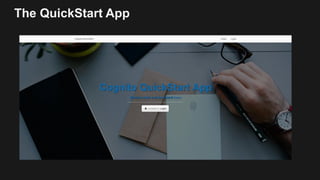
The QuickStart App
Demo time!
http://cognito.budilov.com
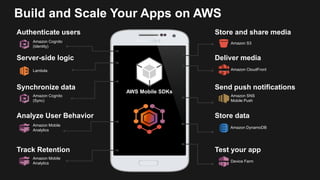
AWS Mobile SDKs
Authenticate users
Analyze User Behavior
Store and share media
Synchronize data
Deliver media
Amazon Cognito
(Sync)
Amazon Cognito
(Identity)
Amazon S3
Amazon CloudFront
Store data
Amazon DynamoDB
Track Retention
Amazon Mobile
Analytics
Send push notifications
Amazon SNS
Mobile Push
Server-side logic
Lambda
Device Farm
Test your app
Build and Scale Your Apps on AWS
Amazon Mobile
Analytics
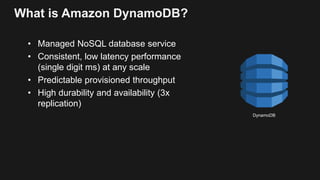
What is Amazon DynamoDB?
• Managed NoSQL database service
• Consistent, low latency performance
(single digit ms) at any scale
• Predictable provisioned throughput
• High durability and availability (3x
replication)
DynamoDB
What is Amazon S3?
• Cloud storage
• Static website hosting
• 11 9’s of Durability
• 4 9’s of Availability
• CloudFront Integration
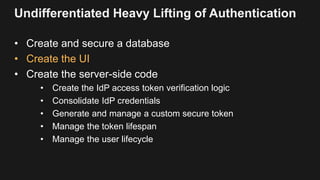
Undifferentiated Heavy Lifting of Authentication
• Create and secure a database
• Create the UI
• Create the server-side code
• Create the IdP access token verification logic
• Consolidate IdP credentials
• Generate and manage a custom secure token
• Manage the token lifespan
• Manage the user lifecycle
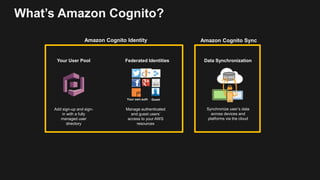
Amazon Cognito
Manage authenticated
and guest users’
access to your AWS
resources
Federated Identities
Synchronize user’s data
across devices and
platforms via the cloud
Data Synchronization
Add sign-up and sign-
in with a fully
managed user
directory
Your User Pool
GuestYour own auth
Amazon Cognito Identity Amazon Cognito Sync
k/v data
What’s Amazon Cognito?
Amazon Cognito Federated Identities
• Authenticate Users with third-party IdPs
• Authenticate with Cognito User Pool
• Anonymous Identities
• Federation of Identities
• OpenID Connect Token Generation
• Control access from your app to other AWS Services
Amazon Cognito Sync
• Store Customer Data in the Cloud
• Synchronize Data
• Cognito Events Trigger AWS Lambda Functions
• Cognito Streams Send Data to Amazon Kinesis
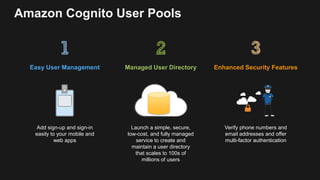
Amazon Cognito User Pools
Add sign-up and sign-in
easily to your mobile and
web apps
Easy User Management
Verify phone numbers and
email addresses and offer
multi-factor authentication
Enhanced Security Features
Launch a simple, secure,
low-cost, and fully managed
service to create and
maintain a user directory
that scales to 100s of
millions of users
Managed User Directory
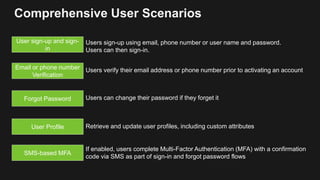
Comprehensive User Scenarios
Email or phone number
Verification
Forgot Password
User sign-up and sign-
in
Users verify their email address or phone number prior to activating an account
Users can change their password if they forget it
Users sign-up using email, phone number or user name and password.
Users can then sign-in.
User Profile Retrieve and update user profiles, including custom attributes
SMS-based MFA
If enabled, users complete Multi-Factor Authentication (MFA) with a confirmation
code via SMS as part of sign-in and forgot password flows
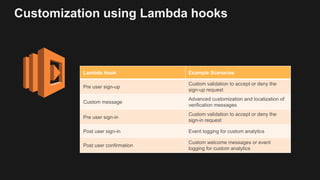
Customization using Lambda hooks
Lambda Hook Example Scenarios
Pre user sign-up
Custom validation to accept or deny the
sign-up request
Custom message
Advanced customization and localization of
verification messages
Pre user sign-in
Custom validation to accept or deny the
sign-in request
Post user sign-in Event logging for custom analytics
Post user confirmation
Custom welcome messages or event
logging for custom analytics
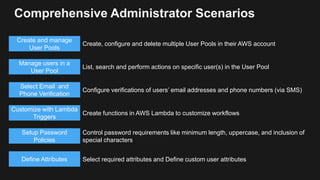
Comprehensive Administrator Scenarios
Manage users in a
User Pool
Select Email and
Phone Verification
Customize with Lambda
Triggers
Setup Password
Policies
Create and manage
User Pools
List, search and perform actions on specific user(s) in the User Pool
Configure verifications of users’ email addresses and phone numbers (via SMS)
Create functions in AWS Lambda to customize workflows
Control password requirements like minimum length, uppercase, and inclusion of
special characters
Create, configure and delete multiple User Pools in their AWS account
Define Attributes Select required attributes and Define custom user attributes
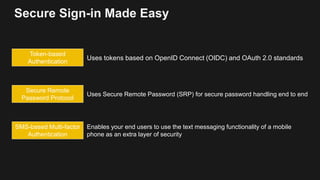
Secure Sign-in Made Easy
Token-based
Authentication
Secure Remote
Password Protocol
SMS-based Multi-factor
Authentication
Uses tokens based on OpenID Connect (OIDC) and OAuth 2.0 standards
Uses Secure Remote Password (SRP) for secure password handling end to end
Enables your end users to use the text messaging functionality of a mobile
phone as an extra layer of security
Authentication flow
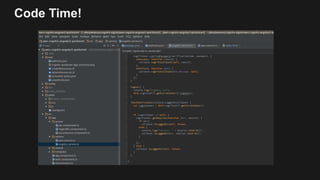
Code Time!
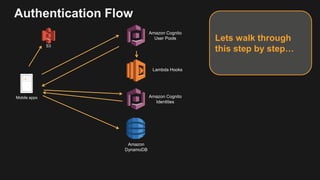
Authentication Flow
Amazon Cognito
User Pools
Amazon
DynamoDB
Mobile apps
Lets walk through
this step by step…S3
Lambda Hooks
Amazon Cognito
Identities
Authentication Flow
Amazon Cognito
User Pools
Amazon
DynamoDB
Mobile apps
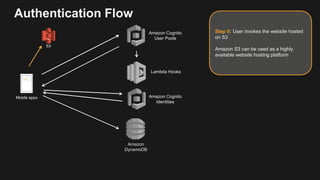
Step 0: User invokes the website hosted
on S3
Amazon S3 can be used as a highly
available website hosting platform
Lambda Hooks
Amazon Cognito
Identities
S3
Authentication Flow
Amazon Cognito
User Pools
Mobile apps
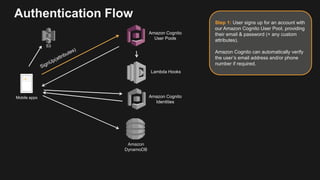
Step 1: User signs up for an account with
our Amazon Cognito User Pool, providing
their email & password (+ any custom
attributes).
Amazon Cognito can automatically verify
the user’s email address and/or phone
number if required.
S3
Amazon
DynamoDB
Lambda Hooks
Amazon Cognito
Identities
Authentication Flow
Amazon Cognito
User Pools
Mobile apps
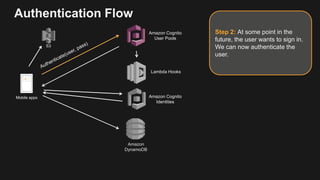
Step 2: At some point in the
future, the user wants to sign in.
We can now authenticate the
user.
Amazon
DynamoDB
Lambda Hooks
Amazon Cognito
Identities
S3
Authentication Flow
Amazon Cognito
User Pools
Mobile apps
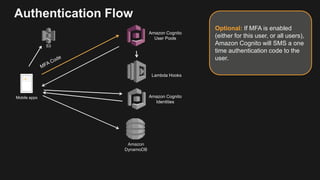
Optional: If MFA is enabled
(either for this user, or all users),
Amazon Cognito will SMS a one
time authentication code to the
user.
Amazon
DynamoDB
Lambda Hooks
Amazon Cognito
Identities
S3
Authentication Flow
Amazon Cognito
User Pools
Mobile apps
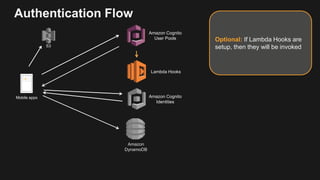
Optional: If Lambda Hooks are
setup, then they will be invoked
Amazon
DynamoDB
Lambda Hooks
S3
Amazon Cognito
Identities
Authentication Flow
Amazon Cognito
User Pools
Mobile apps
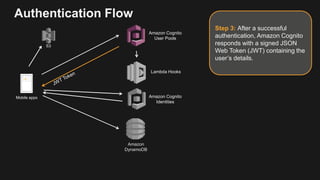
Step 3: After a successful
authentication, Amazon Cognito
responds with a signed JSON
Web Token (JWT) containing the
user’s details.
Amazon
DynamoDB
Lambda Hooks
S3
Amazon Cognito
Identities
Authentication Flow
Amazon Cognito
User Pools
Mobile apps
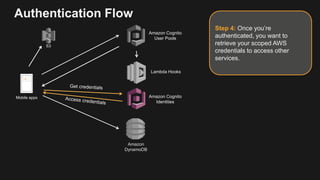
Step 4: Once you’re
authenticated, you want to
retrieve your scoped AWS
credentials to access other
services.
Amazon
DynamoDB
Lambda Hooks
S3
Amazon Cognito
Identities
Authentication Flow
Amazon Cognito
User Pools
Mobile apps
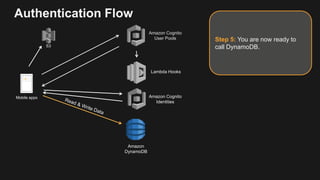
Step 5: You are now ready to
call DynamoDB.
Amazon
DynamoDB
Lambda Hooks
S3
Amazon Cognito
Identities
Going serverless
Amazon Cognito
User Pools
Amazon API Gateway
Lambda Hooks
/v1 Lambda Function
/v2… Lambda
Function
Amazon
DynamoDB
Throttling
Cache
Logging
Monitoring
Auth
Mobile apps
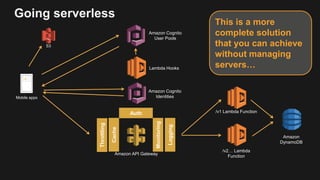
This is a more
complete solution
that you can achieve
without managing
servers…
S3
Amazon Cognito
Identities
Getting started with the
QuickStart app
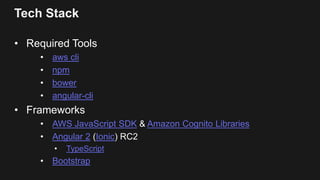
Tech Stack
• Required Tools
• aws cli
• npm
• bower
• angular-cli
• Frameworks
• AWS JavaScript SDK & Amazon Cognito Libraries
• Angular 2 (Ionic) RC2
• TypeScript
• Bootstrap
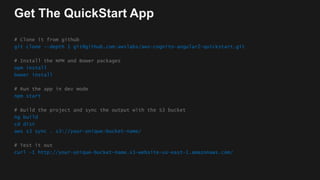
Get The QuickStart App
# Clone it from github
git clone --depth 1 git@github.com:awslabs/aws-cognito-angular2-quickstart.git
# Install the NPM and Bower packages
npm install
bower install
# Run the app in dev mode
npm start
# Build the project and sync the output with the S3 bucket
ng build
cd dist
aws s3 sync . s3://your-unique-bucket-name/
# Test it out
curl –I http://your-unique-bucket-name.s3-website-us-east-1.amazonaws.com/
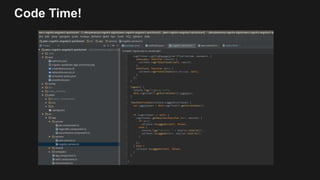
Code Time!
Tokens
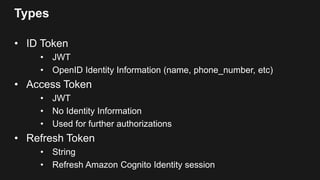
Types
• ID Token
• JWT
• OpenID Identity Information (name, phone_number, etc)
• Access Token
• JWT
• No Identity Information
• Used for further authorizations
• Refresh Token
• String
• Refresh Amazon Cognito Identity session
ID Token
• Header
• kid – used to locate the public key
• alg – RS256
• Payload
• user attributes (user identity information)
• iss – the issuer
• sub – UUID of the authenticated user
• token_use – the purpose of the token
• Signature
• Based on header and payload
Access Token
• Header
• kid – different from ID token since different keys used
• alg – RS256
• Payload
• username – (e.g. vladimir@budilov.com)
• Signature
• Based on header and payload
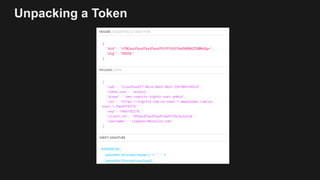
Unpacking a Token
Thank You!
Questions? Comments? Suggestions?
Don’t Forget Evaluations!

amazon-cognito-auth-in-minutes

  • 2.
    © 2016, AmazonWeb Services, Inc. or its Affiliates. All rights reserved. Vladimir Budilov, Technical Account Manager 6/21/2016 Workshop: How to Architect User Authentication and Authorization in Your Apps
  • 3.
    What to expectfrom this session? • High-level overview of AWS Mobile Services • Deep dive into Amazon Cognito, specifically Cognito User Pools • Walkthrough of a ready-to-use Angular 2 app powered by Cognito • How to store & manage users without creating a line of server-side code (no plumbing needed!)
  • 4.
  • 5.
  • 6.
    AWS Mobile SDKs Authenticateusers Analyze User Behavior Store and share media Synchronize data Deliver media Amazon Cognito (Sync) Amazon Cognito (Identity) Amazon S3 Amazon CloudFront Store data Amazon DynamoDB Track Retention Amazon Mobile Analytics Send push notifications Amazon SNS Mobile Push Server-side logic Lambda Device Farm Test your app Build and Scale Your Apps on AWS Amazon Mobile Analytics
  • 7.
    What is AmazonDynamoDB? • Managed NoSQL database service • Consistent, low latency performance (single digit ms) at any scale • Predictable provisioned throughput • High durability and availability (3x replication) DynamoDB
  • 8.
    What is AmazonS3? • Cloud storage • Static website hosting • 11 9’s of Durability • 4 9’s of Availability • CloudFront Integration
  • 9.
    Undifferentiated Heavy Liftingof Authentication • Create and secure a database • Create the UI • Create the server-side code • Create the IdP access token verification logic • Consolidate IdP credentials • Generate and manage a custom secure token • Manage the token lifespan • Manage the user lifecycle
  • 10.
  • 11.
    Manage authenticated and guestusers’ access to your AWS resources Federated Identities Synchronize user’s data across devices and platforms via the cloud Data Synchronization Add sign-up and sign- in with a fully managed user directory Your User Pool GuestYour own auth Amazon Cognito Identity Amazon Cognito Sync k/v data What’s Amazon Cognito?
  • 12.
    Amazon Cognito FederatedIdentities • Authenticate Users with third-party IdPs • Authenticate with Cognito User Pool • Anonymous Identities • Federation of Identities • OpenID Connect Token Generation • Control access from your app to other AWS Services
  • 13.
    Amazon Cognito Sync •Store Customer Data in the Cloud • Synchronize Data • Cognito Events Trigger AWS Lambda Functions • Cognito Streams Send Data to Amazon Kinesis
  • 14.
    Amazon Cognito UserPools Add sign-up and sign-in easily to your mobile and web apps Easy User Management Verify phone numbers and email addresses and offer multi-factor authentication Enhanced Security Features Launch a simple, secure, low-cost, and fully managed service to create and maintain a user directory that scales to 100s of millions of users Managed User Directory
  • 15.
    Comprehensive User Scenarios Emailor phone number Verification Forgot Password User sign-up and sign- in Users verify their email address or phone number prior to activating an account Users can change their password if they forget it Users sign-up using email, phone number or user name and password. Users can then sign-in. User Profile Retrieve and update user profiles, including custom attributes SMS-based MFA If enabled, users complete Multi-Factor Authentication (MFA) with a confirmation code via SMS as part of sign-in and forgot password flows
  • 16.
    Customization using Lambdahooks Lambda Hook Example Scenarios Pre user sign-up Custom validation to accept or deny the sign-up request Custom message Advanced customization and localization of verification messages Pre user sign-in Custom validation to accept or deny the sign-in request Post user sign-in Event logging for custom analytics Post user confirmation Custom welcome messages or event logging for custom analytics
  • 17.
    Comprehensive Administrator Scenarios Manageusers in a User Pool Select Email and Phone Verification Customize with Lambda Triggers Setup Password Policies Create and manage User Pools List, search and perform actions on specific user(s) in the User Pool Configure verifications of users’ email addresses and phone numbers (via SMS) Create functions in AWS Lambda to customize workflows Control password requirements like minimum length, uppercase, and inclusion of special characters Create, configure and delete multiple User Pools in their AWS account Define Attributes Select required attributes and Define custom user attributes
  • 18.
    Secure Sign-in MadeEasy Token-based Authentication Secure Remote Password Protocol SMS-based Multi-factor Authentication Uses tokens based on OpenID Connect (OIDC) and OAuth 2.0 standards Uses Secure Remote Password (SRP) for secure password handling end to end Enables your end users to use the text messaging functionality of a mobile phone as an extra layer of security
  • 19.
  • 20.
  • 21.
    Authentication Flow Amazon Cognito UserPools Amazon DynamoDB Mobile apps Lets walk through this step by step…S3 Lambda Hooks Amazon Cognito Identities
  • 22.
    Authentication Flow Amazon Cognito UserPools Amazon DynamoDB Mobile apps Step 0: User invokes the website hosted on S3 Amazon S3 can be used as a highly available website hosting platform Lambda Hooks Amazon Cognito Identities S3
  • 23.
    Authentication Flow Amazon Cognito UserPools Mobile apps Step 1: User signs up for an account with our Amazon Cognito User Pool, providing their email & password (+ any custom attributes). Amazon Cognito can automatically verify the user’s email address and/or phone number if required. S3 Amazon DynamoDB Lambda Hooks Amazon Cognito Identities
  • 24.
    Authentication Flow Amazon Cognito UserPools Mobile apps Step 2: At some point in the future, the user wants to sign in. We can now authenticate the user. Amazon DynamoDB Lambda Hooks Amazon Cognito Identities S3
  • 25.
    Authentication Flow Amazon Cognito UserPools Mobile apps Optional: If MFA is enabled (either for this user, or all users), Amazon Cognito will SMS a one time authentication code to the user. Amazon DynamoDB Lambda Hooks Amazon Cognito Identities S3
  • 26.
    Authentication Flow Amazon Cognito UserPools Mobile apps Optional: If Lambda Hooks are setup, then they will be invoked Amazon DynamoDB Lambda Hooks S3 Amazon Cognito Identities
  • 27.
    Authentication Flow Amazon Cognito UserPools Mobile apps Step 3: After a successful authentication, Amazon Cognito responds with a signed JSON Web Token (JWT) containing the user’s details. Amazon DynamoDB Lambda Hooks S3 Amazon Cognito Identities
  • 28.
    Authentication Flow Amazon Cognito UserPools Mobile apps Step 4: Once you’re authenticated, you want to retrieve your scoped AWS credentials to access other services. Amazon DynamoDB Lambda Hooks S3 Amazon Cognito Identities
  • 29.
    Authentication Flow Amazon Cognito UserPools Mobile apps Step 5: You are now ready to call DynamoDB. Amazon DynamoDB Lambda Hooks S3 Amazon Cognito Identities
  • 30.
    Going serverless Amazon Cognito UserPools Amazon API Gateway Lambda Hooks /v1 Lambda Function /v2… Lambda Function Amazon DynamoDB Throttling Cache Logging Monitoring Auth Mobile apps This is a more complete solution that you can achieve without managing servers… S3 Amazon Cognito Identities
  • 31.
    Getting started withthe QuickStart app
  • 32.
    Tech Stack • RequiredTools • aws cli • npm • bower • angular-cli • Frameworks • AWS JavaScript SDK & Amazon Cognito Libraries • Angular 2 (Ionic) RC2 • TypeScript • Bootstrap
  • 33.
    Get The QuickStartApp # Clone it from github git clone --depth 1 git@github.com:awslabs/aws-cognito-angular2-quickstart.git # Install the NPM and Bower packages npm install bower install # Run the app in dev mode npm start # Build the project and sync the output with the S3 bucket ng build cd dist aws s3 sync . s3://your-unique-bucket-name/ # Test it out curl –I http://your-unique-bucket-name.s3-website-us-east-1.amazonaws.com/
  • 34.
  • 35.
  • 36.
    Types • ID Token •JWT • OpenID Identity Information (name, phone_number, etc) • Access Token • JWT • No Identity Information • Used for further authorizations • Refresh Token • String • Refresh Amazon Cognito Identity session
  • 37.
    ID Token • Header •kid – used to locate the public key • alg – RS256 • Payload • user attributes (user identity information) • iss – the issuer • sub – UUID of the authenticated user • token_use – the purpose of the token • Signature • Based on header and payload
  • 38.
    Access Token • Header •kid – different from ID token since different keys used • alg – RS256 • Payload • username – (e.g. vladimir@budilov.com) • Signature • Based on header and payload
  • 39.
  • 40.
  • 41.