Building Cloud-powered Mobile Apps 
Danilo Poccia, Technical Evangelist 
October 29th, 2014
#AWSUGIT 
@danilop
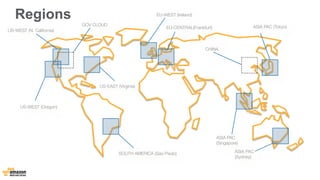
Regions 
US- WEST (N. California) 
EU-WEST (Ireland) 
ASIA PAC (Tokyo) 
ASIA PAC 
(Singapore) 
US-WEST (Oregon) 
US-EAST (Virginia) 
EU-CENTRAL(Frankfurt) 
SOUTH AMERICA (Sao Paulo) 
GOV CLOUD 
ASIA PAC 
(Sydney) 
CHINA
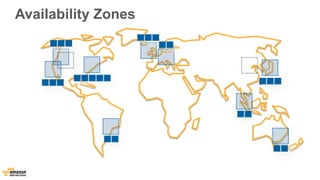
Availability Zones
Edge Locations 
New York (3) 
Marseille 
Los Angeles (2) Jacksonville 
Dallas(2) 
St.Louis 
Miami 
Palo Alto 
Seattle 
London(2) 
Ashburn(3) 
Newark 
Dublin 
Amsterdam (3) 
Stockholm 
Frankfurt(3) 
Paris(2) 
Singapore (2) 
Tokyo (2) 
Taipei 
Hong Kong (2) 
Sao Paulo 
South Bend 
San Jose 
Milan 
Sydney 
Madrid 
Seoul 
Mumbai 
Chennai 
Atlanta 
Hayward 
Rio de Janeiro 
Warsaw 
Osaka 
Manila 
Melbourne
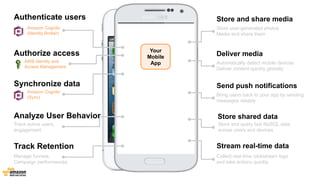
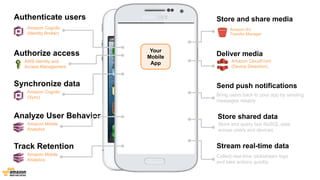
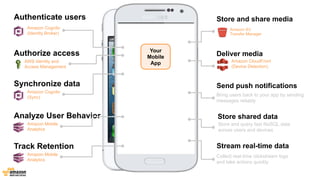
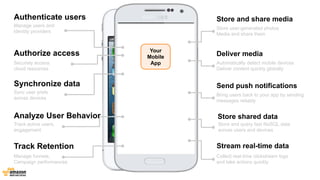
How to build a mobile app today?
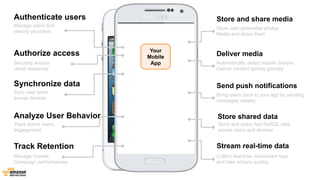
Authenticate users 
Manage users and 
identity providers 
Authorize access 
Securely access 
cloud resources 
Sync user prefs 
across devices 
Analyze User Behavior 
Store and share media 
Synchronize data 
Deliver media 
Send push notifications 
Store shared data 
Track active users, 
engagement 
Track Retention Stream real-time data 
Manage funnels, 
Campaign performances 
Store user-generated photos 
Media and share them 
Automatically detect mobile devices 
Deliver content quickly globally 
Bring users back to your app by sending 
messages reliably 
Store and query fast NoSQL data 
across users and devices 
Collect real-time clickstream logs 
and take actions quickly 
Your 
Mobile 
App
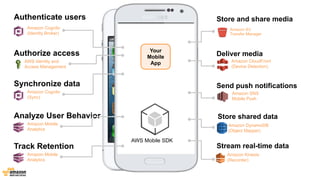
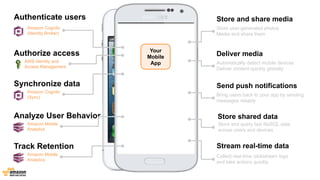
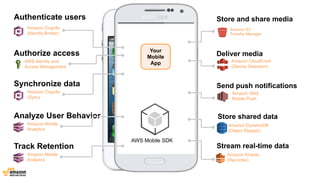
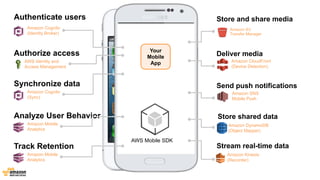
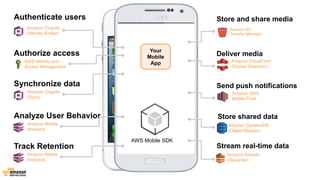
Authenticate users 
Amazon Cognito 
(Identity Broker) 
Authorize access 
AWS Identity and 
Access Management 
Analyze User Behavior 
Store and share media 
Synchronize data 
AWS Mobile SDK 
Amazon Mobile 
Analytics 
Deliver media 
Amazon Cognito 
(Sync) 
Amazon S3 
Transfer Manager 
Amazon CloudFront 
(Device Detection) 
Store shared data 
Amazon DynamoDB 
(Object Mapper) 
Stream real-time data 
Amazon Kinesis 
(Recorder) 
Track Retention 
Amazon Mobile 
Analytics 
Send push notifications 
Amazon SNS 
Mobile Push 
Your 
Mobile 
App
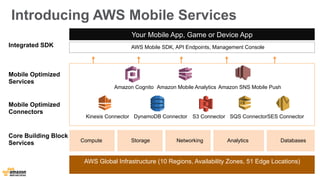
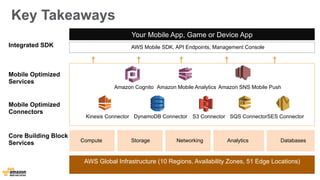
Introducing AWS Mobile Services 
Amazon Cognito Amazon Mobile Analytics Amazon SNS Mobile Push 
Kinesis Connector DynamoDB Connector S3 Connector SQS Connector SES Connector 
AWS Global Infrastructure (10 Regions, Availability Zones, 51 Edge Locations) 
Mobile Optimized 
Services 
Mobile Optimized 
Connectors 
Core Building Block 
Services 
Your Mobile App, Game or Device App 
AWS Mobile SDK, API Endpoints, Management Console 
Compute Storage Networking Analytics Databases 
Integrated SDK
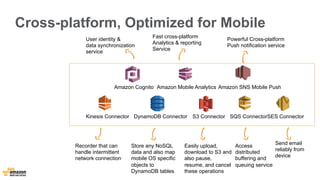
Cross-platform, Optimized for Mobile 
User identity & 
data synchronization 
service 
Fast cross-platform 
Analytics & reporting 
Service 
Amazon Cognito Amazon Mobile Analytics Amazon SNS Mobile Push 
Kinesis Connector DynamoDB Connector S3 Connector SQS Connector SES Connector 
Store any NoSQL 
data and also map 
mobile OS specific 
objects to 
DynamoDB tables 
Powerful Cross-platform 
Push notification service 
Recorder that can 
handle intermittent 
network connection 
Easily upload, 
download to S3 and 
also pause, 
resume, and cancel 
these operations 
Send email 
reliably from 
device 
Access 
distributed 
buffering and 
queuing service
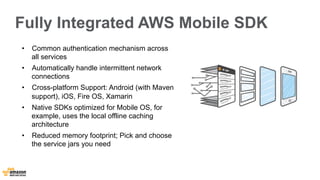
Fully Integrated AWS Mobile SDK 
• Common authentication mechanism across 
all services 
• Automatically handle intermittent network 
connections 
• Cross-platform Support: Android (with Maven 
support), iOS, Fire OS, Xamarin 
• Native SDKs optimized for Mobile OS, for 
example, uses the local offline caching 
architecture 
• Reduced memory footprint; Pick and choose 
the service jars you need
Authenticate users: Amazon Cognito
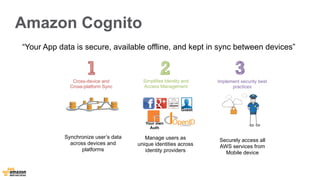
Amazon Cognito 
“Your App data is secure, available offline, and kept in sync between devices” 
Simplifies Identity and 
Access Management 
Securely access all 
AWS services from 
Mobile device 
Cross-device and 
Cross-platform Sync 
Implement security best 
practices 
Synchronize user’s data 
across devices and 
platforms 
Guest 
Your own 
Auth 
Manage users as 
unique identities across 
identity providers
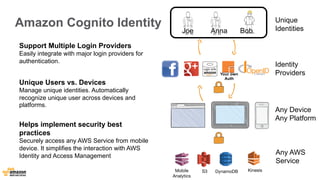
Unique 
Joe Anna Bob Identities 
Identity 
Providers 
Any Device 
Any Platform 
Any AWS 
Service 
Amazon Cognito Identity 
Support Multiple Login Providers 
Easily integrate with major login providers for 
authentication. 
Unique Users vs. Devices 
Manage unique identities. Automatically 
recognize unique user across devices and 
platforms. 
Helps implement security best 
practices 
Securely access any AWS Service from mobile 
device. It simplifies the interaction with AWS 
Identity and Access Management 
Mobile 
Analytics 
S3 
DynamoDB 
Kinesis 
Your own 
Auth
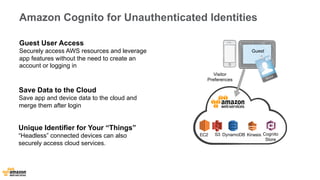
Amazon Cognito for Unauthenticated Identities 
Guest User Access 
Securely access AWS resources and leverage 
app features without the need to create an 
account or logging in 
Save Data to the Cloud 
Save app and device data to the cloud and 
merge them after login 
Unique Identifier for Your “Things” 
“Headless” connected devices can also 
securely access cloud services. 
Visitor 
Preferences 
Guest 
Cognito 
Store 
EC2 
S3 
DynamoDB 
Kinesis
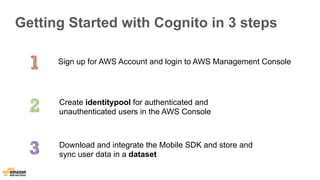
Getting Started with Cognito in 3 steps 
Sign up for AWS Account and login to AWS Management Console 
Create identitypool for authenticated and 
unauthenticated users in the AWS Console 
Download and integrate the Mobile SDK and store and 
sync user data in a dataset
Demo: Amazon Cognito Console
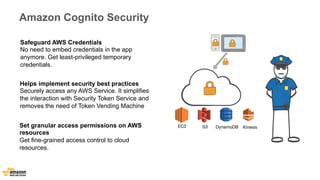
Amazon Cognito Security 
Safeguard AWS Credentials 
No need to embed credentials in the app 
anymore. Get least-privileged temporary 
credentials. 
Helps implement security best practices 
Securely access any AWS Service. It simplifies 
the interaction with Security Token Service and 
removes the need of Token Vending Machine 
Set granular access permissions on AWS 
resources 
Get fine-grained access control to cloud 
resources. 
EC2 
S3 
DynamoDB 
Kinesis
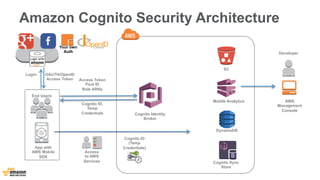
Amazon Cognito Security Architecture 
Cognito ID 
(Temp 
Credentials) 
DynamoDB 
End Users 
Developer 
Access 
to AWS 
Services 
Cognito Identity 
Broker 
Login OAUTH/OpenID 
Access Token 
Cognito ID, 
Temp 
Credentials 
S3 
Mobile Analytics 
Cognito Sync 
Store 
AWS 
Management 
Console 
Access Token 
Pool ID 
Role ARNs 
App with 
AWS Mobile 
SDK 
Your own 
Auth
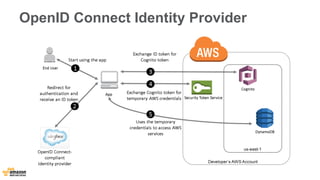
OpenID Connect Identity Provider
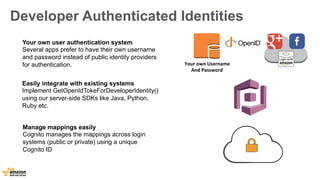
Developer Authenticated Identities 
Your 
own 
Username 
And 
Password 
Your own user authentication system 
Several apps prefer to have their own username 
and password instead of public identity providers 
for authentication. 
Easily integrate with existing systems 
Implement GetOpenIdTokeForDeveloperIdentity() 
using our server-side SDKs like Java, Python, 
Ruby etc. 
Manage mappings easily 
Cognito manages the mappings across login 
systems (public or private) using a unique 
Cognito ID
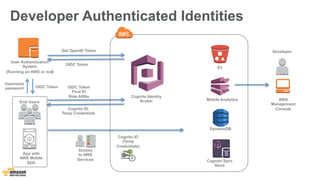
Developer Authenticated Identities 
Cognito ID 
(Temp 
Credentials) 
DynamoDB 
End Users 
Developer 
App with 
AWS Mobile 
SDK 
Access 
to AWS 
Services 
Cognito Identity 
Broker 
Get OpenID Token 
Username 
password 
Cognito ID, 
Temp Credentials 
S3 
Mobile Analytics 
Cognito Sync 
Store 
AWS 
Management 
Console 
OIDC Token 
Pool ID 
Role ARNs 
User Authentication 
System 
(Running on AWS or not) 
OIDC Token 
OIDC Token
Authorize access: 
Amazon Cognito + AWS IAM + Fine-grained access control
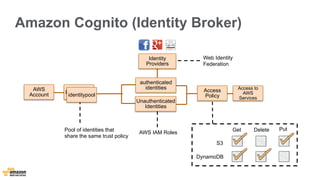
Amazon Cognito (Identity Broker) 
authenticated 
identities 
Access to 
AWS 
Services identitypool 
Identitypool 
Identity 
Providers 
Pool of identities that 
share the same trust policy 
Access 
Policy 
Unauthenticated 
Identities 
AWS IAM Roles 
AWS 
Account 
Web Identity 
Federation 
S3 
DynamoDB 
Get Delete Put
Access Policy for the IAM Role 
{ 
"Effect":"Allow", 
"Action":["s3:*"], 
"Resource":"*" 
} 
{ 
"Effect": ”Deny", 
"Action": ["dynamodb:*"], 
"Resource": "*" 
} 
{ 
"Effect": "Allow", 
"Action": [”cognito-sync:*"], 
"Resource": "*" 
} 
Allow 
Actions: 
All S3, Sync store 
Operations 
Resource: 
All resources within 
these services 
Deny 
Actions: 
All DDB Operations 
Resource: 
All resources
Access Policy Restriction 
{ 
"Effect":"Allow", 
"Action":["s3:PutObject","s3:GetObject","s3:DeleteObject", 
"s3:ListMultipartUploadParts","s3:AbortMultipartUpload"], 
"Resource":"arn:aws:s3:::BUCKET_NAME/*" 
} 
{ 
"Effect":"Allow", 
"Action":["s3:ListBucket","s3:ListBucketMultipartUploads"], 
"Resource":"arn:aws:s3:::BUCKET_NAME" 
}{ 
"Effect": "Allow", 
"Action": ["dynamodb:GetItem", "dynamodb:Query", "dynamodb:PutItem"], 
"Resource" : [ "arn:aws:dynamodb:REGION:123456789:table/TABLE_NAME", 
"arn:aws:dynamodb:REGION:123456789:table/TABLE_NAME/ 
index/INDEX_NAME" ] 
} 
Allow 
Actions: 
Certain operations 
Resource: 
One bucket, table ..
Access Policy Restriction 
{ 
"Effect":"Allow”, 
"Action” ["s3:PutObject","s3:GetObject","s3:DeleteObj 
ect”,”s3:ListMultipartUploadParts","s3:AbortMultipart 
Upload"], 
"Resource":"arn:aws:s3:::BUCKET_NAME/Bob/*" 
} 
{ 
"Effect":"Allow", 
"Action":"s3:ListBucket", 
"Resource":"arn:aws:s3:::BUCKET_NAME", 
"Condition":{"StringLike":{"s3:prefix":”Bob/"}} 
}{ 
"Effect":"Allow", 
"Action":["s3:ListBucketMultipartUploads"], 
"Resource":"arn:aws:s3:::BUCKET_NAME" 
} 
Allow 
Actions: 
Certain operations 
Resource: 
Within a bucket with 
specific prefix (user)
Access Policy Restriction (Policy Variables) 
Allow 
Actions: 
All sync operations 
Resource: 
Only to that identity 
{" 
Effect":"Allow", 
"Action":"cognito-sync:*", 
"Resource":["arn:aws:cognito-sync:us-east-1: 
{ 
"Effect": "Allow”, 
"Action": ["s3:GetObject”,"s3:PutObject”], 
"Resource": ["arn:aws:s3::: 
myBucket/amazon/snakegame/ 
${cognito-identity.amazonaws.com:sub}"] 
} 
123456789012:identitypool/ 
${cognito-identity.amazonaws.com:aud}/identity/ 
${cognito-identity.amazonaws.com:sub}/*"] 
} 
Allow 
Actions: 
S3 Get/Put operations 
Resource: 
Only to a specific part 
of bucket to that identity
Synchronize data across devices : Amazon Cognito (Sync)
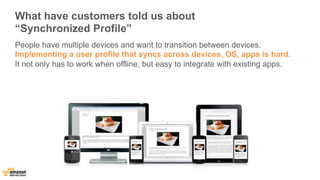
What have customers told us about 
“Synchronized Profile” 
People have multiple devices and want to transition between devices. 
Implementing a user profile that syncs across devices, OS, apps is hard. 
It not only has to work when offline, but easy to integrate with existing apps.
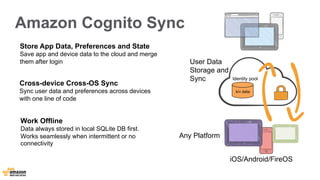
Amazon Cognito Sync 
User Data 
Storage and 
Sync 
Any Platform 
Identity pool 
iOS/Android/FireOS 
Store App Data, Preferences and State 
Save app and device data to the cloud and merge 
them after login 
Cross-device Cross-OS Sync 
Sync user data and preferences across devices 
with one line of code 
Work Offline 
Data always stored in local SQLite DB first. 
Works seamlessly when intermittent or no 
connectivity 
k/v data
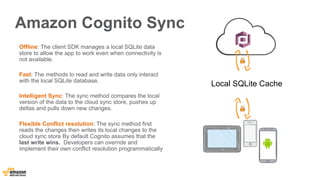
Amazon Cognito Sync 
Offline: The client SDK manages a local SQLite data 
store to allow the app to work even when connectivity is 
not available. 
Fast: The methods to read and write data only interact 
with the local SQLite database. 
Intelligent Sync: The sync method compares the local 
version of the data to the cloud sync store, pushes up 
deltas and pulls down new changes. 
Flexible Conflict resolution: The sync method first 
reads the changes then writes its local changes to the 
cloud sync store By default Cognito assumes that the 
last write wins. Developers can override and 
implement their own conflict resolution programmatically 
Local SQLite Cache
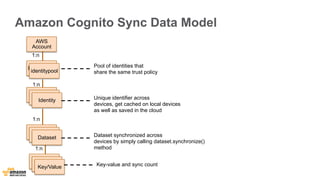
Amazon Cognito Sync Data Model 
AWS 
Account 
Identitypool 
identitypool 
Dataset 
Pool of identities that 
share the same trust policy 
IdIdeenntittiyt y Identity 
DDaatatasseet t 
Unique identifier across 
devices, get cached on local devices 
as well as saved in the cloud 
1:n 
1:n 
1:n 
Dataset synchronized across 
devices by simply calling dataset.synchronize() 
method 
1:n 
DDaatatasseet t Key/Value 
Key-value and sync count
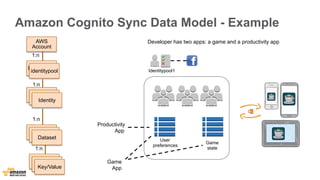
Amazon Cognito Sync Data Model - Example 
AWS 
Account 
1:n 
Identitypool 
identitypool 
1:n 
IdIdeenntittiyt y Identity 
1:n 
Dataset 
DDaatatasseet t 
Developer has two apps: a game and a productivity app 
User 
preferences 
Game 
state 
Identitypool1 
Productivity 
App 
Game 
App 
1:n 
DDaatatasseet t Key/Value
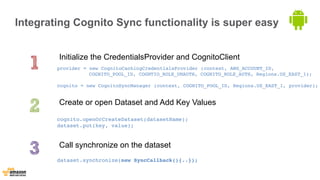
Integrating Cognito Sync functionality is super easy 
Initialize the CredentialsProvider and CognitoClient 
provider = new CognitoCachingCredentialsProvider (context, AWS_ACCOUNT_ID, 
COGNITO_POOL_ID, COGNTIO_ROLE_UNAUTH, COGNITO_ROLE_AUTH, Regions.US_EAST_1); 
cognito = new CognitoSyncManager (context, COGNITO_POOL_ID, Regions.US_EAST_1, provider); 
Create or open Dataset and Add Key Values 
cognito.openOrCreateDataset(datasetName); 
dataset.put(key, value); 
Call synchronize on the dataset 
dataset.synchronize(new SyncCallback(){..});
Integrating Cognito Sync functionality is dead simple 
Initialize the AWSCognitoSyncClient 
AWSCognitoSyncClient *syncClient = [[AWSCognitoSyncClient alloc] 
initWithConfiguration: configuration]; 
Create or open Dataset and Add Key Values 
DataSet *dataset = [syncClient openOrCreateDataSet:@"myDataSet"]; 
NSString *value = [dataset readStringForKey:@"myKey"]; 
[dataset putString:@"my value" forKey:@"myKey"]; 
Call synchronize on the dataset 
[dataset synchronize]; 
iOS
Amazon Cognito 
(Identity Broker) 
AWS Identity and 
Access Management 
Analyze User Behavior 
Store and share media 
Deliver media 
Send push notifications 
Store shared data 
Track active users, 
engagement 
Track Retention Stream real-time data 
Manage funnels, 
Campaign performances 
Store user-generated photos 
Media and share them 
Automatically detect mobile devices 
Deliver content quickly globally 
Bring users back to your app by sending 
messages reliably 
Store and query fast NoSQL data 
across users and devices 
Collect real-time clickstream logs 
and take actions quickly 
Your 
Mobile 
App 
Authenticate users 
Authorize access 
Synchronize data 
Amazon Cognito 
(Sync)
Analyze User Behavior: Amazon Mobile Analytics
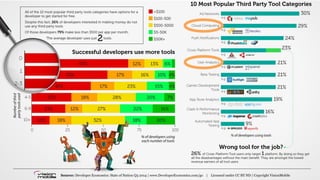
Developer Economics | State of the Developer Nation Q3 2014 | © VisionMobile | All rights reserved | www.developereconomics.com/go 27
User Analytics (and Cloud Computing) 
among top 10 most popular tools 
Successful developers use more tools 
Developer Economics 
State of the Developer Nation Q3 2014 
© VisionMobile
What Customers Told Us About “Mobile Analytics” 
Developers deeply value user analytics and consider it an integral part 
of their app development process. They want to monitor their most 
important metrics in a timely manner, and take action quickly. They 
would like to own their mobile data, just like they do with any other 
AWS service.
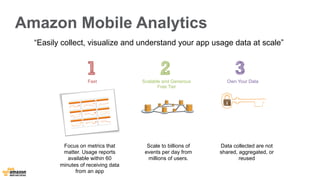
Amazon Mobile Analytics 
“Easily collect, visualize and understand your app usage data at scale” 
Scalable and Generous 
Free Tier 
Fast 
Focus on metrics that 
matter. Usage reports 
available within 60 
minutes of receiving data 
from an app 
Scale to billions of 
events per day from 
millions of users. 
Own Your Data 
Data collected are not 
shared, aggregated, or 
reused
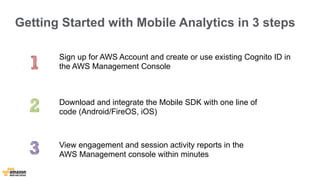
Getting Started with Mobile Analytics in 3 steps 
Sign up for AWS Account and create or use existing Cognito ID in 
the AWS Management Console 
Download and integrate the Mobile SDK with one line of 
code (Android/FireOS, iOS) 
View engagement and session activity reports in the 
AWS Management console within minutes
Demo: Amazon Mobile Analytics Console
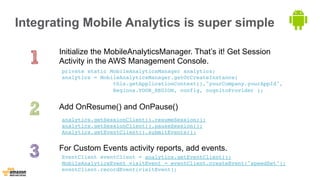
Integrating Mobile Analytics is super simple 
Initialize the MobileAnalyticsManager. That’s it! Get Session 
Activity in the AWS Management Console. 
private static MobileAnalyticsManager analytics; 
analytics = MobileAnalyticsManager.getOrCreateInstance( 
this.getApplicationContext(),"yourCompany.yourAppId", 
Regions.YOUR_REGION, config, cognitoProvider ); 
Add OnResume() and OnPause() 
analytics.getSessionClient().resumeSession(); 
analytics.getSessionClient().pauseSession(); 
Analytics.getEventClient().submitEvents(); 
For Custom Events activity reports, add events. 
EventClient eventClient = analytics.getEventClient(); 
MobileAnalyticsEvent visitEvent = eventClient.createEvent("speedSet"); 
eventClient.recordEvent(visitEvent);
Integrating Mobile Analytics is super simple 
Initialize the AWSMobileAnalytics object. That’s it! Get Session 
Activity in the AWS Management Console. 
AWSMobileAnalytics* analytics = [AWSMobileAnalytics 
defaultAWSMobileAnalyticsWithIdentifier:@"someuniqueid"]; 
Create add Custom Events 
id<AWSMobileAnalyticsEventClient> eventClient = 
analytics.eventClient; 
id<AWSMobileAnalyticsEvent> level1Event = [eventClient 
createEventWithEventType:@"level1Complete"]; 
Submit the event. If we don't call submitEvents, events 
will automatically be submitted at periodic intervals. 
[eventClient submitEvents]; 
iOS
Store and share media 
Store user-generated photos 
Media and share them 
Deliver media 
Automatically detect mobile devices 
Deliver content quickly globally 
Send push notifications 
Bring users back to your app by sending 
messages reliably 
Store shared data 
Store and query fast NoSQL data 
across users and devices 
Stream real-time data 
Collect real-time clickstream logs 
and take actions quickly 
Your 
Mobile 
App 
Authenticate users 
Amazon Cognito 
(Identity Broker) 
Authorize access 
AWS Identity and 
Access Management 
Synchronize data 
Amazon Cognito 
(Sync) 
Analyze User Behavior 
Amazon Mobile 
Analytics 
Track Retention 
Amazon Mobile 
Analytics
Store and share media: Amazon S3
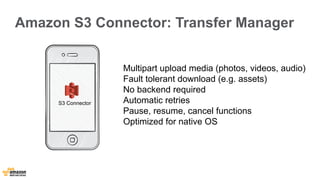
Amazon S3 Connector: Transfer Manager 
S3 Connector 
Multipart upload media (photos, videos, audio) 
Fault tolerant download (e.g. assets) 
No backend required 
Automatic retries 
Pause, resume, cancel functions 
Optimized for native OS
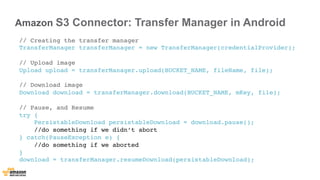
Amazon S3 Connector: Transfer Manager in Android 
// Creating the transfer manager 
TransferManager transferManager = new TransferManager(credentialProvider); 
// Upload image 
Upload upload = transferManager.upload(BUCKET_NAME, fileName, file); 
// Download image 
Download download = transferManager.download(BUCKET_NAME, mKey, file); 
// Pause, and Resume 
try { 
PersistableDownload persistableDownload = download.pause(); 
//do something if we didn’t abort 
} catch(PauseException e) { 
//do something if we aborted 
} 
download = transferManager.resumeDownload(persistableDownload);
Amazon S3 Connector: Transfer Manager in iOS 
// Creating the transfer manager 
self.transferManager = [S3TransferManager new]; 
self.transferManager.s3 = s3client; 
// Upload image 
[self.transferManager uploadFile:fileName bucket:bucketName key:objectName]; 
// Download image 
[self.transferManager downloadFile:fileName bucket:bucketName key:objectName]; 
// Pause, Resume, Cancel 
[self.transferManager pauseAllTransfers]; 
[self.transferManager resumeAllTransfers]; 
[self.transferManager cancelAllTransfers];
Amazon S3 
Transfer Manager 
Send push notifications 
Bring users back to your app by sending 
messages reliably 
Store shared data 
Store and query fast NoSQL data 
across users and devices 
Stream real-time data 
Collect real-time clickstream logs 
and take actions quickly 
Your 
Mobile 
App 
Authenticate users 
Amazon Cognito 
(Identity Broker) 
Authorize access 
AWS Identity and 
Access Management 
Synchronize data 
Amazon Cognito 
(Sync) 
Analyze User Behavior 
Amazon Mobile 
Analytics 
Track Retention 
Amazon Mobile 
Analytics 
Store and share media 
Deliver media 
Amazon CloudFront 
(Device Detection)
Authenticate users 
Amazon Cognito 
(Identity Broker) 
Authorize access 
AWS Identity and 
Access Management 
Analyze User Behavior 
Store and share media 
Synchronize data 
AWS Mobile SDK 
Amazon Mobile 
Analytics 
Deliver media 
Amazon Cognito 
(Sync) 
Amazon S3 
Transfer Manager 
Amazon CloudFront 
(Device Detection) 
Store shared data 
Amazon DynamoDB 
(Object Mapper) 
Stream real-time data 
Amazon Kinesis 
(Recorder) 
Track Retention 
Amazon Mobile 
Analytics 
Send push notifications 
Amazon SNS 
Mobile Push 
Your 
Mobile 
App
Send Push Notifications: Amazon SNS Mobile Push
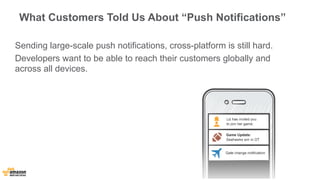
What Customers Told Us About “Push Notifications” 
Sending large-scale push notifications, cross-platform is still hard. 
Developers want to be able to reach their customers globally and 
across all devices.
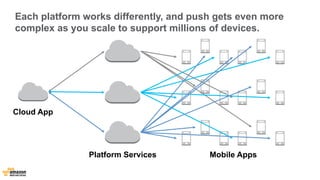
Each platform works differently, and push gets even more 
complex as you scale to support millions of devices. 
Cloud App 
Platform Services Mobile Apps
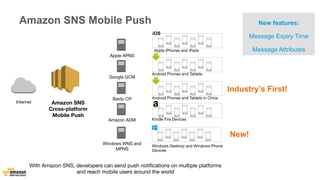
Amazon SNS 
Cross-platform 
Mobile Push 
Internet 
Apple APNS 
Google GCM 
Baidu CP 
Amazon ADM 
Windows WNS and 
MPNS 
Industry’s First! 
New! 
iOS 
Apple iPhones and iPads 
Android Phones and Tablets in China 
With Amazon SNS, developers can send push notifications on multiple platforms 
and reach mobile users around the world 
New features: 
Message Expiry Time 
Message Attributes 
Amazon SNS Mobile Push 
Android Phones and Tablets 
Kindle Fire Devices 
Windows Desktop and Windows Phone 
Devices
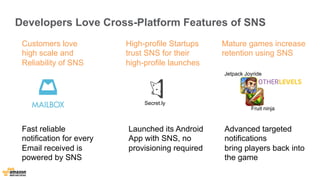
Developers Love Cross-Platform Features of SNS 
Customers love 
high scale and 
Reliability of SNS 
Fast reliable 
notification for every 
Email received is 
powered by SNS 
High-profile Startups 
trust SNS for their 
high-profile launches 
Secret.ly 
Mature games increase 
retention using SNS 
Advanced targeted 
notifications 
bring players back into 
the game 
Launched its Android 
App with SNS, no 
provisioning required 
Jetpack Joyride 
Fruit ninja
Store Shared Data: Amazon DynamoDB
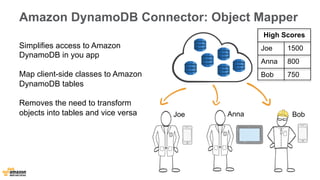
Amazon DynamoDB Connector: Object Mapper 
High Scores 
Joe 1500 
Anna 800 
Bob 750 
Joe Anna Bob 
Simplifies access to Amazon 
DynamoDB in you app 
Map client-side classes to Amazon 
DynamoDB tables 
Removes the need to transform 
objects into tables and vice versa
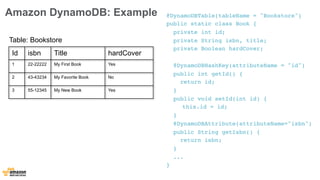
Amazon DynamoDB: Example @DynamoDBTable(tableName = "Bookstore") 
public static class Book { 
private int id; 
private String isbn, title; 
private Boolean hardCover; 
@DynamoDBHashKey(attributeName = "id") 
public int getId() { 
return id; 
} 
public void setId(int id) { 
this.id = id; 
} 
@DynamoDBAttribute(attributeName="isbn") 
public String getIsbn() { 
return isbn; 
} 
... 
} 
Table: Bookstore 
Id isbn Title hardCover 
1 22-22222 My First Book Yes 
2 43-43234 My Favorite Book No 
3 55-12345 My New Book Yes
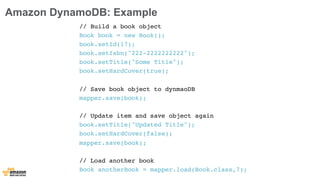
Amazon DynamoDB: Example 
// Build a book object 
Book book = new Book(); 
book.setId(17); 
book.setIsbn("222-2222222222"); 
book.setTitle("Some Title"); 
book.setHardCover(true); 
// Save book object to dynmaoDB 
mapper.save(book); 
// Update item and save object again 
book.setTitle("Updated Title"); 
book.setHardCover(false); 
mapper.save(book); 
// Load another book 
Book anotherBook = mapper.load(Book.class,7);
Amazon S3 
Transfer Manager 
Send push notifications 
Bring users back to your app by sending 
messages reliably 
Store shared data 
Store and query fast NoSQL data 
across users and devices 
Stream real-time data 
Collect real-time clickstream logs 
and take actions quickly 
Your 
Mobile 
App 
Authenticate users 
Amazon Cognito 
(Identity Broker) 
Authorize access 
AWS Identity and 
Access Management 
Synchronize data 
Amazon Cognito 
(Sync) 
Analyze User Behavior 
Amazon Mobile 
Analytics 
Track Retention 
Amazon Mobile 
Analytics 
Store and share media 
Deliver media 
Amazon CloudFront 
(Device Detection)
Authenticate users 
Amazon Cognito 
(Identity Broker) 
Authorize access 
AWS Identity and 
Access Management 
Analyze User Behavior 
Store and share media 
Synchronize data 
AWS Mobile SDK 
Amazon Mobile 
Analytics 
Deliver media 
Amazon Cognito 
(Sync) 
Amazon S3 
Transfer Manager 
Amazon CloudFront 
(Device Detection) 
Store shared data 
Amazon DynamoDB 
(Object Mapper) 
Stream real-time data 
Amazon Kinesis 
(Recorder) 
Track Retention 
Amazon Mobile 
Analytics 
Send push notifications 
Amazon SNS 
Mobile Push 
Your 
Mobile 
App
Collect real-time click-stream data: 
Amazon Kinesis Mobile Connector
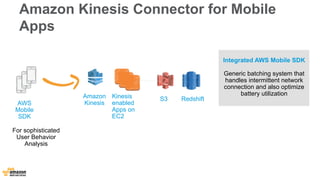
Amazon Kinesis Connector for Mobile 
Apps 
Amazon 
Kinesis 
S3 Redshift Kinesis 
enabled 
Apps on 
EC2 
AWS 
Mobile 
SDK 
For sophisticated 
User Behavior 
Analysis 
Integrated AWS Mobile SDK 
Generic batching system that 
handles intermittent network 
connection and also optimize 
battery utilization
Summary
Authenticate users 
Manage users and 
identity providers 
Authorize access 
Securely access 
cloud resources 
Sync user prefs 
across devices 
Analyze User Behavior 
Store and share media 
Synchronize data 
Deliver media 
Send push notifications 
Store shared data 
Track active users, 
engagement 
Track Retention Stream real-time data 
Manage funnels, 
Campaign performances 
Store user-generated photos 
Media and share them 
Automatically detect mobile devices 
Deliver content quickly globally 
Bring users back to your app by sending 
messages reliably 
Store and query fast NoSQL data 
across users and devices 
Collect real-time clickstream logs 
and take actions quickly 
Your 
Mobile 
App
Authenticate users 
Amazon Cognito 
(Identity Broker) 
Authorize access 
AWS Identity and 
Access Management 
Analyze User Behavior 
Store and share media 
Synchronize data 
AWS Mobile SDK 
Amazon Mobile 
Analytics 
Deliver media 
Amazon Cognito 
(Sync) 
Amazon S3 
Transfer Manager 
Amazon CloudFront 
(Device Detection) 
Store shared data 
Amazon DynamoDB 
(Object Mapper) 
Stream real-time data 
Amazon Kinesis 
(Recorder) 
Track Retention 
Amazon Mobile 
Analytics 
Send push notifications 
Amazon SNS 
Mobile Push 
Your 
Mobile 
App
Key Takeaways 
Amazon Cognito Amazon Mobile Analytics Amazon SNS Mobile Push 
Kinesis Connector DynamoDB Connector S3 Connector SQS Connector SES Connector 
AWS Global Infrastructure (10 Regions, Availability Zones, 51 Edge Locations) 
Mobile Optimized 
Services 
Mobile Optimized 
Connectors 
Core Building Block 
Services 
Your Mobile App, Game or Device App 
AWS Mobile SDK, API Endpoints, Management Console 
Compute Storage Networking Analytics Databases 
Integrated SDK
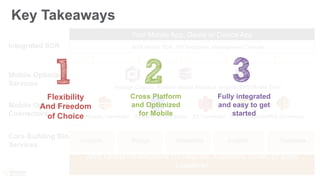
Key Takeaways 
Amazon Cognito Amazon Mobile Analytics Amazon SNS Mobile Push 
Kinesis Connector DynamoDB Connector S3 Connector SQS Connector SES Connector 
AWS Global Infrastructure (10 Regions, Availability Zones, 51 Edge 
Locations) 
Mobile Optimized 
Services 
Mobile Optimized 
Connectors 
Core Building Block 
Services 
Your Mobile App, Game or Device App 
AWS Mobile SDK, API Endpoints, Management Console 
Compute Storage Networking Analytics Databases 
Integrated SDK 
Cross Platform 
and Optimized 
for Mobile 
Flexibility 
And Freedom 
of Choice 
Fully integrated 
and easy to get 
started
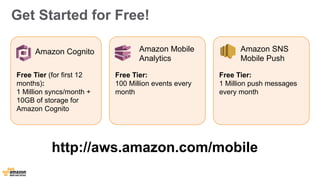
Get Started for Free! 
Amazon Cognito Amazon Mobile 
Analytics 
Amazon SNS 
Mobile Push 
Free Tier: 
1 Million push messages 
every month 
Free Tier (for first 12 
months): 
1 Million syncs/month + 
10GB of storage for 
Amazon Cognito 
Free Tier: 
100 Million events every 
month 
http://aws.amazon.com/mobile
Thank You! 
#AWSUGIT 
@danilop

Building Cloud-powered Mobile Apps

  • 1.
    Building Cloud-powered MobileApps Danilo Poccia, Technical Evangelist October 29th, 2014
  • 2.
  • 3.
    Regions US- WEST(N. California) EU-WEST (Ireland) ASIA PAC (Tokyo) ASIA PAC (Singapore) US-WEST (Oregon) US-EAST (Virginia) EU-CENTRAL(Frankfurt) SOUTH AMERICA (Sao Paulo) GOV CLOUD ASIA PAC (Sydney) CHINA
  • 4.
  • 5.
    Edge Locations NewYork (3) Marseille Los Angeles (2) Jacksonville Dallas(2) St.Louis Miami Palo Alto Seattle London(2) Ashburn(3) Newark Dublin Amsterdam (3) Stockholm Frankfurt(3) Paris(2) Singapore (2) Tokyo (2) Taipei Hong Kong (2) Sao Paulo South Bend San Jose Milan Sydney Madrid Seoul Mumbai Chennai Atlanta Hayward Rio de Janeiro Warsaw Osaka Manila Melbourne
  • 7.
    How to builda mobile app today?
  • 8.
    Authenticate users Manageusers and identity providers Authorize access Securely access cloud resources Sync user prefs across devices Analyze User Behavior Store and share media Synchronize data Deliver media Send push notifications Store shared data Track active users, engagement Track Retention Stream real-time data Manage funnels, Campaign performances Store user-generated photos Media and share them Automatically detect mobile devices Deliver content quickly globally Bring users back to your app by sending messages reliably Store and query fast NoSQL data across users and devices Collect real-time clickstream logs and take actions quickly Your Mobile App
  • 9.
    Authenticate users AmazonCognito (Identity Broker) Authorize access AWS Identity and Access Management Analyze User Behavior Store and share media Synchronize data AWS Mobile SDK Amazon Mobile Analytics Deliver media Amazon Cognito (Sync) Amazon S3 Transfer Manager Amazon CloudFront (Device Detection) Store shared data Amazon DynamoDB (Object Mapper) Stream real-time data Amazon Kinesis (Recorder) Track Retention Amazon Mobile Analytics Send push notifications Amazon SNS Mobile Push Your Mobile App
  • 10.
    Introducing AWS MobileServices Amazon Cognito Amazon Mobile Analytics Amazon SNS Mobile Push Kinesis Connector DynamoDB Connector S3 Connector SQS Connector SES Connector AWS Global Infrastructure (10 Regions, Availability Zones, 51 Edge Locations) Mobile Optimized Services Mobile Optimized Connectors Core Building Block Services Your Mobile App, Game or Device App AWS Mobile SDK, API Endpoints, Management Console Compute Storage Networking Analytics Databases Integrated SDK
  • 11.
    Cross-platform, Optimized forMobile User identity & data synchronization service Fast cross-platform Analytics & reporting Service Amazon Cognito Amazon Mobile Analytics Amazon SNS Mobile Push Kinesis Connector DynamoDB Connector S3 Connector SQS Connector SES Connector Store any NoSQL data and also map mobile OS specific objects to DynamoDB tables Powerful Cross-platform Push notification service Recorder that can handle intermittent network connection Easily upload, download to S3 and also pause, resume, and cancel these operations Send email reliably from device Access distributed buffering and queuing service
  • 12.
    Fully Integrated AWSMobile SDK • Common authentication mechanism across all services • Automatically handle intermittent network connections • Cross-platform Support: Android (with Maven support), iOS, Fire OS, Xamarin • Native SDKs optimized for Mobile OS, for example, uses the local offline caching architecture • Reduced memory footprint; Pick and choose the service jars you need
  • 13.
  • 14.
    Amazon Cognito “YourApp data is secure, available offline, and kept in sync between devices” Simplifies Identity and Access Management Securely access all AWS services from Mobile device Cross-device and Cross-platform Sync Implement security best practices Synchronize user’s data across devices and platforms Guest Your own Auth Manage users as unique identities across identity providers
  • 15.
    Unique Joe AnnaBob Identities Identity Providers Any Device Any Platform Any AWS Service Amazon Cognito Identity Support Multiple Login Providers Easily integrate with major login providers for authentication. Unique Users vs. Devices Manage unique identities. Automatically recognize unique user across devices and platforms. Helps implement security best practices Securely access any AWS Service from mobile device. It simplifies the interaction with AWS Identity and Access Management Mobile Analytics S3 DynamoDB Kinesis Your own Auth
  • 16.
    Amazon Cognito forUnauthenticated Identities Guest User Access Securely access AWS resources and leverage app features without the need to create an account or logging in Save Data to the Cloud Save app and device data to the cloud and merge them after login Unique Identifier for Your “Things” “Headless” connected devices can also securely access cloud services. Visitor Preferences Guest Cognito Store EC2 S3 DynamoDB Kinesis
  • 17.
    Getting Started withCognito in 3 steps Sign up for AWS Account and login to AWS Management Console Create identitypool for authenticated and unauthenticated users in the AWS Console Download and integrate the Mobile SDK and store and sync user data in a dataset
  • 18.
  • 19.
    Amazon Cognito Security Safeguard AWS Credentials No need to embed credentials in the app anymore. Get least-privileged temporary credentials. Helps implement security best practices Securely access any AWS Service. It simplifies the interaction with Security Token Service and removes the need of Token Vending Machine Set granular access permissions on AWS resources Get fine-grained access control to cloud resources. EC2 S3 DynamoDB Kinesis
  • 20.
    Amazon Cognito SecurityArchitecture Cognito ID (Temp Credentials) DynamoDB End Users Developer Access to AWS Services Cognito Identity Broker Login OAUTH/OpenID Access Token Cognito ID, Temp Credentials S3 Mobile Analytics Cognito Sync Store AWS Management Console Access Token Pool ID Role ARNs App with AWS Mobile SDK Your own Auth
  • 21.
  • 22.
    Developer Authenticated Identities Your own Username And Password Your own user authentication system Several apps prefer to have their own username and password instead of public identity providers for authentication. Easily integrate with existing systems Implement GetOpenIdTokeForDeveloperIdentity() using our server-side SDKs like Java, Python, Ruby etc. Manage mappings easily Cognito manages the mappings across login systems (public or private) using a unique Cognito ID
  • 23.
    Developer Authenticated Identities Cognito ID (Temp Credentials) DynamoDB End Users Developer App with AWS Mobile SDK Access to AWS Services Cognito Identity Broker Get OpenID Token Username password Cognito ID, Temp Credentials S3 Mobile Analytics Cognito Sync Store AWS Management Console OIDC Token Pool ID Role ARNs User Authentication System (Running on AWS or not) OIDC Token OIDC Token
  • 24.
    Authorize access: AmazonCognito + AWS IAM + Fine-grained access control
  • 25.
    Amazon Cognito (IdentityBroker) authenticated identities Access to AWS Services identitypool Identitypool Identity Providers Pool of identities that share the same trust policy Access Policy Unauthenticated Identities AWS IAM Roles AWS Account Web Identity Federation S3 DynamoDB Get Delete Put
  • 26.
    Access Policy forthe IAM Role { "Effect":"Allow", "Action":["s3:*"], "Resource":"*" } { "Effect": ”Deny", "Action": ["dynamodb:*"], "Resource": "*" } { "Effect": "Allow", "Action": [”cognito-sync:*"], "Resource": "*" } Allow Actions: All S3, Sync store Operations Resource: All resources within these services Deny Actions: All DDB Operations Resource: All resources
  • 27.
    Access Policy Restriction { "Effect":"Allow", "Action":["s3:PutObject","s3:GetObject","s3:DeleteObject", "s3:ListMultipartUploadParts","s3:AbortMultipartUpload"], "Resource":"arn:aws:s3:::BUCKET_NAME/*" } { "Effect":"Allow", "Action":["s3:ListBucket","s3:ListBucketMultipartUploads"], "Resource":"arn:aws:s3:::BUCKET_NAME" }{ "Effect": "Allow", "Action": ["dynamodb:GetItem", "dynamodb:Query", "dynamodb:PutItem"], "Resource" : [ "arn:aws:dynamodb:REGION:123456789:table/TABLE_NAME", "arn:aws:dynamodb:REGION:123456789:table/TABLE_NAME/ index/INDEX_NAME" ] } Allow Actions: Certain operations Resource: One bucket, table ..
  • 28.
    Access Policy Restriction { "Effect":"Allow”, "Action” ["s3:PutObject","s3:GetObject","s3:DeleteObj ect”,”s3:ListMultipartUploadParts","s3:AbortMultipart Upload"], "Resource":"arn:aws:s3:::BUCKET_NAME/Bob/*" } { "Effect":"Allow", "Action":"s3:ListBucket", "Resource":"arn:aws:s3:::BUCKET_NAME", "Condition":{"StringLike":{"s3:prefix":”Bob/"}} }{ "Effect":"Allow", "Action":["s3:ListBucketMultipartUploads"], "Resource":"arn:aws:s3:::BUCKET_NAME" } Allow Actions: Certain operations Resource: Within a bucket with specific prefix (user)
  • 29.
    Access Policy Restriction(Policy Variables) Allow Actions: All sync operations Resource: Only to that identity {" Effect":"Allow", "Action":"cognito-sync:*", "Resource":["arn:aws:cognito-sync:us-east-1: { "Effect": "Allow”, "Action": ["s3:GetObject”,"s3:PutObject”], "Resource": ["arn:aws:s3::: myBucket/amazon/snakegame/ ${cognito-identity.amazonaws.com:sub}"] } 123456789012:identitypool/ ${cognito-identity.amazonaws.com:aud}/identity/ ${cognito-identity.amazonaws.com:sub}/*"] } Allow Actions: S3 Get/Put operations Resource: Only to a specific part of bucket to that identity
  • 30.
    Synchronize data acrossdevices : Amazon Cognito (Sync)
  • 31.
    What have customerstold us about “Synchronized Profile” People have multiple devices and want to transition between devices. Implementing a user profile that syncs across devices, OS, apps is hard. It not only has to work when offline, but easy to integrate with existing apps.
  • 32.
    Amazon Cognito Sync User Data Storage and Sync Any Platform Identity pool iOS/Android/FireOS Store App Data, Preferences and State Save app and device data to the cloud and merge them after login Cross-device Cross-OS Sync Sync user data and preferences across devices with one line of code Work Offline Data always stored in local SQLite DB first. Works seamlessly when intermittent or no connectivity k/v data
  • 33.
    Amazon Cognito Sync Offline: The client SDK manages a local SQLite data store to allow the app to work even when connectivity is not available. Fast: The methods to read and write data only interact with the local SQLite database. Intelligent Sync: The sync method compares the local version of the data to the cloud sync store, pushes up deltas and pulls down new changes. Flexible Conflict resolution: The sync method first reads the changes then writes its local changes to the cloud sync store By default Cognito assumes that the last write wins. Developers can override and implement their own conflict resolution programmatically Local SQLite Cache
  • 34.
    Amazon Cognito SyncData Model AWS Account Identitypool identitypool Dataset Pool of identities that share the same trust policy IdIdeenntittiyt y Identity DDaatatasseet t Unique identifier across devices, get cached on local devices as well as saved in the cloud 1:n 1:n 1:n Dataset synchronized across devices by simply calling dataset.synchronize() method 1:n DDaatatasseet t Key/Value Key-value and sync count
  • 35.
    Amazon Cognito SyncData Model - Example AWS Account 1:n Identitypool identitypool 1:n IdIdeenntittiyt y Identity 1:n Dataset DDaatatasseet t Developer has two apps: a game and a productivity app User preferences Game state Identitypool1 Productivity App Game App 1:n DDaatatasseet t Key/Value
  • 36.
    Integrating Cognito Syncfunctionality is super easy Initialize the CredentialsProvider and CognitoClient provider = new CognitoCachingCredentialsProvider (context, AWS_ACCOUNT_ID, COGNITO_POOL_ID, COGNTIO_ROLE_UNAUTH, COGNITO_ROLE_AUTH, Regions.US_EAST_1); cognito = new CognitoSyncManager (context, COGNITO_POOL_ID, Regions.US_EAST_1, provider); Create or open Dataset and Add Key Values cognito.openOrCreateDataset(datasetName); dataset.put(key, value); Call synchronize on the dataset dataset.synchronize(new SyncCallback(){..});
  • 37.
    Integrating Cognito Syncfunctionality is dead simple Initialize the AWSCognitoSyncClient AWSCognitoSyncClient *syncClient = [[AWSCognitoSyncClient alloc] initWithConfiguration: configuration]; Create or open Dataset and Add Key Values DataSet *dataset = [syncClient openOrCreateDataSet:@"myDataSet"]; NSString *value = [dataset readStringForKey:@"myKey"]; [dataset putString:@"my value" forKey:@"myKey"]; Call synchronize on the dataset [dataset synchronize]; iOS
  • 38.
    Amazon Cognito (IdentityBroker) AWS Identity and Access Management Analyze User Behavior Store and share media Deliver media Send push notifications Store shared data Track active users, engagement Track Retention Stream real-time data Manage funnels, Campaign performances Store user-generated photos Media and share them Automatically detect mobile devices Deliver content quickly globally Bring users back to your app by sending messages reliably Store and query fast NoSQL data across users and devices Collect real-time clickstream logs and take actions quickly Your Mobile App Authenticate users Authorize access Synchronize data Amazon Cognito (Sync)
  • 39.
    Analyze User Behavior:Amazon Mobile Analytics
  • 40.
    Developer Economics |State of the Developer Nation Q3 2014 | © VisionMobile | All rights reserved | www.developereconomics.com/go 27
  • 41.
    User Analytics (andCloud Computing) among top 10 most popular tools Successful developers use more tools Developer Economics State of the Developer Nation Q3 2014 © VisionMobile
  • 42.
    What Customers ToldUs About “Mobile Analytics” Developers deeply value user analytics and consider it an integral part of their app development process. They want to monitor their most important metrics in a timely manner, and take action quickly. They would like to own their mobile data, just like they do with any other AWS service.
  • 43.
    Amazon Mobile Analytics “Easily collect, visualize and understand your app usage data at scale” Scalable and Generous Free Tier Fast Focus on metrics that matter. Usage reports available within 60 minutes of receiving data from an app Scale to billions of events per day from millions of users. Own Your Data Data collected are not shared, aggregated, or reused
  • 44.
    Getting Started withMobile Analytics in 3 steps Sign up for AWS Account and create or use existing Cognito ID in the AWS Management Console Download and integrate the Mobile SDK with one line of code (Android/FireOS, iOS) View engagement and session activity reports in the AWS Management console within minutes
  • 45.
    Demo: Amazon MobileAnalytics Console
  • 46.
    Integrating Mobile Analyticsis super simple Initialize the MobileAnalyticsManager. That’s it! Get Session Activity in the AWS Management Console. private static MobileAnalyticsManager analytics; analytics = MobileAnalyticsManager.getOrCreateInstance( this.getApplicationContext(),"yourCompany.yourAppId", Regions.YOUR_REGION, config, cognitoProvider ); Add OnResume() and OnPause() analytics.getSessionClient().resumeSession(); analytics.getSessionClient().pauseSession(); Analytics.getEventClient().submitEvents(); For Custom Events activity reports, add events. EventClient eventClient = analytics.getEventClient(); MobileAnalyticsEvent visitEvent = eventClient.createEvent("speedSet"); eventClient.recordEvent(visitEvent);
  • 47.
    Integrating Mobile Analyticsis super simple Initialize the AWSMobileAnalytics object. That’s it! Get Session Activity in the AWS Management Console. AWSMobileAnalytics* analytics = [AWSMobileAnalytics defaultAWSMobileAnalyticsWithIdentifier:@"someuniqueid"]; Create add Custom Events id<AWSMobileAnalyticsEventClient> eventClient = analytics.eventClient; id<AWSMobileAnalyticsEvent> level1Event = [eventClient createEventWithEventType:@"level1Complete"]; Submit the event. If we don't call submitEvents, events will automatically be submitted at periodic intervals. [eventClient submitEvents]; iOS
  • 48.
    Store and sharemedia Store user-generated photos Media and share them Deliver media Automatically detect mobile devices Deliver content quickly globally Send push notifications Bring users back to your app by sending messages reliably Store shared data Store and query fast NoSQL data across users and devices Stream real-time data Collect real-time clickstream logs and take actions quickly Your Mobile App Authenticate users Amazon Cognito (Identity Broker) Authorize access AWS Identity and Access Management Synchronize data Amazon Cognito (Sync) Analyze User Behavior Amazon Mobile Analytics Track Retention Amazon Mobile Analytics
  • 49.
    Store and sharemedia: Amazon S3
  • 50.
    Amazon S3 Connector:Transfer Manager S3 Connector Multipart upload media (photos, videos, audio) Fault tolerant download (e.g. assets) No backend required Automatic retries Pause, resume, cancel functions Optimized for native OS
  • 51.
    Amazon S3 Connector:Transfer Manager in Android // Creating the transfer manager TransferManager transferManager = new TransferManager(credentialProvider); // Upload image Upload upload = transferManager.upload(BUCKET_NAME, fileName, file); // Download image Download download = transferManager.download(BUCKET_NAME, mKey, file); // Pause, and Resume try { PersistableDownload persistableDownload = download.pause(); //do something if we didn’t abort } catch(PauseException e) { //do something if we aborted } download = transferManager.resumeDownload(persistableDownload);
  • 52.
    Amazon S3 Connector:Transfer Manager in iOS // Creating the transfer manager self.transferManager = [S3TransferManager new]; self.transferManager.s3 = s3client; // Upload image [self.transferManager uploadFile:fileName bucket:bucketName key:objectName]; // Download image [self.transferManager downloadFile:fileName bucket:bucketName key:objectName]; // Pause, Resume, Cancel [self.transferManager pauseAllTransfers]; [self.transferManager resumeAllTransfers]; [self.transferManager cancelAllTransfers];
  • 53.
    Amazon S3 TransferManager Send push notifications Bring users back to your app by sending messages reliably Store shared data Store and query fast NoSQL data across users and devices Stream real-time data Collect real-time clickstream logs and take actions quickly Your Mobile App Authenticate users Amazon Cognito (Identity Broker) Authorize access AWS Identity and Access Management Synchronize data Amazon Cognito (Sync) Analyze User Behavior Amazon Mobile Analytics Track Retention Amazon Mobile Analytics Store and share media Deliver media Amazon CloudFront (Device Detection)
  • 54.
    Authenticate users AmazonCognito (Identity Broker) Authorize access AWS Identity and Access Management Analyze User Behavior Store and share media Synchronize data AWS Mobile SDK Amazon Mobile Analytics Deliver media Amazon Cognito (Sync) Amazon S3 Transfer Manager Amazon CloudFront (Device Detection) Store shared data Amazon DynamoDB (Object Mapper) Stream real-time data Amazon Kinesis (Recorder) Track Retention Amazon Mobile Analytics Send push notifications Amazon SNS Mobile Push Your Mobile App
  • 55.
    Send Push Notifications:Amazon SNS Mobile Push
  • 56.
    What Customers ToldUs About “Push Notifications” Sending large-scale push notifications, cross-platform is still hard. Developers want to be able to reach their customers globally and across all devices.
  • 57.
    Each platform worksdifferently, and push gets even more complex as you scale to support millions of devices. Cloud App Platform Services Mobile Apps
  • 58.
    Amazon SNS Cross-platform Mobile Push Internet Apple APNS Google GCM Baidu CP Amazon ADM Windows WNS and MPNS Industry’s First! New! iOS Apple iPhones and iPads Android Phones and Tablets in China With Amazon SNS, developers can send push notifications on multiple platforms and reach mobile users around the world New features: Message Expiry Time Message Attributes Amazon SNS Mobile Push Android Phones and Tablets Kindle Fire Devices Windows Desktop and Windows Phone Devices
  • 59.
    Developers Love Cross-PlatformFeatures of SNS Customers love high scale and Reliability of SNS Fast reliable notification for every Email received is powered by SNS High-profile Startups trust SNS for their high-profile launches Secret.ly Mature games increase retention using SNS Advanced targeted notifications bring players back into the game Launched its Android App with SNS, no provisioning required Jetpack Joyride Fruit ninja
  • 60.
    Store Shared Data:Amazon DynamoDB
  • 61.
    Amazon DynamoDB Connector:Object Mapper High Scores Joe 1500 Anna 800 Bob 750 Joe Anna Bob Simplifies access to Amazon DynamoDB in you app Map client-side classes to Amazon DynamoDB tables Removes the need to transform objects into tables and vice versa
  • 62.
    Amazon DynamoDB: Example@DynamoDBTable(tableName = "Bookstore") public static class Book { private int id; private String isbn, title; private Boolean hardCover; @DynamoDBHashKey(attributeName = "id") public int getId() { return id; } public void setId(int id) { this.id = id; } @DynamoDBAttribute(attributeName="isbn") public String getIsbn() { return isbn; } ... } Table: Bookstore Id isbn Title hardCover 1 22-22222 My First Book Yes 2 43-43234 My Favorite Book No 3 55-12345 My New Book Yes
  • 63.
    Amazon DynamoDB: Example // Build a book object Book book = new Book(); book.setId(17); book.setIsbn("222-2222222222"); book.setTitle("Some Title"); book.setHardCover(true); // Save book object to dynmaoDB mapper.save(book); // Update item and save object again book.setTitle("Updated Title"); book.setHardCover(false); mapper.save(book); // Load another book Book anotherBook = mapper.load(Book.class,7);
  • 64.
    Amazon S3 TransferManager Send push notifications Bring users back to your app by sending messages reliably Store shared data Store and query fast NoSQL data across users and devices Stream real-time data Collect real-time clickstream logs and take actions quickly Your Mobile App Authenticate users Amazon Cognito (Identity Broker) Authorize access AWS Identity and Access Management Synchronize data Amazon Cognito (Sync) Analyze User Behavior Amazon Mobile Analytics Track Retention Amazon Mobile Analytics Store and share media Deliver media Amazon CloudFront (Device Detection)
  • 65.
    Authenticate users AmazonCognito (Identity Broker) Authorize access AWS Identity and Access Management Analyze User Behavior Store and share media Synchronize data AWS Mobile SDK Amazon Mobile Analytics Deliver media Amazon Cognito (Sync) Amazon S3 Transfer Manager Amazon CloudFront (Device Detection) Store shared data Amazon DynamoDB (Object Mapper) Stream real-time data Amazon Kinesis (Recorder) Track Retention Amazon Mobile Analytics Send push notifications Amazon SNS Mobile Push Your Mobile App
  • 66.
    Collect real-time click-streamdata: Amazon Kinesis Mobile Connector
  • 67.
    Amazon Kinesis Connectorfor Mobile Apps Amazon Kinesis S3 Redshift Kinesis enabled Apps on EC2 AWS Mobile SDK For sophisticated User Behavior Analysis Integrated AWS Mobile SDK Generic batching system that handles intermittent network connection and also optimize battery utilization
  • 68.
  • 69.
    Authenticate users Manageusers and identity providers Authorize access Securely access cloud resources Sync user prefs across devices Analyze User Behavior Store and share media Synchronize data Deliver media Send push notifications Store shared data Track active users, engagement Track Retention Stream real-time data Manage funnels, Campaign performances Store user-generated photos Media and share them Automatically detect mobile devices Deliver content quickly globally Bring users back to your app by sending messages reliably Store and query fast NoSQL data across users and devices Collect real-time clickstream logs and take actions quickly Your Mobile App
  • 70.
    Authenticate users AmazonCognito (Identity Broker) Authorize access AWS Identity and Access Management Analyze User Behavior Store and share media Synchronize data AWS Mobile SDK Amazon Mobile Analytics Deliver media Amazon Cognito (Sync) Amazon S3 Transfer Manager Amazon CloudFront (Device Detection) Store shared data Amazon DynamoDB (Object Mapper) Stream real-time data Amazon Kinesis (Recorder) Track Retention Amazon Mobile Analytics Send push notifications Amazon SNS Mobile Push Your Mobile App
  • 71.
    Key Takeaways AmazonCognito Amazon Mobile Analytics Amazon SNS Mobile Push Kinesis Connector DynamoDB Connector S3 Connector SQS Connector SES Connector AWS Global Infrastructure (10 Regions, Availability Zones, 51 Edge Locations) Mobile Optimized Services Mobile Optimized Connectors Core Building Block Services Your Mobile App, Game or Device App AWS Mobile SDK, API Endpoints, Management Console Compute Storage Networking Analytics Databases Integrated SDK
  • 72.
    Key Takeaways AmazonCognito Amazon Mobile Analytics Amazon SNS Mobile Push Kinesis Connector DynamoDB Connector S3 Connector SQS Connector SES Connector AWS Global Infrastructure (10 Regions, Availability Zones, 51 Edge Locations) Mobile Optimized Services Mobile Optimized Connectors Core Building Block Services Your Mobile App, Game or Device App AWS Mobile SDK, API Endpoints, Management Console Compute Storage Networking Analytics Databases Integrated SDK Cross Platform and Optimized for Mobile Flexibility And Freedom of Choice Fully integrated and easy to get started
  • 73.
    Get Started forFree! Amazon Cognito Amazon Mobile Analytics Amazon SNS Mobile Push Free Tier: 1 Million push messages every month Free Tier (for first 12 months): 1 Million syncs/month + 10GB of storage for Amazon Cognito Free Tier: 100 Million events every month http://aws.amazon.com/mobile
  • 74.