Getting Started Guide on
        Migration
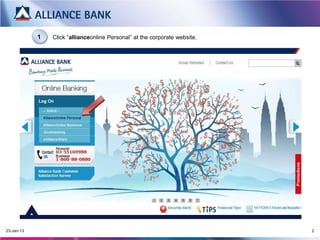
1   Click “allianceonline Personal” at the corporate website.


20-Mar-13                                                                   2
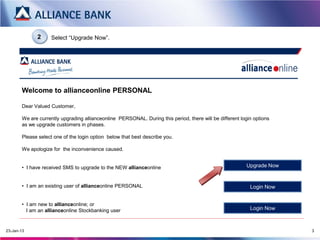
2      Select “Upgrade Now”.


Welcome to allianceonline PERSONAL
   Dear Valued Customer,

   We are currently upgrading allianceonline PERSONAL. During this period, there will be different login options as we
   upgrade customers in phases.


    For existing customer of allianceonline PERSONAL,               For new allianceonline customer, please click here to
    please click here to LOGIN                                      LOGIN

          For customer who has received SMS/letter to upgrade to the NEW allianceonline              Upgrade Now

          **Please login via new allianceonline customer link once you have upgraded
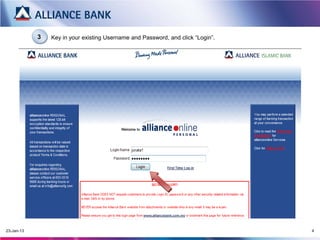
3   Key in your existing Username and Password, and click “Login”.


20-Mar-13                                                                        4
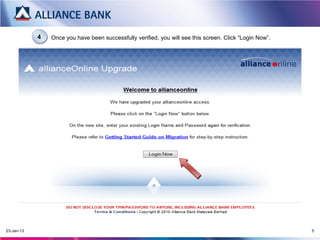
4   Once you have been successfully verified, you will see this screen. Click “Login Now”.


20-Mar-13                                                                                                5
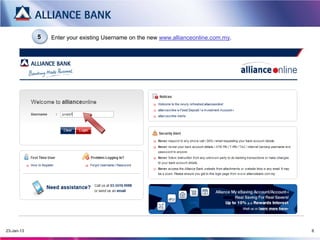
5   Enter your existing Username on the new www.allianceonline.com.my.


20-Mar-13                                                                            6
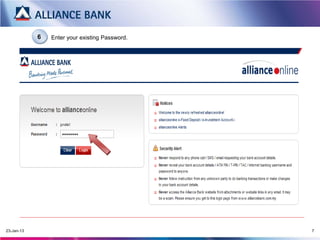
6   Enter your existing Password.


20-Mar-13                                       7
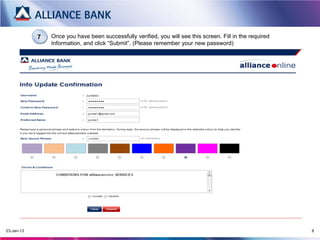
7   Once you have been successfully verified, you will see this screen. Fill in the required
                Information, and click “Submit”. (Please remember your new password)


20-Mar-13                                                                                                  8
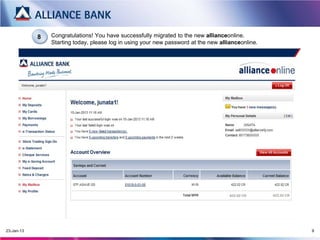
8   Congratulations! You have successfully migrated to the new allianceonline.
                Starting today, please log in using your new password at the new allianceonline.


20-Mar-13                                                                                          9

allianceonline : Getting Started Guide on Migration

  • 1.
  • 2.
    1 Click “allianceonline Personal” at the corporate website. 20-Mar-13 2
  • 3.
    2 Select “Upgrade Now”. Welcome to allianceonline PERSONAL Dear Valued Customer, We are currently upgrading allianceonline PERSONAL. During this period, there will be different login options as we upgrade customers in phases. For existing customer of allianceonline PERSONAL, For new allianceonline customer, please click here to please click here to LOGIN LOGIN For customer who has received SMS/letter to upgrade to the NEW allianceonline Upgrade Now **Please login via new allianceonline customer link once you have upgraded
  • 4.
    3 Key in your existing Username and Password, and click “Login”. 20-Mar-13 4
  • 5.
    4 Once you have been successfully verified, you will see this screen. Click “Login Now”. 20-Mar-13 5
  • 6.
    5 Enter your existing Username on the new www.allianceonline.com.my. 20-Mar-13 6
  • 7.
    6 Enter your existing Password. 20-Mar-13 7
  • 8.
    7 Once you have been successfully verified, you will see this screen. Fill in the required Information, and click “Submit”. (Please remember your new password) 20-Mar-13 8
  • 9.
    8 Congratulations! You have successfully migrated to the new allianceonline. Starting today, please log in using your new password at the new allianceonline. 20-Mar-13 9