ลิขสิทธิ'ของ Cloud NC ห้ามทําซํ0า ดัดแปลง หรือเผยแพร่ต่อสาธารณชน
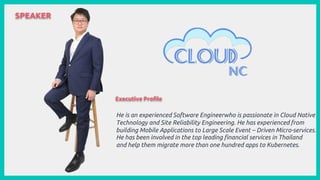
SPEAKER
He is an experienced Software Engineerwho is passionate in Cloud Native
Technology and Site Reliability Engineering. He has experienced from
building Mobile Applications to Large Scale Event – Driven Micro-services.
He has been involved in the top leading financial services in Thailand
and help them migrate more than one hundred apps to Kubernetes.
Executive Profile
ลิขสิทธิ'ของ Cloud NC ห้ามทําซํ0า ดัดแปลง หรือเผยแพร่ต่อสาธารณชน
AKS Backup with Velero and
Workload Identities
Sirinat Paphatsirinatthi (Oam)
Director of Engineering @ Cloud NC
Challenge of AKS Backup
1. Challenge of Backup Azure Disks on
AKS
This will come with difficulty as Azure
Disks will be mounted as PVC for any
deployments on Kubernetes.
Challenge of AKS Backup? (Cont.)
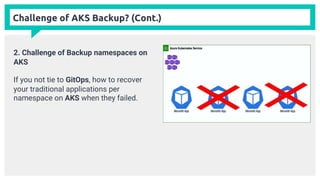
2. Challenge of Backup namespaces on
AKS
If you not tie to GitOps, how to recover
your traditional applications per
namespace on AKS when they failed.
Challenge of AKS Backup? (Cont.)
3. Developer experience and Cloud
Storage compatibility
- Learn new tools often have learning
curve and how you remove
boilerplate of these
- Any cloud storage compatible for
High Available?
Velero comes with the help of AKS Backup Challenge
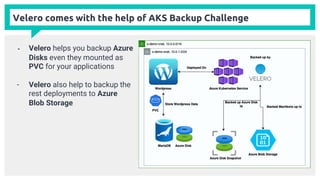
- Velero helps you backup Azure
Disks even they mounted as
PVC for your applications
- Velero also help to backup the
rest deployments to Azure
Blob Storage
Velero comes with the help of AKS Backup Challenge (Cont.)
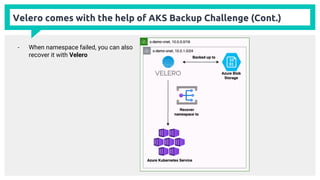
- When namespace failed, you can also
recover it with Velero
Velero comes with the help of AKS Backup Challenge (Cont.)
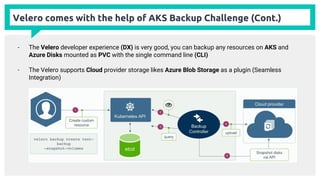
- The Velero developer experience (DX) is very good, you can backup any resources on AKS and
Azure Disks mounted as PVC with the single command line (CLI)
- The Velero supports Cloud provider storage likes Azure Blob Storage as a plugin (Seamless
Integration)
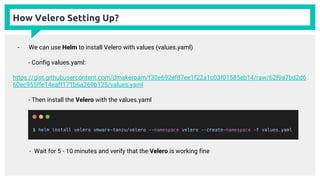
How Velero Setting Up?
- We can use Helm to install Velero with values (values.yaml)
- Config values.yaml:
https://gist.githubusercontent.com/dmakeroam/f30e692ef87ee1f22a1c03f01585eb14/raw/62f9a7bd2d6
60ec955ffe14eaff171b6a269b125/values.yaml
- Then install the Velero with the values.yaml
- Wait for 5 - 10 minutes and verify that the Velero is working fine
How Velero Setting Up? (Cont.)
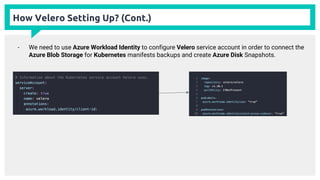
- We need to use Azure Workload Identity to configure Velero service account in order to connect the
Azure Blob Storage for Kubernetes manifests backups and create Azure Disk Snapshots.
How Velero Setting Up? (Cont.)
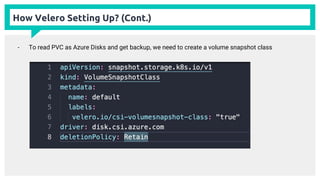
- To read PVC as Azure Disks and get backup, we need to create a volume snapshot class
How Velero Setting Up? (Cont.)
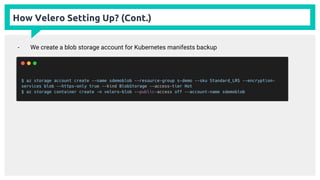
- We create a blob storage account for Kubernetes manifests backup
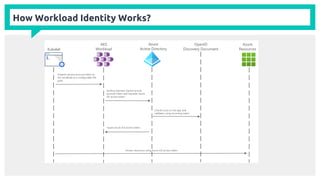
How Workload Identity Works?
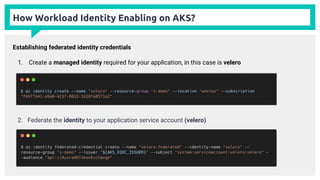
How Workload Identity Enabling on AKS?
Establishing federated identity credentials
1. Create a managed identity required for your application, in this case is velero
2. Federate the identity to your application service account (velero)
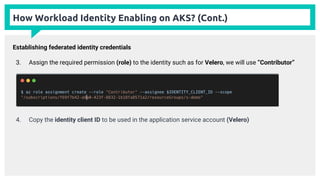
How Workload Identity Enabling on AKS? (Cont.)
Establishing federated identity credentials
3. Assign the required permission (role) to the identity such as for Velero, we will use “Contributor”
4. Copy the identity client ID to be used in the application service account (Velero)
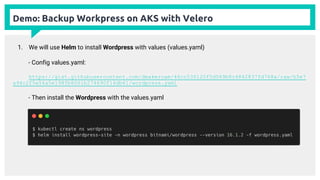
Demo: Backup Workpress on AKS with Velero
1. We will use Helm to install Wordpress with values (values.yaml)
- Config values.yaml:
https://gist.githubusercontent.com/dmakeroam/46cc530120f5d069b8c4842837fd768a/raw/b5e7
a94c2f5e54a5e198fb8061b274690f16db61/wordpress.yaml
- Then install the Wordpress with the values.yaml
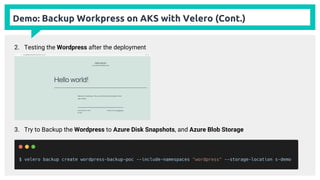
Demo: Backup Workpress on AKS with Velero (Cont.)
2. Testing the Wordpress after the deployment
3. Try to Backup the Wordpress to Azure Disk Snapshots, and Azure Blob Storage
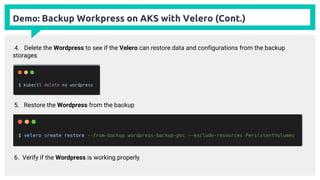
Demo: Backup Workpress on AKS with Velero (Cont.)
5. Restore the Wordpress from the backup
6. Verify if the Wordpress is working properly
4. Delete the Wordpress to see if the Velero can restore data and configurations from the backup
storages
Would you like to join our team?

AKS backup with Velero and Workload Identities

  • 1.
    ลิขสิทธิ'ของ Cloud NCห้ามทําซํ0า ดัดแปลง หรือเผยแพร่ต่อสาธารณชน
  • 2.
    SPEAKER He is anexperienced Software Engineerwho is passionate in Cloud Native Technology and Site Reliability Engineering. He has experienced from building Mobile Applications to Large Scale Event – Driven Micro-services. He has been involved in the top leading financial services in Thailand and help them migrate more than one hundred apps to Kubernetes. Executive Profile
  • 3.
    ลิขสิทธิ'ของ Cloud NCห้ามทําซํ0า ดัดแปลง หรือเผยแพร่ต่อสาธารณชน
  • 4.
    AKS Backup withVelero and Workload Identities Sirinat Paphatsirinatthi (Oam) Director of Engineering @ Cloud NC
  • 5.
    Challenge of AKSBackup 1. Challenge of Backup Azure Disks on AKS This will come with difficulty as Azure Disks will be mounted as PVC for any deployments on Kubernetes.
  • 6.
    Challenge of AKSBackup? (Cont.) 2. Challenge of Backup namespaces on AKS If you not tie to GitOps, how to recover your traditional applications per namespace on AKS when they failed.
  • 7.
    Challenge of AKSBackup? (Cont.) 3. Developer experience and Cloud Storage compatibility - Learn new tools often have learning curve and how you remove boilerplate of these - Any cloud storage compatible for High Available?
  • 8.
    Velero comes withthe help of AKS Backup Challenge - Velero helps you backup Azure Disks even they mounted as PVC for your applications - Velero also help to backup the rest deployments to Azure Blob Storage
  • 9.
    Velero comes withthe help of AKS Backup Challenge (Cont.) - When namespace failed, you can also recover it with Velero
  • 10.
    Velero comes withthe help of AKS Backup Challenge (Cont.) - The Velero developer experience (DX) is very good, you can backup any resources on AKS and Azure Disks mounted as PVC with the single command line (CLI) - The Velero supports Cloud provider storage likes Azure Blob Storage as a plugin (Seamless Integration)
  • 11.
    How Velero SettingUp? - We can use Helm to install Velero with values (values.yaml) - Config values.yaml: https://gist.githubusercontent.com/dmakeroam/f30e692ef87ee1f22a1c03f01585eb14/raw/62f9a7bd2d6 60ec955ffe14eaff171b6a269b125/values.yaml - Then install the Velero with the values.yaml - Wait for 5 - 10 minutes and verify that the Velero is working fine
  • 12.
    How Velero SettingUp? (Cont.) - We need to use Azure Workload Identity to configure Velero service account in order to connect the Azure Blob Storage for Kubernetes manifests backups and create Azure Disk Snapshots.
  • 13.
    How Velero SettingUp? (Cont.) - To read PVC as Azure Disks and get backup, we need to create a volume snapshot class
  • 14.
    How Velero SettingUp? (Cont.) - We create a blob storage account for Kubernetes manifests backup
  • 15.
  • 16.
    How Workload IdentityEnabling on AKS? Establishing federated identity credentials 1. Create a managed identity required for your application, in this case is velero 2. Federate the identity to your application service account (velero)
  • 17.
    How Workload IdentityEnabling on AKS? (Cont.) Establishing federated identity credentials 3. Assign the required permission (role) to the identity such as for Velero, we will use “Contributor” 4. Copy the identity client ID to be used in the application service account (Velero)
  • 18.
    Demo: Backup Workpresson AKS with Velero
  • 19.
    Demo: Backup Workpresson AKS with Velero 1. We will use Helm to install Wordpress with values (values.yaml) - Config values.yaml: https://gist.githubusercontent.com/dmakeroam/46cc530120f5d069b8c4842837fd768a/raw/b5e7 a94c2f5e54a5e198fb8061b274690f16db61/wordpress.yaml - Then install the Wordpress with the values.yaml
  • 20.
    Demo: Backup Workpresson AKS with Velero (Cont.) 2. Testing the Wordpress after the deployment 3. Try to Backup the Wordpress to Azure Disk Snapshots, and Azure Blob Storage
  • 21.
    Demo: Backup Workpresson AKS with Velero (Cont.) 5. Restore the Wordpress from the backup 6. Verify if the Wordpress is working properly 4. Delete the Wordpress to see if the Velero can restore data and configurations from the backup storages
  • 22.
    Would you liketo join our team?