An
Introduction to
Agile SCRUM Methodology
AgendaAgenda
 Introduction
 What is Agile Methodology?
 Need for Agile
 What is Scrum?
 Functionality of Scrum
 Components of Scrum
 Scrum Roles
 The Process
 Scrum Artifacts
Sunrise of Agile
 In February 2001, 17 Software Developers met at the Snowbird resort in Utah,
USA to discuss lightweight development methods. They published
the Manifesto for Agile Software Development.
 The use of the word agile in this context derives from the agile manifesto. A
small group of people got together to discuss their feelings that the traditional
approach to managing software development projects was failing far too often,
and there had to be a better way.
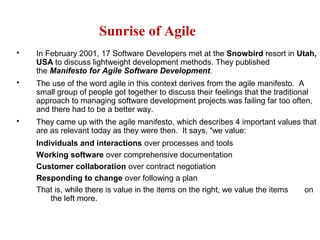
 They came up with the agile manifesto, which describes 4 important values that
are as relevant today as they were then. It says, “we value:
Individuals and interactions over processes and tools
Working software over comprehensive documentation
Customer collaboration over contract negotiation
Responding to change over following a plan
That is, while there is value in the items on the right, we value the items on
the left more.
Dictionary MeaningDictionary Meaning
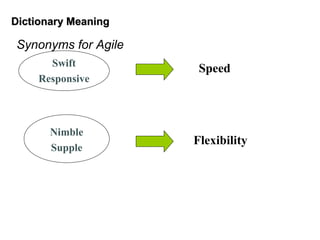
Synonyms for Agile
Swift
Responsive
Nimble
Supple
Speed
Flexibility
AgileAgile
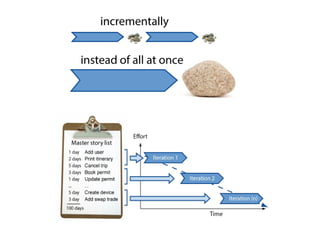
 Agile is a time boxed, iterative approach to software
delivery that builds software incrementally from the
start of the project, instead of trying to deliver it all at
once near the end.
 It works by breaking projects down into little bits of
user functionality called user stories, prioritizing them,
and then continuously delivering them in short two
week cycles called iterations.
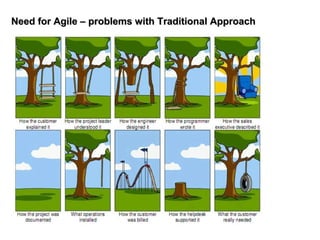
Need for Agile – problems with Traditional ApproachNeed for Agile – problems with Traditional Approach
Changing Times…Changing Times…
 Time to market becoming crucial
 Budgets are shrinking
 Requirements not clear upfront or being developed concurrently
Agile methodology addresses all the above
Principles behind the Agile ManifestoPrinciples behind the Agile Manifesto
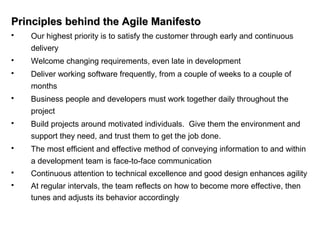
 Our highest priority is to satisfy the customer through early and continuous
delivery
 Welcome changing requirements, even late in development
 Deliver working software frequently, from a couple of weeks to a couple of
months
 Business people and developers must work together daily throughout the
project
 Build projects around motivated individuals. Give them the environment and
support they need, and trust them to get the job done.
 The most efficient and effective method of conveying information to and within
a development team is face-to-face communication
 Continuous attention to technical excellence and good design enhances agility
 At regular intervals, the team reflects on how to become more effective, then
tunes and adjusts its behavior accordingly
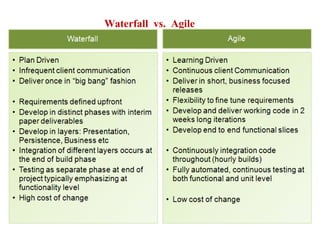
Waterfall vs. Agile
Agile MethodsAgile Methods
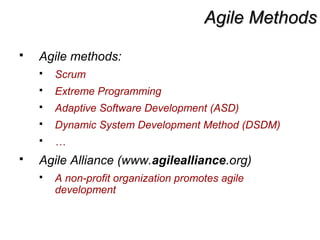
 Agile methods:
 Scrum
 Extreme Programming
 Adaptive Software Development (ASD)
 Dynamic System Development Method (DSDM)
 …
 Agile Alliance (www.agilealliance.org)
 A non-profit organization promotes agile
development
ScrumScrum
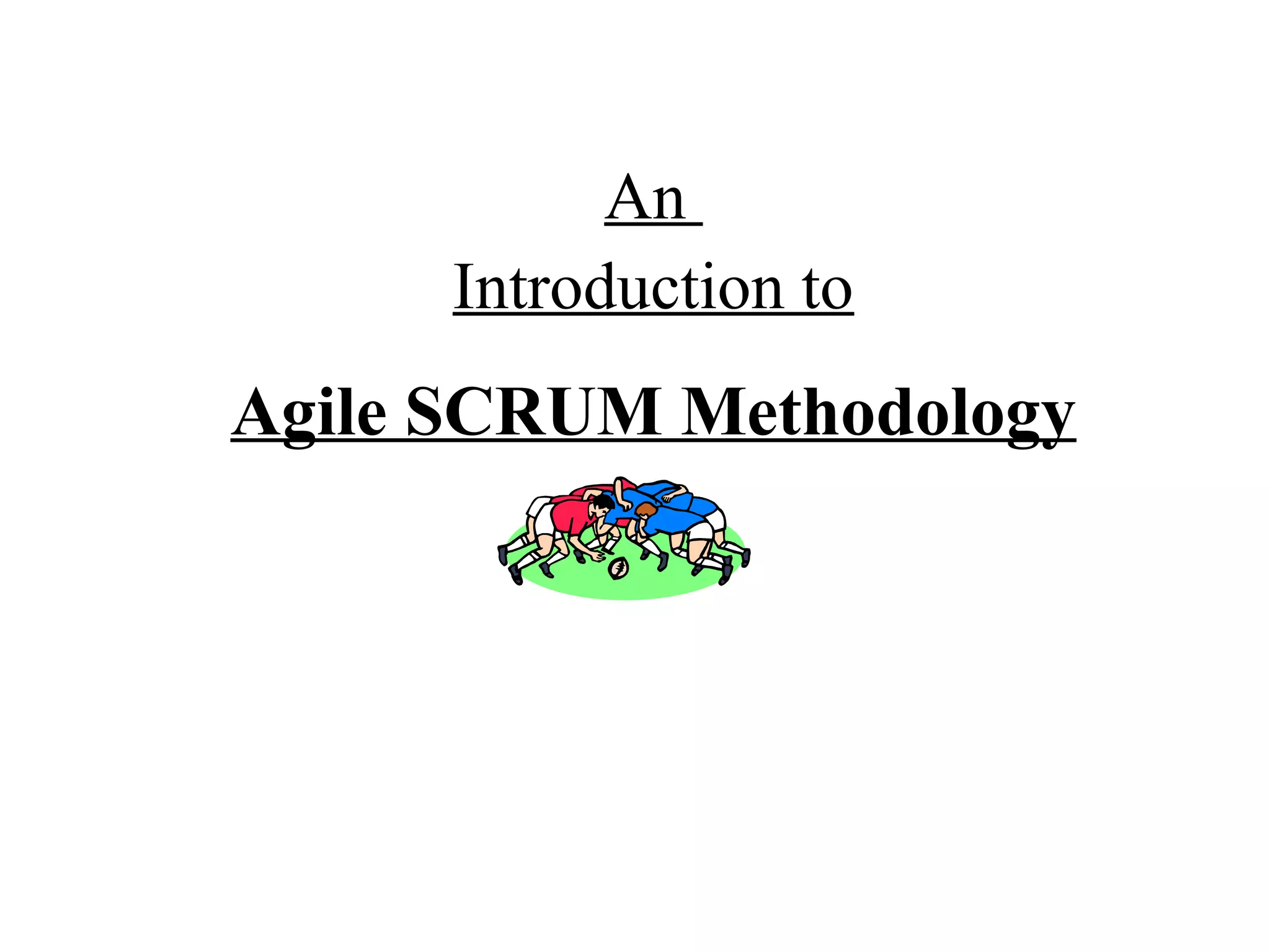
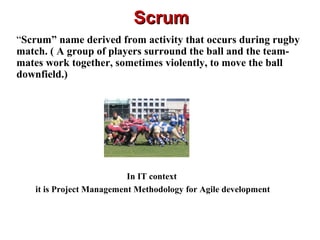
“Scrum” name derived from activity that occurs during rugby
match. ( A group of players surround the ball and the team-
mates work together, sometimes violently, to move the ball
downfield.)
In IT context
it is Project Management Methodology for Agile development
ScrumScrum
Scrum is an agile process that allows us to focus on
delivering the highest business value in the shortest
time.
It allows us to rapidly and repeatedly inspect actual
working software (every two weeks to one month).
The business sets the priorities. Our teams self-manage
to determine the best way to deliver the highest
priority features.
Every two weeks to a month anyone can see real working
software and decide to release it as is or continue to
enhance for another iteration.
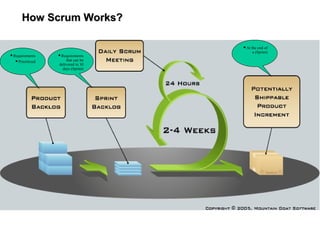
How Scrum Works?How Scrum Works?
Requirements
Prioritized
Requirements
that can be
delivered in 30
days (Sprint)
At the end of
a (Sprint)
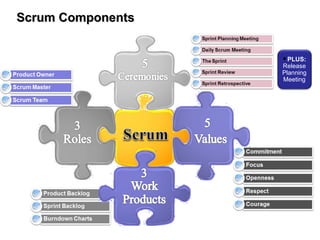
Scrum ComponentsScrum Components
PLUS:
Release
Planning
Meeting
Scrum FrameworkScrum Framework
 Roles : Product Owner, ScrumMaster, Team
 Ceremonies : Sprint Planning, Sprint Review,
Sprint Retrospective, & Daily Scrum Meeting
 Artifacts : Product Backlog, Sprint Backlog,
and Burndown Chart
Product OwnerProduct Owner
 Define the features of the product
 Decide on release date and content
 Be responsible for the profitability of the
product
 Prioritize features according to market value
 Adjust features and priority every iteration, as
needed
 Accept or reject work results.
The Scrum MasterThe Scrum Master
 Represents management to the project
 Responsible for enacting Scrum values and practices
 Removes impediments
 Ensure that the team is fully functional and productive
 Enable close cooperation across all roles and
functions
 Shield the team from external interferences
Scrum TeamScrum Team
 Typically 5-10 people
 Cross-functional
 QA, Programmers, UI Designers, etc.
 Members should be full-time
 May be exceptions (e.g., System Admin, etc.)
 Teams are self-organizing
 What to do if a team self-organizes someone off the team??
 Ideally, no titles but rarely a possibility
 Membership can change only between sprints
CeremoniesCeremonies
 Sprint Planning Meeting
 Sprint
 Daily Scrum
 Sprint Review Meeting
 Sprint Retrospective Meeting
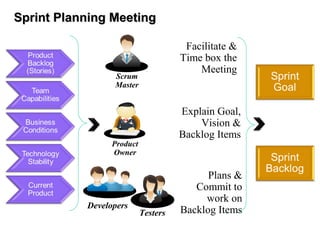
Sprint Planning MeetingSprint Planning Meeting
Scrum
Master
Facilitate &
Time box the
Meeting
Product
Owner
Explain Goal,
Vision &
Backlog Items
Developers
Testers
Plans &
Commit to
work on
Backlog Items
Pre-Project/Kickoff MeetingPre-Project/Kickoff Meeting
 A special form of Sprint Planning Meeting
 Meeting before the begin of the Project
SprintSprint
 A month-long iteration, during which is
incremented a product functionality
 NO outside influence can interfere with the
Scrum team during the Sprint
 Each Sprint begins with the Daily Scrum
Meeting
Daily ScrumDaily Scrum
 Parameters
 Daily
 15-minutes
 Stand-up
 Not for problem solving
 Three questions:
1. What did you do yesterday
2. What will you do today?
3. What obstacles are in your way?
Daily ScrumDaily Scrum
 Is NOT a problem solving session
 Is NOT a way to collect information about
WHO is behind the schedule
 Is a meeting in which team members make
commitments to each other and to the Scrum
Master
 Is a good way for a Scrum Master to track the
progress of the Team
Sprint Review MeetingSprint Review Meeting
 At the end of every sprint cycle, the
SCRUM team meets again and
demonstrates implemented user stories
to the product owner.
 The product owner may cross verify the
stories as per its acceptance criteria.
Sprint Retrospective MeetingSprint Retrospective Meeting
Retrospective meeting happens after the review meeting. The
SCRUM team meets and discusses & document the following
points:
 What went well during the Sprint (Best practices)
 What did not went well in the Sprint
 Lessons learnt
 Action Items.
The Scrum team should continue to follow the best practice, ignore the “not
best practices” and implement the lessons learnt during the consequent
sprints. The retrospective meeting helps to implement the continuous
improvement of the SCRUM process.
Product BacklogProduct Backlog
 A list of all desired work on the project
 Usually a combination of
 story-based work (“let user search and
replace”)
 task-based work (“improve exception
handling”)
 List is prioritized by the Product Owner
 Typically a Product Manager, Marketing, Internal
Customer, etc.
Product BacklogProduct Backlog
 Requirements for a system, expressed as a
prioritized list of Backlog Items
 Is managed and owned by a Product Owner
 Spreadsheet (typically)
 Usually is created during the Sprint Planning
Meeting
 Can be changed and re-prioritized before
each PM
From Sprint Goal to Sprint BacklogFrom Sprint Goal to Sprint Backlog
 Scrum team takes the Sprint Goal and
decides what tasks are necessary
 Team self-organizes around how they’ll meet
the Sprint Goal
 Manager doesn’t assign tasks to individuals
 Managers don’t make decisions for the team
 Sprint Backlog is created
Sprint Backlog during the SprintSprint Backlog during the Sprint
 Changes
 Team adds new tasks whenever they need to in
order to meet the Sprint Goal
 Team can remove unnecessary tasks
 But: Sprint Backlog can only be updated by the
team
 Estimates are updated whenever there’s new
information
Sprint BacklogSprint Backlog
 A subset of Product Backlog Items, which
define the work for a Sprint
 Is created ONLY by Team members
 Each Item has it’s own status
 Should be updated every day
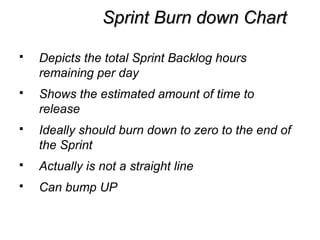
Sprint Burn down ChartSprint Burn down Chart
 Depicts the total Sprint Backlog hours
remaining per day
 Shows the estimated amount of time to
release
 Ideally should burn down to zero to the end of
the Sprint
 Actually is not a straight line
 Can bump UP
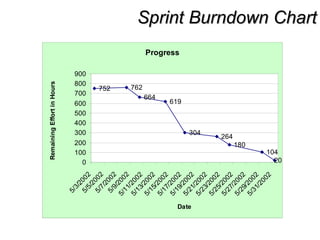
Sprint Burndown ChartSprint Burndown Chart
Progress
752 762
664
619
304
264
180
104
200
100
200
300
400
500
600
700
800
900
5/3/2002
5/5/20025/7/2002
5/9/2002
5/11/2002
5/13/2002
5/15/2002
5/17/2002
5/19/2002
5/21/2002
5/23/2002
5/25/2002
5/27/2002
5/29/2002
5/31/2002
Date
RemainingEffortinHours
Release Burndown ChartRelease Burndown Chart
 Will the release be done on right time?
 X-axis: sprints
 Y-axis: amount of hours remaining
 The estimated work remaining can also burn
up
Product Burndown ChartProduct Burndown Chart
 Is a “big picture” view of project’s progress (all
the releases)
Pros/ConsPros/Cons
 Advantages
 Completely developed and
tested features in short
iterations
 Simplicity of the process
 Clearly defined rules
 Increasing productivity
 Self-organizing
 each team member carries
a lot of responsibility
 Improved communication
 Combination with Extreme
Programming
 Drawbacks
 “Undisciplined hacking”
(no written
documentation)
 Violation of
responsibility
 Current mainly carried
by the inventors
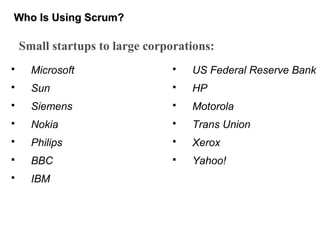
Who Is Using Scrum?Who Is Using Scrum?
 Microsoft
 Sun
 Siemens
 Nokia
 Philips
 BBC
 IBM
 US Federal Reserve Bank
 HP
 Motorola
 Trans Union
 Xerox
 Yahoo!
Small startups to large corporations:
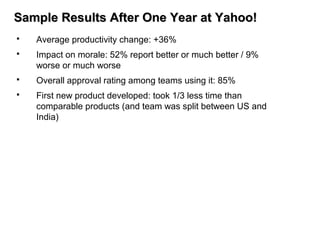
Sample Results After One Year at Yahoo!Sample Results After One Year at Yahoo!
 Average productivity change: +36%
 Impact on morale: 52% report better or much better / 9%
worse or much worse
 Overall approval rating among teams using it: 85%
 First new product developed: took 1/3 less time than
comparable products (and team was split between US and
India)
Migrating to AgileMigrating to Agile
Agile - When and Where to use and NOT to use
 Use Agile when:
 Domain & Technology are
evolving
 Requirements change
 Short timelines for
delivery
 Do not use when:
 If the people involved
aren't interested in the
kind of intense
collaboration
 If the people involved
aren't interested in the
kind of intense
collaboration
 If the people involved
aren't interested in the
kind of intense
collaboration
ChallengesChallenges
 Documentation – Retain critical information over time
 Design and coding standards for every technology
 Refactoring – frequent refactoring would enable local changes
 Competent manpower (past experience in technology domain) and
willing to live with developers’ decisions
 Fast feedback from the customer/users
 Physically co-located teams
 Larger programs and distributed teams
 Availability of tools
 Co-ordinating team of teams
Thank You !!!

Agile

  • 1.
  • 2.
    AgendaAgenda  Introduction  Whatis Agile Methodology?  Need for Agile  What is Scrum?  Functionality of Scrum  Components of Scrum  Scrum Roles  The Process  Scrum Artifacts
  • 3.
    Sunrise of Agile In February 2001, 17 Software Developers met at the Snowbird resort in Utah, USA to discuss lightweight development methods. They published the Manifesto for Agile Software Development.  The use of the word agile in this context derives from the agile manifesto. A small group of people got together to discuss their feelings that the traditional approach to managing software development projects was failing far too often, and there had to be a better way.  They came up with the agile manifesto, which describes 4 important values that are as relevant today as they were then. It says, “we value: Individuals and interactions over processes and tools Working software over comprehensive documentation Customer collaboration over contract negotiation Responding to change over following a plan That is, while there is value in the items on the right, we value the items on the left more.
  • 4.
    Dictionary MeaningDictionary Meaning Synonymsfor Agile Swift Responsive Nimble Supple Speed Flexibility
  • 5.
    AgileAgile  Agile isa time boxed, iterative approach to software delivery that builds software incrementally from the start of the project, instead of trying to deliver it all at once near the end.  It works by breaking projects down into little bits of user functionality called user stories, prioritizing them, and then continuously delivering them in short two week cycles called iterations.
  • 7.
    Need for Agile– problems with Traditional ApproachNeed for Agile – problems with Traditional Approach
  • 8.
    Changing Times…Changing Times… Time to market becoming crucial  Budgets are shrinking  Requirements not clear upfront or being developed concurrently Agile methodology addresses all the above
  • 9.
    Principles behind theAgile ManifestoPrinciples behind the Agile Manifesto  Our highest priority is to satisfy the customer through early and continuous delivery  Welcome changing requirements, even late in development  Deliver working software frequently, from a couple of weeks to a couple of months  Business people and developers must work together daily throughout the project  Build projects around motivated individuals. Give them the environment and support they need, and trust them to get the job done.  The most efficient and effective method of conveying information to and within a development team is face-to-face communication  Continuous attention to technical excellence and good design enhances agility  At regular intervals, the team reflects on how to become more effective, then tunes and adjusts its behavior accordingly
  • 10.
  • 11.
    Agile MethodsAgile Methods Agile methods:  Scrum  Extreme Programming  Adaptive Software Development (ASD)  Dynamic System Development Method (DSDM)  …  Agile Alliance (www.agilealliance.org)  A non-profit organization promotes agile development
  • 12.
    ScrumScrum “Scrum” name derivedfrom activity that occurs during rugby match. ( A group of players surround the ball and the team- mates work together, sometimes violently, to move the ball downfield.) In IT context it is Project Management Methodology for Agile development
  • 13.
    ScrumScrum Scrum is anagile process that allows us to focus on delivering the highest business value in the shortest time. It allows us to rapidly and repeatedly inspect actual working software (every two weeks to one month). The business sets the priorities. Our teams self-manage to determine the best way to deliver the highest priority features. Every two weeks to a month anyone can see real working software and decide to release it as is or continue to enhance for another iteration.
  • 14.
    How Scrum Works?HowScrum Works? Requirements Prioritized Requirements that can be delivered in 30 days (Sprint) At the end of a (Sprint)
  • 15.
  • 16.
    Scrum FrameworkScrum Framework Roles : Product Owner, ScrumMaster, Team  Ceremonies : Sprint Planning, Sprint Review, Sprint Retrospective, & Daily Scrum Meeting  Artifacts : Product Backlog, Sprint Backlog, and Burndown Chart
  • 17.
    Product OwnerProduct Owner Define the features of the product  Decide on release date and content  Be responsible for the profitability of the product  Prioritize features according to market value  Adjust features and priority every iteration, as needed  Accept or reject work results.
  • 18.
    The Scrum MasterTheScrum Master  Represents management to the project  Responsible for enacting Scrum values and practices  Removes impediments  Ensure that the team is fully functional and productive  Enable close cooperation across all roles and functions  Shield the team from external interferences
  • 19.
    Scrum TeamScrum Team Typically 5-10 people  Cross-functional  QA, Programmers, UI Designers, etc.  Members should be full-time  May be exceptions (e.g., System Admin, etc.)  Teams are self-organizing  What to do if a team self-organizes someone off the team??  Ideally, no titles but rarely a possibility  Membership can change only between sprints
  • 20.
    CeremoniesCeremonies  Sprint PlanningMeeting  Sprint  Daily Scrum  Sprint Review Meeting  Sprint Retrospective Meeting
  • 21.
    Sprint Planning MeetingSprintPlanning Meeting Scrum Master Facilitate & Time box the Meeting Product Owner Explain Goal, Vision & Backlog Items Developers Testers Plans & Commit to work on Backlog Items
  • 22.
    Pre-Project/Kickoff MeetingPre-Project/Kickoff Meeting A special form of Sprint Planning Meeting  Meeting before the begin of the Project
  • 23.
    SprintSprint  A month-longiteration, during which is incremented a product functionality  NO outside influence can interfere with the Scrum team during the Sprint  Each Sprint begins with the Daily Scrum Meeting
  • 24.
    Daily ScrumDaily Scrum Parameters  Daily  15-minutes  Stand-up  Not for problem solving  Three questions: 1. What did you do yesterday 2. What will you do today? 3. What obstacles are in your way?
  • 25.
    Daily ScrumDaily Scrum Is NOT a problem solving session  Is NOT a way to collect information about WHO is behind the schedule  Is a meeting in which team members make commitments to each other and to the Scrum Master  Is a good way for a Scrum Master to track the progress of the Team
  • 26.
    Sprint Review MeetingSprintReview Meeting  At the end of every sprint cycle, the SCRUM team meets again and demonstrates implemented user stories to the product owner.  The product owner may cross verify the stories as per its acceptance criteria.
  • 27.
    Sprint Retrospective MeetingSprintRetrospective Meeting Retrospective meeting happens after the review meeting. The SCRUM team meets and discusses & document the following points:  What went well during the Sprint (Best practices)  What did not went well in the Sprint  Lessons learnt  Action Items. The Scrum team should continue to follow the best practice, ignore the “not best practices” and implement the lessons learnt during the consequent sprints. The retrospective meeting helps to implement the continuous improvement of the SCRUM process.
  • 28.
    Product BacklogProduct Backlog A list of all desired work on the project  Usually a combination of  story-based work (“let user search and replace”)  task-based work (“improve exception handling”)  List is prioritized by the Product Owner  Typically a Product Manager, Marketing, Internal Customer, etc.
  • 29.
    Product BacklogProduct Backlog Requirements for a system, expressed as a prioritized list of Backlog Items  Is managed and owned by a Product Owner  Spreadsheet (typically)  Usually is created during the Sprint Planning Meeting  Can be changed and re-prioritized before each PM
  • 30.
    From Sprint Goalto Sprint BacklogFrom Sprint Goal to Sprint Backlog  Scrum team takes the Sprint Goal and decides what tasks are necessary  Team self-organizes around how they’ll meet the Sprint Goal  Manager doesn’t assign tasks to individuals  Managers don’t make decisions for the team  Sprint Backlog is created
  • 31.
    Sprint Backlog duringthe SprintSprint Backlog during the Sprint  Changes  Team adds new tasks whenever they need to in order to meet the Sprint Goal  Team can remove unnecessary tasks  But: Sprint Backlog can only be updated by the team  Estimates are updated whenever there’s new information
  • 32.
    Sprint BacklogSprint Backlog A subset of Product Backlog Items, which define the work for a Sprint  Is created ONLY by Team members  Each Item has it’s own status  Should be updated every day
  • 33.
    Sprint Burn downChartSprint Burn down Chart  Depicts the total Sprint Backlog hours remaining per day  Shows the estimated amount of time to release  Ideally should burn down to zero to the end of the Sprint  Actually is not a straight line  Can bump UP
  • 34.
    Sprint Burndown ChartSprintBurndown Chart Progress 752 762 664 619 304 264 180 104 200 100 200 300 400 500 600 700 800 900 5/3/2002 5/5/20025/7/2002 5/9/2002 5/11/2002 5/13/2002 5/15/2002 5/17/2002 5/19/2002 5/21/2002 5/23/2002 5/25/2002 5/27/2002 5/29/2002 5/31/2002 Date RemainingEffortinHours
  • 35.
    Release Burndown ChartReleaseBurndown Chart  Will the release be done on right time?  X-axis: sprints  Y-axis: amount of hours remaining  The estimated work remaining can also burn up
  • 36.
    Product Burndown ChartProductBurndown Chart  Is a “big picture” view of project’s progress (all the releases)
  • 37.
    Pros/ConsPros/Cons  Advantages  Completelydeveloped and tested features in short iterations  Simplicity of the process  Clearly defined rules  Increasing productivity  Self-organizing  each team member carries a lot of responsibility  Improved communication  Combination with Extreme Programming  Drawbacks  “Undisciplined hacking” (no written documentation)  Violation of responsibility  Current mainly carried by the inventors
  • 38.
    Who Is UsingScrum?Who Is Using Scrum?  Microsoft  Sun  Siemens  Nokia  Philips  BBC  IBM  US Federal Reserve Bank  HP  Motorola  Trans Union  Xerox  Yahoo! Small startups to large corporations:
  • 39.
    Sample Results AfterOne Year at Yahoo!Sample Results After One Year at Yahoo!  Average productivity change: +36%  Impact on morale: 52% report better or much better / 9% worse or much worse  Overall approval rating among teams using it: 85%  First new product developed: took 1/3 less time than comparable products (and team was split between US and India)
  • 40.
    Migrating to AgileMigratingto Agile Agile - When and Where to use and NOT to use  Use Agile when:  Domain & Technology are evolving  Requirements change  Short timelines for delivery  Do not use when:  If the people involved aren't interested in the kind of intense collaboration  If the people involved aren't interested in the kind of intense collaboration  If the people involved aren't interested in the kind of intense collaboration
  • 41.
    ChallengesChallenges  Documentation –Retain critical information over time  Design and coding standards for every technology  Refactoring – frequent refactoring would enable local changes  Competent manpower (past experience in technology domain) and willing to live with developers’ decisions  Fast feedback from the customer/users  Physically co-located teams  Larger programs and distributed teams  Availability of tools  Co-ordinating team of teams
  • 42.