INDIA CHAPTER
Speakers
Arko Mukherjee
Lead Developer @ OneTrust
AEMUG – India Chapter
Divanshu Goyal
Consultant @ TechX
AEMUG – India Chapter
Upcoming AEM User Group
Meetings
• Thursday, July 24 @ 10am ET: AEM Assets - DAM
Global User Group / Kick off Meeting
o Hosted by: AEM Assets – DAM Global User
Group Chapter
• Thursday, August 14 @ 12pm ET: Establishing and
Maintaining Metadata in AEM Assets for GenAI
Readiness
o Hosted by: AEM – Women In Tech Chapter
Scan to
register!
© 2024 Adobe. All Rights Reserved. Adobe
Confidential.
In 2025, the Skill Exchange will host a multi-day, multi-solution Digital Experience over the course of two consecutive weeks featuring SIX Adobe Solutions! Registration opens in early July.
 DATES:
o Wed, August 13:
 RTCDP/AJO (Grow Track)
 Marketo Engage (Grow Track)
o Thu, August 14: Analytics (Learn & Grow Tracks)
o Wed, August 20:
 Adobe Experience Manager (Grow Track)
 Adobe Commerce (Grow Track)
o Thu, August 21: Workfront (Learn & Grow Tracks)
Note: This is a digital event and sessions will run from 9:00 a.m. to 12:00 p.m. Pacific Time
Skill Exchange Digital 2025 – Coming This Summer!
Join User Group
chapters
Find your location, click on
the chapter, hit the "Join"
button, and just like that,
you’ll be part of their
regional space to connect
with their peers.
Start a new Chapter
If you are interested in
starting a group in a
different city, fill out the
interest form; a minimum
of 10 members are
required to launch a
chapter in a new location.
Launching | Adobe Experience Platform User Groups
Nominate User
group Leader
If interested in being AEP
user group leader, send a
mail to
nimashaj@adobe.com
with the subject line “AEP
UGL Nomination –
<CityName>”.
Please include the name,
company, User Group
location and why you
think you would make a
great leader.
Introducing AEP User Groups as dedicated peer-to-peer meetups for Real-Time CDP and Adobe Journey Optimizer users to connect,
share insights, and collaborate on solving real-world challenges using AEP and apps.
Key Locations – SF Bay Area, New York, Denver, Syndney, London, Madrid, Melbourne, Singapore, Bangalore, Toronto
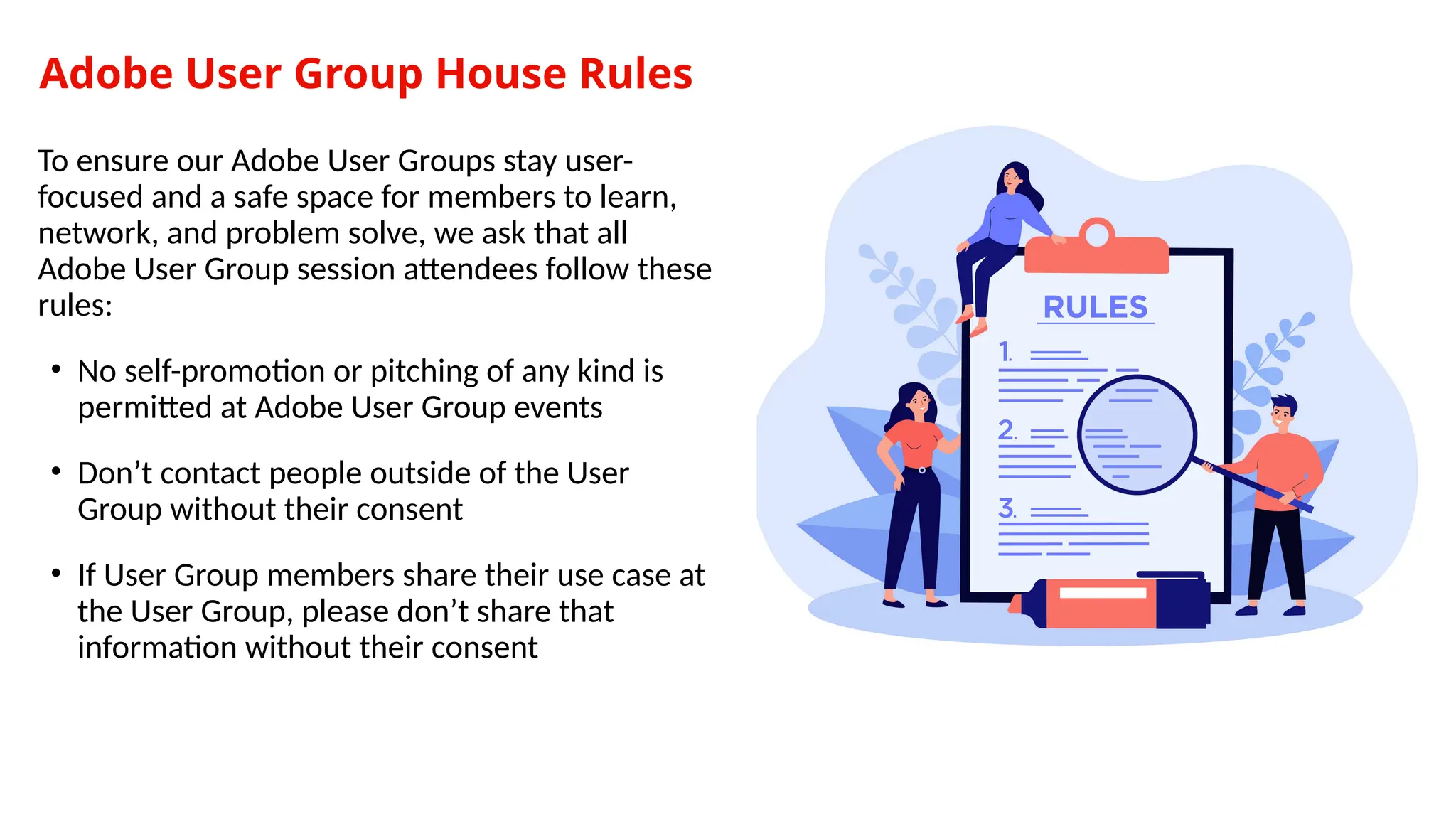
Adobe User Group House Rules
To ensure our Adobe User Groups stay user-
focused and a safe space for members to learn,
network, and problem solve, we ask that all
Adobe User Group session attendees follow these
rules:
• No self-promotion or pitching of any kind is
permitted at Adobe User Group events
• Don’t contact people outside of the User
Group without their consent
• If User Group members share their use case at
the User Group, please don’t share that
information without their consent
Notice: This User Group Meeting is being Recorded.
To ensure that we are abiding by the Adobe User
Group Code of Conduct, we are informing all
user group attendees at Working Smart with
AEM on 10th
July 2025 at 5.00 PM that this
meeting will be recorded and posted on the
Adobe User Group YouTube Channel to
promote training, education, and future
learning.
If you do not wish to participate in a LIVE
recorded session, please feel free to watch the
recording at a later time, which will be linked
after the meeting concludes. Send us any
questions you may have to
advocacy@adobe.com
Stay connected with our AEMUG - India Chapter!
Sign up
Step 1: Navigate to
https://aem-augs.adobe.com/aemug-india-chapter
Step 2: Create an account using the email associated with
your Adobe Experience Manager user account
Step 3: Join the Chapter. Once you’ve joined the chapter,
you’ll receive notifications and reminders about new
events that the chapter has posted!
Working Smart with AEM:
Things You Wish You Knew
Earlier
A fast-paced hour on working smarter with AEM —
packed with sharp insights, underrated tools, and
practical ideas you’ll want to take back to your
team.
Agenda
Contents
• Early access to speaker registration.
• AEM quick tools you didn’t know
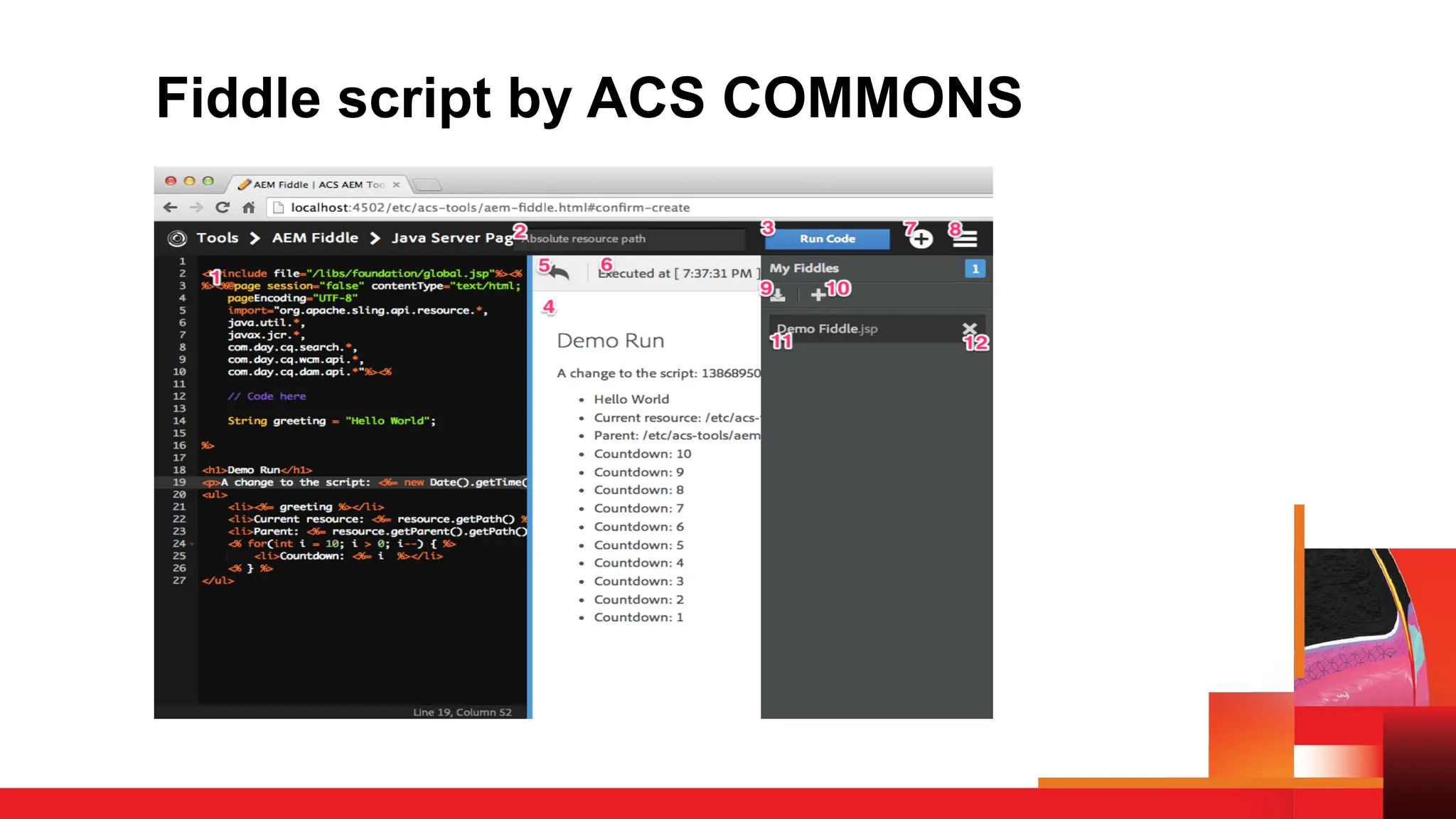
• Writing and testing code faster with AEM Fiddle scripts
• Let’s learn about shared component approach
Want to Speak at the Next
AEMUG India Event?
We’re looking for passionate AEM professionals, tinkerers, and
storytellers to join us as speakers for our upcoming sessions!
Whether you have a tip, a tool, or a tale from the trenches—this is
your chance to share it with the community.
Please fill out the speaker registration form to express your interest
post the meeting.
Let’s learn, grow, and build together!
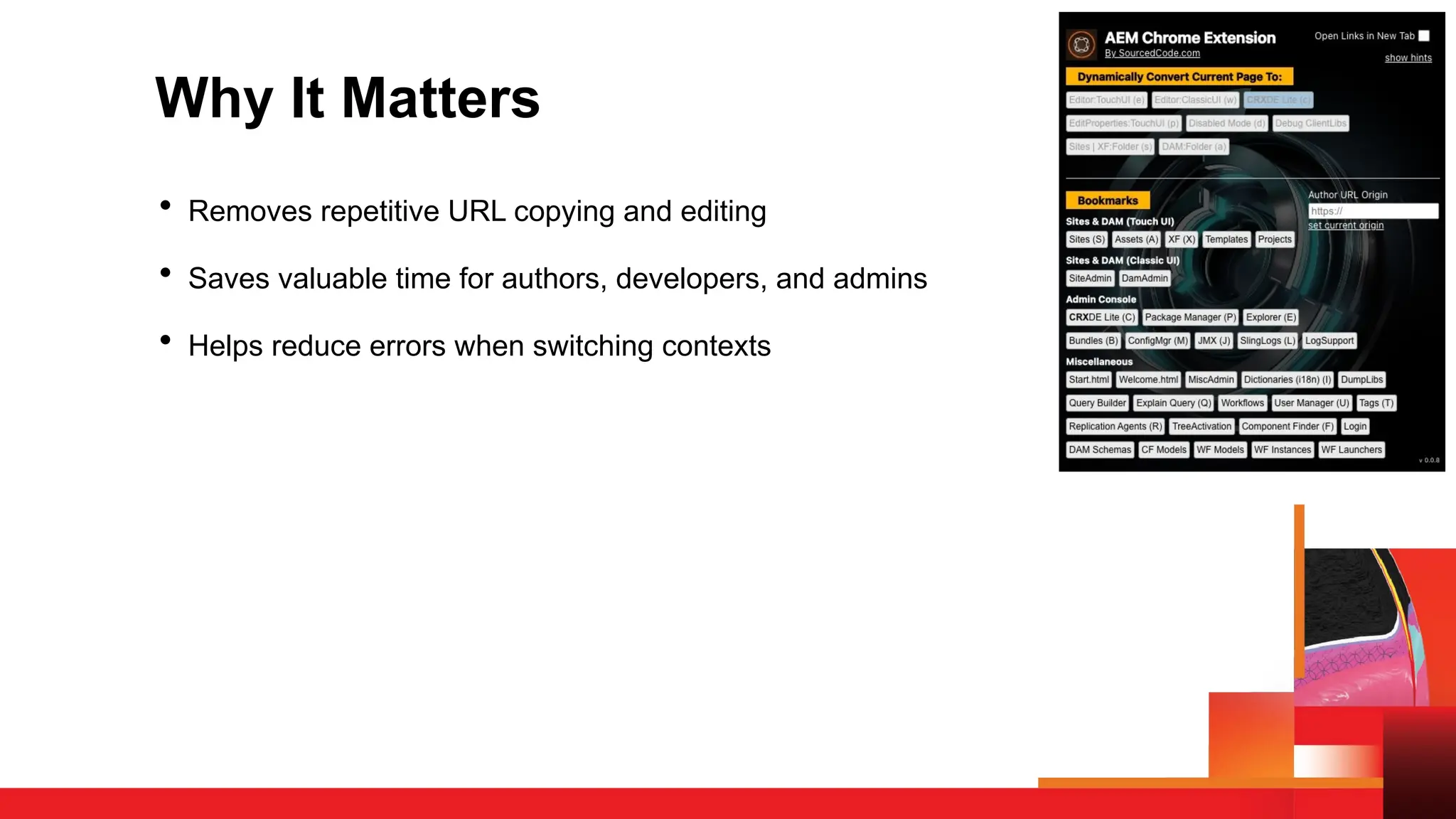
AEM Quick Links – Chrome Extension
Streamline Navigation Across AEM
• Built by SourcedCode (Brian Ka Sing Li)
• Being used by 2,000+ AEM professionals already
• Saves time with one-click navigation to key AEM interfaces:
Touch UI, Classic UI, CRXDE, Page Properties, DAM, Sites,
and more
• Available free on Chrome Web Store
Why It Matters
• Removes repetitive URL copying and editing
• Saves valuable time for authors, developers, and admins
• Helps reduce errors when switching contexts
Key Features & Smart Navigation
Key Features & Smart Navigation:-
Dynamic Quick Links (Hotkeys):
• e – Touch UI Editor
• w – Classic UI
• c – CRXDE Lite
• p – Page Properties
• d – Disabled Mode
• s, a – Folder navigation for Sites/DAM
Bookmark Quick Links (Shift + Hotkeys):
• Shift + S – Sites
• Shift + A – DAM
• Shift + X – Experience Fragments
• Shift + C – CRXDE
• Supports direct jumps to Package Manager, OSGi Console, ConfigMgr, etc.
Other Enhancements:
Open in New Tab checkbox
Hide UI Hints for cleaner view
Installation & Setup
• Go to the Chrome Web Store➜ Install Extension
• Click the extension icon while on any AEM page (e.g., /content/...)
• Explore the quick tools and hotkeys
• Customize hints, tabs, or environment switching if needed
Fiddle script by ACS COMMONS
AEM Sidekick – Chrome Extension
Empowering In-Context Authoring & Publishing in AEM/EDS:-
• Developed and maintained by Adobe, Inc
• Enables previewing, editing, and publishing of content
directly from your live or preview site context
Why It Matters
• Streamlines authoring workflow by enabling edit → preview →
publish without leaving the live page
• Simplifies environment switching—navigate easily between preview,
live, and production environments
• Reduces friction for non-technical authors by offering quick shift to
doc based authoring console
Core Features &
Authoring Navigation
A floating toolbar appears on AEM pages once installed—toggle via the Adobe icon if
hidden
Three Modes:
• Source Mode – regenerate preview from a document source (e.g., Google Docs/Sheets)
• Preview Mode – view latest rendered content; actions: Edit, Update, Publish
• Live Mode – see what's published; allows editing and publishing if available
Environment Switcher:
Jump between .aem.page → .aem.live → production domains; custom domains supported
by adding your project config
Bulk Actions in Drive or SharePoint:
• Select multiple files to preview or publish in one go
• Copy or open multiple generated URLs effortlessly
• Status feedback with color indicators (green = success, red = failure)
Unpublish & Delete:
Accessible via ellipsis menu; requires sign-in and relevant roles; deletion is irreversible—
users must type “DELETE” to confirm.
Installation & Initial Setup
• Visit the Chrome Web Store and install AEM Sidekick
by Adobe
• Pin the extension icon to your toolbar for easy access
• Navigate to any AEM page (preview, .live, or production
domain)
• Click the extension icon to activate Sidekick toolbar
• If necessary, sign in to your authoring environment to
enable delete/unpublish actions
• Add custom domains or projects via the Sidekick menu if
auto-detect does not trigger
Shared Component
Properties in AEM
Centralizing Dialog Data for Consistency & Reuse
What it is:
• An ACS AEM Commons feature to share dialog properties across
components
• Supports both shared (component-specific) and global (agnostic)
properties
• Reduces authoring time and enforces consistency across a page
Why & When to Use It
Why?
• Avoid repeated content entry across multiple components
• Centralized authoring of common values like CTA labels, tracking
codes, styling, or toggles
• Reduces human error and maintenance effort
When?
• Landing pages with repeated CTAs
• Layout/styling toggles used across components
• Multilingual or multi-market content needing synchronized config
• When authors request “set once, apply everywhere”
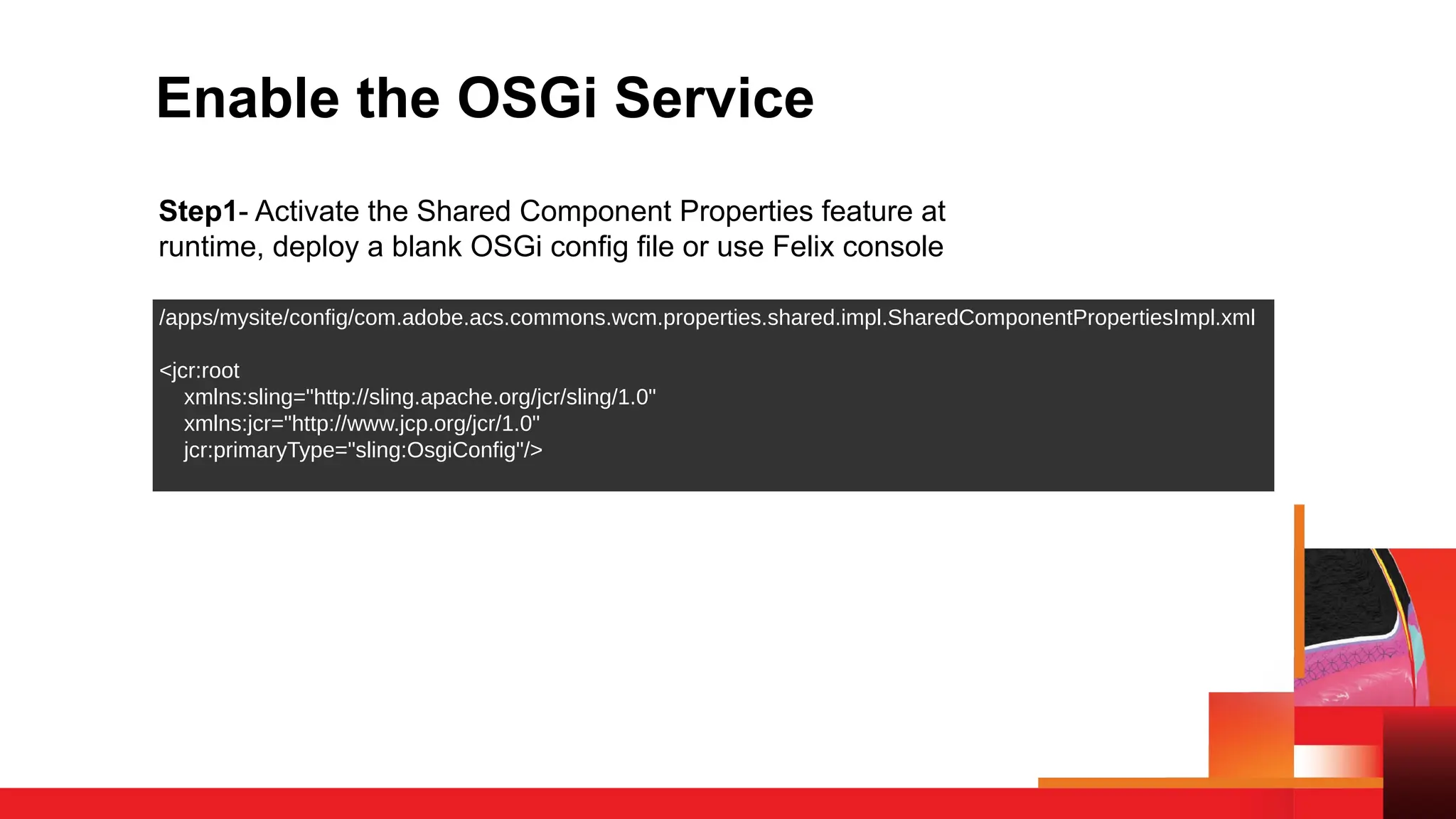
Enable the OSGi Service
Step1- Activate the Shared Component Properties feature at
runtime, deploy a blank OSGi config file or use Felix console
/apps/mysite/config/com.adobe.acs.commons.wcm.properties.shared.impl.SharedComponentPropertiesImpl.xml
<jcr:root
xmlns:sling="http://sling.apache.org/jcr/sling/1.0"
xmlns:jcr="http://www.jcp.org/jcr/1.0"
jcr:primaryType="sling:OsgiConfig"/>
Add Client Libraries for Authoring
Step 2 –Enables author dialogs for configuring shared/global props:
• Create Touch UI and/or Classic UI clientlib folders
• Embed ACS-provided clientlibs and include a blank js.txt
<jcr:root jcr:primaryType="cq:ClientLibraryFolder"
categories="cq.authoring.editor”
embed="[acs-commons.shared-component-properties]"/>
Specify Site Root Page via OSGi Config
Step 3- Shared/global properties are stored under the page root
• Deploy a config specifying the root path using regex
/apps/mysite/config/com.adobe.acs.commons.wcm.impl.PageRootProviderConfig-example.xml
<jcr:root jcr:primaryType="sling:OsgiConfig"
page.root.path="[/content/geometrixx/[a-z]{2}]"/>
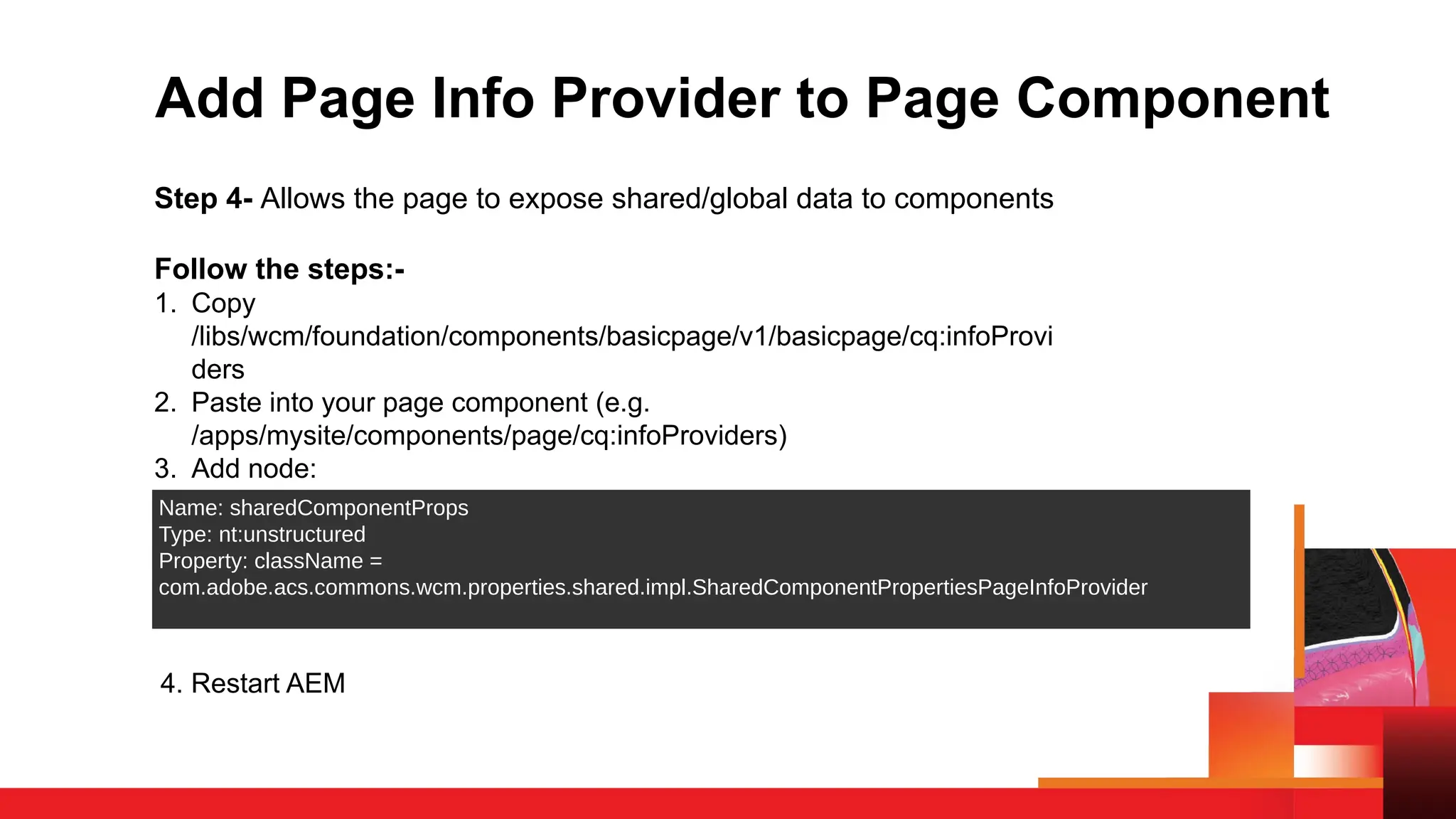
Add Page Info Provider to Page Component
Step 4- Allows the page to expose shared/global data to components
Follow the steps:-
1. Copy
/libs/wcm/foundation/components/basicpage/v1/basicpage/cq:infoProvi
ders
2. Paste into your page component (e.g.
/apps/mysite/components/page/cq:infoProviders)
3. Add node:
Name: sharedComponentProps
Type: nt:unstructured
Property: className =
com.adobe.acs.commons.wcm.properties.shared.impl.SharedComponentPropertiesPageInfoProvider
4. Restart AEM
Using Shared & Global Dialogs
in Components
For Shared Properties:-
• Add a dialogshared node in your component like you add cq:dialog
• Authors click the "Configure Shared Properties" (layers icon)
For Global Properties:-
• Add dialogglobal node in your component like you add cq:dialog
• Authors click "Configure Global Properties" (globe icon)
Learn More & Official
Documentation
For complete implementation details, examples, and updates:
🔗 Visit: Shared Component Properties
📄 Maintained by Adobe Consulting Services
🧩 Part of the ACS AEM Commons open-source project
Q&A Time
Got questions? Let’s hear them!
How to Ask
• Unmute and speak up
• Drop your questions in the chat
Let’s make this an open, helpful conversation.
Thank You for Joining Us!
We hope you enjoyed the session and took away something valuable.
Let’s keep the momentum going!
👥 Join Our AEMUG – India Chapter
Stay connected, network with peers, and be the first to know about
our upcoming events.
🔗 aem-augs.adobe.com/aemug-india-chapter
📢 Stay Tuned
New events, more learning, and exciting announcements are coming
your way soon!

AEM User Group: India Chapter Kickoff Meeting

  • 1.
  • 2.
    Speakers Arko Mukherjee Lead Developer@ OneTrust AEMUG – India Chapter Divanshu Goyal Consultant @ TechX AEMUG – India Chapter
  • 3.
    Upcoming AEM UserGroup Meetings • Thursday, July 24 @ 10am ET: AEM Assets - DAM Global User Group / Kick off Meeting o Hosted by: AEM Assets – DAM Global User Group Chapter • Thursday, August 14 @ 12pm ET: Establishing and Maintaining Metadata in AEM Assets for GenAI Readiness o Hosted by: AEM – Women In Tech Chapter Scan to register!
  • 4.
    © 2024 Adobe.All Rights Reserved. Adobe Confidential. In 2025, the Skill Exchange will host a multi-day, multi-solution Digital Experience over the course of two consecutive weeks featuring SIX Adobe Solutions! Registration opens in early July.  DATES: o Wed, August 13:  RTCDP/AJO (Grow Track)  Marketo Engage (Grow Track) o Thu, August 14: Analytics (Learn & Grow Tracks) o Wed, August 20:  Adobe Experience Manager (Grow Track)  Adobe Commerce (Grow Track) o Thu, August 21: Workfront (Learn & Grow Tracks) Note: This is a digital event and sessions will run from 9:00 a.m. to 12:00 p.m. Pacific Time Skill Exchange Digital 2025 – Coming This Summer!
  • 5.
    Join User Group chapters Findyour location, click on the chapter, hit the "Join" button, and just like that, you’ll be part of their regional space to connect with their peers. Start a new Chapter If you are interested in starting a group in a different city, fill out the interest form; a minimum of 10 members are required to launch a chapter in a new location. Launching | Adobe Experience Platform User Groups Nominate User group Leader If interested in being AEP user group leader, send a mail to nimashaj@adobe.com with the subject line “AEP UGL Nomination – <CityName>”. Please include the name, company, User Group location and why you think you would make a great leader. Introducing AEP User Groups as dedicated peer-to-peer meetups for Real-Time CDP and Adobe Journey Optimizer users to connect, share insights, and collaborate on solving real-world challenges using AEP and apps. Key Locations – SF Bay Area, New York, Denver, Syndney, London, Madrid, Melbourne, Singapore, Bangalore, Toronto
  • 7.
    Adobe User GroupHouse Rules To ensure our Adobe User Groups stay user- focused and a safe space for members to learn, network, and problem solve, we ask that all Adobe User Group session attendees follow these rules: • No self-promotion or pitching of any kind is permitted at Adobe User Group events • Don’t contact people outside of the User Group without their consent • If User Group members share their use case at the User Group, please don’t share that information without their consent
  • 8.
    Notice: This UserGroup Meeting is being Recorded. To ensure that we are abiding by the Adobe User Group Code of Conduct, we are informing all user group attendees at Working Smart with AEM on 10th July 2025 at 5.00 PM that this meeting will be recorded and posted on the Adobe User Group YouTube Channel to promote training, education, and future learning. If you do not wish to participate in a LIVE recorded session, please feel free to watch the recording at a later time, which will be linked after the meeting concludes. Send us any questions you may have to advocacy@adobe.com
  • 9.
    Stay connected withour AEMUG - India Chapter! Sign up Step 1: Navigate to https://aem-augs.adobe.com/aemug-india-chapter Step 2: Create an account using the email associated with your Adobe Experience Manager user account Step 3: Join the Chapter. Once you’ve joined the chapter, you’ll receive notifications and reminders about new events that the chapter has posted!
  • 10.
    Working Smart withAEM: Things You Wish You Knew Earlier A fast-paced hour on working smarter with AEM — packed with sharp insights, underrated tools, and practical ideas you’ll want to take back to your team.
  • 11.
    Agenda Contents • Early accessto speaker registration. • AEM quick tools you didn’t know • Writing and testing code faster with AEM Fiddle scripts • Let’s learn about shared component approach
  • 12.
    Want to Speakat the Next AEMUG India Event? We’re looking for passionate AEM professionals, tinkerers, and storytellers to join us as speakers for our upcoming sessions! Whether you have a tip, a tool, or a tale from the trenches—this is your chance to share it with the community. Please fill out the speaker registration form to express your interest post the meeting. Let’s learn, grow, and build together!
  • 13.
    AEM Quick Links– Chrome Extension Streamline Navigation Across AEM • Built by SourcedCode (Brian Ka Sing Li) • Being used by 2,000+ AEM professionals already • Saves time with one-click navigation to key AEM interfaces: Touch UI, Classic UI, CRXDE, Page Properties, DAM, Sites, and more • Available free on Chrome Web Store
  • 14.
    Why It Matters •Removes repetitive URL copying and editing • Saves valuable time for authors, developers, and admins • Helps reduce errors when switching contexts
  • 15.
    Key Features &Smart Navigation Key Features & Smart Navigation:- Dynamic Quick Links (Hotkeys): • e – Touch UI Editor • w – Classic UI • c – CRXDE Lite • p – Page Properties • d – Disabled Mode • s, a – Folder navigation for Sites/DAM Bookmark Quick Links (Shift + Hotkeys): • Shift + S – Sites • Shift + A – DAM • Shift + X – Experience Fragments • Shift + C – CRXDE • Supports direct jumps to Package Manager, OSGi Console, ConfigMgr, etc. Other Enhancements: Open in New Tab checkbox Hide UI Hints for cleaner view
  • 16.
    Installation & Setup •Go to the Chrome Web Store➜ Install Extension • Click the extension icon while on any AEM page (e.g., /content/...) • Explore the quick tools and hotkeys • Customize hints, tabs, or environment switching if needed
  • 17.
    Fiddle script byACS COMMONS
  • 18.
    AEM Sidekick –Chrome Extension Empowering In-Context Authoring & Publishing in AEM/EDS:- • Developed and maintained by Adobe, Inc • Enables previewing, editing, and publishing of content directly from your live or preview site context
  • 19.
    Why It Matters •Streamlines authoring workflow by enabling edit → preview → publish without leaving the live page • Simplifies environment switching—navigate easily between preview, live, and production environments • Reduces friction for non-technical authors by offering quick shift to doc based authoring console
  • 20.
    Core Features & AuthoringNavigation A floating toolbar appears on AEM pages once installed—toggle via the Adobe icon if hidden Three Modes: • Source Mode – regenerate preview from a document source (e.g., Google Docs/Sheets) • Preview Mode – view latest rendered content; actions: Edit, Update, Publish • Live Mode – see what's published; allows editing and publishing if available Environment Switcher: Jump between .aem.page → .aem.live → production domains; custom domains supported by adding your project config Bulk Actions in Drive or SharePoint: • Select multiple files to preview or publish in one go • Copy or open multiple generated URLs effortlessly • Status feedback with color indicators (green = success, red = failure) Unpublish & Delete: Accessible via ellipsis menu; requires sign-in and relevant roles; deletion is irreversible— users must type “DELETE” to confirm.
  • 21.
    Installation & InitialSetup • Visit the Chrome Web Store and install AEM Sidekick by Adobe • Pin the extension icon to your toolbar for easy access • Navigate to any AEM page (preview, .live, or production domain) • Click the extension icon to activate Sidekick toolbar • If necessary, sign in to your authoring environment to enable delete/unpublish actions • Add custom domains or projects via the Sidekick menu if auto-detect does not trigger
  • 22.
    Shared Component Properties inAEM Centralizing Dialog Data for Consistency & Reuse What it is: • An ACS AEM Commons feature to share dialog properties across components • Supports both shared (component-specific) and global (agnostic) properties • Reduces authoring time and enforces consistency across a page
  • 23.
    Why & Whento Use It Why? • Avoid repeated content entry across multiple components • Centralized authoring of common values like CTA labels, tracking codes, styling, or toggles • Reduces human error and maintenance effort When? • Landing pages with repeated CTAs • Layout/styling toggles used across components • Multilingual or multi-market content needing synchronized config • When authors request “set once, apply everywhere”
  • 24.
    Enable the OSGiService Step1- Activate the Shared Component Properties feature at runtime, deploy a blank OSGi config file or use Felix console /apps/mysite/config/com.adobe.acs.commons.wcm.properties.shared.impl.SharedComponentPropertiesImpl.xml <jcr:root xmlns:sling="http://sling.apache.org/jcr/sling/1.0" xmlns:jcr="http://www.jcp.org/jcr/1.0" jcr:primaryType="sling:OsgiConfig"/>
  • 25.
    Add Client Librariesfor Authoring Step 2 –Enables author dialogs for configuring shared/global props: • Create Touch UI and/or Classic UI clientlib folders • Embed ACS-provided clientlibs and include a blank js.txt <jcr:root jcr:primaryType="cq:ClientLibraryFolder" categories="cq.authoring.editor” embed="[acs-commons.shared-component-properties]"/>
  • 26.
    Specify Site RootPage via OSGi Config Step 3- Shared/global properties are stored under the page root • Deploy a config specifying the root path using regex /apps/mysite/config/com.adobe.acs.commons.wcm.impl.PageRootProviderConfig-example.xml <jcr:root jcr:primaryType="sling:OsgiConfig" page.root.path="[/content/geometrixx/[a-z]{2}]"/>
  • 27.
    Add Page InfoProvider to Page Component Step 4- Allows the page to expose shared/global data to components Follow the steps:- 1. Copy /libs/wcm/foundation/components/basicpage/v1/basicpage/cq:infoProvi ders 2. Paste into your page component (e.g. /apps/mysite/components/page/cq:infoProviders) 3. Add node: Name: sharedComponentProps Type: nt:unstructured Property: className = com.adobe.acs.commons.wcm.properties.shared.impl.SharedComponentPropertiesPageInfoProvider 4. Restart AEM
  • 28.
    Using Shared &Global Dialogs in Components For Shared Properties:- • Add a dialogshared node in your component like you add cq:dialog • Authors click the "Configure Shared Properties" (layers icon) For Global Properties:- • Add dialogglobal node in your component like you add cq:dialog • Authors click "Configure Global Properties" (globe icon)
  • 29.
    Learn More &Official Documentation For complete implementation details, examples, and updates: 🔗 Visit: Shared Component Properties 📄 Maintained by Adobe Consulting Services 🧩 Part of the ACS AEM Commons open-source project
  • 30.
    Q&A Time Got questions?Let’s hear them! How to Ask • Unmute and speak up • Drop your questions in the chat Let’s make this an open, helpful conversation.
  • 31.
    Thank You forJoining Us! We hope you enjoyed the session and took away something valuable. Let’s keep the momentum going! 👥 Join Our AEMUG – India Chapter Stay connected, network with peers, and be the first to know about our upcoming events. 🔗 aem-augs.adobe.com/aemug-india-chapter 📢 Stay Tuned New events, more learning, and exciting announcements are coming your way soon!