Advanced WWW Brought to you by Fresno County Public Library written by Lisa Lindsay, MLIS
Class Goals We will cover: Basic facts about the WWW.  How to quickly evaluate a website to determine if it’s authoritative Effective search techniques for Google  Additional directories and search engines
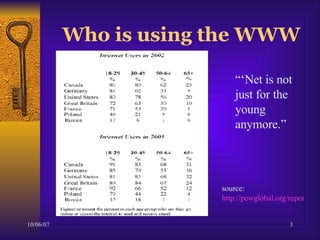
Who is using the WWW “‘ Net is not just for the  young anymore.”  source:  http://pewglobal.org/reports/display.php?ReportID=251
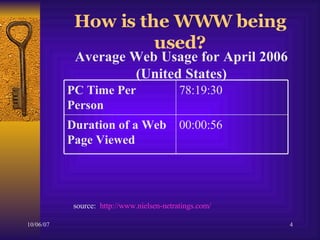
How is the WWW being used? Average Web Usage for April 2006 (United States) source:  http://www.nielsen-netratings.com/ 00:00:56  Duration of a Web Page Viewed   78:19:30  PC Time Per Person
Who do you trust  on the  Internet?  The WWW includes information on hundreds of thousands of computers around the world.  It’s important to consider who is writing the information and why they are sharing it.  Example
Indicators of an  Authoritative  Site: The URL offers some very basic information that is helpful (for example “ . gov ” for government and “ . edu ” for higher education).  A quality websites is upfront about who created the content.  Example .  Also, each page will indicate when it was last updated.  Example . When these details are missing it’s good clue that the site is not an authoritative source.
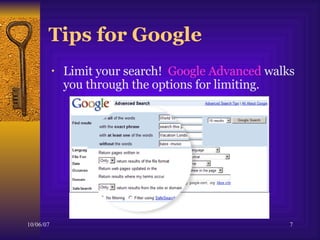
Tips for Google Limit your search!  Google Advanced  walks you through the options for limiting.
More Tips for Google  Use quotes.  Use minus sign to exclude a word. Use the site operator.  (site:gov) For lots more read the Advanced Search tips Google offers:  http:// www.google.com/intl/en/help/refinesearch.html
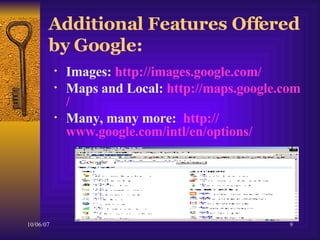
Additional Features Offered by Google: Images:  http:// images.google.com / Maps and Local:  http:// maps.google.com / Many, many more:  http:// www.google.com/intl/en/options /
Beyond Google Directories http:// dir.yahoo.com / http:// www.lii.org / Other Search Engines http://www.ask.com http://www.answers.com Recommended   websites on Hand-out
Find it! What was the estimated financial cost to the U.S. of the Vietnam War?
Find it! Words to the song “A Natural Woman” by Carol King.
Find it! How was Edgar Allan Poe related to Virginia Clem?
Find it! Who was head of the Women’s Peace Party during the Progressive Era?
Find it! Basic information on each California Mission with pictures.
Find It! A brief biography on Arnold Schwarzenegger.
Important Reminders Become familiar with a couple of web directories and search engines. Be careful what information you trust --  look for an authoritative source.  Practice the search strategies we’ve covered to help make your searches specific. DON’T GIVE UP
Creative Commons License  Adapted from a workshop created by Nancy Riesgraf for the Hibbing Public Library (MN).  Updated June 2006 by Lisa Lindsay, MLIS, of Fresno County Public Library.  This work is licensed under Creative Commons Attribution-Non Commercial-Share Alike Licensed.  To view a copy of this license, visit  http://creativecommons.org/licenses/by-nc-sa/2.5/

Advanced Internet

  • 1.
    Advanced WWW Broughtto you by Fresno County Public Library written by Lisa Lindsay, MLIS
  • 2.
    Class Goals Wewill cover: Basic facts about the WWW. How to quickly evaluate a website to determine if it’s authoritative Effective search techniques for Google Additional directories and search engines
  • 3.
    Who is usingthe WWW “‘ Net is not just for the young anymore.” source: http://pewglobal.org/reports/display.php?ReportID=251
  • 4.
    How is theWWW being used? Average Web Usage for April 2006 (United States) source: http://www.nielsen-netratings.com/ 00:00:56 Duration of a Web Page Viewed 78:19:30 PC Time Per Person
  • 5.
    Who do youtrust on the Internet? The WWW includes information on hundreds of thousands of computers around the world. It’s important to consider who is writing the information and why they are sharing it. Example
  • 6.
    Indicators of an Authoritative Site: The URL offers some very basic information that is helpful (for example “ . gov ” for government and “ . edu ” for higher education). A quality websites is upfront about who created the content. Example . Also, each page will indicate when it was last updated. Example . When these details are missing it’s good clue that the site is not an authoritative source.
  • 7.
    Tips for GoogleLimit your search! Google Advanced walks you through the options for limiting.
  • 8.
    More Tips forGoogle Use quotes. Use minus sign to exclude a word. Use the site operator. (site:gov) For lots more read the Advanced Search tips Google offers: http:// www.google.com/intl/en/help/refinesearch.html
  • 9.
    Additional Features Offeredby Google: Images: http:// images.google.com / Maps and Local: http:// maps.google.com / Many, many more: http:// www.google.com/intl/en/options /
  • 10.
    Beyond Google Directorieshttp:// dir.yahoo.com / http:// www.lii.org / Other Search Engines http://www.ask.com http://www.answers.com Recommended websites on Hand-out
  • 11.
    Find it! Whatwas the estimated financial cost to the U.S. of the Vietnam War?
  • 12.
    Find it! Wordsto the song “A Natural Woman” by Carol King.
  • 13.
    Find it! Howwas Edgar Allan Poe related to Virginia Clem?
  • 14.
    Find it! Whowas head of the Women’s Peace Party during the Progressive Era?
  • 15.
    Find it! Basicinformation on each California Mission with pictures.
  • 16.
    Find It! Abrief biography on Arnold Schwarzenegger.
  • 17.
    Important Reminders Becomefamiliar with a couple of web directories and search engines. Be careful what information you trust -- look for an authoritative source. Practice the search strategies we’ve covered to help make your searches specific. DON’T GIVE UP
  • 18.
    Creative Commons License Adapted from a workshop created by Nancy Riesgraf for the Hibbing Public Library (MN). Updated June 2006 by Lisa Lindsay, MLIS, of Fresno County Public Library. This work is licensed under Creative Commons Attribution-Non Commercial-Share Alike Licensed. To view a copy of this license, visit http://creativecommons.org/licenses/by-nc-sa/2.5/

Editor's Notes

  • #2 Created by Lisa Lindsay for Sunnyside Regional Library of Fresno County Public Library. Updated April 2006 This work is licensed under Creative Commons Attribution-Non Commercial-Share Alike Licensed. To view a copy of this license, visit http://creativecommons.org/licenses/by-nc-sa/1.0/ or send a letter to creative commons, 559 North Abbott Way Stanford California 94305, USA