MySQL Connectors :
Advanced DocStore Features
23rd August, 2019
Sankalita Chakraborty
Vishnu Priya
Copyright © 2016, Oracle and/or its affiliates. All rights reserved. | 2
Safe Harbour Statement
Copyright (c) 2019 Oracle and/or its affiliates. All rights reserved.
The following is intended to outline our general product
direction. It is intended for information purposes only,
and may not be incorporated into any contract.
It is not a commitment to deliver any material, code, or
functionality, and should not be relied upon in making
purchasing decisions. The development, release, and
timing of any features or functionality described for
Oracle’s products remains at the sole discretion of
Oracle.
[1
3
DocStore Introduction
MySQL Document Store is essentially an alternative way using the MySQL Database.
It allows developers to work with SQL relational tables and schema-less JSON
collections
Two of the Key features of MySQL Document Store :
• Flexibility of a NoSQL Database
• Consistency of a RDBMS
Copyright (c) 2019 Oracle and/or its affiliates. All rights reserved.
4
Connector Products
Copyright (c) 2019 Oracle and/or its affiliates. All rights reserved.
 Connector Java
 Connector Python
 Connector NodeJS
 Connector Net
 Connector C++
5
Agenda
Copyright (c) 2019 Oracle and/or its affiliates. All rights reserved.
The following new features implemented in the Connectors as part of Docstore support:
 Connection Pooling
 Locking Read Operations
 Prepared Statement
 Create Index
We will be discussing each of these in details and will show a small demo in the end.
6Copyright (c) 2019 Oracle and/or its affiliates. All rights reserved.
Connection Pooling
7
Introduction
Copyright (c) 2019 Oracle and/or its affiliates. All rights reserved.
Connection pooling is a technique of creating and managing a pool
of connections that are ready for use, which greatly increase the
performance of your applications by reducing the connection
creation time.
8
Introduction Contd.
Creating physical connections to a remote database server is an
expensive operation, especially when SSL is used. It is possible that many
applications make use of many short lived database connections during
operation.
To speed up these operations a pooling option is made available so that
executing an open session operation will retrieve an existing and
currently unused network connection from a pool, reset it, and use it.
Closing a session would mark the underlying connection as unused and
return it to the pool.
Copyright (c) 2019 Oracle and/or its affiliates. All rights reserved.
9
Client Object
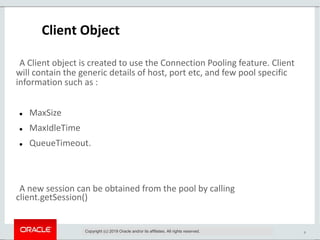
A Client object is created to use the Connection Pooling feature. Client
will contain the generic details of host, port etc, and few pool specific
information such as :
 MaxSize
 MaxIdleTime
 QueueTimeout.
A new session can be obtained from the pool by calling
client.getSession()
Copyright (c) 2019 Oracle and/or its affiliates. All rights reserved.
10
Client Object
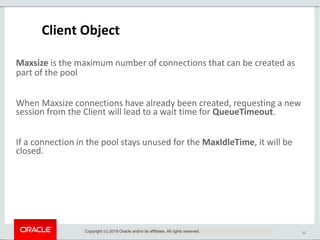
Maxsize is the maximum number of connections that can be created as
part of the pool
When Maxsize connections have already been created, requesting a new
session from the Client will lead to a wait time for QueueTimeout.
If a connection in the pool stays unused for the MaxIdleTime, it will be
closed.
Copyright (c) 2019 Oracle and/or its affiliates. All rights reserved.
11
Client Object
Copyright (c) 2019 Oracle and/or its affiliates. All rights reserved.
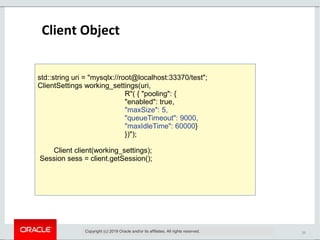
std::string uri = "mysqlx://root@localhost:33370/test";
ClientSettings working_settings(uri,
R"( { "pooling": {
"enabled": true,
"maxSize": 5,
"queueTimeout": 9000,
"maxIdleTime": 60000}
})");
Client client(working_settings);
Session sess = client.getSession();
12
Client Object
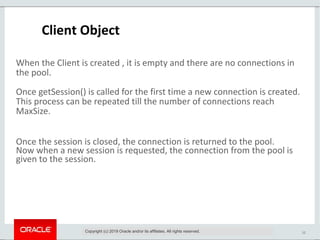
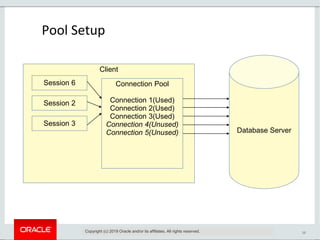
When the Client is created , it is empty and there are no connections in
the pool.
Once getSession() is called for the first time a new connection is created.
This process can be repeated till the number of connections reach
MaxSize.
Once the session is closed, the connection is returned to the pool.
Now when a new session is requested, the connection from the pool is
given to the session.
Copyright (c) 2019 Oracle and/or its affiliates. All rights reserved.
13
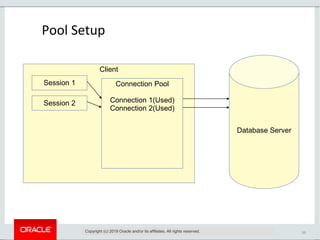
Pool Setup
Copyright (c) 2019 Oracle and/or its affiliates. All rights reserved.
Database Server
Client
Connection Pool
Connection 1(Used)
Connection 2(Used)
Session 1
Session 2
14
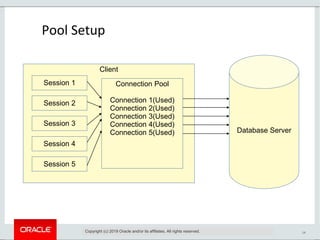
Pool Setup
Copyright (c) 2019 Oracle and/or its affiliates. All rights reserved.
Database Server
Client
Connection Pool
Connection 1(Used)
Connection 2(Used)
Connection 3(Used)
Connection 4(Used)
Connection 5(Used)
Session 1
Session 2
Session 3
Session 4
Session 5
15
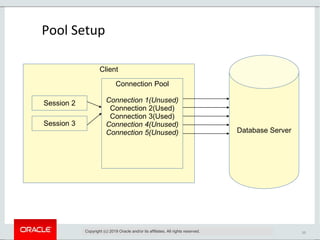
Pool Setup
Copyright (c) 2019 Oracle and/or its affiliates. All rights reserved.
Database Server
Client
Connection Pool
Connection 1(Unused)
Connection 2(Used)
Connection 3(Used)
Connection 4(Unused)
Connection 5(Unused)
Session 2
Session 3
16
Pool Setup
Copyright (c) 2019 Oracle and/or its affiliates. All rights reserved.
Database Server
Client
Connection Pool
Connection 1(Used)
Connection 2(Used)
Connection 3(Used)
Connection 4(Unused)
Connection 5(Unused)
Session 6
Session 2
Session 3
17
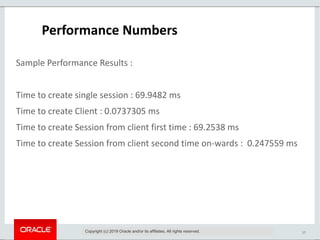
Performance Numbers
Sample Performance Results :
Time to create single session : 69.9482 ms
Time to create Client : 0.0737305 ms
Time to create Session from client first time : 69.2538 ms
Time to create Session from client second time on-wards : 0.247559 ms
Copyright (c) 2019 Oracle and/or its affiliates. All rights reserved.
18Copyright (c) 2019 Oracle and/or its affiliates. All rights reserved.
Locking read operations
19
Introduction
Copyright (c) 2019 Oracle and/or its affiliates. All rights reserved.
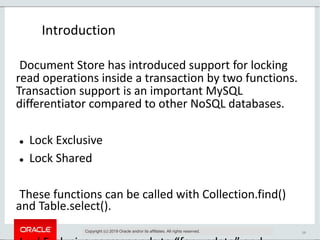
Document Store has introduced support for locking
read operations inside a transaction by two functions.
Transaction support is an important MySQL
differentiator compared to other NoSQL databases.
 Lock Exclusive
 Lock Shared
These functions can be called with Collection.find()
and Table.select().
20
Locking Scenario
Copyright (c) 2019 Oracle and/or its affiliates. All rights reserved.
Client A performs:
sessionA.startTransaction();
doc = collection.find("_id = 123").lockExclusive().execute().fetchOne();
doc["xxx"] = "foo";
doc["counter"] = doc["counter"] + 1;
collection.modify("_id = 123").replace(doc).execute();
Client B performs:
sessionB.startTransaction();
doc = collection.find("_id = 123").lockExclusive().execute().fetchOne();
# The document with _id = 123 is already locked by Client A, so Client B will block now.
21
Locking Scenario Contd.
Copyright (c) 2019 Oracle and/or its affiliates. All rights reserved.
Client A then commits:
sessionA.commit();
# The lock on _id = 123 is released, so Client B can now continue
Client B:
doc["xxx"] = "bla";
doc["yyy"] = "bar";
doc["counter"] = doc["counter"] + 1;
collection.modify("_id = 123").replace(doc).execute();
sessionB.commit();
22
Locking parameter
Copyright (c) 2019 Oracle and/or its affiliates. All rights reserved.
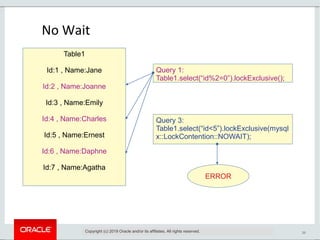
The LockContention parameter is available for LockExclusive and
LockShared. The valid options for LockContention parameter are
as follows:
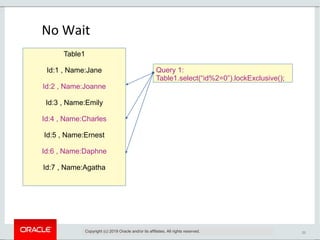
 No Wait
A locking read that uses NOWAIT never waits to acquire a row
lock. The query executes immediately, failing with an error if a
requested row is locked.
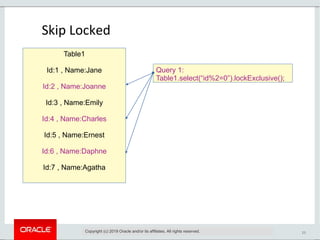
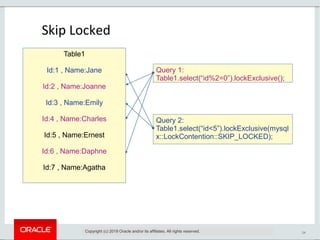
 Skip Locked
A locking read that uses SKIP LOCKED never waits to acquire a
row lock. The query executes immediately, removing locked rows
from the result set.
 Default
Query waits if any row is already locked
23
Table1
Id:1 , Name:Jane
Id:2 , Name:Joanne
Id:3 , Name:Emily
Id:4 , Name:Charles
Id:5 , Name:Ernest
Id:6 , Name:Daphne
Id:7 , Name:Agatha
Query 1:
Table1.select(“id%2=0”).lockExclusive();
Skip Locked
Copyright (c) 2019 Oracle and/or its affiliates. All rights reserved.
24
Table1
Id:1 , Name:Jane
Id:2 , Name:Joanne
Id:3 , Name:Emily
Id:4 , Name:Charles
Id:5 , Name:Ernest
Id:6 , Name:Daphne
Id:7 , Name:Agatha
Query 1:
Table1.select(“id%2=0”).lockExclusive();
Query 2:
Table1.select(“id<5”).lockExclusive(mysql
x::LockContention::SKIP_LOCKED);
Skip Locked
Copyright (c) 2019 Oracle and/or its affiliates. All rights reserved.
25
Table1
Id:1 , Name:Jane
Id:2 , Name:Joanne
Id:3 , Name:Emily
Id:4 , Name:Charles
Id:5 , Name:Ernest
Id:6 , Name:Daphne
Id:7 , Name:Agatha
Query 1:
Table1.select(“id%2=0”).lockExclusive();
No Wait
Copyright (c) 2019 Oracle and/or its affiliates. All rights reserved.
26
Table1
Id:1 , Name:Jane
Id:2 , Name:Joanne
Id:3 , Name:Emily
Id:4 , Name:Charles
Id:5 , Name:Ernest
Id:6 , Name:Daphne
Id:7 , Name:Agatha
Query 1:
Table1.select(“id%2=0”).lockExclusive();
Query 3:
Table1.select(“id<5”).lockExclusive(mysql
x::LockContention::NOWAIT);
ERROR
No Wait
Copyright (c) 2019 Oracle and/or its affiliates. All rights reserved.
27
Prepared Statement
Copyright (c) 2019 Oracle and/or its affiliates. All rights reserved.
28
Introduction
Multiple executions of same SQL statement is one of
the expensive operations that can be optimized using
prepared statements.
Prepared statements are used
 To execute the same statement repeatedly for high efficiency.
 To allow clients to request the server to cache a parsed query and query
plan, allowing statements that are executed multiple times to execute
faster.
Implements support for preparing and executing
Read/Update/Delete requests.
Copyright (c) 2019 Oracle and/or its affiliates. All rights reserved.
29
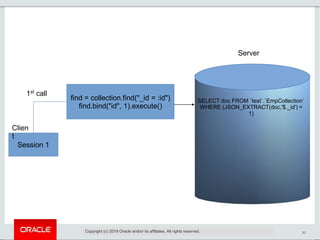
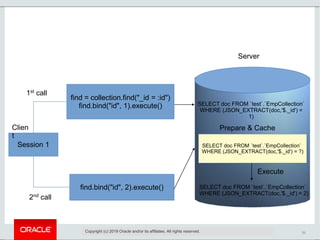
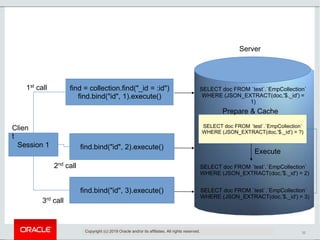
 Two stages:
 Prepare: a statement template is sent to the MySQL server.
 Execute : client binds parameter values and sends them to the server
Copyright (c) 2019 Oracle and/or its affiliates. All rights reserved.
30
Session 1
Clien
t
Server
find = collection.find("_id = :id")
find.bind("id", 1).execute()
1st
call
Copyright (c) 2019 Oracle and/or its affiliates. All rights reserved.
SELECT doc FROM `test`.`EmpCollection`
WHERE (JSON_EXTRACT(doc,'$._id') =
1)
31
Session 1
Clien
t
find = collection.find("_id = :id")
find.bind("id", 1).execute()
find.bind("id", 2).execute()
1st
call
2nd
call
Copyright (c) 2019 Oracle and/or its affiliates. All rights reserved.
Server
SELECT doc FROM `test`.`EmpCollection`
WHERE (JSON_EXTRACT(doc,'$._id') =
1)
SELECT doc FROM `test`.`EmpCollection`
WHERE (JSON_EXTRACT(doc,'$._id') = ?)
Prepare & Cache
SELECT doc FROM `test`.`EmpCollection`
WHERE (JSON_EXTRACT(doc,'$._id') = 2)
Execute
32
Session 1
Clien
t
find = collection.find("_id = :id")
find.bind("id", 1).execute()
find.bind("id", 2).execute()
1st
call
2nd
call
Copyright (c) 2019 Oracle and/or its affiliates. All rights reserved.
find.bind("id", 3).execute()
3rd
call
Server
SELECT doc FROM `test`.`EmpCollection`
WHERE (JSON_EXTRACT(doc,'$._id') =
1)
SELECT doc FROM `test`.`EmpCollection`
WHERE (JSON_EXTRACT(doc,'$._id') = ?)
Prepare & Cache
SELECT doc FROM `test`.`EmpCollection`
WHERE (JSON_EXTRACT(doc,'$._id') = 3)
Execute
SELECT doc FROM `test`.`EmpCollection`
WHERE (JSON_EXTRACT(doc,'$._id') = 2)
33
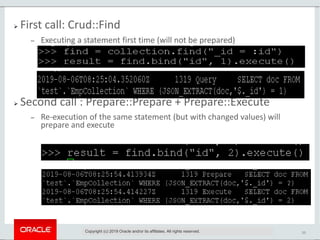
 First call: Crud::Find
 Executing a statement first time (will not be prepared)
 Second call : Prepare::Prepare + Prepare::Execute
 Re-execution of the same statement (but with changed values) will
prepare and execute
Copyright (c) 2019 Oracle and/or its affiliates. All rights reserved.
34
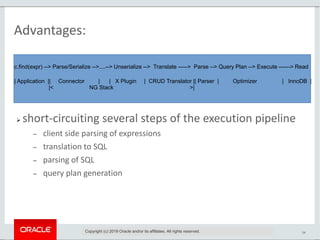
Advantages:
 short-circuiting several steps of the execution pipeline
 client side parsing of expressions
 translation to SQL
 parsing of SQL
 query plan generation
Copyright (c) 2019 Oracle and/or its affiliates. All rights reserved.
c.find(expr) --> Parse/Serialize -->....--> Unserialize --> Translate -----> Parse --> Query Plan --> Execute ------> Read
| Application || Connector | | X Plugin | CRUD Translator || Parser | Optimizer | InnoDB |
|< NG Stack >|
35
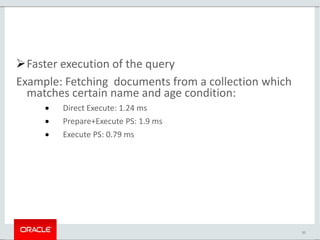
Faster execution of the query
Example: Fetching documents from a collection which
matches certain name and age condition:
 Direct Execute: 1.24 ms
 Prepare+Execute PS: 1.9 ms
 Execute PS: 0.79 ms
36
Indexing Collections
 To make large collections of documents more efficient
to navigate you can create an index based on one or
more fields found in the documents in the collection.
 Collection indexes are ordinary MySQL indexes on
virtual columns that extract data from the documents
in the collection.
 Single Value Index
 Multi Value Index
Copyright (c) 2019 Oracle and/or its affiliates. All rights reserved.
37
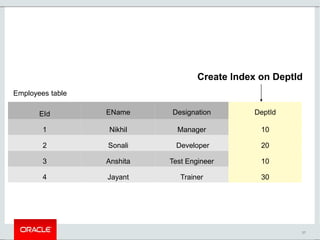
EId EName Designation DeptId
1 Nikhil Manager 10
2 Sonali Developer 20
3 Anshita Test Engineer 10
4 Jayant Trainer 30
Create Index on DeptId
Employees table
38
Single Value Index
collection=schema.create_collection('Employees')
collection.add(
{"eid":1,"ename":"Nikhil","designation":”Manager”,”deptid”:10},
{"eid":2,"ename":"Sonali","designation":”Developer”,”deptid”:20},
{"eid":2,"ename":"Anshita","designation":”Test Engineer”,”deptid”:10},
{"eid":2,"ename":"Jayant","designation":”Trainer”,”deptid”:30},
).execute()
collection.create_index("deptIndex",
{"fields": [{"field": "$.deptid",
"type": "INT",
"required": True}],
"type": "INDEX"}).execute()
Copyright (c) 2019 Oracle and/or its affiliates. All rights reserved.
39
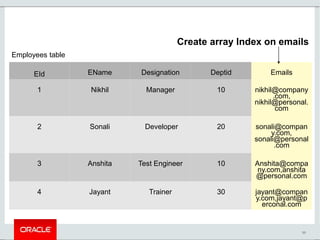
EId EName Designation Deptid Emails
1 Nikhil Manager 10 nikhil@company
.com,
nikhil@personal.
com
2 Sonali Developer 20 sonali@compan
y.com,
sonali@personal
.com
3 Anshita Test Engineer 10 Anshita@compa
ny.com,anshita
@personal.com
4 Jayant Trainer 30 jayant@compan
y.com,jayant@p
erconal.com
Create array Index on emails
Employees table
40
Array Index (8.0.17 and later)
collection=schema.create_collection('Employees')
collection.create_index("emails_idx",
{"fields": [{"field": "$.emails",
"type": "CHAR(128)",
"array": True}],
"type": "INDEX"}).execute()
Copyright (c) 2019 Oracle and/or its affiliates. All rights reserved.
41
Restrictions on MVI
 For each index, only one indexed field can be an array
 Supported data types
 INTEGER [SIGNED/UNSIGNED] √
 DECIMAL(m,n) √
 DATE, TIME and DATETIME √
 CHAR(n), BINARY(n) √
 TEXT X
Copyright (c) 2019 Oracle and/or its affiliates. All rights reserved.
42
Thank You!

Advance MySQL Docstore Features

  • 1.
    MySQL Connectors : AdvancedDocStore Features 23rd August, 2019 Sankalita Chakraborty Vishnu Priya
  • 2.
    Copyright © 2016,Oracle and/or its affiliates. All rights reserved. | 2 Safe Harbour Statement Copyright (c) 2019 Oracle and/or its affiliates. All rights reserved. The following is intended to outline our general product direction. It is intended for information purposes only, and may not be incorporated into any contract. It is not a commitment to deliver any material, code, or functionality, and should not be relied upon in making purchasing decisions. The development, release, and timing of any features or functionality described for Oracle’s products remains at the sole discretion of Oracle. [1
  • 3.
    3 DocStore Introduction MySQL DocumentStore is essentially an alternative way using the MySQL Database. It allows developers to work with SQL relational tables and schema-less JSON collections Two of the Key features of MySQL Document Store : • Flexibility of a NoSQL Database • Consistency of a RDBMS Copyright (c) 2019 Oracle and/or its affiliates. All rights reserved.
  • 4.
    4 Connector Products Copyright (c)2019 Oracle and/or its affiliates. All rights reserved.  Connector Java  Connector Python  Connector NodeJS  Connector Net  Connector C++
  • 5.
    5 Agenda Copyright (c) 2019Oracle and/or its affiliates. All rights reserved. The following new features implemented in the Connectors as part of Docstore support:  Connection Pooling  Locking Read Operations  Prepared Statement  Create Index We will be discussing each of these in details and will show a small demo in the end.
  • 6.
    6Copyright (c) 2019Oracle and/or its affiliates. All rights reserved. Connection Pooling
  • 7.
    7 Introduction Copyright (c) 2019Oracle and/or its affiliates. All rights reserved. Connection pooling is a technique of creating and managing a pool of connections that are ready for use, which greatly increase the performance of your applications by reducing the connection creation time.
  • 8.
    8 Introduction Contd. Creating physicalconnections to a remote database server is an expensive operation, especially when SSL is used. It is possible that many applications make use of many short lived database connections during operation. To speed up these operations a pooling option is made available so that executing an open session operation will retrieve an existing and currently unused network connection from a pool, reset it, and use it. Closing a session would mark the underlying connection as unused and return it to the pool. Copyright (c) 2019 Oracle and/or its affiliates. All rights reserved.
  • 9.
    9 Client Object A Clientobject is created to use the Connection Pooling feature. Client will contain the generic details of host, port etc, and few pool specific information such as :  MaxSize  MaxIdleTime  QueueTimeout. A new session can be obtained from the pool by calling client.getSession() Copyright (c) 2019 Oracle and/or its affiliates. All rights reserved.
  • 10.
    10 Client Object Maxsize isthe maximum number of connections that can be created as part of the pool When Maxsize connections have already been created, requesting a new session from the Client will lead to a wait time for QueueTimeout. If a connection in the pool stays unused for the MaxIdleTime, it will be closed. Copyright (c) 2019 Oracle and/or its affiliates. All rights reserved.
  • 11.
    11 Client Object Copyright (c)2019 Oracle and/or its affiliates. All rights reserved. std::string uri = "mysqlx://root@localhost:33370/test"; ClientSettings working_settings(uri, R"( { "pooling": { "enabled": true, "maxSize": 5, "queueTimeout": 9000, "maxIdleTime": 60000} })"); Client client(working_settings); Session sess = client.getSession();
  • 12.
    12 Client Object When theClient is created , it is empty and there are no connections in the pool. Once getSession() is called for the first time a new connection is created. This process can be repeated till the number of connections reach MaxSize. Once the session is closed, the connection is returned to the pool. Now when a new session is requested, the connection from the pool is given to the session. Copyright (c) 2019 Oracle and/or its affiliates. All rights reserved.
  • 13.
    13 Pool Setup Copyright (c)2019 Oracle and/or its affiliates. All rights reserved. Database Server Client Connection Pool Connection 1(Used) Connection 2(Used) Session 1 Session 2
  • 14.
    14 Pool Setup Copyright (c)2019 Oracle and/or its affiliates. All rights reserved. Database Server Client Connection Pool Connection 1(Used) Connection 2(Used) Connection 3(Used) Connection 4(Used) Connection 5(Used) Session 1 Session 2 Session 3 Session 4 Session 5
  • 15.
    15 Pool Setup Copyright (c)2019 Oracle and/or its affiliates. All rights reserved. Database Server Client Connection Pool Connection 1(Unused) Connection 2(Used) Connection 3(Used) Connection 4(Unused) Connection 5(Unused) Session 2 Session 3
  • 16.
    16 Pool Setup Copyright (c)2019 Oracle and/or its affiliates. All rights reserved. Database Server Client Connection Pool Connection 1(Used) Connection 2(Used) Connection 3(Used) Connection 4(Unused) Connection 5(Unused) Session 6 Session 2 Session 3
  • 17.
    17 Performance Numbers Sample PerformanceResults : Time to create single session : 69.9482 ms Time to create Client : 0.0737305 ms Time to create Session from client first time : 69.2538 ms Time to create Session from client second time on-wards : 0.247559 ms Copyright (c) 2019 Oracle and/or its affiliates. All rights reserved.
  • 18.
    18Copyright (c) 2019Oracle and/or its affiliates. All rights reserved. Locking read operations
  • 19.
    19 Introduction Copyright (c) 2019Oracle and/or its affiliates. All rights reserved. Document Store has introduced support for locking read operations inside a transaction by two functions. Transaction support is an important MySQL differentiator compared to other NoSQL databases.  Lock Exclusive  Lock Shared These functions can be called with Collection.find() and Table.select().
  • 20.
    20 Locking Scenario Copyright (c)2019 Oracle and/or its affiliates. All rights reserved. Client A performs: sessionA.startTransaction(); doc = collection.find("_id = 123").lockExclusive().execute().fetchOne(); doc["xxx"] = "foo"; doc["counter"] = doc["counter"] + 1; collection.modify("_id = 123").replace(doc).execute(); Client B performs: sessionB.startTransaction(); doc = collection.find("_id = 123").lockExclusive().execute().fetchOne(); # The document with _id = 123 is already locked by Client A, so Client B will block now.
  • 21.
    21 Locking Scenario Contd. Copyright(c) 2019 Oracle and/or its affiliates. All rights reserved. Client A then commits: sessionA.commit(); # The lock on _id = 123 is released, so Client B can now continue Client B: doc["xxx"] = "bla"; doc["yyy"] = "bar"; doc["counter"] = doc["counter"] + 1; collection.modify("_id = 123").replace(doc).execute(); sessionB.commit();
  • 22.
    22 Locking parameter Copyright (c)2019 Oracle and/or its affiliates. All rights reserved. The LockContention parameter is available for LockExclusive and LockShared. The valid options for LockContention parameter are as follows:  No Wait A locking read that uses NOWAIT never waits to acquire a row lock. The query executes immediately, failing with an error if a requested row is locked.  Skip Locked A locking read that uses SKIP LOCKED never waits to acquire a row lock. The query executes immediately, removing locked rows from the result set.  Default Query waits if any row is already locked
  • 23.
    23 Table1 Id:1 , Name:Jane Id:2, Name:Joanne Id:3 , Name:Emily Id:4 , Name:Charles Id:5 , Name:Ernest Id:6 , Name:Daphne Id:7 , Name:Agatha Query 1: Table1.select(“id%2=0”).lockExclusive(); Skip Locked Copyright (c) 2019 Oracle and/or its affiliates. All rights reserved.
  • 24.
    24 Table1 Id:1 , Name:Jane Id:2, Name:Joanne Id:3 , Name:Emily Id:4 , Name:Charles Id:5 , Name:Ernest Id:6 , Name:Daphne Id:7 , Name:Agatha Query 1: Table1.select(“id%2=0”).lockExclusive(); Query 2: Table1.select(“id<5”).lockExclusive(mysql x::LockContention::SKIP_LOCKED); Skip Locked Copyright (c) 2019 Oracle and/or its affiliates. All rights reserved.
  • 25.
    25 Table1 Id:1 , Name:Jane Id:2, Name:Joanne Id:3 , Name:Emily Id:4 , Name:Charles Id:5 , Name:Ernest Id:6 , Name:Daphne Id:7 , Name:Agatha Query 1: Table1.select(“id%2=0”).lockExclusive(); No Wait Copyright (c) 2019 Oracle and/or its affiliates. All rights reserved.
  • 26.
    26 Table1 Id:1 , Name:Jane Id:2, Name:Joanne Id:3 , Name:Emily Id:4 , Name:Charles Id:5 , Name:Ernest Id:6 , Name:Daphne Id:7 , Name:Agatha Query 1: Table1.select(“id%2=0”).lockExclusive(); Query 3: Table1.select(“id<5”).lockExclusive(mysql x::LockContention::NOWAIT); ERROR No Wait Copyright (c) 2019 Oracle and/or its affiliates. All rights reserved.
  • 27.
    27 Prepared Statement Copyright (c)2019 Oracle and/or its affiliates. All rights reserved.
  • 28.
    28 Introduction Multiple executions ofsame SQL statement is one of the expensive operations that can be optimized using prepared statements. Prepared statements are used  To execute the same statement repeatedly for high efficiency.  To allow clients to request the server to cache a parsed query and query plan, allowing statements that are executed multiple times to execute faster. Implements support for preparing and executing Read/Update/Delete requests. Copyright (c) 2019 Oracle and/or its affiliates. All rights reserved.
  • 29.
    29  Two stages: Prepare: a statement template is sent to the MySQL server.  Execute : client binds parameter values and sends them to the server Copyright (c) 2019 Oracle and/or its affiliates. All rights reserved.
  • 30.
    30 Session 1 Clien t Server find =collection.find("_id = :id") find.bind("id", 1).execute() 1st call Copyright (c) 2019 Oracle and/or its affiliates. All rights reserved. SELECT doc FROM `test`.`EmpCollection` WHERE (JSON_EXTRACT(doc,'$._id') = 1)
  • 31.
    31 Session 1 Clien t find =collection.find("_id = :id") find.bind("id", 1).execute() find.bind("id", 2).execute() 1st call 2nd call Copyright (c) 2019 Oracle and/or its affiliates. All rights reserved. Server SELECT doc FROM `test`.`EmpCollection` WHERE (JSON_EXTRACT(doc,'$._id') = 1) SELECT doc FROM `test`.`EmpCollection` WHERE (JSON_EXTRACT(doc,'$._id') = ?) Prepare & Cache SELECT doc FROM `test`.`EmpCollection` WHERE (JSON_EXTRACT(doc,'$._id') = 2) Execute
  • 32.
    32 Session 1 Clien t find =collection.find("_id = :id") find.bind("id", 1).execute() find.bind("id", 2).execute() 1st call 2nd call Copyright (c) 2019 Oracle and/or its affiliates. All rights reserved. find.bind("id", 3).execute() 3rd call Server SELECT doc FROM `test`.`EmpCollection` WHERE (JSON_EXTRACT(doc,'$._id') = 1) SELECT doc FROM `test`.`EmpCollection` WHERE (JSON_EXTRACT(doc,'$._id') = ?) Prepare & Cache SELECT doc FROM `test`.`EmpCollection` WHERE (JSON_EXTRACT(doc,'$._id') = 3) Execute SELECT doc FROM `test`.`EmpCollection` WHERE (JSON_EXTRACT(doc,'$._id') = 2)
  • 33.
    33  First call:Crud::Find  Executing a statement first time (will not be prepared)  Second call : Prepare::Prepare + Prepare::Execute  Re-execution of the same statement (but with changed values) will prepare and execute Copyright (c) 2019 Oracle and/or its affiliates. All rights reserved.
  • 34.
    34 Advantages:  short-circuiting severalsteps of the execution pipeline  client side parsing of expressions  translation to SQL  parsing of SQL  query plan generation Copyright (c) 2019 Oracle and/or its affiliates. All rights reserved. c.find(expr) --> Parse/Serialize -->....--> Unserialize --> Translate -----> Parse --> Query Plan --> Execute ------> Read | Application || Connector | | X Plugin | CRUD Translator || Parser | Optimizer | InnoDB | |< NG Stack >|
  • 35.
    35 Faster execution ofthe query Example: Fetching documents from a collection which matches certain name and age condition:  Direct Execute: 1.24 ms  Prepare+Execute PS: 1.9 ms  Execute PS: 0.79 ms
  • 36.
    36 Indexing Collections  Tomake large collections of documents more efficient to navigate you can create an index based on one or more fields found in the documents in the collection.  Collection indexes are ordinary MySQL indexes on virtual columns that extract data from the documents in the collection.  Single Value Index  Multi Value Index Copyright (c) 2019 Oracle and/or its affiliates. All rights reserved.
  • 37.
    37 EId EName DesignationDeptId 1 Nikhil Manager 10 2 Sonali Developer 20 3 Anshita Test Engineer 10 4 Jayant Trainer 30 Create Index on DeptId Employees table
  • 38.
    38 Single Value Index collection=schema.create_collection('Employees') collection.add( {"eid":1,"ename":"Nikhil","designation":”Manager”,”deptid”:10}, {"eid":2,"ename":"Sonali","designation":”Developer”,”deptid”:20}, {"eid":2,"ename":"Anshita","designation":”TestEngineer”,”deptid”:10}, {"eid":2,"ename":"Jayant","designation":”Trainer”,”deptid”:30}, ).execute() collection.create_index("deptIndex", {"fields": [{"field": "$.deptid", "type": "INT", "required": True}], "type": "INDEX"}).execute() Copyright (c) 2019 Oracle and/or its affiliates. All rights reserved.
  • 39.
    39 EId EName DesignationDeptid Emails 1 Nikhil Manager 10 nikhil@company .com, nikhil@personal. com 2 Sonali Developer 20 sonali@compan y.com, sonali@personal .com 3 Anshita Test Engineer 10 Anshita@compa ny.com,anshita @personal.com 4 Jayant Trainer 30 jayant@compan y.com,jayant@p erconal.com Create array Index on emails Employees table
  • 40.
    40 Array Index (8.0.17and later) collection=schema.create_collection('Employees') collection.create_index("emails_idx", {"fields": [{"field": "$.emails", "type": "CHAR(128)", "array": True}], "type": "INDEX"}).execute() Copyright (c) 2019 Oracle and/or its affiliates. All rights reserved.
  • 41.
    41 Restrictions on MVI For each index, only one indexed field can be an array  Supported data types  INTEGER [SIGNED/UNSIGNED] √  DECIMAL(m,n) √  DATE, TIME and DATETIME √  CHAR(n), BINARY(n) √  TEXT X Copyright (c) 2019 Oracle and/or its affiliates. All rights reserved.
  • 42.