
Adding Enterprise Content Management to your Drupal site using CMIS
IntroductionThe current problem in ECMThe solution - CMISBenefits of CMISThe Drupal CMIS ModuleDemonstrationDeveloping your own CMIS WebsitesConclusion
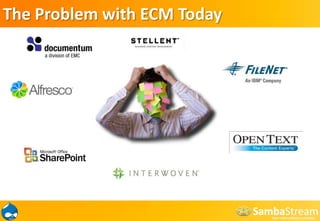
The Problem with ECM Today
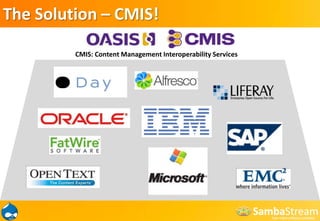
The Solution – CMIS!CMIS: Content Management Interoperability Services
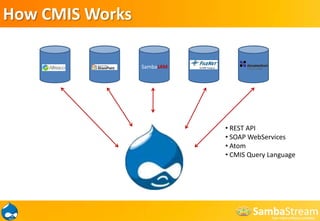
How CMIS WorksSambaJAM REST API
 SOAP WebServices
 Atom
CMIS Query LanguageBenefits of CMISCMIS specification provides a Web services interface that:• Is designed to work over existing repositories enabling customers to build and leverage applications against multiple repositories -- unlocking content they already have • Decouples Web services and content from the content management repository, enabling customers to manage content independently • Provides common Web services and Web 2.0 interfaces to dramatically simplify application development • Is development platform and language agnostic • Supports composite application development and mash-up by the business or IT analyst
Drupal + CMIS = Enable proper document management on your site using CMIS and an Enterprise RepositoryDrupal – Community sites, web publishing, eCommerce, web applicationsECM – Full text search, workflows, renditions, security, auditing, scalability, metadata, version control
Drupal CMIS Modulecmis.module- CMIS client apicmis_common.module- CMIS common client library implementation cmis_browser.module- CMIS repository browser cmis_query.module- Provides the ability to run CMIS 1.0 queries against the current CMIS repository. cmis_sync.module- Allows synchronization between Drupal nodes and CMIS objects. cmis_headerswing.module- Demo module that demonstrates using hook_cmis_service() to access the CMIS repository via header-based authentication such as Basic Auth or NTLM. cmis_dev.module- Demo module that displays current CMIS repository's properties. Useful for basic connection testing.
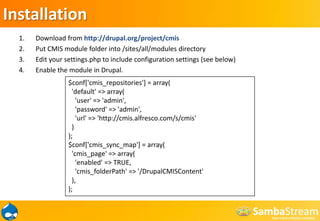
InstallationDownload from http://drupal.org/project/cmisPut CMIS module folder into /sites/all/modules directoryEdit your settings.php to include configuration settings (see below)Enable the module in Drupal.$conf['cmis_repositories'] = array(  'default' => array(    'user' => 'admin',    'password' => 'admin',    'url' => 'http://cmis.alfresco.com/s/cmis'  ));$conf['cmis_sync_map'] = array(  'cmis_page' => array(    'enabled' => TRUE,    'cmis_folderPath' => '/DrupalCMISContent'  ),);
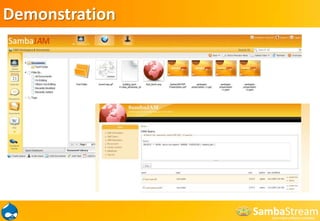
Demonstration

Adding Enterprise Content Managment to your Drupal site using CMIS

  • 1.
    Adding Enterprise ContentManagement to your Drupal site using CMIS
  • 2.
    IntroductionThe current problemin ECMThe solution - CMISBenefits of CMISThe Drupal CMIS ModuleDemonstrationDeveloping your own CMIS WebsitesConclusion
  • 3.
  • 4.
    The Solution –CMIS!CMIS: Content Management Interoperability Services
  • 5.
  • 6.
  • 7.
  • 8.
    CMIS Query LanguageBenefitsof CMISCMIS specification provides a Web services interface that:• Is designed to work over existing repositories enabling customers to build and leverage applications against multiple repositories -- unlocking content they already have • Decouples Web services and content from the content management repository, enabling customers to manage content independently • Provides common Web services and Web 2.0 interfaces to dramatically simplify application development • Is development platform and language agnostic • Supports composite application development and mash-up by the business or IT analyst
  • 9.
    Drupal + CMIS= Enable proper document management on your site using CMIS and an Enterprise RepositoryDrupal – Community sites, web publishing, eCommerce, web applicationsECM – Full text search, workflows, renditions, security, auditing, scalability, metadata, version control
  • 10.
    Drupal CMIS Modulecmis.module-CMIS client apicmis_common.module- CMIS common client library implementation cmis_browser.module- CMIS repository browser cmis_query.module- Provides the ability to run CMIS 1.0 queries against the current CMIS repository. cmis_sync.module- Allows synchronization between Drupal nodes and CMIS objects. cmis_headerswing.module- Demo module that demonstrates using hook_cmis_service() to access the CMIS repository via header-based authentication such as Basic Auth or NTLM. cmis_dev.module- Demo module that displays current CMIS repository's properties. Useful for basic connection testing.
  • 11.
    InstallationDownload from http://drupal.org/project/cmisPutCMIS module folder into /sites/all/modules directoryEdit your settings.php to include configuration settings (see below)Enable the module in Drupal.$conf['cmis_repositories'] = array( 'default' => array( 'user' => 'admin', 'password' => 'admin', 'url' => 'http://cmis.alfresco.com/s/cmis' ));$conf['cmis_sync_map'] = array( 'cmis_page' => array( 'enabled' => TRUE, 'cmis_folderPath' => '/DrupalCMISContent' ),);
  • 12.