ACE Assessment
The ACE Centre Aiding Communication in Education Assessment, training, research, software development… Centres in Oxford and Oldham
CAP Communication Aids Project £10 million for two years 2000 – 2005 Has resulted in our assessment process being more flexible Emphasis on developing skills amongst local team
Presentation Pre-assessment Assessment process Post assessment
Pre - assessment planning a vitally important part of our assessment process
Collecting Information Phone calls  (to parents, school, therapists) Background information form
Background Information Interests Motivation Sensory abilities  (hearing, vision, perception) Communication Seating and positioning Mobility Education Use of technology Medication
Collecting Information  cont’d Pre-assessment visits / meetings Video conferencing  Video
Video Guidelines 10 minutes Interacting with other children Interacting with adults Close up of AAC system Child in activity / discussion  Computer use Child in seating / wheelchair Fine and gross motor control away from computer Using speech / vocalising
Pre-Assessment Video of Child using Big Mack and One Step was shown
Venue School ACE Centre Home somewhere else…
Preparation of activities and equipment Fun and motivating  based on information gathered regarding the young person’s likes and interests ACE assessment planning form
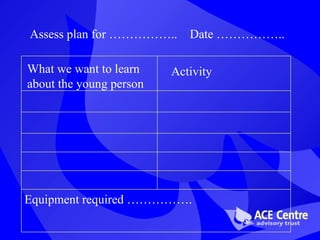
Assess plan for …………….. Date …………….. What we want to learn about the young person Activity Equipment   required …………….
Summary of pre-assessment planning Time-consuming….  BUT WORTH IT! Video very valuable
The Assessment
Our Assessment Team Speech & language therapist  Occupational therapist Teacher
Others Involved Parents / carers Child’s local therapists Other specialists Class teacher & teaching assistant LEA advisory teachers Education officer / funder
Set-up at the ACE Centre Assessment room Observation room Video link Frequent interaction between the two rooms
Other venues Two linked rooms are ideal!  When its not possible… We try not to crowd the young person We try to take video to share with others Flexible attendance during the day
Goals of the Assessment Control of technology accuracy and efficiency – maximum output for the minimum physical input seating and positioning environment, computer, communication Access to learning and the curriculum Communication  low and high tech
Assessment Activities Fun,  motivating,  interesting for the youngster Experience success
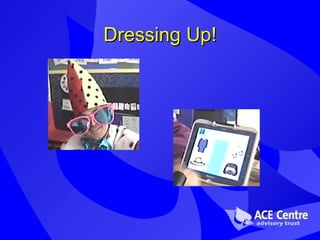
Dressing Up!
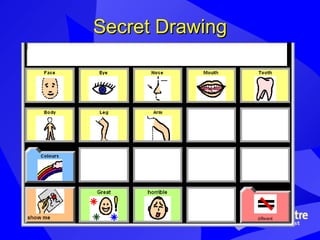
Secret Drawing
Making Choices Assessment Video of child directing father to read him a poem using auditory scanning on a dynavox with two head switches
Software Photo of child using Touch Games software with joystick and switch
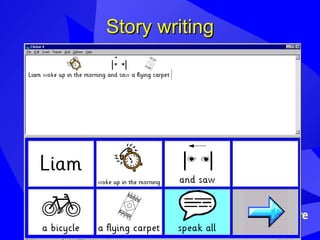
Story writing
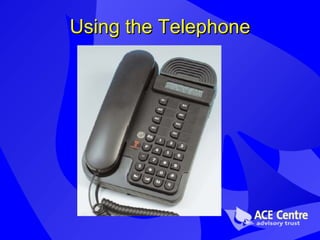
Using the Telephone
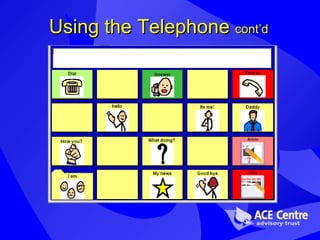
Using the Telephone  cont’d
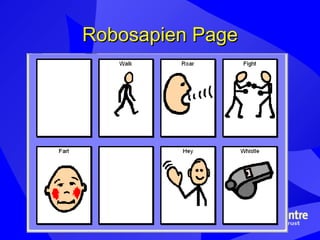
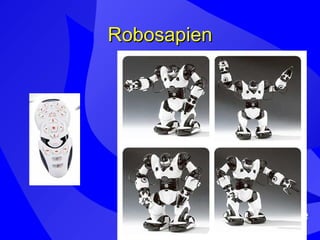
Playing with Infra-red toys Assessment Video showing child playing with Robosapien using DV4 in place of the remote control
Robosapien Page
Robosapien
Other activities… Musical statues Simon Says Joint story-telling Mr Potato Head Guessing games e.g. Guess Who Etc.
A few principles Flexibility! Child centred We ask & listen throughout the assessment Team working  Cross boundaries  Discussion time  Regularly, throughout day, with everyone
Post Assessment
The Report Detailed working document Draft versions shared with local team and parents if appropriate Important as so much takes place during the assessment May include: Diagrams  Photos Screen shots
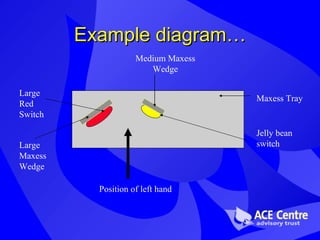
Example diagram… Maxess Tray Large Red Switch Large Maxess Wedge Jelly bean switch Medium Maxess Wedge Position of left hand
Loan of equipment ACE (or CAP) loan library VOCA suppliers Sale or return
Follow-up Decided at initial assessment After a follow-up phone call / video received further assessment training
Support for local team Information days Video conferencing Emails Phone calls
Summary Pre assessment, assessment and post assessment stages very flexible! Moving towards a ‘modular approach’ Teamwork Child centred

ACE Centre Assessment

  • 1.
  • 2.
    The ACE CentreAiding Communication in Education Assessment, training, research, software development… Centres in Oxford and Oldham
  • 3.
    CAP Communication AidsProject £10 million for two years 2000 – 2005 Has resulted in our assessment process being more flexible Emphasis on developing skills amongst local team
  • 4.
  • 5.
    Pre - assessmentplanning a vitally important part of our assessment process
  • 6.
    Collecting Information Phonecalls (to parents, school, therapists) Background information form
  • 7.
    Background Information InterestsMotivation Sensory abilities (hearing, vision, perception) Communication Seating and positioning Mobility Education Use of technology Medication
  • 8.
    Collecting Information cont’d Pre-assessment visits / meetings Video conferencing Video
  • 9.
    Video Guidelines 10minutes Interacting with other children Interacting with adults Close up of AAC system Child in activity / discussion Computer use Child in seating / wheelchair Fine and gross motor control away from computer Using speech / vocalising
  • 10.
    Pre-Assessment Video ofChild using Big Mack and One Step was shown
  • 11.
    Venue School ACECentre Home somewhere else…
  • 12.
    Preparation of activitiesand equipment Fun and motivating based on information gathered regarding the young person’s likes and interests ACE assessment planning form
  • 13.
    Assess plan for…………….. Date …………….. What we want to learn about the young person Activity Equipment required …………….
  • 14.
    Summary of pre-assessmentplanning Time-consuming…. BUT WORTH IT! Video very valuable
  • 15.
  • 16.
    Our Assessment TeamSpeech & language therapist Occupational therapist Teacher
  • 17.
    Others Involved Parents/ carers Child’s local therapists Other specialists Class teacher & teaching assistant LEA advisory teachers Education officer / funder
  • 18.
    Set-up at theACE Centre Assessment room Observation room Video link Frequent interaction between the two rooms
  • 19.
    Other venues Twolinked rooms are ideal! When its not possible… We try not to crowd the young person We try to take video to share with others Flexible attendance during the day
  • 20.
    Goals of theAssessment Control of technology accuracy and efficiency – maximum output for the minimum physical input seating and positioning environment, computer, communication Access to learning and the curriculum Communication low and high tech
  • 21.
    Assessment Activities Fun, motivating, interesting for the youngster Experience success
  • 22.
  • 23.
  • 24.
    Making Choices AssessmentVideo of child directing father to read him a poem using auditory scanning on a dynavox with two head switches
  • 25.
    Software Photo ofchild using Touch Games software with joystick and switch
  • 26.
  • 27.
  • 28.
  • 29.
    Playing with Infra-redtoys Assessment Video showing child playing with Robosapien using DV4 in place of the remote control
  • 30.
  • 31.
  • 32.
    Other activities… Musicalstatues Simon Says Joint story-telling Mr Potato Head Guessing games e.g. Guess Who Etc.
  • 33.
    A few principlesFlexibility! Child centred We ask & listen throughout the assessment Team working Cross boundaries Discussion time Regularly, throughout day, with everyone
  • 34.
  • 35.
    The Report Detailedworking document Draft versions shared with local team and parents if appropriate Important as so much takes place during the assessment May include: Diagrams Photos Screen shots
  • 36.
    Example diagram… MaxessTray Large Red Switch Large Maxess Wedge Jelly bean switch Medium Maxess Wedge Position of left hand
  • 37.
    Loan of equipmentACE (or CAP) loan library VOCA suppliers Sale or return
  • 38.
    Follow-up Decided atinitial assessment After a follow-up phone call / video received further assessment training
  • 39.
    Support for localteam Information days Video conferencing Emails Phone calls
  • 40.
    Summary Pre assessment,assessment and post assessment stages very flexible! Moving towards a ‘modular approach’ Teamwork Child centred