Access 2016 Instructor’s Manual Page 1 of 8
Š 2017 Cengage LearningŽ. All rights reserved. May not be scanned, copied or duplicated, in whole or in part, except for use as permitted in a
license distributed with a certain product or service or otherwise on a password-protected website for classroom use.
Access Module 2: Building and Using Queries
A Guide to this Instructor’s Manual:
We have designed this Instructor’s Manual to supplement and enhance your teaching experience
through classroom activities and a cohesive module summary.
This document is organized chronologically, using the same heading in blue that you see in the textbook.
Under each heading you will find (in order): Lecture Notes that summarize the section, Teacher Tips,
Classroom Activities, and Lab Activities.
In addition to this Instructor’s Manual, our Instructor’s Resources Site also contains PowerPoint
Presentations, Test Banks, and other supplements to aid in your teaching experience.
Table of Contents
Module Objectives 2
Access 28: Use the Query Wizard 2
Access 30: Work with Data in a Query 3
Access 32: Use Query Design View 3
Access 34: Sort and Find Data 4
Access 36: Filter Data 5
Access 38: Apply AND Criteria 6
Access 40: Apply OR Criteria 8
Access 42: Format a Datasheet 8
End of Module Material 9
Module Objectives
Students will have mastered the material in Access Module 2 when they can:
 Use the Query Wizard
 Work with data in a query
 Use Query Design View
 Sort and find data
 Filter data
 Apply AND criteria
 Apply OR criteria
 Format a datasheet
Access 28: Use the Query Wizard
LEARNING OUTCOMES
• Describe the purpose for a query
• Create a query with the Simple Query Wizard
Full file at https://testbankuniv.eu/Illustrated-Microsoft-Office-365-and-Access-2016-Introductory-1st-Edition-Friedrichsen-Solutions-Manual
Access 2016 Instructor’s Manual Page 2 of 8
Š 2017 Cengage LearningŽ. All rights reserved. May not be scanned, copied or duplicated, in whole or in part, except for use as permitted in a
license distributed with a certain product or service or otherwise on a password-protected website for classroom use.
LECTURE NOTES
• Introduce the Simple Query Wizard in FIGURE 2-1 and, depending on the background of students,
show them that using the wizard spares students having to write SQL (Structured Query Language)
code.
• Make sure students realize that a query is merely a question – it is not a duplication of the data even
though the datasheet that is presented (the logical view of the data, shown in FIGURE 2-2) can be
used for data entry and updates.
• Be sure students understand that a query allows you to focus on specific information that answers
the query question.
• Emphasize the wide and extensive use of queries to the database user.
TEACHER TIPS
Introduce this module by reminding students that when they use an online search engine, such as
Google or Bing they are really asking questions of a database. When they access the online catalog at
the library, they also are querying a database.
Querying is one of the main benefits of creating a database. Users want to be able to find answers
quickly to questions concerning the data.
CLASSROOM ACTIVITIES
1. Critical Thinking: Ask students to come up with reasons they would use a query (versus opening a
table datasheet). Answers include:
• To view fields from more than one table in a single datasheet.
• To view subsets of records rather than all the records in a table datasheet (filtering and adding
criteria – covered later in Unit B).
• To create calculated fields.
• To collect the fields and records needed for forms and reports.
2. Class Discussion: Ask students for sample questions that might be asked of a student database.
Access 30: Work with Data in a Query
LEARNING OUTCOMES
• Edit records in a query
• Delete records in a query
LECTURE NOTES
• Compare entering and editing data in a query datasheet to the same tasks in a table datasheet.
• Use FIGURES 2-3 and 2-4 to show the effects of updating a record in the query datasheet and
deleting another record.
Full file at https://testbankuniv.eu/Illustrated-Microsoft-Office-365-and-Access-2016-Introductory-1st-Edition-Friedrichsen-Solutions-Manual
Access 2016 Instructor’s Manual Page 3 of 8
Š 2017 Cengage LearningŽ. All rights reserved. May not be scanned, copied or duplicated, in whole or in part, except for use as permitted in a
license distributed with a certain product or service or otherwise on a password-protected website for classroom use.
TEACHER TIP
Inherent to students’ understanding of how relational databases work is understanding that every other
object is built “on top of” the tables. Any time data is being edited, it is being changed/stored in table
objects. Tables, queries, and forms can all be used to enter and update data, but data is only physically
stored in tables. Without this understanding students may be led to believe that they need to update
data every place it is presented – in every query, form, or report where it is shown. This is not true. Once
data is changed, for example, once the name Friedrichsen is changed to Franklin, every other object that
displays that data is automatically updated as well.
CLASSROOM ACTIVITIES
1. Class Discussion: Ask students to brainstorm some real-world scenarios in which they would
make the kinds of modifications demonstrated in this section.
2. Critical Thinking: Querying means asking questions. What kind of questions do you ask in a
typical day? Would a database be able to answer those questions?
Access 32: Use Query Design View
LEARNING OUTCOMES
• Work in Query Design View
• Add criteria to a query
LECTURE NOTES
• Point out the various parts of the Query Design View window in FIGURE 2-5, and the resulting query
in FIGURE 2-6.
• Explain that students should be extremely familiar with Query Design View, criteria, field lists, join
lines (link lines), and the query design grid.
• Point out the one-to-many relationship line between related tables in the query in FIGURE 2-5.
• Distinguish between the use of the Save command on the File tab and the Save Object As
command, reminding students that Access saves data automatically as they move from record to
record.
TEACHER TIPS
Note that when there is no scroll bar in a field list, it means that all fields are visible.
Access uses Query-by-Example (QBE) to query a database. Query-by-Example is a query manipulation
language for relational databases in which users indicate the action to be taken by completing on-screen
forms. The query feature of Microsoft Excel uses QBE.
Students should understand that although the answer displays in Datasheet view, no table exists. It is a
dynamic or virtual set of records. When a query design is saved, only the design is saved not the answer.
Query results, therefore, always show the most current data.
Full file at https://testbankuniv.eu/Illustrated-Microsoft-Office-365-and-Access-2016-Introductory-1st-Edition-Friedrichsen-Solutions-Manual
Access 2016 Instructor’s Manual Page 4 of 8
Š 2017 Cengage LearningŽ. All rights reserved. May not be scanned, copied or duplicated, in whole or in part, except for use as permitted in a
license distributed with a certain product or service or otherwise on a password-protected website for classroom use.
CLASSROOM ACTIVITIES
1. Quick Quiz:
1. How is the relationship between two tables displayed? (Answer: With a join line, or link line)
2. What does the query design grid display? (Answer: The field names, sort orders, and criteria
used within the query)
2. Assign a Project: Have students research QBE, an early language for creating queries and then
share the results of their research with the class.
Access 34: Sort and Find Data
LEARNING OUTCOMES
• Apply short orders to a query
• Find and replace data in a query
• Undo edits in a query
LECTURE NOTES
• Make sure students understand how ascending and descending sort orders apply to each different
type of field, for example text, number, currency, and date/time data.
• Make sure students know that they can click any field and use it to sort the records. Point out the
field selector in FIGURE 2-7. Access never sorts just a single field/column at a time. Review the result
of the new sort orders in the datasheet in FIGURE 2-9.
• Review the features of the Find and Replace dialog box in FIGURE 2-8.
CLASSROOM ACTIVITIES
1. Critical Thinking: Sorting means ordering records in a particular way. When would it be useful to
sort data in ascending order? Why? When would it be useful to sort data in descending order?
Why?
2. Quick Quiz:
1. Deleting a field from a query deletes it from the underlying table. T/F? (Answer: False)
2. Sort orders always work from right to left. T/F? (Answer: False)
LAB ACTIVITY
Using the query shown in FIGURE 2-7, have students practice sorting on more than one field such as
Category and TripName. Ask them to sort by duration within each category. Show them how to move
the Price field to the left of the Category field, select both fields, and apply a sort to the two fields at the
same time to achieve the desired sort.
Access 36: Filter Data
LEARNING OUTCOMES
• Apply and remove filters in a query
• Use wildcards in criteria
Full file at https://testbankuniv.eu/Illustrated-Microsoft-Office-365-and-Access-2016-Introductory-1st-Edition-Friedrichsen-Solutions-Manual
Access 2016 Instructor’s Manual Page 5 of 8
Š 2017 Cengage LearningŽ. All rights reserved. May not be scanned, copied or duplicated, in whole or in part, except for use as permitted in a
license distributed with a certain product or service or otherwise on a password-protected website for classroom use.
LECTURE NOTES
• Filtering data is a temporary activity. As soon as the filter is removed, it is not saved. Therefore, if a
question about the data is asked over and over again, it should be saved as a query so that the query
can simply be opened to see the resulting data.
• Simple filters require only that students click the field they want to filter on (such as Adventure in
the Category field), and click the Selection button. Any filtering done with two or more fields
requires the use of the advanced filter tools.
• Contrast the use of the Filter By Selection feature with the use of Filter By Form feature.
• Use TABLE 2-2 to compare filters and queries. Point out to students, however, that queries are by far
more powerful. Discuss the filter buttons shown in TABLE 2-3 and when each one would be used.
• Review the wildcard characters shown in the Clues to Use box.
TEACHER TIPS
Be sure to have students view the navigation buttons after each filter to get a sense of how many
records they are viewing at any one time. This will help them answer the “reasonableness” test
question. Is the answer I’m seeing reasonable? (or not?) Students may not know the answer to this
when working with sample database files provided by this textbook, but they certainly would be able to
answer that question in the real world when working with their own data.
Note that while a filter is not the same thing as a query, if you create a filter and decide that you would
like to reuse it, and therefore should have created a query, a filter can be saved as a query object and
reused. For the most part, however, filters are temporary views of data and do not contain as much
power as queries (see TABLE 2-2).
Filtering produces a subset of the table. This is useful when you need to update a field in several records
with the same value but do not need an update query.
Make sure students understand the difference between the Toggle Filter button and the Clear All Filters
button. The Toggle Filter button redisplays all records but does not clear any filters that have been
applied.
When a criterion is entered in a query, the criterion is an example of the expected result. Entering
criterion in a query is similar to entering an author’s name in a search of a library card catalog or an
electronic library database. The asterisk and question mark wildcards are the same wildcards that are
used with the search features in Windows and other Microsoft applications. Access automatically adds
the LIKE operator and quotation marks to criteria that use wildcards.
CLASSROOM ACTIVITIES
1. Class Discussion: Consider circumstances in which the Filter By Selection feature is the tool to use.
When is Filter By Form better to use?
Full file at https://testbankuniv.eu/Illustrated-Microsoft-Office-365-and-Access-2016-Introductory-1st-Edition-Friedrichsen-Solutions-Manual
Access 2016 Instructor’s Manual Page 6 of 8
Š 2017 Cengage LearningŽ. All rights reserved. May not be scanned, copied or duplicated, in whole or in part, except for use as permitted in a
license distributed with a certain product or service or otherwise on a password-protected website for classroom use.
2. Critical Thinking: Why does Microsoft provide so many different features (filters versus queries for
example) that overlap in functionality? (Even though there are times when more than one tool could
do a job, depending on the nature of the problem there is generally a “best” way to accomplish a
task. Providing many different tools gives the user the choice of several ways to tackle a problem. It
is incumbent on the user to be trained well enough to know which tool is most productive and best
for each job.)
3. Critical Thinking: Compare the two methods of finding records presented in this chapter: searching
and filtering. Which do you consider to be more efficient? As a database user, when do you think it
would be best to use filtering rather than searching?
Access 38: Apply AND Criteria
LEARNING OUTCOMES
• Enter AND criteria in a query
• Define criteria syntax
• Use comparison operators with criteria
LECTURE NOTES:
• Being able to master query criteria is absolutely essential to the success of every Access user. Do not
let students go beyond this lesson until they completely understand it.
• Note that the use of “AND” means that BOTH criteria must be true in order for the record to be
selected.
• The AND criteria are entered in one row of the query grid as shown in FIGURE 2-13. It is absolutely
essential that students understand what AND criteria is as well as how to enter it in the query grid.
• Discuss the support that Access provides with criteria syntax and review the function of the
comparison operators in TABLE 2-4.
• Explain how to search for blank fields using the Clues to Use box.
TEACHER TIPS
Comparison operators are used with both numeric and text data. The order of the greater than or equal
to (>=) and less than or equal to (<=) operators is fixed; they cannot be reversed.
The difference between putting criteria in one versus two rows is extremely important and is covered in
the lessons on AND versus OR criteria. At this point, students are starting to see how important
precision is when working with databases.
Be sure students understand that they can go back and forth between Datasheet and Query Design View
to make sure you get the records desired. The most common errors would be not entering the criteria
on one row or making a typo.
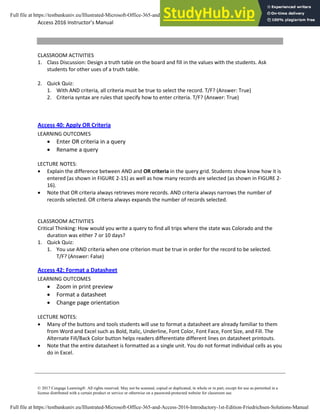
You can use a Venn diagram to illustrate the concept of AND and OR criterion visually:
Full file at https://testbankuniv.eu/Illustrated-Microsoft-Office-365-and-Access-2016-Introductory-1st-Edition-Friedrichsen-Solutions-Manual
Access 2016 Instructor’s Manual Page 7 of 8
Š 2017 Cengage LearningŽ. All rights reserved. May not be scanned, copied or duplicated, in whole or in part, except for use as permitted in a
license distributed with a certain product or service or otherwise on a password-protected website for classroom use.
CLASSROOM ACTIVITIES
1. Class Discussion: Design a truth table on the board and fill in the values with the students. Ask
students for other uses of a truth table.
2. Quick Quiz:
1. With AND criteria, all criteria must be true to select the record. T/F? (Answer: True)
2. Criteria syntax are rules that specify how to enter criteria. T/F? (Answer: True)
Access 40: Apply OR Criteria
LEARNING OUTCOMES
• Enter OR criteria in a query
• Rename a query
LECTURE NOTES:
• Explain the difference between AND and OR criteria in the query grid. Students show know how it is
entered (as shown in FIGURE 2-15) as well as how many records are selected (as shown in FIGURE 2-
16).
• Note that OR criteria always retrieves more records. AND criteria always narrows the number of
records selected. OR criteria always expands the number of records selected.
CLASSROOM ACTIVITIES
Critical Thinking: How would you write a query to find all trips where the state was Colorado and the
duration was either 7 or 10 days?
1. Quick Quiz:
1. You use AND criteria when one criterion must be true in order for the record to be selected.
T/F? (Answer: False)
Access 42: Format a Datasheet
LEARNING OUTCOMES
• Zoom in print preview
• Format a datasheet
• Change page orientation
LECTURE NOTES:
• Many of the buttons and tools students will use to format a datasheet are already familiar to them
from Word and Excel such as Bold, Italic, Underline, Font Color, Font Face, Font Size, and Fill. The
Alternate Fill/Back Color button helps readers differentiate different lines on datasheet printouts.
• Note that the entire datasheet is formatted as a single unit. You do not format individual cells as you
do in Excel.
Full file at https://testbankuniv.eu/Illustrated-Microsoft-Office-365-and-Access-2016-Introductory-1st-Edition-Friedrichsen-Solutions-Manual
Access 2016 Instructor’s Manual Page 8 of 8
Š 2017 Cengage LearningŽ. All rights reserved. May not be scanned, copied or duplicated, in whole or in part, except for use as permitted in a
license distributed with a certain product or service or otherwise on a password-protected website for classroom use.
TEACHER TIP:
Point out the differences between a color and black and white printer. On a black and white printer, all
colors are converted to shades of gray. Bright colors may be converted to solid black boxes. Always
encourage students to print preview before printing.
CLASSROOM ACTIVITIES
1. Assign a Project: Have students open a datasheet and apply at least three formats that they feel
enhance the printout. Print the datasheets, pair students up, and have them critique each other’s
printouts. Remind students that some formatting embellishments, such as too much color, font size
too small to read, font face too fancy to be legible, can actually detract from readability and
professionalism.
2. Group Activity: Ask students to apply three different formats to a datasheet in three different
categories (font face, font size, color) and print them. Have them write down the formatting
embellishments on the back of the paper. Pass the papers around the class and ask students to vote
on the one they like best and explain why.
End of Module Material
• Concepts Reviews consist of multiple choice, matching, and screen identification questions.
• Skills Reviews provide additional hands-on, step-by-step reinforcement.
• Independent Challenges are case projects requiring critical thinking and application of the module
skills. The Independent Challenges increase in difficulty, with the first one in each module being the
easiest. Independent Challenges 2 and 3 become increasingly open-ended, requiring more
independent problem solving.
• Independent Challenge 4: Explore contain practical exercises to help students with their everyday
lives by focusing on important and useful essential skills, including creating photo montages for
scrapbooks and photo albums, retouching and color-correcting family photos, applying layer styles
and getting Help online.
• Visual Workshops are practical, self-graded capstone projects that require independent problem
solving.
f Document
Full file at https://testbankuniv.eu/Illustrated-Microsoft-Office-365-and-Access-2016-Introductory-1st-Edition-Friedrichsen-Solutions-Manual
Name: Class: Date:
Productivity App: Productivity Apps for School and Work
Copyright Cengage Learning. Powered by Cognero. Page 1
1. OneNote will not function at all without an Internet connection.
a. True
b. False
ANSWER: False
POINTS: 1
REFERENCES: PA-2
Syncing a Notebook to the Cloud
QUESTION TYPE: True / False
HAS VARIABLES: False
DATE CREATED: 4/26/2016 7:21 PM
DATE MODIFIED: 4/26/2016 7:26 PM
2. OneNote allows users to convert handwriting to text using the Ink to Text button.
a. True
b. False
ANSWER: True
POINTS: 1
REFERENCES: Converting Handwriting to Text
PA-3
QUESTION TYPE: True / False
HAS VARIABLES: False
DATE CREATED: 4/26/2016 7:26 PM
DATE MODIFIED: 4/26/2016 7:27 PM
3. It is possible to record audio conversations with OneNote if your computer or device has a camera and/or a
microphone.
a. True
b. False
ANSWER: True
POINTS: 1
REFERENCES: PA-4
Recording a Lecture
QUESTION TYPE: True / False
HAS VARIABLES: False
DATE CREATED: 4/26/2016 7:27 PM
DATE MODIFIED: 4/26/2016 7:29 PM
4. Microsoft Sway is available as an app on Office365 or at Sway.com.
a. True
b. False
ANSWER: True
POINTS: 1
REFERENCES: Introduction to Sway
PA-6
Full file at https://testbankuniv.eu/Illustrated-Microsoft-Office-365-and-Access-2016-Introductory-1st-Edition-Friedrichsen-Solutions-Manual
Name: Class: Date:
Productivity App: Productivity Apps for School and Work
Copyright Cengage Learning. Powered by Cognero. Page 2
QUESTION TYPE: True / False
HAS VARIABLES: False
DATE CREATED: 4/26/2016 7:35 PM
DATE MODIFIED: 4/26/2016 7:38 PM
5. Sway users work through a Storyline, which has tools and a work area for composing a digital story.
a. True
b. False
ANSWER: False
POINTS: 1
REFERENCES: Creating a Sway Presentation
PA-6
QUESTION TYPE: True / False
HAS VARIABLES: False
DATE CREATED: 4/26/2016 7:38 PM
DATE MODIFIED: 4/26/2016 7:46 PM
6. Sway will not resize background images, so it is necessary to purchase a separate app to do that.
a. True
b. False
ANSWER: False
POINTS: 1
REFERENCES: Introduction to Sway
PA-6
QUESTION TYPE: True / False
HAS VARIABLES: False
DATE CREATED: 4/26/2016 7:46 PM
DATE MODIFIED: 4/26/2016 7:48 PM
7. Office Mix is an add-in for Microsoft PowerPoint, which allows users to enhance PowerPoint presentations.
a. True
b. False
ANSWER: True
POINTS: 1
REFERENCES: Introduction to Office
PA-10
QUESTION TYPE: True / False
HAS VARIABLES: False
DATE CREATED: 4/26/2016 7:48 PM
DATE MODIFIED: 4/26/2016 7:49 PM
8. Through Office Mix, video clips, slide notes, and screen recordings can be added to PowerPoint presentations.
a. True
Full file at https://testbankuniv.eu/Illustrated-Microsoft-Office-365-and-Access-2016-Introductory-1st-Edition-Friedrichsen-Solutions-Manual
Name: Class: Date:
Productivity App: Productivity Apps for School and Work
Copyright Cengage Learning. Powered by Cognero. Page 3
b. False
ANSWER: True
POINTS: 1
REFERENCES: Capturing Video Clips
PA-11
QUESTION TYPE: True / False
HAS VARIABLES: False
DATE CREATED: 4/26/2016 7:50 PM
DATE MODIFIED: 4/26/2016 7:51 PM
9. Office Mix is currently capable of handling extended response quizzes, with more quiz types to be available soon.
a. True
b. False
ANSWER: False
POINTS: 1
REFERENCES: Inserting Quizzes, Live Webpages, and Apps
PA-12
QUESTION TYPE: True / False
HAS VARIABLES: False
DATE CREATED: 4/26/2016 7:51 PM
DATE MODIFIED: 4/26/2016 7:52 PM
10. Microsoft Edge is a Web browser that was designed as an add-in to Internet Explorer.
a. True
b. False
ANSWER: False
POINTS: 1
REFERENCES: Introduction to Microsoft Edge
PA-14
QUESTION TYPE: True / False
HAS VARIABLES: False
DATE CREATED: 4/26/2016 7:52 PM
DATE MODIFIED: 4/26/2016 7:53 PM
11. Cortana appears as an animated circle in the Address bar when it is turned on and you might need assistance.
a. True
b. False
ANSWER: True
POINTS: 1
REFERENCES: Locating Information with Cortana
PA-14
QUESTION TYPE: True / False
HAS VARIABLES: False
Full file at https://testbankuniv.eu/Illustrated-Microsoft-Office-365-and-Access-2016-Introductory-1st-Edition-Friedrichsen-Solutions-Manual
Name: Class: Date:
Productivity App: Productivity Apps for School and Work
Copyright Cengage Learning. Powered by Cognero. Page 4
DATE CREATED: 4/26/2016 7:54 PM
DATE MODIFIED: 4/26/2016 7:55 PM
12. Microsoft Edge will allow users to save webpages, but they cannot be written on.
a. True
b. False
ANSWER: False
POINTS: 1
REFERENCES: Annotating Webpages
PA-15
QUESTION TYPE: True / False
HAS VARIABLES: False
DATE CREATED: 4/26/2016 7:56 PM
DATE MODIFIED: 4/26/2016 7:57 PM
13. Each OneNote notebook is divided into sections, also called Section Tabs. __________________
ANSWER: True
POINTS: 1
REFERENCES: Introduction to OneNote 2016
PA-2
QUESTION TYPE: Modified True / False
HAS VARIABLES: False
DATE CREATED: 4/26/2016 7:57 PM
DATE MODIFIED: 4/26/2016 7:59 PM
14. It is possible, through OneNote, to draw directly on the screen using drawing tools. __________________
ANSWER: True
POINTS: 1
REFERENCES: Introduction to OneNote 2016
PA-2
QUESTION TYPE: Modified True / False
HAS VARIABLES: False
DATE CREATED: 4/26/2016 7:59 PM
DATE MODIFIED: 4/26/2016 7:59 PM
15. OneNote only allows one type of project to be stored at a time. __________________
ANSWER: False -
POINTS: 1
REFERENCES: Creating a OneNote Notebook
PA-2
QUESTION TYPE: Modified True / False
HAS VARIABLES: False
DATE CREATED: 4/26/2016 8:01 PM
DATE MODIFIED: 4/26/2016 8:03 PM
Full file at https://testbankuniv.eu/Illustrated-Microsoft-Office-365-and-Access-2016-Introductory-1st-Edition-Friedrichsen-Solutions-Manual
Name: Class: Date:
Productivity App: Productivity Apps for School and Work
Copyright Cengage Learning. Powered by Cognero. Page 5
16. A Sway site can be shared on Microsoft-approved devices only. __________________
ANSWER: False -
POINTS: 1
REFERENCES: PA-6
Introduction to Sway
QUESTION TYPE: Modified True / False
HAS VARIABLES: False
DATE CREATED: 4/26/2016 8:03 PM
DATE MODIFIED: 4/26/2016 8:05 PM
17. Storyline selections, called Frames, allow users to add content. __________________
ANSWER: False -
POINTS: 1
REFERENCES: Creating a Sway Presentation
PA-6
QUESTION TYPE: Modified True / False
HAS VARIABLES: False
DATE CREATED: 4/26/2016 8:05 PM
DATE MODIFIED: 4/26/2016 8:06 PM
18. Users can add Facebook or OneNote pictures in Sway without leaving the app. __________________
ANSWER: True
POINTS: 1
REFERENCES: Adding Content to Build a Story
PA-7
QUESTION TYPE: Modified True / False
HAS VARIABLES: False
DATE CREATED: 4/26/2016 8:07 PM
DATE MODIFIED: 4/26/2016 8:08 PM
19. To use Office Mix, an account is necessary at mix.office.com. __________________
ANSWER: True
POINTS: 1
REFERENCES: Adding Office Mix to PowerPoint
PA-10
QUESTION TYPE: Modified True / False
HAS VARIABLES: False
DATE CREATED: 4/26/2016 8:08 PM
DATE MODIFIED: 4/26/2016 8:09 PM
20. Office Mix is an integral part of PowerPoint--it need not be downloaded and installed. __________________
ANSWER: False -
Full file at https://testbankuniv.eu/Illustrated-Microsoft-Office-365-and-Access-2016-Introductory-1st-Edition-Friedrichsen-Solutions-Manual
Name: Class: Date:
Productivity App: Productivity Apps for School and Work
Copyright Cengage Learning. Powered by Cognero. Page 6
POINTS: 1
REFERENCES: PA-10
Adding Office Mix to PowerPoint
QUESTION TYPE: Modified True / False
HAS VARIABLES: False
DATE CREATED: 4/26/2016 8:10 PM
DATE MODIFIED: 4/26/2016 8:11 PM
21. Using Office Mix, screen recordings can be captured and used to help enhance a presentation.
__________________
ANSWER: True
POINTS: 1
REFERENCES: Capturing Video Clips
PA-11
QUESTION TYPE: Modified True / False
HAS VARIABLES: False
DATE CREATED: 4/26/2016 8:12 PM
DATE MODIFIED: 4/26/2016 8:13 PM
22. In Microsoft Edge, Reading View will not block pop-up ads or other clutter on a webpage. __________________
ANSWER: False -
POINTS: 1
REFERENCES: Browsing the Web with Microsoft Edge
PA-14
QUESTION TYPE: Modified True / False
HAS VARIABLES: False
DATE CREATED: 4/26/2016 8:13 PM
DATE MODIFIED: 4/26/2016 8:14 PM
23. The Inking toolbar in Microsoft Edge allows users to write on webpages and save the webpage as well as the
writing on it. __________________
ANSWER: True
POINTS: 1
REFERENCES: Annotating Webpages
PA-15
QUESTION TYPE: Modified True / False
HAS VARIABLES: False
DATE CREATED: 4/26/2016 8:15 PM
DATE MODIFIED: 4/26/2016 8:15 PM
24. Microsoft Edge runs in a partial Sandbox, which helps prevent attackers from gaining control of a computer.
__________________
ANSWER: True
POINTS: 1
Full file at https://testbankuniv.eu/Illustrated-Microsoft-Office-365-and-Access-2016-Introductory-1st-Edition-Friedrichsen-Solutions-Manual
Name: Class: Date:
Productivity App: Productivity Apps for School and Work
Copyright Cengage Learning. Powered by Cognero. Page 7
REFERENCES: Annotating Webpages
PA-15
QUESTION TYPE: Modified True / False
HAS VARIABLES: False
DATE CREATED: 4/26/2016 8:16 PM
DATE MODIFIED: 4/26/2016 8:17 PM
25. Microsoft OneNote is a __________________ app for your academic and professional life.
a. spreadsheet
b. notetaking
c. database
d. gaming
ANSWER: b
POINTS: 1
REFERENCES: Introduction to OneNote 2016
PA-2
QUESTION TYPE: Multiple Choice
HAS VARIABLES: False
DATE CREATED: 4/26/2016 8:17 PM
DATE MODIFIED: 4/26/2016 8:23 PM
26. OneNote is divided into sections similar to that of a
a. spiral notebook.
b. map
c. compass
d. desktop
ANSWER: a
POINTS: 1
REFERENCES: Creating a OneNote Notebook
PA-2
QUESTION TYPE: Multiple Choice
HAS VARIABLES: False
DATE CREATED: 4/26/2016 8:56 PM
DATE MODIFIED: 4/26/2016 8:58 PM
27. The Microsoft OneNote mobile app
a. was subcontracted for Microsoft by Google.
b. runs a full version of OneNote 2016.
c. is a lightweight version of OneNote 2016.
d. syncs with all Apple products.
ANSWER: c
POINTS: 1
REFERENCES: Syncing a Notebook to the Cloud
Full file at https://testbankuniv.eu/Illustrated-Microsoft-Office-365-and-Access-2016-Introductory-1st-Edition-Friedrichsen-Solutions-Manual
Name: Class: Date:
Productivity App: Productivity Apps for School and Work
Copyright Cengage Learning. Powered by Cognero. Page 8
PA-2
QUESTION TYPE: Multiple Choice
HAS VARIABLES: False
DATE CREATED: 4/26/2016 8:59 PM
DATE MODIFIED: 4/26/2016 9:01 PM
28. OneNote creates a Drawing Canvas, which is
a. a container for shapes and lines.
b. a personal assistant.
c. a storyline for interactive video content
d. .a teleprompter.
ANSWER: a
POINTS: 1
REFERENCES: Syncing a Notebook to the Cloud
PA-2
QUESTION TYPE: Multiple Choice
HAS VARIABLES: False
DATE CREATED: 4/27/2016 3:07 PM
DATE MODIFIED: 4/27/2016 3:14 PM
29. Microsoft Sway utilizes Responsive Design, which means
a. the software responds to hackers and other threats responsively.
b. what you create becomes the exclusive property of Microsoft.
c. your content only works with Microsoft-approved products.
d. your content adapts perfectly to any screen size.
ANSWER: d
POINTS: 1
REFERENCES: Introduction to Sway
PA-6
QUESTION TYPE: Multiple Choice
HAS VARIABLES: False
DATE CREATED: 4/27/2016 3:14 PM
DATE MODIFIED: 4/27/2016 3:16 PM
30. In Sway, each storyline can include
a. text, images, and videos.
b. databases, word-processor documents, and spreadsheets.
c. games, productivity apps, and home-office applications.
d. other Sways.
ANSWER: a
POINTS: 1
REFERENCES: Creating a Sway presentation
PA-6
Full file at https://testbankuniv.eu/Illustrated-Microsoft-Office-365-and-Access-2016-Introductory-1st-Edition-Friedrichsen-Solutions-Manual
Name: Class: Date:
Productivity App: Productivity Apps for School and Work
Copyright Cengage Learning. Powered by Cognero. Page 9
QUESTION TYPE: Multiple Choice
HAS VARIABLES: False
DATE CREATED: 4/27/2016 3:16 PM
DATE MODIFIED: 4/27/2016 3:20 PM
31. To add content to Sway from search results, you
a. purchase varying data plans from Microsoft.
b. left-click on the content once.
c. drag the content right into Sway.
d. press ALT-F4.
ANSWER: c
POINTS: 1
REFERENCES: Adding Content to Build a Story
PA-7
QUESTION TYPE: Multiple Choice
HAS VARIABLES: False
DATE CREATED: 4/27/2016 3:20 PM
DATE MODIFIED: 4/27/2016 3:23 PM
32. To share a presentation through Office Mix,
a. users hold up their devices so that others can look at it.
b. Presentations cannot be shared through Office Mix.
c. a data projector is required.
d. a link is shared with friends and colleagues.
ANSWER: d
POINTS: 1
REFERENCES: Sharing an office Mix Presentation
PA-12
QUESTION TYPE: Multiple Choice
HAS VARIABLES: False
DATE CREATED: 4/27/2016 3:23 PM
DATE MODIFIED: 4/27/2016 3:24 PM
33. In Office Mix, the Slide Notes feature works as a ____________, to help you focus on your content instead of
memorizing a presentation.
a. digital assistant
b. TelePrompTer
c. calculator
d. spreadsheet
ANSWER: a
POINTS: 1
REFERENCES: Capturing Video Clips
PA-11
Full file at https://testbankuniv.eu/Illustrated-Microsoft-Office-365-and-Access-2016-Introductory-1st-Edition-Friedrichsen-Solutions-Manual
Name: Class: Date:
Productivity App: Productivity Apps for School and Work
Copyright Cengage Learning. Powered by Cognero. Page 10
QUESTION TYPE: Multiple Choice
HAS VARIABLES: False
DATE CREATED: 4/27/2016 3:25 PM
DATE MODIFIED: 4/27/2016 3:26 PM
34. In a Screen Recording, Office Mix
a. often crashes any computer running it.
b. offers helpful suggestions to search queries.
c. filters out any spam that may distract a user from a presentation.
d. captures everything that happens in a selected part of the screen, to be added to a presentation.
ANSWER: d
POINTS: 1
REFERENCES: Capturing Video Clips
PA-11
QUESTION TYPE: Multiple Choice
HAS VARIABLES: False
DATE CREATED: 4/27/2016 3:27 PM
DATE MODIFIED: 4/27/2016 3:28 PM
35. To share an Office Mix presentation,
a. let a friend or colleage take a picture of it.
b. upload it to your personal Office Mix dashboard.
c. send the device via snail mail to whomever you want to present it to.
d. sharing Office Mix presentations is currently unavailable.
ANSWER: b
POINTS: 1
REFERENCES: Sharing an Office Mix Presentation
PA-12
QUESTION TYPE: Multiple Choice
HAS VARIABLES: False
DATE CREATED: 4/27/2016 5:25 PM
DATE MODIFIED: 4/27/2016 5:25 PM
36. Microsoft Edge
a. has been discontinued in favor of an enhanced version of Internet Explorer.
b. is a cutting-edge word processing program.
c. is the default web browser for Windows 10, designed to replace Internet Explorer.
d. allows users to make high quality presentations to friends or colleagues.
ANSWER: c
POINTS: 1
REFERENCES: Introduction to Microsoft Edge
PA-14
QUESTION TYPE: Multiple Choice
Full file at https://testbankuniv.eu/Illustrated-Microsoft-Office-365-and-Access-2016-Introductory-1st-Edition-Friedrichsen-Solutions-Manual
Name: Class: Date:
Productivity App: Productivity Apps for School and Work
Copyright Cengage Learning. Powered by Cognero. Page 11
HAS VARIABLES: False
DATE CREATED: 4/27/2016 5:26 PM
DATE MODIFIED: 4/27/2016 5:28 PM
37. Consider the Hub in Microsoft Edge as
a. similar to using Office Mix.
b. a complete replacement for Microsoft Office.
c. a nuisance, to be ignored at all costs.
d. one-stop access to all the things you collect on the Web.
ANSWER: d
POINTS: 1
REFERENCES: Browsing the Web with Microsoft Edge
PA-14
QUESTION TYPE: Multiple Choice
HAS VARIABLES: False
DATE CREATED: 4/27/2016 5:28 PM
DATE MODIFIED: 4/27/2016 5:29 PM
38. When Cortana is on in Microsoft Edge, it acts as a(n)
a. personal assistant.
b. template to draw on a web page with.
c. array of tools to make quality presentations.
d. place to store text, images, and videos.
ANSWER: a
POINTS: 1
REFERENCES: Locating Information with Cortana
PA-14
QUESTION TYPE: Multiple Choice
HAS VARIABLES: False
DATE CREATED: 4/27/2016 5:30 PM
DATE MODIFIED: 4/27/2016 5:39 PM
39. Microsoft OneNote replaces physical _____, _____, and ______ with a searchable, digital notebook.
a. notebooks
b. binders
c. paper notes
d. computers
ANSWER: a, b, c
POINTS: 1
REFERENCES: Introduction to OneNote 2016
PA-2
QUESTION TYPE: Multiple Response
HAS VARIABLES: False
Full file at https://testbankuniv.eu/Illustrated-Microsoft-Office-365-and-Access-2016-Introductory-1st-Edition-Friedrichsen-Solutions-Manual
Name: Class: Date:
Productivity App: Productivity Apps for School and Work
Copyright Cengage Learning. Powered by Cognero. Page 12
DATE CREATED: 4/27/2016 5:39 PM
DATE MODIFIED: 4/27/2016 5:45 PM
40. OneNote captures your ideas and schoolwork on any device so you can _____, _____, and _____.
a. stay organized
b. share notes
c. work with others on projects
d. let others do your work for you.
ANSWER: a, b, c
POINTS: 1
REFERENCES: Introduction to OneNote 2016
PA-2
QUESTION TYPE: Multiple Response
HAS VARIABLES: False
DATE CREATED: 4/27/2016 5:43 PM
DATE MODIFIED: 4/27/2016 5:44 PM
41. Each OneNote notebook contains _____, _____, and _____.
a. sections
b. pages
c. other notebooks
d. complete apps
ANSWER: a, b, c
POINTS: 1
REFERENCES: Creating a OneNote Notebook
PA-2
QUESTION TYPE: Multiple Response
HAS VARIABLES: False
DATE CREATED: 4/27/2016 5:45 PM
DATE MODIFIED: 4/27/2016 5:45 PM
42. Sway lets you combine which of the following onto a Sway site that you can share and display on any device? (select
all that apply)
a. text
b. images
c. videos
d. social media
ANSWER: a, b, c, d
POINTS: 1
REFERENCES: Introduction to Sway
PA-6
QUESTION TYPE: Multiple Response
HAS VARIABLES: False
Full file at https://testbankuniv.eu/Illustrated-Microsoft-Office-365-and-Access-2016-Introductory-1st-Edition-Friedrichsen-Solutions-Manual
Name: Class: Date:
Productivity App: Productivity Apps for School and Work
Copyright Cengage Learning. Powered by Cognero. Page 13
DATE CREATED: 4/27/2016 5:46 PM
DATE MODIFIED: 4/27/2016 5:48 PM
43. With Sway, you can (select all that apply)
a. Drag content from the search results right into the Storyline.
b. specify the source of the media, so you can add Facebook or OneNote pictures and videos without leaving the
app.
c. have your computer make Sways for you automatically.
d. legally use copyrighted material free of charge.
ANSWER: a, b
POINTS: 1
REFERENCES: Adding Content to Build a Story
PA-7
QUESTION TYPE: Multiple Response
HAS VARIABLES: False
DATE CREATED: 4/27/2016 5:48 PM
DATE MODIFIED: 4/27/2016 5:50 PM
44. In sharing a Sway site, you can (select all that apply)
a. share a Sway with only yourself
b. post the Sway on Docs.com.
c. send friends a link to the Sway site
d. share a Sway site by way of social media, such as Facebook and Twitter.
ANSWER: a, b, c, d
POINTS: 1
REFERENCES: Sharing a Sway
PA-8
QUESTION TYPE: Multiple Response
HAS VARIABLES: False
DATE CREATED: 4/27/2016 5:50 PM
DATE MODIFIED: 4/27/2016 5:52 PM
45. Using Office Mix, you can (select all that apply)
a. record yourself on video.
b. capture still and moving images on your desktop.
c. insert interactive elements sucha as quizzes and live webpages directly into PowerPoint slides.
d. post presentations to OneDrive, but only one viewer at a time can watch them.
ANSWER: a, b, c
POINTS: 1
REFERENCES: Introduction to Office Mix
PA-10
QUESTION TYPE: Multiple Response
HAS VARIABLES: False
Full file at https://testbankuniv.eu/Illustrated-Microsoft-Office-365-and-Access-2016-Introductory-1st-Edition-Friedrichsen-Solutions-Manual
Name: Class: Date:
Productivity App: Productivity Apps for School and Work
Copyright Cengage Learning. Powered by Cognero. Page 14
DATE CREATED: 4/27/2016 5:52 PM
DATE MODIFIED: 4/27/2016 5:54 PM
46. Office Mix can support which types of user-created quizzes? (select all that apply)
a. short answer
b. true/false
c. multiple choice
d. multiple response
ANSWER: a, b, c, d
POINTS: 1
REFERENCES: Inserting Quizzes, Live Webpages, and Apps
PA-12
QUESTION TYPE: Multiple Response
HAS VARIABLES: False
DATE CREATED: 4/27/2016 5:54 PM
DATE MODIFIED: 4/27/2016 5:56 PM
47. Office Mix will run on which types of operating systems/devices? (select all that apply)
a. PCs
b. Macs
c. iOS devices
d. Android devices
ANSWER: a, b, c, d
POINTS: 1
REFERENCES: Sharing an Office Mix Presentation
PA-12
QUESTION TYPE: Multiple Response
HAS VARIABLES: False
DATE CREATED: 4/27/2016 5:56 PM
DATE MODIFIED: 4/27/2016 5:58 PM
48. Microsoft Edge allows users to _____, _____, and _____. (select all that apply)
a. write on webpages
b. read webpages without advertisements and other distractions
c. search for information using a virtual personal assistant
d. work seamlessly in real time with colleagues worldwide
ANSWER: a, b, c
POINTS: 1
REFERENCES: Introduction to Microsoft Edge
PA-14
QUESTION TYPE: Multiple Response
HAS VARIABLES: False
DATE CREATED: 4/27/2016 5:58 PM
Full file at https://testbankuniv.eu/Illustrated-Microsoft-Office-365-and-Access-2016-Introductory-1st-Edition-Friedrichsen-Solutions-Manual
Name: Class: Date:
Productivity App: Productivity Apps for School and Work
Copyright Cengage Learning. Powered by Cognero. Page 15
DATE MODIFIED: 4/27/2016 6:00 PM
49. When Cortana is turned on in Microsoft Edge, it can assist users with (select all that apply)
a. defining words
b. finding the weather
c. suggesting coupons for shopping
d. updating stock market information
ANSWER: a, b, c, d
POINTS: 1
REFERENCES: Locating Information with Cortana
PA-14
QUESTION TYPE: Multiple Response
HAS VARIABLES: False
DATE CREATED: 4/27/2016 6:00 PM
DATE MODIFIED: 4/27/2016 6:01 PM
50. Microsoft Edge allows users who want to annotate Web pages to (select all that apply)
a. insert typed notes
b. draw on the page with only a fingertip
c. copy a screen image
d. draw on the screen, but not save the page or the drawing
ANSWER: a, b, c
POINTS: 1
REFERENCES: Annotating Webpages
PA-15
QUESTION TYPE: Multiple Response
HAS VARIABLES: False
DATE CREATED: 4/27/2016 6:05 PM
DATE MODIFIED: 4/27/2016 6:08 PM
51. OneNote is ______________.
ANSWER: A note-taking app for your academic and professional life.
POINTS: 1
REFERENCES: Introduction to OneNote 2016
PA-2
QUESTION TYPE: Completion
HAS VARIABLES: False
DATE CREATED: 4/27/2016 6:08 PM
DATE MODIFIED: 4/27/2016 6:10 PM
52. Links to companion Sways that teach you how to use OneNote can be found at __________.
ANSWER: www.cengagebrain.com.
POINTS: 1
REFERENCES: Creating a OneNote Notebook
Full file at https://testbankuniv.eu/Illustrated-Microsoft-Office-365-and-Access-2016-Introductory-1st-Edition-Friedrichsen-Solutions-Manual
Name: Class: Date:
Productivity App: Productivity Apps for School and Work
Copyright Cengage Learning. Powered by Cognero. Page 16
PA-2
QUESTION TYPE: Completion
HAS VARIABLES: False
DATE CREATED: 4/27/2016 6:10 PM
DATE MODIFIED: 4/27/2016 6:11 PM
53. Beyond simple typed notes, OneNote __________.
ANSWER: stores drawings, converts handwriting to searchable text and mathematical sketches to equations,
and records audio and video.
POINTS: 1
REFERENCES: Taking Notes
PA-3
QUESTION TYPE: Completion
HAS VARIABLES: False
DATE CREATED: 4/27/2016 6:12 PM
DATE MODIFIED: 4/27/2016 6:14 PM
54. If a notebook contains sensitive material, you can __________.
ANSWER: password-protect some or all of the notebook so that only certain people can open it.
POINTS: 1
REFERENCES: Recording a Lecture
PA-4
QUESTION TYPE: Completion
HAS VARIABLES: False
DATE CREATED: 4/27/2016 6:14 PM
DATE MODIFIED: 4/27/2016 6:17 PM
55. When you draw on a page, OneNote creates a__________.
ANSWER: drawing canvas, which is a container for shapes and lines.
POINTS: 1
REFERENCES: Taking Notes
PA-3
QUESTION TYPE: Completion
HAS VARIABLES: False
DATE CREATED: 4/27/2016 6:17 PM
DATE MODIFIED: 4/27/2016 6:18 PM
56. OneNote saves your notes __________.
ANSWER: every time you make a change in a notebook.
POINTS: 1
REFERENCES: Syncing a Notebook to the Cloud
PA-2
QUESTION TYPE: Completion
HAS VARIABLES: False
Full file at https://testbankuniv.eu/Illustrated-Microsoft-Office-365-and-Access-2016-Introductory-1st-Edition-Friedrichsen-Solutions-Manual
Name: Class: Date:
Productivity App: Productivity Apps for School and Work
Copyright Cengage Learning. Powered by Cognero. Page 17
DATE CREATED: 4/27/2016 6:18 PM
DATE MODIFIED: 4/27/2016 6:21 PM
57. A Sway site organizes text, images, and video into a __________.
ANSWER: responsive design, which means your content adapts perfectly to any screen size.
POINTS: 1
REFERENCES: Introduction to Sway
PA-6
QUESTION TYPE: Completion
HAS VARIABLES: False
DATE CREATED: 4/27/2016 6:22 PM
DATE MODIFIED: 4/27/2016 6:23 PM
58. You create a Sway by adding text and media content into a Storyline selection, or
ANSWER: card
POINTS: 1
REFERENCES: Creating a Sway Presentation
PA-6
QUESTION TYPE: Completion
HAS VARIABLES: False
DATE CREATED: 4/27/2016 6:23 PM
DATE MODIFIED: 4/27/2016 6:24 PM
59. To add pictures, videos, or documents in a Sway, select a card in the left pane and __________.
ANSWER: select the Insert Content button.
POINTS: 1
REFERENCES: Creating a Sway Presentation
PA-6
QUESTION TYPE: Completion
HAS VARIABLES: False
DATE CREATED: 4/27/2016 6:24 PM
DATE MODIFIED: 4/27/2016 6:25 PM
60. In Sway, use the Design button to display tools including __________.
ANSWER: color palettes, font choices, animation emphasis effects, and style templates.
POINTS: 1
REFERENCES: Designing a Sway
PA-8
QUESTION TYPE: Completion
HAS VARIABLES: False
DATE CREATED: 4/27/2016 6:26 PM
DATE MODIFIED: 4/27/2016 6:27 PM
61. Use the ______ button to display your finished Sway presentation as a website.
Full file at https://testbankuniv.eu/Illustrated-Microsoft-Office-365-and-Access-2016-Introductory-1st-Edition-Friedrichsen-Solutions-Manual
Name: Class: Date:
Productivity App: Productivity Apps for School and Work
Copyright Cengage Learning. Powered by Cognero. Page 18
ANSWER: Play
POINTS: 1
REFERENCES: Publishing a Sway
PA-8
QUESTION TYPE: Completion
HAS VARIABLES: False
DATE CREATED: 4/27/2016 6:27 PM
DATE MODIFIED: 4/27/2016 6:28 PM
62. As the author, you can edit a published Sway site by clicking the__________.
ANSWER: Edit button
POINTS: 1
REFERENCES: Publishing a Sway
PA-8
QUESTION TYPE: Completion
HAS VARIABLES: False
DATE CREATED: 4/27/2016 6:28 PM
DATE MODIFIED: 4/27/2016 6:30 PM
63. Office Mix is a __________
ANSWER: free PowerPoint add-in from Microsoft that adds features to PowerPoint.
POINTS: 1
REFERENCES: Introduction to Office Mix
PA-10
QUESTION TYPE: Completion
HAS VARIABLES: False
DATE CREATED: 4/27/2016 6:30 PM
DATE MODIFIED: 4/27/2016 6:31 PM
64. When you post a finished presentation to OneDrive, Office Mix __________.
ANSWER: provides a link you can share with friends and colleagues.
POINTS: 1
REFERENCES: Introduction to Office Mix
PA-10
QUESTION TYPE: Completion
HAS VARIABLES: False
DATE CREATED: 4/27/2016 6:31 PM
DATE MODIFIED: 4/27/2016 6:33 PM
65. In Office Mix, a clip is __________.
ANSWER: a short segment of audio, such as music, or video.
POINTS: 1
REFERENCES: Capturing Video Clips
PA-11
Full file at https://testbankuniv.eu/Illustrated-Microsoft-Office-365-and-Access-2016-Introductory-1st-Edition-Friedrichsen-Solutions-Manual
Name: Class: Date:
Productivity App: Productivity Apps for School and Work
Copyright Cengage Learning. Powered by Cognero. Page 19
QUESTION TYPE: Completion
HAS VARIABLES: False
DATE CREATED: 4/27/2016 6:33 PM
DATE MODIFIED: 4/27/2016 6:34 PM
66. Office Mix creates video clips in two ways: __________.
ANSWER: by recording live action on a webcam and by capturing screen images and movements.
POINTS: 1
REFERENCES: Capturing Video Clips
PA-11
QUESTION TYPE: Completion
HAS VARIABLES: False
DATE CREATED: 4/27/2016 6:34 PM
DATE MODIFIED: 4/27/2016 6:36 PM
67. To enhance and assess audience understanding, make your slides interactive by using Office Mix to __________.
ANSWER: add quizzes, live webpages, and apps.
POINTS: 1
REFERENCES: Inserting Quizzes, Live Webpages, and Apps
PA-12
QUESTION TYPE: Completion
HAS VARIABLES: False
DATE CREATED: 4/27/2016 6:38 PM
DATE MODIFIED: 4/27/2016 6:40 PM
68. When you complete your work with Office Mix, __________.
ANSWER: upload the presentation to your personal Office Mix dashboard.
POINTS: 1
REFERENCES: Sharing an Office Mix Presentation
PA-12
QUESTION TYPE: Completion
HAS VARIABLES: False
DATE CREATED: 4/27/2016 6:40 PM
DATE MODIFIED: 4/27/2016 6:41 PM
69. Microsoft Edge is __________.
ANSWER: the name of the new Web browser built into Windows 10.
POINTS: 1
REFERENCES: Introduction to Microsoft Edge
PA-14
QUESTION TYPE: Completion
HAS VARIABLES: False
DATE CREATED: 4/27/2016 6:41 PM
DATE MODIFIED: 4/27/2016 6:43 PM
Full file at https://testbankuniv.eu/Illustrated-Microsoft-Office-365-and-Access-2016-Introductory-1st-Edition-Friedrichsen-Solutions-Manual
Name: Class: Date:
Productivity App: Productivity Apps for School and Work
Copyright Cengage Learning. Powered by Cognero. Page 20
70. Microsoft Edge allows you to __________.
ANSWER: search the Web faster, take Web notes, read webpages without distractions, and get instant
assistance from Cortana.
POINTS: 1
REFERENCES: Introduction to Microsoft Edge
PA-14
QUESTION TYPE: Completion
HAS VARIABLES: False
DATE CREATED: 4/27/2016 6:43 PM
DATE MODIFIED: 4/27/2016 6:44 PM
71. Businesses started adopting Internet Explorer more than 20 years ago simply to view webpages. Today, Microsoft
Edge has a different purpose: __________.
ANSWER: to promote interaction with the web and share its contents with colleagues.
POINTS: 1
REFERENCES: Locating Information with Cortana
PA-14
QUESTION TYPE: Completion
HAS VARIABLES: False
DATE CREATED: 4/27/2016 6:44 PM
DATE MODIFIED: 4/27/2016 6:46 PM
72. In Microsoft Edge, you can switch to Reading View, which __________.
ANSWER: is available for most news and research sites, to eliminate distracting advertisements.
POINTS: 1
REFERENCES: Browsing the Web with Microsoft Edge
PA-14
QUESTION TYPE: Completion
HAS VARIABLES: False
DATE CREATED: 4/27/2016 6:46 PM
DATE MODIFIED: 4/27/2016 6:47 PM
73. Consider the Hub in Microsoft Edge as __________.
ANSWER: providing one-stop access to all the things you collect on the web.
POINTS: 1
REFERENCES: Browsing the Web with Microsoft Edge
PA-14
QUESTION TYPE: Completion
HAS VARIABLES: False
DATE CREATED: 4/27/2016 6:47 PM
DATE MODIFIED: 4/27/2016 6:48 PM
74. One of the most impressive Microsoft Edge features are the Web Note tools, __________.
ANSWER: which you use to write on a webpage or to highlight text.
Full file at https://testbankuniv.eu/Illustrated-Microsoft-Office-365-and-Access-2016-Introductory-1st-Edition-Friedrichsen-Solutions-Manual
Name: Class: Date:
Productivity App: Productivity Apps for School and Work
Copyright Cengage Learning. Powered by Cognero. Page 21
POINTS: 1
REFERENCES: Annotating Webpages
PA-15
QUESTION TYPE: Completion
HAS VARIABLES: False
DATE CREATED: 4/27/2016 6:49 PM
DATE MODIFIED: 4/27/2016 6:50 PM
75. You can share inked pages with others using Microsoft Edge by __________.
ANSWER: using the Share Web Note button.
POINTS: 1
REFERENCES: Annotating Webpages
PA-15
QUESTION TYPE: Completion
HAS VARIABLES: False
DATE CREATED: 4/27/2016 6:50 PM
DATE MODIFIED: 4/27/2016 6:52 PM
Full file at https://testbankuniv.eu/Illustrated-Microsoft-Office-365-and-Access-2016-Introductory-1st-Edition-Friedrichsen-Solutions-Manual
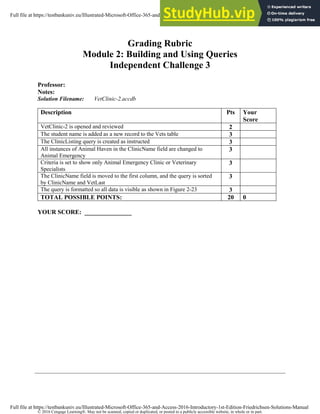
Grading Rubric
Module 2: Building and Using Queries
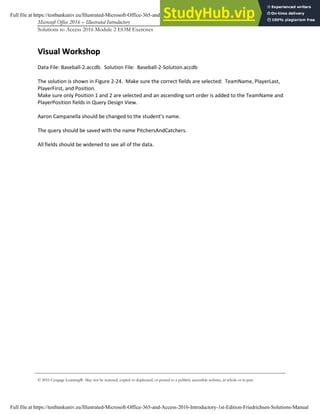
Visual Workshop
(page 1 of 1)
Š 2017 Cengage LearningŽ. May not be scanned, copied or duplicated, or posted to a publicly accessible website, in whole or in part.
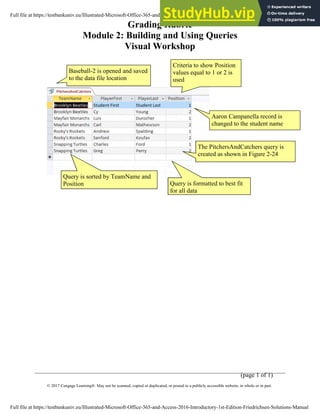
The PitchersAndCatchers query is
created as shown in Figure 2-24
Aaron Campanella record is
changed to the student name
Criteria to show Position
values equal to 1 or 2 is
used
Query is formatted to best fit
for all data
Baseball-2 is opened and saved
to the data file location
Query is sorted by TeamName and
Position
Full file at https://testbankuniv.eu/Illustrated-Microsoft-Office-365-and-Access-2016-Introductory-1st-Edition-Friedrichsen-Solutions-Manual
Grading Rubric
Module 2: Building and Using Queries
Independent Challenge 2
(page 1 of 1)
Š 2017 Cengage LearningŽ. May not be scanned, copied or duplicated, or posted to a publicly accessible website, in whole or in part.
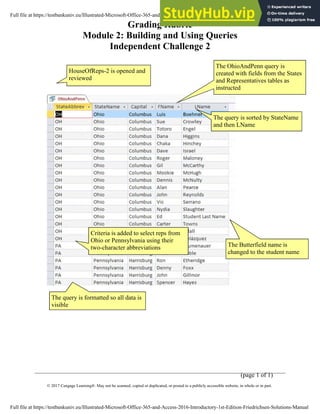
Criteria is added to select reps from
Ohio or Pennsylvania using their
two-character abbreviations
The query is sorted by StateName
and then LName
The OhioAndPenn query is
created with fields from the States
and Representatives tables as
instructed
The Butterfield name is
changed to the student name
HouseOfReps-2 is opened and
reviewed
The query is formatted so all data is
visible
Full file at https://testbankuniv.eu/Illustrated-Microsoft-Office-365-and-Access-2016-Introductory-1st-Edition-Friedrichsen-Solutions-Manual
Grading Rubric
Module 2: Building and Using Queries
Independent Challenge 4
(page 1 of 2)
Š 2017 Cengage LearningŽ. May not be scanned, copied or duplicated, or posted to a publicly accessible website, in whole or in part.
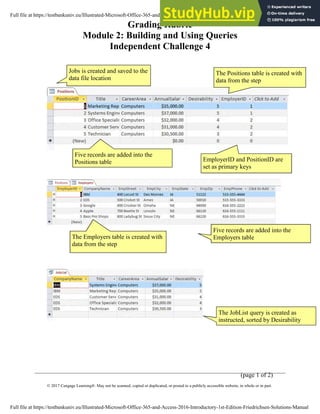
Five records are added into the
Employers table
EmployerID and PositionID are
set as primary keys
The Positions table is created with
data from the step
Jobs is created and saved to the
data file location
The Employers table is created with
data from the step
Five records are added into the
Positions table
The JobList query is created as
instructed, sorted by Desirability
Full file at https://testbankuniv.eu/Illustrated-Microsoft-Office-365-and-Access-2016-Introductory-1st-Edition-Friedrichsen-Solutions-Manual
Grading Rubric
Module 2: Building and Using Queries
Independent Challenge 4
(page 2 of 2)
Š 2017 Cengage LearningŽ. May not be scanned, copied or duplicated, or posted to a publicly accessible website, in whole or in part.
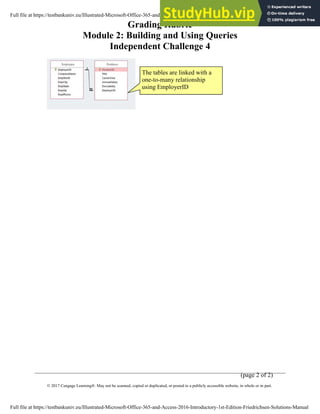
The tables are linked with a
one-to-many relationship
using EmployerID
Full file at https://testbankuniv.eu/Illustrated-Microsoft-Office-365-and-Access-2016-Introductory-1st-Edition-Friedrichsen-Solutions-Manual
Š 2017 Cengage LearningŽ. May not be scanned, copied or duplicated, or posted to a publicly accessible website, in whole or in part.
Grading Rubric
Module 2: Building and Using Queries
Visual Workshop
Professor:
Notes:
Solution Filename: Baseball-2.accdb
Description Pts Your
Score
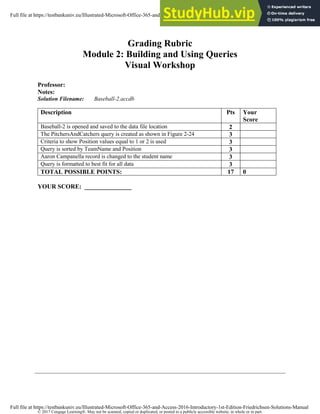
Baseball-2 is opened and saved to the data file location 2
The PitchersAndCatchers query is created as shown in Figure 2-24 3
Criteria to show Position values equal to 1 or 2 is used 3
Query is sorted by TeamName and Position 3
Aaron Campanella record is changed to the student name 3
Query is formatted to best fit for all data 3
TOTAL POSSIBLE POINTS: 17 0
YOUR SCORE: _______________
Full file at https://testbankuniv.eu/Illustrated-Microsoft-Office-365-and-Access-2016-Introductory-1st-Edition-Friedrichsen-Solutions-Manual
Š 2017 Cengage LearningŽ. May not be scanned, copied or duplicated, or posted to a publicly accessible website, in whole or in part.
Grading Rubric
Module 2: Building and Using Queries
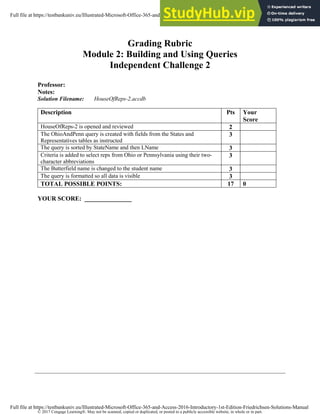
Independent Challenge 2
Professor:
Notes:
Solution Filename: HouseOfReps-2.accdb
Description Pts Your
Score
HouseOfReps-2 is opened and reviewed 2
The OhioAndPenn query is created with fields from the States and
Representatives tables as instructed
3
The query is sorted by StateName and then LName 3
Criteria is added to select reps from Ohio or Pennsylvania using their two-
character abbreviations
3
The Butterfield name is changed to the student name 3
The query is formatted so all data is visible 3
TOTAL POSSIBLE POINTS: 17 0
YOUR SCORE: _______________
Full file at https://testbankuniv.eu/Illustrated-Microsoft-Office-365-and-Access-2016-Introductory-1st-Edition-Friedrichsen-Solutions-Manual
Š 2017 Cengage LearningŽ. May not be scanned, copied or duplicated, or posted to a publicly accessible website, in whole or in part.
Grading Rubric
Module 2: Building and Using Queries
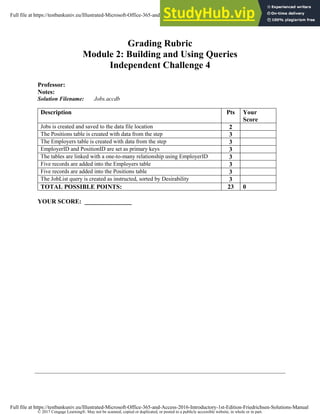
Independent Challenge 4
Professor:
Notes:
Solution Filename: Jobs.accdb
Description Pts Your
Score
Jobs is created and saved to the data file location 2
The Positions table is created with data from the step 3
The Employers table is created with data from the step 3
EmployerID and PositionID are set as primary keys 3
The tables are linked with a one-to-many relationship using EmployerID 3
Five records are added into the Employers table 3
Five records are added into the Positions table 3
The JobList query is created as instructed, sorted by Desirability 3
TOTAL POSSIBLE POINTS: 23 0
YOUR SCORE: _______________
Full file at https://testbankuniv.eu/Illustrated-Microsoft-Office-365-and-Access-2016-Introductory-1st-Edition-Friedrichsen-Solutions-Manual
Š 2016 Cengage LearningŽ. May not be scanned, copied or duplicated, or posted to a publicly accessible website, in whole or in part.
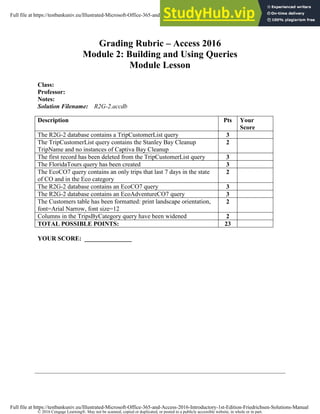
Grading Rubric – Access 2016
Module 2: Building and Using Queries
Module Lesson
Class:
Professor:
Notes:
Solution Filename: R2G-2.accdb
Description Pts Your
Score
The R2G-2 database contains a TripCustomerList query 3
The TripCustomerList query contains the Stanley Bay Cleanup
TripName and no instances of Captiva Bay Cleanup
2
The first record has been deleted from the TripCustomerList query 3
The FloridaTours query has been created 3
The EcoCO7 query contains an only trips that last 7 days in the state
of CO and in the Eco category
2
The R2G-2 database contains an EcoCO7 query 3
The R2G-2 database contains an EcoAdventureCO7 query 3
The Customers table has been formatted: print landscape orientation,
font=Arial Narrow, font size=12
2
Columns in the TripsByCategory query have been widened 2
TOTAL POSSIBLE POINTS: 23
YOUR SCORE: _______________
Full file at https://testbankuniv.eu/Illustrated-Microsoft-Office-365-and-Access-2016-Introductory-1st-Edition-Friedrichsen-Solutions-Manual
Š 2016 Cengage LearningŽ. May not be scanned, copied or duplicated, or posted to a publicly accessible website, in whole or in part.
Grading Rubric
Module 2: Building and Using Queries
Skills Review
Professor:
Notes:
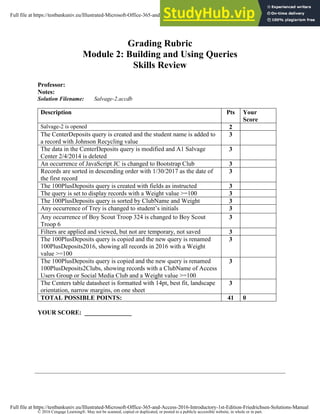
Solution Filename: Salvage-2.accdb
Description Pts Your
Score
Salvage-2 is opened 2
The CenterDeposits query is created and the student name is added to
a record with Johnson Recycling value
3
The data in the CenterDeposits query is modified and A1 Salvage
Center 2/4/2014 is deleted
3
An occurrence of JavaScript JC is changed to Bootstrap Club 3
Records are sorted in descending order with 1/30/2017 as the date of
the first record
3
The 100PlusDeposits query is created with fields as instructed 3
The query is set to display records with a Weight value >=100 3
The 100PlusDeposits query is sorted by ClubName and Weight 3
Any occurrence of Trey is changed to student’s initials 3
Any occurrence of Boy Scout Troop 324 is changed to Boy Scout
Troop 6
3
Filters are applied and viewed, but not are temporary, not saved 3
The 100PlusDeposits query is copied and the new query is renamed
100PlusDeposits2016, showing all records in 2016 with a Weight
value >=100
3
The 100PlusDeposits query is copied and the new query is renamed
100PlusDeposits2Clubs, showing records with a ClubName of Access
Users Group or Social Media Club and a Weight value >=100
3
The Centers table datasheet is formatted with 14pt, best fit, landscape
orientation, narrow margins, on one sheet
3
TOTAL POSSIBLE POINTS: 41 0
YOUR SCORE: _______________
Full file at https://testbankuniv.eu/Illustrated-Microsoft-Office-365-and-Access-2016-Introductory-1st-Edition-Friedrichsen-Solutions-Manual
Š 2017 Cengage LearningŽ. May not be scanned, copied or duplicated, or posted to a publicly accessible website, in whole or in part.
Grading Rubric
Module 2: Building and Using Queries
Independent Challenge 1
Professor:
Notes:
Solution Filename: Service-2.accdb
Description Pts Your
Score
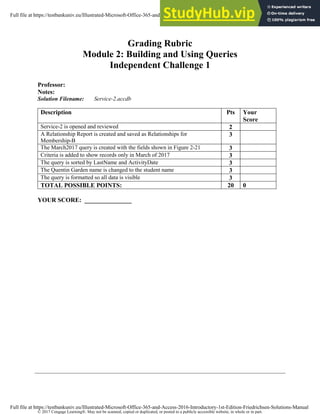
Service-2 is opened and reviewed 2
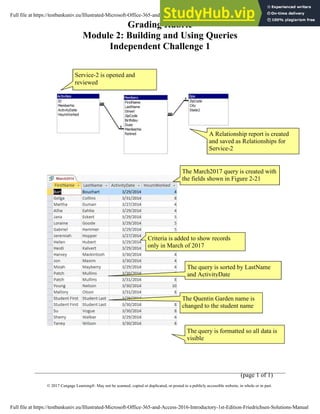
A Relationship Report is created and saved as Relationships for
Membership-B
3
The March2017 query is created with the fields shown in Figure 2-21 3
Criteria is added to show records only in March of 2017 3
The query is sorted by LastName and ActivityDate 3
The Quentin Garden name is changed to the student name 3
The query is formatted so all data is visible 3
TOTAL POSSIBLE POINTS: 20 0
YOUR SCORE: _______________
Full file at https://testbankuniv.eu/Illustrated-Microsoft-Office-365-and-Access-2016-Introductory-1st-Edition-Friedrichsen-Solutions-Manual
Š 2016 Cengage LearningŽ. May not be scanned, copied or duplicated, or posted to a publicly accessible website, in whole or in part.
Grading Rubric
Module 2: Building and Using Queries
Independent Challenge 3
Professor:
Notes:
Solution Filename: VetClinic-2.accdb
Description Pts Your
Score
VetClinic-2 is opened and reviewed 2
The student name is added as a new record to the Vets table 3
The ClinicListing query is created as instructed 3
All instances of Animal Haven in the ClinicName field are changed to
Animal Emergency
3
Criteria is set to show only Animal Emergency Clinic or Veterinary
Specialists
3
The ClinicName field is moved to the first column, and the query is sorted
by ClinicName and VetLast
3
The query is formatted so all data is visible as shown in Figure 2-23 3
TOTAL POSSIBLE POINTS: 20 0
YOUR SCORE: _______________
Full file at https://testbankuniv.eu/Illustrated-Microsoft-Office-365-and-Access-2016-Introductory-1st-Edition-Friedrichsen-Solutions-Manual
Grading Rubric
Module 2: Building and Using Queries
Skills Review
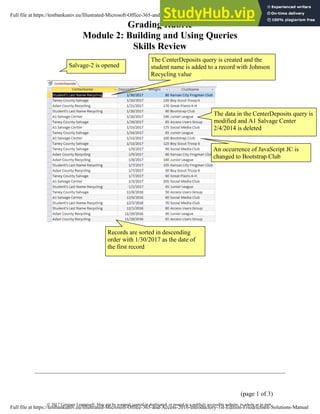
(page 1 of 3)
Š 2017 Cengage LearningŽ. May not be scanned, copied or duplicated, or posted to a publicly accessible website, in whole or in part.
Records are sorted in descending
order with 1/30/2017 as the date of
the first record
The CenterDeposits query is created and the
student name is added to a record with Johnson
Recycling value
Salvage-2 is opened
The data in the CenterDeposits query is
modified and A1 Salvage Center
2/4/2014 is deleted
An occurrence of JavaScript JC is
changed to Bootstrap Club
Full file at https://testbankuniv.eu/Illustrated-Microsoft-Office-365-and-Access-2016-Introductory-1st-Edition-Friedrichsen-Solutions-Manual
Grading Rubric
Module 2: Building and Using Queries
Skills Review
(page 2 of 3)
Š 2017 Cengage LearningŽ. May not be scanned, copied or duplicated, or posted to a publicly accessible website, in whole or in part.
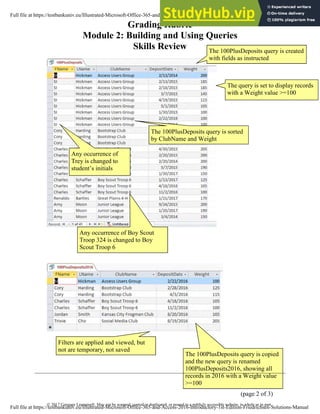
The 100PlusDeposits query is created
with fields as instructed
The 100PlusDeposits query is sorted
by ClubName and Weight
The query is set to display records
with a Weight value >=100
Any occurrence of
Trey is changed to
student’s initials
The 100PlusDeposits query is copied
and the new query is renamed
100PlusDeposits2016, showing all
records in 2016 with a Weight value
>=100
Filters are applied and viewed, but
not are temporary, not saved
Any occurrence of Boy Scout
Troop 324 is changed to Boy
Scout Troop 6
Full file at https://testbankuniv.eu/Illustrated-Microsoft-Office-365-and-Access-2016-Introductory-1st-Edition-Friedrichsen-Solutions-Manual
Grading Rubric
Module 2: Building and Using Queries
Skills Review
(page 3 of 3)
Š 2017 Cengage LearningŽ. May not be scanned, copied or duplicated, or posted to a publicly accessible website, in whole or in part.
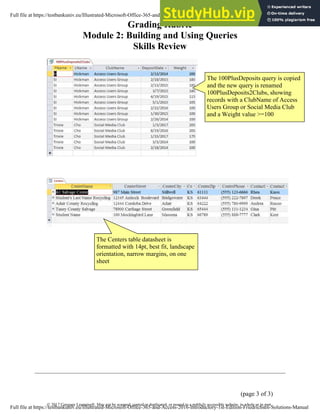
The 100PlusDeposits query is copied
and the new query is renamed
100PlusDeposits2Clubs, showing
records with a ClubName of Access
Users Group or Social Media Club
and a Weight value >=100
The Centers table datasheet is
formatted with 14pt, best fit, landscape
orientation, narrow margins, on one
sheet
Full file at https://testbankuniv.eu/Illustrated-Microsoft-Office-365-and-Access-2016-Introductory-1st-Edition-Friedrichsen-Solutions-Manual
Grading Rubric
Module 2: Building and Using Queries
Independent Challenge 1
(page 1 of 1)
Š 2017 Cengage LearningŽ. May not be scanned, copied or duplicated, or posted to a publicly accessible website, in whole or in part.
The March2017 query is created with
the fields shown in Figure 2-21
A Relationship report is created
and saved as Relationships for
Service-2
Service-2 is opened and
reviewed
The query is sorted by LastName
and ActivityDate
Criteria is added to show records
only in March of 2017
The query is formatted so all data is
visible
The Quentin Garden name is
changed to the student name
Full file at https://testbankuniv.eu/Illustrated-Microsoft-Office-365-and-Access-2016-Introductory-1st-Edition-Friedrichsen-Solutions-Manual
Grading Rubric
Module 2: Building and Using Queries
Independent Challenge 3
(page 1 of 1)
Š 2017 Cengage LearningŽ. May not be scanned, copied or duplicated, or posted to a publicly accessible website, in whole or in part.
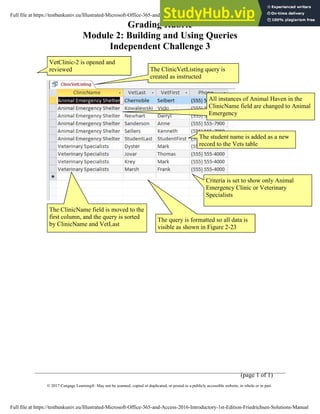
The ClinicName field is moved to the
first column, and the query is sorted
by ClinicName and VetLast
The ClinicVetListing query is
created as instructed
The student name is added as a new
record to the Vets table
VetClinic-2 is opened and
reviewed
Criteria is set to show only Animal
Emergency Clinic or Veterinary
Specialists
All instances of Animal Haven in the
ClinicName field are changed to Animal
Emergency
The query is formatted so all data is
visible as shown in Figure 2-23
Full file at https://testbankuniv.eu/Illustrated-Microsoft-Office-365-and-Access-2016-Introductory-1st-Edition-Friedrichsen-Solutions-Manual
Module 2 – Building and Using Queries (page 1 of 6)
Š 2016 Cengage LearningŽ. May not be scanned, copied or duplicated, or posted to a publicly accessible website, in whole or in part.
Access Module 2: Building and Using Queries
Annotated Solutions
Module Lesson
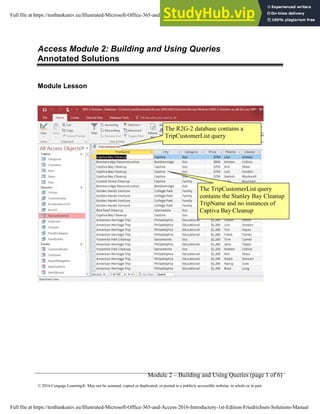
The TripCustomerList query
contains the Stanley Bay Cleanup
TripName and no instances of
Captiva Bay Cleanup
The R2G-2 database contains a
TripCustomerList query
Full file at https://testbankuniv.eu/Illustrated-Microsoft-Office-365-and-Access-2016-Introductory-1st-Edition-Friedrichsen-Solutions-Manual
Module 2 – Building and Using Queries (page 2 of 6)
Š 2016 Cengage LearningŽ. May not be scanned, copied or duplicated, or posted to a publicly accessible website, in whole or in part.
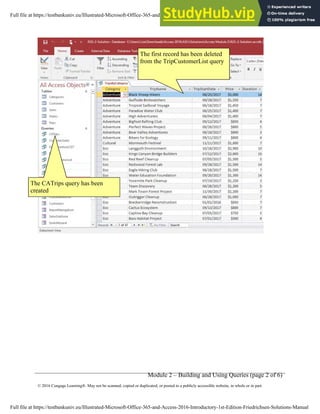
The first record has been deleted
from the TripCustomerList query
The CATrips query has been
created
Full file at https://testbankuniv.eu/Illustrated-Microsoft-Office-365-and-Access-2016-Introductory-1st-Edition-Friedrichsen-Solutions-Manual
Module 2 – Building and Using Queries (page 3 of 6)
Š 2016 Cengage LearningŽ. May not be scanned, copied or duplicated, or posted to a publicly accessible website, in whole or in part.
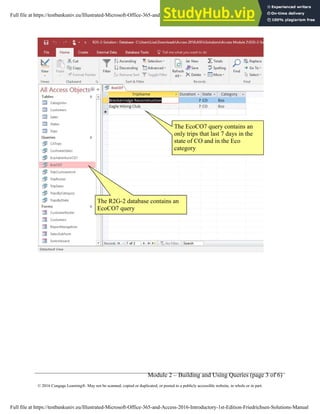
The EcoCO7 query contains an
only trips that last 7 days in the
state of CO and in the Eco
category
The R2G-2 database contains an
EcoCO7 query
Full file at https://testbankuniv.eu/Illustrated-Microsoft-Office-365-and-Access-2016-Introductory-1st-Edition-Friedrichsen-Solutions-Manual
Module 2 – Building and Using Queries (page 4 of 6)
Š 2016 Cengage LearningŽ. May not be scanned, copied or duplicated, or posted to a publicly accessible website, in whole or in part.
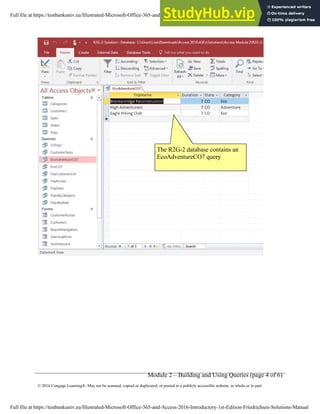
The R2G-2 database contains an
EcoAdventureCO7 query
Full file at https://testbankuniv.eu/Illustrated-Microsoft-Office-365-and-Access-2016-Introductory-1st-Edition-Friedrichsen-Solutions-Manual
Module 2 – Building and Using Queries (page 5 of 6)
Š 2016 Cengage LearningŽ. May not be scanned, copied or duplicated, or posted to a publicly accessible website, in whole or in part.
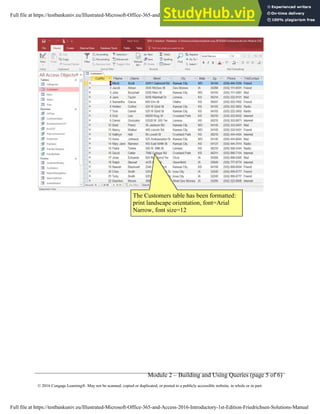
The Customers table has been formatted:
print landscape orientation, font=Arial
Narrow, font size=12
Full file at https://testbankuniv.eu/Illustrated-Microsoft-Office-365-and-Access-2016-Introductory-1st-Edition-Friedrichsen-Solutions-Manual
Module 2 – Building and Using Queries (page 6 of 6)
Š 2016 Cengage LearningŽ. May not be scanned, copied or duplicated, or posted to a publicly accessible website, in whole or in part.
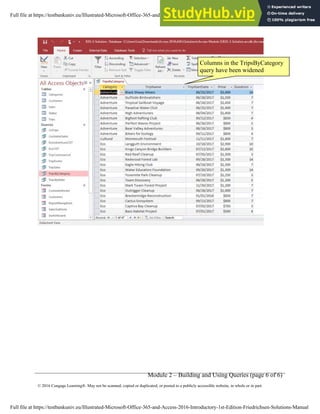
Columns in the TripsByCategory
query have been widened
Full file at https://testbankuniv.eu/Illustrated-Microsoft-Office-365-and-Access-2016-Introductory-1st-Edition-Friedrichsen-Solutions-Manual
Microsoft Office 2016 – Illustrated Introductory Access-1
Solutions to Access 2016 Module 2 EOM Exercises
Š 2016 Cengage LearningŽ. May not be scanned, copied or duplicated, or posted to a publicly accessible website, in whole or in part.
MODULE 2
Building and Using Queries
T
Ta
ab
bl
le
e o
of
f C
Co
on
nt
te
en
nt
ts
s
Unit B: Building and Using Queries................................................................................................................2
Concepts Review............................................................................................................................................2
Skills Review...................................................................................................................................................3
Independent Challenge 1...............................................................................................................................6
Independent Challenge 2...............................................................................................................................6
Independent Challenge 3...............................................................................................................................6
Independent Challenge 4...............................................................................................................................7
Visual Workshop............................................................................................................................................9
Full file at https://testbankuniv.eu/Illustrated-Microsoft-Office-365-and-Access-2016-Introductory-1st-Edition-Friedrichsen-Solutions-Manual
Microsoft Office 2016 – Illustrated Introductory Access-2
Solutions to Access 2016 Module 2 EOM Exercises
Š 2016 Cengage LearningŽ. May not be scanned, copied or duplicated, or posted to a publicly accessible website, in whole or in part.
M
Mo
od
du
ul
le
e 2
2:
: B
Bu
ui
il
ld
di
in
ng
g a
an
nd
d U
Us
si
in
ng
g Q
Qu
ue
er
ri
ie
es
s
C
Co
on
nc
ce
ep
pt
ts
s R
Re
ev
vi
ie
ew
w
S
Sc
cr
re
ee
en
n L
La
ab
be
el
li
in
ng
g M
Ma
at
tc
ch
hi
in
ng
g I
It
te
em
ms
s M
Mu
ul
lt
ti
ip
pl
le
e C
Ch
ho
oi
ic
ce
e
1. Trips table field list 6. h 16. b
2. Duration field from Trips
table in query grid
7. c 17. a
3. Ascending sort order on
TripName field
8. d 18. d
4. Or criteria on two rows 9. j 19. b
5. And criteria on one row 10. e 20. a
11. a
12. i
13. b
14. f
15. g
Full file at https://testbankuniv.eu/Illustrated-Microsoft-Office-365-and-Access-2016-Introductory-1st-Edition-Friedrichsen-Solutions-Manual
Microsoft Office 2016 – Illustrated Introductory Access-3
Solutions to Access 2016 Module 2 EOM Exercises
Š 2016 Cengage LearningŽ. May not be scanned, copied or duplicated, or posted to a publicly accessible website, in whole or in part.
S
Sk
ki
il
ll
ls
s R
Re
ev
vi
ie
ew
w
Data File: Salvage-2.accdb. Solution File: Salvage-2-Solution.accdb
1.-2. The final CenterDeposits query is shown below.
Note:
1b: CenterName, DepositDate, Weight, ClubName fields
1c: Johnson Recycling was changed to a center name that has the student’s last name.
2a: The first record (A1 Salvage Center with a DepositDate of 2/4/2014) has been deleted
2b: JavaScript KC (ClubName) has changed to Bootstrap Club.
2d: The date of 1/30/2017 is entered for the current first record
3-5: The final 100PlusDeposits query is shown below:
Full file at https://testbankuniv.eu/Illustrated-Microsoft-Office-365-and-Access-2016-Introductory-1st-Edition-Friedrichsen-Solutions-Manual
Microsoft Office 2016 – Illustrated Introductory Access-4
Solutions to Access 2016 Module 2 EOM Exercises
Š 2016 Cengage LearningŽ. May not be scanned, copied or duplicated, or posted to a publicly accessible website, in whole or in part.
Note:
3c: FName, LName, ClubName, DepositDate, Weight fields
3d: All Weight values are >=100 saved in Query Design View
4a: Ascending sort order is placed on the ClubName field and descending sort order is placed on Weight
field in Query Design View
4c: Boy Scout Troop 324 (ClubName) has been changed to Boy Scout Troop 6.
4d: Trey in FName field is changed to student’s initials (SI in figure above)
5a Filter the records for ClubName equals Access Users Group.
5b Filter the records from step 5a for DepositDate >=1/1/2015 as shown below:
5c Print the datasheet if requested by the instructor. Note that filters are temporary and not saved with
the query, so if you want to grade step 5, the student must produce this printout.
Full file at https://testbankuniv.eu/Illustrated-Microsoft-Office-365-and-Access-2016-Introductory-1st-Edition-Friedrichsen-Solutions-Manual
Microsoft Office 2016 – Illustrated Introductory Access-5
Solutions to Access 2016 Module 2 EOM Exercises
Š 2016 Cengage LearningŽ. May not be scanned, copied or duplicated, or posted to a publicly accessible website, in whole or in part.
6a: Save the 100PlusDeposits query as 100PlusDeposits2016.
6c. The criteria entry Like "*/*/2016" should be in the DepositDate field in Query Design View.
Alternatively, the criteria >=1/1/2016 and <= 12/31/2016 or >12/31/2015 and <1/1/2017 are also
equivalent ways to select all records in the year 2016 as shown below:
7. Save the 100PlusDeposits query as 100PlusDeposits2Clubs. The solution is shown in Figure 2-20. Note:
7b-7c. All records have ClubName = Social Media Club or Access Users Group and Weight >=100
8a. For the Centers table, the Times New Roman font with 14-point font size is applied
8b. All columns have been resized so data and field names are visible.
8c-8d. If creating a printout, the printout should be in landscape orientation and use narrow margins so
that it fits on a single sheet of paper.
Full file at https://testbankuniv.eu/Illustrated-Microsoft-Office-365-and-Access-2016-Introductory-1st-Edition-Friedrichsen-Solutions-Manual
Microsoft Office 2016 – Illustrated Introductory Access-6
Solutions to Access 2016 Module 2 EOM Exercises
Š 2016 Cengage LearningŽ. May not be scanned, copied or duplicated, or posted to a publicly accessible website, in whole or in part.
I
In
nd
de
ep
pe
en
nd
de
en
nt
t C
Ch
ha
al
ll
le
en
ng
ge
e 1
1
Data File: Service-2.accdb. Solution File: Service-2-Solution.accdb
The solution to this exercise is shown in Figure 2-21.
d. Check for the Relationships for Service-2 report shown below:
e. Create a query (named March2017 in step i) with these fields: FirstName, LastName, ActivityDate,
HoursWorked. The solution to this is shown in Figure 2-21.
g. Add criteria to select only those records in March 2017.
h. In Query Design View, apply an ascending sort order on the LastName and ActivityDate fields.
i. Make sure that the student’s name has replaced Quentin Garden and that the columns have been
widened to clearly display all data and field names.
I
In
nd
de
ep
pe
en
nd
de
en
nt
t C
Ch
ha
al
ll
le
en
ng
ge
e 2
2
Data File: HouseOfReps-2.accdb. Solution File: HouseOfReps-2-Solution.accdb
The final solution is shown in Figure 2-22. Note:
c. The fields are in the following order: StateAbbrev, StateName, Capital, FName, LName
d. An ascending sort order on StateName then LName.
e. Criteria to select only Ohio or Pennsylvania using OH and PA criteria in the StateAbbrev field.
f. The query is named OhioAndPenn.
The student’s name is entered instead of Butterfield.
I
In
nd
de
ep
pe
en
nd
de
en
nt
t C
Ch
ha
al
ll
le
en
ng
ge
e 3
3
Data File: VetClinic-2.accdb. Solution File: VetClinic-2-Solution.accdb
Full file at https://testbankuniv.eu/Illustrated-Microsoft-Office-365-and-Access-2016-Introductory-1st-Edition-Friedrichsen-Solutions-Manual
Microsoft Office 2016 – Illustrated Introductory Access-7
Solutions to Access 2016 Module 2 EOM Exercises
Š 2016 Cengage LearningŽ. May not be scanned, copied or duplicated, or posted to a publicly accessible website, in whole or in part.
The solution is shown in Figure 2-23. Note:
c. Student Name is added as a new record in Vets table.
e. ClinicVetListing is the new query name with the following fields: VetLast, VetFirst, ClinicName, and
Phone. (Note the order of fields is changed in step h.)
f. Animal Haven (ClinicName) changed to Animal Emergency Shelter.
g. In Query Design View, criteria is added to the ClinicName field to select only Animal Emergency Shelter
or Veterinary Specialists.
h. In Query Design View, the ClinicName field is moved to the first field column and an ascending sort
order is added to the ClinicName and VetLast fields.
i. Fields are resized to show all data.
I
In
nd
de
ep
pe
en
nd
de
en
nt
t C
Ch
ha
al
ll
le
en
ng
ge
e 4
4
No Data File. Solution File: Jobs-Solution.accdb
b. Check Table Design View of the Positions table. The field names, data types, and descriptions should
match this step.
c. Check Table Design View of the Employers table. The field names, data types, and descriptions should
match this step.
d. Make sure EmployerID is the primary key field of the Employers table.
Make sure PositionID is the primary key field of the Positions table.
e. Make sure the relationships window looks like the following:
f-g. Answers will vary, but a potential solution is shown below. There should be five valid records in the
Employers table, and five valid records in the Positions table. The records in the Positions table can be
attached to any employer record.
Full file at https://testbankuniv.eu/Illustrated-Microsoft-Office-365-and-Access-2016-Introductory-1st-Edition-Friedrichsen-Solutions-Manual
Microsoft Office 2016 – Illustrated Introductory Access-8
Solutions to Access 2016 Module 2 EOM Exercises
Š 2016 Cengage LearningŽ. May not be scanned, copied or duplicated, or posted to a publicly accessible website, in whole or in part.
h. A potential solution to the JobList query is shown below. (Answers will vary based on the records
entered in the Positions table). Make sure the query contains these fields: CompanyName, Title,
CareerArea, AnnualSalary, and Desirability. Make sure the records are sorted in descending order on
the Desirability field.
Full file at https://testbankuniv.eu/Illustrated-Microsoft-Office-365-and-Access-2016-Introductory-1st-Edition-Friedrichsen-Solutions-Manual
Microsoft Office 2016 – Illustrated Introductory Access-9
Solutions to Access 2016 Module 2 EOM Exercises
Š 2016 Cengage LearningŽ. May not be scanned, copied or duplicated, or posted to a publicly accessible website, in whole or in part.
V
Vi
is
su
ua
al
l W
Wo
or
rk
ks
sh
ho
op
p
Data File: Baseball-2.accdb. Solution File: Baseball-2-Solution.accdb
The solution is shown in Figure 2-24. Make sure the correct fields are selected: TeamName, PlayerLast,
PlayerFirst, and Position.
Make sure only Position 1 and 2 are selected and an ascending sort order is added to the TeamName and
PlayerPosition fields in Query Design View.
Aaron Campanella should be changed to the student’s name.
The query should be saved with the name PitchersAndCatchers.
All fields should be widened to see all of the data.
Full file at https://testbankuniv.eu/Illustrated-Microsoft-Office-365-and-Access-2016-Introductory-1st-Edition-Friedrichsen-Solutions-Manual

Access 2016 Instructor S Manual Access Module 2 Building And Using Queries

  • 1.
    Access 2016 Instructor’sManual Page 1 of 8 © 2017 Cengage Learning®. All rights reserved. May not be scanned, copied or duplicated, in whole or in part, except for use as permitted in a license distributed with a certain product or service or otherwise on a password-protected website for classroom use. Access Module 2: Building and Using Queries A Guide to this Instructor’s Manual: We have designed this Instructor’s Manual to supplement and enhance your teaching experience through classroom activities and a cohesive module summary. This document is organized chronologically, using the same heading in blue that you see in the textbook. Under each heading you will find (in order): Lecture Notes that summarize the section, Teacher Tips, Classroom Activities, and Lab Activities. In addition to this Instructor’s Manual, our Instructor’s Resources Site also contains PowerPoint Presentations, Test Banks, and other supplements to aid in your teaching experience. Table of Contents Module Objectives 2 Access 28: Use the Query Wizard 2 Access 30: Work with Data in a Query 3 Access 32: Use Query Design View 3 Access 34: Sort and Find Data 4 Access 36: Filter Data 5 Access 38: Apply AND Criteria 6 Access 40: Apply OR Criteria 8 Access 42: Format a Datasheet 8 End of Module Material 9 Module Objectives Students will have mastered the material in Access Module 2 when they can:  Use the Query Wizard  Work with data in a query  Use Query Design View  Sort and find data  Filter data  Apply AND criteria  Apply OR criteria  Format a datasheet Access 28: Use the Query Wizard LEARNING OUTCOMES • Describe the purpose for a query • Create a query with the Simple Query Wizard Full file at https://testbankuniv.eu/Illustrated-Microsoft-Office-365-and-Access-2016-Introductory-1st-Edition-Friedrichsen-Solutions-Manual Full file at https://testbankuniv.eu/Illustrated-Microsoft-Office-365-and-Access-2016-Introductory-1st-Edition-Friedrichsen-Solutions-Manual
  • 2.
    Access 2016 Instructor’sManual Page 2 of 8 © 2017 Cengage Learning®. All rights reserved. May not be scanned, copied or duplicated, in whole or in part, except for use as permitted in a license distributed with a certain product or service or otherwise on a password-protected website for classroom use. LECTURE NOTES • Introduce the Simple Query Wizard in FIGURE 2-1 and, depending on the background of students, show them that using the wizard spares students having to write SQL (Structured Query Language) code. • Make sure students realize that a query is merely a question – it is not a duplication of the data even though the datasheet that is presented (the logical view of the data, shown in FIGURE 2-2) can be used for data entry and updates. • Be sure students understand that a query allows you to focus on specific information that answers the query question. • Emphasize the wide and extensive use of queries to the database user. TEACHER TIPS Introduce this module by reminding students that when they use an online search engine, such as Google or Bing they are really asking questions of a database. When they access the online catalog at the library, they also are querying a database. Querying is one of the main benefits of creating a database. Users want to be able to find answers quickly to questions concerning the data. CLASSROOM ACTIVITIES 1. Critical Thinking: Ask students to come up with reasons they would use a query (versus opening a table datasheet). Answers include: • To view fields from more than one table in a single datasheet. • To view subsets of records rather than all the records in a table datasheet (filtering and adding criteria – covered later in Unit B). • To create calculated fields. • To collect the fields and records needed for forms and reports. 2. Class Discussion: Ask students for sample questions that might be asked of a student database. Access 30: Work with Data in a Query LEARNING OUTCOMES • Edit records in a query • Delete records in a query LECTURE NOTES • Compare entering and editing data in a query datasheet to the same tasks in a table datasheet. • Use FIGURES 2-3 and 2-4 to show the effects of updating a record in the query datasheet and deleting another record. Full file at https://testbankuniv.eu/Illustrated-Microsoft-Office-365-and-Access-2016-Introductory-1st-Edition-Friedrichsen-Solutions-Manual Full file at https://testbankuniv.eu/Illustrated-Microsoft-Office-365-and-Access-2016-Introductory-1st-Edition-Friedrichsen-Solutions-Manual
  • 3.
    Access 2016 Instructor’sManual Page 3 of 8 © 2017 Cengage Learning®. All rights reserved. May not be scanned, copied or duplicated, in whole or in part, except for use as permitted in a license distributed with a certain product or service or otherwise on a password-protected website for classroom use. TEACHER TIP Inherent to students’ understanding of how relational databases work is understanding that every other object is built “on top of” the tables. Any time data is being edited, it is being changed/stored in table objects. Tables, queries, and forms can all be used to enter and update data, but data is only physically stored in tables. Without this understanding students may be led to believe that they need to update data every place it is presented – in every query, form, or report where it is shown. This is not true. Once data is changed, for example, once the name Friedrichsen is changed to Franklin, every other object that displays that data is automatically updated as well. CLASSROOM ACTIVITIES 1. Class Discussion: Ask students to brainstorm some real-world scenarios in which they would make the kinds of modifications demonstrated in this section. 2. Critical Thinking: Querying means asking questions. What kind of questions do you ask in a typical day? Would a database be able to answer those questions? Access 32: Use Query Design View LEARNING OUTCOMES • Work in Query Design View • Add criteria to a query LECTURE NOTES • Point out the various parts of the Query Design View window in FIGURE 2-5, and the resulting query in FIGURE 2-6. • Explain that students should be extremely familiar with Query Design View, criteria, field lists, join lines (link lines), and the query design grid. • Point out the one-to-many relationship line between related tables in the query in FIGURE 2-5. • Distinguish between the use of the Save command on the File tab and the Save Object As command, reminding students that Access saves data automatically as they move from record to record. TEACHER TIPS Note that when there is no scroll bar in a field list, it means that all fields are visible. Access uses Query-by-Example (QBE) to query a database. Query-by-Example is a query manipulation language for relational databases in which users indicate the action to be taken by completing on-screen forms. The query feature of Microsoft Excel uses QBE. Students should understand that although the answer displays in Datasheet view, no table exists. It is a dynamic or virtual set of records. When a query design is saved, only the design is saved not the answer. Query results, therefore, always show the most current data. Full file at https://testbankuniv.eu/Illustrated-Microsoft-Office-365-and-Access-2016-Introductory-1st-Edition-Friedrichsen-Solutions-Manual Full file at https://testbankuniv.eu/Illustrated-Microsoft-Office-365-and-Access-2016-Introductory-1st-Edition-Friedrichsen-Solutions-Manual
  • 4.
    Access 2016 Instructor’sManual Page 4 of 8 © 2017 Cengage Learning®. All rights reserved. May not be scanned, copied or duplicated, in whole or in part, except for use as permitted in a license distributed with a certain product or service or otherwise on a password-protected website for classroom use. CLASSROOM ACTIVITIES 1. Quick Quiz: 1. How is the relationship between two tables displayed? (Answer: With a join line, or link line) 2. What does the query design grid display? (Answer: The field names, sort orders, and criteria used within the query) 2. Assign a Project: Have students research QBE, an early language for creating queries and then share the results of their research with the class. Access 34: Sort and Find Data LEARNING OUTCOMES • Apply short orders to a query • Find and replace data in a query • Undo edits in a query LECTURE NOTES • Make sure students understand how ascending and descending sort orders apply to each different type of field, for example text, number, currency, and date/time data. • Make sure students know that they can click any field and use it to sort the records. Point out the field selector in FIGURE 2-7. Access never sorts just a single field/column at a time. Review the result of the new sort orders in the datasheet in FIGURE 2-9. • Review the features of the Find and Replace dialog box in FIGURE 2-8. CLASSROOM ACTIVITIES 1. Critical Thinking: Sorting means ordering records in a particular way. When would it be useful to sort data in ascending order? Why? When would it be useful to sort data in descending order? Why? 2. Quick Quiz: 1. Deleting a field from a query deletes it from the underlying table. T/F? (Answer: False) 2. Sort orders always work from right to left. T/F? (Answer: False) LAB ACTIVITY Using the query shown in FIGURE 2-7, have students practice sorting on more than one field such as Category and TripName. Ask them to sort by duration within each category. Show them how to move the Price field to the left of the Category field, select both fields, and apply a sort to the two fields at the same time to achieve the desired sort. Access 36: Filter Data LEARNING OUTCOMES • Apply and remove filters in a query • Use wildcards in criteria Full file at https://testbankuniv.eu/Illustrated-Microsoft-Office-365-and-Access-2016-Introductory-1st-Edition-Friedrichsen-Solutions-Manual Full file at https://testbankuniv.eu/Illustrated-Microsoft-Office-365-and-Access-2016-Introductory-1st-Edition-Friedrichsen-Solutions-Manual
  • 5.
    Access 2016 Instructor’sManual Page 5 of 8 © 2017 Cengage Learning®. All rights reserved. May not be scanned, copied or duplicated, in whole or in part, except for use as permitted in a license distributed with a certain product or service or otherwise on a password-protected website for classroom use. LECTURE NOTES • Filtering data is a temporary activity. As soon as the filter is removed, it is not saved. Therefore, if a question about the data is asked over and over again, it should be saved as a query so that the query can simply be opened to see the resulting data. • Simple filters require only that students click the field they want to filter on (such as Adventure in the Category field), and click the Selection button. Any filtering done with two or more fields requires the use of the advanced filter tools. • Contrast the use of the Filter By Selection feature with the use of Filter By Form feature. • Use TABLE 2-2 to compare filters and queries. Point out to students, however, that queries are by far more powerful. Discuss the filter buttons shown in TABLE 2-3 and when each one would be used. • Review the wildcard characters shown in the Clues to Use box. TEACHER TIPS Be sure to have students view the navigation buttons after each filter to get a sense of how many records they are viewing at any one time. This will help them answer the “reasonableness” test question. Is the answer I’m seeing reasonable? (or not?) Students may not know the answer to this when working with sample database files provided by this textbook, but they certainly would be able to answer that question in the real world when working with their own data. Note that while a filter is not the same thing as a query, if you create a filter and decide that you would like to reuse it, and therefore should have created a query, a filter can be saved as a query object and reused. For the most part, however, filters are temporary views of data and do not contain as much power as queries (see TABLE 2-2). Filtering produces a subset of the table. This is useful when you need to update a field in several records with the same value but do not need an update query. Make sure students understand the difference between the Toggle Filter button and the Clear All Filters button. The Toggle Filter button redisplays all records but does not clear any filters that have been applied. When a criterion is entered in a query, the criterion is an example of the expected result. Entering criterion in a query is similar to entering an author’s name in a search of a library card catalog or an electronic library database. The asterisk and question mark wildcards are the same wildcards that are used with the search features in Windows and other Microsoft applications. Access automatically adds the LIKE operator and quotation marks to criteria that use wildcards. CLASSROOM ACTIVITIES 1. Class Discussion: Consider circumstances in which the Filter By Selection feature is the tool to use. When is Filter By Form better to use? Full file at https://testbankuniv.eu/Illustrated-Microsoft-Office-365-and-Access-2016-Introductory-1st-Edition-Friedrichsen-Solutions-Manual Full file at https://testbankuniv.eu/Illustrated-Microsoft-Office-365-and-Access-2016-Introductory-1st-Edition-Friedrichsen-Solutions-Manual
  • 6.
    Access 2016 Instructor’sManual Page 6 of 8 © 2017 Cengage Learning®. All rights reserved. May not be scanned, copied or duplicated, in whole or in part, except for use as permitted in a license distributed with a certain product or service or otherwise on a password-protected website for classroom use. 2. Critical Thinking: Why does Microsoft provide so many different features (filters versus queries for example) that overlap in functionality? (Even though there are times when more than one tool could do a job, depending on the nature of the problem there is generally a “best” way to accomplish a task. Providing many different tools gives the user the choice of several ways to tackle a problem. It is incumbent on the user to be trained well enough to know which tool is most productive and best for each job.) 3. Critical Thinking: Compare the two methods of finding records presented in this chapter: searching and filtering. Which do you consider to be more efficient? As a database user, when do you think it would be best to use filtering rather than searching? Access 38: Apply AND Criteria LEARNING OUTCOMES • Enter AND criteria in a query • Define criteria syntax • Use comparison operators with criteria LECTURE NOTES: • Being able to master query criteria is absolutely essential to the success of every Access user. Do not let students go beyond this lesson until they completely understand it. • Note that the use of “AND” means that BOTH criteria must be true in order for the record to be selected. • The AND criteria are entered in one row of the query grid as shown in FIGURE 2-13. It is absolutely essential that students understand what AND criteria is as well as how to enter it in the query grid. • Discuss the support that Access provides with criteria syntax and review the function of the comparison operators in TABLE 2-4. • Explain how to search for blank fields using the Clues to Use box. TEACHER TIPS Comparison operators are used with both numeric and text data. The order of the greater than or equal to (>=) and less than or equal to (<=) operators is fixed; they cannot be reversed. The difference between putting criteria in one versus two rows is extremely important and is covered in the lessons on AND versus OR criteria. At this point, students are starting to see how important precision is when working with databases. Be sure students understand that they can go back and forth between Datasheet and Query Design View to make sure you get the records desired. The most common errors would be not entering the criteria on one row or making a typo. You can use a Venn diagram to illustrate the concept of AND and OR criterion visually: Full file at https://testbankuniv.eu/Illustrated-Microsoft-Office-365-and-Access-2016-Introductory-1st-Edition-Friedrichsen-Solutions-Manual Full file at https://testbankuniv.eu/Illustrated-Microsoft-Office-365-and-Access-2016-Introductory-1st-Edition-Friedrichsen-Solutions-Manual
  • 7.
    Access 2016 Instructor’sManual Page 7 of 8 © 2017 Cengage Learning®. All rights reserved. May not be scanned, copied or duplicated, in whole or in part, except for use as permitted in a license distributed with a certain product or service or otherwise on a password-protected website for classroom use. CLASSROOM ACTIVITIES 1. Class Discussion: Design a truth table on the board and fill in the values with the students. Ask students for other uses of a truth table. 2. Quick Quiz: 1. With AND criteria, all criteria must be true to select the record. T/F? (Answer: True) 2. Criteria syntax are rules that specify how to enter criteria. T/F? (Answer: True) Access 40: Apply OR Criteria LEARNING OUTCOMES • Enter OR criteria in a query • Rename a query LECTURE NOTES: • Explain the difference between AND and OR criteria in the query grid. Students show know how it is entered (as shown in FIGURE 2-15) as well as how many records are selected (as shown in FIGURE 2- 16). • Note that OR criteria always retrieves more records. AND criteria always narrows the number of records selected. OR criteria always expands the number of records selected. CLASSROOM ACTIVITIES Critical Thinking: How would you write a query to find all trips where the state was Colorado and the duration was either 7 or 10 days? 1. Quick Quiz: 1. You use AND criteria when one criterion must be true in order for the record to be selected. T/F? (Answer: False) Access 42: Format a Datasheet LEARNING OUTCOMES • Zoom in print preview • Format a datasheet • Change page orientation LECTURE NOTES: • Many of the buttons and tools students will use to format a datasheet are already familiar to them from Word and Excel such as Bold, Italic, Underline, Font Color, Font Face, Font Size, and Fill. The Alternate Fill/Back Color button helps readers differentiate different lines on datasheet printouts. • Note that the entire datasheet is formatted as a single unit. You do not format individual cells as you do in Excel. Full file at https://testbankuniv.eu/Illustrated-Microsoft-Office-365-and-Access-2016-Introductory-1st-Edition-Friedrichsen-Solutions-Manual Full file at https://testbankuniv.eu/Illustrated-Microsoft-Office-365-and-Access-2016-Introductory-1st-Edition-Friedrichsen-Solutions-Manual
  • 8.
    Access 2016 Instructor’sManual Page 8 of 8 © 2017 Cengage Learning®. All rights reserved. May not be scanned, copied or duplicated, in whole or in part, except for use as permitted in a license distributed with a certain product or service or otherwise on a password-protected website for classroom use. TEACHER TIP: Point out the differences between a color and black and white printer. On a black and white printer, all colors are converted to shades of gray. Bright colors may be converted to solid black boxes. Always encourage students to print preview before printing. CLASSROOM ACTIVITIES 1. Assign a Project: Have students open a datasheet and apply at least three formats that they feel enhance the printout. Print the datasheets, pair students up, and have them critique each other’s printouts. Remind students that some formatting embellishments, such as too much color, font size too small to read, font face too fancy to be legible, can actually detract from readability and professionalism. 2. Group Activity: Ask students to apply three different formats to a datasheet in three different categories (font face, font size, color) and print them. Have them write down the formatting embellishments on the back of the paper. Pass the papers around the class and ask students to vote on the one they like best and explain why. End of Module Material • Concepts Reviews consist of multiple choice, matching, and screen identification questions. • Skills Reviews provide additional hands-on, step-by-step reinforcement. • Independent Challenges are case projects requiring critical thinking and application of the module skills. The Independent Challenges increase in difficulty, with the first one in each module being the easiest. Independent Challenges 2 and 3 become increasingly open-ended, requiring more independent problem solving. • Independent Challenge 4: Explore contain practical exercises to help students with their everyday lives by focusing on important and useful essential skills, including creating photo montages for scrapbooks and photo albums, retouching and color-correcting family photos, applying layer styles and getting Help online. • Visual Workshops are practical, self-graded capstone projects that require independent problem solving. f Document Full file at https://testbankuniv.eu/Illustrated-Microsoft-Office-365-and-Access-2016-Introductory-1st-Edition-Friedrichsen-Solutions-Manual Full file at https://testbankuniv.eu/Illustrated-Microsoft-Office-365-and-Access-2016-Introductory-1st-Edition-Friedrichsen-Solutions-Manual
  • 9.
    Name: Class: Date: ProductivityApp: Productivity Apps for School and Work Copyright Cengage Learning. Powered by Cognero. Page 1 1. OneNote will not function at all without an Internet connection. a. True b. False ANSWER: False POINTS: 1 REFERENCES: PA-2 Syncing a Notebook to the Cloud QUESTION TYPE: True / False HAS VARIABLES: False DATE CREATED: 4/26/2016 7:21 PM DATE MODIFIED: 4/26/2016 7:26 PM 2. OneNote allows users to convert handwriting to text using the Ink to Text button. a. True b. False ANSWER: True POINTS: 1 REFERENCES: Converting Handwriting to Text PA-3 QUESTION TYPE: True / False HAS VARIABLES: False DATE CREATED: 4/26/2016 7:26 PM DATE MODIFIED: 4/26/2016 7:27 PM 3. It is possible to record audio conversations with OneNote if your computer or device has a camera and/or a microphone. a. True b. False ANSWER: True POINTS: 1 REFERENCES: PA-4 Recording a Lecture QUESTION TYPE: True / False HAS VARIABLES: False DATE CREATED: 4/26/2016 7:27 PM DATE MODIFIED: 4/26/2016 7:29 PM 4. Microsoft Sway is available as an app on Office365 or at Sway.com. a. True b. False ANSWER: True POINTS: 1 REFERENCES: Introduction to Sway PA-6 Full file at https://testbankuniv.eu/Illustrated-Microsoft-Office-365-and-Access-2016-Introductory-1st-Edition-Friedrichsen-Solutions-Manual Full file at https://testbankuniv.eu/Illustrated-Microsoft-Office-365-and-Access-2016-Introductory-1st-Edition-Friedrichsen-Solutions-Manual
  • 10.
    Name: Class: Date: ProductivityApp: Productivity Apps for School and Work Copyright Cengage Learning. Powered by Cognero. Page 2 QUESTION TYPE: True / False HAS VARIABLES: False DATE CREATED: 4/26/2016 7:35 PM DATE MODIFIED: 4/26/2016 7:38 PM 5. Sway users work through a Storyline, which has tools and a work area for composing a digital story. a. True b. False ANSWER: False POINTS: 1 REFERENCES: Creating a Sway Presentation PA-6 QUESTION TYPE: True / False HAS VARIABLES: False DATE CREATED: 4/26/2016 7:38 PM DATE MODIFIED: 4/26/2016 7:46 PM 6. Sway will not resize background images, so it is necessary to purchase a separate app to do that. a. True b. False ANSWER: False POINTS: 1 REFERENCES: Introduction to Sway PA-6 QUESTION TYPE: True / False HAS VARIABLES: False DATE CREATED: 4/26/2016 7:46 PM DATE MODIFIED: 4/26/2016 7:48 PM 7. Office Mix is an add-in for Microsoft PowerPoint, which allows users to enhance PowerPoint presentations. a. True b. False ANSWER: True POINTS: 1 REFERENCES: Introduction to Office PA-10 QUESTION TYPE: True / False HAS VARIABLES: False DATE CREATED: 4/26/2016 7:48 PM DATE MODIFIED: 4/26/2016 7:49 PM 8. Through Office Mix, video clips, slide notes, and screen recordings can be added to PowerPoint presentations. a. True Full file at https://testbankuniv.eu/Illustrated-Microsoft-Office-365-and-Access-2016-Introductory-1st-Edition-Friedrichsen-Solutions-Manual Full file at https://testbankuniv.eu/Illustrated-Microsoft-Office-365-and-Access-2016-Introductory-1st-Edition-Friedrichsen-Solutions-Manual
  • 11.
    Name: Class: Date: ProductivityApp: Productivity Apps for School and Work Copyright Cengage Learning. Powered by Cognero. Page 3 b. False ANSWER: True POINTS: 1 REFERENCES: Capturing Video Clips PA-11 QUESTION TYPE: True / False HAS VARIABLES: False DATE CREATED: 4/26/2016 7:50 PM DATE MODIFIED: 4/26/2016 7:51 PM 9. Office Mix is currently capable of handling extended response quizzes, with more quiz types to be available soon. a. True b. False ANSWER: False POINTS: 1 REFERENCES: Inserting Quizzes, Live Webpages, and Apps PA-12 QUESTION TYPE: True / False HAS VARIABLES: False DATE CREATED: 4/26/2016 7:51 PM DATE MODIFIED: 4/26/2016 7:52 PM 10. Microsoft Edge is a Web browser that was designed as an add-in to Internet Explorer. a. True b. False ANSWER: False POINTS: 1 REFERENCES: Introduction to Microsoft Edge PA-14 QUESTION TYPE: True / False HAS VARIABLES: False DATE CREATED: 4/26/2016 7:52 PM DATE MODIFIED: 4/26/2016 7:53 PM 11. Cortana appears as an animated circle in the Address bar when it is turned on and you might need assistance. a. True b. False ANSWER: True POINTS: 1 REFERENCES: Locating Information with Cortana PA-14 QUESTION TYPE: True / False HAS VARIABLES: False Full file at https://testbankuniv.eu/Illustrated-Microsoft-Office-365-and-Access-2016-Introductory-1st-Edition-Friedrichsen-Solutions-Manual Full file at https://testbankuniv.eu/Illustrated-Microsoft-Office-365-and-Access-2016-Introductory-1st-Edition-Friedrichsen-Solutions-Manual
  • 12.
    Name: Class: Date: ProductivityApp: Productivity Apps for School and Work Copyright Cengage Learning. Powered by Cognero. Page 4 DATE CREATED: 4/26/2016 7:54 PM DATE MODIFIED: 4/26/2016 7:55 PM 12. Microsoft Edge will allow users to save webpages, but they cannot be written on. a. True b. False ANSWER: False POINTS: 1 REFERENCES: Annotating Webpages PA-15 QUESTION TYPE: True / False HAS VARIABLES: False DATE CREATED: 4/26/2016 7:56 PM DATE MODIFIED: 4/26/2016 7:57 PM 13. Each OneNote notebook is divided into sections, also called Section Tabs. __________________ ANSWER: True POINTS: 1 REFERENCES: Introduction to OneNote 2016 PA-2 QUESTION TYPE: Modified True / False HAS VARIABLES: False DATE CREATED: 4/26/2016 7:57 PM DATE MODIFIED: 4/26/2016 7:59 PM 14. It is possible, through OneNote, to draw directly on the screen using drawing tools. __________________ ANSWER: True POINTS: 1 REFERENCES: Introduction to OneNote 2016 PA-2 QUESTION TYPE: Modified True / False HAS VARIABLES: False DATE CREATED: 4/26/2016 7:59 PM DATE MODIFIED: 4/26/2016 7:59 PM 15. OneNote only allows one type of project to be stored at a time. __________________ ANSWER: False - POINTS: 1 REFERENCES: Creating a OneNote Notebook PA-2 QUESTION TYPE: Modified True / False HAS VARIABLES: False DATE CREATED: 4/26/2016 8:01 PM DATE MODIFIED: 4/26/2016 8:03 PM Full file at https://testbankuniv.eu/Illustrated-Microsoft-Office-365-and-Access-2016-Introductory-1st-Edition-Friedrichsen-Solutions-Manual Full file at https://testbankuniv.eu/Illustrated-Microsoft-Office-365-and-Access-2016-Introductory-1st-Edition-Friedrichsen-Solutions-Manual
  • 13.
    Name: Class: Date: ProductivityApp: Productivity Apps for School and Work Copyright Cengage Learning. Powered by Cognero. Page 5 16. A Sway site can be shared on Microsoft-approved devices only. __________________ ANSWER: False - POINTS: 1 REFERENCES: PA-6 Introduction to Sway QUESTION TYPE: Modified True / False HAS VARIABLES: False DATE CREATED: 4/26/2016 8:03 PM DATE MODIFIED: 4/26/2016 8:05 PM 17. Storyline selections, called Frames, allow users to add content. __________________ ANSWER: False - POINTS: 1 REFERENCES: Creating a Sway Presentation PA-6 QUESTION TYPE: Modified True / False HAS VARIABLES: False DATE CREATED: 4/26/2016 8:05 PM DATE MODIFIED: 4/26/2016 8:06 PM 18. Users can add Facebook or OneNote pictures in Sway without leaving the app. __________________ ANSWER: True POINTS: 1 REFERENCES: Adding Content to Build a Story PA-7 QUESTION TYPE: Modified True / False HAS VARIABLES: False DATE CREATED: 4/26/2016 8:07 PM DATE MODIFIED: 4/26/2016 8:08 PM 19. To use Office Mix, an account is necessary at mix.office.com. __________________ ANSWER: True POINTS: 1 REFERENCES: Adding Office Mix to PowerPoint PA-10 QUESTION TYPE: Modified True / False HAS VARIABLES: False DATE CREATED: 4/26/2016 8:08 PM DATE MODIFIED: 4/26/2016 8:09 PM 20. Office Mix is an integral part of PowerPoint--it need not be downloaded and installed. __________________ ANSWER: False - Full file at https://testbankuniv.eu/Illustrated-Microsoft-Office-365-and-Access-2016-Introductory-1st-Edition-Friedrichsen-Solutions-Manual Full file at https://testbankuniv.eu/Illustrated-Microsoft-Office-365-and-Access-2016-Introductory-1st-Edition-Friedrichsen-Solutions-Manual
  • 14.
    Name: Class: Date: ProductivityApp: Productivity Apps for School and Work Copyright Cengage Learning. Powered by Cognero. Page 6 POINTS: 1 REFERENCES: PA-10 Adding Office Mix to PowerPoint QUESTION TYPE: Modified True / False HAS VARIABLES: False DATE CREATED: 4/26/2016 8:10 PM DATE MODIFIED: 4/26/2016 8:11 PM 21. Using Office Mix, screen recordings can be captured and used to help enhance a presentation. __________________ ANSWER: True POINTS: 1 REFERENCES: Capturing Video Clips PA-11 QUESTION TYPE: Modified True / False HAS VARIABLES: False DATE CREATED: 4/26/2016 8:12 PM DATE MODIFIED: 4/26/2016 8:13 PM 22. In Microsoft Edge, Reading View will not block pop-up ads or other clutter on a webpage. __________________ ANSWER: False - POINTS: 1 REFERENCES: Browsing the Web with Microsoft Edge PA-14 QUESTION TYPE: Modified True / False HAS VARIABLES: False DATE CREATED: 4/26/2016 8:13 PM DATE MODIFIED: 4/26/2016 8:14 PM 23. The Inking toolbar in Microsoft Edge allows users to write on webpages and save the webpage as well as the writing on it. __________________ ANSWER: True POINTS: 1 REFERENCES: Annotating Webpages PA-15 QUESTION TYPE: Modified True / False HAS VARIABLES: False DATE CREATED: 4/26/2016 8:15 PM DATE MODIFIED: 4/26/2016 8:15 PM 24. Microsoft Edge runs in a partial Sandbox, which helps prevent attackers from gaining control of a computer. __________________ ANSWER: True POINTS: 1 Full file at https://testbankuniv.eu/Illustrated-Microsoft-Office-365-and-Access-2016-Introductory-1st-Edition-Friedrichsen-Solutions-Manual Full file at https://testbankuniv.eu/Illustrated-Microsoft-Office-365-and-Access-2016-Introductory-1st-Edition-Friedrichsen-Solutions-Manual
  • 15.
    Name: Class: Date: ProductivityApp: Productivity Apps for School and Work Copyright Cengage Learning. Powered by Cognero. Page 7 REFERENCES: Annotating Webpages PA-15 QUESTION TYPE: Modified True / False HAS VARIABLES: False DATE CREATED: 4/26/2016 8:16 PM DATE MODIFIED: 4/26/2016 8:17 PM 25. Microsoft OneNote is a __________________ app for your academic and professional life. a. spreadsheet b. notetaking c. database d. gaming ANSWER: b POINTS: 1 REFERENCES: Introduction to OneNote 2016 PA-2 QUESTION TYPE: Multiple Choice HAS VARIABLES: False DATE CREATED: 4/26/2016 8:17 PM DATE MODIFIED: 4/26/2016 8:23 PM 26. OneNote is divided into sections similar to that of a a. spiral notebook. b. map c. compass d. desktop ANSWER: a POINTS: 1 REFERENCES: Creating a OneNote Notebook PA-2 QUESTION TYPE: Multiple Choice HAS VARIABLES: False DATE CREATED: 4/26/2016 8:56 PM DATE MODIFIED: 4/26/2016 8:58 PM 27. The Microsoft OneNote mobile app a. was subcontracted for Microsoft by Google. b. runs a full version of OneNote 2016. c. is a lightweight version of OneNote 2016. d. syncs with all Apple products. ANSWER: c POINTS: 1 REFERENCES: Syncing a Notebook to the Cloud Full file at https://testbankuniv.eu/Illustrated-Microsoft-Office-365-and-Access-2016-Introductory-1st-Edition-Friedrichsen-Solutions-Manual Full file at https://testbankuniv.eu/Illustrated-Microsoft-Office-365-and-Access-2016-Introductory-1st-Edition-Friedrichsen-Solutions-Manual
  • 16.
    Name: Class: Date: ProductivityApp: Productivity Apps for School and Work Copyright Cengage Learning. Powered by Cognero. Page 8 PA-2 QUESTION TYPE: Multiple Choice HAS VARIABLES: False DATE CREATED: 4/26/2016 8:59 PM DATE MODIFIED: 4/26/2016 9:01 PM 28. OneNote creates a Drawing Canvas, which is a. a container for shapes and lines. b. a personal assistant. c. a storyline for interactive video content d. .a teleprompter. ANSWER: a POINTS: 1 REFERENCES: Syncing a Notebook to the Cloud PA-2 QUESTION TYPE: Multiple Choice HAS VARIABLES: False DATE CREATED: 4/27/2016 3:07 PM DATE MODIFIED: 4/27/2016 3:14 PM 29. Microsoft Sway utilizes Responsive Design, which means a. the software responds to hackers and other threats responsively. b. what you create becomes the exclusive property of Microsoft. c. your content only works with Microsoft-approved products. d. your content adapts perfectly to any screen size. ANSWER: d POINTS: 1 REFERENCES: Introduction to Sway PA-6 QUESTION TYPE: Multiple Choice HAS VARIABLES: False DATE CREATED: 4/27/2016 3:14 PM DATE MODIFIED: 4/27/2016 3:16 PM 30. In Sway, each storyline can include a. text, images, and videos. b. databases, word-processor documents, and spreadsheets. c. games, productivity apps, and home-office applications. d. other Sways. ANSWER: a POINTS: 1 REFERENCES: Creating a Sway presentation PA-6 Full file at https://testbankuniv.eu/Illustrated-Microsoft-Office-365-and-Access-2016-Introductory-1st-Edition-Friedrichsen-Solutions-Manual Full file at https://testbankuniv.eu/Illustrated-Microsoft-Office-365-and-Access-2016-Introductory-1st-Edition-Friedrichsen-Solutions-Manual
  • 17.
    Name: Class: Date: ProductivityApp: Productivity Apps for School and Work Copyright Cengage Learning. Powered by Cognero. Page 9 QUESTION TYPE: Multiple Choice HAS VARIABLES: False DATE CREATED: 4/27/2016 3:16 PM DATE MODIFIED: 4/27/2016 3:20 PM 31. To add content to Sway from search results, you a. purchase varying data plans from Microsoft. b. left-click on the content once. c. drag the content right into Sway. d. press ALT-F4. ANSWER: c POINTS: 1 REFERENCES: Adding Content to Build a Story PA-7 QUESTION TYPE: Multiple Choice HAS VARIABLES: False DATE CREATED: 4/27/2016 3:20 PM DATE MODIFIED: 4/27/2016 3:23 PM 32. To share a presentation through Office Mix, a. users hold up their devices so that others can look at it. b. Presentations cannot be shared through Office Mix. c. a data projector is required. d. a link is shared with friends and colleagues. ANSWER: d POINTS: 1 REFERENCES: Sharing an office Mix Presentation PA-12 QUESTION TYPE: Multiple Choice HAS VARIABLES: False DATE CREATED: 4/27/2016 3:23 PM DATE MODIFIED: 4/27/2016 3:24 PM 33. In Office Mix, the Slide Notes feature works as a ____________, to help you focus on your content instead of memorizing a presentation. a. digital assistant b. TelePrompTer c. calculator d. spreadsheet ANSWER: a POINTS: 1 REFERENCES: Capturing Video Clips PA-11 Full file at https://testbankuniv.eu/Illustrated-Microsoft-Office-365-and-Access-2016-Introductory-1st-Edition-Friedrichsen-Solutions-Manual Full file at https://testbankuniv.eu/Illustrated-Microsoft-Office-365-and-Access-2016-Introductory-1st-Edition-Friedrichsen-Solutions-Manual
  • 18.
    Name: Class: Date: ProductivityApp: Productivity Apps for School and Work Copyright Cengage Learning. Powered by Cognero. Page 10 QUESTION TYPE: Multiple Choice HAS VARIABLES: False DATE CREATED: 4/27/2016 3:25 PM DATE MODIFIED: 4/27/2016 3:26 PM 34. In a Screen Recording, Office Mix a. often crashes any computer running it. b. offers helpful suggestions to search queries. c. filters out any spam that may distract a user from a presentation. d. captures everything that happens in a selected part of the screen, to be added to a presentation. ANSWER: d POINTS: 1 REFERENCES: Capturing Video Clips PA-11 QUESTION TYPE: Multiple Choice HAS VARIABLES: False DATE CREATED: 4/27/2016 3:27 PM DATE MODIFIED: 4/27/2016 3:28 PM 35. To share an Office Mix presentation, a. let a friend or colleage take a picture of it. b. upload it to your personal Office Mix dashboard. c. send the device via snail mail to whomever you want to present it to. d. sharing Office Mix presentations is currently unavailable. ANSWER: b POINTS: 1 REFERENCES: Sharing an Office Mix Presentation PA-12 QUESTION TYPE: Multiple Choice HAS VARIABLES: False DATE CREATED: 4/27/2016 5:25 PM DATE MODIFIED: 4/27/2016 5:25 PM 36. Microsoft Edge a. has been discontinued in favor of an enhanced version of Internet Explorer. b. is a cutting-edge word processing program. c. is the default web browser for Windows 10, designed to replace Internet Explorer. d. allows users to make high quality presentations to friends or colleagues. ANSWER: c POINTS: 1 REFERENCES: Introduction to Microsoft Edge PA-14 QUESTION TYPE: Multiple Choice Full file at https://testbankuniv.eu/Illustrated-Microsoft-Office-365-and-Access-2016-Introductory-1st-Edition-Friedrichsen-Solutions-Manual Full file at https://testbankuniv.eu/Illustrated-Microsoft-Office-365-and-Access-2016-Introductory-1st-Edition-Friedrichsen-Solutions-Manual
  • 19.
    Name: Class: Date: ProductivityApp: Productivity Apps for School and Work Copyright Cengage Learning. Powered by Cognero. Page 11 HAS VARIABLES: False DATE CREATED: 4/27/2016 5:26 PM DATE MODIFIED: 4/27/2016 5:28 PM 37. Consider the Hub in Microsoft Edge as a. similar to using Office Mix. b. a complete replacement for Microsoft Office. c. a nuisance, to be ignored at all costs. d. one-stop access to all the things you collect on the Web. ANSWER: d POINTS: 1 REFERENCES: Browsing the Web with Microsoft Edge PA-14 QUESTION TYPE: Multiple Choice HAS VARIABLES: False DATE CREATED: 4/27/2016 5:28 PM DATE MODIFIED: 4/27/2016 5:29 PM 38. When Cortana is on in Microsoft Edge, it acts as a(n) a. personal assistant. b. template to draw on a web page with. c. array of tools to make quality presentations. d. place to store text, images, and videos. ANSWER: a POINTS: 1 REFERENCES: Locating Information with Cortana PA-14 QUESTION TYPE: Multiple Choice HAS VARIABLES: False DATE CREATED: 4/27/2016 5:30 PM DATE MODIFIED: 4/27/2016 5:39 PM 39. Microsoft OneNote replaces physical _____, _____, and ______ with a searchable, digital notebook. a. notebooks b. binders c. paper notes d. computers ANSWER: a, b, c POINTS: 1 REFERENCES: Introduction to OneNote 2016 PA-2 QUESTION TYPE: Multiple Response HAS VARIABLES: False Full file at https://testbankuniv.eu/Illustrated-Microsoft-Office-365-and-Access-2016-Introductory-1st-Edition-Friedrichsen-Solutions-Manual Full file at https://testbankuniv.eu/Illustrated-Microsoft-Office-365-and-Access-2016-Introductory-1st-Edition-Friedrichsen-Solutions-Manual
  • 20.
    Name: Class: Date: ProductivityApp: Productivity Apps for School and Work Copyright Cengage Learning. Powered by Cognero. Page 12 DATE CREATED: 4/27/2016 5:39 PM DATE MODIFIED: 4/27/2016 5:45 PM 40. OneNote captures your ideas and schoolwork on any device so you can _____, _____, and _____. a. stay organized b. share notes c. work with others on projects d. let others do your work for you. ANSWER: a, b, c POINTS: 1 REFERENCES: Introduction to OneNote 2016 PA-2 QUESTION TYPE: Multiple Response HAS VARIABLES: False DATE CREATED: 4/27/2016 5:43 PM DATE MODIFIED: 4/27/2016 5:44 PM 41. Each OneNote notebook contains _____, _____, and _____. a. sections b. pages c. other notebooks d. complete apps ANSWER: a, b, c POINTS: 1 REFERENCES: Creating a OneNote Notebook PA-2 QUESTION TYPE: Multiple Response HAS VARIABLES: False DATE CREATED: 4/27/2016 5:45 PM DATE MODIFIED: 4/27/2016 5:45 PM 42. Sway lets you combine which of the following onto a Sway site that you can share and display on any device? (select all that apply) a. text b. images c. videos d. social media ANSWER: a, b, c, d POINTS: 1 REFERENCES: Introduction to Sway PA-6 QUESTION TYPE: Multiple Response HAS VARIABLES: False Full file at https://testbankuniv.eu/Illustrated-Microsoft-Office-365-and-Access-2016-Introductory-1st-Edition-Friedrichsen-Solutions-Manual Full file at https://testbankuniv.eu/Illustrated-Microsoft-Office-365-and-Access-2016-Introductory-1st-Edition-Friedrichsen-Solutions-Manual
  • 21.
    Name: Class: Date: ProductivityApp: Productivity Apps for School and Work Copyright Cengage Learning. Powered by Cognero. Page 13 DATE CREATED: 4/27/2016 5:46 PM DATE MODIFIED: 4/27/2016 5:48 PM 43. With Sway, you can (select all that apply) a. Drag content from the search results right into the Storyline. b. specify the source of the media, so you can add Facebook or OneNote pictures and videos without leaving the app. c. have your computer make Sways for you automatically. d. legally use copyrighted material free of charge. ANSWER: a, b POINTS: 1 REFERENCES: Adding Content to Build a Story PA-7 QUESTION TYPE: Multiple Response HAS VARIABLES: False DATE CREATED: 4/27/2016 5:48 PM DATE MODIFIED: 4/27/2016 5:50 PM 44. In sharing a Sway site, you can (select all that apply) a. share a Sway with only yourself b. post the Sway on Docs.com. c. send friends a link to the Sway site d. share a Sway site by way of social media, such as Facebook and Twitter. ANSWER: a, b, c, d POINTS: 1 REFERENCES: Sharing a Sway PA-8 QUESTION TYPE: Multiple Response HAS VARIABLES: False DATE CREATED: 4/27/2016 5:50 PM DATE MODIFIED: 4/27/2016 5:52 PM 45. Using Office Mix, you can (select all that apply) a. record yourself on video. b. capture still and moving images on your desktop. c. insert interactive elements sucha as quizzes and live webpages directly into PowerPoint slides. d. post presentations to OneDrive, but only one viewer at a time can watch them. ANSWER: a, b, c POINTS: 1 REFERENCES: Introduction to Office Mix PA-10 QUESTION TYPE: Multiple Response HAS VARIABLES: False Full file at https://testbankuniv.eu/Illustrated-Microsoft-Office-365-and-Access-2016-Introductory-1st-Edition-Friedrichsen-Solutions-Manual Full file at https://testbankuniv.eu/Illustrated-Microsoft-Office-365-and-Access-2016-Introductory-1st-Edition-Friedrichsen-Solutions-Manual
  • 22.
    Name: Class: Date: ProductivityApp: Productivity Apps for School and Work Copyright Cengage Learning. Powered by Cognero. Page 14 DATE CREATED: 4/27/2016 5:52 PM DATE MODIFIED: 4/27/2016 5:54 PM 46. Office Mix can support which types of user-created quizzes? (select all that apply) a. short answer b. true/false c. multiple choice d. multiple response ANSWER: a, b, c, d POINTS: 1 REFERENCES: Inserting Quizzes, Live Webpages, and Apps PA-12 QUESTION TYPE: Multiple Response HAS VARIABLES: False DATE CREATED: 4/27/2016 5:54 PM DATE MODIFIED: 4/27/2016 5:56 PM 47. Office Mix will run on which types of operating systems/devices? (select all that apply) a. PCs b. Macs c. iOS devices d. Android devices ANSWER: a, b, c, d POINTS: 1 REFERENCES: Sharing an Office Mix Presentation PA-12 QUESTION TYPE: Multiple Response HAS VARIABLES: False DATE CREATED: 4/27/2016 5:56 PM DATE MODIFIED: 4/27/2016 5:58 PM 48. Microsoft Edge allows users to _____, _____, and _____. (select all that apply) a. write on webpages b. read webpages without advertisements and other distractions c. search for information using a virtual personal assistant d. work seamlessly in real time with colleagues worldwide ANSWER: a, b, c POINTS: 1 REFERENCES: Introduction to Microsoft Edge PA-14 QUESTION TYPE: Multiple Response HAS VARIABLES: False DATE CREATED: 4/27/2016 5:58 PM Full file at https://testbankuniv.eu/Illustrated-Microsoft-Office-365-and-Access-2016-Introductory-1st-Edition-Friedrichsen-Solutions-Manual Full file at https://testbankuniv.eu/Illustrated-Microsoft-Office-365-and-Access-2016-Introductory-1st-Edition-Friedrichsen-Solutions-Manual
  • 23.
    Name: Class: Date: ProductivityApp: Productivity Apps for School and Work Copyright Cengage Learning. Powered by Cognero. Page 15 DATE MODIFIED: 4/27/2016 6:00 PM 49. When Cortana is turned on in Microsoft Edge, it can assist users with (select all that apply) a. defining words b. finding the weather c. suggesting coupons for shopping d. updating stock market information ANSWER: a, b, c, d POINTS: 1 REFERENCES: Locating Information with Cortana PA-14 QUESTION TYPE: Multiple Response HAS VARIABLES: False DATE CREATED: 4/27/2016 6:00 PM DATE MODIFIED: 4/27/2016 6:01 PM 50. Microsoft Edge allows users who want to annotate Web pages to (select all that apply) a. insert typed notes b. draw on the page with only a fingertip c. copy a screen image d. draw on the screen, but not save the page or the drawing ANSWER: a, b, c POINTS: 1 REFERENCES: Annotating Webpages PA-15 QUESTION TYPE: Multiple Response HAS VARIABLES: False DATE CREATED: 4/27/2016 6:05 PM DATE MODIFIED: 4/27/2016 6:08 PM 51. OneNote is ______________. ANSWER: A note-taking app for your academic and professional life. POINTS: 1 REFERENCES: Introduction to OneNote 2016 PA-2 QUESTION TYPE: Completion HAS VARIABLES: False DATE CREATED: 4/27/2016 6:08 PM DATE MODIFIED: 4/27/2016 6:10 PM 52. Links to companion Sways that teach you how to use OneNote can be found at __________. ANSWER: www.cengagebrain.com. POINTS: 1 REFERENCES: Creating a OneNote Notebook Full file at https://testbankuniv.eu/Illustrated-Microsoft-Office-365-and-Access-2016-Introductory-1st-Edition-Friedrichsen-Solutions-Manual Full file at https://testbankuniv.eu/Illustrated-Microsoft-Office-365-and-Access-2016-Introductory-1st-Edition-Friedrichsen-Solutions-Manual
  • 24.
    Name: Class: Date: ProductivityApp: Productivity Apps for School and Work Copyright Cengage Learning. Powered by Cognero. Page 16 PA-2 QUESTION TYPE: Completion HAS VARIABLES: False DATE CREATED: 4/27/2016 6:10 PM DATE MODIFIED: 4/27/2016 6:11 PM 53. Beyond simple typed notes, OneNote __________. ANSWER: stores drawings, converts handwriting to searchable text and mathematical sketches to equations, and records audio and video. POINTS: 1 REFERENCES: Taking Notes PA-3 QUESTION TYPE: Completion HAS VARIABLES: False DATE CREATED: 4/27/2016 6:12 PM DATE MODIFIED: 4/27/2016 6:14 PM 54. If a notebook contains sensitive material, you can __________. ANSWER: password-protect some or all of the notebook so that only certain people can open it. POINTS: 1 REFERENCES: Recording a Lecture PA-4 QUESTION TYPE: Completion HAS VARIABLES: False DATE CREATED: 4/27/2016 6:14 PM DATE MODIFIED: 4/27/2016 6:17 PM 55. When you draw on a page, OneNote creates a__________. ANSWER: drawing canvas, which is a container for shapes and lines. POINTS: 1 REFERENCES: Taking Notes PA-3 QUESTION TYPE: Completion HAS VARIABLES: False DATE CREATED: 4/27/2016 6:17 PM DATE MODIFIED: 4/27/2016 6:18 PM 56. OneNote saves your notes __________. ANSWER: every time you make a change in a notebook. POINTS: 1 REFERENCES: Syncing a Notebook to the Cloud PA-2 QUESTION TYPE: Completion HAS VARIABLES: False Full file at https://testbankuniv.eu/Illustrated-Microsoft-Office-365-and-Access-2016-Introductory-1st-Edition-Friedrichsen-Solutions-Manual Full file at https://testbankuniv.eu/Illustrated-Microsoft-Office-365-and-Access-2016-Introductory-1st-Edition-Friedrichsen-Solutions-Manual
  • 25.
    Name: Class: Date: ProductivityApp: Productivity Apps for School and Work Copyright Cengage Learning. Powered by Cognero. Page 17 DATE CREATED: 4/27/2016 6:18 PM DATE MODIFIED: 4/27/2016 6:21 PM 57. A Sway site organizes text, images, and video into a __________. ANSWER: responsive design, which means your content adapts perfectly to any screen size. POINTS: 1 REFERENCES: Introduction to Sway PA-6 QUESTION TYPE: Completion HAS VARIABLES: False DATE CREATED: 4/27/2016 6:22 PM DATE MODIFIED: 4/27/2016 6:23 PM 58. You create a Sway by adding text and media content into a Storyline selection, or ANSWER: card POINTS: 1 REFERENCES: Creating a Sway Presentation PA-6 QUESTION TYPE: Completion HAS VARIABLES: False DATE CREATED: 4/27/2016 6:23 PM DATE MODIFIED: 4/27/2016 6:24 PM 59. To add pictures, videos, or documents in a Sway, select a card in the left pane and __________. ANSWER: select the Insert Content button. POINTS: 1 REFERENCES: Creating a Sway Presentation PA-6 QUESTION TYPE: Completion HAS VARIABLES: False DATE CREATED: 4/27/2016 6:24 PM DATE MODIFIED: 4/27/2016 6:25 PM 60. In Sway, use the Design button to display tools including __________. ANSWER: color palettes, font choices, animation emphasis effects, and style templates. POINTS: 1 REFERENCES: Designing a Sway PA-8 QUESTION TYPE: Completion HAS VARIABLES: False DATE CREATED: 4/27/2016 6:26 PM DATE MODIFIED: 4/27/2016 6:27 PM 61. Use the ______ button to display your finished Sway presentation as a website. Full file at https://testbankuniv.eu/Illustrated-Microsoft-Office-365-and-Access-2016-Introductory-1st-Edition-Friedrichsen-Solutions-Manual Full file at https://testbankuniv.eu/Illustrated-Microsoft-Office-365-and-Access-2016-Introductory-1st-Edition-Friedrichsen-Solutions-Manual
  • 26.
    Name: Class: Date: ProductivityApp: Productivity Apps for School and Work Copyright Cengage Learning. Powered by Cognero. Page 18 ANSWER: Play POINTS: 1 REFERENCES: Publishing a Sway PA-8 QUESTION TYPE: Completion HAS VARIABLES: False DATE CREATED: 4/27/2016 6:27 PM DATE MODIFIED: 4/27/2016 6:28 PM 62. As the author, you can edit a published Sway site by clicking the__________. ANSWER: Edit button POINTS: 1 REFERENCES: Publishing a Sway PA-8 QUESTION TYPE: Completion HAS VARIABLES: False DATE CREATED: 4/27/2016 6:28 PM DATE MODIFIED: 4/27/2016 6:30 PM 63. Office Mix is a __________ ANSWER: free PowerPoint add-in from Microsoft that adds features to PowerPoint. POINTS: 1 REFERENCES: Introduction to Office Mix PA-10 QUESTION TYPE: Completion HAS VARIABLES: False DATE CREATED: 4/27/2016 6:30 PM DATE MODIFIED: 4/27/2016 6:31 PM 64. When you post a finished presentation to OneDrive, Office Mix __________. ANSWER: provides a link you can share with friends and colleagues. POINTS: 1 REFERENCES: Introduction to Office Mix PA-10 QUESTION TYPE: Completion HAS VARIABLES: False DATE CREATED: 4/27/2016 6:31 PM DATE MODIFIED: 4/27/2016 6:33 PM 65. In Office Mix, a clip is __________. ANSWER: a short segment of audio, such as music, or video. POINTS: 1 REFERENCES: Capturing Video Clips PA-11 Full file at https://testbankuniv.eu/Illustrated-Microsoft-Office-365-and-Access-2016-Introductory-1st-Edition-Friedrichsen-Solutions-Manual Full file at https://testbankuniv.eu/Illustrated-Microsoft-Office-365-and-Access-2016-Introductory-1st-Edition-Friedrichsen-Solutions-Manual
  • 27.
    Name: Class: Date: ProductivityApp: Productivity Apps for School and Work Copyright Cengage Learning. Powered by Cognero. Page 19 QUESTION TYPE: Completion HAS VARIABLES: False DATE CREATED: 4/27/2016 6:33 PM DATE MODIFIED: 4/27/2016 6:34 PM 66. Office Mix creates video clips in two ways: __________. ANSWER: by recording live action on a webcam and by capturing screen images and movements. POINTS: 1 REFERENCES: Capturing Video Clips PA-11 QUESTION TYPE: Completion HAS VARIABLES: False DATE CREATED: 4/27/2016 6:34 PM DATE MODIFIED: 4/27/2016 6:36 PM 67. To enhance and assess audience understanding, make your slides interactive by using Office Mix to __________. ANSWER: add quizzes, live webpages, and apps. POINTS: 1 REFERENCES: Inserting Quizzes, Live Webpages, and Apps PA-12 QUESTION TYPE: Completion HAS VARIABLES: False DATE CREATED: 4/27/2016 6:38 PM DATE MODIFIED: 4/27/2016 6:40 PM 68. When you complete your work with Office Mix, __________. ANSWER: upload the presentation to your personal Office Mix dashboard. POINTS: 1 REFERENCES: Sharing an Office Mix Presentation PA-12 QUESTION TYPE: Completion HAS VARIABLES: False DATE CREATED: 4/27/2016 6:40 PM DATE MODIFIED: 4/27/2016 6:41 PM 69. Microsoft Edge is __________. ANSWER: the name of the new Web browser built into Windows 10. POINTS: 1 REFERENCES: Introduction to Microsoft Edge PA-14 QUESTION TYPE: Completion HAS VARIABLES: False DATE CREATED: 4/27/2016 6:41 PM DATE MODIFIED: 4/27/2016 6:43 PM Full file at https://testbankuniv.eu/Illustrated-Microsoft-Office-365-and-Access-2016-Introductory-1st-Edition-Friedrichsen-Solutions-Manual Full file at https://testbankuniv.eu/Illustrated-Microsoft-Office-365-and-Access-2016-Introductory-1st-Edition-Friedrichsen-Solutions-Manual
  • 28.
    Name: Class: Date: ProductivityApp: Productivity Apps for School and Work Copyright Cengage Learning. Powered by Cognero. Page 20 70. Microsoft Edge allows you to __________. ANSWER: search the Web faster, take Web notes, read webpages without distractions, and get instant assistance from Cortana. POINTS: 1 REFERENCES: Introduction to Microsoft Edge PA-14 QUESTION TYPE: Completion HAS VARIABLES: False DATE CREATED: 4/27/2016 6:43 PM DATE MODIFIED: 4/27/2016 6:44 PM 71. Businesses started adopting Internet Explorer more than 20 years ago simply to view webpages. Today, Microsoft Edge has a different purpose: __________. ANSWER: to promote interaction with the web and share its contents with colleagues. POINTS: 1 REFERENCES: Locating Information with Cortana PA-14 QUESTION TYPE: Completion HAS VARIABLES: False DATE CREATED: 4/27/2016 6:44 PM DATE MODIFIED: 4/27/2016 6:46 PM 72. In Microsoft Edge, you can switch to Reading View, which __________. ANSWER: is available for most news and research sites, to eliminate distracting advertisements. POINTS: 1 REFERENCES: Browsing the Web with Microsoft Edge PA-14 QUESTION TYPE: Completion HAS VARIABLES: False DATE CREATED: 4/27/2016 6:46 PM DATE MODIFIED: 4/27/2016 6:47 PM 73. Consider the Hub in Microsoft Edge as __________. ANSWER: providing one-stop access to all the things you collect on the web. POINTS: 1 REFERENCES: Browsing the Web with Microsoft Edge PA-14 QUESTION TYPE: Completion HAS VARIABLES: False DATE CREATED: 4/27/2016 6:47 PM DATE MODIFIED: 4/27/2016 6:48 PM 74. One of the most impressive Microsoft Edge features are the Web Note tools, __________. ANSWER: which you use to write on a webpage or to highlight text. Full file at https://testbankuniv.eu/Illustrated-Microsoft-Office-365-and-Access-2016-Introductory-1st-Edition-Friedrichsen-Solutions-Manual Full file at https://testbankuniv.eu/Illustrated-Microsoft-Office-365-and-Access-2016-Introductory-1st-Edition-Friedrichsen-Solutions-Manual
  • 29.
    Name: Class: Date: ProductivityApp: Productivity Apps for School and Work Copyright Cengage Learning. Powered by Cognero. Page 21 POINTS: 1 REFERENCES: Annotating Webpages PA-15 QUESTION TYPE: Completion HAS VARIABLES: False DATE CREATED: 4/27/2016 6:49 PM DATE MODIFIED: 4/27/2016 6:50 PM 75. You can share inked pages with others using Microsoft Edge by __________. ANSWER: using the Share Web Note button. POINTS: 1 REFERENCES: Annotating Webpages PA-15 QUESTION TYPE: Completion HAS VARIABLES: False DATE CREATED: 4/27/2016 6:50 PM DATE MODIFIED: 4/27/2016 6:52 PM Full file at https://testbankuniv.eu/Illustrated-Microsoft-Office-365-and-Access-2016-Introductory-1st-Edition-Friedrichsen-Solutions-Manual Full file at https://testbankuniv.eu/Illustrated-Microsoft-Office-365-and-Access-2016-Introductory-1st-Edition-Friedrichsen-Solutions-Manual
  • 30.
    Grading Rubric Module 2:Building and Using Queries Visual Workshop (page 1 of 1) Š 2017 Cengage LearningŽ. May not be scanned, copied or duplicated, or posted to a publicly accessible website, in whole or in part. The PitchersAndCatchers query is created as shown in Figure 2-24 Aaron Campanella record is changed to the student name Criteria to show Position values equal to 1 or 2 is used Query is formatted to best fit for all data Baseball-2 is opened and saved to the data file location Query is sorted by TeamName and Position Full file at https://testbankuniv.eu/Illustrated-Microsoft-Office-365-and-Access-2016-Introductory-1st-Edition-Friedrichsen-Solutions-Manual Full file at https://testbankuniv.eu/Illustrated-Microsoft-Office-365-and-Access-2016-Introductory-1st-Edition-Friedrichsen-Solutions-Manual
  • 31.
    Grading Rubric Module 2:Building and Using Queries Independent Challenge 2 (page 1 of 1) Š 2017 Cengage LearningŽ. May not be scanned, copied or duplicated, or posted to a publicly accessible website, in whole or in part. Criteria is added to select reps from Ohio or Pennsylvania using their two-character abbreviations The query is sorted by StateName and then LName The OhioAndPenn query is created with fields from the States and Representatives tables as instructed The Butterfield name is changed to the student name HouseOfReps-2 is opened and reviewed The query is formatted so all data is visible Full file at https://testbankuniv.eu/Illustrated-Microsoft-Office-365-and-Access-2016-Introductory-1st-Edition-Friedrichsen-Solutions-Manual Full file at https://testbankuniv.eu/Illustrated-Microsoft-Office-365-and-Access-2016-Introductory-1st-Edition-Friedrichsen-Solutions-Manual
  • 32.
    Grading Rubric Module 2:Building and Using Queries Independent Challenge 4 (page 1 of 2) Š 2017 Cengage LearningŽ. May not be scanned, copied or duplicated, or posted to a publicly accessible website, in whole or in part. Five records are added into the Employers table EmployerID and PositionID are set as primary keys The Positions table is created with data from the step Jobs is created and saved to the data file location The Employers table is created with data from the step Five records are added into the Positions table The JobList query is created as instructed, sorted by Desirability Full file at https://testbankuniv.eu/Illustrated-Microsoft-Office-365-and-Access-2016-Introductory-1st-Edition-Friedrichsen-Solutions-Manual Full file at https://testbankuniv.eu/Illustrated-Microsoft-Office-365-and-Access-2016-Introductory-1st-Edition-Friedrichsen-Solutions-Manual
  • 33.
    Grading Rubric Module 2:Building and Using Queries Independent Challenge 4 (page 2 of 2) Š 2017 Cengage LearningŽ. May not be scanned, copied or duplicated, or posted to a publicly accessible website, in whole or in part. The tables are linked with a one-to-many relationship using EmployerID Full file at https://testbankuniv.eu/Illustrated-Microsoft-Office-365-and-Access-2016-Introductory-1st-Edition-Friedrichsen-Solutions-Manual Full file at https://testbankuniv.eu/Illustrated-Microsoft-Office-365-and-Access-2016-Introductory-1st-Edition-Friedrichsen-Solutions-Manual
  • 34.
    Š 2017 CengageLearningŽ. May not be scanned, copied or duplicated, or posted to a publicly accessible website, in whole or in part. Grading Rubric Module 2: Building and Using Queries Visual Workshop Professor: Notes: Solution Filename: Baseball-2.accdb Description Pts Your Score Baseball-2 is opened and saved to the data file location 2 The PitchersAndCatchers query is created as shown in Figure 2-24 3 Criteria to show Position values equal to 1 or 2 is used 3 Query is sorted by TeamName and Position 3 Aaron Campanella record is changed to the student name 3 Query is formatted to best fit for all data 3 TOTAL POSSIBLE POINTS: 17 0 YOUR SCORE: _______________ Full file at https://testbankuniv.eu/Illustrated-Microsoft-Office-365-and-Access-2016-Introductory-1st-Edition-Friedrichsen-Solutions-Manual Full file at https://testbankuniv.eu/Illustrated-Microsoft-Office-365-and-Access-2016-Introductory-1st-Edition-Friedrichsen-Solutions-Manual
  • 35.
    Š 2017 CengageLearningŽ. May not be scanned, copied or duplicated, or posted to a publicly accessible website, in whole or in part. Grading Rubric Module 2: Building and Using Queries Independent Challenge 2 Professor: Notes: Solution Filename: HouseOfReps-2.accdb Description Pts Your Score HouseOfReps-2 is opened and reviewed 2 The OhioAndPenn query is created with fields from the States and Representatives tables as instructed 3 The query is sorted by StateName and then LName 3 Criteria is added to select reps from Ohio or Pennsylvania using their two- character abbreviations 3 The Butterfield name is changed to the student name 3 The query is formatted so all data is visible 3 TOTAL POSSIBLE POINTS: 17 0 YOUR SCORE: _______________ Full file at https://testbankuniv.eu/Illustrated-Microsoft-Office-365-and-Access-2016-Introductory-1st-Edition-Friedrichsen-Solutions-Manual Full file at https://testbankuniv.eu/Illustrated-Microsoft-Office-365-and-Access-2016-Introductory-1st-Edition-Friedrichsen-Solutions-Manual
  • 36.
    Š 2017 CengageLearningŽ. May not be scanned, copied or duplicated, or posted to a publicly accessible website, in whole or in part. Grading Rubric Module 2: Building and Using Queries Independent Challenge 4 Professor: Notes: Solution Filename: Jobs.accdb Description Pts Your Score Jobs is created and saved to the data file location 2 The Positions table is created with data from the step 3 The Employers table is created with data from the step 3 EmployerID and PositionID are set as primary keys 3 The tables are linked with a one-to-many relationship using EmployerID 3 Five records are added into the Employers table 3 Five records are added into the Positions table 3 The JobList query is created as instructed, sorted by Desirability 3 TOTAL POSSIBLE POINTS: 23 0 YOUR SCORE: _______________ Full file at https://testbankuniv.eu/Illustrated-Microsoft-Office-365-and-Access-2016-Introductory-1st-Edition-Friedrichsen-Solutions-Manual Full file at https://testbankuniv.eu/Illustrated-Microsoft-Office-365-and-Access-2016-Introductory-1st-Edition-Friedrichsen-Solutions-Manual
  • 37.
    © 2016 CengageLearning®. May not be scanned, copied or duplicated, or posted to a publicly accessible website, in whole or in part. Grading Rubric – Access 2016 Module 2: Building and Using Queries Module Lesson Class: Professor: Notes: Solution Filename: R2G-2.accdb Description Pts Your Score The R2G-2 database contains a TripCustomerList query 3 The TripCustomerList query contains the Stanley Bay Cleanup TripName and no instances of Captiva Bay Cleanup 2 The first record has been deleted from the TripCustomerList query 3 The FloridaTours query has been created 3 The EcoCO7 query contains an only trips that last 7 days in the state of CO and in the Eco category 2 The R2G-2 database contains an EcoCO7 query 3 The R2G-2 database contains an EcoAdventureCO7 query 3 The Customers table has been formatted: print landscape orientation, font=Arial Narrow, font size=12 2 Columns in the TripsByCategory query have been widened 2 TOTAL POSSIBLE POINTS: 23 YOUR SCORE: _______________ Full file at https://testbankuniv.eu/Illustrated-Microsoft-Office-365-and-Access-2016-Introductory-1st-Edition-Friedrichsen-Solutions-Manual Full file at https://testbankuniv.eu/Illustrated-Microsoft-Office-365-and-Access-2016-Introductory-1st-Edition-Friedrichsen-Solutions-Manual
  • 38.
    © 2016 CengageLearning®. May not be scanned, copied or duplicated, or posted to a publicly accessible website, in whole or in part. Grading Rubric Module 2: Building and Using Queries Skills Review Professor: Notes: Solution Filename: Salvage-2.accdb Description Pts Your Score Salvage-2 is opened 2 The CenterDeposits query is created and the student name is added to a record with Johnson Recycling value 3 The data in the CenterDeposits query is modified and A1 Salvage Center 2/4/2014 is deleted 3 An occurrence of JavaScript JC is changed to Bootstrap Club 3 Records are sorted in descending order with 1/30/2017 as the date of the first record 3 The 100PlusDeposits query is created with fields as instructed 3 The query is set to display records with a Weight value >=100 3 The 100PlusDeposits query is sorted by ClubName and Weight 3 Any occurrence of Trey is changed to student’s initials 3 Any occurrence of Boy Scout Troop 324 is changed to Boy Scout Troop 6 3 Filters are applied and viewed, but not are temporary, not saved 3 The 100PlusDeposits query is copied and the new query is renamed 100PlusDeposits2016, showing all records in 2016 with a Weight value >=100 3 The 100PlusDeposits query is copied and the new query is renamed 100PlusDeposits2Clubs, showing records with a ClubName of Access Users Group or Social Media Club and a Weight value >=100 3 The Centers table datasheet is formatted with 14pt, best fit, landscape orientation, narrow margins, on one sheet 3 TOTAL POSSIBLE POINTS: 41 0 YOUR SCORE: _______________ Full file at https://testbankuniv.eu/Illustrated-Microsoft-Office-365-and-Access-2016-Introductory-1st-Edition-Friedrichsen-Solutions-Manual Full file at https://testbankuniv.eu/Illustrated-Microsoft-Office-365-and-Access-2016-Introductory-1st-Edition-Friedrichsen-Solutions-Manual
  • 39.
    Š 2017 CengageLearningŽ. May not be scanned, copied or duplicated, or posted to a publicly accessible website, in whole or in part. Grading Rubric Module 2: Building and Using Queries Independent Challenge 1 Professor: Notes: Solution Filename: Service-2.accdb Description Pts Your Score Service-2 is opened and reviewed 2 A Relationship Report is created and saved as Relationships for Membership-B 3 The March2017 query is created with the fields shown in Figure 2-21 3 Criteria is added to show records only in March of 2017 3 The query is sorted by LastName and ActivityDate 3 The Quentin Garden name is changed to the student name 3 The query is formatted so all data is visible 3 TOTAL POSSIBLE POINTS: 20 0 YOUR SCORE: _______________ Full file at https://testbankuniv.eu/Illustrated-Microsoft-Office-365-and-Access-2016-Introductory-1st-Edition-Friedrichsen-Solutions-Manual Full file at https://testbankuniv.eu/Illustrated-Microsoft-Office-365-and-Access-2016-Introductory-1st-Edition-Friedrichsen-Solutions-Manual
  • 40.
    Š 2016 CengageLearningŽ. May not be scanned, copied or duplicated, or posted to a publicly accessible website, in whole or in part. Grading Rubric Module 2: Building and Using Queries Independent Challenge 3 Professor: Notes: Solution Filename: VetClinic-2.accdb Description Pts Your Score VetClinic-2 is opened and reviewed 2 The student name is added as a new record to the Vets table 3 The ClinicListing query is created as instructed 3 All instances of Animal Haven in the ClinicName field are changed to Animal Emergency 3 Criteria is set to show only Animal Emergency Clinic or Veterinary Specialists 3 The ClinicName field is moved to the first column, and the query is sorted by ClinicName and VetLast 3 The query is formatted so all data is visible as shown in Figure 2-23 3 TOTAL POSSIBLE POINTS: 20 0 YOUR SCORE: _______________ Full file at https://testbankuniv.eu/Illustrated-Microsoft-Office-365-and-Access-2016-Introductory-1st-Edition-Friedrichsen-Solutions-Manual Full file at https://testbankuniv.eu/Illustrated-Microsoft-Office-365-and-Access-2016-Introductory-1st-Edition-Friedrichsen-Solutions-Manual
  • 41.
    Grading Rubric Module 2:Building and Using Queries Skills Review (page 1 of 3) Š 2017 Cengage LearningŽ. May not be scanned, copied or duplicated, or posted to a publicly accessible website, in whole or in part. Records are sorted in descending order with 1/30/2017 as the date of the first record The CenterDeposits query is created and the student name is added to a record with Johnson Recycling value Salvage-2 is opened The data in the CenterDeposits query is modified and A1 Salvage Center 2/4/2014 is deleted An occurrence of JavaScript JC is changed to Bootstrap Club Full file at https://testbankuniv.eu/Illustrated-Microsoft-Office-365-and-Access-2016-Introductory-1st-Edition-Friedrichsen-Solutions-Manual Full file at https://testbankuniv.eu/Illustrated-Microsoft-Office-365-and-Access-2016-Introductory-1st-Edition-Friedrichsen-Solutions-Manual
  • 42.
    Grading Rubric Module 2:Building and Using Queries Skills Review (page 2 of 3) © 2017 Cengage Learning®. May not be scanned, copied or duplicated, or posted to a publicly accessible website, in whole or in part. The 100PlusDeposits query is created with fields as instructed The 100PlusDeposits query is sorted by ClubName and Weight The query is set to display records with a Weight value >=100 Any occurrence of Trey is changed to student’s initials The 100PlusDeposits query is copied and the new query is renamed 100PlusDeposits2016, showing all records in 2016 with a Weight value >=100 Filters are applied and viewed, but not are temporary, not saved Any occurrence of Boy Scout Troop 324 is changed to Boy Scout Troop 6 Full file at https://testbankuniv.eu/Illustrated-Microsoft-Office-365-and-Access-2016-Introductory-1st-Edition-Friedrichsen-Solutions-Manual Full file at https://testbankuniv.eu/Illustrated-Microsoft-Office-365-and-Access-2016-Introductory-1st-Edition-Friedrichsen-Solutions-Manual
  • 43.
    Grading Rubric Module 2:Building and Using Queries Skills Review (page 3 of 3) Š 2017 Cengage LearningŽ. May not be scanned, copied or duplicated, or posted to a publicly accessible website, in whole or in part. The 100PlusDeposits query is copied and the new query is renamed 100PlusDeposits2Clubs, showing records with a ClubName of Access Users Group or Social Media Club and a Weight value >=100 The Centers table datasheet is formatted with 14pt, best fit, landscape orientation, narrow margins, on one sheet Full file at https://testbankuniv.eu/Illustrated-Microsoft-Office-365-and-Access-2016-Introductory-1st-Edition-Friedrichsen-Solutions-Manual Full file at https://testbankuniv.eu/Illustrated-Microsoft-Office-365-and-Access-2016-Introductory-1st-Edition-Friedrichsen-Solutions-Manual
  • 44.
    Grading Rubric Module 2:Building and Using Queries Independent Challenge 1 (page 1 of 1) Š 2017 Cengage LearningŽ. May not be scanned, copied or duplicated, or posted to a publicly accessible website, in whole or in part. The March2017 query is created with the fields shown in Figure 2-21 A Relationship report is created and saved as Relationships for Service-2 Service-2 is opened and reviewed The query is sorted by LastName and ActivityDate Criteria is added to show records only in March of 2017 The query is formatted so all data is visible The Quentin Garden name is changed to the student name Full file at https://testbankuniv.eu/Illustrated-Microsoft-Office-365-and-Access-2016-Introductory-1st-Edition-Friedrichsen-Solutions-Manual Full file at https://testbankuniv.eu/Illustrated-Microsoft-Office-365-and-Access-2016-Introductory-1st-Edition-Friedrichsen-Solutions-Manual
  • 45.
    Grading Rubric Module 2:Building and Using Queries Independent Challenge 3 (page 1 of 1) Š 2017 Cengage LearningŽ. May not be scanned, copied or duplicated, or posted to a publicly accessible website, in whole or in part. The ClinicName field is moved to the first column, and the query is sorted by ClinicName and VetLast The ClinicVetListing query is created as instructed The student name is added as a new record to the Vets table VetClinic-2 is opened and reviewed Criteria is set to show only Animal Emergency Clinic or Veterinary Specialists All instances of Animal Haven in the ClinicName field are changed to Animal Emergency The query is formatted so all data is visible as shown in Figure 2-23 Full file at https://testbankuniv.eu/Illustrated-Microsoft-Office-365-and-Access-2016-Introductory-1st-Edition-Friedrichsen-Solutions-Manual Full file at https://testbankuniv.eu/Illustrated-Microsoft-Office-365-and-Access-2016-Introductory-1st-Edition-Friedrichsen-Solutions-Manual
  • 46.
    Module 2 –Building and Using Queries (page 1 of 6) © 2016 Cengage Learning®. May not be scanned, copied or duplicated, or posted to a publicly accessible website, in whole or in part. Access Module 2: Building and Using Queries Annotated Solutions Module Lesson The TripCustomerList query contains the Stanley Bay Cleanup TripName and no instances of Captiva Bay Cleanup The R2G-2 database contains a TripCustomerList query Full file at https://testbankuniv.eu/Illustrated-Microsoft-Office-365-and-Access-2016-Introductory-1st-Edition-Friedrichsen-Solutions-Manual Full file at https://testbankuniv.eu/Illustrated-Microsoft-Office-365-and-Access-2016-Introductory-1st-Edition-Friedrichsen-Solutions-Manual
  • 47.
    Module 2 –Building and Using Queries (page 2 of 6) © 2016 Cengage Learning®. May not be scanned, copied or duplicated, or posted to a publicly accessible website, in whole or in part. The first record has been deleted from the TripCustomerList query The CATrips query has been created Full file at https://testbankuniv.eu/Illustrated-Microsoft-Office-365-and-Access-2016-Introductory-1st-Edition-Friedrichsen-Solutions-Manual Full file at https://testbankuniv.eu/Illustrated-Microsoft-Office-365-and-Access-2016-Introductory-1st-Edition-Friedrichsen-Solutions-Manual
  • 48.
    Module 2 –Building and Using Queries (page 3 of 6) © 2016 Cengage Learning®. May not be scanned, copied or duplicated, or posted to a publicly accessible website, in whole or in part. The EcoCO7 query contains an only trips that last 7 days in the state of CO and in the Eco category The R2G-2 database contains an EcoCO7 query Full file at https://testbankuniv.eu/Illustrated-Microsoft-Office-365-and-Access-2016-Introductory-1st-Edition-Friedrichsen-Solutions-Manual Full file at https://testbankuniv.eu/Illustrated-Microsoft-Office-365-and-Access-2016-Introductory-1st-Edition-Friedrichsen-Solutions-Manual
  • 49.
    Module 2 –Building and Using Queries (page 4 of 6) © 2016 Cengage Learning®. May not be scanned, copied or duplicated, or posted to a publicly accessible website, in whole or in part. The R2G-2 database contains an EcoAdventureCO7 query Full file at https://testbankuniv.eu/Illustrated-Microsoft-Office-365-and-Access-2016-Introductory-1st-Edition-Friedrichsen-Solutions-Manual Full file at https://testbankuniv.eu/Illustrated-Microsoft-Office-365-and-Access-2016-Introductory-1st-Edition-Friedrichsen-Solutions-Manual
  • 50.
    Module 2 –Building and Using Queries (page 5 of 6) © 2016 Cengage Learning®. May not be scanned, copied or duplicated, or posted to a publicly accessible website, in whole or in part. The Customers table has been formatted: print landscape orientation, font=Arial Narrow, font size=12 Full file at https://testbankuniv.eu/Illustrated-Microsoft-Office-365-and-Access-2016-Introductory-1st-Edition-Friedrichsen-Solutions-Manual Full file at https://testbankuniv.eu/Illustrated-Microsoft-Office-365-and-Access-2016-Introductory-1st-Edition-Friedrichsen-Solutions-Manual
  • 51.
    Module 2 –Building and Using Queries (page 6 of 6) © 2016 Cengage Learning®. May not be scanned, copied or duplicated, or posted to a publicly accessible website, in whole or in part. Columns in the TripsByCategory query have been widened Full file at https://testbankuniv.eu/Illustrated-Microsoft-Office-365-and-Access-2016-Introductory-1st-Edition-Friedrichsen-Solutions-Manual Full file at https://testbankuniv.eu/Illustrated-Microsoft-Office-365-and-Access-2016-Introductory-1st-Edition-Friedrichsen-Solutions-Manual
  • 52.
    Microsoft Office 2016– Illustrated Introductory Access-1 Solutions to Access 2016 Module 2 EOM Exercises © 2016 Cengage Learning®. May not be scanned, copied or duplicated, or posted to a publicly accessible website, in whole or in part. MODULE 2 Building and Using Queries T Ta ab bl le e o of f C Co on nt te en nt ts s Unit B: Building and Using Queries................................................................................................................2 Concepts Review............................................................................................................................................2 Skills Review...................................................................................................................................................3 Independent Challenge 1...............................................................................................................................6 Independent Challenge 2...............................................................................................................................6 Independent Challenge 3...............................................................................................................................6 Independent Challenge 4...............................................................................................................................7 Visual Workshop............................................................................................................................................9 Full file at https://testbankuniv.eu/Illustrated-Microsoft-Office-365-and-Access-2016-Introductory-1st-Edition-Friedrichsen-Solutions-Manual Full file at https://testbankuniv.eu/Illustrated-Microsoft-Office-365-and-Access-2016-Introductory-1st-Edition-Friedrichsen-Solutions-Manual
  • 53.
    Microsoft Office 2016– Illustrated Introductory Access-2 Solutions to Access 2016 Module 2 EOM Exercises © 2016 Cengage Learning®. May not be scanned, copied or duplicated, or posted to a publicly accessible website, in whole or in part. M Mo od du ul le e 2 2: : B Bu ui il ld di in ng g a an nd d U Us si in ng g Q Qu ue er ri ie es s C Co on nc ce ep pt ts s R Re ev vi ie ew w S Sc cr re ee en n L La ab be el li in ng g M Ma at tc ch hi in ng g I It te em ms s M Mu ul lt ti ip pl le e C Ch ho oi ic ce e 1. Trips table field list 6. h 16. b 2. Duration field from Trips table in query grid 7. c 17. a 3. Ascending sort order on TripName field 8. d 18. d 4. Or criteria on two rows 9. j 19. b 5. And criteria on one row 10. e 20. a 11. a 12. i 13. b 14. f 15. g Full file at https://testbankuniv.eu/Illustrated-Microsoft-Office-365-and-Access-2016-Introductory-1st-Edition-Friedrichsen-Solutions-Manual Full file at https://testbankuniv.eu/Illustrated-Microsoft-Office-365-and-Access-2016-Introductory-1st-Edition-Friedrichsen-Solutions-Manual
  • 54.
    Microsoft Office 2016– Illustrated Introductory Access-3 Solutions to Access 2016 Module 2 EOM Exercises © 2016 Cengage Learning®. May not be scanned, copied or duplicated, or posted to a publicly accessible website, in whole or in part. S Sk ki il ll ls s R Re ev vi ie ew w Data File: Salvage-2.accdb. Solution File: Salvage-2-Solution.accdb 1.-2. The final CenterDeposits query is shown below. Note: 1b: CenterName, DepositDate, Weight, ClubName fields 1c: Johnson Recycling was changed to a center name that has the student’s last name. 2a: The first record (A1 Salvage Center with a DepositDate of 2/4/2014) has been deleted 2b: JavaScript KC (ClubName) has changed to Bootstrap Club. 2d: The date of 1/30/2017 is entered for the current first record 3-5: The final 100PlusDeposits query is shown below: Full file at https://testbankuniv.eu/Illustrated-Microsoft-Office-365-and-Access-2016-Introductory-1st-Edition-Friedrichsen-Solutions-Manual Full file at https://testbankuniv.eu/Illustrated-Microsoft-Office-365-and-Access-2016-Introductory-1st-Edition-Friedrichsen-Solutions-Manual
  • 55.
    Microsoft Office 2016– Illustrated Introductory Access-4 Solutions to Access 2016 Module 2 EOM Exercises © 2016 Cengage Learning®. May not be scanned, copied or duplicated, or posted to a publicly accessible website, in whole or in part. Note: 3c: FName, LName, ClubName, DepositDate, Weight fields 3d: All Weight values are >=100 saved in Query Design View 4a: Ascending sort order is placed on the ClubName field and descending sort order is placed on Weight field in Query Design View 4c: Boy Scout Troop 324 (ClubName) has been changed to Boy Scout Troop 6. 4d: Trey in FName field is changed to student’s initials (SI in figure above) 5a Filter the records for ClubName equals Access Users Group. 5b Filter the records from step 5a for DepositDate >=1/1/2015 as shown below: 5c Print the datasheet if requested by the instructor. Note that filters are temporary and not saved with the query, so if you want to grade step 5, the student must produce this printout. Full file at https://testbankuniv.eu/Illustrated-Microsoft-Office-365-and-Access-2016-Introductory-1st-Edition-Friedrichsen-Solutions-Manual Full file at https://testbankuniv.eu/Illustrated-Microsoft-Office-365-and-Access-2016-Introductory-1st-Edition-Friedrichsen-Solutions-Manual
  • 56.
    Microsoft Office 2016– Illustrated Introductory Access-5 Solutions to Access 2016 Module 2 EOM Exercises © 2016 Cengage Learning®. May not be scanned, copied or duplicated, or posted to a publicly accessible website, in whole or in part. 6a: Save the 100PlusDeposits query as 100PlusDeposits2016. 6c. The criteria entry Like "*/*/2016" should be in the DepositDate field in Query Design View. Alternatively, the criteria >=1/1/2016 and <= 12/31/2016 or >12/31/2015 and <1/1/2017 are also equivalent ways to select all records in the year 2016 as shown below: 7. Save the 100PlusDeposits query as 100PlusDeposits2Clubs. The solution is shown in Figure 2-20. Note: 7b-7c. All records have ClubName = Social Media Club or Access Users Group and Weight >=100 8a. For the Centers table, the Times New Roman font with 14-point font size is applied 8b. All columns have been resized so data and field names are visible. 8c-8d. If creating a printout, the printout should be in landscape orientation and use narrow margins so that it fits on a single sheet of paper. Full file at https://testbankuniv.eu/Illustrated-Microsoft-Office-365-and-Access-2016-Introductory-1st-Edition-Friedrichsen-Solutions-Manual Full file at https://testbankuniv.eu/Illustrated-Microsoft-Office-365-and-Access-2016-Introductory-1st-Edition-Friedrichsen-Solutions-Manual
  • 57.
    Microsoft Office 2016– Illustrated Introductory Access-6 Solutions to Access 2016 Module 2 EOM Exercises © 2016 Cengage Learning®. May not be scanned, copied or duplicated, or posted to a publicly accessible website, in whole or in part. I In nd de ep pe en nd de en nt t C Ch ha al ll le en ng ge e 1 1 Data File: Service-2.accdb. Solution File: Service-2-Solution.accdb The solution to this exercise is shown in Figure 2-21. d. Check for the Relationships for Service-2 report shown below: e. Create a query (named March2017 in step i) with these fields: FirstName, LastName, ActivityDate, HoursWorked. The solution to this is shown in Figure 2-21. g. Add criteria to select only those records in March 2017. h. In Query Design View, apply an ascending sort order on the LastName and ActivityDate fields. i. Make sure that the student’s name has replaced Quentin Garden and that the columns have been widened to clearly display all data and field names. I In nd de ep pe en nd de en nt t C Ch ha al ll le en ng ge e 2 2 Data File: HouseOfReps-2.accdb. Solution File: HouseOfReps-2-Solution.accdb The final solution is shown in Figure 2-22. Note: c. The fields are in the following order: StateAbbrev, StateName, Capital, FName, LName d. An ascending sort order on StateName then LName. e. Criteria to select only Ohio or Pennsylvania using OH and PA criteria in the StateAbbrev field. f. The query is named OhioAndPenn. The student’s name is entered instead of Butterfield. I In nd de ep pe en nd de en nt t C Ch ha al ll le en ng ge e 3 3 Data File: VetClinic-2.accdb. Solution File: VetClinic-2-Solution.accdb Full file at https://testbankuniv.eu/Illustrated-Microsoft-Office-365-and-Access-2016-Introductory-1st-Edition-Friedrichsen-Solutions-Manual Full file at https://testbankuniv.eu/Illustrated-Microsoft-Office-365-and-Access-2016-Introductory-1st-Edition-Friedrichsen-Solutions-Manual
  • 58.
    Microsoft Office 2016– Illustrated Introductory Access-7 Solutions to Access 2016 Module 2 EOM Exercises © 2016 Cengage Learning®. May not be scanned, copied or duplicated, or posted to a publicly accessible website, in whole or in part. The solution is shown in Figure 2-23. Note: c. Student Name is added as a new record in Vets table. e. ClinicVetListing is the new query name with the following fields: VetLast, VetFirst, ClinicName, and Phone. (Note the order of fields is changed in step h.) f. Animal Haven (ClinicName) changed to Animal Emergency Shelter. g. In Query Design View, criteria is added to the ClinicName field to select only Animal Emergency Shelter or Veterinary Specialists. h. In Query Design View, the ClinicName field is moved to the first field column and an ascending sort order is added to the ClinicName and VetLast fields. i. Fields are resized to show all data. I In nd de ep pe en nd de en nt t C Ch ha al ll le en ng ge e 4 4 No Data File. Solution File: Jobs-Solution.accdb b. Check Table Design View of the Positions table. The field names, data types, and descriptions should match this step. c. Check Table Design View of the Employers table. The field names, data types, and descriptions should match this step. d. Make sure EmployerID is the primary key field of the Employers table. Make sure PositionID is the primary key field of the Positions table. e. Make sure the relationships window looks like the following: f-g. Answers will vary, but a potential solution is shown below. There should be five valid records in the Employers table, and five valid records in the Positions table. The records in the Positions table can be attached to any employer record. Full file at https://testbankuniv.eu/Illustrated-Microsoft-Office-365-and-Access-2016-Introductory-1st-Edition-Friedrichsen-Solutions-Manual Full file at https://testbankuniv.eu/Illustrated-Microsoft-Office-365-and-Access-2016-Introductory-1st-Edition-Friedrichsen-Solutions-Manual
  • 59.
    Microsoft Office 2016– Illustrated Introductory Access-8 Solutions to Access 2016 Module 2 EOM Exercises © 2016 Cengage Learning®. May not be scanned, copied or duplicated, or posted to a publicly accessible website, in whole or in part. h. A potential solution to the JobList query is shown below. (Answers will vary based on the records entered in the Positions table). Make sure the query contains these fields: CompanyName, Title, CareerArea, AnnualSalary, and Desirability. Make sure the records are sorted in descending order on the Desirability field. Full file at https://testbankuniv.eu/Illustrated-Microsoft-Office-365-and-Access-2016-Introductory-1st-Edition-Friedrichsen-Solutions-Manual Full file at https://testbankuniv.eu/Illustrated-Microsoft-Office-365-and-Access-2016-Introductory-1st-Edition-Friedrichsen-Solutions-Manual
  • 60.
    Microsoft Office 2016– Illustrated Introductory Access-9 Solutions to Access 2016 Module 2 EOM Exercises © 2016 Cengage Learning®. May not be scanned, copied or duplicated, or posted to a publicly accessible website, in whole or in part. V Vi is su ua al l W Wo or rk ks sh ho op p Data File: Baseball-2.accdb. Solution File: Baseball-2-Solution.accdb The solution is shown in Figure 2-24. Make sure the correct fields are selected: TeamName, PlayerLast, PlayerFirst, and Position. Make sure only Position 1 and 2 are selected and an ascending sort order is added to the TeamName and PlayerPosition fields in Query Design View. Aaron Campanella should be changed to the student’s name. The query should be saved with the name PitchersAndCatchers. All fields should be widened to see all of the data. Full file at https://testbankuniv.eu/Illustrated-Microsoft-Office-365-and-Access-2016-Introductory-1st-Edition-Friedrichsen-Solutions-Manual Full file at https://testbankuniv.eu/Illustrated-Microsoft-Office-365-and-Access-2016-Introductory-1st-Edition-Friedrichsen-Solutions-Manual