Accelerate Quality
With POSTMAN - Basics
Vandana Yadav
QA Consultant
Agenda
➢ Introduction of Postman
➢ Postman core concepts
➢ Postman Collections
➢ Postman Environment
➢ Postman scripts
➢ Collection Runner
➢ Introduction to Newman
➢ Command line integration with Newman
Postman
❖ Started In 2012 and till now it is a well known API client which can be used for fulfilling
all requirements of a developer and a tester during API development life cycle.
❖ Postman is an app which is used to prototyping the API with some more powerful
testing features.
❖ Most widely used app for API testing. Why am I saying it most widely used :
➢ 5 Million Developers and 100000 companies are using postman to access 130
million api’s
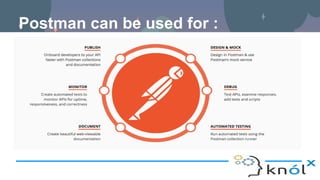
Postman can be used for :
Basic Postman Use Case:
● Exploring API.
● Manual Testing /Smoke Testing.
● Functional Testing.
● Integration Testing.
● Acceptance Testing.
Postman Core Concepts:
● Collections.
● Environments.
● Scripts.
Collections
A Postman Collection lets you group individual requests together. We can organize these
requests into folders.
Why Collections
❖ Organizing Requests :
➢ We can group requests together into folders and collections so that we don’t have
to search through our history repeatedly.
❖ Documentation :
➢ We can add a name and descriptions to requests, folders, and collections. In
Postman, we can use the collection browser to view the documentation.
❖ Test suites :
➢ we can attach test scripts to requests and build integration test suites.
❖ Manage workflows :
➢ We can use scripts to pass data between API requests and build workflows that
mirror your actual API use case.
Environments
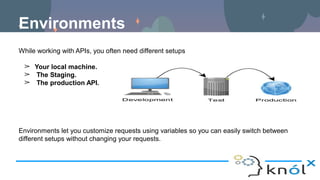
While working with APIs, you often need different setups
➢ Your local machine.
➢ The Staging.
➢ The production API.
Environments let you customize requests using variables so you can easily switch between
different setups without changing your requests.
Scripts
Postman contains a powerful runtime based on Node.js that allows you to add dynamic
behavior to requests and collections. This allows you to write test suites, build requests that
can contain dynamic parameters, pass data between requests, and a lot more. You can add
JavaScript code to execute during 2 events in the flow:
● Before a request is sent to the server, as a pre-request script under the Pre-request
Script tab.
● After a response is received, as a test script under the Tests tab.
Users can add pre-request and test scripts to a collection, a folder, a request within a
collection, or a request not saved to a collection.
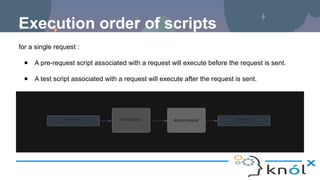
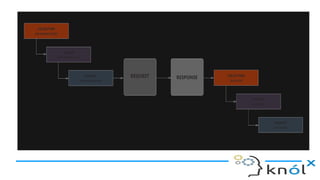
Execution order of scripts
for a single request :
● A pre-request script associated with a request will execute before the request is sent.
● A test script associated with a request will execute after the request is sent.
For every request in a collection
● A pre-request script associated with a collection will run prior to every request in the
collection.
● A pre-request script associated with a folder will run prior to every request in the folder.
● A test script associated with a collection will run after every request in the collection.
● A test script associated with a folder will run after after request in the folder.
To run collections, we can use :
● Postman app collection runner.
● Newman command line tool.
● Postman Monitors to run collections in scheduled intervals.
Collection Runner
As we already know that
Collections are groups of requests that can be run together as a series of requests, against a
corresponding environment.
Running a collection is useful when you want to automate API testing. When you run a
collection, you send all requests in your collection one after another.
Newman
Newman is a command line Collection Runner for Postman. It allows you to run and test a
Postman Collection directly from the command line. It is built with extensibility in mind so that
you can easily integrate it with your continuous integration servers and build systems.
Newman maintains feature parity with Postman and allows you to run collections the way
they are executed inside the collection runner in the Postman app.
Installing Newman :
Newman is built on Node.js. To run Newman, make sure you have Node.js installed.
Install Newman from npm globally on your system, which allows you to run it from anywhere.
$ npm install -g newman
The easiest way to run Newman is to run it with a collection. You can run any collection file
from your file system.
$ newman run mycollection.json
Working with Postman Step-By-Step
1. Create/import requests inside Postman.
2. Add them to a collection.
3. Parameterize using environments.
4. Add pre-request and test scripts.
5. Test inside Postman and collection Runner.
6. Export to newman.
7. Integrate with build system.
References
https://www.getpostman.com/docs/v6/
https://www.youtube.com/watch?v=tOmR-dbzvRw
Thank You!!!!

Accelerate Quality with Postman - Basics

  • 1.
    Accelerate Quality With POSTMAN- Basics Vandana Yadav QA Consultant
  • 2.
    Agenda ➢ Introduction ofPostman ➢ Postman core concepts ➢ Postman Collections ➢ Postman Environment ➢ Postman scripts ➢ Collection Runner ➢ Introduction to Newman ➢ Command line integration with Newman
  • 3.
    Postman ❖ Started In2012 and till now it is a well known API client which can be used for fulfilling all requirements of a developer and a tester during API development life cycle. ❖ Postman is an app which is used to prototyping the API with some more powerful testing features. ❖ Most widely used app for API testing. Why am I saying it most widely used : ➢ 5 Million Developers and 100000 companies are using postman to access 130 million api’s
  • 4.
    Postman can beused for :
  • 5.
    Basic Postman UseCase: ● Exploring API. ● Manual Testing /Smoke Testing. ● Functional Testing. ● Integration Testing. ● Acceptance Testing.
  • 6.
    Postman Core Concepts: ●Collections. ● Environments. ● Scripts.
  • 7.
    Collections A Postman Collectionlets you group individual requests together. We can organize these requests into folders.
  • 8.
    Why Collections ❖ OrganizingRequests : ➢ We can group requests together into folders and collections so that we don’t have to search through our history repeatedly. ❖ Documentation : ➢ We can add a name and descriptions to requests, folders, and collections. In Postman, we can use the collection browser to view the documentation. ❖ Test suites : ➢ we can attach test scripts to requests and build integration test suites. ❖ Manage workflows : ➢ We can use scripts to pass data between API requests and build workflows that mirror your actual API use case.
  • 9.
    Environments While working withAPIs, you often need different setups ➢ Your local machine. ➢ The Staging. ➢ The production API. Environments let you customize requests using variables so you can easily switch between different setups without changing your requests.
  • 10.
    Scripts Postman contains apowerful runtime based on Node.js that allows you to add dynamic behavior to requests and collections. This allows you to write test suites, build requests that can contain dynamic parameters, pass data between requests, and a lot more. You can add JavaScript code to execute during 2 events in the flow: ● Before a request is sent to the server, as a pre-request script under the Pre-request Script tab. ● After a response is received, as a test script under the Tests tab. Users can add pre-request and test scripts to a collection, a folder, a request within a collection, or a request not saved to a collection.
  • 11.
    Execution order ofscripts for a single request : ● A pre-request script associated with a request will execute before the request is sent. ● A test script associated with a request will execute after the request is sent.
  • 13.
    For every requestin a collection ● A pre-request script associated with a collection will run prior to every request in the collection. ● A pre-request script associated with a folder will run prior to every request in the folder. ● A test script associated with a collection will run after every request in the collection. ● A test script associated with a folder will run after after request in the folder.
  • 14.
    To run collections,we can use : ● Postman app collection runner. ● Newman command line tool. ● Postman Monitors to run collections in scheduled intervals.
  • 15.
    Collection Runner As wealready know that Collections are groups of requests that can be run together as a series of requests, against a corresponding environment. Running a collection is useful when you want to automate API testing. When you run a collection, you send all requests in your collection one after another.
  • 16.
    Newman Newman is acommand line Collection Runner for Postman. It allows you to run and test a Postman Collection directly from the command line. It is built with extensibility in mind so that you can easily integrate it with your continuous integration servers and build systems. Newman maintains feature parity with Postman and allows you to run collections the way they are executed inside the collection runner in the Postman app.
  • 17.
    Installing Newman : Newmanis built on Node.js. To run Newman, make sure you have Node.js installed. Install Newman from npm globally on your system, which allows you to run it from anywhere. $ npm install -g newman The easiest way to run Newman is to run it with a collection. You can run any collection file from your file system. $ newman run mycollection.json
  • 18.
    Working with PostmanStep-By-Step 1. Create/import requests inside Postman. 2. Add them to a collection. 3. Parameterize using environments. 4. Add pre-request and test scripts. 5. Test inside Postman and collection Runner. 6. Export to newman. 7. Integrate with build system.
  • 19.
  • 20.

Editor's Notes

  • #11 When you use scripts, you can build integration test suites, pass data between API requests, and build workflows that mirror your actual use case of APIs.