Day 2
10 to 12
Thought of the day.
“An investment in knowledge pays the best interest.”
..... Benjamin Franklin
DEVICE AND PRODUCT INTRODUCTION
WE HAVE BEEN DRIVING INNOVATION
IN PAYMENTS...
DEVICE AND PRODUCT INTRODUCTION
 POS devices.
Payments Made Simple
With Mswipe POS
Machine!
In Products we have:
 UPI-QR codes:
Scan to pay with MQR,
including Boom Box!
 PBL (Pay By Link):
Generate Payment Link & Collect
Payments Using Mswipe Pay By
Link!
 Money Back Card:
Save on all your spends
with 1% Cashback on
Mswipe’s Money Back
card!
DEVICE SPECIFICATION
Wisepad G2
 Built in GPRS modem (SIM
slot)/ Wi-Fi / Bluetooth).
 Additionally can connect to a
smartphone or PC via Bluetooth
like traditional MPOS.
 NFC, EMV Chip and Pin.
 Auto Settlement # Ease of
settlement.
 Automatic batch closure in
every 24 hours.
 Instant / real time Transaction
summary on our merchant app
or www.mswipe.com.
 Electronics Charge slip .
WISEPAD G2 PLUS
 Built in GPRS modem (SIM slot)
and Wi-Fi.
 NFC, EMV Chip and Pin /
Integrated with a thermal printer and
rechargeable battery.
 Offers total mobility and ultimate
convenience.
 By connecting to your smartphone or
tablet via Bluetooth.
 Auto Settlement # Ease of
settlement.
 Automatic batch closure in every 24
hours.
 Instant / real time Transaction
summary on our merchant app or
www.mswipe.com.
 Electronics Charge slip.
WISEPAD GO.
 WisePad GO takes MPOS
capabilities to the next level.
 Smooth transaction with
Wisepad Go.
 Seamless connection
with your phone.
 Easily accepts
EMV/Chip/NFC cards.
 LED indicator.
 Secure keypad.
 Micro USB port.
 Charging contact.
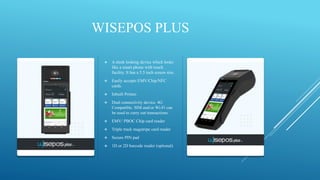
WISEPOS PLUS
 A sleek looking device which looks
like a smart phone with touch
facility. It has a 5.5 inch screen size.
 Easily accepts EMV/Chip/NFC
cards.
 Inbuilt Printer.
 Dual connectivity device. 4G
Compatible. SIM and/or Wi-Fi can
be used to carry out transactions.
 EMV/ PBOC Chip card reader
 Triple track magstripe card reader
 Secure PIN pad
 1D or 2D barcode reader (optional)
WISEPOS NEO
 WisePOS Neo is an Android
based all in one POS device
which improves mobility by
integrating payments with
business applications in a
single device.
 Streamlining business
management and reducing
complexity.
 It is ideal for restaurant
delivery business and host of
other applications.
WISEPOS GO
 WisePOS Go is an Android
based POS device which
improves mobility by
integrating payments with
business applications in a
single device. Streamlining
business management and
reducing complexity.
 Magstripe, EMV, and NFC
card readers, a barcode
scanner, 5-megapixel camera.
 Supports 4G, Wi-Fi,
Bluetooth and micro-USB.
WISEPOS 2.0
 Trusted by
Maharashtra Traffic
Police.
 Integrated with built-in
receipt printer.
 Barcode scanner.
 Long battery life
 Get 14+ hours of standby
time on a full charge.
MQR
 Mswipe offers UPI QR Code to merchants • Enables
merchants to collect payments via UPI QR.
 Mswipe provide Dynamic and Static QR Code options
to merchants.
 Dynamic QR is generated from the Mswipe app by
clicking on “QR Sale”.
 MQR payment settlement will be done in the bank
account registered with Mswipe.
 MQR settlement happens 3 times in a day.
 No activation fee from Mswipe for QR.
 Zero transaction fee as per current directive from RBI
BOOM BOX
 Screen for better visibility.
 ZERO HOLD ISSUE.
 4G SIM card (Airtel only).
 Hindi and English and Change device language in real-time.
 Power adapter, user manual, SIM, and cable / Power button,
function key, volume keys.
 Fast charging device, when charged for 15 to 20 minutes can support
approximately 100 transactions.
 The batch is auto-settled.
 Last 10 TXN merchant can check in display.
 Audio broadcast / LCD indicator / LED display / Replay of previous
transaction.
ALL ABOUT POS
SECOND HALF
BREAK TIME
Technical Issues
 Having good quality control measures in place ensures that only high-quality products are
produced.
 However, sometimes things go wrong and being able to service faulty parts as opposed to
replacing products under warranty, saves both time and money.
Common POS System Problems
Failure to charge
Software Problems
Connectivity
Power Not ON
Device Issue.
Bad Swipe.
System Halt Damage/Lost Chip Not Detected
Terminate Error.
How do you deal with a problem at the POS?
Restart the POS terminal.
Check the POS battery is
charged.
Power on.
Try a test transaction.
Use correct
TROUBLESHOOT
Confirm ERROR CODE on POS.
Ensure the issue is
resolved.
ERROR CODES & It’s SOLUTIONS
Error code:
 Invalid Merchant: Ask merchant to connect helpline for IT support.
 Pick Up: The customer’s card issuer has declined the transaction and requested that the card be retained
as the card may have been reported as lost or stolen. The customer should use an alternate credit card, or
contact their bank.
 Do Not Honor: This indicates an error or problem from the card issuer. In general the reason for this
response code may be any of the following: Suspected Fraud. Insufficient Funds. ... Any other rule
imposed by the card issuer that causes a decline (e.g. daily limit exceeded, duplicate transaction
suspected, etc.)
 Not Sufficient Funds: This indicates insufficient funds in card holder’s account.
 TID for this terminal is not found: Device not mapped properly.
 Declined Transaction: Device not mapped properly; App not updated & Serial no. mismatch.
 Unknown Error: Hardware issue & change device.
 Refer to Card Issuer: The customer’s card issuer has indicated there is a problem with the card
number. The customer should use an alternate credit card, or contact their bank.
Straight Through Process (STP)
&
Non Straight Through Process (NSTP)
CASES
Straight through process are such cases in which the merchant's device issues are fixed and are rectified
and they can begin transacting once you do a test swipe and its successful, STP cases are, those cases where
merchant’s issue is resolved at the time of your visit.
Where the test transaction is successful.
Where the ticket raised in complete and successful.
whereas:
Non-Straight Through Process are those cases in which the issue must be highlighted and the merchant's
device issue is not resolved.
Where the test transaction is failed.
Which cases on field are not resolved which needs to be escalated ahead.
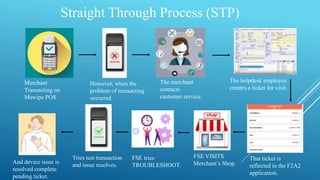
Straight Through Process (STP)
Merchant
Transacting on
Mswipe POS.
However, when the
problem of transacting
occurred.
The merchant
contacts
customer service.
The helpdesk employee
creates a ticket for visit.
That ticket is
reflected in the F2A2
application.
FSE VISITS
Merchant’s Shop.
FSE tries
TROUBLESHOOT.
Tries test transaction
and issue resolves.
And device issue is
resolved complete
pending ticket.
Non-Straight Through Process (NSTP)
Merchant Facing
device issue.
After trying
TROUBLESHOOT
if issue still not
resolved
Find out what the exact issue is
and what error code is coming.
Try troubleshoot for that error
code and try to resolve if not
resolved give merchant correct
details provide him TAT time
and highlight it to the seniors in
Mattermost on product desk.
ASSESSMENT
LINK

About POS

  • 2.
    Day 2 10 to12 Thought of the day. “An investment in knowledge pays the best interest.” ..... Benjamin Franklin
  • 3.
    DEVICE AND PRODUCTINTRODUCTION
  • 4.
    WE HAVE BEENDRIVING INNOVATION IN PAYMENTS...
  • 5.
    DEVICE AND PRODUCTINTRODUCTION  POS devices. Payments Made Simple With Mswipe POS Machine! In Products we have:  UPI-QR codes: Scan to pay with MQR, including Boom Box!  PBL (Pay By Link): Generate Payment Link & Collect Payments Using Mswipe Pay By Link!  Money Back Card: Save on all your spends with 1% Cashback on Mswipe’s Money Back card!
  • 6.
    DEVICE SPECIFICATION Wisepad G2 Built in GPRS modem (SIM slot)/ Wi-Fi / Bluetooth).  Additionally can connect to a smartphone or PC via Bluetooth like traditional MPOS.  NFC, EMV Chip and Pin.  Auto Settlement # Ease of settlement.  Automatic batch closure in every 24 hours.  Instant / real time Transaction summary on our merchant app or www.mswipe.com.  Electronics Charge slip .
  • 7.
    WISEPAD G2 PLUS Built in GPRS modem (SIM slot) and Wi-Fi.  NFC, EMV Chip and Pin / Integrated with a thermal printer and rechargeable battery.  Offers total mobility and ultimate convenience.  By connecting to your smartphone or tablet via Bluetooth.  Auto Settlement # Ease of settlement.  Automatic batch closure in every 24 hours.  Instant / real time Transaction summary on our merchant app or www.mswipe.com.  Electronics Charge slip.
  • 8.
    WISEPAD GO.  WisePadGO takes MPOS capabilities to the next level.  Smooth transaction with Wisepad Go.  Seamless connection with your phone.  Easily accepts EMV/Chip/NFC cards.  LED indicator.  Secure keypad.  Micro USB port.  Charging contact.
  • 9.
    WISEPOS PLUS  Asleek looking device which looks like a smart phone with touch facility. It has a 5.5 inch screen size.  Easily accepts EMV/Chip/NFC cards.  Inbuilt Printer.  Dual connectivity device. 4G Compatible. SIM and/or Wi-Fi can be used to carry out transactions.  EMV/ PBOC Chip card reader  Triple track magstripe card reader  Secure PIN pad  1D or 2D barcode reader (optional)
  • 10.
    WISEPOS NEO  WisePOSNeo is an Android based all in one POS device which improves mobility by integrating payments with business applications in a single device.  Streamlining business management and reducing complexity.  It is ideal for restaurant delivery business and host of other applications.
  • 11.
    WISEPOS GO  WisePOSGo is an Android based POS device which improves mobility by integrating payments with business applications in a single device. Streamlining business management and reducing complexity.  Magstripe, EMV, and NFC card readers, a barcode scanner, 5-megapixel camera.  Supports 4G, Wi-Fi, Bluetooth and micro-USB.
  • 12.
    WISEPOS 2.0  Trustedby Maharashtra Traffic Police.  Integrated with built-in receipt printer.  Barcode scanner.  Long battery life  Get 14+ hours of standby time on a full charge.
  • 13.
    MQR  Mswipe offersUPI QR Code to merchants • Enables merchants to collect payments via UPI QR.  Mswipe provide Dynamic and Static QR Code options to merchants.  Dynamic QR is generated from the Mswipe app by clicking on “QR Sale”.  MQR payment settlement will be done in the bank account registered with Mswipe.  MQR settlement happens 3 times in a day.  No activation fee from Mswipe for QR.  Zero transaction fee as per current directive from RBI
  • 14.
    BOOM BOX  Screenfor better visibility.  ZERO HOLD ISSUE.  4G SIM card (Airtel only).  Hindi and English and Change device language in real-time.  Power adapter, user manual, SIM, and cable / Power button, function key, volume keys.  Fast charging device, when charged for 15 to 20 minutes can support approximately 100 transactions.  The batch is auto-settled.  Last 10 TXN merchant can check in display.  Audio broadcast / LCD indicator / LED display / Replay of previous transaction.
  • 15.
  • 16.
  • 17.
    Technical Issues  Havinggood quality control measures in place ensures that only high-quality products are produced.  However, sometimes things go wrong and being able to service faulty parts as opposed to replacing products under warranty, saves both time and money. Common POS System Problems Failure to charge Software Problems Connectivity Power Not ON Device Issue. Bad Swipe. System Halt Damage/Lost Chip Not Detected Terminate Error.
  • 18.
    How do youdeal with a problem at the POS? Restart the POS terminal. Check the POS battery is charged. Power on. Try a test transaction. Use correct TROUBLESHOOT Confirm ERROR CODE on POS. Ensure the issue is resolved.
  • 19.
    ERROR CODES &It’s SOLUTIONS Error code:  Invalid Merchant: Ask merchant to connect helpline for IT support.  Pick Up: The customer’s card issuer has declined the transaction and requested that the card be retained as the card may have been reported as lost or stolen. The customer should use an alternate credit card, or contact their bank.  Do Not Honor: This indicates an error or problem from the card issuer. In general the reason for this response code may be any of the following: Suspected Fraud. Insufficient Funds. ... Any other rule imposed by the card issuer that causes a decline (e.g. daily limit exceeded, duplicate transaction suspected, etc.)  Not Sufficient Funds: This indicates insufficient funds in card holder’s account.  TID for this terminal is not found: Device not mapped properly.  Declined Transaction: Device not mapped properly; App not updated & Serial no. mismatch.  Unknown Error: Hardware issue & change device.  Refer to Card Issuer: The customer’s card issuer has indicated there is a problem with the card number. The customer should use an alternate credit card, or contact their bank.
  • 20.
    Straight Through Process(STP) & Non Straight Through Process (NSTP) CASES Straight through process are such cases in which the merchant's device issues are fixed and are rectified and they can begin transacting once you do a test swipe and its successful, STP cases are, those cases where merchant’s issue is resolved at the time of your visit. Where the test transaction is successful. Where the ticket raised in complete and successful. whereas: Non-Straight Through Process are those cases in which the issue must be highlighted and the merchant's device issue is not resolved. Where the test transaction is failed. Which cases on field are not resolved which needs to be escalated ahead.
  • 21.
    Straight Through Process(STP) Merchant Transacting on Mswipe POS. However, when the problem of transacting occurred. The merchant contacts customer service. The helpdesk employee creates a ticket for visit. That ticket is reflected in the F2A2 application. FSE VISITS Merchant’s Shop. FSE tries TROUBLESHOOT. Tries test transaction and issue resolves. And device issue is resolved complete pending ticket.
  • 22.
    Non-Straight Through Process(NSTP) Merchant Facing device issue. After trying TROUBLESHOOT if issue still not resolved Find out what the exact issue is and what error code is coming. Try troubleshoot for that error code and try to resolve if not resolved give merchant correct details provide him TAT time and highlight it to the seniors in Mattermost on product desk.
  • 23.