Speed Up Synchronization Locks:  A Scaleform Case Study Abhishek Agrawal Software Solutions Group
Legal Disclaimer INFORMATION IN THIS DOCUMENT IS PROVIDED IN CONNECTION WITH INTEL® PRODUCTS. NO LICENSE, EXPRESS OR IMPLIED, BY ESTOPPEL OR OTHERWISE, TO ANY INTELLECTUAL PROPERTY RIGHTS IS GRANTED BY THIS DOCUMENT. EXCEPT AS PROVIDED IN INTEL’S TERMS AND CONDITIONS OF SALE FOR SUCH PRODUCTS, INTEL ASSUMES NO LIABILITY WHATSOEVER, AND INTEL DISCLAIMS ANY EXPRESS OR IMPLIED WARRANTY, RELATING TO SALE AND/OR USE OF INTEL® PRODUCTS INCLUDING LIABILITY OR WARRANTIES RELATING TO FITNESS FOR A PARTICULAR PURPOSE, MERCHANTABILITY, OR INFRINGEMENT OF ANY PATENT, COPYRIGHT OR OTHER INTELLECTUAL PROPERTY RIGHT. INTEL PRODUCTS ARE NOT INTENDED FOR USE IN MEDICAL, LIFE SAVING, OR LIFE SUSTAINING APPLICATIONS.  Intel may make changes to specifications and product descriptions at any time, without notice. All products, dates, and figures specified are preliminary based on current expectations, and are subject to change without notice. Intel, processors, chipsets, and desktop boards may contain design defects or errors known as errata, which may cause the product to deviate from published specifications. Current characterized errata are available on request. Performance tests and ratings are measured using specific computer systems and/or components and reflect the approximate performance of Intel products as measured by those tests.  Any difference in system hardware or software design or configuration may affect actual performance.  Intel, Intel Inside, and the Intel logo are trademarks of Intel Corporation in the United States and other countries.  *Other names and brands may be claimed as the property of others. Copyright © 2008 Intel Corporation.
Agenda Common Locking Issues Windows* Locking Methodologies and associated performance User Level Atomic Locks with Scaleform* case Study Hot Locks and Lock Contention with Flight Simulator* Case Study Locks in Intel TBB ® Summary & Call to Action
Why care for Locking ?? Locking code can be the most frequently run code in a multi-threaded application Determining which methodology of locking to utilize can be as critical as identification of parallelism within an application Improper use of locking mechanism can lead to situations like lock stuttering, very high contention and new types of programming bugs Proper use of locks  is crucial for multi-threading applications
Common Lock Pathologies Can introduce performance and correctness problems  Some potential problems Deadlock Happens when tasks are trying to acquire more than one lock and each holds some of the locks the other tasks need in order to proceed Convoying  Occurs when the operating system interrupts a task that is holding a lock Priority Inversion Refers to the scenario where a lower-priority task holds a shared resource that is required by a higher-priority task
How to avoid Lock Pathologies Deadlocks Avoid needing to hold two locks at the same time Always acquire locks in the same order (e.g. outer container and inner container mutexes) Use  atomic operations Convoying & Priority Inversion Use  atomic operations  instead of locks where possible Use Atomic Operations and  User-Level Locks
Agenda Common Locking Issues Windows* Locking Methodologies and associated performance User Level Atomic Locks with Scaleform* case Study Hot Locks and Lock Contention with Flight Simulator* Case Study Locks in Intel TBB ® Summary & Call to Action
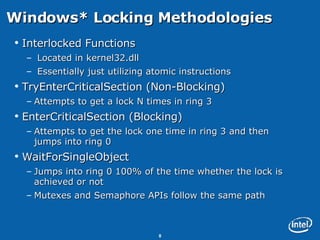
Windows* Locking Methodologies  Interlocked Functions Located in kernel32.dll Essentially just utilizing atomic instructions TryEnterCriticalSection (Non-Blocking) Attempts to get a lock N times in ring 3 EnterCriticalSection (Blocking) Attempts to get the lock one time in ring 3 and then jumps into ring 0 WaitForSingleObject Jumps into ring 0 100% of the time whether the lock is achieved or not Mutexes and Semaphore APIs follow the same path
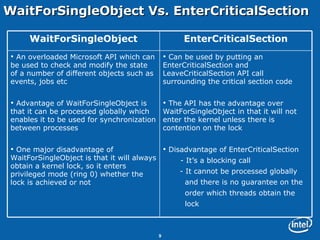
WaitForSingleObject Vs. EnterCriticalSection Can be used by putting an EnterCriticalSection and LeaveCriticalSection API call surrounding the critical section code The API has the advantage over WaitForSingleObject in that it will not enter the kernel unless there is contention on the lock Disadvantage of EnterCriticalSection - It’s a blocking call - It cannot be processed globally  and there is no guarantee on the  order which threads obtain the  lock An overloaded Microsoft API which can be used to check and modify the state of a number of different objects such as events, jobs etc Advantage of WaitForSingleObject is that it can be processed globally which enables it to be used for synchronization between processes One major disadvantage of WaitForSingleObject is that it will always obtain a kernel lock, so it enters privileged mode (ring 0) whether the lock is achieved or not EnterCriticalSection WaitForSingleObject
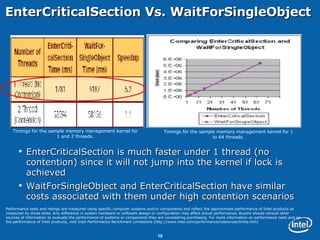
EnterCriticalSection Vs. WaitForSingleObject EnterCriticalSection is much faster under 1 thread (no contention) since it will not jump into the kernel if lock is achieved WaitForSingleObject and EnterCriticalSection have similar costs associated with them under high contention scenarios Timings for the sample memory management kernel for 1 and 2 threads. Timings for the sample memory management kernel for 1 to 64 threads. Performance tests and ratings are measured using specific computer systems and/or components and reflect the approximate performance of Intel products as measured by those tests. Any difference in system hardware or software design or configuration may affect actual performance. Buyers should consult other sources of information to evaluate the performance of systems or components they are considering purchasing. For more information on performance tests and on the performance of Intel products, visit Intel Performance Benchmark Limitations (http://www.intel.com/performance/resources/limits.htm)
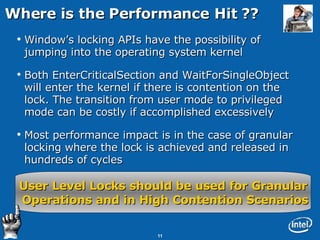
Where is the Performance Hit ?? Window’s locking APIs have the possibility of jumping into the operating system kernel Both EnterCriticalSection and WaitForSingleObject will enter the kernel if there is contention on the lock. The transition from user mode to privileged mode can be costly if accomplished excessively Most performance impact is in the case of granular locking where the lock is achieved and released in hundreds of cycles User Level Locks should be used for Granular Operations and in High Contention Scenarios
Agenda Common Locking Issues Windows* Locking Methodologies and associated performance User Level Atomic Locks with Scaleform* case Study Hot Locks and Lock Contention with Flight Simulator* Case Study Locks in Intel TBB ® Summary & Call to Action
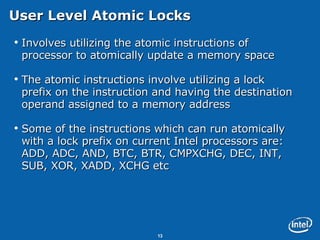
User Level Atomic Locks Involves utilizing the atomic instructions of processor to atomically update a memory space The atomic instructions involve utilizing a lock prefix on the instruction and having the destination operand assigned to a memory address Some of the instructions which can run atomically with a lock prefix on current Intel processors are: ADD, ADC, AND, BTC, BTR, CMPXCHG, DEC, INT, SUB, XOR, XADD, XCHG etc
A Sample User Level Atomic Lock Figure shows the assembly of a simple mutex lock demonstrating usage of utilizing an atomic instruction with a lock prefix for obtaining a lock Is it necessary to write assembly to take advantage of user land locks which utilize the lock prefix ??
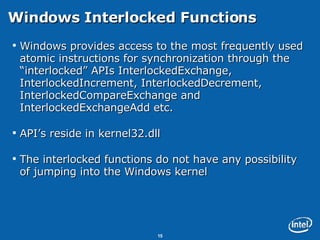
Windows Interlocked Functions Windows provides access to the most frequently used atomic instructions for synchronization through the “interlocked” APIs InterlockedExchange, InterlockedIncrement, InterlockedDecrement, InterlockedCompareExchange and InterlockedExchangeAdd etc. API’s reside in kernel32.dll The interlocked functions do not have any possibility of jumping into the Windows kernel
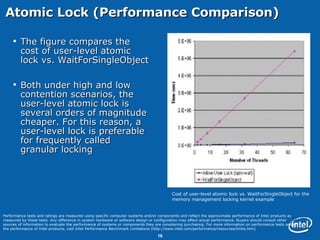
Atomic Lock (Performance Comparison)  The figure compares the cost of user-level atomic lock vs. WaitForSingleObject Both under high and low contention scenarios, the user-level atomic lock is several orders of magnitude cheaper. For this reason, a user-level lock is preferable for frequently called granular locking Cost of user-level atomic lock vs. WaitForSingleObject for the memory management locking kernel example Performance tests and ratings are measured using specific computer systems and/or components and reflect the approximate performance of Intel products as measured by those tests. Any difference in system hardware or software design or configuration may affect actual performance. Buyers should consult other sources of information to evaluate the performance of systems or components they are considering purchasing. For more information on performance tests and on the performance of Intel products, visit Intel Performance Benchmark Limitations (http://www.intel.com/performance/resources/limits.htm)
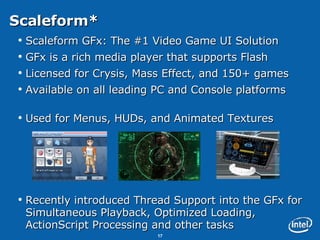
Scaleform* Scaleform GFx: The #1 Video Game UI Solution GFx is a rich media player that supports Flash  Licensed for Crysis, Mass Effect, and 150+ games Available on all leading PC and Console platforms Used for Menus, HUDs, and Animated Textures Recently introduced Thread Support into the GFx for Simultaneous Playback, Optimized Loading, ActionScript Processing and other tasks
Why Is Threaded UI Important ??  The Future of Animated Flash and Video Textures!
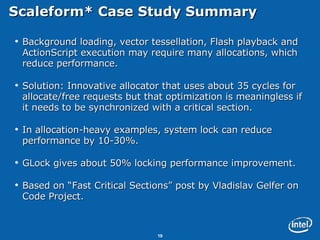
Scaleform* Case Study Summary  Background loading, vector tessellation, Flash playback and ActionScript execution may require many allocations, which reduce performance. Solution: Innovative allocator that uses about 35 cycles for allocate/free requests but that optimization is meaningless if it needs to be synchronized with a critical section.  In allocation-heavy examples, system lock can reduce performance by 10-30%. GLock gives about 50% locking performance improvement.  Based on “Fast Critical Sections” post by Vladislav Gelfer on Code Project.
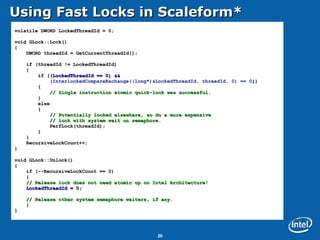
Using Fast Locks in Scaleform* volatile DWORD LockedThreadId = 0; void GLock::Lock() { DWORD threadId = GetCurrentThreadId(); if (threadId != LockedThreadId) { if ( (LockedThreadId == 0) && (InterlockedCompareExchange((long*)&LockedThreadId, threadId, 0) == 0 ) ) { // Single instruction atomic quick-lock was successful. } else { // Potentially locked elsewhere, so do a more expensive // lock with system wait on semaphore. PerfLock(threadId);  } } RecursiveLockCount++; } void GLock::Unlock() { if (--RecursiveLockCount == 0) { // Release lock does not need atomic op on Intel Architecture! LockedThreadId = 0; // Release other system semaphore waiters, if any. } }
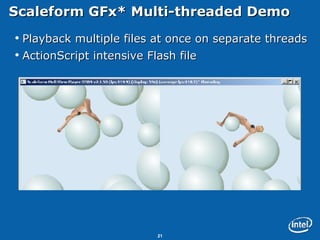
Scaleform GFx* Multi-threaded Demo  Playback multiple files at once on separate threads ActionScript intensive Flash file
Agenda Common Locking Issues Windows Locking Methodologies and associated performance User Level Atomic Locks with Scaleform* case Study Hot Locks and Lock Contention with Flight Simulator* Case Study Locks in Intel TBB ® Summary & Call to Action
Finding Lock Contention Using Intel Tools Lock Contention is another major issue which limits Scalability and adds Complexity Intel Tools can help in finding high contention scenarios VTune™ Collecting clock ticks event via event based sampling using the Intel VTune Analyzer can be useful to help determine how much contention is occurring Thread Profiler™ Provides an API for users to instrument user synchronization Spin waits appear as a hashed color in the Thread Profiler GUI Please refer to Intel Session on “Comparative Analysis  of Game Parallelization” for more details on Thread Profiler
Contention using VTune™ (Where to Look) EnterCriticalSection Ring0 ntoskrnl.exe becomes hotter For very high contention scenario, ring 0 becomes hot and number of context switches become very high TryEnterCriticalSection Ntdll.dll will become hotter as you add threads WaitForSingleObject Similar behavior as EnterCriticalSection Interlocked Functions kernel32.dll will get hot
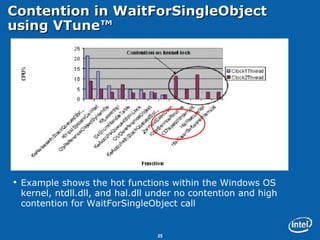
Contention in WaitForSingleObject using VTune™ Example shows the hot functions within the Windows OS kernel, ntdll.dll, and hal.dll under no contention and high contention for WaitForSingleObject call
Possible Ways to Reduce Lock Contention Lock Stripping. Does your whole array really need to be protected by the same lock or can you give each element its own lock? Protect data, not code. Common technique is to put a lock around the whole function call. Remember that it’s only data that needs to be protected, not the code. Use Reader-Writer Locks where applicable. For the cases where a lot of threads read a memory location that is rarely changed.  Ensures that multiple readers can enter the lock at the same time.
Microsoft Flight Simulator* Case Study Multi-Threading Goal Separate terrain processing from rendering Loading games once in the beginning The engine keeps loading contents in the background while playing Main thread runs D3D, physics, etc. All other threads loads and pre-processes the terrain textures and other contents Loading and processing textures without slowing down frame-rate Expected to scale in terms of processing more contents as more processors are available
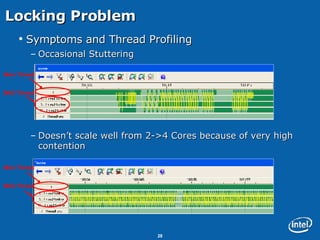
Symptoms and Thread Profiling Occasional Stuttering Doesn’t scale well from 2->4 Cores because of very high contention Locking Problem Main Thread BKG Thread Main Thread BKG Thread
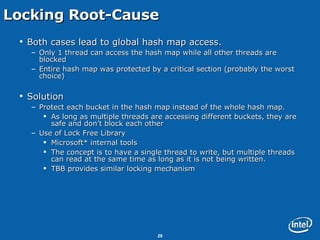
Locking Root-Cause Both cases lead to global hash map access. Only 1 thread can access the hash map while all other threads are blocked Entire hash map was protected by a critical section (probably the worst choice) Solution Protect each bucket in the hash map instead of the whole hash map. As long as multiple threads are accessing different buckets, they are safe and don’t block each other Use of Lock Free Library Microsoft* internal tools The concept is to have a single thread to write, but multiple threads can read at the same time as long as it is not being written.  TBB provides similar locking mechanism
Flight Simulator* Result Reduced stuttering, lower latency in terrain loading, and  better visuals without sacrificing frame rates
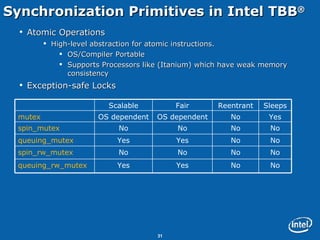
Synchronization Primitives in Intel TBB ® Atomic Operations High-level abstraction for atomic instructions. OS/Compiler Portable Supports Processors like (Itanium) which have weak memory consistency Exception-safe Locks No No Yes Yes queuing_rw_mutex No No No No spin_rw_mutex No No Yes Yes queuing_mutex No No No No spin_mutex Yes No OS dependent OS dependent mutex Sleeps Reentrant Fair Scalable
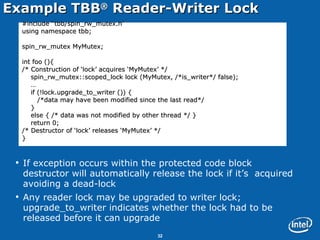
Example TBB ®  Reader-Writer Lock If exception occurs within the protected code block destructor will automatically release the lock if it’s  acquired avoiding a dead-lock Any reader lock may be upgraded to writer lock; upgrade_to_writer indicates whether the lock had to be released before it can upgrade #include “tbb/spin_rw_mutex.h” using namespace tbb; spin_rw_mutex MyMutex; int foo (){ /* Construction of ‘lock’ acquires ‘MyMutex’ */ spin_rw_mutex::scoped_lock lock (MyMutex, /*is_writer*/ false); … if (!lock.upgrade_to_writer ()) { /*data may have been modified since the last read*/  } else { /* data was not modified by other thread */ } return 0;  /* Destructor of ‘lock’ releases ‘MyMutex’ */ }
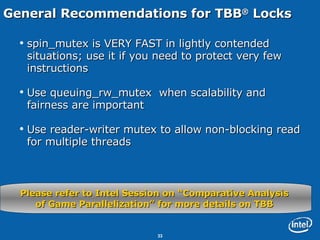
General Recommendations for TBB ®  Locks spin_mutex is VERY FAST in lightly contended situations; use it if you need to protect very few instructions Use queuing_rw_mutex  when scalability and fairness are important Use reader-writer mutex to allow non-blocking read for multiple threads Please refer to Intel Session on “Comparative Analysis  of Game Parallelization” for more details on TBB
Summary & Call to Action The use of inefficient synchronization strategy can have a big impact on the performance of your Multi-Threaded application: if it doesn’t hit you today then it sure will do tomorrow. Try using User-Level Atomic Locks instead of very expensive Kernel-Locks. Use Intel Tools (VTune™ and Thread Profiler™) to help identify potential lock problems. Use the locks properly to avoid high contention scenarios and make your code more scalable.
Contact Info For more info –see our Graphics, Game Development and Threading resources at:  http:// softwarecommunity.intel.com / Feel free to contact me directly: abhishek.r.agrawal@intel.com
 

Speed Up Synchronization Locks: How and Why?

  • 1.
    Speed Up SynchronizationLocks: A Scaleform Case Study Abhishek Agrawal Software Solutions Group
  • 2.
    Legal Disclaimer INFORMATIONIN THIS DOCUMENT IS PROVIDED IN CONNECTION WITH INTEL® PRODUCTS. NO LICENSE, EXPRESS OR IMPLIED, BY ESTOPPEL OR OTHERWISE, TO ANY INTELLECTUAL PROPERTY RIGHTS IS GRANTED BY THIS DOCUMENT. EXCEPT AS PROVIDED IN INTEL’S TERMS AND CONDITIONS OF SALE FOR SUCH PRODUCTS, INTEL ASSUMES NO LIABILITY WHATSOEVER, AND INTEL DISCLAIMS ANY EXPRESS OR IMPLIED WARRANTY, RELATING TO SALE AND/OR USE OF INTEL® PRODUCTS INCLUDING LIABILITY OR WARRANTIES RELATING TO FITNESS FOR A PARTICULAR PURPOSE, MERCHANTABILITY, OR INFRINGEMENT OF ANY PATENT, COPYRIGHT OR OTHER INTELLECTUAL PROPERTY RIGHT. INTEL PRODUCTS ARE NOT INTENDED FOR USE IN MEDICAL, LIFE SAVING, OR LIFE SUSTAINING APPLICATIONS. Intel may make changes to specifications and product descriptions at any time, without notice. All products, dates, and figures specified are preliminary based on current expectations, and are subject to change without notice. Intel, processors, chipsets, and desktop boards may contain design defects or errors known as errata, which may cause the product to deviate from published specifications. Current characterized errata are available on request. Performance tests and ratings are measured using specific computer systems and/or components and reflect the approximate performance of Intel products as measured by those tests. Any difference in system hardware or software design or configuration may affect actual performance. Intel, Intel Inside, and the Intel logo are trademarks of Intel Corporation in the United States and other countries. *Other names and brands may be claimed as the property of others. Copyright © 2008 Intel Corporation.
  • 3.
    Agenda Common LockingIssues Windows* Locking Methodologies and associated performance User Level Atomic Locks with Scaleform* case Study Hot Locks and Lock Contention with Flight Simulator* Case Study Locks in Intel TBB ® Summary & Call to Action
  • 4.
    Why care forLocking ?? Locking code can be the most frequently run code in a multi-threaded application Determining which methodology of locking to utilize can be as critical as identification of parallelism within an application Improper use of locking mechanism can lead to situations like lock stuttering, very high contention and new types of programming bugs Proper use of locks is crucial for multi-threading applications
  • 5.
    Common Lock PathologiesCan introduce performance and correctness problems Some potential problems Deadlock Happens when tasks are trying to acquire more than one lock and each holds some of the locks the other tasks need in order to proceed Convoying Occurs when the operating system interrupts a task that is holding a lock Priority Inversion Refers to the scenario where a lower-priority task holds a shared resource that is required by a higher-priority task
  • 6.
    How to avoidLock Pathologies Deadlocks Avoid needing to hold two locks at the same time Always acquire locks in the same order (e.g. outer container and inner container mutexes) Use atomic operations Convoying & Priority Inversion Use atomic operations instead of locks where possible Use Atomic Operations and User-Level Locks
  • 7.
    Agenda Common LockingIssues Windows* Locking Methodologies and associated performance User Level Atomic Locks with Scaleform* case Study Hot Locks and Lock Contention with Flight Simulator* Case Study Locks in Intel TBB ® Summary & Call to Action
  • 8.
    Windows* Locking Methodologies Interlocked Functions Located in kernel32.dll Essentially just utilizing atomic instructions TryEnterCriticalSection (Non-Blocking) Attempts to get a lock N times in ring 3 EnterCriticalSection (Blocking) Attempts to get the lock one time in ring 3 and then jumps into ring 0 WaitForSingleObject Jumps into ring 0 100% of the time whether the lock is achieved or not Mutexes and Semaphore APIs follow the same path
  • 9.
    WaitForSingleObject Vs. EnterCriticalSectionCan be used by putting an EnterCriticalSection and LeaveCriticalSection API call surrounding the critical section code The API has the advantage over WaitForSingleObject in that it will not enter the kernel unless there is contention on the lock Disadvantage of EnterCriticalSection - It’s a blocking call - It cannot be processed globally and there is no guarantee on the order which threads obtain the lock An overloaded Microsoft API which can be used to check and modify the state of a number of different objects such as events, jobs etc Advantage of WaitForSingleObject is that it can be processed globally which enables it to be used for synchronization between processes One major disadvantage of WaitForSingleObject is that it will always obtain a kernel lock, so it enters privileged mode (ring 0) whether the lock is achieved or not EnterCriticalSection WaitForSingleObject
  • 10.
    EnterCriticalSection Vs. WaitForSingleObjectEnterCriticalSection is much faster under 1 thread (no contention) since it will not jump into the kernel if lock is achieved WaitForSingleObject and EnterCriticalSection have similar costs associated with them under high contention scenarios Timings for the sample memory management kernel for 1 and 2 threads. Timings for the sample memory management kernel for 1 to 64 threads. Performance tests and ratings are measured using specific computer systems and/or components and reflect the approximate performance of Intel products as measured by those tests. Any difference in system hardware or software design or configuration may affect actual performance. Buyers should consult other sources of information to evaluate the performance of systems or components they are considering purchasing. For more information on performance tests and on the performance of Intel products, visit Intel Performance Benchmark Limitations (http://www.intel.com/performance/resources/limits.htm)
  • 11.
    Where is thePerformance Hit ?? Window’s locking APIs have the possibility of jumping into the operating system kernel Both EnterCriticalSection and WaitForSingleObject will enter the kernel if there is contention on the lock. The transition from user mode to privileged mode can be costly if accomplished excessively Most performance impact is in the case of granular locking where the lock is achieved and released in hundreds of cycles User Level Locks should be used for Granular Operations and in High Contention Scenarios
  • 12.
    Agenda Common LockingIssues Windows* Locking Methodologies and associated performance User Level Atomic Locks with Scaleform* case Study Hot Locks and Lock Contention with Flight Simulator* Case Study Locks in Intel TBB ® Summary & Call to Action
  • 13.
    User Level AtomicLocks Involves utilizing the atomic instructions of processor to atomically update a memory space The atomic instructions involve utilizing a lock prefix on the instruction and having the destination operand assigned to a memory address Some of the instructions which can run atomically with a lock prefix on current Intel processors are: ADD, ADC, AND, BTC, BTR, CMPXCHG, DEC, INT, SUB, XOR, XADD, XCHG etc
  • 14.
    A Sample UserLevel Atomic Lock Figure shows the assembly of a simple mutex lock demonstrating usage of utilizing an atomic instruction with a lock prefix for obtaining a lock Is it necessary to write assembly to take advantage of user land locks which utilize the lock prefix ??
  • 15.
    Windows Interlocked FunctionsWindows provides access to the most frequently used atomic instructions for synchronization through the “interlocked” APIs InterlockedExchange, InterlockedIncrement, InterlockedDecrement, InterlockedCompareExchange and InterlockedExchangeAdd etc. API’s reside in kernel32.dll The interlocked functions do not have any possibility of jumping into the Windows kernel
  • 16.
    Atomic Lock (PerformanceComparison) The figure compares the cost of user-level atomic lock vs. WaitForSingleObject Both under high and low contention scenarios, the user-level atomic lock is several orders of magnitude cheaper. For this reason, a user-level lock is preferable for frequently called granular locking Cost of user-level atomic lock vs. WaitForSingleObject for the memory management locking kernel example Performance tests and ratings are measured using specific computer systems and/or components and reflect the approximate performance of Intel products as measured by those tests. Any difference in system hardware or software design or configuration may affect actual performance. Buyers should consult other sources of information to evaluate the performance of systems or components they are considering purchasing. For more information on performance tests and on the performance of Intel products, visit Intel Performance Benchmark Limitations (http://www.intel.com/performance/resources/limits.htm)
  • 17.
    Scaleform* Scaleform GFx:The #1 Video Game UI Solution GFx is a rich media player that supports Flash Licensed for Crysis, Mass Effect, and 150+ games Available on all leading PC and Console platforms Used for Menus, HUDs, and Animated Textures Recently introduced Thread Support into the GFx for Simultaneous Playback, Optimized Loading, ActionScript Processing and other tasks
  • 18.
    Why Is ThreadedUI Important ?? The Future of Animated Flash and Video Textures!
  • 19.
    Scaleform* Case StudySummary Background loading, vector tessellation, Flash playback and ActionScript execution may require many allocations, which reduce performance. Solution: Innovative allocator that uses about 35 cycles for allocate/free requests but that optimization is meaningless if it needs to be synchronized with a critical section. In allocation-heavy examples, system lock can reduce performance by 10-30%. GLock gives about 50% locking performance improvement. Based on “Fast Critical Sections” post by Vladislav Gelfer on Code Project.
  • 20.
    Using Fast Locksin Scaleform* volatile DWORD LockedThreadId = 0; void GLock::Lock() { DWORD threadId = GetCurrentThreadId(); if (threadId != LockedThreadId) { if ( (LockedThreadId == 0) && (InterlockedCompareExchange((long*)&LockedThreadId, threadId, 0) == 0 ) ) { // Single instruction atomic quick-lock was successful. } else { // Potentially locked elsewhere, so do a more expensive // lock with system wait on semaphore. PerfLock(threadId); } } RecursiveLockCount++; } void GLock::Unlock() { if (--RecursiveLockCount == 0) { // Release lock does not need atomic op on Intel Architecture! LockedThreadId = 0; // Release other system semaphore waiters, if any. } }
  • 21.
    Scaleform GFx* Multi-threadedDemo Playback multiple files at once on separate threads ActionScript intensive Flash file
  • 22.
    Agenda Common LockingIssues Windows Locking Methodologies and associated performance User Level Atomic Locks with Scaleform* case Study Hot Locks and Lock Contention with Flight Simulator* Case Study Locks in Intel TBB ® Summary & Call to Action
  • 23.
    Finding Lock ContentionUsing Intel Tools Lock Contention is another major issue which limits Scalability and adds Complexity Intel Tools can help in finding high contention scenarios VTune™ Collecting clock ticks event via event based sampling using the Intel VTune Analyzer can be useful to help determine how much contention is occurring Thread Profiler™ Provides an API for users to instrument user synchronization Spin waits appear as a hashed color in the Thread Profiler GUI Please refer to Intel Session on “Comparative Analysis of Game Parallelization” for more details on Thread Profiler
  • 24.
    Contention using VTune™(Where to Look) EnterCriticalSection Ring0 ntoskrnl.exe becomes hotter For very high contention scenario, ring 0 becomes hot and number of context switches become very high TryEnterCriticalSection Ntdll.dll will become hotter as you add threads WaitForSingleObject Similar behavior as EnterCriticalSection Interlocked Functions kernel32.dll will get hot
  • 25.
    Contention in WaitForSingleObjectusing VTune™ Example shows the hot functions within the Windows OS kernel, ntdll.dll, and hal.dll under no contention and high contention for WaitForSingleObject call
  • 26.
    Possible Ways toReduce Lock Contention Lock Stripping. Does your whole array really need to be protected by the same lock or can you give each element its own lock? Protect data, not code. Common technique is to put a lock around the whole function call. Remember that it’s only data that needs to be protected, not the code. Use Reader-Writer Locks where applicable. For the cases where a lot of threads read a memory location that is rarely changed. Ensures that multiple readers can enter the lock at the same time.
  • 27.
    Microsoft Flight Simulator*Case Study Multi-Threading Goal Separate terrain processing from rendering Loading games once in the beginning The engine keeps loading contents in the background while playing Main thread runs D3D, physics, etc. All other threads loads and pre-processes the terrain textures and other contents Loading and processing textures without slowing down frame-rate Expected to scale in terms of processing more contents as more processors are available
  • 28.
    Symptoms and ThreadProfiling Occasional Stuttering Doesn’t scale well from 2->4 Cores because of very high contention Locking Problem Main Thread BKG Thread Main Thread BKG Thread
  • 29.
    Locking Root-Cause Bothcases lead to global hash map access. Only 1 thread can access the hash map while all other threads are blocked Entire hash map was protected by a critical section (probably the worst choice) Solution Protect each bucket in the hash map instead of the whole hash map. As long as multiple threads are accessing different buckets, they are safe and don’t block each other Use of Lock Free Library Microsoft* internal tools The concept is to have a single thread to write, but multiple threads can read at the same time as long as it is not being written. TBB provides similar locking mechanism
  • 30.
    Flight Simulator* ResultReduced stuttering, lower latency in terrain loading, and better visuals without sacrificing frame rates
  • 31.
    Synchronization Primitives inIntel TBB ® Atomic Operations High-level abstraction for atomic instructions. OS/Compiler Portable Supports Processors like (Itanium) which have weak memory consistency Exception-safe Locks No No Yes Yes queuing_rw_mutex No No No No spin_rw_mutex No No Yes Yes queuing_mutex No No No No spin_mutex Yes No OS dependent OS dependent mutex Sleeps Reentrant Fair Scalable
  • 32.
    Example TBB ® Reader-Writer Lock If exception occurs within the protected code block destructor will automatically release the lock if it’s acquired avoiding a dead-lock Any reader lock may be upgraded to writer lock; upgrade_to_writer indicates whether the lock had to be released before it can upgrade #include “tbb/spin_rw_mutex.h” using namespace tbb; spin_rw_mutex MyMutex; int foo (){ /* Construction of ‘lock’ acquires ‘MyMutex’ */ spin_rw_mutex::scoped_lock lock (MyMutex, /*is_writer*/ false); … if (!lock.upgrade_to_writer ()) { /*data may have been modified since the last read*/ } else { /* data was not modified by other thread */ } return 0; /* Destructor of ‘lock’ releases ‘MyMutex’ */ }
  • 33.
    General Recommendations forTBB ® Locks spin_mutex is VERY FAST in lightly contended situations; use it if you need to protect very few instructions Use queuing_rw_mutex when scalability and fairness are important Use reader-writer mutex to allow non-blocking read for multiple threads Please refer to Intel Session on “Comparative Analysis of Game Parallelization” for more details on TBB
  • 34.
    Summary & Callto Action The use of inefficient synchronization strategy can have a big impact on the performance of your Multi-Threaded application: if it doesn’t hit you today then it sure will do tomorrow. Try using User-Level Atomic Locks instead of very expensive Kernel-Locks. Use Intel Tools (VTune™ and Thread Profiler™) to help identify potential lock problems. Use the locks properly to avoid high contention scenarios and make your code more scalable.
  • 35.
    Contact Info Formore info –see our Graphics, Game Development and Threading resources at: http:// softwarecommunity.intel.com / Feel free to contact me directly: abhishek.r.agrawal@intel.com
  • 36.