A PLAN FOR TECHNOLOGY
                            AT
        CROCKETT JUNIOR HIGH
                     Donna Drum, ET8044


EDLD 5362
Informational Systems Management
Mission and Vision
                Mission:
  CROCKETT INDEPENDENT SCHOOL DISTRICT
  Learning Environment of Excellence

               Vision:
         CROCKETT JUNIOR HIGH
          Student Success
                  (Crockett Junior High School, 2011)
Where We Are
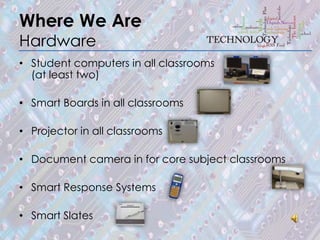
Hardware
• Student computers in all classrooms
  (at least two)

• Smart Boards in all classrooms

• Projector in all classrooms

• Document camera in for core subject classrooms

• Smart Response Systems

• Smart Slates
Where We Are
Hardware (cont.)
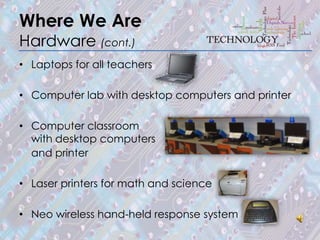
• Laptops for all teachers

• Computer lab with desktop computers and printer

• Computer classroom
  with desktop computers
  and printer

• Laser printers for math and science

• Neo wireless hand-held response system
Where We Are
Software
Computer-based programs that facilitate grades,
recordkeeping, communication, data management,
etc.
• Data Management for Assessment and Curriculum
  (DMAC)
• TxEIS (State-sponsored Student Information System
  by the Texas Education Agency)
• C-SCOPE
• Eduphoria
• Microsoft Office 2007
Where We Are
Software (cont.)
Computer-based instructional programs that have
been purchased to increase student achievement
(Crockett Junior High School, 2011).
• Study Island
• Science Starters
• DyNed (English learning solutions)
• Accelerated Reader
Where We Are
Staff
Instructional activities to engage students and increase
student achievement. Using the IFC grant, Algebra
Readiness grant, SCE grant (Crockett Junior High School,
2011).
• Summer Academy
• Kagan Strategies
• CHAMPS
• Accelerated Math
• MSTAR
• Smart Board
Where We Are
Staff (cont.)
Communication to inform students and parents.
• Campus newsletter
• Parent Portal
• Website
National Technology Plan
Goals
Arne Duncan, U.S. Secretary of Education, speaks
about Five Technology Goals:
1. To change fundamentally the learning process with
   technology.
2. To use technology in the second generation of
   assessments.
3. To connect teachers with their peers.
4. To build an infrastructure that allows us to support
   access in and out of school.
5. To harness the power of technology to help schools
   to become more productive, to accelerate student
   achievement faster than ever before (Duncan,
   2010).
National Technology Plan
Summary
• Adequate broadband and wireless access inside and
  outside of school
• At least one Internet-enabled device for every student
  and educator -- at home and at school
• Use of Creative Commons and open licenses in course
  content and support for OpenCourseWare endeavors
• R&D into the use of gaming, simulations, and virtual
  worlds for instruction and assessment
                                                (continued)
National Technology Plan
Summary(cont.)
• Encouragement of cloud computing for school districts,
  freeing local IT resources for other purposes
• Development of computerized assessment tools that
  are both adaptive -- that is, respond to student's own
  input -- and accessible
• Changes to FERPA (Family Educational Rights & Privacy
  Act) to open access to student data and enable better
  data portability for student and financial records
• Changes to CIPA (Children's Internet Protection Act) to
  open access to the Internet and rethink how filtering
  works in schools (Watters, 2011).
Where We Can Be
Hardware
•   Wireless connectivity throughout school
•   Wireless mobile computer lab
•   Smart phones and smart tablets
•   Sound connected to audio system
Where We Can Be
Software
To “increase the use of technology” and provide
“additional computer software for the enhancement and
remediation of academic skills” (Crockett Junior High
School, 2010).
These skills describe the standards that The International
Society for Technology in Education (ISTE) say technology
literate students will experience (ISTE, 2007).
• Mobile device applications
• Cloud computing
• Open content strategies
• Personal learning environments (blogs, wikis, etc.)
• Game-based learning (simulation games, etc.)
• Learning analytics
Where We Can Be
Staff
• Digital native (Prensky, 2001).
• ISTE standards for teachers met (ISTE, 2007).
• Technology integration expectations met,
• Creating Technology Enriched Performance
  Indicators (TEPIs),
• Sustainable research-based professional
  development,
• Evaluating goals and policies for continuous
  improvement (Moak, Slayton, McClatchy, &
  Burgess, (2010).
How to Get There
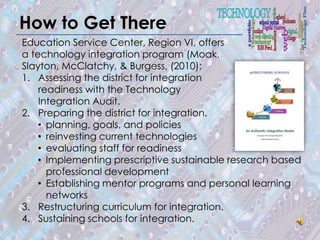
Education Service Center, Region VI, offers
a technology integration program (Moak,
Slayton, McClatchy, & Burgess, (2010):
1. Assessing the district for integration
    readiness with the Technology
    Integration Audit.
2. Preparing the district for integration.
    • planning, goals, and policies
    • reinvesting current technologies
    • evaluating staff for readiness
    • Implementing prescriptive sustainable research based
      professional development
    • Establishing mentor programs and personal learning
      networks
3. Restructuring curriculum for integration.
4. Sustaining schools for integration.
References
Crockett Junior High School. (2011). Campus Improvement Plan Goals 2011-2012.
   Crockett, TX: Author.
Duncan, A. (2010, November 14). 5 min. Arne Duncan talks about the 2010 National
   Technology Plan [Video file]. Retrieved from
   http://www.youtube.com/watch?v=Z0PctTd_plE
ISTE. (2007). Nets for students 2007 profiles. International Society for Technology in
    Education. Retrieved from http://www.iste.org/standards/nets-for-students/nets-
    for-students-2007-profiles.aspx
Moak, C., Slayton, C., McClatchy, M., & Burgess, M. (2010). eStructuring Schools: An
  Authentic Integration Model. Huntsville, Texas: Education Service Center
  Region VI.
Prensky, M. (2001). Digital Native, Digital Immigrants: Part 1. On the Horizon, 9(5), 1-6.
Watters, A. (2011, January 25). National educational technology plan: Your
  questions answered. Edutopia What Works In Education. The George Lucas
  Educational Foundation. Retrieved from http://www.edutopia.org/blog/national-
  educational-technology-plan-netp-audrey-watters

A Plan for Technology

  • 1.
    A PLAN FORTECHNOLOGY AT CROCKETT JUNIOR HIGH Donna Drum, ET8044 EDLD 5362 Informational Systems Management
  • 2.
    Mission and Vision Mission: CROCKETT INDEPENDENT SCHOOL DISTRICT Learning Environment of Excellence Vision: CROCKETT JUNIOR HIGH Student Success (Crockett Junior High School, 2011)
  • 3.
    Where We Are Hardware •Student computers in all classrooms (at least two) • Smart Boards in all classrooms • Projector in all classrooms • Document camera in for core subject classrooms • Smart Response Systems • Smart Slates
  • 4.
    Where We Are Hardware(cont.) • Laptops for all teachers • Computer lab with desktop computers and printer • Computer classroom with desktop computers and printer • Laser printers for math and science • Neo wireless hand-held response system
  • 5.
    Where We Are Software Computer-basedprograms that facilitate grades, recordkeeping, communication, data management, etc. • Data Management for Assessment and Curriculum (DMAC) • TxEIS (State-sponsored Student Information System by the Texas Education Agency) • C-SCOPE • Eduphoria • Microsoft Office 2007
  • 6.
    Where We Are Software(cont.) Computer-based instructional programs that have been purchased to increase student achievement (Crockett Junior High School, 2011). • Study Island • Science Starters • DyNed (English learning solutions) • Accelerated Reader
  • 7.
    Where We Are Staff Instructionalactivities to engage students and increase student achievement. Using the IFC grant, Algebra Readiness grant, SCE grant (Crockett Junior High School, 2011). • Summer Academy • Kagan Strategies • CHAMPS • Accelerated Math • MSTAR • Smart Board
  • 8.
    Where We Are Staff(cont.) Communication to inform students and parents. • Campus newsletter • Parent Portal • Website
  • 9.
    National Technology Plan Goals ArneDuncan, U.S. Secretary of Education, speaks about Five Technology Goals: 1. To change fundamentally the learning process with technology. 2. To use technology in the second generation of assessments. 3. To connect teachers with their peers. 4. To build an infrastructure that allows us to support access in and out of school. 5. To harness the power of technology to help schools to become more productive, to accelerate student achievement faster than ever before (Duncan, 2010).
  • 10.
    National Technology Plan Summary •Adequate broadband and wireless access inside and outside of school • At least one Internet-enabled device for every student and educator -- at home and at school • Use of Creative Commons and open licenses in course content and support for OpenCourseWare endeavors • R&D into the use of gaming, simulations, and virtual worlds for instruction and assessment (continued)
  • 11.
    National Technology Plan Summary(cont.) •Encouragement of cloud computing for school districts, freeing local IT resources for other purposes • Development of computerized assessment tools that are both adaptive -- that is, respond to student's own input -- and accessible • Changes to FERPA (Family Educational Rights & Privacy Act) to open access to student data and enable better data portability for student and financial records • Changes to CIPA (Children's Internet Protection Act) to open access to the Internet and rethink how filtering works in schools (Watters, 2011).
  • 12.
    Where We CanBe Hardware • Wireless connectivity throughout school • Wireless mobile computer lab • Smart phones and smart tablets • Sound connected to audio system
  • 13.
    Where We CanBe Software To “increase the use of technology” and provide “additional computer software for the enhancement and remediation of academic skills” (Crockett Junior High School, 2010). These skills describe the standards that The International Society for Technology in Education (ISTE) say technology literate students will experience (ISTE, 2007). • Mobile device applications • Cloud computing • Open content strategies • Personal learning environments (blogs, wikis, etc.) • Game-based learning (simulation games, etc.) • Learning analytics
  • 14.
    Where We CanBe Staff • Digital native (Prensky, 2001). • ISTE standards for teachers met (ISTE, 2007). • Technology integration expectations met, • Creating Technology Enriched Performance Indicators (TEPIs), • Sustainable research-based professional development, • Evaluating goals and policies for continuous improvement (Moak, Slayton, McClatchy, & Burgess, (2010).
  • 15.
    How to GetThere Education Service Center, Region VI, offers a technology integration program (Moak, Slayton, McClatchy, & Burgess, (2010): 1. Assessing the district for integration readiness with the Technology Integration Audit. 2. Preparing the district for integration. • planning, goals, and policies • reinvesting current technologies • evaluating staff for readiness • Implementing prescriptive sustainable research based professional development • Establishing mentor programs and personal learning networks 3. Restructuring curriculum for integration. 4. Sustaining schools for integration.
  • 16.
    References Crockett Junior HighSchool. (2011). Campus Improvement Plan Goals 2011-2012. Crockett, TX: Author. Duncan, A. (2010, November 14). 5 min. Arne Duncan talks about the 2010 National Technology Plan [Video file]. Retrieved from http://www.youtube.com/watch?v=Z0PctTd_plE ISTE. (2007). Nets for students 2007 profiles. International Society for Technology in Education. Retrieved from http://www.iste.org/standards/nets-for-students/nets- for-students-2007-profiles.aspx Moak, C., Slayton, C., McClatchy, M., & Burgess, M. (2010). eStructuring Schools: An Authentic Integration Model. Huntsville, Texas: Education Service Center Region VI. Prensky, M. (2001). Digital Native, Digital Immigrants: Part 1. On the Horizon, 9(5), 1-6. Watters, A. (2011, January 25). National educational technology plan: Your questions answered. Edutopia What Works In Education. The George Lucas Educational Foundation. Retrieved from http://www.edutopia.org/blog/national- educational-technology-plan-netp-audrey-watters