1
18CSC205J – Operating Systems – Unit V
STORAGE MANAGEMENT AND FILE
MANAGEMENT
2
Course Learning Rationale and Course Learning Outcomes
• Realize the significance of Device management part of an Operating
System
• Comprehend the need of File management functions of an Operating
System
Course Learning Rationale
• Find the significance of device management role of an Operating system
• Recognize the essentials of File Management of an Operating system
Course Learning Outcomes
3
Contents
• STORAGE MANAGEMENT :
• UNDERSTANDING THE BASICS IN STORAGE MANAGEMENT
• DISK SCHEDULING
• UNDERSTANDING THE VARIOUS SCHEDULING WITH RESPECT TO
THE DISK
• FILE SYSTEM INTERFACE:
• FILE CONCEPT
• FILE ACCESS METHODS
• UNDERSTANDING THE FILE BASICS
• FILE SHARING AND PROTECTION
• EMPHASIS THE NEED FOR THE FILE SHARING AND ITS PROTECTION
• FILE SYSTEM IMPLEMENTATION :
• BASIC FILE SYSTEM STRUCTURE
• FILE SYSTEM IMPLEMENTATION
4
Mass-Storage Systems
• Overview of Mass Storage Structure
– Hard disk
– Magnetic tape
– Storage Array
– Storage Area Networks
– Network Attached Storage
5
Objectives
• To describe the physical structure of secondary storage devices
and its effects on the uses of the devices
• To explain the performance characteristics of mass-storage
devices
• To evaluate disk scheduling algorithms
6
Overview of Mass Storage Structure
• Magnetic disks provide bulk of secondary storage of modern
computers
– Drives rotate at 60 to 250 times per second
– Transfer rate is rate at which data flow between drive and computer
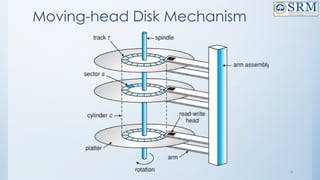
– Positioning time (random-access time) is time to move disk arm to desired
cylinder (seek time) and time for desired sector to rotate under the disk head
(rotational latency)
– Head crash results from disk head making contact with the disk surface --
That’s bad
• Disks can be removable
• Drive attached to computer via I/O bus
– Busses vary, including EIDE, ATA, SATA, USB, Fibre Channel, SCSI, SAS, Firewire
– Host controller in computer uses bus to talk to disk controller built into drive or
storage array
7
Moving-head Disk Mechanism
8
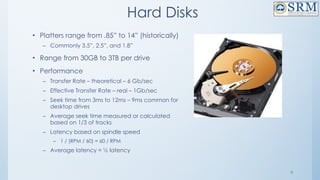
Hard Disks
• Platters range from .85” to 14” (historically)
– Commonly 3.5”, 2.5”, and 1.8”
• Range from 30GB to 3TB per drive
• Performance
– Transfer Rate – theoretical – 6 Gb/sec
– Effective Transfer Rate – real – 1Gb/sec
– Seek time from 3ms to 12ms – 9ms common for desktop drives
– Average seek time measured or calculated based on 1/3 of tracks
– Latency based on spindle speed
– 1 / (RPM / 60) = 60 / RPM
– Average latency = ½ latency
9
Hard Disks
• Platters range from .85” to 14” (historically)
– Commonly 3.5”, 2.5”, and 1.8”
• Range from 30GB to 3TB per drive
• Performance
– Transfer Rate – theoretical – 6 Gb/sec
– Effective Transfer Rate – real – 1Gb/sec
– Seek time from 3ms to 12ms – 9ms common for
desktop drives
– Average seek time measured or calculated
based on 1/3 of tracks
– Latency based on spindle speed
– 1 / (RPM / 60) = 60 / RPM
– Average latency = ½ latency
10
Terms to be considered for calculating Hard Disk
Performance
• 1. Seek time- Seek time is the time taken to locate the disk arm to a
specified track where the data is to be read or write. So the disk
scheduling algorithm that gives minimum average seek time is better.
• 2. Rotational Latency: Rotational Latency is the time taken by the
desired sector of disk to rotate into a position so that it can access the
read/write heads. So the disk scheduling algorithm that gives minimum
rotational latency is better.
• 3. Transfer Time: Transfer time is the time to transfer the data. It depends
on the rotating speed of the disk and number of bytes to be transferred.
• 4. Disk Access Time: Disk Access = Seek time + Rotational latency +
Transfer time
11
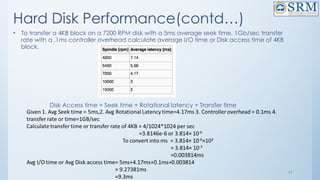
Hard Disk Performance(contd…)
• To transfer a 4KB block on a 7200 RPM disk with a 5ms average seek time, 1Gb/sec transfer
rate with a .1ms controller overhead calculate average I/O time or Disk access time of 4KB
block.
Disk Access time = Seek time + Rotational latency + Transfer time
12
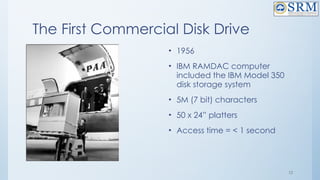
The First Commercial Disk Drive
• 1956
• IBM RAMDAC computer
included the IBM Model 350
disk storage system
• 5M (7 bit) characters
• 50 x 24” platters
• Access time = < 1 second
13
Solid-State Disks
• Nonvolatile memory used like a hard drive
– Many technology variations
• Can be more reliable than HDDs
• More expensive per MB
• Maybe have shorter life span
• Less capacity
• But much faster
• Busses can be too slow -> connect directly to PCI for example
• No moving parts, so no seek time or rotational latency
14
Magnetic Tape
• Was early secondary-storage medium
– Evolved from open spools to cartridges
• Relatively permanent and holds large quantities of data
• Access time slow
• Random access ~1000 times slower than disk
• Mainly used for backup, storage of infrequently-used data, transfer medium between systems
• Kept in spool and wound or rewound past read-write head
• Once data under head, transfer rates comparable to disk
– 140MB/sec and greater
• 200GB to 1.5TB typical storage
• Common technologies are LTO-{3,4,5} and T10000
15
Disk Structure
• Disk drives are addressed as large 1-dimensional arrays of logical
blocks, where the logical block is the smallest unit of transfer
– Low-level formatting creates logical blocks on physical media
• The 1-dimensional array of logical blocks is mapped into the sectors
of the disk sequentially
– Sector 0 is the first sector of the first track on the outermost cylinder
– Mapping proceeds in order through that track, then the rest of the tracks in
that cylinder, and then through the rest of the cylinders from outermost to
innermost
– Logical to physical address should be easy
– Except for bad sectors
– Non-constant # of sectors per track via constant angular velocity
16
Disk Attachment
• Host-attached storage accessed through I/O ports talking to I/O
busses
• SCSI itself is a bus, up to 16 devices on one cable, SCSI initiator
requests operation and SCSI targets perform tasks
– Each target can have up to 8 logical units (disks attached to device
controller)
• FC is high-speed serial architecture
– Can be switched fabric with 24-bit address space – the basis of storage
area networks (SANs) in which many hosts attach to many storage units
• I/O directed to bus ID, device ID, logical unit (LUN)
17
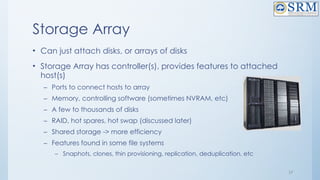
Storage Array
• Can just attach disks, or arrays of disks
• Storage Array has controller(s), provides features to attached
host(s)
– Ports to connect hosts to array
– Memory, controlling software (sometimes NVRAM, etc)
– A few to thousands of disks
– RAID, hot spares, hot swap (discussed later)
– Shared storage -> more efficiency
– Features found in some file systems
– Snaphots, clones, thin provisioning, replication, deduplication, etc
18
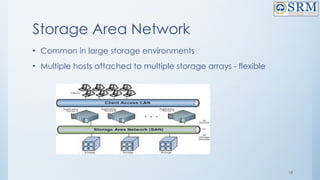
Storage Area Network
• Common in large storage environments
• Multiple hosts attached to multiple storage arrays - flexible
19
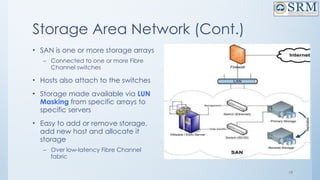
Storage Area Network (Cont.)
• SAN is one or more storage arrays
– Connected to one or more Fibre
Channel switches
• Hosts also attach to the switches
• Storage made available via LUN
Masking from specific arrays to
specific servers
• Easy to add or remove storage,
add new host and allocate it
storage
– Over low-latency Fibre Channel
fabric
20
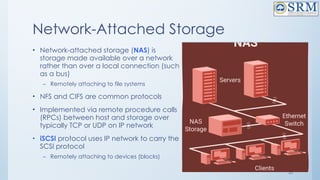
Network-Attached Storage
• Network-attached storage (NAS) is
storage made available over a network
rather than over a local connection (such
as a bus)
– Remotely attaching to file systems
• NFS and CIFS are common protocols
• Implemented via remote procedure calls
(RPCs) between host and storage over
typically TCP or UDP on IP network
• iSCSI protocol uses IP network to carry the
SCSI protocol
– Remotely attaching to devices (blocks)
21
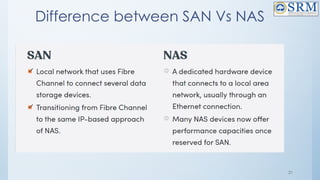
Difference between SAN Vs NAS
22
•Disk Scheduling
– Introduction to Disk Scheduling
– Why Disk Scheduling is Important
– Disk Scheduling Algorithms
– FCFS
– SSTF
– SCAN
– C-SCAN
– LOOK
– C-LOOK
- Disk Management
23
Disk Scheduling
What is Disk Scheduling?
Disk scheduling is done by operating systems to schedule I/O requests arriving for
the disk. Disk scheduling is also known as I/O scheduling.
•The operating system is responsible for using hardware efficiently — for the disk
drives, this means having a fast access time and disk bandwidth
•Minimize seek time
•Seek time  seek distance
•Disk bandwidth is the total number of bytes transferred, divided by the total
time between the first request for service and the completion of the last transfer
•There are many sources of disk I/O request
–OS
–System processes
–Users processes
•I/O request includes input or output mode, disk address, memory address,
number of sectors to transfer
•OS maintains queue of requests, per disk or device
•Idle disk can immediately work on I/O request, busy disk means work must
24
Why Disk Scheduling is Important?
• Disk scheduling is important because:
• Multiple I/O requests may arrive by different processes and only
one I/O request can be served at a time by the disk controller.
Thus other I/O requests need to wait in the waiting queue and
need to be scheduled.
• Two or more request may be far from each other so can result in
greater disk arm movement.
• Hard drives are one of the slowest parts of the computer system
and thus need to be accessed in an efficient manner.
25
Disk Scheduling (Cont.)
• Note that drive controllers have small buffers and can
manage a queue of I/O requests (of varying “depth”)
• Several algorithms exist to schedule the servicing of disk I/O
requests
• The analysis is true for one or many platters
26
Disk Scheduling Algorithms
– Disk Scheduling Algorithms
– FCFS
– SSTF
– SCAN
– C-SCAN
– LOOK
– C-LOOK
27
Disk Scheduling Algorithm - Example
• Consider a disk queue with requests for I/O to blocks on cylinders
98, 183, 41, 122, 14, 124, 65, 67. The FCFS,SSTF,SCAN,C-
SCAN,LOOK, and C-LOOK scheduling algorithm is used. The
head is initially at cylinder number 53. The cylinders are
numbered from 0 to 199. The total head movement (in number
of cylinders) incurred while servicing these requests is _______.
28
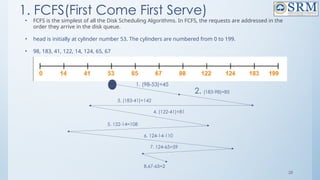
1. FCFS(First Come First Serve)
• FCFS is the simplest of all the Disk Scheduling Algorithms. In FCFS, the requests are addressed in the
order they arrive in the disk queue.
• head is initially at cylinder number 53. The cylinders are numbered from 0 to 199.
• 98, 183, 41, 122, 14, 124, 65, 67
1. (98-53)=45
2. (183-98)=85
4. (122-41)=81
5. 122-14=108
6. 124-14-110
7. 124-65=59
8.67-65=2
3. (183-41)=142
29
FCFS(contd..)
• Total head movements using FCFS= [(98 – 53) + (183 – 98) + (183 – 41) + (122 –
41) + (122 – 14) + (124 – 14) + (124 – 65) + (67 – 65)]
• = 45 + 85 + 142 + 81 + 108 + 110 + 59 + 2
• =632
Advantages:
• Every request gets a fair chance
• No indefinite postponement
Disadvantages:
• Does not try to optimize seek time
• May not provide the best possible service
30
2. SSTF(Shortest Seek Time First)
• Shortest Seek Time First (SSTF) selects the request with the minimum seek time from the current
head position
• SSTF scheduling is a form of SJF scheduling; may cause starvation of some requests
• As a result, the request near the disk arm will get executed first. SSTF is certainly an improvement
over FCFS as it decreases the average response time and increases the throughput of system.
Advantages:
• Average Response Time decreases
• Throughput increases
Disadvantages:
• Overhead to calculate seek time in advance
• Can cause Starvation for a request if it has higher seek time as compared to incoming requests
• High variance of response time as SSTF favours only some requests
SSTF(contd…)
• head is initially at cylinder number 53. The cylinders are numbered from
0 to 199. [98, 183, 41, 122, 14, 124, 65, 67 ]
• 98, 183, 41, 122, 14, 124, 65, 67
31
Total head movement using SSTF=(65-53)+(67-65)+(67-41)+(41-14)+(98-
14)+ (122-98)+(124-122)+(183-124)
=12+2+26+27+84+24+2+59=236)
32
3. SCAN
• The disk arm starts at one end of the disk, and moves toward the other end,
servicing requests until it gets to the other end of the disk, where the head
movement is reversed and servicing continues.
• SCAN algorithm Sometimes called the elevator algorithm
• As a result, the requests at the midrange are serviced more and those arriving
behind the disk arm will have to wait.
Advantages:
• High throughput
• Low variance of response time
• Average response time
Disadvantages:
• Long waiting time for requests for locations just visited by disk arm
33
SCAN or Elevator((1st
Solution)
• head is initially at cylinder number 53. The cylinders are numbered
from 0 to 199. [ 98, 183, 41, 122, 14, 124, 65, 67 ]
Total Head Movement using SCAN=[(65-53)+(67-65)+(98-67)+(122-98)+(124-
122)+(183-124)+(199-183)+(199-41)+
(41-14)]
=12+2+31+24+2+59+16+158+27)=331
34
SCAN or Elevator(2nd
Solution)- Best Choice
• head is initially at cylinder number 53. The cylinders are numbered
from 0 to 199. [ 98, 183, 41, 122, 14, 124, 65, 67 ]
Total Head Movement using SCAN=[(53-41)+(41-14)+(14-0)+(65-0)+(67-65)+
(98-67)+(122-98)+(124-122)+(183-124)]
=12+27+14+65+2+31+24+59
= 234
35
4. C-SCAN
• The head moves from one end of the disk to the other, servicing requests
as it goes
– When it reaches the other end, however, it immediately returns to the
beginning of the disk, without servicing any requests on the return trip
• Treats the cylinders as a circular list that wraps around from the last
cylinder to the first one
• Provides a more uniform wait time than SCAN
Advantages:
• Provides more uniform wait time compared to SCAN
36
C-SCAN(contd…)
• head is initially at cylinder number 53. The cylinders are numbered from 0
to 199. [ 98, 183, 41, 122, 14, 124, 65, 67 ]
Total Head Movement using C-SCAN=[(65-53)+(67-65)+(98-67)+(122-98)+(124-122)+(183-124)+(199-
183)+(199-0)+(14-0)+(41-14)]
=12+2+31+24+2+59+16+199+14+27)=386
37
5. LOOK
• It is similar to the SCAN disk scheduling algorithm except for the
difference that the disk arm in spite of going to the end of the disk goes
only to the last request to be serviced in front of the head and then
reverses its direction from there only. Thus it prevents the extra delay
which occurred due to unnecessary traversal to the end of the disk.
38
LOOK(Contd…)
• head is initially at cylinder number 53. The cylinders are numbered from
0 to 199. [ 98, 183, 41, 122, 14, 124, 65, 67 ]
Total Head Movement using look=[(65-53)+(67-65)+(98-67)+(122-98)+(124-
122)+ (183-124)+(183-41)+(41-14)]
=12+2+31+24+2+59+142+27)=299
39
6. C-LOOK
• LOOK a version of SCAN, C-LOOK a version of C-SCAN
• Arm only goes as far as the last request in each direction, then reverses
direction immediately, without first going all the way to the end of the
disk
• In CLOOK, the disk arm in spite of going to the end goes only to the last
request to be serviced in front of the head and then from there goes to
the other end’s last request. Thus, it also prevents the extra delay which
occurred due to unnecessary traversal to the end of the disk.
40
C- LOOK(contd…)
• head is initially at cylinder number 53. The cylinders are numbered
from 0 to 199.
98, 183, 41, 122, 14, 124, 65, 67
Total Head Movement using C-LOOK=[(65-53)+(67-65)+(98-67)+(122-
98)+(124-122)+(183-124)+(183-14)+
(41-14)]
= 12+2+31+24+2+59+169+27)=326
41
No.of Head movements of All Algorithms
• Total head movements
• 1.FCFS=632
• 2.SSTF=232
• 3.SCAN=331or 234
• 4. C-SCAN=386
• 5.LOOK=299
• 6.C-SCAN=326
42
Selection of a Disk-Scheduling Algorithm
• SSTF is common and has a natural appeal
• SCAN and C-SCAN perform better for systems that place a heavy load on the disk
– Less starvation
• Performance depends on the number and types of requests
• Requests for disk service can be influenced by the file-allocation method
– And metadata layout
• The disk-scheduling algorithm should be written as a separate module of the operating
system, allowing it to be replaced with a different algorithm if necessary
• Either SSTF or LOOK is a reasonable choice for the default algorithm
• What about rotational latency?
– Difficult for OS to calculate
• How does disk-based queueing effect OS queue ordering efforts?
43
Disk Management
• Low-level formatting, or physical formatting — Dividing a disk into sectors that the disk
controller can read and write
– Each sector can hold header information, plus data, plus error correction code (ECC)
– Usually 512 bytes of data but can be selectable
• To use a disk to hold files, the operating system still needs to record its own data structures on
the disk
– Partition the disk into one or more groups of cylinders, each treated as a logical disk
– Logical formatting or “making a file system”
– To increase efficiency most file systems group blocks into clusters
– Disk I/O done in blocks
– File I/O done in clusters
44
Disk Management (Cont.)
• Raw disk access for apps that want to do their own block
management, keep OS out of the way (databases for example)
• Boot block initializes system
– The bootstrap is stored in ROM
– Bootstrap loader program stored in boot blocks of boot partition
• Methods such as sector sparing used to handle bad blocks
45
File System Interface
• File Concept
• File Access Methods
• File Sharing and Protection
46
Objective of File Interface
• To explain the function of file systems
• To describe the interfaces to file systems
• To discuss file-system design tradeoffs, including access
methods, file sharing, file locking, and structures
File Concept
47
48
File Concept
• A file is a named collection of related information that is recorded on secondary storage
such as magnetic disks, magnetic tapes and optical disks. In general, a file is a sequence
of bits, bytes, lines or records whose meaning is defined by the files creator and user.
• Files are the most important mechanism for storing data permanently on mass-storage
devices. Permanently means that the data is not lost when the machine is switched off. Files can
contain:
• data in a format that can be interpreted by programs, but not easily by humans (binary files);
• alphanumeric characters, codified in a standard way (e.g., using ASCII or Unicode), and directly
readable by a human user (text files). Text files are normally organized in a sequence of lines, each
containing a sequence of characters and ending with a special character (usually the newline
character). Consider, for example, a Java program stored in a file on the hard-disk. In this unit we
will deal only with text files.
• Each file is characterized by a name and a directory in which the file is placed (one may consider
the whole path that allows one to find the file on the hard-disk as part of the name of the file).
49
File Attributes
• Name: It is the only information stored in a human-readable form.
• Identifier: Every file is identified by a unique tag number within a file
system known as an identifier.
• Location: Points to file location on device.
• Type: This attribute is required for systems that support various types of
files.
• Size. Attribute used to display the current file size.
• Protection. This attribute assigns and controls the access rights of
reading, writing, and executing the file.
• Time, date and security: It is used for protection, security, and also
used for monitoring
50
File Operations
1.Create
• Creation of the file is the most important operation on the file. Different types of files are
created by different methods for example text editors are used to create a text file, word
processors are used to create a word file and Image editors are used to create the image files.
2.Write
• Writing the file is different from creating the file. The OS maintains a write pointer for every file
which points to the position in the file from which, the data needs to be written.
3.Read
• Every file is opened in three different modes : Read, Write and append. A Read pointer is
maintained by the OS, pointing to the position up to which, the data has been read.
4.Re-position
• Re-positioning is simply moving the file pointers forward or backward depending upon the
user's requirement. It is also called as seeking.
5.Delete
• Deleting the file will not only delete all the data stored inside the file, It also deletes all the
attributes of the file. The space which is allocated to the file will now become available and can
be allocated to the other files.
6.Truncate
• Truncating is simply deleting the file except deleting attributes. The file is not completely
deleted although the information stored inside the file get replaced.
51
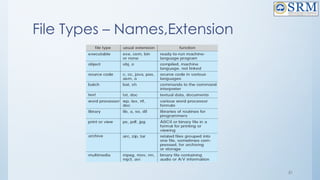
File Types – Names,Extension
52
File Structure
• A file has a certain defined structure according to its type.
• A text file is a sequence of characters organized into lines.
• A source file is a sequence of procedures and functions.
• An object file is a sequence of bytes organized into blocks that are
understandable by the machine.
• When operating system defines different file structures, it also contains
the code to support these file structure. Unix, MS-DOS support
minimum number of file structure.
53
File Structure
File Structure
classification
None-
Sequence of
words,bytes
Simple Record
Structure – Lines,
Fixed and
Variable Length
Complex Structure –
Formatted
Document,
Relocatable load file
54
File Access Methods
File Access
Methods
Sequential Direct Hashed
55
File Access Methods
1. Sequential Access Method: – Sequential Access Method is one of the simplest file
access methods. Most of the OS (operating system) uses a sequential access method
to access the file. In this method, word by word, the operating system read the file,
and we have a pointer that points the file’s base address. If we need to read the file’s
first word, then there is a pointer that offers the word which we want to read and
increment the value of the word by 1, and till the end of the file, this process will
continue.
• The Modern world system offers the facility of index access and direct access to file.
But the sequential access method is one of the most used methods because more
files like text files, audio files, and the video files require to be sequentially accessed.
• Key Points:
1. Sequential Access Method is reasonable for tape.
2. In the sequential access method, if we use read command, then the pointer is moved
ahead by 1.
3. If the write command is used, then the memory will be allocated, and at the end of
the file, a pointer will be moved.
56
File Access Methods
2. Direct Access Method: – Direct Access Method is also called the Relative
access method. In the Database System, we mostly use the Direct Access
Method. In most of the situations, there is a need for information in the filtered
form from the database. And in that case, the speed of sequential access may
be low and not efficient.
• Let us assume that each storage block stores 4 records, and we already know
that the block which we require is stored in the 10th
block. In this situation,
the sequential access method is not suitable. Since if we use this, then to
access the record which is needed, this method will traverse all the blocks.
• So, in this situation, the Direct access method gives a more satisfying result,
else the OS (operating system) needs to perform a few complex jobs like
defining the block number, which is required. It is mostly implemented in the
application of the database.
57
File Access Methods
3. Index Access Method: – Index Access Method is another essential method
of file, accessing. In this method, for a file an index is created, and the index is
just like an index which is at the back of the book. The index includes the
pointer to the different blocks. If we want to find a record in the file, then first,
we search in the index, and after that, with the help of the pointer, we can
directly access the file.
• In the Index Access method, we can search fast in the large database, and
also easy. But in this, the method need some additional space to store the
value of the index in the memory.
• Key Points:
1. On top of the sequential access method, the index access method is built.
2. The Index access method can control the pointer with the help of the index.
File Sharing
Objective of File sharing
• For multiple users-File sharing, file naming and file protection is a
challenging and important task.
• In order to handle this, file access control and protection need to be done.
• If a user wants to share a file with other user, proper protection schemes
need to be followed.
• Whenever a file is shared for various users on distributed systems , it must be
shared across distributed systems.
• In order to share and distribute files, Network File System (NFS) is used.
• For single user system ,the system need to maintain many files and
directory attributes.
File sharing-Multiple Users
• Many file systems evolved with the concept of file (or directory) owner
(or user) and group.
• The owner is the user who can change attributes and grant access and
who has the most control over the file.
• The group attribute defines a subset of users who can share access to
the file.
• For example, the owner of a file on a UNIX system can issue all
operations on a file, while members of the file’s group can execute one
subset of those operations, and all other users can execute another
subset of operations. Exactly which operations can be executed by
group members and other users is definable by the file’s owner
File sharing-Remote File Systems
• The communication among remote computers uses the concept called
Networking that allows the sharing of resources spread across a campus or
even around the world.
• The first implemented method for file sharing involves manually transferring files
between machines via programs like ftp.
• The second major method for file sharing uses a distributed file system (DFS) in
which remote directories are visible from a local machine.
• The third method for file sharing , uses WorldWide Web, is a reversion to the first.
• A browser is needed to gain access to the remote files, and separate
operations (essentially a wrapper for ftp) are used to transfer files.
• Increasingly, cloud computing is being used for file sharing as well.
File sharing-Remote File Systems
• ftp is used for both anonymous and authenticated access.
• Anonymous access allows a user to transfer files without having
an account on the remote system.
• TheWorldWideWeb uses anonymous file exchange almost
exclusively.
• DFS involves a much tighter integration between the machine
that is accessing the remote files and the machine providing the
files.
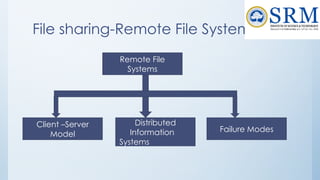
File sharing-Remote File Systems
Remote File
Systems
Failure Modes
Distributed
Information
Systems
Client –Server
Model
File sharing-Remote File Systems-
Client Server Model
• The machine containing the files is the server, and the machine
seeking access to the files is the client.
• The server can serve multiple clients, and a client can use
multiple servers, depending on the implementation details of a
given client–server facility.
• Example:
– NFS is standard UNIX client-server file sharing protocol
– CIFS is standard Windows protocol
– Standard operating system file calls are translated into remote calls
File sharing -Distributed Information
Systems
• Distributed Information Systems (distributed naming services) such as
LDAP, DNS, NIS, Active Directory implement unified access to
information needed for remote computing
• Examples:
• Other distributed information systems provide user
name/password/user ID/group ID space for a distributed facility.
• UNIX systems have employed a wide variety of distributed information
methods.
• Sun Microsystems introduced yellow pages (since renamed network
information service, or NIS), and most of the industry adopted its use.
File Sharing -Failure Modes
• All file systems have failure modes
– For example corruption of directory structures or other non-user data,
called metadata
• Remote file systems add new failure modes, due to network
failure, server failure
• Recovery from failure can involve state information about status
of each remote request
• Stateless protocols such as NFS v3 include all information in each
request, allowing easy recovery but less security
File Sharing-Consistency Semantics
• Consistency semantics represent an important criterion for
evaluating any file system that supports file sharing.
• These semantics specify how multiple users of a system are to
access a shared file simultaneously.
• In particular, they specify when modifications of data by one user
will be observable by other users.
• These semantics are typically implemented as code with the file
system.
• Consistency semantics are directly related to the process
synchronization algorithms
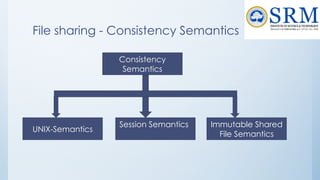
File sharing - Consistency Semantics
Consistency
Semantics
Immutable Shared
File Semantics
Session Semantics
UNIX-Semantics
File Sharing-Consistency Semantics-
Unix Semantics
• The UNIX file system uses the following consistency semantics:
– Writes to an open file by a user are visible immediately to other users who
have this file open.
– One mode of sharing allows users to share the pointer of current location
into the file. Thus, the advancing of the pointer by one user affects all
sharing users. Here, a file has a single image that interleaves all accesses,
regardless of their origin.
File Sharing-Consistency Semantics-
Session Semantics
• The Andrew file system (OpenAFS) uses the following consistency
semantics:
– Writes to an open file by a user are not visible immediately to other users
that have the same file open.
– Once a file is closed, the changes made to it are visible only in sessions
starting later. Already open instances of the file do not reflect these
changes.
• According to these semantics, a file may be associated
temporarily with several (possibly different) images at the same
time.
File Sharing-Consistency Semantics-Immutable-Shared-
Files Semantics
• A unique approach is that of immutable shared files.
• Once a file is declared as shared by its creator, it cannot be
modified. An immutable file has two key properties: its name
may not be reused, and its contents may not be altered.
• Thus, the name of an immutable file signifies that the contents of
the file are fixed.
• The implementation of these semantics in a distributed system
File Protection-Objective
• When information is stored in a computer system, we want to keep it safe from
physical damage (the issue of reliability) and improper access (the issue of
protection).
• Reliability is generally provided by duplicate copies of files.
• Many computers have systems programs that automatically (or through
computer-operator intervention) copy disk files to tape at regular intervals (once
per day or week or month) to maintain a copy should a file system be
accidentally destroyed.
• File systems can be damaged by hardware problems (such as errors in reading or
writing), power surges or failures, head crashes, dirt, temperature extremes, and
vandalism.
• Files may be deleted accidentally. Bugs in the file-system software can also cause
file contents to be lost
Protection
• Protection can be provided in many ways. Protection
mechanisms provide controlled access by limiting the types of
file access that can be made.
– Read. Read from the file.
– Write. Write or rewrite the file.
– Execute. Load the file into memory and execute it.
– Append. Write new information at the end of the file.
– Delete. Delete the file and free its space for possible reuse.
– List. List the name and attributes of the file.
– Other operations, such as renaming, copying, and editing the file, may
also be controlled.
Protection-Access Control
• The most general scheme to implement identity dependent
access is to associate with each file and directory an access-
control list (ACL) specifying user names and the types of access
allowed for each user.
• When a user requests access to a particular file, the operating
system checks the access list associated with that file.
• If that user is listed for the requested access, the access is
allowed. Otherwise, a protection violation occurs, and the user
job is denied access to the file.
Protection-Access Control
• Mode of access: read(4 bits), write(2 bits), execute(1 bit)
• Three classes of users on Unix / Linux(Default Permission)
RWX
a) owner access 7  1 1 1
RWX
b) group access 6  1 1 0
RWX
c) public access 1  0 0 1
To change Permissions the following commands are used :
• Chmod: Change Mode(For files)
• Chown: Change Owner(For Files)
• Chgroup: Change group permission(For files)
Protection-Access Control-Control
List Management
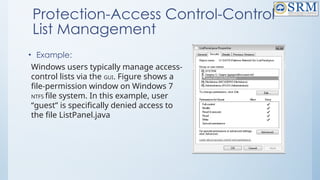
Windows users typically manage access-
control lists via the GUI. Figure shows a
file-permission window on Windows 7
NTFS file system. In this example, user
“guest” is specifically denied access to
the file ListPanel.java
• Example:
Unix File Permission Example
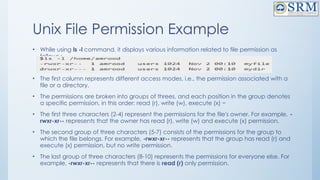
• While using ls -l command, it displays various information related to file permission as
follows :
• The first column represents different access modes, i.e., the permission associated with a
file or a directory.
• The permissions are broken into groups of threes, and each position in the group denotes
a specific permission, in this order: read (r), write (w), execute (x) −
• The first three characters (2-4) represent the permissions for the file's owner. For example, -
rwxr-xr-- represents that the owner has read (r), write (w) and execute (x) permission.
• The second group of three characters (5-7) consists of the permissions for the group to
which the file belongs. For example, -rwxr-xr-- represents that the group has read (r) and
execute (x) permission, but no write permission.
• The last group of three characters (8-10) represents the permissions for everyone else. For
example, -rwxr-xr-- represents that there is read (r) only permission.
File System
Implementation
78
79
File System Implementation
- File System Structure
- Directory Implementation
- File Allocation Methods
- Swap Space Management
80
Objectives of File System
Implementation
• It helps to understand the file system structure
• It helps to apprehend about how the files and folders are
organized in the directory structure and its classification
• To describe the implementation of remote file systems
• To discuss block allocation and free-block algorithms and trade-
offs
• To describe the details of implementing local file systems and
directory structures
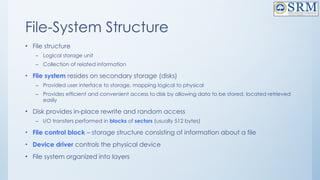
File-System Structure
• File structure
– Logical storage unit
– Collection of related information
• File system resides on secondary storage (disks)
– Provided user interface to storage, mapping logical to physical
– Provides efficient and convenient access to disk by allowing data to be stored, located retrieved
easily
• Disk provides in-place rewrite and random access
– I/O transfers performed in blocks of sectors (usually 512 bytes)
• File control block – storage structure consisting of information about a file
• Device driver controls the physical device
• File system organized into layers
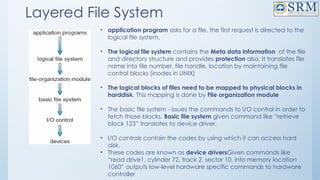
Layered File System
• application program asks for a file, the first request is directed to the
logical file system.
• The logical file system contains the Meta data information of the file
and directory structure and provides protection also. It translates file
name into file number, file handle, location by maintaining file
control blocks (inodes in UNIX)
• The logical blocks of files need to be mapped to physical blocks in
harddisk. This mapping is done by File organization module
• The basic file system - issues the commands to I/O control in order to
fetch those blocks. Basic file system given command like “retrieve
block 123” translates to device driver.
• I/O controls contain the codes by using which it can access hard
disk.
• These codes are known as device driversGiven commands like
“read drive1, cylinder 72, track 2, sector 10, into memory location
1060” outputs low-level hardware specific commands to hardware
controller
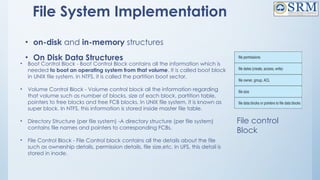
File System Implementation
• on-disk and in-memory structures
• On Disk Data Structures
• Boot Control Block - Boot Control Block contains all the information which is
needed to boot an operating system from that volume. It is called boot block
in UNIX file system. In NTFS, it is called the partition boot sector.
• Volume Control Block - Volume control block all the information regarding
that volume such as number of blocks, size of each block, partition table,
pointers to free blocks and free FCB blocks. In UNIX file system, it is known as
super block. In NTFS, this information is stored inside master file table.
• Directory Structure (per file system) -A directory structure (per file system)
contains file names and pointers to corresponding FCBs.
• File Control Block - File Control block contains all the details about the file
such as ownership details, permission details, file size,etc. In UFS, this detail is
stored in inode.
File control
Block
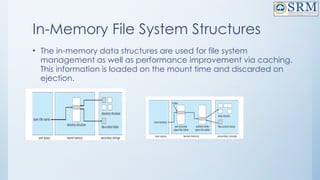
In-Memory File System Structures
• The in-memory data structures are used for file system
management as well as performance improvement via caching.
This information is loaded on the mount time and discarded on
ejection.
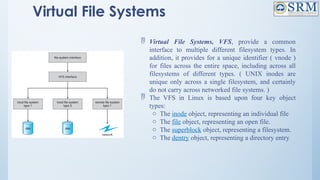
Virtual File Systems
 Virtual File Systems, VFS, provide a common
interface to multiple different filesystem types. In
addition, it provides for a unique identifier ( vnode )
for files across the entire space, including across all
filesystems of different types. ( UNIX inodes are
unique only across a single filesystem, and certainly
do not carry across networked file systems. )
 The VFS in Linux is based upon four key object
types:
o The inode object, representing an individual file
o The file object, representing an open file.
o The superblock object, representing a filesystem.
o The dentry object, representing a directory entry.
Directory Implementation
Directories need to be fast to search, insert, and delete, with a minimum of wasted disk space.
Linear List
• A linear list is the simplest and easiest directory structure to set up, but it does have some drawbacks.
• Finding a file ( or verifying one does not already exist upon creation ) requires a linear search.
• Deletions can be done by moving all entries, flagging an entry as deleted, or by moving the last entry
into the newly vacant position.
• Sorting the list makes searches faster, at the expense of more complex insertions and deletions.
• A linked list makes insertions and deletions into a sorted list easier, with overhead for the links.
• More complex data structures, such as B-trees, could also be considered.
Hash Table
• A hash table can also be used to speed up searches.
• Hash tables are generally implemented in addition to a linear or other structure
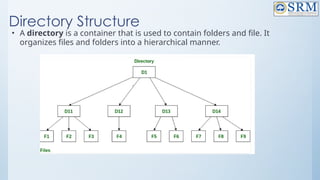
Directory Structure
• A directory is a container that is used to contain folders and file. It
organizes files and folders into a hierarchical manner.
88
Directory Structure(Contd…)
• There are several logical structures of a directory, these are given below.
1. Single-level directory
2. Two-level directory
3. Tree-structured directory
4. Acyclic graph directory
5. General graph directory structure
89
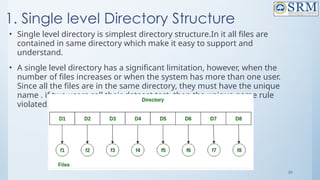
1. Single level Directory Structure
• Single level directory is simplest directory structure.In it all files are
contained in same directory which make it easy to support and
understand.
• A single level directory has a significant limitation, however, when the
number of files increases or when the system has more than one user.
Since all the files are in the same directory, they must have the unique
name . if two users call their dataset test, then the unique name rule
violated.
90
Single level Directory Structure(Contd…)
Advantages:
• Since it is a single directory, so its implementation is very easy.
• If the files are smaller in size, searching will become faster.
• The operations like file creation, searching, deletion, updating are very easy
in such a directory structure.
Disadvantages:
• There may chance of name collision because two files can not have the same
name.
• Searching will become time taking if the directory is large.
• In this can not group the same type of files together.
91
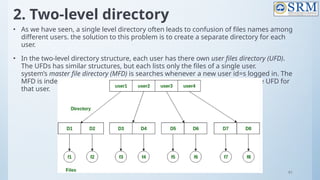
2. Two-level directory
• As we have seen, a single level directory often leads to confusion of files names among
different users. the solution to this problem is to create a separate directory for each
user.
• In the two-level directory structure, each user has there own user files directory (UFD).
The UFDs has similar structures, but each lists only the files of a single user.
system’s master file directory (MFD) is searches whenever a new user id=s logged in. The
MFD is indexed by username or account number, and each entry points to the UFD for
that user.
92
Two-level directory (contd…)
Advantages:
• We can give full path like /User-name/directory-name/.
• Different users can have same directory as well as file name.
• Searching of files become more easy due to path name and user-
grouping.
Disadvantages:
• A user is not allowed to share files with other users.
• Still it not very scalable, two files of the same type cannot be grouped
together in the same user
93
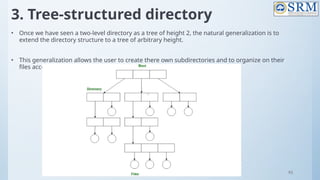
3. Tree-structured directory
• Once we have seen a two-level directory as a tree of height 2, the natural generalization is to
extend the directory structure to a tree of arbitrary height.
• This generalization allows the user to create there own subdirectories and to organize on their
files accordingly
94
Tree-structured directory(contd…)
A tree structure is the most common directory structure. The tree has a root
directory, and every file in the system have a unique path.
Advantages:
1. Very generalize, since full path name can be given.
2. Very scalable, the probability of name collision is less.
3. Searching becomes very easy, we can use both absolute path as well as relative
Disadvantages:
4. Every file does not fit into the hierarchical model, files may be saved into multiple
directories.
5. We can not share files.
6. It is inefficient, because accessing a file may go under multiple directories.
95
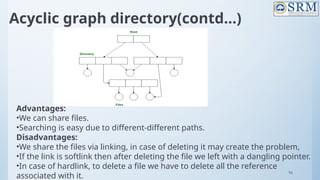
4. Acyclic graph directory
• An acyclic graph is a graph with no cycle and allows to share
subdirectories and files. The same file or subdirectories may be in two
different directories. It is a natural generalization of the tree-structured
directory.
• It is used in the situation like when two programmers are working on a
joint project and they need to access files. The associated files are
stored in a subdirectory, separating them from other projects and files
of other programmers, since they are working on a joint project so they
want the subdirectories to be into their own directories. The common
subdirectories should be shared. So here we use Acyclic directories.
• It is the point to note that shared file is not the same as copy file . If any
programmer makes some changes in the subdirectory it will reflect in
both subdirectories.
96
Acyclic graph directory(contd…)
Advantages:
•We can share files.
•Searching is easy due to different-different paths.
Disadvantages:
•We share the files via linking, in case of deleting it may create the problem,
•If the link is softlink then after deleting the file we left with a dangling pointer.
•In case of hardlink, to delete a file we have to delete all the reference
associated with it.
97
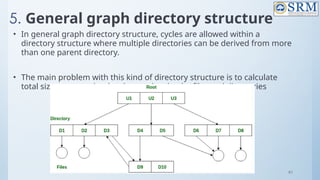
5. General graph directory structure
• In general graph directory structure, cycles are allowed within a
directory structure where multiple directories can be derived from more
than one parent directory.
• The main problem with this kind of directory structure is to calculate
total size or space that has been taken by the files and directories
98
General graph directory structure(contd…)
Advantages:
• It allows cycles.
• It is more flexible than other directories structure.
Disadvantages:
• It is more costly than others.
• It needs garbage collection.
99
Allocation Methods
• An allocation method refers to how disk blocks are allocated for
files:
• Contiguous allocation
• Linked allocation
• Indexed allocation
100
Contiguous Allocation
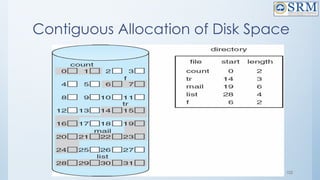
• Each file occupies a set of contiguous blocks on the disk
• Simple – only starting location (block #) and length (number of blocks)
are required
• Random access
• Wasteful of space (dynamic storage-allocation problem)
• Files cannot grow
101
Contiguous Allocation
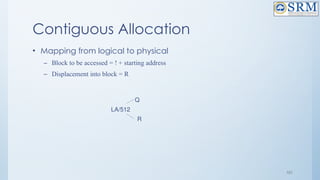
• Mapping from logical to physical
– Block to be accessed = ! + starting address
– Displacement into block = R
LA/512
Q
R
102
Contiguous Allocation of Disk Space
103
Extent-Based Systems
• Many newer file systems (I.e. Veritas File System) use a modified
contiguous allocation scheme
• Extent-based file systems allocate disk blocks in extents
• An extent is a contiguous block of disks
– Extents are allocated for file allocation
– A file consists of one or more extents
104
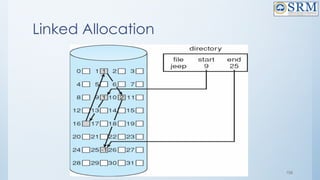
Linked Allocation
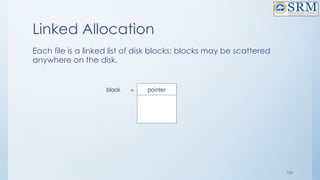
Each file is a linked list of disk blocks: blocks may be scattered
anywhere on the disk.
pointer
block =
105
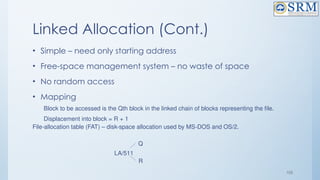
Linked Allocation (Cont.)
• Simple – need only starting address
• Free-space management system – no waste of space
• No random access
• Mapping
Block to be accessed is the Qth block in the linked chain of blocks representing the file.
Displacement into block = R + 1
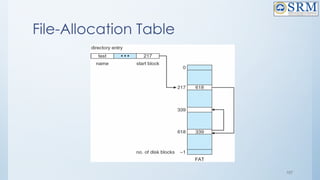
File-allocation table (FAT) – disk-space allocation used by MS-DOS and OS/2.
LA/511
Q
R
106
Linked Allocation
107
File-Allocation Table
108
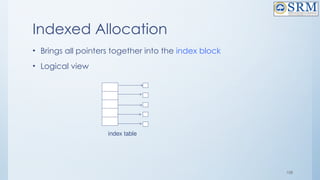
Indexed Allocation
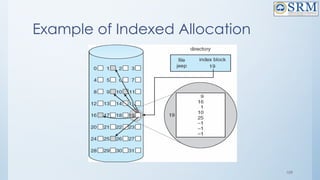
• Brings all pointers together into the index block
• Logical view
index table
109
Example of Indexed Allocation
110
Indexed Allocation (Cont.)
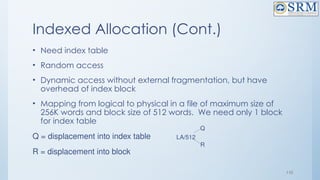
• Need index table
• Random access
• Dynamic access without external fragmentation, but have
overhead of index block
• Mapping from logical to physical in a file of maximum size of
256K words and block size of 512 words. We need only 1 block
for index table
Q = displacement into index table
R = displacement into block
LA/512
Q
R
111
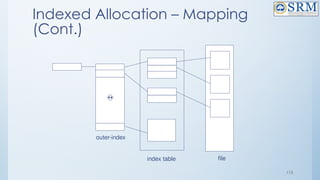
Indexed Allocation – Mapping
(Cont.)
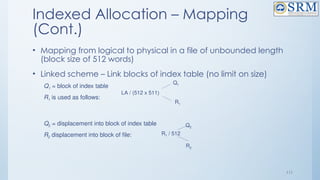
• Mapping from logical to physical in a file of unbounded length
(block size of 512 words)
• Linked scheme – Link blocks of index table (no limit on size)
Q1 = block of index table
R1 is used as follows:
Q2 = displacement into block of index table
R2 displacement into block of file:
LA / (512 x 511)
Q1
R1
R1 / 512
Q2
R2
112
Indexed Allocation – Mapping
(Cont.)
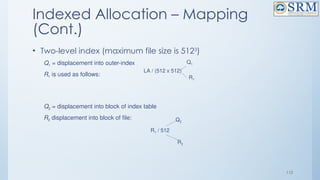
• Two-level index (maximum file size is 5123
)
Q1 = displacement into outer-index
R1 is used as follows:
Q2 = displacement into block of index table
R2 displacement into block of file:
LA / (512 x 512)
Q1
R1
R1 / 512
Q2
R2
113
Indexed Allocation – Mapping
(Cont.)

outer-index
index table file
Worksheet
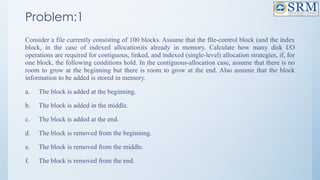
Problem:1
Consider a file currently consisting of 100 blocks. Assume that the file-control block (and the index
block, in the case of indexed allocation)is already in memory. Calculate how many disk I/O
operations are required for contiguous, linked, and indexed (single-level) allocation strategies, if, for
one block, the following conditions hold. In the contiguous-allocation case, assume that there is no
room to grow at the beginning but there is room to grow at the end. Also assume that the block
information to be added is stored in memory.
a. The block is added at the beginning.
b. The block is added in the middle.
c. The block is added at the end.
d. The block is removed from the beginning.
e. The block is removed from the middle.
f. The block is removed from the end.
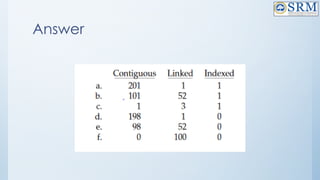
Answer
Problem:2
File of 101 blocks, file positions already in memory, and block to add already in
memory. Every directory or index operation is done in memory. There is room
on the disk after the file but not before. How many operations to...
1.Add a block at the beginning
2.Add a block after the 51st block
3.Add a block at the end
4.Remove the beginning block5.Remove the 51st block
6.Remove the end block
118
Free-Space Management
Bit vector (n blocks)
…
bit[i] =
0  block[i] free
1  block[i] occupied
(number of bits per word) *
(number of 0-value words) +
offset of first 1 bit
119
Free-Space Management (Cont.)
• Bit map requires extra space
– Example:
block size = 212
bytes
disk size = 230
bytes (1 gigabyte)
n = 230
/212
= 218
bits (or 32K bytes)
• Easy to get contiguous files
• Linked list (free list)
– Cannot get contiguous space easily
– No waste of space
• Grouping
• Counting
120
Free-Space Management (Cont.)
• Need to protect:
– Pointer to free list
– Bit map
– Must be kept on disk
– Copy in memory and disk may differ
– Cannot allow for block[i] to have a situation where bit[i] = 1 in memory and
bit[i] = 0 on disk
– Solution:
– Set bit[i] = 1 in disk
– Allocate block[i]
– Set bit[i] = 1 in memory
121
Directory Implementation
• Linear list of file names with pointer to the data blocks
– simple to program
– time-consuming to execute
• Hash Table – linear list with hash data structure
– decreases directory search time
– collisions – situations where two file names hash to the same location
– fixed size
122
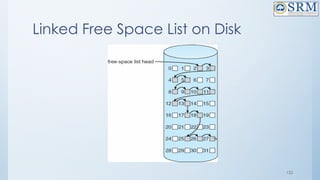
Linked Free Space List on Disk
123
Efficiency and Performance
• Efficiency dependent on:
– disk allocation and directory algorithms
– types of data kept in file’s directory entry
• Performance
– disk cache – separate section of main memory for frequently used blocks
– free-behind and read-ahead – techniques to optimize sequential access
– improve PC performance by dedicating section of memory as virtual disk,
or RAM disk
124
Free Space Management
Objectives :
• Operating system maintains a list of free disk spaces to keep track
of all disk blocks which are not being used by any file.
• Whenever a file has to be created, the list of free disk space is
searched for and then allocated to the new file.
• A file system is responsible to allocate the free blocks to the file
therefore it has to keep track of all the free blocks present in the
disk.
• Hence there is need for understanding the methods available for
managing free space in the disk
Understanding the methods available for maintaining the
free spaces in the disk
The system keeps tracks of the free disk blocks for allocating
space to files when they are created.
Also, to reuse the space released from deleting the files,
free space management becomes crucial.
The system maintains a free space list which keeps track of
the disk blocks that are not allocated to some file or
directory.
• The free space list can be implemented mainly as:
1.Bitmap or Bit vector
• A Bitmap or Bit Vector is series or collection of bits where each bit
corresponds to a disk block.
• The bit can take two values: 0 and 1: 0 indicates that the block is
allocated and 1 indicates a free block.
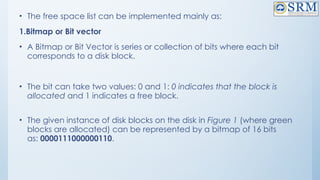
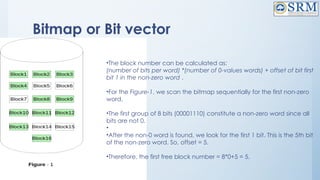
• The given instance of disk blocks on the disk in Figure 1 (where green
blocks are allocated) can be represented by a bitmap of 16 bits
as: 0000111000000110.
Bitmap or Bit vector
•The block number can be calculated as:
(number of bits per word) *(number of 0-values words) + offset of bit first
bit 1 in the non-zero word .
•For the Figure-1, we scan the bitmap sequentially for the first non-zero
word.
•The first group of 8 bits (00001110) constitute a non-zero word since all
bits are not 0.
•
•After the non-0 word is found, we look for the first 1 bit. This is the 5th bit
of the non-zero word. So, offset = 5.
•Therefore, the first free block number = 8*0+5 = 5.
Bitmap or Bit vector
Advantages
• Simple to understand.
• Finding the first free block is efficient. It requires scanning the
words (a group of 8 bits) in a bitmap for a non-zero word. (A 0-
valued word has all bits 0). The first free block is then found by
scanning for the first 1 bit in the non-zero word.
2.Linked List
• In this approach, the free disk blocks are linked together i.e. a
free block contains a pointer to the next free block.
• The block number of the very first disk block is stored at a
separate location on disk and is also cached in memory.
2.Linked List
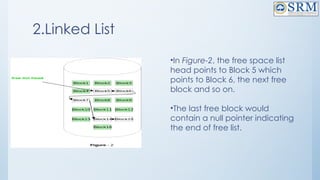
•In Figure-2, the free space list
head points to Block 5 which
points to Block 6, the next free
block and so on.
•The last free block would
contain a null pointer indicating
the end of free list.
3.Grouping
• This approach stores the address of the free blocks in the first free
block.
• The first free block stores the address of some, say n free blocks.
• Out of these n blocks, the first n-1 blocks are actually free and
the last block contains the address of next free n blocks.
• An advantage of this approach is that the addresses of a group
of free disk blocks can be found easily.
4.Counting
• This approach stores the address of the first free disk block and a
number n of free contiguous disk blocks that follow the first block.
Every entry in the list would contain:
• Address of first free disk block
• A number n
• For example, in Figure-1, the first entry of the free space list would
be: ([Address of Block 5], 2), because 2 contiguous free blocks
follow block 5.
Swap-Space Management
• Swapping is a memory management technique used in multi-
programming to increase the number of process sharing the
CPU.
• It is a technique of removing a process from main memory and
storing it into secondary memory, and then bringing it back into
main memory for continued execution.
• This action of moving a process out from main memory to
secondary memory is called Swap Out and the action of moving
a process out from secondary memory to main memory is
called Swap In.
Swap-Space Management
• Swap-space — virtual memory uses disk space as an extension of main
memory.
• Main goal for the design and implementation of swap space is to provide the best
throughput for VM system
• Swap-space use
– Swapping – use swap space to hold entire process image
– Paging –store pages that have been pushed out of memory
• Some OS may support multiple swap-space
– Put on separate disks to balance the load
• Better to overestimate than underestimate
– If out of swap-space, some processes must be aborted or system crashed
Swap-Space Location
• Swap-space can be carved out of the normal file system, or in a
separate disk partition.
• A large file within the file system: simple but inefficient
– Navigating the directory structure and the disk-allocation data structure takes time and
potentially extra disk accesses
– External fragmentation can greatly increase swapping times by forcing multiple seeks during
reading or writing of a process image
– Improvement
• Caching block location information in main memory
• Contiguous allocation for the swap file
– But, the cost of traversing FS data structure still remains
Swap-Space Location
• In a separate partition: raw partition
– Create a swap space during disk partitioning
– A separate swap-space storage manager is used to
allocate and de-allocate blocks
– Use algorithms optimized for speed, rather than storage
efficiency
– Internal fragment may increase
• Linux supports both approaches
Swap-space Management: Example
• Solaris 1
– Text-segment pages are brought in from the file system and are thrown away if
selected for paged out
• More efficient to re-read from FS than write it to the swap space
– Swap space: only used as a backing store for pages of
anonymous memory
• Stack, heap, and uninitialized data
• Solaris 2
– Allocates swap space only when a page is forced out of physical memory
• Not when the virtual memory page is first created.
138
Thank you

18CSC205J Operating Systemkooks-Unit-5.pptx

  • 1.
    1 18CSC205J – OperatingSystems – Unit V STORAGE MANAGEMENT AND FILE MANAGEMENT
  • 2.
    2 Course Learning Rationaleand Course Learning Outcomes • Realize the significance of Device management part of an Operating System • Comprehend the need of File management functions of an Operating System Course Learning Rationale • Find the significance of device management role of an Operating system • Recognize the essentials of File Management of an Operating system Course Learning Outcomes
  • 3.
    3 Contents • STORAGE MANAGEMENT: • UNDERSTANDING THE BASICS IN STORAGE MANAGEMENT • DISK SCHEDULING • UNDERSTANDING THE VARIOUS SCHEDULING WITH RESPECT TO THE DISK • FILE SYSTEM INTERFACE: • FILE CONCEPT • FILE ACCESS METHODS • UNDERSTANDING THE FILE BASICS • FILE SHARING AND PROTECTION • EMPHASIS THE NEED FOR THE FILE SHARING AND ITS PROTECTION • FILE SYSTEM IMPLEMENTATION : • BASIC FILE SYSTEM STRUCTURE • FILE SYSTEM IMPLEMENTATION
  • 4.
    4 Mass-Storage Systems • Overviewof Mass Storage Structure – Hard disk – Magnetic tape – Storage Array – Storage Area Networks – Network Attached Storage
  • 5.
    5 Objectives • To describethe physical structure of secondary storage devices and its effects on the uses of the devices • To explain the performance characteristics of mass-storage devices • To evaluate disk scheduling algorithms
  • 6.
    6 Overview of MassStorage Structure • Magnetic disks provide bulk of secondary storage of modern computers – Drives rotate at 60 to 250 times per second – Transfer rate is rate at which data flow between drive and computer – Positioning time (random-access time) is time to move disk arm to desired cylinder (seek time) and time for desired sector to rotate under the disk head (rotational latency) – Head crash results from disk head making contact with the disk surface -- That’s bad • Disks can be removable • Drive attached to computer via I/O bus – Busses vary, including EIDE, ATA, SATA, USB, Fibre Channel, SCSI, SAS, Firewire – Host controller in computer uses bus to talk to disk controller built into drive or storage array
  • 7.
  • 8.
    8 Hard Disks • Plattersrange from .85” to 14” (historically) – Commonly 3.5”, 2.5”, and 1.8” • Range from 30GB to 3TB per drive • Performance – Transfer Rate – theoretical – 6 Gb/sec – Effective Transfer Rate – real – 1Gb/sec – Seek time from 3ms to 12ms – 9ms common for desktop drives – Average seek time measured or calculated based on 1/3 of tracks – Latency based on spindle speed – 1 / (RPM / 60) = 60 / RPM – Average latency = ½ latency
  • 9.
    9 Hard Disks • Plattersrange from .85” to 14” (historically) – Commonly 3.5”, 2.5”, and 1.8” • Range from 30GB to 3TB per drive • Performance – Transfer Rate – theoretical – 6 Gb/sec – Effective Transfer Rate – real – 1Gb/sec – Seek time from 3ms to 12ms – 9ms common for desktop drives – Average seek time measured or calculated based on 1/3 of tracks – Latency based on spindle speed – 1 / (RPM / 60) = 60 / RPM – Average latency = ½ latency
  • 10.
    10 Terms to beconsidered for calculating Hard Disk Performance • 1. Seek time- Seek time is the time taken to locate the disk arm to a specified track where the data is to be read or write. So the disk scheduling algorithm that gives minimum average seek time is better. • 2. Rotational Latency: Rotational Latency is the time taken by the desired sector of disk to rotate into a position so that it can access the read/write heads. So the disk scheduling algorithm that gives minimum rotational latency is better. • 3. Transfer Time: Transfer time is the time to transfer the data. It depends on the rotating speed of the disk and number of bytes to be transferred. • 4. Disk Access Time: Disk Access = Seek time + Rotational latency + Transfer time
  • 11.
    11 Hard Disk Performance(contd…) •To transfer a 4KB block on a 7200 RPM disk with a 5ms average seek time, 1Gb/sec transfer rate with a .1ms controller overhead calculate average I/O time or Disk access time of 4KB block. Disk Access time = Seek time + Rotational latency + Transfer time
  • 12.
    12 The First CommercialDisk Drive • 1956 • IBM RAMDAC computer included the IBM Model 350 disk storage system • 5M (7 bit) characters • 50 x 24” platters • Access time = < 1 second
  • 13.
    13 Solid-State Disks • Nonvolatilememory used like a hard drive – Many technology variations • Can be more reliable than HDDs • More expensive per MB • Maybe have shorter life span • Less capacity • But much faster • Busses can be too slow -> connect directly to PCI for example • No moving parts, so no seek time or rotational latency
  • 14.
    14 Magnetic Tape • Wasearly secondary-storage medium – Evolved from open spools to cartridges • Relatively permanent and holds large quantities of data • Access time slow • Random access ~1000 times slower than disk • Mainly used for backup, storage of infrequently-used data, transfer medium between systems • Kept in spool and wound or rewound past read-write head • Once data under head, transfer rates comparable to disk – 140MB/sec and greater • 200GB to 1.5TB typical storage • Common technologies are LTO-{3,4,5} and T10000
  • 15.
    15 Disk Structure • Diskdrives are addressed as large 1-dimensional arrays of logical blocks, where the logical block is the smallest unit of transfer – Low-level formatting creates logical blocks on physical media • The 1-dimensional array of logical blocks is mapped into the sectors of the disk sequentially – Sector 0 is the first sector of the first track on the outermost cylinder – Mapping proceeds in order through that track, then the rest of the tracks in that cylinder, and then through the rest of the cylinders from outermost to innermost – Logical to physical address should be easy – Except for bad sectors – Non-constant # of sectors per track via constant angular velocity
  • 16.
    16 Disk Attachment • Host-attachedstorage accessed through I/O ports talking to I/O busses • SCSI itself is a bus, up to 16 devices on one cable, SCSI initiator requests operation and SCSI targets perform tasks – Each target can have up to 8 logical units (disks attached to device controller) • FC is high-speed serial architecture – Can be switched fabric with 24-bit address space – the basis of storage area networks (SANs) in which many hosts attach to many storage units • I/O directed to bus ID, device ID, logical unit (LUN)
  • 17.
    17 Storage Array • Canjust attach disks, or arrays of disks • Storage Array has controller(s), provides features to attached host(s) – Ports to connect hosts to array – Memory, controlling software (sometimes NVRAM, etc) – A few to thousands of disks – RAID, hot spares, hot swap (discussed later) – Shared storage -> more efficiency – Features found in some file systems – Snaphots, clones, thin provisioning, replication, deduplication, etc
  • 18.
    18 Storage Area Network •Common in large storage environments • Multiple hosts attached to multiple storage arrays - flexible
  • 19.
    19 Storage Area Network(Cont.) • SAN is one or more storage arrays – Connected to one or more Fibre Channel switches • Hosts also attach to the switches • Storage made available via LUN Masking from specific arrays to specific servers • Easy to add or remove storage, add new host and allocate it storage – Over low-latency Fibre Channel fabric
  • 20.
    20 Network-Attached Storage • Network-attachedstorage (NAS) is storage made available over a network rather than over a local connection (such as a bus) – Remotely attaching to file systems • NFS and CIFS are common protocols • Implemented via remote procedure calls (RPCs) between host and storage over typically TCP or UDP on IP network • iSCSI protocol uses IP network to carry the SCSI protocol – Remotely attaching to devices (blocks)
  • 21.
  • 22.
    22 •Disk Scheduling – Introductionto Disk Scheduling – Why Disk Scheduling is Important – Disk Scheduling Algorithms – FCFS – SSTF – SCAN – C-SCAN – LOOK – C-LOOK - Disk Management
  • 23.
    23 Disk Scheduling What isDisk Scheduling? Disk scheduling is done by operating systems to schedule I/O requests arriving for the disk. Disk scheduling is also known as I/O scheduling. •The operating system is responsible for using hardware efficiently — for the disk drives, this means having a fast access time and disk bandwidth •Minimize seek time •Seek time  seek distance •Disk bandwidth is the total number of bytes transferred, divided by the total time between the first request for service and the completion of the last transfer •There are many sources of disk I/O request –OS –System processes –Users processes •I/O request includes input or output mode, disk address, memory address, number of sectors to transfer •OS maintains queue of requests, per disk or device •Idle disk can immediately work on I/O request, busy disk means work must
  • 24.
    24 Why Disk Schedulingis Important? • Disk scheduling is important because: • Multiple I/O requests may arrive by different processes and only one I/O request can be served at a time by the disk controller. Thus other I/O requests need to wait in the waiting queue and need to be scheduled. • Two or more request may be far from each other so can result in greater disk arm movement. • Hard drives are one of the slowest parts of the computer system and thus need to be accessed in an efficient manner.
  • 25.
    25 Disk Scheduling (Cont.) •Note that drive controllers have small buffers and can manage a queue of I/O requests (of varying “depth”) • Several algorithms exist to schedule the servicing of disk I/O requests • The analysis is true for one or many platters
  • 26.
    26 Disk Scheduling Algorithms –Disk Scheduling Algorithms – FCFS – SSTF – SCAN – C-SCAN – LOOK – C-LOOK
  • 27.
    27 Disk Scheduling Algorithm- Example • Consider a disk queue with requests for I/O to blocks on cylinders 98, 183, 41, 122, 14, 124, 65, 67. The FCFS,SSTF,SCAN,C- SCAN,LOOK, and C-LOOK scheduling algorithm is used. The head is initially at cylinder number 53. The cylinders are numbered from 0 to 199. The total head movement (in number of cylinders) incurred while servicing these requests is _______.
  • 28.
    28 1. FCFS(First ComeFirst Serve) • FCFS is the simplest of all the Disk Scheduling Algorithms. In FCFS, the requests are addressed in the order they arrive in the disk queue. • head is initially at cylinder number 53. The cylinders are numbered from 0 to 199. • 98, 183, 41, 122, 14, 124, 65, 67 1. (98-53)=45 2. (183-98)=85 4. (122-41)=81 5. 122-14=108 6. 124-14-110 7. 124-65=59 8.67-65=2 3. (183-41)=142
  • 29.
    29 FCFS(contd..) • Total headmovements using FCFS= [(98 – 53) + (183 – 98) + (183 – 41) + (122 – 41) + (122 – 14) + (124 – 14) + (124 – 65) + (67 – 65)] • = 45 + 85 + 142 + 81 + 108 + 110 + 59 + 2 • =632 Advantages: • Every request gets a fair chance • No indefinite postponement Disadvantages: • Does not try to optimize seek time • May not provide the best possible service
  • 30.
    30 2. SSTF(Shortest SeekTime First) • Shortest Seek Time First (SSTF) selects the request with the minimum seek time from the current head position • SSTF scheduling is a form of SJF scheduling; may cause starvation of some requests • As a result, the request near the disk arm will get executed first. SSTF is certainly an improvement over FCFS as it decreases the average response time and increases the throughput of system. Advantages: • Average Response Time decreases • Throughput increases Disadvantages: • Overhead to calculate seek time in advance • Can cause Starvation for a request if it has higher seek time as compared to incoming requests • High variance of response time as SSTF favours only some requests
  • 31.
    SSTF(contd…) • head isinitially at cylinder number 53. The cylinders are numbered from 0 to 199. [98, 183, 41, 122, 14, 124, 65, 67 ] • 98, 183, 41, 122, 14, 124, 65, 67 31 Total head movement using SSTF=(65-53)+(67-65)+(67-41)+(41-14)+(98- 14)+ (122-98)+(124-122)+(183-124) =12+2+26+27+84+24+2+59=236)
  • 32.
    32 3. SCAN • Thedisk arm starts at one end of the disk, and moves toward the other end, servicing requests until it gets to the other end of the disk, where the head movement is reversed and servicing continues. • SCAN algorithm Sometimes called the elevator algorithm • As a result, the requests at the midrange are serviced more and those arriving behind the disk arm will have to wait. Advantages: • High throughput • Low variance of response time • Average response time Disadvantages: • Long waiting time for requests for locations just visited by disk arm
  • 33.
    33 SCAN or Elevator((1st Solution) •head is initially at cylinder number 53. The cylinders are numbered from 0 to 199. [ 98, 183, 41, 122, 14, 124, 65, 67 ] Total Head Movement using SCAN=[(65-53)+(67-65)+(98-67)+(122-98)+(124- 122)+(183-124)+(199-183)+(199-41)+ (41-14)] =12+2+31+24+2+59+16+158+27)=331
  • 34.
    34 SCAN or Elevator(2nd Solution)-Best Choice • head is initially at cylinder number 53. The cylinders are numbered from 0 to 199. [ 98, 183, 41, 122, 14, 124, 65, 67 ] Total Head Movement using SCAN=[(53-41)+(41-14)+(14-0)+(65-0)+(67-65)+ (98-67)+(122-98)+(124-122)+(183-124)] =12+27+14+65+2+31+24+59 = 234
  • 35.
    35 4. C-SCAN • Thehead moves from one end of the disk to the other, servicing requests as it goes – When it reaches the other end, however, it immediately returns to the beginning of the disk, without servicing any requests on the return trip • Treats the cylinders as a circular list that wraps around from the last cylinder to the first one • Provides a more uniform wait time than SCAN Advantages: • Provides more uniform wait time compared to SCAN
  • 36.
    36 C-SCAN(contd…) • head isinitially at cylinder number 53. The cylinders are numbered from 0 to 199. [ 98, 183, 41, 122, 14, 124, 65, 67 ] Total Head Movement using C-SCAN=[(65-53)+(67-65)+(98-67)+(122-98)+(124-122)+(183-124)+(199- 183)+(199-0)+(14-0)+(41-14)] =12+2+31+24+2+59+16+199+14+27)=386
  • 37.
    37 5. LOOK • Itis similar to the SCAN disk scheduling algorithm except for the difference that the disk arm in spite of going to the end of the disk goes only to the last request to be serviced in front of the head and then reverses its direction from there only. Thus it prevents the extra delay which occurred due to unnecessary traversal to the end of the disk.
  • 38.
    38 LOOK(Contd…) • head isinitially at cylinder number 53. The cylinders are numbered from 0 to 199. [ 98, 183, 41, 122, 14, 124, 65, 67 ] Total Head Movement using look=[(65-53)+(67-65)+(98-67)+(122-98)+(124- 122)+ (183-124)+(183-41)+(41-14)] =12+2+31+24+2+59+142+27)=299
  • 39.
    39 6. C-LOOK • LOOKa version of SCAN, C-LOOK a version of C-SCAN • Arm only goes as far as the last request in each direction, then reverses direction immediately, without first going all the way to the end of the disk • In CLOOK, the disk arm in spite of going to the end goes only to the last request to be serviced in front of the head and then from there goes to the other end’s last request. Thus, it also prevents the extra delay which occurred due to unnecessary traversal to the end of the disk.
  • 40.
    40 C- LOOK(contd…) • headis initially at cylinder number 53. The cylinders are numbered from 0 to 199. 98, 183, 41, 122, 14, 124, 65, 67 Total Head Movement using C-LOOK=[(65-53)+(67-65)+(98-67)+(122- 98)+(124-122)+(183-124)+(183-14)+ (41-14)] = 12+2+31+24+2+59+169+27)=326
  • 41.
    41 No.of Head movementsof All Algorithms • Total head movements • 1.FCFS=632 • 2.SSTF=232 • 3.SCAN=331or 234 • 4. C-SCAN=386 • 5.LOOK=299 • 6.C-SCAN=326
  • 42.
    42 Selection of aDisk-Scheduling Algorithm • SSTF is common and has a natural appeal • SCAN and C-SCAN perform better for systems that place a heavy load on the disk – Less starvation • Performance depends on the number and types of requests • Requests for disk service can be influenced by the file-allocation method – And metadata layout • The disk-scheduling algorithm should be written as a separate module of the operating system, allowing it to be replaced with a different algorithm if necessary • Either SSTF or LOOK is a reasonable choice for the default algorithm • What about rotational latency? – Difficult for OS to calculate • How does disk-based queueing effect OS queue ordering efforts?
  • 43.
    43 Disk Management • Low-levelformatting, or physical formatting — Dividing a disk into sectors that the disk controller can read and write – Each sector can hold header information, plus data, plus error correction code (ECC) – Usually 512 bytes of data but can be selectable • To use a disk to hold files, the operating system still needs to record its own data structures on the disk – Partition the disk into one or more groups of cylinders, each treated as a logical disk – Logical formatting or “making a file system” – To increase efficiency most file systems group blocks into clusters – Disk I/O done in blocks – File I/O done in clusters
  • 44.
    44 Disk Management (Cont.) •Raw disk access for apps that want to do their own block management, keep OS out of the way (databases for example) • Boot block initializes system – The bootstrap is stored in ROM – Bootstrap loader program stored in boot blocks of boot partition • Methods such as sector sparing used to handle bad blocks
  • 45.
    45 File System Interface •File Concept • File Access Methods • File Sharing and Protection
  • 46.
    46 Objective of FileInterface • To explain the function of file systems • To describe the interfaces to file systems • To discuss file-system design tradeoffs, including access methods, file sharing, file locking, and structures
  • 47.
  • 48.
    48 File Concept • Afile is a named collection of related information that is recorded on secondary storage such as magnetic disks, magnetic tapes and optical disks. In general, a file is a sequence of bits, bytes, lines or records whose meaning is defined by the files creator and user. • Files are the most important mechanism for storing data permanently on mass-storage devices. Permanently means that the data is not lost when the machine is switched off. Files can contain: • data in a format that can be interpreted by programs, but not easily by humans (binary files); • alphanumeric characters, codified in a standard way (e.g., using ASCII or Unicode), and directly readable by a human user (text files). Text files are normally organized in a sequence of lines, each containing a sequence of characters and ending with a special character (usually the newline character). Consider, for example, a Java program stored in a file on the hard-disk. In this unit we will deal only with text files. • Each file is characterized by a name and a directory in which the file is placed (one may consider the whole path that allows one to find the file on the hard-disk as part of the name of the file).
  • 49.
    49 File Attributes • Name:It is the only information stored in a human-readable form. • Identifier: Every file is identified by a unique tag number within a file system known as an identifier. • Location: Points to file location on device. • Type: This attribute is required for systems that support various types of files. • Size. Attribute used to display the current file size. • Protection. This attribute assigns and controls the access rights of reading, writing, and executing the file. • Time, date and security: It is used for protection, security, and also used for monitoring
  • 50.
    50 File Operations 1.Create • Creationof the file is the most important operation on the file. Different types of files are created by different methods for example text editors are used to create a text file, word processors are used to create a word file and Image editors are used to create the image files. 2.Write • Writing the file is different from creating the file. The OS maintains a write pointer for every file which points to the position in the file from which, the data needs to be written. 3.Read • Every file is opened in three different modes : Read, Write and append. A Read pointer is maintained by the OS, pointing to the position up to which, the data has been read. 4.Re-position • Re-positioning is simply moving the file pointers forward or backward depending upon the user's requirement. It is also called as seeking. 5.Delete • Deleting the file will not only delete all the data stored inside the file, It also deletes all the attributes of the file. The space which is allocated to the file will now become available and can be allocated to the other files. 6.Truncate • Truncating is simply deleting the file except deleting attributes. The file is not completely deleted although the information stored inside the file get replaced.
  • 51.
    51 File Types –Names,Extension
  • 52.
    52 File Structure • Afile has a certain defined structure according to its type. • A text file is a sequence of characters organized into lines. • A source file is a sequence of procedures and functions. • An object file is a sequence of bytes organized into blocks that are understandable by the machine. • When operating system defines different file structures, it also contains the code to support these file structure. Unix, MS-DOS support minimum number of file structure.
  • 53.
    53 File Structure File Structure classification None- Sequenceof words,bytes Simple Record Structure – Lines, Fixed and Variable Length Complex Structure – Formatted Document, Relocatable load file
  • 54.
    54 File Access Methods FileAccess Methods Sequential Direct Hashed
  • 55.
    55 File Access Methods 1.Sequential Access Method: – Sequential Access Method is one of the simplest file access methods. Most of the OS (operating system) uses a sequential access method to access the file. In this method, word by word, the operating system read the file, and we have a pointer that points the file’s base address. If we need to read the file’s first word, then there is a pointer that offers the word which we want to read and increment the value of the word by 1, and till the end of the file, this process will continue. • The Modern world system offers the facility of index access and direct access to file. But the sequential access method is one of the most used methods because more files like text files, audio files, and the video files require to be sequentially accessed. • Key Points: 1. Sequential Access Method is reasonable for tape. 2. In the sequential access method, if we use read command, then the pointer is moved ahead by 1. 3. If the write command is used, then the memory will be allocated, and at the end of the file, a pointer will be moved.
  • 56.
    56 File Access Methods 2.Direct Access Method: – Direct Access Method is also called the Relative access method. In the Database System, we mostly use the Direct Access Method. In most of the situations, there is a need for information in the filtered form from the database. And in that case, the speed of sequential access may be low and not efficient. • Let us assume that each storage block stores 4 records, and we already know that the block which we require is stored in the 10th block. In this situation, the sequential access method is not suitable. Since if we use this, then to access the record which is needed, this method will traverse all the blocks. • So, in this situation, the Direct access method gives a more satisfying result, else the OS (operating system) needs to perform a few complex jobs like defining the block number, which is required. It is mostly implemented in the application of the database.
  • 57.
    57 File Access Methods 3.Index Access Method: – Index Access Method is another essential method of file, accessing. In this method, for a file an index is created, and the index is just like an index which is at the back of the book. The index includes the pointer to the different blocks. If we want to find a record in the file, then first, we search in the index, and after that, with the help of the pointer, we can directly access the file. • In the Index Access method, we can search fast in the large database, and also easy. But in this, the method need some additional space to store the value of the index in the memory. • Key Points: 1. On top of the sequential access method, the index access method is built. 2. The Index access method can control the pointer with the help of the index.
  • 58.
  • 59.
    Objective of Filesharing • For multiple users-File sharing, file naming and file protection is a challenging and important task. • In order to handle this, file access control and protection need to be done. • If a user wants to share a file with other user, proper protection schemes need to be followed. • Whenever a file is shared for various users on distributed systems , it must be shared across distributed systems. • In order to share and distribute files, Network File System (NFS) is used. • For single user system ,the system need to maintain many files and directory attributes.
  • 60.
    File sharing-Multiple Users •Many file systems evolved with the concept of file (or directory) owner (or user) and group. • The owner is the user who can change attributes and grant access and who has the most control over the file. • The group attribute defines a subset of users who can share access to the file. • For example, the owner of a file on a UNIX system can issue all operations on a file, while members of the file’s group can execute one subset of those operations, and all other users can execute another subset of operations. Exactly which operations can be executed by group members and other users is definable by the file’s owner
  • 61.
    File sharing-Remote FileSystems • The communication among remote computers uses the concept called Networking that allows the sharing of resources spread across a campus or even around the world. • The first implemented method for file sharing involves manually transferring files between machines via programs like ftp. • The second major method for file sharing uses a distributed file system (DFS) in which remote directories are visible from a local machine. • The third method for file sharing , uses WorldWide Web, is a reversion to the first. • A browser is needed to gain access to the remote files, and separate operations (essentially a wrapper for ftp) are used to transfer files. • Increasingly, cloud computing is being used for file sharing as well.
  • 62.
    File sharing-Remote FileSystems • ftp is used for both anonymous and authenticated access. • Anonymous access allows a user to transfer files without having an account on the remote system. • TheWorldWideWeb uses anonymous file exchange almost exclusively. • DFS involves a much tighter integration between the machine that is accessing the remote files and the machine providing the files.
  • 63.
    File sharing-Remote FileSystems Remote File Systems Failure Modes Distributed Information Systems Client –Server Model
  • 64.
    File sharing-Remote FileSystems- Client Server Model • The machine containing the files is the server, and the machine seeking access to the files is the client. • The server can serve multiple clients, and a client can use multiple servers, depending on the implementation details of a given client–server facility. • Example: – NFS is standard UNIX client-server file sharing protocol – CIFS is standard Windows protocol – Standard operating system file calls are translated into remote calls
  • 65.
    File sharing -DistributedInformation Systems • Distributed Information Systems (distributed naming services) such as LDAP, DNS, NIS, Active Directory implement unified access to information needed for remote computing • Examples: • Other distributed information systems provide user name/password/user ID/group ID space for a distributed facility. • UNIX systems have employed a wide variety of distributed information methods. • Sun Microsystems introduced yellow pages (since renamed network information service, or NIS), and most of the industry adopted its use.
  • 66.
    File Sharing -FailureModes • All file systems have failure modes – For example corruption of directory structures or other non-user data, called metadata • Remote file systems add new failure modes, due to network failure, server failure • Recovery from failure can involve state information about status of each remote request • Stateless protocols such as NFS v3 include all information in each request, allowing easy recovery but less security
  • 67.
    File Sharing-Consistency Semantics •Consistency semantics represent an important criterion for evaluating any file system that supports file sharing. • These semantics specify how multiple users of a system are to access a shared file simultaneously. • In particular, they specify when modifications of data by one user will be observable by other users. • These semantics are typically implemented as code with the file system. • Consistency semantics are directly related to the process synchronization algorithms
  • 68.
    File sharing -Consistency Semantics Consistency Semantics Immutable Shared File Semantics Session Semantics UNIX-Semantics
  • 69.
    File Sharing-Consistency Semantics- UnixSemantics • The UNIX file system uses the following consistency semantics: – Writes to an open file by a user are visible immediately to other users who have this file open. – One mode of sharing allows users to share the pointer of current location into the file. Thus, the advancing of the pointer by one user affects all sharing users. Here, a file has a single image that interleaves all accesses, regardless of their origin.
  • 70.
    File Sharing-Consistency Semantics- SessionSemantics • The Andrew file system (OpenAFS) uses the following consistency semantics: – Writes to an open file by a user are not visible immediately to other users that have the same file open. – Once a file is closed, the changes made to it are visible only in sessions starting later. Already open instances of the file do not reflect these changes. • According to these semantics, a file may be associated temporarily with several (possibly different) images at the same time.
  • 71.
    File Sharing-Consistency Semantics-Immutable-Shared- FilesSemantics • A unique approach is that of immutable shared files. • Once a file is declared as shared by its creator, it cannot be modified. An immutable file has two key properties: its name may not be reused, and its contents may not be altered. • Thus, the name of an immutable file signifies that the contents of the file are fixed. • The implementation of these semantics in a distributed system
  • 72.
    File Protection-Objective • Wheninformation is stored in a computer system, we want to keep it safe from physical damage (the issue of reliability) and improper access (the issue of protection). • Reliability is generally provided by duplicate copies of files. • Many computers have systems programs that automatically (or through computer-operator intervention) copy disk files to tape at regular intervals (once per day or week or month) to maintain a copy should a file system be accidentally destroyed. • File systems can be damaged by hardware problems (such as errors in reading or writing), power surges or failures, head crashes, dirt, temperature extremes, and vandalism. • Files may be deleted accidentally. Bugs in the file-system software can also cause file contents to be lost
  • 73.
    Protection • Protection canbe provided in many ways. Protection mechanisms provide controlled access by limiting the types of file access that can be made. – Read. Read from the file. – Write. Write or rewrite the file. – Execute. Load the file into memory and execute it. – Append. Write new information at the end of the file. – Delete. Delete the file and free its space for possible reuse. – List. List the name and attributes of the file. – Other operations, such as renaming, copying, and editing the file, may also be controlled.
  • 74.
    Protection-Access Control • Themost general scheme to implement identity dependent access is to associate with each file and directory an access- control list (ACL) specifying user names and the types of access allowed for each user. • When a user requests access to a particular file, the operating system checks the access list associated with that file. • If that user is listed for the requested access, the access is allowed. Otherwise, a protection violation occurs, and the user job is denied access to the file.
  • 75.
    Protection-Access Control • Modeof access: read(4 bits), write(2 bits), execute(1 bit) • Three classes of users on Unix / Linux(Default Permission) RWX a) owner access 7  1 1 1 RWX b) group access 6  1 1 0 RWX c) public access 1  0 0 1 To change Permissions the following commands are used : • Chmod: Change Mode(For files) • Chown: Change Owner(For Files) • Chgroup: Change group permission(For files)
  • 76.
    Protection-Access Control-Control List Management Windowsusers typically manage access- control lists via the GUI. Figure shows a file-permission window on Windows 7 NTFS file system. In this example, user “guest” is specifically denied access to the file ListPanel.java • Example:
  • 77.
    Unix File PermissionExample • While using ls -l command, it displays various information related to file permission as follows : • The first column represents different access modes, i.e., the permission associated with a file or a directory. • The permissions are broken into groups of threes, and each position in the group denotes a specific permission, in this order: read (r), write (w), execute (x) − • The first three characters (2-4) represent the permissions for the file's owner. For example, - rwxr-xr-- represents that the owner has read (r), write (w) and execute (x) permission. • The second group of three characters (5-7) consists of the permissions for the group to which the file belongs. For example, -rwxr-xr-- represents that the group has read (r) and execute (x) permission, but no write permission. • The last group of three characters (8-10) represents the permissions for everyone else. For example, -rwxr-xr-- represents that there is read (r) only permission.
  • 78.
  • 79.
    79 File System Implementation -File System Structure - Directory Implementation - File Allocation Methods - Swap Space Management
  • 80.
    80 Objectives of FileSystem Implementation • It helps to understand the file system structure • It helps to apprehend about how the files and folders are organized in the directory structure and its classification • To describe the implementation of remote file systems • To discuss block allocation and free-block algorithms and trade- offs • To describe the details of implementing local file systems and directory structures
  • 81.
    File-System Structure • Filestructure – Logical storage unit – Collection of related information • File system resides on secondary storage (disks) – Provided user interface to storage, mapping logical to physical – Provides efficient and convenient access to disk by allowing data to be stored, located retrieved easily • Disk provides in-place rewrite and random access – I/O transfers performed in blocks of sectors (usually 512 bytes) • File control block – storage structure consisting of information about a file • Device driver controls the physical device • File system organized into layers
  • 82.
    Layered File System •application program asks for a file, the first request is directed to the logical file system. • The logical file system contains the Meta data information of the file and directory structure and provides protection also. It translates file name into file number, file handle, location by maintaining file control blocks (inodes in UNIX) • The logical blocks of files need to be mapped to physical blocks in harddisk. This mapping is done by File organization module • The basic file system - issues the commands to I/O control in order to fetch those blocks. Basic file system given command like “retrieve block 123” translates to device driver. • I/O controls contain the codes by using which it can access hard disk. • These codes are known as device driversGiven commands like “read drive1, cylinder 72, track 2, sector 10, into memory location 1060” outputs low-level hardware specific commands to hardware controller
  • 83.
    File System Implementation •on-disk and in-memory structures • On Disk Data Structures • Boot Control Block - Boot Control Block contains all the information which is needed to boot an operating system from that volume. It is called boot block in UNIX file system. In NTFS, it is called the partition boot sector. • Volume Control Block - Volume control block all the information regarding that volume such as number of blocks, size of each block, partition table, pointers to free blocks and free FCB blocks. In UNIX file system, it is known as super block. In NTFS, this information is stored inside master file table. • Directory Structure (per file system) -A directory structure (per file system) contains file names and pointers to corresponding FCBs. • File Control Block - File Control block contains all the details about the file such as ownership details, permission details, file size,etc. In UFS, this detail is stored in inode. File control Block
  • 84.
    In-Memory File SystemStructures • The in-memory data structures are used for file system management as well as performance improvement via caching. This information is loaded on the mount time and discarded on ejection.
  • 85.
    Virtual File Systems Virtual File Systems, VFS, provide a common interface to multiple different filesystem types. In addition, it provides for a unique identifier ( vnode ) for files across the entire space, including across all filesystems of different types. ( UNIX inodes are unique only across a single filesystem, and certainly do not carry across networked file systems. )  The VFS in Linux is based upon four key object types: o The inode object, representing an individual file o The file object, representing an open file. o The superblock object, representing a filesystem. o The dentry object, representing a directory entry.
  • 86.
    Directory Implementation Directories needto be fast to search, insert, and delete, with a minimum of wasted disk space. Linear List • A linear list is the simplest and easiest directory structure to set up, but it does have some drawbacks. • Finding a file ( or verifying one does not already exist upon creation ) requires a linear search. • Deletions can be done by moving all entries, flagging an entry as deleted, or by moving the last entry into the newly vacant position. • Sorting the list makes searches faster, at the expense of more complex insertions and deletions. • A linked list makes insertions and deletions into a sorted list easier, with overhead for the links. • More complex data structures, such as B-trees, could also be considered. Hash Table • A hash table can also be used to speed up searches. • Hash tables are generally implemented in addition to a linear or other structure
  • 87.
    Directory Structure • Adirectory is a container that is used to contain folders and file. It organizes files and folders into a hierarchical manner.
  • 88.
    88 Directory Structure(Contd…) • Thereare several logical structures of a directory, these are given below. 1. Single-level directory 2. Two-level directory 3. Tree-structured directory 4. Acyclic graph directory 5. General graph directory structure
  • 89.
    89 1. Single levelDirectory Structure • Single level directory is simplest directory structure.In it all files are contained in same directory which make it easy to support and understand. • A single level directory has a significant limitation, however, when the number of files increases or when the system has more than one user. Since all the files are in the same directory, they must have the unique name . if two users call their dataset test, then the unique name rule violated.
  • 90.
    90 Single level DirectoryStructure(Contd…) Advantages: • Since it is a single directory, so its implementation is very easy. • If the files are smaller in size, searching will become faster. • The operations like file creation, searching, deletion, updating are very easy in such a directory structure. Disadvantages: • There may chance of name collision because two files can not have the same name. • Searching will become time taking if the directory is large. • In this can not group the same type of files together.
  • 91.
    91 2. Two-level directory •As we have seen, a single level directory often leads to confusion of files names among different users. the solution to this problem is to create a separate directory for each user. • In the two-level directory structure, each user has there own user files directory (UFD). The UFDs has similar structures, but each lists only the files of a single user. system’s master file directory (MFD) is searches whenever a new user id=s logged in. The MFD is indexed by username or account number, and each entry points to the UFD for that user.
  • 92.
    92 Two-level directory (contd…) Advantages: •We can give full path like /User-name/directory-name/. • Different users can have same directory as well as file name. • Searching of files become more easy due to path name and user- grouping. Disadvantages: • A user is not allowed to share files with other users. • Still it not very scalable, two files of the same type cannot be grouped together in the same user
  • 93.
    93 3. Tree-structured directory •Once we have seen a two-level directory as a tree of height 2, the natural generalization is to extend the directory structure to a tree of arbitrary height. • This generalization allows the user to create there own subdirectories and to organize on their files accordingly
  • 94.
    94 Tree-structured directory(contd…) A treestructure is the most common directory structure. The tree has a root directory, and every file in the system have a unique path. Advantages: 1. Very generalize, since full path name can be given. 2. Very scalable, the probability of name collision is less. 3. Searching becomes very easy, we can use both absolute path as well as relative Disadvantages: 4. Every file does not fit into the hierarchical model, files may be saved into multiple directories. 5. We can not share files. 6. It is inefficient, because accessing a file may go under multiple directories.
  • 95.
    95 4. Acyclic graphdirectory • An acyclic graph is a graph with no cycle and allows to share subdirectories and files. The same file or subdirectories may be in two different directories. It is a natural generalization of the tree-structured directory. • It is used in the situation like when two programmers are working on a joint project and they need to access files. The associated files are stored in a subdirectory, separating them from other projects and files of other programmers, since they are working on a joint project so they want the subdirectories to be into their own directories. The common subdirectories should be shared. So here we use Acyclic directories. • It is the point to note that shared file is not the same as copy file . If any programmer makes some changes in the subdirectory it will reflect in both subdirectories.
  • 96.
    96 Acyclic graph directory(contd…) Advantages: •Wecan share files. •Searching is easy due to different-different paths. Disadvantages: •We share the files via linking, in case of deleting it may create the problem, •If the link is softlink then after deleting the file we left with a dangling pointer. •In case of hardlink, to delete a file we have to delete all the reference associated with it.
  • 97.
    97 5. General graphdirectory structure • In general graph directory structure, cycles are allowed within a directory structure where multiple directories can be derived from more than one parent directory. • The main problem with this kind of directory structure is to calculate total size or space that has been taken by the files and directories
  • 98.
    98 General graph directorystructure(contd…) Advantages: • It allows cycles. • It is more flexible than other directories structure. Disadvantages: • It is more costly than others. • It needs garbage collection.
  • 99.
    99 Allocation Methods • Anallocation method refers to how disk blocks are allocated for files: • Contiguous allocation • Linked allocation • Indexed allocation
  • 100.
    100 Contiguous Allocation • Eachfile occupies a set of contiguous blocks on the disk • Simple – only starting location (block #) and length (number of blocks) are required • Random access • Wasteful of space (dynamic storage-allocation problem) • Files cannot grow
  • 101.
    101 Contiguous Allocation • Mappingfrom logical to physical – Block to be accessed = ! + starting address – Displacement into block = R LA/512 Q R
  • 102.
  • 103.
    103 Extent-Based Systems • Manynewer file systems (I.e. Veritas File System) use a modified contiguous allocation scheme • Extent-based file systems allocate disk blocks in extents • An extent is a contiguous block of disks – Extents are allocated for file allocation – A file consists of one or more extents
  • 104.
    104 Linked Allocation Each fileis a linked list of disk blocks: blocks may be scattered anywhere on the disk. pointer block =
  • 105.
    105 Linked Allocation (Cont.) •Simple – need only starting address • Free-space management system – no waste of space • No random access • Mapping Block to be accessed is the Qth block in the linked chain of blocks representing the file. Displacement into block = R + 1 File-allocation table (FAT) – disk-space allocation used by MS-DOS and OS/2. LA/511 Q R
  • 106.
  • 107.
  • 108.
    108 Indexed Allocation • Bringsall pointers together into the index block • Logical view index table
  • 109.
  • 110.
    110 Indexed Allocation (Cont.) •Need index table • Random access • Dynamic access without external fragmentation, but have overhead of index block • Mapping from logical to physical in a file of maximum size of 256K words and block size of 512 words. We need only 1 block for index table Q = displacement into index table R = displacement into block LA/512 Q R
  • 111.
    111 Indexed Allocation –Mapping (Cont.) • Mapping from logical to physical in a file of unbounded length (block size of 512 words) • Linked scheme – Link blocks of index table (no limit on size) Q1 = block of index table R1 is used as follows: Q2 = displacement into block of index table R2 displacement into block of file: LA / (512 x 511) Q1 R1 R1 / 512 Q2 R2
  • 112.
    112 Indexed Allocation –Mapping (Cont.) • Two-level index (maximum file size is 5123 ) Q1 = displacement into outer-index R1 is used as follows: Q2 = displacement into block of index table R2 displacement into block of file: LA / (512 x 512) Q1 R1 R1 / 512 Q2 R2
  • 113.
    113 Indexed Allocation –Mapping (Cont.)  outer-index index table file
  • 114.
  • 115.
    Problem:1 Consider a filecurrently consisting of 100 blocks. Assume that the file-control block (and the index block, in the case of indexed allocation)is already in memory. Calculate how many disk I/O operations are required for contiguous, linked, and indexed (single-level) allocation strategies, if, for one block, the following conditions hold. In the contiguous-allocation case, assume that there is no room to grow at the beginning but there is room to grow at the end. Also assume that the block information to be added is stored in memory. a. The block is added at the beginning. b. The block is added in the middle. c. The block is added at the end. d. The block is removed from the beginning. e. The block is removed from the middle. f. The block is removed from the end.
  • 116.
  • 117.
    Problem:2 File of 101blocks, file positions already in memory, and block to add already in memory. Every directory or index operation is done in memory. There is room on the disk after the file but not before. How many operations to... 1.Add a block at the beginning 2.Add a block after the 51st block 3.Add a block at the end 4.Remove the beginning block5.Remove the 51st block 6.Remove the end block
  • 118.
    118 Free-Space Management Bit vector(n blocks) … bit[i] = 0  block[i] free 1  block[i] occupied (number of bits per word) * (number of 0-value words) + offset of first 1 bit
  • 119.
    119 Free-Space Management (Cont.) •Bit map requires extra space – Example: block size = 212 bytes disk size = 230 bytes (1 gigabyte) n = 230 /212 = 218 bits (or 32K bytes) • Easy to get contiguous files • Linked list (free list) – Cannot get contiguous space easily – No waste of space • Grouping • Counting
  • 120.
    120 Free-Space Management (Cont.) •Need to protect: – Pointer to free list – Bit map – Must be kept on disk – Copy in memory and disk may differ – Cannot allow for block[i] to have a situation where bit[i] = 1 in memory and bit[i] = 0 on disk – Solution: – Set bit[i] = 1 in disk – Allocate block[i] – Set bit[i] = 1 in memory
  • 121.
    121 Directory Implementation • Linearlist of file names with pointer to the data blocks – simple to program – time-consuming to execute • Hash Table – linear list with hash data structure – decreases directory search time – collisions – situations where two file names hash to the same location – fixed size
  • 122.
  • 123.
    123 Efficiency and Performance •Efficiency dependent on: – disk allocation and directory algorithms – types of data kept in file’s directory entry • Performance – disk cache – separate section of main memory for frequently used blocks – free-behind and read-ahead – techniques to optimize sequential access – improve PC performance by dedicating section of memory as virtual disk, or RAM disk
  • 124.
    124 Free Space Management Objectives: • Operating system maintains a list of free disk spaces to keep track of all disk blocks which are not being used by any file. • Whenever a file has to be created, the list of free disk space is searched for and then allocated to the new file. • A file system is responsible to allocate the free blocks to the file therefore it has to keep track of all the free blocks present in the disk. • Hence there is need for understanding the methods available for managing free space in the disk
  • 125.
    Understanding the methodsavailable for maintaining the free spaces in the disk The system keeps tracks of the free disk blocks for allocating space to files when they are created. Also, to reuse the space released from deleting the files, free space management becomes crucial. The system maintains a free space list which keeps track of the disk blocks that are not allocated to some file or directory.
  • 126.
    • The freespace list can be implemented mainly as: 1.Bitmap or Bit vector • A Bitmap or Bit Vector is series or collection of bits where each bit corresponds to a disk block. • The bit can take two values: 0 and 1: 0 indicates that the block is allocated and 1 indicates a free block. • The given instance of disk blocks on the disk in Figure 1 (where green blocks are allocated) can be represented by a bitmap of 16 bits as: 0000111000000110.
  • 127.
    Bitmap or Bitvector •The block number can be calculated as: (number of bits per word) *(number of 0-values words) + offset of bit first bit 1 in the non-zero word . •For the Figure-1, we scan the bitmap sequentially for the first non-zero word. •The first group of 8 bits (00001110) constitute a non-zero word since all bits are not 0. • •After the non-0 word is found, we look for the first 1 bit. This is the 5th bit of the non-zero word. So, offset = 5. •Therefore, the first free block number = 8*0+5 = 5.
  • 128.
    Bitmap or Bitvector Advantages • Simple to understand. • Finding the first free block is efficient. It requires scanning the words (a group of 8 bits) in a bitmap for a non-zero word. (A 0- valued word has all bits 0). The first free block is then found by scanning for the first 1 bit in the non-zero word.
  • 129.
    2.Linked List • Inthis approach, the free disk blocks are linked together i.e. a free block contains a pointer to the next free block. • The block number of the very first disk block is stored at a separate location on disk and is also cached in memory.
  • 130.
    2.Linked List •In Figure-2,the free space list head points to Block 5 which points to Block 6, the next free block and so on. •The last free block would contain a null pointer indicating the end of free list.
  • 131.
    3.Grouping • This approachstores the address of the free blocks in the first free block. • The first free block stores the address of some, say n free blocks. • Out of these n blocks, the first n-1 blocks are actually free and the last block contains the address of next free n blocks. • An advantage of this approach is that the addresses of a group of free disk blocks can be found easily.
  • 132.
    4.Counting • This approachstores the address of the first free disk block and a number n of free contiguous disk blocks that follow the first block. Every entry in the list would contain: • Address of first free disk block • A number n • For example, in Figure-1, the first entry of the free space list would be: ([Address of Block 5], 2), because 2 contiguous free blocks follow block 5.
  • 133.
    Swap-Space Management • Swappingis a memory management technique used in multi- programming to increase the number of process sharing the CPU. • It is a technique of removing a process from main memory and storing it into secondary memory, and then bringing it back into main memory for continued execution. • This action of moving a process out from main memory to secondary memory is called Swap Out and the action of moving a process out from secondary memory to main memory is called Swap In.
  • 134.
    Swap-Space Management • Swap-space— virtual memory uses disk space as an extension of main memory. • Main goal for the design and implementation of swap space is to provide the best throughput for VM system • Swap-space use – Swapping – use swap space to hold entire process image – Paging –store pages that have been pushed out of memory • Some OS may support multiple swap-space – Put on separate disks to balance the load • Better to overestimate than underestimate – If out of swap-space, some processes must be aborted or system crashed
  • 135.
    Swap-Space Location • Swap-spacecan be carved out of the normal file system, or in a separate disk partition. • A large file within the file system: simple but inefficient – Navigating the directory structure and the disk-allocation data structure takes time and potentially extra disk accesses – External fragmentation can greatly increase swapping times by forcing multiple seeks during reading or writing of a process image – Improvement • Caching block location information in main memory • Contiguous allocation for the swap file – But, the cost of traversing FS data structure still remains
  • 136.
    Swap-Space Location • Ina separate partition: raw partition – Create a swap space during disk partitioning – A separate swap-space storage manager is used to allocate and de-allocate blocks – Use algorithms optimized for speed, rather than storage efficiency – Internal fragment may increase • Linux supports both approaches
  • 137.
    Swap-space Management: Example •Solaris 1 – Text-segment pages are brought in from the file system and are thrown away if selected for paged out • More efficient to re-read from FS than write it to the swap space – Swap space: only used as a backing store for pages of anonymous memory • Stack, heap, and uninitialized data • Solaris 2 – Allocates swap space only when a page is forced out of physical memory • Not when the virtual memory page is first created.
  • 138.