


A Mixed Reality Virtual
Cloths Try-On System
Pegah hamidkhani
Student no:92131562
ECS Presentation
Thought by: Dr. Alireza Hashemi
Intro
• Physical try-on of cloths is a time
consuming procedure in retail
shopping
• Virtual try-on can help to speed-up
the process by narrowing down
selections
• Enhancement of user experience through new features
• Side-by-side comparison of various cloths
• Simultaneous viewing of outfits from different angles
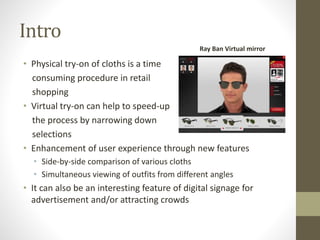
• It can also be an interesting feature of digital signage for
advertisement and/or attracting crowds
Ray Ban Virtual mirror
Overview
In this presentation we will:
• Describe challenges in virtual trying-on
• Describe 3 virtual try on scenarios of the system
• Automatic avatar customization and skin tone mapping
algorithms
• A novel method for alignment of a 3D avatar with the user’s
2D image
• The implementation details with experimental results
• User study on this concept
Challenges
• Accurate alignment and scaling of cloths
• Different Body styles
• Fast rotating of user and following user movements
• Fast algorithm is needed in Real-time environments
• The cloths worn by the user remain visible
• 3D modeling of cloths is time and effort consuming
• Simulation of various garment types is almost impossible
• This is a modern technology and customer acceptance
needs time
Virtual Try-On Scenarios
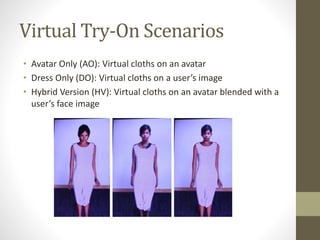
• Avatar Only (AO): Virtual cloths on an avatar
• Dress Only (DO): Virtual cloths on a user’s image
• Hybrid Version (HV): Virtual cloths on an avatar blended with a
user’s face image
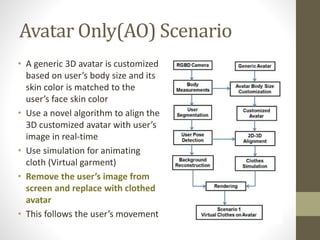
Avatar Only(AO) Scenario
• A generic 3D avatar is customized
based on user’s body size and its
skin color is matched to the
user’s face skin color
• Use a novel algorithm to align the
3D customized avatar with user’s
image in real-time
• Use simulation for animating
cloth (Virtual garment)
• Remove the user’s image from
screen and replace with clothed
avatar
• This follows the user’s movement
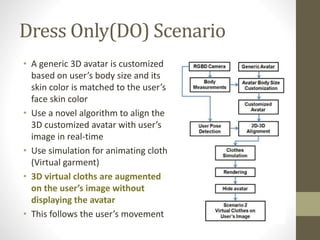
Dress Only(DO) Scenario
• A generic 3D avatar is customized
based on user’s body size and its
skin color is matched to the user’s
face skin color
• Use a novel algorithm to align the
3D customized avatar with user’s
image in real-time
• Use simulation for animating cloth
(Virtual garment)
• 3D virtual cloths are augmented
on the user’s image without
displaying the avatar
• This follows the user’s movement
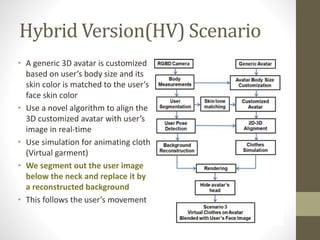
Hybrid Version(HV) Scenario
• A generic 3D avatar is customized
based on user’s body size and its
skin color is matched to the user’s
face skin color
• Use a novel algorithm to align the
3D customized avatar with user’s
image in real-time
• Use simulation for animating cloth
(Virtual garment)
• We segment out the user image
below the neck and replace it by
a reconstructed background
• This follows the user’s movement
Body Customization
• Why ?
• It is much economical in terms of time and effort instead of creating
model from scratch
• How?
• An accurate avatar can be created based on twelve key human body
measurements
• Height, shoulder width, bust girth, waist girth, hip girth, thigh girth, ankle
girth, waist height, crotch height, knee height, upper arm length and
forearm length
• Algorithm
• Scale the model globally according to the user’s height
• Scale the torso and the legs along the y-axis based on the user’s waist,
crotch and knee height.
• Modify the torso and legs based on the user’s shoulder width, bust,
waist, hip, thigh and ankle girths
• Modify the arm based on the user’s upper arm and the forearm length
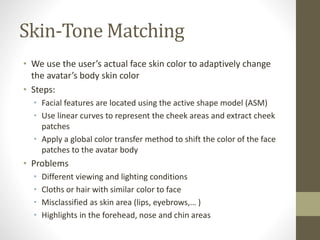
Skin-Tone Matching
• We use the user’s actual face skin color to adaptively change
the avatar’s body skin color
• Steps:
• Facial features are located using the active shape model (ASM)
• Use linear curves to represent the cheek areas and extract cheek
patches
• Apply a global color transfer method to shift the color of the face
patches to the avatar body
• Problems
• Different viewing and lighting conditions
• Cloths or hair with similar color to face
• Misclassified as skin area (lips, eyebrows,… )
• Highlights in the forehead, nose and chin areas
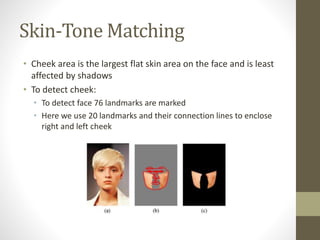
Skin-Tone Matching
• Cheek area is the largest flat skin area on the face and is least
affected by shadows
• To detect cheek:
• To detect face 76 landmarks are marked
• Here we use 20 landmarks and their connection lines to enclose
right and left cheek
Align 3D avatar with 2D user image
• In a virtual try-on system, accurate alignment between a 3D
clothed avatar with a 2D user image stream is of crucial
importance
• One way is to use the transformation matrix but is prone to
misalignment errors for other body parts
• So we ask the user to stand in a standard pose at the
beginning for scaling and alignment (Key Frame)
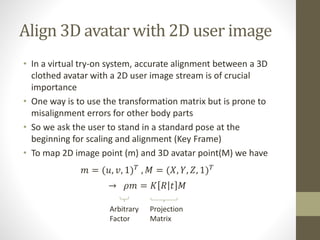
• To map 2D image point (m) and 3D avatar point(M) we have
𝑚 = (𝑢, 𝑣, 1) 𝑇
, 𝑀 = (𝑋, 𝑌, 𝑍, 1) 𝑇
→ 𝜌𝑚 = 𝐾 𝑅 𝑡 𝑀
Projection
Matrix
Arbitrary
Factor
Align 3D avatar with 2D user image
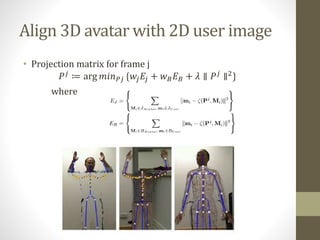
• Projection matrix for frame j
𝑃 𝑗
≔ arg 𝑚𝑖𝑛 𝑃𝑗 {𝑤𝑗 𝐸𝑗 + 𝑤 𝐵 𝐸 𝐵 + 𝜆 ∥ 𝑃 𝑗
∥2
}
where
Robust 3D-2D alignment
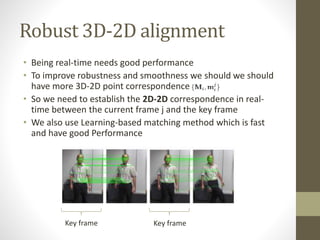
• Being real-time needs good performance
• To improve robustness and smoothness we should we should
have more 3D-2D point correspondence
• So we need to establish the 2D-2D correspondence in real-
time between the current frame j and the key frame
• We also use Learning-based matching method which is fast
and have good Performance
Key frame Key frame
Current Try-On System Overview
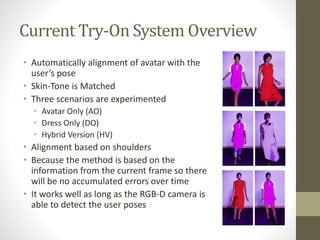
• Automatically alignment of avatar with the
user’s pose
• Skin-Tone is Matched
• Three scenarios are experimented
• Avatar Only (AO)
• Dress Only (DO)
• Hybrid Version (HV)
• Alignment based on shoulders
• Because the method is based on the
information from the current frame so there
will be no accumulated errors over time
• It works well as long as the RGB-D camera is
able to detect the user poses
Measuring the accuracy
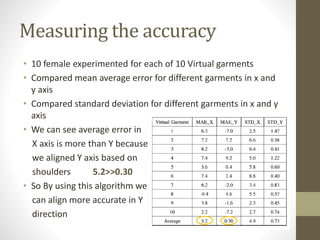
• 10 female experimented for each of 10 Virtual garments
• Compared mean average error for different garments in x and
y axis
• Compared standard deviation for different garments in x and y
axis
• We can see average error in
X axis is more than Y because
we aligned Y axis based on
shoulders 5.2>>0.30
• So By using this algorithm we
can align more accurate in Y
direction
Implementation Details
• Visual Studio 2010
• 2.53GHz Intel Xeon(R) with 24 GB RAM
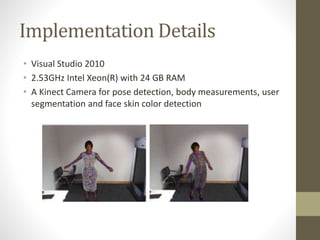
• A Kinect Camera for pose detection, body measurements, user
segmentation and face skin color detection
Try-On System In Action
• First the user stands in front of a display
• The system establish relevant 3D-2D correspondences based
on a key frame
• The user’s body size and the user’s face skin color are
extracted using the Kinect camera
• The User can key-in more body size for a more accurate avatar
customization
• The user can select her favorite virtual cloths for virtual try-on
• The selected virtual clothes will be aligned on the user’s
image, simulated and rendered in real-time
• The user can see the virtual trying-on results with various
clothes from different angles based on movements
Try-On System In Action
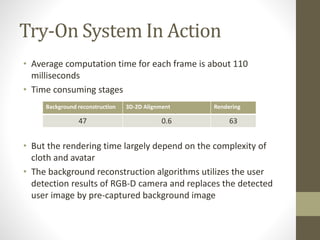
• Average computation time for each frame is about 110
milliseconds
• Time consuming stages
• But the rendering time largely depend on the complexity of
cloth and avatar
• The background reconstruction algorithms utilizes the user
detection results of RGB-D camera and replaces the detected
user image by pre-captured background image
Background reconstruction 3D-2D Alignment Rendering
47 0.6 63
User Study Design
Evaluates the effectiveness of 3 virtual
try-on solution about:
• Quality Attributes (QA): assist a
purchase decision
• Reliability, Accuracy, User centric
issues
• Cognitive Attributes (CA): attributes
concerning the mental processes
• Attention, learning, decision making,
and emotive elements
• Attributes Toward Using (ATU):
attributes resulting from a presence
of perceived ease of use
Questionnaire
User Study Results
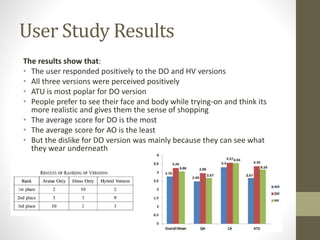
The results show that:
• The user responded positively to the DO and HV versions
• All three versions were perceived positively
• ATU is most poplar for DO version
• People prefer to see their face and body while trying-on and think its
more realistic and gives them the sense of shopping
• The average score for DO is the most
• The average score for AO is the least
• But the dislike for DO version was mainly because they can see what
they wear underneath
Discussion
• The HV solution provides more realistic than others
• The DO version is most preferred by the user
• Some factors affect the performance
• Large Body Rotation: People like to rotate and see the result from
different angles. But large rotation can not be detected reliably
• Solution: Use multiple RGB-D cameras
• Body Customization: RGB-D sensor is not good enough for body
measurement
• Solution: A fast method for measurement is still an open problem
• Skin Tone Mapping: A one-time procedure is used to change the
avatar’s skin color. But the participants detected the difference
• Solution: Despite the existence of some techniques it is still an open
problem on how to connect the user’s face to the avatar’s neck
without notice
Conclusion
• A mixed reality based virtual clothes try-on system described
• Series of novel techniques for virtual try-on was proposed
• Three scenarios of virtualization displayed
• Virtual cloths on the avatar
• Virtual cloths on the actual user’s image
• Virtual cloths on the avatar blended with the user’s face image
• The major contribution
• Automatically customized an invisible (or partially visible) avatar
based on the user’s body size
• A user study was also conducted to evaluate effectiveness
• The result showed that it can help in customer’s purchase
decision
Reference
• Miaolong Yuan; Khan, I.R.; Farbiz, F.; Susu Yao; Niswar, A.; Min-
Hui Foo, "A Mixed Reality Virtual Clothes Try-On System,"
Multimedia, IEEE Transactions on , vol.15, no.8, pp.1958,1968,
Dec. 2013
92131562-ECS-A virtual reality cloths (slides only)

92131562-ECS-A virtual reality cloths (slides only)

  • 1.
    A Mixed RealityVirtual Cloths Try-On System Pegah hamidkhani Student no:92131562 ECS Presentation Thought by: Dr. Alireza Hashemi
  • 2.
    Intro • Physical try-onof cloths is a time consuming procedure in retail shopping • Virtual try-on can help to speed-up the process by narrowing down selections • Enhancement of user experience through new features • Side-by-side comparison of various cloths • Simultaneous viewing of outfits from different angles • It can also be an interesting feature of digital signage for advertisement and/or attracting crowds Ray Ban Virtual mirror
  • 3.
    Overview In this presentationwe will: • Describe challenges in virtual trying-on • Describe 3 virtual try on scenarios of the system • Automatic avatar customization and skin tone mapping algorithms • A novel method for alignment of a 3D avatar with the user’s 2D image • The implementation details with experimental results • User study on this concept
  • 4.
    Challenges • Accurate alignmentand scaling of cloths • Different Body styles • Fast rotating of user and following user movements • Fast algorithm is needed in Real-time environments • The cloths worn by the user remain visible • 3D modeling of cloths is time and effort consuming • Simulation of various garment types is almost impossible • This is a modern technology and customer acceptance needs time
  • 5.
    Virtual Try-On Scenarios •Avatar Only (AO): Virtual cloths on an avatar • Dress Only (DO): Virtual cloths on a user’s image • Hybrid Version (HV): Virtual cloths on an avatar blended with a user’s face image
  • 6.
    Avatar Only(AO) Scenario •A generic 3D avatar is customized based on user’s body size and its skin color is matched to the user’s face skin color • Use a novel algorithm to align the 3D customized avatar with user’s image in real-time • Use simulation for animating cloth (Virtual garment) • Remove the user’s image from screen and replace with clothed avatar • This follows the user’s movement
  • 7.
    Dress Only(DO) Scenario •A generic 3D avatar is customized based on user’s body size and its skin color is matched to the user’s face skin color • Use a novel algorithm to align the 3D customized avatar with user’s image in real-time • Use simulation for animating cloth (Virtual garment) • 3D virtual cloths are augmented on the user’s image without displaying the avatar • This follows the user’s movement
  • 8.
    Hybrid Version(HV) Scenario •A generic 3D avatar is customized based on user’s body size and its skin color is matched to the user’s face skin color • Use a novel algorithm to align the 3D customized avatar with user’s image in real-time • Use simulation for animating cloth (Virtual garment) • We segment out the user image below the neck and replace it by a reconstructed background • This follows the user’s movement
  • 9.
    Body Customization • Why? • It is much economical in terms of time and effort instead of creating model from scratch • How? • An accurate avatar can be created based on twelve key human body measurements • Height, shoulder width, bust girth, waist girth, hip girth, thigh girth, ankle girth, waist height, crotch height, knee height, upper arm length and forearm length • Algorithm • Scale the model globally according to the user’s height • Scale the torso and the legs along the y-axis based on the user’s waist, crotch and knee height. • Modify the torso and legs based on the user’s shoulder width, bust, waist, hip, thigh and ankle girths • Modify the arm based on the user’s upper arm and the forearm length
  • 10.
    Skin-Tone Matching • Weuse the user’s actual face skin color to adaptively change the avatar’s body skin color • Steps: • Facial features are located using the active shape model (ASM) • Use linear curves to represent the cheek areas and extract cheek patches • Apply a global color transfer method to shift the color of the face patches to the avatar body • Problems • Different viewing and lighting conditions • Cloths or hair with similar color to face • Misclassified as skin area (lips, eyebrows,… ) • Highlights in the forehead, nose and chin areas
  • 11.
    Skin-Tone Matching • Cheekarea is the largest flat skin area on the face and is least affected by shadows • To detect cheek: • To detect face 76 landmarks are marked • Here we use 20 landmarks and their connection lines to enclose right and left cheek
  • 12.
    Align 3D avatarwith 2D user image • In a virtual try-on system, accurate alignment between a 3D clothed avatar with a 2D user image stream is of crucial importance • One way is to use the transformation matrix but is prone to misalignment errors for other body parts • So we ask the user to stand in a standard pose at the beginning for scaling and alignment (Key Frame) • To map 2D image point (m) and 3D avatar point(M) we have 𝑚 = (𝑢, 𝑣, 1) 𝑇 , 𝑀 = (𝑋, 𝑌, 𝑍, 1) 𝑇 → 𝜌𝑚 = 𝐾 𝑅 𝑡 𝑀 Projection Matrix Arbitrary Factor
  • 13.
    Align 3D avatarwith 2D user image • Projection matrix for frame j 𝑃 𝑗 ≔ arg 𝑚𝑖𝑛 𝑃𝑗 {𝑤𝑗 𝐸𝑗 + 𝑤 𝐵 𝐸 𝐵 + 𝜆 ∥ 𝑃 𝑗 ∥2 } where
  • 14.
    Robust 3D-2D alignment •Being real-time needs good performance • To improve robustness and smoothness we should we should have more 3D-2D point correspondence • So we need to establish the 2D-2D correspondence in real- time between the current frame j and the key frame • We also use Learning-based matching method which is fast and have good Performance Key frame Key frame
  • 15.
    Current Try-On SystemOverview • Automatically alignment of avatar with the user’s pose • Skin-Tone is Matched • Three scenarios are experimented • Avatar Only (AO) • Dress Only (DO) • Hybrid Version (HV) • Alignment based on shoulders • Because the method is based on the information from the current frame so there will be no accumulated errors over time • It works well as long as the RGB-D camera is able to detect the user poses
  • 16.
    Measuring the accuracy •10 female experimented for each of 10 Virtual garments • Compared mean average error for different garments in x and y axis • Compared standard deviation for different garments in x and y axis • We can see average error in X axis is more than Y because we aligned Y axis based on shoulders 5.2>>0.30 • So By using this algorithm we can align more accurate in Y direction
  • 17.
    Implementation Details • VisualStudio 2010 • 2.53GHz Intel Xeon(R) with 24 GB RAM • A Kinect Camera for pose detection, body measurements, user segmentation and face skin color detection
  • 18.
    Try-On System InAction • First the user stands in front of a display • The system establish relevant 3D-2D correspondences based on a key frame • The user’s body size and the user’s face skin color are extracted using the Kinect camera • The User can key-in more body size for a more accurate avatar customization • The user can select her favorite virtual cloths for virtual try-on • The selected virtual clothes will be aligned on the user’s image, simulated and rendered in real-time • The user can see the virtual trying-on results with various clothes from different angles based on movements
  • 19.
    Try-On System InAction • Average computation time for each frame is about 110 milliseconds • Time consuming stages • But the rendering time largely depend on the complexity of cloth and avatar • The background reconstruction algorithms utilizes the user detection results of RGB-D camera and replaces the detected user image by pre-captured background image Background reconstruction 3D-2D Alignment Rendering 47 0.6 63
  • 20.
    User Study Design Evaluatesthe effectiveness of 3 virtual try-on solution about: • Quality Attributes (QA): assist a purchase decision • Reliability, Accuracy, User centric issues • Cognitive Attributes (CA): attributes concerning the mental processes • Attention, learning, decision making, and emotive elements • Attributes Toward Using (ATU): attributes resulting from a presence of perceived ease of use Questionnaire
  • 21.
    User Study Results Theresults show that: • The user responded positively to the DO and HV versions • All three versions were perceived positively • ATU is most poplar for DO version • People prefer to see their face and body while trying-on and think its more realistic and gives them the sense of shopping • The average score for DO is the most • The average score for AO is the least • But the dislike for DO version was mainly because they can see what they wear underneath
  • 22.
    Discussion • The HVsolution provides more realistic than others • The DO version is most preferred by the user • Some factors affect the performance • Large Body Rotation: People like to rotate and see the result from different angles. But large rotation can not be detected reliably • Solution: Use multiple RGB-D cameras • Body Customization: RGB-D sensor is not good enough for body measurement • Solution: A fast method for measurement is still an open problem • Skin Tone Mapping: A one-time procedure is used to change the avatar’s skin color. But the participants detected the difference • Solution: Despite the existence of some techniques it is still an open problem on how to connect the user’s face to the avatar’s neck without notice
  • 23.
    Conclusion • A mixedreality based virtual clothes try-on system described • Series of novel techniques for virtual try-on was proposed • Three scenarios of virtualization displayed • Virtual cloths on the avatar • Virtual cloths on the actual user’s image • Virtual cloths on the avatar blended with the user’s face image • The major contribution • Automatically customized an invisible (or partially visible) avatar based on the user’s body size • A user study was also conducted to evaluate effectiveness • The result showed that it can help in customer’s purchase decision
  • 24.
    Reference • Miaolong Yuan;Khan, I.R.; Farbiz, F.; Susu Yao; Niswar, A.; Min- Hui Foo, "A Mixed Reality Virtual Clothes Try-On System," Multimedia, IEEE Transactions on , vol.15, no.8, pp.1958,1968, Dec. 2013