IEEE 802.11 Wireless Local Area
Networks (RF-LANs)
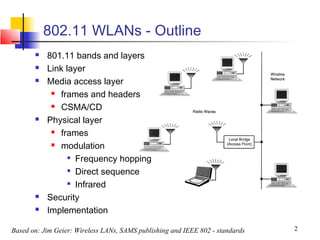
802.11 WLANs - Outline
          801.11 bands and layers
          Link layer
          Media access layer
             frames and headers

             CSMA/CD

          Physical layer
             frames

             modulation

                 
                   Frequency hopping
                 
                   Direct sequence
                 
                   Infrared
          Security
          Implementation

Based on: Jim Geier: Wireless LANs, SAMS publishing and IEEE 802 - standards   2
802.11 WLAN technologies
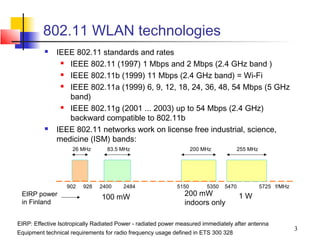
             IEEE 802.11 standards and rates
                IEEE 802.11 (1997) 1 Mbps and 2 Mbps (2.4 GHz band )
                IEEE 802.11b (1999) 11 Mbps (2.4 GHz band) = Wi-Fi
                IEEE 802.11a (1999) 6, 9, 12, 18, 24, 36, 48, 54 Mbps (5 GHz
                 band)
                IEEE 802.11g (2001 ... 2003) up to 54 Mbps (2.4 GHz)
                 backward compatible to 802.11b
             IEEE 802.11 networks work on license free industrial, science,
              medicine (ISM) bands:
                     26 MHz       83.5 MHz                          200 MHz         255 MHz


                  902    928   2400     2484                 5150        5350   5470          5725 f/MHz
 EIRP power                     100 mW                         200 mW                  1W
 in Finland                                                    indoors only

EIRP: Effective Isotropically Radiated Power - radiated power measured immediately after antenna
                                                                                                           3
Equipment technical requirements for radio frequency usage defined in ETS 300 328
Other WLAN technologies
   High performance LAN or HiperLAN (ETSI-BRAN EN 300
    652) in the 5 GHz ISM
      version 1 up to 24 Mbps

      version 2 up to 54 Mbps

   HiperLAN provides also QoS for data, video, voice and
    images
   Bluetooth
      range up to 100 meters only (cable replacement tech.)

      Bluetooth Special Interest Group (SIG)

      Operates at max of 740 kbps at 2.4 GHz ISM band

      Applies fast frequency hopping 1600 hops/second

      Can have serious interference with 802.11 2.4 GHz

       range network
                                                         4
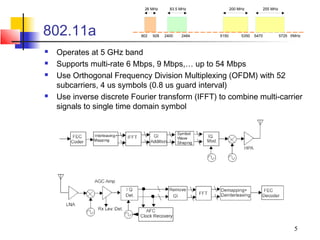
26 MHz       83.5 MHz           200 MHz            255 MHz


802.11a                     902   928   2400   2484   5150        5350   5470             5725 f/MHz


   Operates at 5 GHz band
   Supports multi-rate 6 Mbps, 9 Mbps,… up to 54 Mbps
   Use Orthogonal Frequency Division Multiplexing (OFDM) with 52
    subcarriers, 4 us symbols (0.8 us guard interval)
   Use inverse discrete Fourier transform (IFFT) to combine multi-carrier
    signals to single time domain symbol


                                                                                                 5
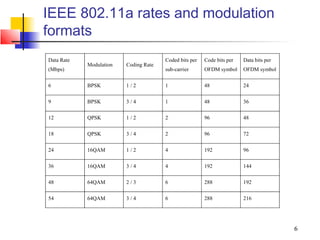
IEEE 802.11a rates and modulation
formats
Data Rate                              Coded bits per   Code bits per   Data bits per
            Modulation   Coding Rate
(Mbps)                                 sub-carrier      OFDM symbol     OFDM symbol


6           BPSK         1/2           1                48              24


9           BPSK         3/4           1                48              36

12          QPSK         1/2           2                96              48


18          QPSK         3/4           2                96              72


24          16QAM        1/2           4                192             96


36          16QAM        3/4           4                192             144

48          64QAM        2/3           6                288             192


54          64QAM        3/4           6                288             216


                                                                                        6
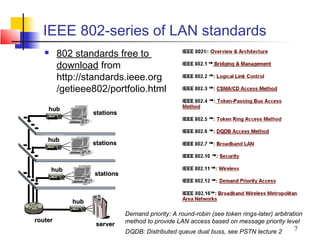
IEEE 802-series of LAN standards
        802 standards free to
         download from
         http://standards.ieee.org
         /getieee802/portfolio.html
    hub
                   stations


    hub
                   stations


       hub
                   stations


             hub
                              Demand priority: A round-robin (see token rings-later) arbitration
router                        method to provide LAN access based on message priority level
                    server
                              DQDB: Distributed queue dual buss, see PSTN lecture 2         7
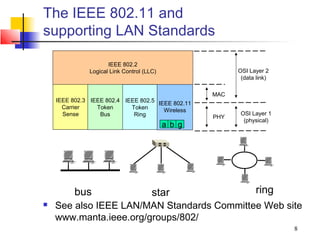
The IEEE 802.11 and
supporting LAN Standards

                     IEEE 802.2
              Logical Link Control (LLC)                 OSI Layer 2
                                                          (data link)

                                                   MAC
    IEEE 802.3 IEEE 802.4 IEEE 802.5
                                     IEEE 802.11
      Carrier    Token      Token      Wireless
      Sense       Bus        Ring                         OSI Layer 1
                                                   PHY
                                                           (physical)
                                           a b g


          bus                         star                     ring
   See also IEEE LAN/MAN Standards Committee Web site
    www.manta.ieee.org/groups/802/
                                                                        8
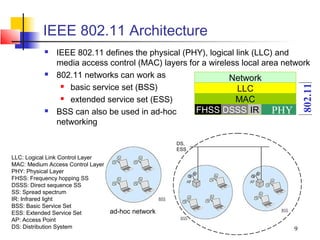
IEEE 802.11 Architecture
             IEEE 802.11 defines the physical (PHY), logical link (LLC) and
              media access control (MAC) layers for a wireless local area network
             802.11 networks can work as                   Network
                basic service set (BSS)


                                                                                802.11
                                                              LLC
                extended service set (ESS)                   MAC
             BSS can also be used in ad-hoc      FHSS DSSS IR PHY
              networking

                                                  DS,
                                                  ESS
LLC: Logical Link Control Layer
MAC: Medium Access Control Layer
PHY: Physical Layer
FHSS: Frequency hopping SS
DSSS: Direct sequence SS
SS: Spread spectrum
IR: Infrared light
BSS: Basic Service Set
ESS: Extended Service Set        ad-hoc network
AP: Access Point
DS: Distribution System                                                     9
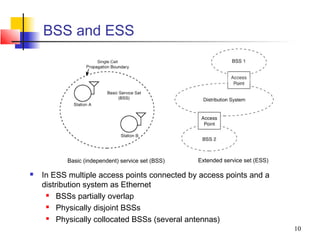
BSS and ESS


          Basic (independent) service set (BSS)   Extended service set (ESS)

   In ESS multiple access points connected by access points and a
    distribution system as Ethernet
        BSSs partially overlap
        Physically disjoint BSSs
        Physically collocated BSSs (several antennas)
                                                                               10
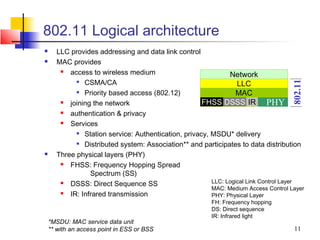
802.11 Logical architecture
     LLC provides addressing and data link control
     MAC provides
         access to wireless medium                           Network
             CSMA/CA


                                                                                    802.11
                                                                 LLC
             Priority based access (802.12)
                                                                MAC
         joining the network                        FHSS DSSS IR PHY
         authentication & privacy
         Services
             Station service: Authentication, privacy, MSDU* delivery

             Distributed system: Association** and participates to data distribution

     Three physical layers (PHY)
         FHSS: Frequency Hopping Spread
                 Spectrum (SS)
         DSSS: Direct Sequence SS                      LLC: Logical Link Control Layer
                                                        MAC: Medium Access Control Layer
         IR: Infrared transmission                     PHY: Physical Layer
                                                         FH: Frequency hopping
                                                         DS: Direct sequence
                                                         IR: Infrared light
    *MSDU: MAC service data unit
    ** with an access point in ESS or BSS                                            11
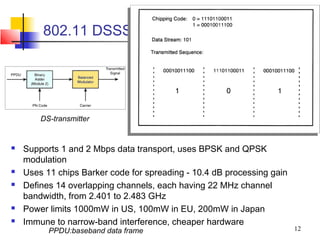
802.11 DSSS


        DS-transmitter


   Supports 1 and 2 Mbps data transport, uses BPSK and QPSK
    modulation
   Uses 11 chips Barker code for spreading - 10.4 dB processing gain
   Defines 14 overlapping channels, each having 22 MHz channel
    bandwidth, from 2.401 to 2.483 GHz
   Power limits 1000mW in US, 100mW in EU, 200mW in Japan
   Immune to narrow-band interference, cheaper hardware
          PPDU:baseband data frame                                      12
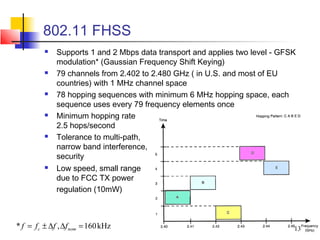
802.11 FHSS
             Supports 1 and 2 Mbps data transport and applies two level - GFSK
              modulation* (Gaussian Frequency Shift Keying)
             79 channels from 2.402 to 2.480 GHz ( in U.S. and most of EU
              countries) with 1 MHz channel space
             78 hopping sequences with minimum 6 MHz hopping space, each
              sequence uses every 79 frequency elements once
             Minimum hopping rate
              2.5 hops/second
             Tolerance to multi-path,
              narrow band interference,
              security
             Low speed, small range
              due to FCC TX power
              regulation (10mW)


* f = f c ± ∆f , ∆f nom = 160 kHz                                             13
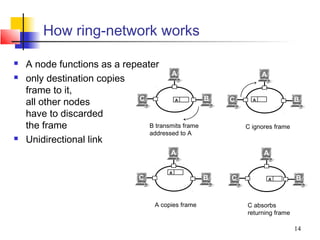
How ring-network works

   A node functions as a repeater
                                       A                            A
   only destination copies
    frame to it,
                              C                       B
    all other nodes                     A                 C     A               B

    have to discarded
    the frame                   B transmits frame             C ignores frame
                                addressed to A
   Unidirectional link
                                          A                         A

                                         A
                                 C                    B   C             A       B


                                     A copies frame           C absorbs
                                                              returning frame

                                                                                14
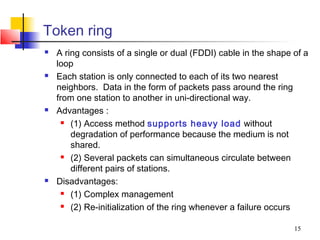
Token ring
   A ring consists of a single or dual (FDDI) cable in the shape of a
    loop
   Each station is only connected to each of its two nearest
    neighbors. Data in the form of packets pass around the ring
    from one station to another in uni-directional way.
   Advantages :
       (1) Access method supports heavy load without

        degradation of performance because the medium is not
        shared.
       (2) Several packets can simultaneous circulate between

        different pairs of stations.
   Disadvantages:
       (1) Complex management

       (2) Re-initialization of the ring whenever a failure occurs


                                                                  15
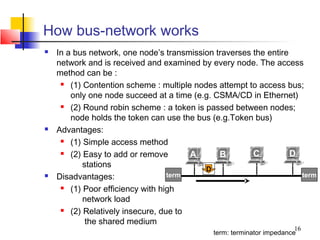
How bus-network works
   In a bus network, one node’s transmission traverses the entire
    network and is received and examined by every node. The access
    method can be :
      (1) Contention scheme : multiple nodes attempt to access bus;

        only one node succeed at a time (e.g. CSMA/CD in Ethernet)
      (2) Round robin scheme : a token is passed between nodes;

        node holds the token can use the bus (e.g.Token bus)
   Advantages:
      (1) Simple access method

      (2) Easy to add or remove       A       B        C          D
           stations
                                           D
   Disadvantages:                term                               term
      (1) Poor efficiency with high

           network load
      (2) Relatively insecure, due to

            the shared medium
                                                                       16
                                             term: terminator impedance
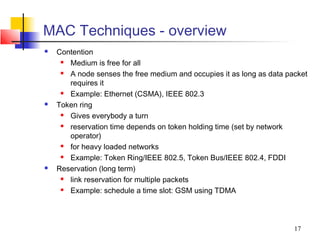
MAC Techniques - overview
   Contention
      Medium is free for all
      A node senses the free medium and occupies it as long as data packet
       requires it
      Example: Ethernet (CSMA), IEEE 802.3
   Token ring
      Gives everybody a turn
      reservation time depends on token holding time (set by network
       operator)
      for heavy loaded networks
      Example: Token Ring/IEEE 802.5, Token Bus/IEEE 802.4, FDDI
   Reservation (long term)
      link reservation for multiple packets
      Example: schedule a time slot: GSM using TDMA


                                                                       17
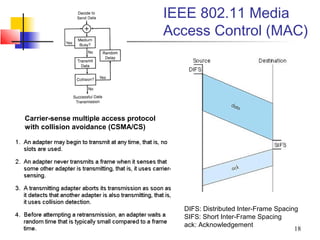
IEEE 802.11 Media
                                         Access Control (MAC)


Carrier-sense multiple access protocol
with collision avoidance (CSMA/CS)


                                           DIFS: Distributed Inter-Frame Spacing
                                           SIFS: Short Inter-Frame Spacing
                                           ack: Acknowledgement
                                                                               18
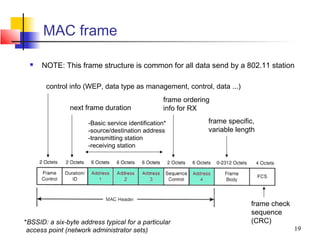
MAC frame

     NOTE: This frame structure is common for all data send by a 802.11 station

       control info (WEP, data type as management, control, data ...)
                                                  frame ordering
               next frame duration                info for RX

                      -Basic service identification*           frame specific,
                      -source/destination address              variable length
                      -transmitting station
                      -receiving station


                                                                            frame check
                                                                            sequence
*BSSID: a six-byte address typical for a particular                         (CRC)
 access point (network administrator sets)                                                19
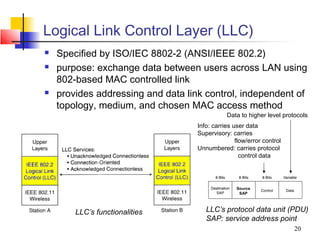
Logical Link Control Layer (LLC)
   Specified by ISO/IEC 8802-2 (ANSI/IEEE 802.2)
   purpose: exchange data between users across LAN using
    802-based MAC controlled link
   provides addressing and data link control, independent of
    topology, medium, and chosen MAC access method
                                               Data to higher level protocols
                                    Info: carries user data
                                    Supervisory: carries
                                                   flow/error control
                                    Unnumbered: carries protocol
                                                     control data


                                                   Source
                                                    SAP


        LLC’s functionalities          LLC’s protocol data unit (PDU)
                                       SAP: service address point
                                                                        20
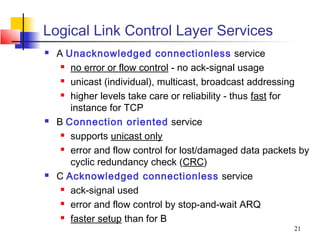
Logical Link Control Layer Services
   A Unacknowledged connectionless service
      no error or flow control - no ack-signal usage

      unicast (individual), multicast, broadcast addressing

      higher levels take care or reliability - thus fast for

       instance for TCP
   B Connection oriented service
      supports unicast only

      error and flow control for lost/damaged data packets by

       cyclic redundancy check (CRC)
   C Acknowledged connectionless service
      ack-signal used

      error and flow control by stop-and-wait ARQ

      faster setup than for B

                                                          21
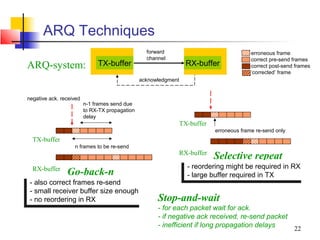
ARQ Techniques
                                                  forward                                  erroneous frame
                                                  channel                                  correct pre-send frames
ARQ-system:                   TX-buffer                            RX-buffer               correct post-send frames
                                                                                           ‘corrected’ frame
                                                acknowledgment


negative ack. received
                         n-1 frames send due
                         to RX-TX propagation
                         delay
                                                                 TX-buffer
                                                                             erroneous frame re-send only
  TX-buffer
                   n frames to be re-send
                                                                 RX-buffer
                                                                             Selective repeat
  RX-buffer                                                       - -reordering might be required in RX
                                                                      reordering might be required in RX
                Go-back-n                                         - -large buffer required in TX
                                                                      large buffer required in TX
- -also correct frames re-send
    also correct frames re-send
- -small receiver buffer size enough
    small receiver buffer size enough
- -no reordering in RX
    no reordering in RX                               Stop-and-wait
                                                      - for each packet wait for ack.
                                                      - if negative ack received, re-send packet
                                                      - inefficient if long propagation delays   22
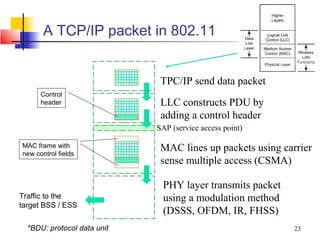
A TCP/IP packet in 802.11


                              TPC/IP send data packet
      Control
      header                  LLC constructs PDU by
                              adding a control header
                             SAP (service access point)

MAC frame with
new control fields
                              MAC lines up packets using carrier
                              sense multiple access (CSMA)

                              PHY layer transmits packet
Traffic to the                using a modulation method
target BSS / ESS
                              (DSSS, OFDM, IR, FHSS)
  *BDU: protocol data unit                                  23
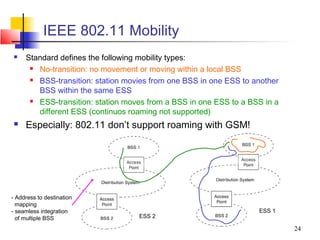
IEEE 802.11 Mobility
    Standard defines the following mobility types:
       No-transition: no movement or moving within a local BSS
       BSS-transition: station movies from one BSS in one ESS to another
        BSS within the same ESS
       ESS-transition: station moves from a BSS in one ESS to a BSS in a
        different ESS (continuos roaming not supported)
    Especially: 802.11 don’t support roaming with GSM!


- Address to destination
  mapping
- seamless integration                                             ESS 1
  of multiple BSS                  ESS 2

                                                                            24
Authentication and privacy
   Goal: to prevent unauthorized access & eavesdropping
   Realized by authentication service prior access
   Open system authentication
      station wanting to authenticate sends authentication
       management frame - receiving station sends back frame for
       successful authentication
   Shared key authentication (included in WEP*)
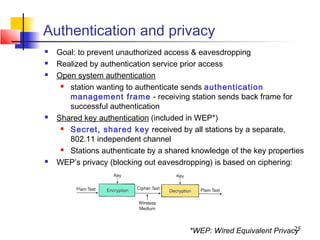
      Secret, shared key received by all stations by a separate,
       802.11 independent channel
      Stations authenticate by a shared knowledge of the key properties
   WEP’s privacy (blocking out eavesdropping) is based on ciphering:


                                                                     25
                                        *WEP: Wired Equivalent Privacy
WLAN Network Planning
   Network planning target
       Maximize system performance with limited resource
       Including
           coverage

           throughput

           capacity

           interference

           roaming

           security, etc.

   Planning process
       Requirements for project management personnel
       Site investigation
       Computer-aided planning practice
       Testing and verifying planning


                                                            26
Planning tools

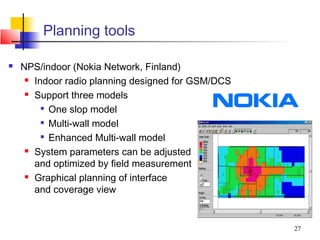
   NPS/indoor (Nokia Network, Finland)
      Indoor radio planning designed for GSM/DCS

      Support three models

         
           One slop model
         
           Multi-wall model
          Enhanced Multi-wall model

      System parameters can be adjusted

       and optimized by field measurement
      Graphical planning of interface

       and coverage view


                                                    27
Field measurements
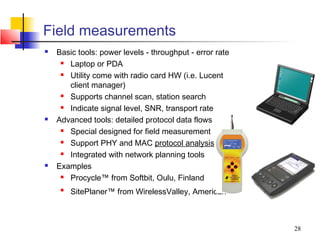
   Basic tools: power levels - throughput - error rate
      Laptop or PDA
      Utility come with radio card HW (i.e. Lucent
       client manager)
      Supports channel scan, station search
      Indicate signal level, SNR, transport rate
   Advanced tools: detailed protocol data flows
      Special designed for field measurement
      Support PHY and MAC protocol analysis
      Integrated with network planning tools
   Examples
      Procycle™ from Softbit, Oulu, Finland
     
         SitePlaner™ from WirelessValley, American


                                                          28
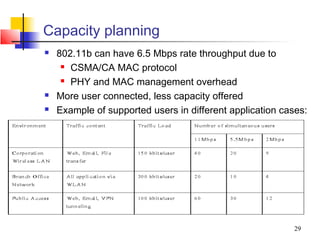
Capacity planning
   802.11b can have 6.5 Mbps rate throughput due to
      CSMA/CA MAC protocol

      PHY and MAC management overhead

   More user connected, less capacity offered
   Example of supported users in different application cases:


                                                           29
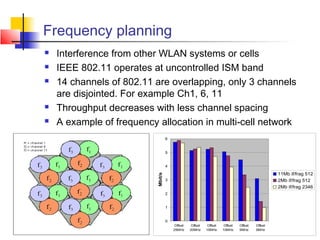
Frequency planning
   Interference from other WLAN systems or cells
   IEEE 802.11 operates at uncontrolled ISM band
   14 channels of 802.11 are overlapping, only 3 channels
    are disjointed. For example Ch1, 6, 11
   Throughput decreases with less channel spacing
   A example of frequency allocation in multi-cell network
                                    6


                                    5


                                    4

                                                                                                  11Mb if/frag 512
                           Mbit/s


                                    3                                                             2Mb if/frag 512
                                                                                                  2Mb if/frag 2346
                                    2


                                    1


                                    0
                                         Offset    Offset    Offset    Offset   Offset   Offset
                                        25MHz     20MHz     15MHz     10MHz     5MHz     0MHz            30
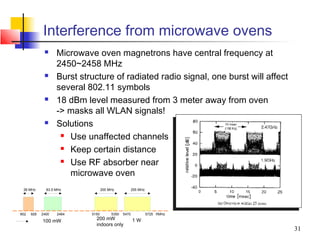
Interference from microwave ovens
                  Microwave oven magnetrons have central frequency at
                   2450~2458 MHz
                  Burst structure of radiated radio signal, one burst will affect
                   several 802.11 symbols
                  18 dBm level measured from 3 meter away from oven
                   -> masks all WLAN signals!
                  Solutions
                     Use unaffected channels

                     Keep certain distance

                     Use RF absorber near

                      microwave oven
 26 MHz       83.5 MHz             200 MHz            255 MHz


902   928   2400   2484     5150        5350   5470             5725 f/MHz

            100 mW            200 mW                  1W
                              indoors only
                                                                                     31
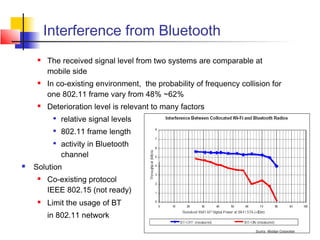
Interference from Bluetooth
        The received signal level from two systems are comparable at
         mobile side
        In co-existing environment, the probability of frequency collision for
         one 802.11 frame vary from 48% ~62%
        Deterioration level is relevant to many factors
          
              relative signal levels
          
              802.11 frame length
          
              activity in Bluetooth
              channel
   Solution
        Co-existing protocol
         IEEE 802.15 (not ready)
        Limit the usage of BT
         in 802.11 network
                                                                                  32
WLAN benefits
   Mobility
      increases working efficiency and productivity

      extends the On-line period

   Installation on difficult-to-wire areas
      inside buildings

      road crossings

   Increased reliability
      Note: Pay attention to security!

   Reduced installation time
      cabling time and convenient to users and difficult-to-

       wire cases


                                                            33
WLAN benefits (cont.)
   Broadband
      11 Mbps for 802.11b

      54 Mbps for 802.11a/g (GSM:9.6Kbps,

       HCSCD:~40Kbps, GPRS:~160Kbps, WCDMA:up to
       2Mbps)
   Long-term cost savings
      O & M cheaper that for wired nets

      Comes from easy maintenance, cabling cost, working

       efficiency and accuracy
      Network can be established in a new location just by

       moving the PCs!


                                                         34
WLAN technology problems
   Date Speed
      IEEE 802.11b support up to 11 MBps, sometimes this is not

        enough - far lower than 100 Mbps fast Ethernet
   Interference
      Works in ISM band, share same frequency with microwave

        oven, Bluetooth, and others
   Security
      Current WEP algorithm is weak - usually not ON!

   Roaming
      No industry standard is available and propriety solution are

        not interoperable - especially with GSM
   Inter-operability
      Only few basic functionality are interoperable, other vendor’s

        features can’t be used in a mixed network
                                                                 35
WLAN implementation problems
   Lack of wireless networking experience for most IT
    engineer
   No well-recognized operation process on network
    implementation
   Selecting access points with ‘Best Guess’ method
   Unaware of interference from/to other networks
   Weak security policy
   As a result, your WLAN may have
      Poor performance (coverage, throughput, capacity,

       security)
      Unstable service

      Customer dissatisfaction


                                                           36

8 wlans

  • 1.
    IEEE 802.11 WirelessLocal Area Networks (RF-LANs)
  • 2.
    802.11 WLANs -Outline  801.11 bands and layers  Link layer  Media access layer  frames and headers  CSMA/CD  Physical layer  frames  modulation  Frequency hopping  Direct sequence  Infrared  Security  Implementation Based on: Jim Geier: Wireless LANs, SAMS publishing and IEEE 802 - standards 2
  • 3.
    802.11 WLAN technologies  IEEE 802.11 standards and rates  IEEE 802.11 (1997) 1 Mbps and 2 Mbps (2.4 GHz band )  IEEE 802.11b (1999) 11 Mbps (2.4 GHz band) = Wi-Fi  IEEE 802.11a (1999) 6, 9, 12, 18, 24, 36, 48, 54 Mbps (5 GHz band)  IEEE 802.11g (2001 ... 2003) up to 54 Mbps (2.4 GHz) backward compatible to 802.11b  IEEE 802.11 networks work on license free industrial, science, medicine (ISM) bands: 26 MHz 83.5 MHz 200 MHz 255 MHz 902 928 2400 2484 5150 5350 5470 5725 f/MHz EIRP power 100 mW 200 mW 1W in Finland indoors only EIRP: Effective Isotropically Radiated Power - radiated power measured immediately after antenna 3 Equipment technical requirements for radio frequency usage defined in ETS 300 328
  • 4.
    Other WLAN technologies  High performance LAN or HiperLAN (ETSI-BRAN EN 300 652) in the 5 GHz ISM  version 1 up to 24 Mbps  version 2 up to 54 Mbps  HiperLAN provides also QoS for data, video, voice and images  Bluetooth  range up to 100 meters only (cable replacement tech.)  Bluetooth Special Interest Group (SIG)  Operates at max of 740 kbps at 2.4 GHz ISM band  Applies fast frequency hopping 1600 hops/second  Can have serious interference with 802.11 2.4 GHz range network 4
  • 5.
    26 MHz 83.5 MHz 200 MHz 255 MHz 802.11a 902 928 2400 2484 5150 5350 5470 5725 f/MHz  Operates at 5 GHz band  Supports multi-rate 6 Mbps, 9 Mbps,… up to 54 Mbps  Use Orthogonal Frequency Division Multiplexing (OFDM) with 52 subcarriers, 4 us symbols (0.8 us guard interval)  Use inverse discrete Fourier transform (IFFT) to combine multi-carrier signals to single time domain symbol 5
  • 6.
    IEEE 802.11a ratesand modulation formats Data Rate Coded bits per Code bits per Data bits per Modulation Coding Rate (Mbps) sub-carrier OFDM symbol OFDM symbol 6 BPSK 1/2 1 48 24 9 BPSK 3/4 1 48 36 12 QPSK 1/2 2 96 48 18 QPSK 3/4 2 96 72 24 16QAM 1/2 4 192 96 36 16QAM 3/4 4 192 144 48 64QAM 2/3 6 288 192 54 64QAM 3/4 6 288 216 6
  • 7.
    IEEE 802-series ofLAN standards  802 standards free to download from http://standards.ieee.org /getieee802/portfolio.html hub stations hub stations hub stations hub Demand priority: A round-robin (see token rings-later) arbitration router method to provide LAN access based on message priority level server DQDB: Distributed queue dual buss, see PSTN lecture 2 7
  • 8.
    The IEEE 802.11and supporting LAN Standards IEEE 802.2 Logical Link Control (LLC) OSI Layer 2 (data link) MAC IEEE 802.3 IEEE 802.4 IEEE 802.5 IEEE 802.11 Carrier Token Token Wireless Sense Bus Ring OSI Layer 1 PHY (physical) a b g bus star ring  See also IEEE LAN/MAN Standards Committee Web site www.manta.ieee.org/groups/802/ 8
  • 9.
    IEEE 802.11 Architecture  IEEE 802.11 defines the physical (PHY), logical link (LLC) and media access control (MAC) layers for a wireless local area network  802.11 networks can work as Network  basic service set (BSS) 802.11 LLC  extended service set (ESS) MAC  BSS can also be used in ad-hoc FHSS DSSS IR PHY networking DS, ESS LLC: Logical Link Control Layer MAC: Medium Access Control Layer PHY: Physical Layer FHSS: Frequency hopping SS DSSS: Direct sequence SS SS: Spread spectrum IR: Infrared light BSS: Basic Service Set ESS: Extended Service Set ad-hoc network AP: Access Point DS: Distribution System 9
  • 10.
    BSS and ESS Basic (independent) service set (BSS) Extended service set (ESS)  In ESS multiple access points connected by access points and a distribution system as Ethernet  BSSs partially overlap  Physically disjoint BSSs  Physically collocated BSSs (several antennas) 10
  • 11.
    802.11 Logical architecture  LLC provides addressing and data link control  MAC provides  access to wireless medium Network  CSMA/CA 802.11 LLC  Priority based access (802.12) MAC  joining the network FHSS DSSS IR PHY  authentication & privacy  Services  Station service: Authentication, privacy, MSDU* delivery  Distributed system: Association** and participates to data distribution  Three physical layers (PHY)  FHSS: Frequency Hopping Spread Spectrum (SS)  DSSS: Direct Sequence SS LLC: Logical Link Control Layer MAC: Medium Access Control Layer  IR: Infrared transmission PHY: Physical Layer FH: Frequency hopping DS: Direct sequence IR: Infrared light *MSDU: MAC service data unit ** with an access point in ESS or BSS 11
  • 12.
    802.11 DSSS DS-transmitter  Supports 1 and 2 Mbps data transport, uses BPSK and QPSK modulation  Uses 11 chips Barker code for spreading - 10.4 dB processing gain  Defines 14 overlapping channels, each having 22 MHz channel bandwidth, from 2.401 to 2.483 GHz  Power limits 1000mW in US, 100mW in EU, 200mW in Japan  Immune to narrow-band interference, cheaper hardware PPDU:baseband data frame 12
  • 13.
    802.11 FHSS  Supports 1 and 2 Mbps data transport and applies two level - GFSK modulation* (Gaussian Frequency Shift Keying)  79 channels from 2.402 to 2.480 GHz ( in U.S. and most of EU countries) with 1 MHz channel space  78 hopping sequences with minimum 6 MHz hopping space, each sequence uses every 79 frequency elements once  Minimum hopping rate 2.5 hops/second  Tolerance to multi-path, narrow band interference, security  Low speed, small range due to FCC TX power regulation (10mW) * f = f c ± ∆f , ∆f nom = 160 kHz 13
  • 14.
    How ring-network works  A node functions as a repeater A A  only destination copies frame to it, C B all other nodes A C A B have to discarded the frame B transmits frame C ignores frame addressed to A  Unidirectional link A A A C B C A B A copies frame C absorbs returning frame 14
  • 15.
    Token ring  A ring consists of a single or dual (FDDI) cable in the shape of a loop  Each station is only connected to each of its two nearest neighbors. Data in the form of packets pass around the ring from one station to another in uni-directional way.  Advantages :  (1) Access method supports heavy load without degradation of performance because the medium is not shared.  (2) Several packets can simultaneous circulate between different pairs of stations.  Disadvantages:  (1) Complex management  (2) Re-initialization of the ring whenever a failure occurs 15
  • 16.
    How bus-network works  In a bus network, one node’s transmission traverses the entire network and is received and examined by every node. The access method can be :  (1) Contention scheme : multiple nodes attempt to access bus; only one node succeed at a time (e.g. CSMA/CD in Ethernet)  (2) Round robin scheme : a token is passed between nodes; node holds the token can use the bus (e.g.Token bus)  Advantages:  (1) Simple access method  (2) Easy to add or remove A B C D stations D  Disadvantages: term term  (1) Poor efficiency with high network load  (2) Relatively insecure, due to the shared medium 16 term: terminator impedance
  • 17.
    MAC Techniques -overview  Contention  Medium is free for all  A node senses the free medium and occupies it as long as data packet requires it  Example: Ethernet (CSMA), IEEE 802.3  Token ring  Gives everybody a turn  reservation time depends on token holding time (set by network operator)  for heavy loaded networks  Example: Token Ring/IEEE 802.5, Token Bus/IEEE 802.4, FDDI  Reservation (long term)  link reservation for multiple packets  Example: schedule a time slot: GSM using TDMA 17
  • 18.
    IEEE 802.11 Media Access Control (MAC) Carrier-sense multiple access protocol with collision avoidance (CSMA/CS) DIFS: Distributed Inter-Frame Spacing SIFS: Short Inter-Frame Spacing ack: Acknowledgement 18
  • 19.
    MAC frame  NOTE: This frame structure is common for all data send by a 802.11 station control info (WEP, data type as management, control, data ...) frame ordering next frame duration info for RX -Basic service identification* frame specific, -source/destination address variable length -transmitting station -receiving station frame check sequence *BSSID: a six-byte address typical for a particular (CRC) access point (network administrator sets) 19
  • 20.
    Logical Link ControlLayer (LLC)  Specified by ISO/IEC 8802-2 (ANSI/IEEE 802.2)  purpose: exchange data between users across LAN using 802-based MAC controlled link  provides addressing and data link control, independent of topology, medium, and chosen MAC access method Data to higher level protocols Info: carries user data Supervisory: carries flow/error control Unnumbered: carries protocol control data Source SAP LLC’s functionalities LLC’s protocol data unit (PDU) SAP: service address point 20
  • 21.
    Logical Link ControlLayer Services  A Unacknowledged connectionless service  no error or flow control - no ack-signal usage  unicast (individual), multicast, broadcast addressing  higher levels take care or reliability - thus fast for instance for TCP  B Connection oriented service  supports unicast only  error and flow control for lost/damaged data packets by cyclic redundancy check (CRC)  C Acknowledged connectionless service  ack-signal used  error and flow control by stop-and-wait ARQ  faster setup than for B 21
  • 22.
    ARQ Techniques forward erroneous frame channel correct pre-send frames ARQ-system: TX-buffer RX-buffer correct post-send frames ‘corrected’ frame acknowledgment negative ack. received n-1 frames send due to RX-TX propagation delay TX-buffer erroneous frame re-send only TX-buffer n frames to be re-send RX-buffer Selective repeat RX-buffer - -reordering might be required in RX reordering might be required in RX Go-back-n - -large buffer required in TX large buffer required in TX - -also correct frames re-send also correct frames re-send - -small receiver buffer size enough small receiver buffer size enough - -no reordering in RX no reordering in RX Stop-and-wait - for each packet wait for ack. - if negative ack received, re-send packet - inefficient if long propagation delays 22
  • 23.
    A TCP/IP packetin 802.11 TPC/IP send data packet Control header LLC constructs PDU by adding a control header SAP (service access point) MAC frame with new control fields MAC lines up packets using carrier sense multiple access (CSMA) PHY layer transmits packet Traffic to the using a modulation method target BSS / ESS (DSSS, OFDM, IR, FHSS) *BDU: protocol data unit 23
  • 24.
    IEEE 802.11 Mobility  Standard defines the following mobility types:  No-transition: no movement or moving within a local BSS  BSS-transition: station movies from one BSS in one ESS to another BSS within the same ESS  ESS-transition: station moves from a BSS in one ESS to a BSS in a different ESS (continuos roaming not supported)  Especially: 802.11 don’t support roaming with GSM! - Address to destination mapping - seamless integration ESS 1 of multiple BSS ESS 2 24
  • 25.
    Authentication and privacy  Goal: to prevent unauthorized access & eavesdropping  Realized by authentication service prior access  Open system authentication  station wanting to authenticate sends authentication management frame - receiving station sends back frame for successful authentication  Shared key authentication (included in WEP*)  Secret, shared key received by all stations by a separate, 802.11 independent channel  Stations authenticate by a shared knowledge of the key properties  WEP’s privacy (blocking out eavesdropping) is based on ciphering: 25 *WEP: Wired Equivalent Privacy
  • 26.
    WLAN Network Planning  Network planning target  Maximize system performance with limited resource  Including  coverage  throughput  capacity  interference  roaming  security, etc.  Planning process  Requirements for project management personnel  Site investigation  Computer-aided planning practice  Testing and verifying planning 26
  • 27.
    Planning tools  NPS/indoor (Nokia Network, Finland)  Indoor radio planning designed for GSM/DCS  Support three models  One slop model  Multi-wall model  Enhanced Multi-wall model  System parameters can be adjusted and optimized by field measurement  Graphical planning of interface and coverage view 27
  • 28.
    Field measurements  Basic tools: power levels - throughput - error rate  Laptop or PDA  Utility come with radio card HW (i.e. Lucent client manager)  Supports channel scan, station search  Indicate signal level, SNR, transport rate  Advanced tools: detailed protocol data flows  Special designed for field measurement  Support PHY and MAC protocol analysis  Integrated with network planning tools  Examples  Procycle™ from Softbit, Oulu, Finland  SitePlaner™ from WirelessValley, American 28
  • 29.
    Capacity planning  802.11b can have 6.5 Mbps rate throughput due to  CSMA/CA MAC protocol  PHY and MAC management overhead  More user connected, less capacity offered  Example of supported users in different application cases: 29
  • 30.
    Frequency planning  Interference from other WLAN systems or cells  IEEE 802.11 operates at uncontrolled ISM band  14 channels of 802.11 are overlapping, only 3 channels are disjointed. For example Ch1, 6, 11  Throughput decreases with less channel spacing  A example of frequency allocation in multi-cell network 6 5 4 11Mb if/frag 512 Mbit/s 3 2Mb if/frag 512 2Mb if/frag 2346 2 1 0 Offset Offset Offset Offset Offset Offset 25MHz 20MHz 15MHz 10MHz 5MHz 0MHz 30
  • 31.
    Interference from microwaveovens  Microwave oven magnetrons have central frequency at 2450~2458 MHz  Burst structure of radiated radio signal, one burst will affect several 802.11 symbols  18 dBm level measured from 3 meter away from oven -> masks all WLAN signals!  Solutions  Use unaffected channels  Keep certain distance  Use RF absorber near microwave oven 26 MHz 83.5 MHz 200 MHz 255 MHz 902 928 2400 2484 5150 5350 5470 5725 f/MHz 100 mW 200 mW 1W indoors only 31
  • 32.
    Interference from Bluetooth  The received signal level from two systems are comparable at mobile side  In co-existing environment, the probability of frequency collision for one 802.11 frame vary from 48% ~62%  Deterioration level is relevant to many factors  relative signal levels  802.11 frame length  activity in Bluetooth channel  Solution  Co-existing protocol IEEE 802.15 (not ready)  Limit the usage of BT in 802.11 network 32
  • 33.
    WLAN benefits  Mobility  increases working efficiency and productivity  extends the On-line period  Installation on difficult-to-wire areas  inside buildings  road crossings  Increased reliability  Note: Pay attention to security!  Reduced installation time  cabling time and convenient to users and difficult-to- wire cases 33
  • 34.
    WLAN benefits (cont.)  Broadband  11 Mbps for 802.11b  54 Mbps for 802.11a/g (GSM:9.6Kbps, HCSCD:~40Kbps, GPRS:~160Kbps, WCDMA:up to 2Mbps)  Long-term cost savings  O & M cheaper that for wired nets  Comes from easy maintenance, cabling cost, working efficiency and accuracy  Network can be established in a new location just by moving the PCs! 34
  • 35.
    WLAN technology problems  Date Speed  IEEE 802.11b support up to 11 MBps, sometimes this is not enough - far lower than 100 Mbps fast Ethernet  Interference  Works in ISM band, share same frequency with microwave oven, Bluetooth, and others  Security  Current WEP algorithm is weak - usually not ON!  Roaming  No industry standard is available and propriety solution are not interoperable - especially with GSM  Inter-operability  Only few basic functionality are interoperable, other vendor’s features can’t be used in a mixed network 35
  • 36.
    WLAN implementation problems  Lack of wireless networking experience for most IT engineer  No well-recognized operation process on network implementation  Selecting access points with ‘Best Guess’ method  Unaware of interference from/to other networks  Weak security policy  As a result, your WLAN may have  Poor performance (coverage, throughput, capacity, security)  Unstable service  Customer dissatisfaction 36