Module 10:
                                       Inheritance in C#

Contents

Overview                                 1
Deriving Classes                         2
Implementing Methods                    10
Using Sealed Classes                    27
Using Interfaces                        29
Using Abstract Classes                  42
Lab 10.1: Using Inheritance to Implement
an Interface                             52
Review                                  70
Information in this document, including URL and other Internet Web site references, is subject to
change without notice. Unless otherwise noted, the example companies, organizations, products,
domain names, e-mail addresses, logos, people, places, and events depicted herein are fictitious,
and no association with any real company, organization, product, domain name, e-mail address,
logo, person, places or events is intended or should be inferred. Complying with all applicable
copyright laws is the responsibility of the user. Without limiting the rights under copyright, no
part of this document may be reproduced, stored in or introduced into a retrieval system, or
transmitted in any form or by any means (electronic, mechanical, photocopying, recording, or
otherwise), or for any purpose, without the express written permission of Microsoft Corporation.

Microsoft may have patents, patent applications, trademarks, copyrights, or other intellectual
property rights covering subject matter in this document. Except as expressly provided in any
written license agreement from Microsoft, the furnishing of this document does not give you any
license to these patents, trademarks, copyrights, or other intellectual property.

 2001−2002 Microsoft Corporation. All rights reserved.

Microsoft, MS-DOS, Windows, Windows NT, ActiveX, BizTalk, IntelliSense, JScript, MSDN,
PowerPoint, SQL Server, Visual Basic, Visual C++, Visual C#, Visual J#, Visual Studio, and
Win32 are either registered trademarks or trademarks of Microsoft Corporation in the U.S.A.
and/or other countries.

The names of actual companies and products mentioned herein may be the trademarks of their
respective owners.
Module 10: Inheritance in C#         1


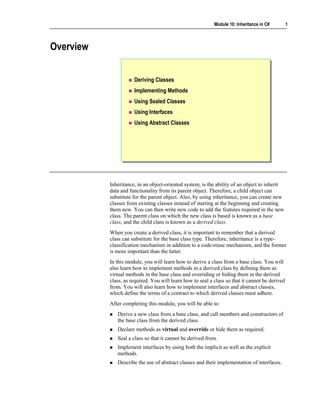
Overview


                      Deriving Classes
                      Implementing Methods
                      Using Sealed Classes
                      Using Interfaces
                      Using Abstract Classes


           Inheritance, in an object-oriented system, is the ability of an object to inherit
           data and functionality from its parent object. Therefore, a child object can
           substitute for the parent object. Also, by using inheritance, you can create new
           classes from existing classes instead of starting at the beginning and creating
           them new. You can then write new code to add the features required in the new
           class. The parent class on which the new class is based is known as a base
           class, and the child class is known as a derived class.
           When you create a derived class, it is important to remember that a derived
           class can substitute for the base class type. Therefore, inheritance is a type-
           classification mechanism in addition to a code-reuse mechanism, and the former
           is more important than the latter.
           In this module, you will learn how to derive a class from a base class. You will
           also learn how to implement methods in a derived class by defining them as
           virtual methods in the base class and overriding or hiding them in the derived
           class, as required. You will learn how to seal a class so that it cannot be derived
           from. You will also learn how to implement interfaces and abstract classes,
           which define the terms of a contract to which derived classes must adhere.
           After completing this module, you will be able to:
              Derive a new class from a base class, and call members and constructors of
              the base class from the derived class.
              Declare methods as virtual and override or hide them as required.
              Seal a class so that it cannot be derived from.
              Implement interfaces by using both the implicit as well as the explicit
              methods.
              Describe the use of abstract classes and their implementation of interfaces.
2   Module 10: Inheritance in C#


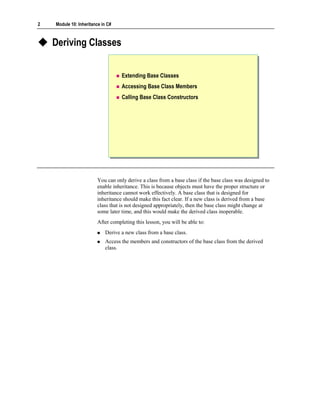
    Deriving Classes


                                   Extending Base Classes
                                   Accessing Base Class Members
                                   Calling Base Class Constructors


                        You can only derive a class from a base class if the base class was designed to
                        enable inheritance. This is because objects must have the proper structure or
                        inheritance cannot work effectively. A base class that is designed for
                        inheritance should make this fact clear. If a new class is derived from a base
                        class that is not designed appropriately, then the base class might change at
                        some later time, and this would make the derived class inoperable.
                        After completing this lesson, you will be able to:
                            Derive a new class from a base class.
                            Access the members and constructors of the base class from the derived
                            class.
Module 10: Inheritance in C#        3


Extending Base Classes

                          Syntax for deriving a class from a base class
                 class Token                                             Token
                                                                         Token
                  class Token
                 {            Derived class
                              Derived class  Base class
                                             Base class               « concrete »
                                                                      « concrete »
                  {
                      ...
                      ...
                 }}
                 class CommentToken: Token
                  class CommentToken: Token                         CommentToken
                                                                    CommentToken
                 {{                                                  « concrete »
                                                                     « concrete »
                      ...
                      ...              Colon
                                       Colon
                 }}

                          A derived class inherits most elements of its base class
                          A derived class cannot be more accessible than its base
                          class


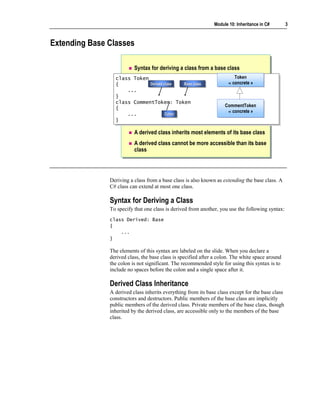
               Deriving a class from a base class is also known as extending the base class. A
               C# class can extend at most one class.

               Syntax for Deriving a Class
               To specify that one class is derived from another, you use the following syntax:
               class Derived: Base
               {
                   ...
               }

               The elements of this syntax are labeled on the slide. When you declare a
               derived class, the base class is specified after a colon. The white space around
               the colon is not significant. The recommended style for using this syntax is to
               include no spaces before the colon and a single space after it.

               Derived Class Inheritance
               A derived class inherits everything from its base class except for the base class
               constructors and destructors. Public members of the base class are implicitly
               public members of the derived class. Private members of the base class, though
               inherited by the derived class, are accessible only to the members of the base
               class.
4   Module 10: Inheritance in C#


                        Accessibility of a Derived Class
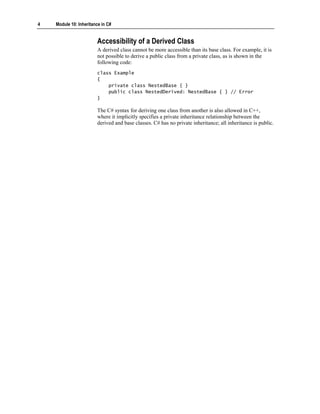
                        A derived class cannot be more accessible than its base class. For example, it is
                        not possible to derive a public class from a private class, as is shown in the
                        following code:
                        class Example
                        {
                            private class NestedBase { }
                            public class NestedDerived: NestedBase { } // Error
                        }

                        The C# syntax for deriving one class from another is also allowed in C++,
                        where it implicitly specifies a private inheritance relationship between the
                        derived and base classes. C# has no private inheritance; all inheritance is public.
Module 10: Inheritance in C#   5


Accessing Base Class Members
                 class Token
                  class Token
                 {{  ...
                      ...                                     class Outside
                                                               class Outside
                     protected string name;
                      protected string name;                  {{
                 }}                                                void Fails(Token t)
                                                                   void Fails(Token t)
                 class CommentToken: Token
                  class CommentToken: Token                        {
                                                                   {
                 {{  ...
                      ...                                             ...
                                                                       ...
                     public string Name( )
                      public string Name( )                             t.name
                                                                        t.name
                     {{                                               ...
                                                                       ...
                          return name;
                          return name;                             }
                                                                   }
                     }}                                       }}
                 }}
                        Inherited protected members are implicitly protected in the derived
                        class
                        Methods of a derived class can access only their inherited protected
                        members
                        Protected access modifiers cannot be used in a struct


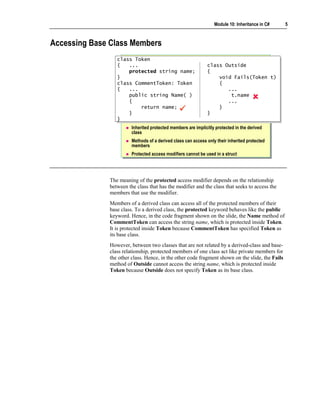
              The meaning of the protected access modifier depends on the relationship
              between the class that has the modifier and the class that seeks to access the
              members that use the modifier.
              Members of a derived class can access all of the protected members of their
              base class. To a derived class, the protected keyword behaves like the public
              keyword. Hence, in the code fragment shown on the slide, the Name method of
              CommentToken can access the string name, which is protected inside Token.
              It is protected inside Token because CommentToken has specified Token as
              its base class.
              However, between two classes that are not related by a derived-class and base-
              class relationship, protected members of one class act like private members for
              the other class. Hence, in the other code fragment shown on the slide, the Fails
              method of Outside cannot access the string name, which is protected inside
              Token because Outside does not specify Token as its base class.
6   Module 10: Inheritance in C#


                        Inherited Protected Members
                        When a derived class inherits a protected member, that member is also
                        implicitly a protected member of the derived class. This means that protected
                        members are accessible to all directly and indirectly derived classes of the base
                        class. This is shown in the following example:
                        class Base
                        {
                            protected string name;
                        }

                        class Derived: Base
                        {
                        }

                        class FurtherDerived: Derived
                        {
                            void Compiles( )
                            {
                                Console.WriteLine(name); // Okay
                            }
                        }


                        Protected Members and Methods
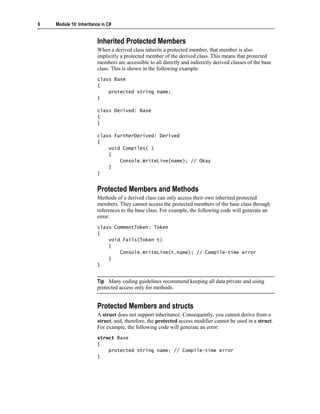
                        Methods of a derived class can only access their own inherited protected
                        members. They cannot access the protected members of the base class through
                        references to the base class. For example, the following code will generate an
                        error:
                        class CommentToken: Token
                        {
                            void Fails(Token t)
                            {
                                Console.WriteLine(t.name); // Compile-time error
                            }
                        }


                        Tip Many coding guidelines recommend keeping all data private and using
                        protected access only for methods.


                        Protected Members and structs
                        A struct does not support inheritance. Consequently, you cannot derive from a
                        struct, and, therefore, the protected access modifier cannot be used in a struct.
                        For example, the following code will generate an error:
                        struct Base
                        {
                            protected string name; // Compile-time error
                        }
Module 10: Inheritance in C#   7


Calling Base Class Constructors

                           Constructor declarations must use the base keyword
                  class Token
                   class Token
                  {{
                       protected Token(string name) { ... }
                       protected Token(string name) { ... }
                       ...
                       ...
                  }}
                  class CommentToken: Token
                   class CommentToken: Token
                  {{
                       public CommentToken(string name) : base(name) { }
                       public CommentToken(string name) : base(name) { }
                       ...
                       ...
                  }}

                           A private base class constructor cannot be accessed by a derived
                           class
                           Use the base keyword to qualify identifier scope


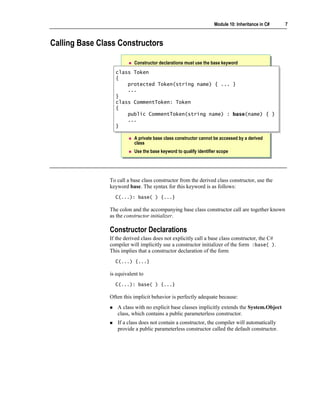
                To call a base class constructor from the derived class constructor, use the
                keyword base. The syntax for this keyword is as follows:
                  C(...): base( ) {...}

                The colon and the accompanying base class constructor call are together known
                as the constructor initializer.

                Constructor Declarations
                If the derived class does not explicitly call a base class constructor, the C#
                compiler will implicitly use a constructor initializer of the form :base( ).
                This implies that a constructor declaration of the form
                  C(...) {...}

                is equivalent to
                  C(...): base( ) {...}

                Often this implicit behavior is perfectly adequate because:
                   A class with no explicit base classes implicitly extends the System.Object
                   class, which contains a public parameterless constructor.
                   If a class does not contain a constructor, the compiler will automatically
                   provide a public parameterless constructor called the default constructor.
8   Module 10: Inheritance in C#


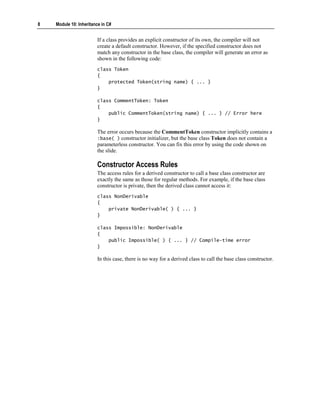
                        If a class provides an explicit constructor of its own, the compiler will not
                        create a default constructor. However, if the specified constructor does not
                        match any constructor in the base class, the compiler will generate an error as
                        shown in the following code:
                        class Token
                        {
                            protected Token(string name) { ... }
                        }

                        class CommentToken: Token
                        {
                            public CommentToken(string name) { ... } // Error here
                        }

                        The error occurs because the CommentToken constructor implicitly contains a
                        :base( ) constructor initializer, but the base class Token does not contain a
                        parameterless constructor. You can fix this error by using the code shown on
                        the slide.

                        Constructor Access Rules
                        The access rules for a derived constructor to call a base class constructor are
                        exactly the same as those for regular methods. For example, if the base class
                        constructor is private, then the derived class cannot access it:
                        class NonDerivable
                        {
                            private NonDerivable( ) { ... }
                        }

                        class Impossible: NonDerivable
                        {
                            public Impossible( ) { ... } // Compile-time error
                        }

                        In this case, there is no way for a derived class to call the base class constructor.
Module 10: Inheritance in C#      9


Scoping an Identifier
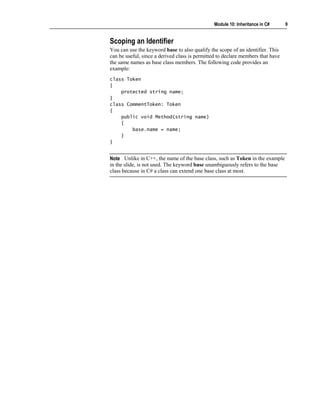
You can use the keyword base to also qualify the scope of an identifier. This
can be useful, since a derived class is permitted to declare members that have
the same names as base class members. The following code provides an
example:
class Token
{
    protected string name;
}
class CommentToken: Token
{
    public void Method(string name)
    {
        base.name = name;
    }
}


Note Unlike in C++, the name of the base class, such as Token in the example
in the slide, is not used. The keyword base unambiguously refers to the base
class because in C# a class can extend one base class at most.
10    Module 10: Inheritance in C#


     Implementing Methods


                                     Defining Virtual Methods
                                     Working with Virtual Methods
                                     Overriding Methods
                                     Working with Override Methods
                                     Using new to Hide Methods
                                     Working with the new Keyword
                                     Practice: Implementing Methods
                                     Quiz: Spot the Bugs


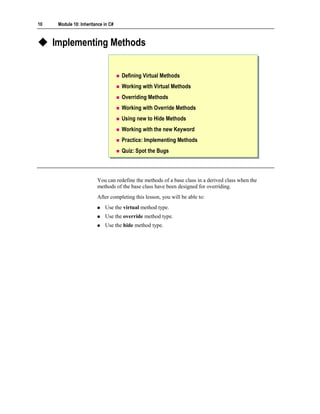
                         You can redefine the methods of a base class in a derived class when the
                         methods of the base class have been designed for overriding.
                         After completing this lesson, you will be able to:
                             Use the virtual method type.
                             Use the override method type.
                             Use the hide method type.
Module 10: Inheritance in C#     11


Defining Virtual Methods

                          Syntax: Declare as virtual
                  class Token
                   class Token
                  {{
                      ...
                       ...
                      public int LineNumber( )
                       public int LineNumber( )
                      { ...
                       { ...
                      }}
                      public virtual string Name( )
                       public virtual string Name( )
                      { ...
                       { ...
                      }}
                  }}

                          Virtual methods are polymorphic


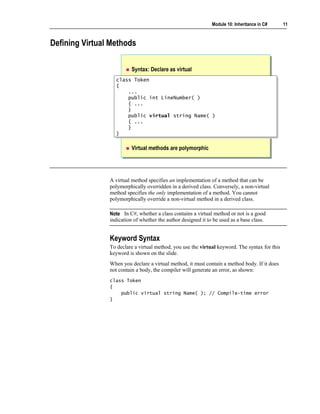
                A virtual method specifies an implementation of a method that can be
                polymorphically overridden in a derived class. Conversely, a non-virtual
                method specifies the only implementation of a method. You cannot
                polymorphically override a non-virtual method in a derived class.

                Note In C#, whether a class contains a virtual method or not is a good
                indication of whether the author designed it to be used as a base class.


                Keyword Syntax
                To declare a virtual method, you use the virtual keyword. The syntax for this
                keyword is shown on the slide.
                When you declare a virtual method, it must contain a method body. If it does
                not contain a body, the compiler will generate an error, as shown:
                class Token
                {
                    public virtual string Name( ); // Compile-time error
                }
12   Module 10: Inheritance in C#


Working with Virtual Methods


                                    To use virtual methods:
                                       You cannot declare virtual methods as static
                                       You cannot declare virtual methods as private


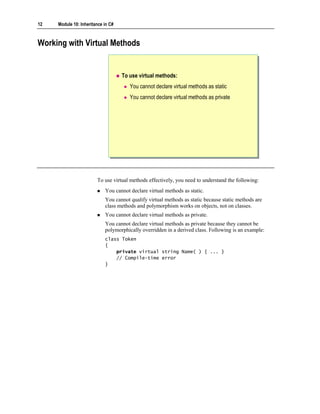
                        To use virtual methods effectively, you need to understand the following:
                            You cannot declare virtual methods as static.
                            You cannot qualify virtual methods as static because static methods are
                            class methods and polymorphism works on objects, not on classes.
                            You cannot declare virtual methods as private.
                            You cannot declare virtual methods as private because they cannot be
                            polymorphically overridden in a derived class. Following is an example:
                            class Token
                            {
                                private virtual string Name( ) { ... }
                                // Compile-time error
                            }
Module 10: Inheritance in C#   13


Overriding Methods


                          Syntax: Use the override keyword


                     class Token
                      class Token
                     {{ ...
                          ...
                         public virtual string Name( ) { ... }
                          public virtual string Name( ) { ... }
                     }}
                     class CommentToken: Token
                      class CommentToken: Token
                     {{ ...
                          ...
                         public override string Name( ) { ... }
                          public override string Name( ) { ... }
                     }}


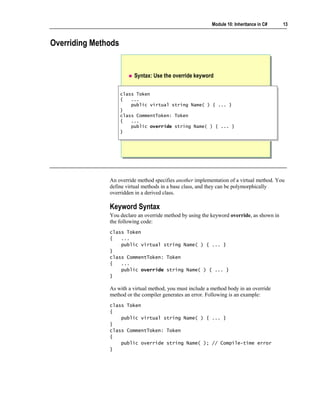
               An override method specifies another implementation of a virtual method. You
               define virtual methods in a base class, and they can be polymorphically
               overridden in a derived class.

               Keyword Syntax
               You declare an override method by using the keyword override, as shown in
               the following code:
               class Token
               {   ...
                   public virtual string Name( ) { ... }
               }
               class CommentToken: Token
               {   ...
                   public override string Name( ) { ... }
               }

               As with a virtual method, you must include a method body in an override
               method or the compiler generates an error. Following is an example:
               class Token
               {
                   public virtual string Name( ) { ... }
               }
               class CommentToken: Token
               {
                   public override string Name( ); // Compile-time error
               }
14   Module 10: Inheritance in C#


Working with Override Methods
                                    You can only override identical inherited virtual methods
                              class Token
                               class Token
                              {{ ...
                                   ...
                                  public int LineNumber( ) { ... }
                                   public int LineNumber( ) { ... }
                                  public virtual string Name( ) { ... }
                                   public virtual string Name( ) { ... }
                              }}
                              class CommentToken: Token
                               class CommentToken: Token
                              {{ ...
                                   ...
                                  public override int LineNumber( ) { ... }
                                   public override int LineNumber( ) { ... }
                                  public override string Name( ) { ... }
                                   public override string Name( ) { ... }
                              }}

                                    You must match an override method with its associated virtual
                                    method
                                    You can override an override method
                                    You cannot explicitly declare an override method as virtual
                                    You cannot declare an override method as static or private


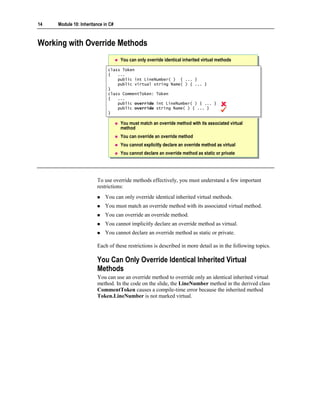
                        To use override methods effectively, you must understand a few important
                        restrictions:
                            You can only override identical inherited virtual methods.
                            You must match an override method with its associated virtual method.
                            You can override an override method.
                            You cannot implicitly declare an override method as virtual.
                            You cannot declare an override method as static or private.

                        Each of these restrictions is described in more detail as in the following topics.

                        You Can Only Override Identical Inherited Virtual
                        Methods
                        You can use an override method to override only an identical inherited virtual
                        method. In the code on the slide, the LineNumber method in the derived class
                        CommentToken causes a compile-time error because the inherited method
                        Token.LineNumber is not marked virtual.
Module 10: Inheritance in C#     15


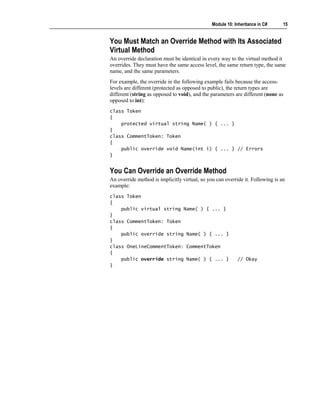
You Must Match an Override Method with Its Associated
Virtual Method
An override declaration must be identical in every way to the virtual method it
overrides. They must have the same access level, the same return type, the same
name, and the same parameters.
For example, the override in the following example fails because the access-
levels are different (protected as opposed to public), the return types are
different (string as opposed to void), and the parameters are different (none as
opposed to int):
class Token
{
    protected virtual string Name( ) { ... }
}
class CommentToken: Token
{
    public override void Name(int i) { ... } // Errors
}


You Can Override an Override Method
An override method is implicitly virtual, so you can override it. Following is an
example:
class Token
{
    public virtual string Name( ) { ... }
}
class CommentToken: Token
{
    public override string Name( ) { ... }
}
class OneLineCommentToken: CommentToken
{
    public override string Name( ) { ... }                 // Okay
}
16   Module 10: Inheritance in C#


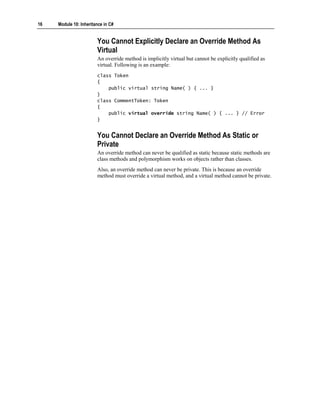
                        You Cannot Explicitly Declare an Override Method As
                        Virtual
                        An override method is implicitly virtual but cannot be explicitly qualified as
                        virtual. Following is an example:
                        class Token
                        {
                            public virtual string Name( ) { ... }
                        }
                        class CommentToken: Token
                        {
                            public virtual override string Name( ) { ... } // Error
                        }


                        You Cannot Declare an Override Method As Static or
                        Private
                        An override method can never be qualified as static because static methods are
                        class methods and polymorphism works on objects rather than classes.
                        Also, an override method can never be private. This is because an override
                        method must override a virtual method, and a virtual method cannot be private.
Module 10: Inheritance in C#    17


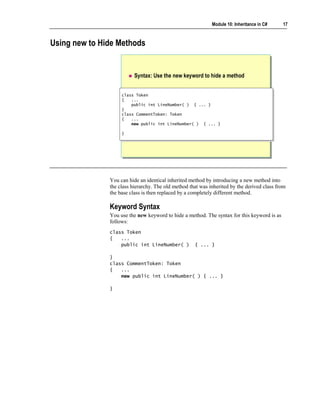
Using new to Hide Methods


                          Syntax: Use the new keyword to hide a method


                    class Token
                     class Token
                    {{ ...
                         ...
                        public int LineNumber( ) { ... }
                         public int LineNumber( ) { ... }
                    }}
                    class CommentToken: Token
                     class CommentToken: Token
                    {{ ...
                         ...
                        new public int LineNumber( ) { ... }
                         new public int LineNumber( ) { ... }

                    }}


               You can hide an identical inherited method by introducing a new method into
               the class hierarchy. The old method that was inherited by the derived class from
               the base class is then replaced by a completely different method.

               Keyword Syntax
               You use the new keyword to hide a method. The syntax for this keyword is as
               follows:
               class Token
               {   ...
                   public int LineNumber( )          { ... }

               }
               class CommentToken: Token
               {   ...
                   new public int LineNumber( ) { ... }

               }
18   Module 10: Inheritance in C#


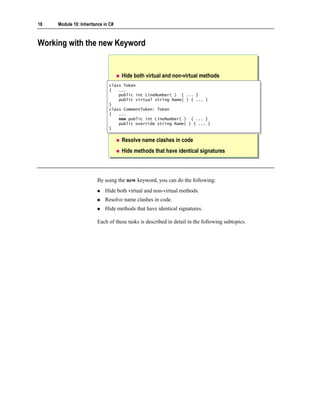
Working with the new Keyword


                                    Hide both virtual and non-virtual methods
                              class Token
                               class Token
                              {{ ...
                                   ...
                                  public int LineNumber( ) { ... }
                                   public int LineNumber( ) { ... }
                                  public virtual string Name( ) { ... }
                                   public virtual string Name( ) { ... }
                              }}
                              class CommentToken: Token
                               class CommentToken: Token
                              {{ ...
                                   ...
                                  new public int LineNumber( ) { ... }
                                   new public int LineNumber( ) { ... }
                                  public override string Name( ) { ... }
                                   public override string Name( ) { ... }
                              }}

                                    Resolve name clashes in code
                                    Hide methods that have identical signatures


                        By using the new keyword, you can do the following:
                            Hide both virtual and non-virtual methods.
                            Resolve name clashes in code.
                            Hide methods that have identical signatures.

                        Each of these tasks is described in detail in the following subtopics.
Module 10: Inheritance in C#      19


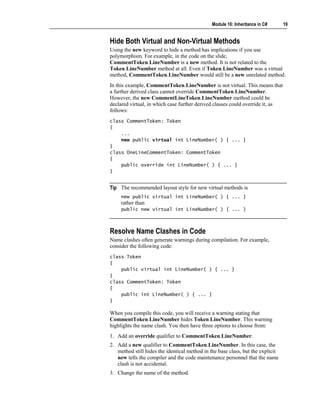
Hide Both Virtual and Non-Virtual Methods
Using the new keyword to hide a method has implications if you use
polymorphism. For example, in the code on the slide,
CommentToken.LineNumber is a new method. It is not related to the
Token.LineNumber method at all. Even if Token.LineNumber was a virtual
method, CommentToken.LineNumber would still be a new unrelated method.
In this example, CommentToken.LineNumber is not virtual. This means that
a further derived class cannot override CommentToken.LineNumber.
However, the new CommentLineToken.LineNumber method could be
declared virtual, in which case further derived classes could override it, as
follows:
class CommentToken: Token
{
    ...
    new public virtual int LineNumber( ) { ... }
}
class OneLineCommentToken: CommentToken
{
    public override int LineNumber( ) { ... }
}


Tip The recommended layout style for new virtual methods is
     new public virtual int LineNumber( ) { ... }
     rather than
     public new virtual int LineNumber( ) { ... }


Resolve Name Clashes in Code
Name clashes often generate warnings during compilation. For example,
consider the following code:
class Token
{
    public virtual int LineNumber( ) { ... }
}
class CommentToken: Token
{
    public int LineNumber( ) { ... }
}

When you compile this code, you will receive a warning stating that
CommentToken.LineNumber hides Token.LineNumber. This warning
highlights the name clash. You then have three options to choose from:
1. Add an override qualifier to CommentToken.LineNumber.
2. Add a new qualifier to CommentToken.LineNumber. In this case, the
   method still hides the identical method in the base class, but the explicit
   new tells the compiler and the code maintenance personnel that the name
   clash is not accidental.
3. Change the name of the method.
20   Module 10: Inheritance in C#


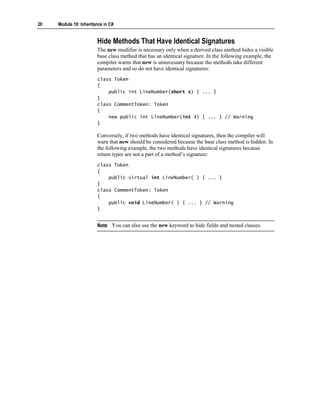
                        Hide Methods That Have Identical Signatures
                        The new modifier is necessary only when a derived class method hides a visible
                        base class method that has an identical signature. In the following example, the
                        compiler warns that new is unnecessary because the methods take different
                        parameters and so do not have identical signatures:
                        class Token
                        {
                            public int LineNumber(short s) { ... }
                        }
                        class CommentToken: Token
                        {
                            new public int LineNumber(int i) { ... } // Warning
                        }

                        Conversely, if two methods have identical signatures, then the compiler will
                        warn that new should be considered because the base class method is hidden. In
                        the following example, the two methods have identical signatures because
                        return types are not a part of a method’s signature:
                        class Token
                        {
                            public virtual int LineNumber( ) { ... }
                        }
                        class CommentToken: Token
                        {
                            public void LineNumber( ) { ... } // Warning
                        }


                        Note You can also use the new keyword to hide fields and nested classes.
Module 10: Inheritance in C#      21


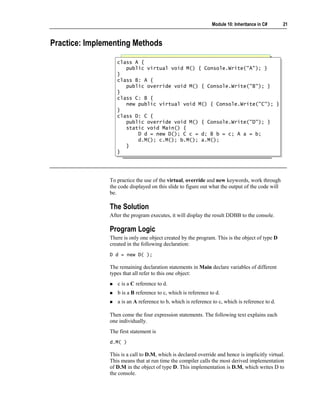
Practice: Implementing Methods

                  class A {
                   class A {
                     public virtual void M() { Console.Write("A"); }
                      public virtual void M() { Console.Write("A"); }
                  }}
                  class B: A {
                   class B: A {
                     public override void M() { Console.Write("B"); }
                      public override void M() { Console.Write("B"); }
                  }}
                  class C: B {
                   class C: B {
                     new public virtual void M() { Console.Write("C"); }
                      new public virtual void M() { Console.Write("C"); }
                  }}
                  class D: C {
                   class D: C {
                     public override void M() { Console.Write("D"); }
                      public override void M() { Console.Write("D"); }
                     static void Main() {
                      static void Main() {
                          D d = new D(); C c = d; B b = c; A a = b;
                           D d = new D(); C c = d; B b = c; A a = b;
                          d.M(); c.M(); b.M(); a.M();
                           d.M(); c.M(); b.M(); a.M();
                     }}
                  }}


               To practice the use of the virtual, override and new keywords, work through
               the code displayed on this slide to figure out what the output of the code will
               be.

               The Solution
               After the program executes, it will display the result DDBB to the console.

               Program Logic
               There is only one object created by the program. This is the object of type D
               created in the following declaration:
               D d = new D( );

               The remaining declaration statements in Main declare variables of different
               types that all refer to this one object:
                  c is a C reference to d.
                  b is a B reference to c, which is reference to d.
                  a is an A reference to b, which is reference to c, which is reference to d.

               Then come the four expression statements. The following text explains each
               one individually.
               The first statement is
               d.M( )

               This is a call to D.M, which is declared override and hence is implicitly virtual.
               This means that at run time the compiler calls the most derived implementation
               of D.M in the object of type D. This implementation is D.M, which writes D to
               the console.
22   Module 10: Inheritance in C#


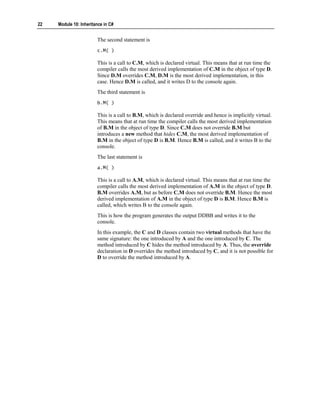
                        The second statement is
                        c.M( )

                        This is a call to C.M, which is declared virtual. This means that at run time the
                        compiler calls the most derived implementation of C.M in the object of type D.
                        Since D.M overrides C.M, D.M is the most derived implementation, in this
                        case. Hence D.M is called, and it writes D to the console again.
                        The third statement is
                        b.M( )

                        This is a call to B.M, which is declared override and hence is implicitly virtual.
                        This means that at run time the compiler calls the most derived implementation
                        of B.M in the object of type D. Since C.M does not override B.M but
                        introduces a new method that hides C.M, the most derived implementation of
                        B.M in the object of type D is B.M. Hence B.M is called, and it writes B to the
                        console.
                        The last statement is
                        a.M( )

                        This is a call to A.M, which is declared virtual. This means that at run time the
                        compiler calls the most derived implementation of A.M in the object of type D.
                        B.M overrides A.M, but as before C.M does not override B.M. Hence the most
                        derived implementation of A.M in the object of type D is B.M. Hence B.M is
                        called, which writes B to the console again.
                        This is how the program generates the output DDBB and writes it to the
                        console.
                        In this example, the C and D classes contain two virtual methods that have the
                        same signature: the one introduced by A and the one introduced by C. The
                        method introduced by C hides the method introduced by A. Thus, the override
                        declaration in D overrides the method introduced by C, and it is not possible for
                        D to override the method introduced by A.
Module 10: Inheritance in C#     23


Quiz: Spot the Bugs

                   class Base
                    class Base
                   {{
                       public void Alpha( ) { ... }
                        public void Alpha( ) { ... }
                       public virtual void Beta( ) { ... }
                        public virtual void Beta( ) { ... }
                       public virtual void Gamma(int i) { ... }
                        public virtual void Gamma(int i) { ... }
                       public virtual void Delta( ) { ... }
                        public virtual void Delta( ) { ... }
                       private virtual void Epsilon( ) { ... }
                        private virtual void Epsilon( ) { ... }
                   }}
                   class Derived: Base
                    class Derived: Base
                   {{
                       public override void Alpha( ) { ... }
                        public override void Alpha( ) { ... }
                       protected override void Beta( ) { ... }
                        protected override void Beta( ) { ... }
                       public override void Gamma(double d) { ... }
                        public override void Gamma(double d) { ... }
                       public override int Delta( ) { ... }
                        public override int Delta( ) { ... }
                   }}


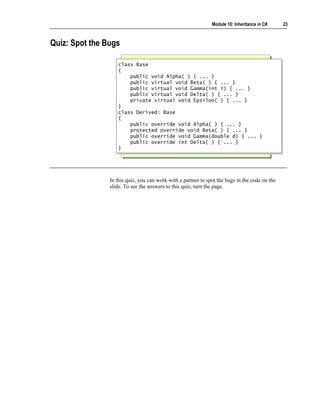
                In this quiz, you can work with a partner to spot the bugs in the code on the
                slide. To see the answers to this quiz, turn the page.
24   Module 10: Inheritance in C#


                        Answers
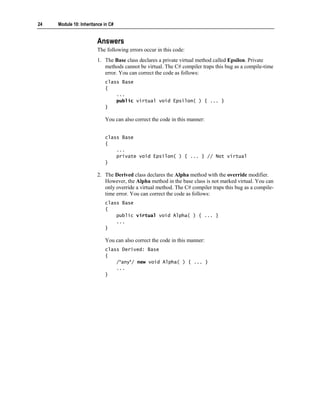
                        The following errors occur in this code:
                        1. The Base class declares a private virtual method called Epsilon. Private
                           methods cannot be virtual. The C# compiler traps this bug as a compile-time
                           error. You can correct the code as follows:
                            class Base
                            {
                                ...
                                public virtual void Epsilon( ) { ... }
                            }

                            You can also correct the code in this manner:


                            class Base
                            {
                                ...
                                private void Epsilon( ) { ... } // Not virtual
                            }

                        2. The Derived class declares the Alpha method with the override modifier.
                           However, the Alpha method in the base class is not marked virtual. You can
                           only override a virtual method. The C# compiler traps this bug as a compile-
                           time error. You can correct the code as follows:
                            class Base
                            {
                                public virtual void Alpha( ) { ... }
                                ...
                            }

                            You can also correct the code in this manner:
                            class Derived: Base
                            {
                                /*any*/ new void Alpha( ) { ... }
                                ...
                            }
Module 10: Inheritance in C#    25


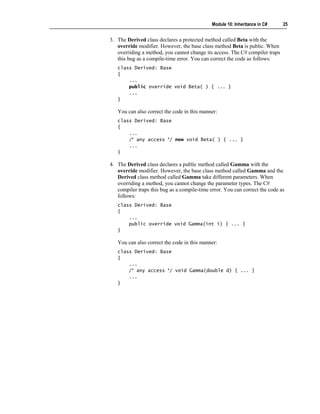
3. The Derived class declares a protected method called Beta with the
   override modifier. However, the base class method Beta is public. When
   overriding a method, you cannot change its access. The C# compiler traps
   this bug as a compile-time error. You can correct the code as follows:
   class Derived: Base
   {
       ...
       public override void Beta( ) { ... }
       ...
   }

   You can also correct the code in this manner:
   class Derived: Base
   {
       ...
       /* any access */ new void Beta( ) { ... }
       ...
   }

4. The Derived class declares a public method called Gamma with the
   override modifier. However, the base class method called Gamma and the
   Derived class method called Gamma take different parameters. When
   overriding a method, you cannot change the parameter types. The C#
   compiler traps this bug as a compile-time error. You can correct the code as
   follows:
   class Derived: Base
   {
       ...
       public override void Gamma(int i) { ... }
   }

   You can also correct the code in this manner:
   class Derived: Base
   {
       ...
       /* any access */ void Gamma(double d) { ... }
       ...
   }
26   Module 10: Inheritance in C#


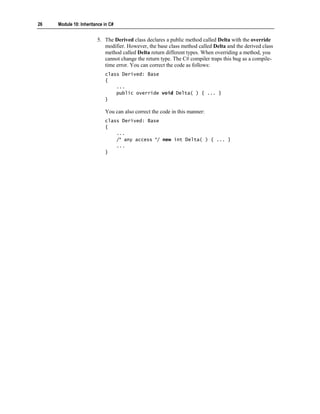
                        5. The Derived class declares a public method called Delta with the override
                           modifier. However, the base class method called Delta and the derived class
                           method called Delta return different types. When overriding a method, you
                           cannot change the return type. The C# compiler traps this bug as a compile-
                           time error. You can correct the code as follows:
                            class Derived: Base
                            {
                                ...
                                public override void Delta( ) { ... }
                            }

                            You can also correct the code in this manner:
                            class Derived: Base
                            {
                                ...
                                /* any access */ new int Delta( ) { ... }
                                ...
                            }
Module 10: Inheritance in C#      27


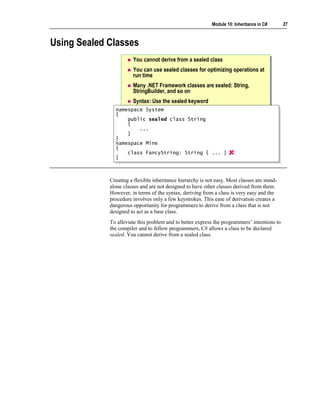
Using Sealed Classes
                       You cannot derive from a sealed class
                       You can use sealed classes for optimizing operations at
                       run time
                       Many .NET Framework classes are sealed: String,
                       StringBuilder, and so on
                       Syntax: Use the sealed keyword
               namespace System
                namespace System
               {{
                    public sealed class String
                    public sealed class String
                    {
                    {
                        ...
                         ...
                    }
                    }
               }}
               namespace Mine
                namespace Mine
               {{
                    class FancyString: String { ... }
                    class FancyString: String { ... }
               }}


             Creating a flexible inheritance hierarchy is not easy. Most classes are stand-
             alone classes and are not designed to have other classes derived from them.
             However, in terms of the syntax, deriving from a class is very easy and the
             procedure involves only a few keystrokes. This ease of derivation creates a
             dangerous opportunity for programmers to derive from a class that is not
             designed to act as a base class.
             To alleviate this problem and to better express the programmers’ intentions to
             the compiler and to fellow programmers, C# allows a class to be declared
             sealed. You cannot derive from a sealed class.
28   Module 10: Inheritance in C#


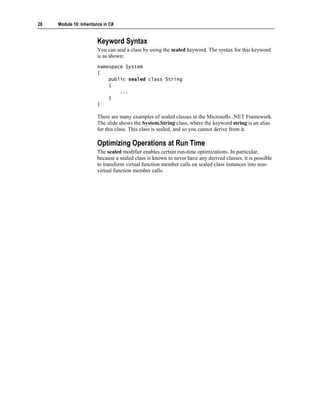
                        Keyword Syntax
                        You can seal a class by using the sealed keyword. The syntax for this keyword
                        is as shown:
                        namespace System
                        {
                            public sealed class String
                            {
                                ...
                            }
                        }

                        There are many examples of sealed classes in the Microsoft® .NET Framework.
                        The slide shows the System.String class, where the keyword string is an alias
                        for this class. This class is sealed, and so you cannot derive from it.

                        Optimizing Operations at Run Time
                        The sealed modifier enables certain run-time optimizations. In particular,
                        because a sealed class is known to never have any derived classes, it is possible
                        to transform virtual function member calls on sealed class instances into non-
                        virtual function member calls.
Module 10: Inheritance in C#      29


Using Interfaces


                     Declaring Interfaces
                     Implementing Multiple Interfaces
                     Implementing Interface Methods
                     Implementing Interface Methods Explicitly
                     Quiz: Spot the Bugs


          An interface specifies a syntactic and semantic contract that all derived classes
          must adhere to. Specifically, an interface describes the what part of the contract
          and the classes that implement the interface describe the how part of the
          contract.
          After completing this lesson, you will be able to:
             Use the syntax for declaring interfaces.
             Use the two techniques for implementing interface methods in derived
             classes.
30   Module 10: Inheritance in C#


Declaring Interfaces


                                     Syntax: Use the interface keyword to declare methods
                                                                          Interface names should
                                                                           Interface names should
                                                                           begin with a capital “I”
                                                                            begin with a capital “I”


                           interface IToken
                            interface IToken                                     IToken
                                                                                  IToken
                           {{                                                 « interface »
                                                                              « interface »
                               int LineNumber( );
                                int LineNumber( );
                               string Name( );                            LineNumber( ))
                                                                          LineNumber(
                                string Name( );
                           }                                              Name( ))
                                                                          Name(
                            }

                                No access specifiers
                                No access specifiers   No method bodies
                                                       No method bodies


                        An interface resembles a class without any code. You declare an interface in a
                        similar manner to the way in which you declare a class. To declare an interface
                        in C#, you use the keyword interface instead of class. The syntax for this
                        keyword is explained on the slide.

                        Note It is recommended that all interface names be prefixed with a capital "I."
                        For example, use IToken rather than Token.


                        Features of Interfaces
                        The following are two important features of interfaces.

                        Interface Methods Are Implicitly Public
                        The methods declared in an interface are implicitly public. Therefore, explicit
                        public access modifiers are not allowed, as shown in the following example:
                        interface IToken
                        {
                            public int LineNumber( ); // Compile-time error
                        }
Module 10: Inheritance in C#    31


Interface Methods Do Not Contain Method Bodies
The methods declared in an interface are not allowed to contain method bodies.
For example, the following code is not allowed:
interface IToken
{
    int LineNumber( ) { ... } // Compile-time error
}

Strictly speaking, interfaces can contain interface property declarations, which
are declarations of properties with no body, interface event declarations, which
are declarations of events with no body, and interface indexer declarations,
which are declarations of indexers with no body.
32   Module 10: Inheritance in C#


Implementing Multiple Interfaces
                                    A class can implement zero or more interfaces
                           interface IToken
                            interface IToken
                           {{                               IToken
                                                             IToken             IVisitable
                                                                                 IVisitable
                                string Name( );
                                string Name( );          « interface »        « interface »
                           }                             « interface »         « interface »
                            }
                           interface IVisitable
                            interface IVisitable
                           {{
                                void Accept(IVisitor v);
                                void Accept(IVisitor v);
                           }}
                           class Token: IToken, IVisitable
                            class Token: IToken, IVisitable             Token
                                                                        Token
                           { ...
                            { ...                                    « concrete »
                                                                     « concrete »
                           }}
                                    An interface can extend zero or more interfaces
                                    A class can be more accessible than its base interfaces
                                    An interface cannot be more accessible than its base interfaces
                                    A class must implement all inherited interface methods


                        Although C# permits only single inheritance, it allows you to implement
                        multiple interfaces in a single class. This topic discusses the differences
                        between a class and an interface with respect to implementation and extension
                        of interfaces, respectively, in addition to their accessibility in comparison to
                        their base interfaces.

                        Interface Implementation
                        A class can implement zero or more interfaces but can explicitly extend no
                        more than one class. An example of this feature is displayed on the slide.

                        Note Strictly speaking, a class always extends one class. If you do not specify
                        a base class, your class will implicitly inherit from object.
Module 10: Inheritance in C#      33


In contrast, an interface can extend zero or more interfaces. For example, you
can rewrite the code on the slide as follows:
interface IToken { ... }
interface IVisitable { ... }
interface IVisitableToken: IVisitable, IToken { ... }
class Token: IVisitableToken { ... }


Accessibility
A class can be more accessible than its base interfaces. For example, you can
declare a public class that implements a private interface, as follows:
class Example
{
    private interface INested { }
    public class Nested: INested { } // Okay
}

However, an interface cannot be more accessible than any of its base interfaces.
It is an error to declare a public interface that extends a private interface, as
shown in the following example:
class Example
{
    private interface INested { }

     public interface IAlsoNested: INested { }
     // Compile-time error
}


Interface Methods
A class must implement all methods of any interfaces it extends, regardless of
whether the interfaces are inherited directly or indirectly.
34   Module 10: Inheritance in C#


Implementing Interface Methods


                                     The implementing method must be the same as the
                                     interface method
                                     The implementing method can be virtual or non-virtual

                            class Token: IToken, IVisitable
                             class Token: IToken, IVisitable                          Same access
                                                                                      Same access
                            {{                                                        Same return type
                                                                                      Same return type
                                public virtual string Name(
                                 public virtual string Name(              ))          Same name
                                                                                      Same name
                                { ...
                                 { ...
                                                                                      Same parameters
                                                                                      Same parameters
                                }}
                                public void Accept(IVisitor
                                 public void Accept(IVisitor              v)
                                                                          v)
                                { ...
                                 { ...
                                }}
                            }}


                        When a class implements an interface, it must implement every method
                        declared in that interface. This requirement is practical because interfaces
                        cannot define their own method bodies.
                        The method that the class implements must be identical to the interface method
                        in every way. It must have the same:
                            Access
                            Since an interface method is implicitly public, this means that the
                            implementing method must be explicitly declared public. If the access
                            modifier is omitted, then the method defaults to being private.
                            Return type
                            If the return type in the interface is declared as T, then the return type in the
                            implementing class cannot be declared as a type derived from T; it must
                            be T. In other words, return type covariance is not supported in C#.
                            Name
                            Remember that names in C# are case sensitive.
                            Parameter-type list
Module 10: Inheritance in C#   35


The following code meets all of these requirements:
interface IToken
{
    string Name( );
}
interface IVisitable
{
    void Accept(IVisitor v);
}
class Token: IToken, IVisitable
{
    public virtual string Name( )
    { ...
    }
    public void Accept(IVisitor v)
    { ...
    }
}

The implementing method can be virtual, such as Name in the preceding code.
In this case, the method can be overridden in further derived classes. The
implementing method can also be non-virtual, such as Accept in the preceding
code. In the latter case, the method cannot be overridden in further derived
classes.
36   Module 10: Inheritance in C#


Implementing Interface Methods Explicitly
                                    Use the fully qualified interface method name
                            class Token: IToken, IVisitable
                             class Token: IToken, IVisitable
                            {{
                                string IToken.Name( )
                                 string IToken.Name( )
                                { ...
                                 { ...
                                }}
                                void IVisitable.Accept(IVisitor v)
                                 void IVisitable.Accept(IVisitor v)
                                { ...
                                 { ...
                                }}
                            }}
                                    Restrictions of explicit interface method implementation
                                        You can only access methods through the interface
                                        You cannot declare methods as virtual
                                        You cannot specify an access modifier


                        An alternative way for a class to implement a method inherited from an
                        interface is to use an explicit interface method implementation.

                        Use the Fully Qualified Interface Method Name
                        When using the explicit interface method implementation, you must use the
                        fully qualified name of the implementing method. This implies that the name of
                        the method must include the name of the interface as well, such as IToken in
                        IToken.Name.
                        An example of two interface methods implemented explicitly by the Token
                        class is displayed on the slide. Notice the differences between this
                        implementation and the earlier implementation.
Module 10: Inheritance in C#     37


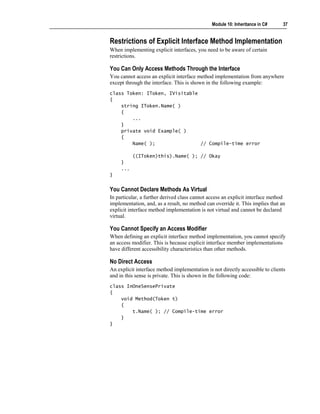
Restrictions of Explicit Interface Method Implementation
When implementing explicit interfaces, you need to be aware of certain
restrictions.

You Can Only Access Methods Through the Interface
You cannot access an explicit interface method implementation from anywhere
except through the interface. This is shown in the following example:
class Token: IToken, IVisitable
{
    string IToken.Name( )
    {
        ...
    }
    private void Example( )
    {
        Name( );                // Compile-time error

           ((IToken)this).Name( ); // Okay
     }
     ...
}


You Cannot Declare Methods As Virtual
In particular, a further derived class cannot access an explicit interface method
implementation, and, as a result, no method can override it. This implies that an
explicit interface method implementation is not virtual and cannot be declared
virtual.

You Cannot Specify an Access Modifier
When defining an explicit interface method implementation, you cannot specify
an access modifier. This is because explicit interface member implementations
have different accessibility characteristics than other methods.

No Direct Access
An explicit interface method implementation is not directly accessible to clients
and in this sense is private. This is shown in the following code:
class InOneSensePrivate
{
    void Method(Token t)
    {
        t.Name( ); // Compile-time error
    }
}
38   Module 10: Inheritance in C#


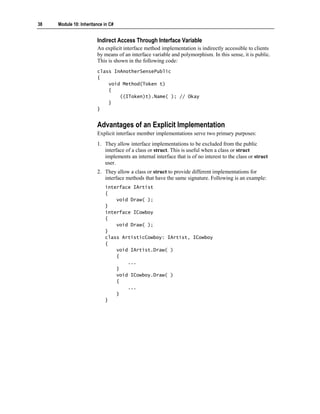
                        Indirect Access Through Interface Variable
                        An explicit interface method implementation is indirectly accessible to clients
                        by means of an interface variable and polymorphism. In this sense, it is public.
                        This is shown in the following code:
                        class InAnotherSensePublic
                        {
                            void Method(Token t)
                            {
                                ((IToken)t).Name( ); // Okay
                            }
                        }


                        Advantages of an Explicit Implementation
                        Explicit interface member implementations serve two primary purposes:
                        1. They allow interface implementations to be excluded from the public
                           interface of a class or struct. This is useful when a class or struct
                           implements an internal interface that is of no interest to the class or struct
                           user.
                        2. They allow a class or struct to provide different implementations for
                           interface methods that have the same signature. Following is an example:
                            interface IArtist
                            {
                                void Draw( );
                            }
                            interface ICowboy
                            {
                                void Draw( );
                            }
                            class ArtisticCowboy: IArtist, ICowboy
                            {
                                void IArtist.Draw( )
                                {
                                    ...
                                }
                                void ICowboy.Draw( )
                                {
                                    ...
                                }
                            }
Module 10: Inheritance in C#     39


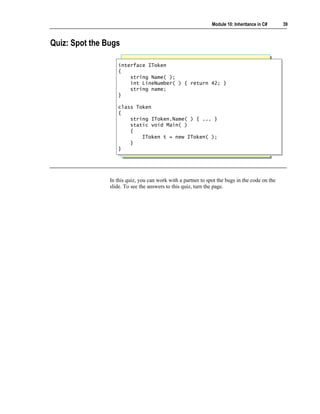
Quiz: Spot the Bugs

                   interface IToken
                    interface IToken
                   {{
                       string Name( );
                        string Name( );
                       int LineNumber( ) { return 42; }
                        int LineNumber( ) { return 42; }
                       string name;
                        string name;
                   }}

                   class Token
                    class Token
                   {{
                       string IToken.Name( ) { ... }
                        string IToken.Name( ) { ... }
                       static void Main( )
                        static void Main( )
                       {{
                           IToken t = new IToken( );
                            IToken t = new IToken( );
                       }}
                   }}


                In this quiz, you can work with a partner to spot the bugs in the code on the
                slide. To see the answers to this quiz, turn the page.
40   Module 10: Inheritance in C#


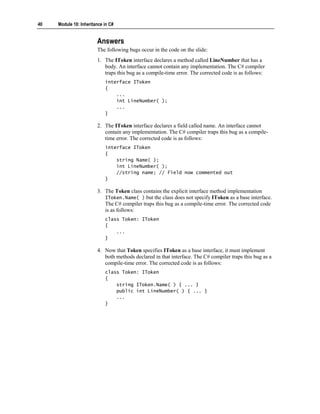
                        Answers
                        The following bugs occur in the code on the slide:
                        1. The IToken interface declares a method called LineNumber that has a
                           body. An interface cannot contain any implementation. The C# compiler
                           traps this bug as a compile-time error. The corrected code is as follows:
                            interface IToken
                            {
                                ...
                                int LineNumber( );
                                ...
                            }

                        2. The IToken interface declares a field called name. An interface cannot
                           contain any implementation. The C# compiler traps this bug as a compile-
                           time error. The corrected code is as follows:
                            interface IToken
                            {
                                string Name( );
                                int LineNumber( );
                                //string name; // Field now commented out
                            }

                        3. The Token class contains the explicit interface method implementation
                           IToken.Name( ) but the class does not specify IToken as a base interface.
                           The C# compiler traps this bug as a compile-time error. The corrected code
                           is as follows:
                            class Token: IToken
                            {
                                ...
                            }

                        4. Now that Token specifies IToken as a base interface, it must implement
                           both methods declared in that interface. The C# compiler traps this bug as a
                           compile-time error. The corrected code is as follows:
                            class Token: IToken
                            {
                                string IToken.Name( ) { ... }
                                public int LineNumber( ) { ... }
                                ...
                            }
Module 10: Inheritance in C#     41


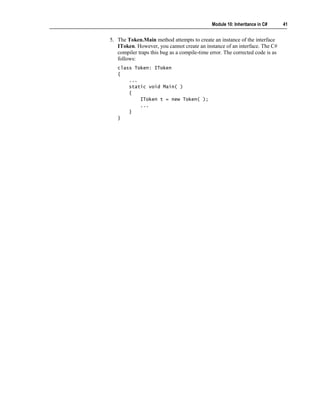
5. The Token.Main method attempts to create an instance of the interface
   IToken. However, you cannot create an instance of an interface. The C#
   compiler traps this bug as a compile-time error. The corrected code is as
   follows:
   class Token: IToken
   {
       ...
       static void Main( )
       {
           IToken t = new Token( );
           ...
       }
   }
42    Module 10: Inheritance in C#


     Using Abstract Classes


                                     Declaring Abstract Classes
                                     Using Abstract Classes in a Class Hierarchy
                                     Comparing Abstract Classes to Interfaces
                                     Implementing Abstract Methods
                                     Working with Abstract Methods
                                     Quiz: Spot the Bugs


                         Abstract classes are used to provide partial class implementations that can be
                         completed by derived concrete classes. Abstract classes are particularly useful
                         for providing a partial implementation of an interface that can be reused by
                         multiple derived classes.
                         After completing this lesson, you will be able to:
                             Use the syntax for declaring an abstract class.
                             Explain how to use abstract classes in a class hierarchy.
Module 10: Inheritance in C#     43


Declaring Abstract Classes


                           Use the abstract keyword

                   abstract class Token
                    abstract class Token
                   {{
                       ...
                        ...
                   }}
                   class Test                                                 Token
                                                                              Token
                    class Test
                   {                                                      {{ abstract }}
                                                                             abstract
                    {
                       static void Main( )
                        static void Main( )
                       {{                                          An abstract class cannot
                                                                   An abstract class cannot
                            new Token( );
                            new Token( );                              be instantiated
                                                                        be instantiated
                       }}
                   }}


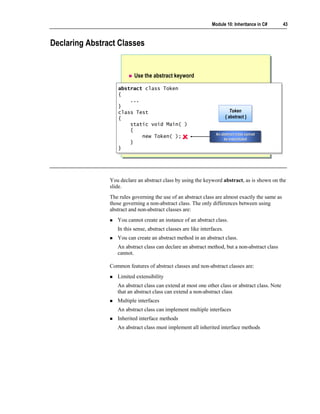
                You declare an abstract class by using the keyword abstract, as is shown on the
                slide.
                The rules governing the use of an abstract class are almost exactly the same as
                those governing a non-abstract class. The only differences between using
                abstract and non-abstract classes are:
                   You cannot create an instance of an abstract class.
                   In this sense, abstract classes are like interfaces.
                   You can create an abstract method in an abstract class.
                   An abstract class can declare an abstract method, but a non-abstract class
                   cannot.

                Common features of abstract classes and non-abstract classes are:
                   Limited extensibility
                   An abstract class can extend at most one other class or abstract class. Note
                   that an abstract class can extend a non-abstract class
                   Multiple interfaces
                   An abstract class can implement multiple interfaces
                   Inherited interface methods
                   An abstract class must implement all inherited interface methods
44   Module 10: Inheritance in C#


Using Abstract Classes in a Class Hierarchy

                                    Example 1
                             interface IToken
                              interface IToken                                     IToken
                             {                                                      IToken
                              {                                                 « interface »
                                 string Name( );
                                  string Name( );                               « interface »
                             }}
                             abstract class Token: IToken
                              abstract class Token: IToken
                             {{
                                 string IToken.Name( )                                 Token
                                                                                       Token
                                  string IToken.Name( )
                                 {{ ...
                                      ...                                          {{ abstract }}
                                                                                      abstract
                                 }}
                                 ...
                                  ...
                             }}
                             class CommentToken: Token
                              class CommentToken: Token                  Comment
                                                                          Comment             Keyword
                                                                                              Keyword
                             {{ ...
                                  ...                                      Token
                                                                           Token               Token
                                                                                               Token
                             }}
                             class KeywordToken: Token                  « concrete »
                                                                        « concrete »        « concrete »
                                                                                            « concrete »
                              class KeywordToken: Token
                             {{ ...
                                  ...
                             }}


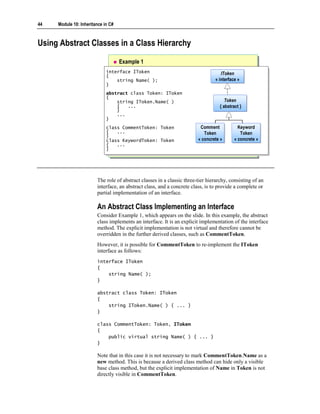
                        The role of abstract classes in a classic three-tier hierarchy, consisting of an
                        interface, an abstract class, and a concrete class, is to provide a complete or
                        partial implementation of an interface.

                        An Abstract Class Implementing an Interface
                        Consider Example 1, which appears on the slide. In this example, the abstract
                        class implements an interface. It is an explicit implementation of the interface
                        method. The explicit implementation is not virtual and therefore cannot be
                        overridden in the further derived classes, such as CommentToken.
                        However, it is possible for CommentToken to re-implement the IToken
                        interface as follows:
                        interface IToken
                        {
                            string Name( );
                        }

                        abstract class Token: IToken
                        {
                            string IToken.Name( ) { ... }
                        }

                        class CommentToken: Token, IToken
                        {
                            public virtual string Name( ) { ... }
                        }

                        Note that in this case it is not necessary to mark CommentToken.Name as a
                        new method. This is because a derived class method can hide only a visible
                        base class method, but the explicit implementation of Name in Token is not
                        directly visible in CommentToken.
Module 10: Inheritance in C#       45


Using Abstract Classes in a Class Hierarchy (continued)
                           Example 2
                    interface IToken
                     interface IToken                                       IToken
                                                                             IToken
                    {{
                        string Name( );                                  « interface »
                                                                         « interface »
                         string Name( );
                    }}
                    abstract class Token
                     abstract class Token
                    {{
                        public virtual string Name( )                          Token
                                                                               Token
                         public virtual string Name( )
                        {{ ...
                             ...                                           {{ abstract }}
                                                                              abstract
                        }}
                        ...
                         ...
                    }}
                    class CommentToken: Token, IToken Comment
                     class CommentToken: Token, IToken Comment
                                                                                      Keyword
                                                                                      Keyword
                    {{ ...
                         ...                              Token
                                                          Token                        Token
                                                                                       Token
                    }}
                    class KeywordToken: Token, IToken « concrete »
                     class KeywordToken: Token, IToken
                                                       « concrete »                 « concrete »
                                                                                    « concrete »
                    {{ ...
                         ...
                    }}


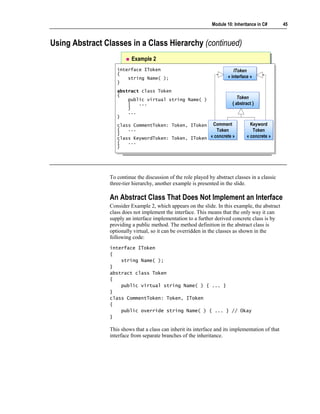
                 To continue the discussion of the role played by abstract classes in a classic
                 three-tier hierarchy, another example is presented in the slide.

                 An Abstract Class That Does Not Implement an Interface
                 Consider Example 2, which appears on the slide. In this example, the abstract
                 class does not implement the interface. This means that the only way it can
                 supply an interface implementation to a further derived concrete class is by
                 providing a public method. The method definition in the abstract class is
                 optionally virtual, so it can be overridden in the classes as shown in the
                 following code:
                 interface IToken
                 {
                     string Name( );
                 }
                 abstract class Token
                 {
                     public virtual string Name( ) { ... }
                 }
                 class CommentToken: Token, IToken
                 {
                     public override string Name( ) { ... } // Okay
                 }

                 This shows that a class can inherit its interface and its implementation of that
                 interface from separate branches of the inheritance.
46   Module 10: Inheritance in C#


Comparing Abstract Classes to Interfaces


                                     Similarities
                                        Neither can be instantiated
                                        Neither can be sealed
                                     Differences
                                        Interfaces cannot contain any implementation
                                        Interfaces cannot declare non-public members
                                        Interfaces cannot extend non-interfaces


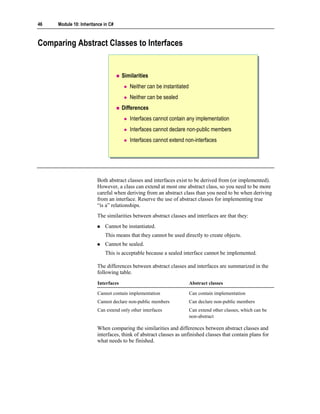
                        Both abstract classes and interfaces exist to be derived from (or implemented).
                        However, a class can extend at most one abstract class, so you need to be more
                        careful when deriving from an abstract class than you need to be when deriving
                        from an interface. Reserve the use of abstract classes for implementing true
                        “is a” relationships.
                        The similarities between abstract classes and interfaces are that they:
                            Cannot be instantiated.
                            This means that they cannot be used directly to create objects.
                            Cannot be sealed.
                            This is acceptable because a sealed interface cannot be implemented.

                        The differences between abstract classes and interfaces are summarized in the
                        following table.
                        Interfaces                                    Abstract classes

                        Cannot contain implementation                 Can contain implementation
                        Cannot declare non-public members             Can declare non-public members
                        Can extend only other interfaces              Can extend other classes, which can be
                                                                      non-abstract

                        When comparing the similarities and differences between abstract classes and
                        interfaces, think of abstract classes as unfinished classes that contain plans for
                        what needs to be finished.
Module 10: Inheritance in C#      47


Implementing Abstract Methods

                        Syntax: Use the abstract keyword
                 abstract class Token
                  abstract class Token
                 {{
                     public virtual string Name( ) { ... }
                      public virtual string Name( ) { ... }
                     public abstract int Length( );
                      public abstract int Length( );
                 }}
                 class CommentToken: Token
                  class CommentToken: Token
                 {{
                     public override string Name( ) { ... }
                      public override string Name( ) { ... }
                     public override int Length( ) { ... }
                      public override int Length( ) { ... }
                 }}

                        Only abstract classes can declare abstract methods
                        Abstract methods cannot contain a method body


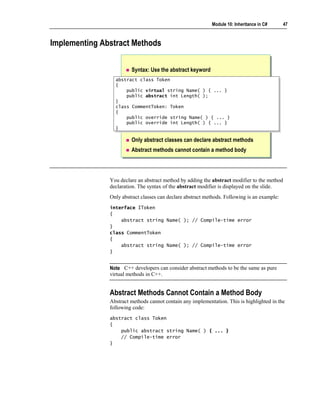
               You declare an abstract method by adding the abstract modifier to the method
               declaration. The syntax of the abstract modifier is displayed on the slide.
               Only abstract classes can declare abstract methods. Following is an example:
               interface IToken
               {
                   abstract string Name( ); // Compile-time error
               }
               class CommentToken
               {
                   abstract string Name( ); // Compile-time error
               }


               Note C++ developers can consider abstract methods to be the same as pure
               virtual methods in C++.


               Abstract Methods Cannot Contain a Method Body
               Abstract methods cannot contain any implementation. This is highlighted in the
               following code:
               abstract class Token
               {
                   public abstract string Name( ) { ... }
                   // Compile-time error
               }
48   Module 10: Inheritance in C#


Working with Abstract Methods


                                    Abstract methods are virtual
                                    Override methods can override abstract methods in
                                    further derived classes
                                    Abstract methods can override base class methods
                                    declared as virtual
                                    Abstract methods can override base class methods
                                    declared as override


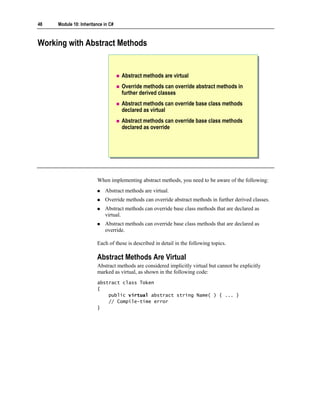
                        When implementing abstract methods, you need to be aware of the following:
                            Abstract methods are virtual.
                            Override methods can override abstract methods in further derived classes.
                            Abstract methods can override base class methods that are declared as
                            virtual.
                            Abstract methods can override base class methods that are declared as
                            override.

                        Each of these is described in detail in the following topics.

                        Abstract Methods Are Virtual
                        Abstract methods are considered implicitly virtual but cannot be explicitly
                        marked as virtual, as shown in the following code:
                        abstract class Token
                        {
                            public virtual abstract string Name( ) { ... }
                            // Compile-time error
                        }
Module 10: Inheritance in C#     49


Override Methods Can Override Abstract Methods in
Further Derived Classes
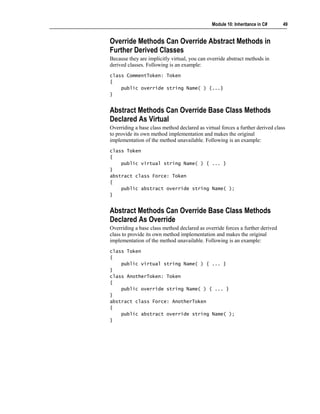
Because they are implicitly virtual, you can override abstract methods in
derived classes. Following is an example:
class CommentToken: Token
{
    public override string Name( ) {...}
}


Abstract Methods Can Override Base Class Methods
Declared As Virtual
Overriding a base class method declared as virtual forces a further derived class
to provide its own method implementation and makes the original
implementation of the method unavailable. Following is an example:
class Token
{
    public virtual string Name( ) { ... }
}
abstract class Force: Token
{
    public abstract override string Name( );
}


Abstract Methods Can Override Base Class Methods
Declared As Override
Overriding a base class method declared as override forces a further derived
class to provide its own method implementation and makes the original
implementation of the method unavailable. Following is an example:
class Token
{
    public virtual string Name( ) { ... }
}
class AnotherToken: Token
{
    public override string Name( ) { ... }
}
abstract class Force: AnotherToken
{
    public abstract override string Name( );
}
50   Module 10: Inheritance in C#


Quiz: Spot the Bugs
                             class First
                              class First
                             {{
                                 public abstract void Method( );
                                  public abstract void Method( );
                                                                                      1
                                                                                      1
                             }}

                             abstract class Second
                              abstract class Second
                             {{
                                 public abstract void Method( ) { }
                                  public abstract void Method( ) { }                  2
                                                                                      2
                             }}

                             interface IThird
                              interface IThird
                             {{
                                 void Method( );
                                  void Method( );
                             }}                                                       3
                                                                                      3
                             abstract class Third: IThird
                              abstract class Third: IThird
                             {{
                             }}


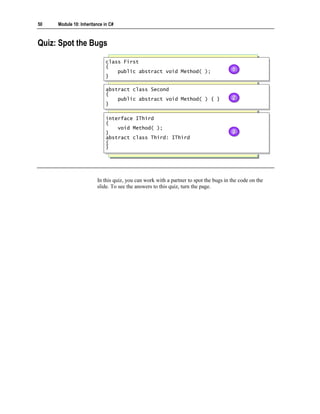
                        In this quiz, you can work with a partner to spot the bugs in the code on the
                        slide. To see the answers to this quiz, turn the page.
Module 10: Inheritance in C#      51


Answers
The following bugs occur in the code on the slide:
1. You can only declare an abstract method in an abstract class. The C#
   compiler traps this bug as a compile-time error. You can fix the code by
   rewriting it as follows:
   abstract class First
   {
       public abstract void Method( );
   }

2. An abstract method cannot declare a method body. The C# compiler traps
   this bug as a compile-time error. You can fix the code by rewriting it as
   follows:
   abstract class Second
   {
       public abstract void Method( );
   }

3. The C# compiler traps this as a compile-time error. An abstract class must
   provide for the implementation of all methods in interfaces that it
   implements in much the same way as a concrete class. The main difference
   is that when you use an abstract class this can be achieved directly or
   indirectly. You can fix the code by rewriting it as follows:
   abstract class Third: IThird
   {
       public virtual void Method( ) { ... }
   }

   Alternatively, if you do not want to implement the body of Method in an
   abstract class, you can declare it abstract and thus ensure that a derived class
   will implement it:
   abstract class Third: IThird
   {
       public abstract void Method( );
   }
52   Module 10: Inheritance in C#


Lab 10.1: Using Inheritance to Implement an Interface


                        Objectives
                        After completing this lab, you will be able to:
                            Define and use interfaces, abstract classes, and concrete classes.
                            Implement an interface in a concrete class.
                            Know how and when to use the virtual and override keywords.
                            Define an abstract class and use it in a class hierarchy.
                            Create sealed classes to prevent inheritance.

                        Prerequisites
                        Before working on this lab, you must be able to:
                            Create classes in C#.
                            Define methods for classes.

                        Estimated time to complete this lab: 75 minutes
Module 10: Inheritance in C#        53


Exercise 1
Converting a C# Source File into a Color Syntax HTML File
                Frameworks are extremely useful because they provide an easy-to-use, flexible
                body of code. Unlike a library, which you use by directly calling a method, you
                use a framework by creating a new class that implements an interface. The
                framework code can then polymorphically call the methods of your class by
                means of the interface operations. Hence, a well-designed framework can be
                used in many different ways, unlike a library method, which can only be used in
                one way.

                Scenario
                This exercise uses a pre-written hierarchy of interfaces and classes that form a
                miniature framework. The framework tokenizes a C# source file and stores the
                different kinds of tokens in a collection held in the SourceFile class. An
                ITokenVisitor interface with Visit operations is also provided, which in
                combination with the Accept method of SourceFile allows every token of the
                source file to be visited and processed in sequence. When you visit a token,
                your class can perform whatever processing it requires by using that token.
                An abstract class called NullTokenVisitor has been created that implements all
                the Visit methods in ITokenVisitor by using empty methods. If you do not
                want to implement every method in ITokenVisitor, you can derive a class from
                NullTokenVisitor instead and override only the Visit methods that you want.
                In this exercise, you will derive an HTMLTokenVisitor class from the
                ITokenVisitor interface. You will implement each overloaded Visit method in
                this derived class to output to the console the token bracketed by Hypertext
                Markup Language (HTML) <span class=...> and </span> markers. You will run
                a simple batch file, which will run the created executable and redirect console
                output to create an HTML page that uses a cascading style sheet. You will then
                open the HTML page in Microsoft Internet Explorer to see the original source
                file displayed with color-coded syntax.
54   Module 10: Inheritance in C#


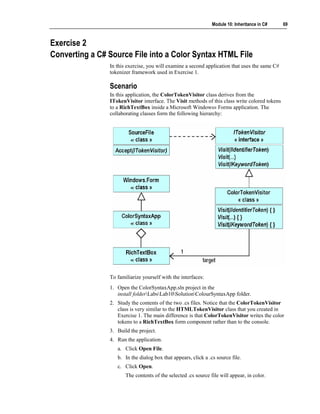
                            To familiarize yourself with the interfaces
                        1. Open the ColorTokeniser.sln project in the
                           install folderLabsLab10StarterColorTokeniser folder.
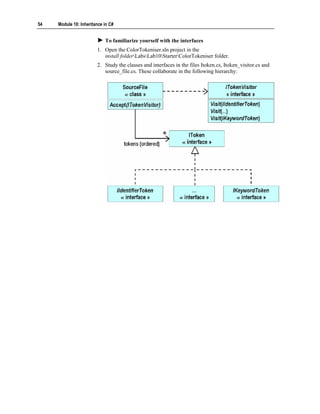
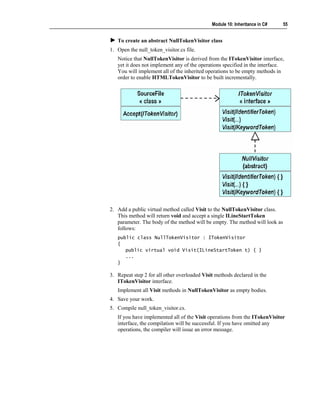
                        2. Study the classes and interfaces in the files Itoken.cs, Itoken_visitor.cs and
                           source_file.cs. These collaborate in the following hierarchy:
Module 10: Inheritance in C#    55


   To create an abstract NullTokenVisitor class
1. Open the null_token_visitor.cs file.
   Notice that NullTokenVisitor is derived from the ITokenVisitor interface,
   yet it does not implement any of the operations specified in the interface.
   You will implement all of the inherited operations to be empty methods in
   order to enable HTMLTokenVisitor to be built incrementally.


2. Add a public virtual method called Visit to the NullTokenVisitor class.
   This method will return void and accept a single ILineStartToken
   parameter. The body of the method will be empty. The method will look as
   follows:
   public class NullTokenVisitor : ITokenVisitor
   {
      public virtual void Visit(ILineStartToken t) { }
      ...
   }

3. Repeat step 2 for all other overloaded Visit methods declared in the
   ITokenVisitor interface.
   Implement all Visit methods in NullTokenVisitor as empty bodies.
4. Save your work.
5. Compile null_token_visitor.cs.
   If you have implemented all of the Visit operations from the ITokenVisitor
   interface, the compilation will be successful. If you have omitted any
   operations, the compiler will issue an error message.
56   Module 10: Inheritance in C#


                        6. Add a private static void method called Test to the NullTokenVisitor class.
                            This method will expect no parameters. The body of this method should
                            contain a single statement that creates a new NullTokenVisitor object. This
                            statement will verify that the NullTokenVisitor class has implemented all
                            of the Visit operations and that NullTokenVisitor instances can be created.
                            The code for this method will be as follows:
                            public class NullTokenVisitor : ITokenVisitor
                            {
                               ...
                               static void Test( )
                               {
                                   new NullTokenVisitor( );
                               }
                            }

                        7. Save your work.
                        8. Compile null_token_visitor.cs and correct any errors.
                        9. Change the definition of NullTokenVisitor.
                            Since the purpose of the NullTokenVisitor class is not to be instantiated but
                            to be derived from, you need to change the definition so that it is an abstract
                            class.
                        10. Compile null_token_visitor.cs again.
                            Also, verify that the new statement inside the Test method now causes an
                            error, as you cannot create instances of an abstract class.
                        11. Delete the Test method.
                        12. NullTokenVisitor should now look like this:
                            public abstract class NullTokenVisitor : ITokenVisitor
                            {
                               public virtual void Visit(ILineStartToken t) { }
                               public virtual void Visit(ILineEndToken   t) { }

                                public   virtual   void   Visit(ICommentToken           t)   {   }
                                public   virtual   void   Visit(IDirectiveToken         t)   {   }
                                public   virtual   void   Visit(IIdentifierToken        t)   {   }
                                public   virtual   void   Visit(IKeywordToken           t)   {   }
                                public   virtual   void   Visit(IWhiteSpaceToken        t)   {   }

                                public virtual void Visit(IOtherToken t) { }
                            }
Module 10: Inheritance in C#   57


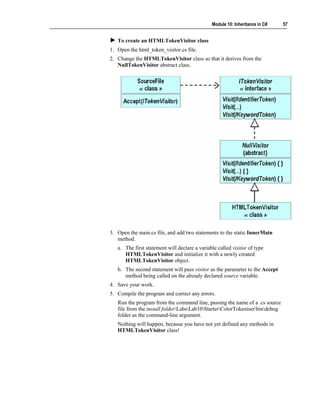
   To create an HTMLTokenVisitor class
1. Open the html_token_visitor.cs file.
2. Change the HTMLTokenVisitor class so that it derives from the
   NullTokenVisitor abstract class.


3. Open the main.cs file, and add two statements to the static InnerMain
   method.
   a. The first statement will declare a variable called visitor of type
      HTMLTokenVisitor and initialize it with a newly created
      HTMLTokenVisitor object.
   b. The second statement will pass visitor as the parameter to the Accept
      method being called on the already declared source variable.
4. Save your work.
5. Compile the program and correct any errors.
   Run the program from the command line, passing the name of a .cs source
   file from the install folderLabsLab10StarterColorTokeniserbindebug
   folder as the command-line argument.
   Nothing will happen, because you have not yet defined any methods in
   HTMLTokenVisitor class!
58   Module 10: Inheritance in C#


                        6. Add a public non-static Visit method to the HTMLTokenVisitor class.
                           This method will return void and accept a single ILineStartToken
                           parameter called line.
                            Implement the body of the method as a single statement that calls Write
                            (not WriteLine), displaying the value of line.Number( ) to the console.
                            Note that Number is an operation declared in the ILineStartToken
                            interface. Do not qualify the method with a virtual or override keyword.
                            This is shown in the following code:
                            public class HTMLTokenVisitor : NullTokenVisitor
                            {
                               public void Visit(ILineStartToken line)
                               {
                                   Console.Write(line.Number( )); // Not WriteLine
                               }
                            }

                        7. Save your work.
                        8. Compile the program.
                            Run the program again, as before. Nothing will happen, because the Visit
                            method in HTMLTokenVisitor is hiding the Visit method in the base class
                            NullTokenVisitor.
                        9. Change HTMLTokenVisitor.Visit(ILineStartToken) so that it overrides
                           Visit from its base class.
                            This will make HTMLTokenVisitor.Visit polymorphic, as shown in the
                            following code:
                            public class HTMLTokenVisitor : NullTokenVisitor
                            {
                               public override void Visit(ILineStartToken line)
                               {
                                   Console.Write(line.Number( ));
                               }
                            }

                        10. Save your work.
                        11. Compile the program and correct any errors.
                            Run the program as before. Output will be displayed. It will contain
                            ascending numbers with no intervening white space. (The numbers are
                            generated line numbers for the file that you specified.)
Module 10: Inheritance in C#       59


12. In HTMLTokenVisitor, define an overloaded public non-static Visit
    method that returns void and accepts a single ILineEndToken parameter.
   This revision adds a new line between lines of output tokens. Notice that
   this operation is declared in the ITokenVisitor interface. Implement the
   body of this method to print a single new line to the console, as shown.
   (Note that this method uses WriteLine, not Write.)
   public class HTMLTokenVisitor : NullTokenVisitor
   {
      ...
      public override void Visit(ILineEndToken t)
      {
          Console.WriteLine( ); // Not Write
      }
   }

13. Save your work.
14. Compile the program and correct any errors.
   Run the program as before. This time each line number is terminated with a
   separate line.

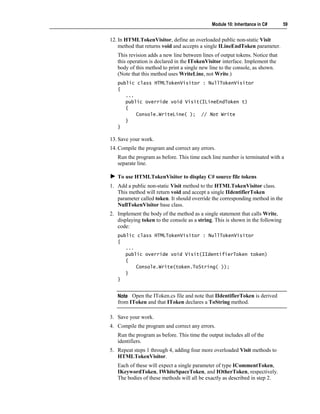
   To use HTMLTokenVisitor to display C# source file tokens
1. Add a public non-static Visit method to the HTMLTokenVisitor class.
   This method will return void and accept a single IIdentifierToken
   parameter called token. It should override the corresponding method in the
   NullTokenVisitor base class.
2. Implement the body of the method as a single statement that calls Write,
   displaying token to the console as a string. This is shown in the following
   code:
   public class HTMLTokenVisitor : NullTokenVisitor
   {
      ...
      public override void Visit(IIdentifierToken token)
      {
          Console.Write(token.ToString( ));
      }
   }


   Note Open the IToken.cs file and note that IIdentifierToken is derived
   from IToken and that IToken declares a ToString method.

3. Save your work.
4. Compile the program and correct any errors.
   Run the program as before. This time the output includes all of the
   identifiers.
5. Repeat steps 1 through 4, adding four more overloaded Visit methods to
   HTMLTokenVisitor.
   Each of these will expect a single parameter of type ICommentToken,
   IKeywordToken, IWhiteSpaceToken, and IOtherToken, respectively.
   The bodies of these methods will all be exactly as described in step 2.
60   Module 10: Inheritance in C#


                            To convert a C# source file into an HTML filex
                        1. In the install folderLabsLab10StarterColorTokeniserbindebug folder,
                           there is a batch script called generate.bat. This script executes the
                           ColorTokeniser program, using a command-line parameter that you pass to
                           it. It also performs some pre-processing and post-processing of the
                           tokenized file that is produced. It performs this processing by using a
                           cascading style sheet (code_style.css) to convert the output into HTML.
                            From the command prompt, run the program by using the generate batch
                            file, passing in token.cs file as a parameter. (This is actually a copy of part
                            of the source code for your program, but it will work as an example .cs file.)
                            Capture the output to another file that has an .html suffix. Following is an
                            example:
                            generate token.cs > token.html

                        2. Use Internet Explorer to display the .html file that you just created
                           (token.html in the example in the previous step). You can do this by typing
                           token.html at the command prompt.
                            The displayed result will show many formatting flaws. Line numbers greater
                            than 9 are all indented differently from the lines with numbers less than 10.
                            This is because numbers less than 10 have a single digit, whereas numbers
                            greater than 9 have two digits. Notice also that the line numbers are in the
                            same color as the source file tokens, which is not helpful.

                            To find and fix the line number and indentation problems
                        1. Change the definition of the Visit(ILineStartToken) method as follows to
                           add some output that fixes both of these problems. This is shown in the
                           following code:
                            public class HTMLTokenVisitor : NullTokenVisitor
                            {
                               public override void Visit(ILineStartToken line)
                               {
                                   Console.Write("<span class="line_number">");
                                   Console.Write("{0,3}", line.Number( ));
                                   Console.Write("</span>");
                               }
                               ...
                            }

                        2. Save your work.
                        3. Compile the program and correct any errors.
Module 10: Inheritance in C#      61


4. Re-create the token.html file from the token.cs source file from the
   command line as before:
   generate token.cs > token.html

5. Open token.html in Internet Explorer.
   There is still a problem. Compare the appearance of token.html in Internet
   Explorer to the original token.cs file. Notice that the first comment in
   token.cs (/// <summary>) appears in the browser as “///”. The <summary>
   has been lost. The problem is that in HTML some characters have a special
   meaning. To display the left angle bracket (<), the HTML source must be
   &lt; and to display the right angle bracket (>) the HTML source must be
   &gt;. To display the ampersand (&), the HTML source must be &amp;.

   To make the changes required to correctly display the angle bracket
   and ampersand characters
1. Add to HTMLTokenVisitor a private non-static method called
   FilteredWrite that returns void and expects a single parameter of type
   IToken called token.
   This method will create a string called dst from token and iterate through
   each character in dst, applying the transformations described above. The
   code will look as follows:
   public class HTMLTokenVisitor : NullTokenVisitor
   {
      ...
      private void FilteredWrite(IToken token)
      {
          string src = token.ToString( );
          for (int i = 0; i != src.Length; i++) {
              string dst;
              switch (src[i]) {
              case '<' :
                  dst = "&lt;"; break;
              case '>' :
                  dst = "&gt;"; break;
              case '&' :
                  dst = "&amp;"; break;
              default :
                  dst = new string(src[i], 1); break;
              }
              Console.Write(dst);
          }
      }
   }
62   Module 10: Inheritance in C#


                        2. Change the definition of HTMLTokenVisitor.Visit(ICommentToken) to
                           use the new FilteredWrite method instead of Console.Write, as follows:
                            public class HTMLTokenVisitor : NullTokenVisitor
                            {
                               public override void Visit(ICommentToken token)
                               {
                                   FilteredWrite(token);
                               }
                               ...
                            }

                        3. Change the definition of HTMLTokenVisitor.Visit(IOtherToken) to use
                           the new FilteredWrite method instead of Console.Write, as follows:
                            public class HTMLTokenVisitor : NullTokenVisitor
                            {
                               public override void Visit(IOtherToken token)
                               {
                                   FilteredWrite(token);
                               }
                               ...
                            }

                        4. Save your work.
                        5. Compile the program and correct any errors.
                        6. Re-create the token.html file from the token.cs source file from the
                           command line as before:
                            generate token.cs > token.html

                        7. Open token.html in Internet Explorer and verify that the angle bracket and
                           ampersand characters are now displayed correctly.
Module 10: Inheritance in C#     63


   To add color comments to the HTML file
1. Use Notepad to open the code_style.css style sheet in the
   install folderLabsLab10StarterColorTokeniserbindebug folder.
   The cascading style sheet file called code_style.css will be used to add color
   to the HTML file. This file has already been created for you. The following
   is an example of its contents:
   ...
   SPAN.LINE_NUMBER
   {
      background-color: white;
      color: gray;
   }
   ...
   SPAN.COMMENT
   {
      color: green;
      font-style: italic;
   }

   The HTMLTokenVisitor.Visit(ILineStartToken) method already uses
   this style sheet:
   public class HTMLTokenVisitor : NullTokenVisitor
   {
      public override void Visit(ILineStartToken line)
      {
          Console.Write("<span class="line_number">");
          Console.Write("{0,3}", line.Number( ));
          Console.Write("</span>");
      }
      ...
   }

   Notice that this method writes the words “span” and “line_number,” and
   that the style sheet contains an entry for SPAN.LINE_NUMBER.
2. Change the body of HTMLTokenVisitor.Visit(ICommentToken) so that
   it takes the following pattern:
   public class HTMLTokenVisitor : NullTokenVisitor
   {
      public override void Visit(ICommentToken token)
      {
          Console.Write("<span class="comment">");
          FilteredWrite(token);
          Console.Write("</span>");
      }
      ...
   }

3. Save your work.
4. Compile the program and correct any errors.
64   Module 10: Inheritance in C#


                        5. Re-create the token.html file from the token.cs source file as before:
                            generate token.cs > token.html

                        6. Open token.html in Internet Explorer.
                            Verify that the source file comments are now green and are italicized.

                            To add color keywords to the HTML file
                        1. Notice that the code_style.css file contains the following entry:
                            ...
                            SPAN.KEYWORD
                            {
                               color: blue;
                            }
                            ...

                        2. Change the body of HTMLTokenVisitor.Visit(IKeywordToken) to use
                           the style specified in the style sheet, as follows:
                            public class HTMLTokenVisitor : NullTokenVisitor
                            {
                               public override void Visit(IKeywordToken token)
                               {
                                   Console.Write("<span class="keyword">");
                                   FilteredWrite(token);
                                   Console.Write("</span>");
                               }
                               ...
                            }

                        3. Save your work.
                        4. Compile the program and correct any errors.
                        5. Re-create the token.html file from the token.cs source file by using the
                           generate batch file as before:
                            generate token.cs > token.html

                        6. Open token.html in Internet Explorer and verify that the keywords are now
                           in blue.
Module 10: Inheritance in C#      65


   To refactor the Visit methods to eliminate duplication
1. Notice the duplication in the two previous Visit methods. That is, both
   methods write span strings to the console.
   You can refactor the Visit methods to avoid this duplication. Define a new
   private non-static method called SpannedFilteredWrite that returns void
   and expects two parameters, a string called spanName and an IToken
   called token. The body of this method will contain three statements. The
   first statement will write the span string to the console by using the
   spanName parameter. The second statement will call the FilteredWrite
   method, passing token as the argument. The third statement will write the
   closing span string to the console. The code will look as follows:
   public class HTMLTokenVisitor : NullTokenVisitor
   {
      ...
      private void SpannedFilteredWrite(string spanName,
     IToken token)
      {
          Console.Write("<span class="{0}">", spanName);
          FilteredWrite(token);
          Console.Write("</span>");
      }
      ...
   }

2. Change HTMLTokenVisitor.Visit(ICommentToken) to use this new
   method, as follows:
   public class HTMLTokenVisitor : NullTokenVisitor
   {
      ...
      public override void Visit(ICommentToken token)
      {
          SpannedFilteredWrite("comment", token);
      }
      ...
   }

3. Change HTMLTokenVisitor.Visit(IKeywordToken) to use this new
   method, as follows:
   public class HTMLTokenVisitor : NullTokenVisitor
   {
      ...
      public override void Visit(IKeywordToken token)
      {
          SpannedFilteredWrite("keyword", token);
      }
      ...
   }
66   Module 10: Inheritance in C#


                        4. Change the HTMLTokenVisitor.Visit(IIdentifierToken) method body so
                           that it calls the SpannedFilteredWrite method. You must do this because
                           identifier tokens also have an entry in the code_style.css file:
                            public class HTMLTokenVisitor : NullTokenVisitor
                            {
                               ...
                               public override void Visit(IIdentifierToken token)
                               {
                                   SpannedFilteredWrite("identifier", token);
                               }
                               ...
                            }

                        5. Save your work.
                        6. Compile the program and correct any errors.
                        7. Re-create the token.html file from the token.cs source file by using the
                           generate batch file as before:
                            generate token.cs > token.html

                        8. Open token.html in Internet Explorer.
                            Verify that the comments are still green and that the keywords are still blue.

                            To implement HTMLTokenVisitor directly from ITokenVisitor
                        1. Open the html_token_visitor.cs file.
                        2. Change the code so that the HTMLTokenVisitor class derives from the
                           ITokenVisitor interface. Because you have implemented nearly all of the
                           Visit methods in HTMLTokenVisitor, it no longer needs to inherit from
                           the NullTokenVisitor abstract class (which provides a default empty
                           implementation of every method in ITokenVisitor). It can be derived
                           directly from the ITokenVisitor interface.
Module 10: Inheritance in C#     67


   The class should look as follows:
   public class HTMLTokenVisitor : ITokenVisitor
   {
      ...
   }

3. Save your work.
4. Compile the program.
   There will be many errors. The problem is that the Visit methods in
   HTMLTokenVisitor are still qualified as override, but you cannot override
   an operation in an interface.
5. Remove the keyword override from every Visit method definition.
6. Compile the program.
   There will still be an error. The problem this time is that
   HTMLTokenVisitor does not implement the Visit(IDirectiveToken)
   operation inherited from its ITokenVisitor interface. Previously,
   HTMLTokenVisitor inherited an empty implementation of this operation
   from NullTokenVisitor.
7. In HTMLTokenVisitor, define a public non-static method called Visit that
   returns void and expects a single parameter of type IDirectiveToken called
   token. This will fix the implementation problem.
   The body of this method will call the SpannedFilteredWrite method,
   passing it two parameters: the string literal “directive” and the variable
   token.
   public class HTMLTokenVisitor : ITokenVisitor
   {
      ...
      public void Visit(IDirectiveToken token)
      {
          SpannedFilteredWrite("directive", token);
      }
      ...
   }

8. Save your work.
9. Compile the program and correct any errors.
10. Re-create the token.html file from the token.cs source file by using the
    generate batch file as before:
   generate token.cs > token.html

11. Open token.html in Internet Explorer.
   Verify that the comments are still green and that the keywords are still blue.
68   Module 10: Inheritance in C#


                            To prevent the use of HTMLTokenVisitor as a base class
                        1. Declare HTMLTokenVisitor as a sealed class.
                            Given that the methods of HTMLTokenVisitor are no longer virtual, it
                            makes sense for HTMLTokenVisitor to be declared as a sealed class. This
                            is shown in the following code:
                            public sealed class HTMLTokenVisitor : ITokenVisitor
                            {
                               ...
                            }

                        2. Compile the program and correct any errors.
                        3. Re-create the token.html file from the token.cs source file by using the
                           generate batch file as before:
                            generate token.cs > token.html

                        4. Open token.html in Internet Explorer, and verify that the comments are still
                           green and that the keywords are still blue.
Module 10: Inheritance in C#    69


Exercise 2
Converting a C# Source File into a Color Syntax HTML File
                In this exercise, you will examine a second application that uses the same C#
                tokenizer framework used in Exercise 1.

                Scenario
                In this application, the ColorTokenVisitor class derives from the
                ITokenVisitor interface. The Visit methods of this class write colored tokens
                to a RichTextBox inside a Microsoft Windows® Forms application. The
                collaborating classes form the following hierarchy:


                To familiarize yourself with the interfaces:
                1. Open the ColorSyntaxApp.sln project in the
                   install folderLabsLab10SolutionColourSyntaxApp folder.
                2. Study the contents of the two .cs files. Notice that the ColorTokenVisitor
                   class is very similar to the HTMLTokenVisitor class that you created in
                   Exercise 1. The main difference is that ColorTokenVisitor writes the color
                   tokens to a RichTextBox form component rather than to the console.
                3. Build the project.
                4. Run the application.
                   a. Click Open File.
                   b. In the dialog box that appears, click a .cs source file.
                   c. Click Open.
                       The contents of the selected .cs source file will appear, in color.
70   Module 10: Inheritance in C#


Review


                                    Deriving Classes
                                    Implementing Methods
                                    Using Sealed Classes
                                    Using Interfaces
                                    Using Abstract Classes


                        1. Create a class called Widget that declares two public methods. Create both
                           methods so that they return void and so that they do not use parameters. Call
                           the first method First, and declare it as virtual. Call the second method
                           Second, and do not declare it as virtual. Create a class called FancyWidget
                           that extends Widget, overriding the inherited First method and hiding the
                           inherited Second method.
Module 10: Inheritance in C#    71


2. Create an interface called IWidget that declares two methods. Create both
   methods so that they return void and so that they do not use parameters. Call
   the first method First, and call the second method Second. Create a class
   called Widget that implements IWidget. Implement First as virtual, and
   implement Second explicitly.


3. Create an abstract class called Widget that declares a protected abstract
   method called First that returns void and does not use parameters. Create a
   class called FancyWidget that extends Widget, overriding the inherited
   First method.
72   Module 10: Inheritance in C#


                        4. Create a sealed class called Widget that implements the IWidget interface
                           that you created in question 2. Create Widget so that it implements both
                           inherited methods explicitly.

7494610

  • 1.
    Module 10: Inheritance in C# Contents Overview 1 Deriving Classes 2 Implementing Methods 10 Using Sealed Classes 27 Using Interfaces 29 Using Abstract Classes 42 Lab 10.1: Using Inheritance to Implement an Interface 52 Review 70
  • 2.
    Information in thisdocument, including URL and other Internet Web site references, is subject to change without notice. Unless otherwise noted, the example companies, organizations, products, domain names, e-mail addresses, logos, people, places, and events depicted herein are fictitious, and no association with any real company, organization, product, domain name, e-mail address, logo, person, places or events is intended or should be inferred. Complying with all applicable copyright laws is the responsibility of the user. Without limiting the rights under copyright, no part of this document may be reproduced, stored in or introduced into a retrieval system, or transmitted in any form or by any means (electronic, mechanical, photocopying, recording, or otherwise), or for any purpose, without the express written permission of Microsoft Corporation. Microsoft may have patents, patent applications, trademarks, copyrights, or other intellectual property rights covering subject matter in this document. Except as expressly provided in any written license agreement from Microsoft, the furnishing of this document does not give you any license to these patents, trademarks, copyrights, or other intellectual property.  2001−2002 Microsoft Corporation. All rights reserved. Microsoft, MS-DOS, Windows, Windows NT, ActiveX, BizTalk, IntelliSense, JScript, MSDN, PowerPoint, SQL Server, Visual Basic, Visual C++, Visual C#, Visual J#, Visual Studio, and Win32 are either registered trademarks or trademarks of Microsoft Corporation in the U.S.A. and/or other countries. The names of actual companies and products mentioned herein may be the trademarks of their respective owners.
  • 3.
    Module 10: Inheritancein C# 1 Overview Deriving Classes Implementing Methods Using Sealed Classes Using Interfaces Using Abstract Classes Inheritance, in an object-oriented system, is the ability of an object to inherit data and functionality from its parent object. Therefore, a child object can substitute for the parent object. Also, by using inheritance, you can create new classes from existing classes instead of starting at the beginning and creating them new. You can then write new code to add the features required in the new class. The parent class on which the new class is based is known as a base class, and the child class is known as a derived class. When you create a derived class, it is important to remember that a derived class can substitute for the base class type. Therefore, inheritance is a type- classification mechanism in addition to a code-reuse mechanism, and the former is more important than the latter. In this module, you will learn how to derive a class from a base class. You will also learn how to implement methods in a derived class by defining them as virtual methods in the base class and overriding or hiding them in the derived class, as required. You will learn how to seal a class so that it cannot be derived from. You will also learn how to implement interfaces and abstract classes, which define the terms of a contract to which derived classes must adhere. After completing this module, you will be able to: Derive a new class from a base class, and call members and constructors of the base class from the derived class. Declare methods as virtual and override or hide them as required. Seal a class so that it cannot be derived from. Implement interfaces by using both the implicit as well as the explicit methods. Describe the use of abstract classes and their implementation of interfaces.
  • 4.
    2 Module 10: Inheritance in C# Deriving Classes Extending Base Classes Accessing Base Class Members Calling Base Class Constructors You can only derive a class from a base class if the base class was designed to enable inheritance. This is because objects must have the proper structure or inheritance cannot work effectively. A base class that is designed for inheritance should make this fact clear. If a new class is derived from a base class that is not designed appropriately, then the base class might change at some later time, and this would make the derived class inoperable. After completing this lesson, you will be able to: Derive a new class from a base class. Access the members and constructors of the base class from the derived class.
  • 5.
    Module 10: Inheritancein C# 3 Extending Base Classes Syntax for deriving a class from a base class class Token Token Token class Token { Derived class Derived class Base class Base class « concrete » « concrete » { ... ... }} class CommentToken: Token class CommentToken: Token CommentToken CommentToken {{ « concrete » « concrete » ... ... Colon Colon }} A derived class inherits most elements of its base class A derived class cannot be more accessible than its base class Deriving a class from a base class is also known as extending the base class. A C# class can extend at most one class. Syntax for Deriving a Class To specify that one class is derived from another, you use the following syntax: class Derived: Base { ... } The elements of this syntax are labeled on the slide. When you declare a derived class, the base class is specified after a colon. The white space around the colon is not significant. The recommended style for using this syntax is to include no spaces before the colon and a single space after it. Derived Class Inheritance A derived class inherits everything from its base class except for the base class constructors and destructors. Public members of the base class are implicitly public members of the derived class. Private members of the base class, though inherited by the derived class, are accessible only to the members of the base class.
  • 6.
    4 Module 10: Inheritance in C# Accessibility of a Derived Class A derived class cannot be more accessible than its base class. For example, it is not possible to derive a public class from a private class, as is shown in the following code: class Example { private class NestedBase { } public class NestedDerived: NestedBase { } // Error } The C# syntax for deriving one class from another is also allowed in C++, where it implicitly specifies a private inheritance relationship between the derived and base classes. C# has no private inheritance; all inheritance is public.
  • 7.
    Module 10: Inheritancein C# 5 Accessing Base Class Members class Token class Token {{ ... ... class Outside class Outside protected string name; protected string name; {{ }} void Fails(Token t) void Fails(Token t) class CommentToken: Token class CommentToken: Token { { {{ ... ... ... ... public string Name( ) public string Name( ) t.name t.name {{ ... ... return name; return name; } } }} }} }} Inherited protected members are implicitly protected in the derived class Methods of a derived class can access only their inherited protected members Protected access modifiers cannot be used in a struct The meaning of the protected access modifier depends on the relationship between the class that has the modifier and the class that seeks to access the members that use the modifier. Members of a derived class can access all of the protected members of their base class. To a derived class, the protected keyword behaves like the public keyword. Hence, in the code fragment shown on the slide, the Name method of CommentToken can access the string name, which is protected inside Token. It is protected inside Token because CommentToken has specified Token as its base class. However, between two classes that are not related by a derived-class and base- class relationship, protected members of one class act like private members for the other class. Hence, in the other code fragment shown on the slide, the Fails method of Outside cannot access the string name, which is protected inside Token because Outside does not specify Token as its base class.
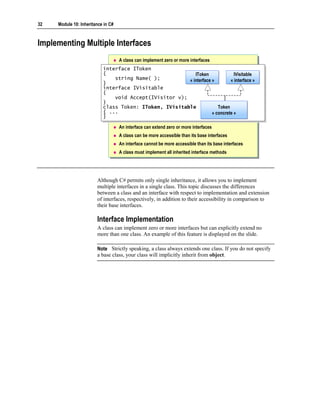
  • 8.
    6 Module 10: Inheritance in C# Inherited Protected Members When a derived class inherits a protected member, that member is also implicitly a protected member of the derived class. This means that protected members are accessible to all directly and indirectly derived classes of the base class. This is shown in the following example: class Base { protected string name; } class Derived: Base { } class FurtherDerived: Derived { void Compiles( ) { Console.WriteLine(name); // Okay } } Protected Members and Methods Methods of a derived class can only access their own inherited protected members. They cannot access the protected members of the base class through references to the base class. For example, the following code will generate an error: class CommentToken: Token { void Fails(Token t) { Console.WriteLine(t.name); // Compile-time error } } Tip Many coding guidelines recommend keeping all data private and using protected access only for methods. Protected Members and structs A struct does not support inheritance. Consequently, you cannot derive from a struct, and, therefore, the protected access modifier cannot be used in a struct. For example, the following code will generate an error: struct Base { protected string name; // Compile-time error }
  • 9.
    Module 10: Inheritancein C# 7 Calling Base Class Constructors Constructor declarations must use the base keyword class Token class Token {{ protected Token(string name) { ... } protected Token(string name) { ... } ... ... }} class CommentToken: Token class CommentToken: Token {{ public CommentToken(string name) : base(name) { } public CommentToken(string name) : base(name) { } ... ... }} A private base class constructor cannot be accessed by a derived class Use the base keyword to qualify identifier scope To call a base class constructor from the derived class constructor, use the keyword base. The syntax for this keyword is as follows: C(...): base( ) {...} The colon and the accompanying base class constructor call are together known as the constructor initializer. Constructor Declarations If the derived class does not explicitly call a base class constructor, the C# compiler will implicitly use a constructor initializer of the form :base( ). This implies that a constructor declaration of the form C(...) {...} is equivalent to C(...): base( ) {...} Often this implicit behavior is perfectly adequate because: A class with no explicit base classes implicitly extends the System.Object class, which contains a public parameterless constructor. If a class does not contain a constructor, the compiler will automatically provide a public parameterless constructor called the default constructor.
  • 10.
    8 Module 10: Inheritance in C# If a class provides an explicit constructor of its own, the compiler will not create a default constructor. However, if the specified constructor does not match any constructor in the base class, the compiler will generate an error as shown in the following code: class Token { protected Token(string name) { ... } } class CommentToken: Token { public CommentToken(string name) { ... } // Error here } The error occurs because the CommentToken constructor implicitly contains a :base( ) constructor initializer, but the base class Token does not contain a parameterless constructor. You can fix this error by using the code shown on the slide. Constructor Access Rules The access rules for a derived constructor to call a base class constructor are exactly the same as those for regular methods. For example, if the base class constructor is private, then the derived class cannot access it: class NonDerivable { private NonDerivable( ) { ... } } class Impossible: NonDerivable { public Impossible( ) { ... } // Compile-time error } In this case, there is no way for a derived class to call the base class constructor.
  • 11.
    Module 10: Inheritancein C# 9 Scoping an Identifier You can use the keyword base to also qualify the scope of an identifier. This can be useful, since a derived class is permitted to declare members that have the same names as base class members. The following code provides an example: class Token { protected string name; } class CommentToken: Token { public void Method(string name) { base.name = name; } } Note Unlike in C++, the name of the base class, such as Token in the example in the slide, is not used. The keyword base unambiguously refers to the base class because in C# a class can extend one base class at most.
  • 12.
    10 Module 10: Inheritance in C# Implementing Methods Defining Virtual Methods Working with Virtual Methods Overriding Methods Working with Override Methods Using new to Hide Methods Working with the new Keyword Practice: Implementing Methods Quiz: Spot the Bugs You can redefine the methods of a base class in a derived class when the methods of the base class have been designed for overriding. After completing this lesson, you will be able to: Use the virtual method type. Use the override method type. Use the hide method type.
  • 13.
    Module 10: Inheritancein C# 11 Defining Virtual Methods Syntax: Declare as virtual class Token class Token {{ ... ... public int LineNumber( ) public int LineNumber( ) { ... { ... }} public virtual string Name( ) public virtual string Name( ) { ... { ... }} }} Virtual methods are polymorphic A virtual method specifies an implementation of a method that can be polymorphically overridden in a derived class. Conversely, a non-virtual method specifies the only implementation of a method. You cannot polymorphically override a non-virtual method in a derived class. Note In C#, whether a class contains a virtual method or not is a good indication of whether the author designed it to be used as a base class. Keyword Syntax To declare a virtual method, you use the virtual keyword. The syntax for this keyword is shown on the slide. When you declare a virtual method, it must contain a method body. If it does not contain a body, the compiler will generate an error, as shown: class Token { public virtual string Name( ); // Compile-time error }
  • 14.
    12 Module 10: Inheritance in C# Working with Virtual Methods To use virtual methods: You cannot declare virtual methods as static You cannot declare virtual methods as private To use virtual methods effectively, you need to understand the following: You cannot declare virtual methods as static. You cannot qualify virtual methods as static because static methods are class methods and polymorphism works on objects, not on classes. You cannot declare virtual methods as private. You cannot declare virtual methods as private because they cannot be polymorphically overridden in a derived class. Following is an example: class Token { private virtual string Name( ) { ... } // Compile-time error }
  • 15.
    Module 10: Inheritancein C# 13 Overriding Methods Syntax: Use the override keyword class Token class Token {{ ... ... public virtual string Name( ) { ... } public virtual string Name( ) { ... } }} class CommentToken: Token class CommentToken: Token {{ ... ... public override string Name( ) { ... } public override string Name( ) { ... } }} An override method specifies another implementation of a virtual method. You define virtual methods in a base class, and they can be polymorphically overridden in a derived class. Keyword Syntax You declare an override method by using the keyword override, as shown in the following code: class Token { ... public virtual string Name( ) { ... } } class CommentToken: Token { ... public override string Name( ) { ... } } As with a virtual method, you must include a method body in an override method or the compiler generates an error. Following is an example: class Token { public virtual string Name( ) { ... } } class CommentToken: Token { public override string Name( ); // Compile-time error }
  • 16.
    14 Module 10: Inheritance in C# Working with Override Methods You can only override identical inherited virtual methods class Token class Token {{ ... ... public int LineNumber( ) { ... } public int LineNumber( ) { ... } public virtual string Name( ) { ... } public virtual string Name( ) { ... } }} class CommentToken: Token class CommentToken: Token {{ ... ... public override int LineNumber( ) { ... } public override int LineNumber( ) { ... } public override string Name( ) { ... } public override string Name( ) { ... } }} You must match an override method with its associated virtual method You can override an override method You cannot explicitly declare an override method as virtual You cannot declare an override method as static or private To use override methods effectively, you must understand a few important restrictions: You can only override identical inherited virtual methods. You must match an override method with its associated virtual method. You can override an override method. You cannot implicitly declare an override method as virtual. You cannot declare an override method as static or private. Each of these restrictions is described in more detail as in the following topics. You Can Only Override Identical Inherited Virtual Methods You can use an override method to override only an identical inherited virtual method. In the code on the slide, the LineNumber method in the derived class CommentToken causes a compile-time error because the inherited method Token.LineNumber is not marked virtual.
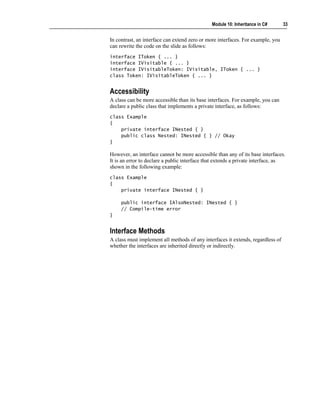
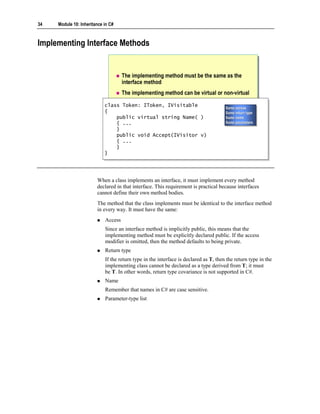
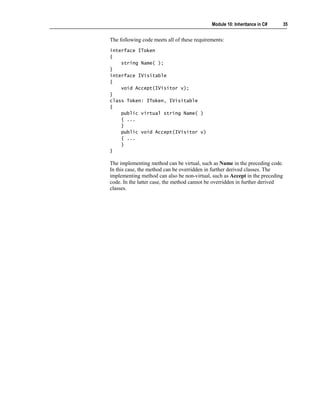
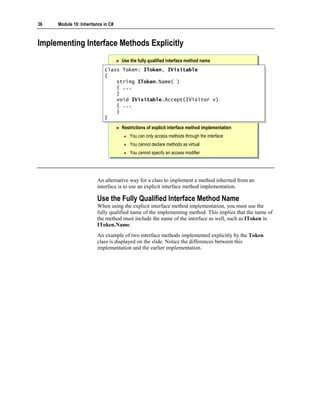
  • 17.
    Module 10: Inheritancein C# 15 You Must Match an Override Method with Its Associated Virtual Method An override declaration must be identical in every way to the virtual method it overrides. They must have the same access level, the same return type, the same name, and the same parameters. For example, the override in the following example fails because the access- levels are different (protected as opposed to public), the return types are different (string as opposed to void), and the parameters are different (none as opposed to int): class Token { protected virtual string Name( ) { ... } } class CommentToken: Token { public override void Name(int i) { ... } // Errors } You Can Override an Override Method An override method is implicitly virtual, so you can override it. Following is an example: class Token { public virtual string Name( ) { ... } } class CommentToken: Token { public override string Name( ) { ... } } class OneLineCommentToken: CommentToken { public override string Name( ) { ... } // Okay }
  • 18.
    16 Module 10: Inheritance in C# You Cannot Explicitly Declare an Override Method As Virtual An override method is implicitly virtual but cannot be explicitly qualified as virtual. Following is an example: class Token { public virtual string Name( ) { ... } } class CommentToken: Token { public virtual override string Name( ) { ... } // Error } You Cannot Declare an Override Method As Static or Private An override method can never be qualified as static because static methods are class methods and polymorphism works on objects rather than classes. Also, an override method can never be private. This is because an override method must override a virtual method, and a virtual method cannot be private.
  • 19.
    Module 10: Inheritancein C# 17 Using new to Hide Methods Syntax: Use the new keyword to hide a method class Token class Token {{ ... ... public int LineNumber( ) { ... } public int LineNumber( ) { ... } }} class CommentToken: Token class CommentToken: Token {{ ... ... new public int LineNumber( ) { ... } new public int LineNumber( ) { ... } }} You can hide an identical inherited method by introducing a new method into the class hierarchy. The old method that was inherited by the derived class from the base class is then replaced by a completely different method. Keyword Syntax You use the new keyword to hide a method. The syntax for this keyword is as follows: class Token { ... public int LineNumber( ) { ... } } class CommentToken: Token { ... new public int LineNumber( ) { ... } }
  • 20.
    18 Module 10: Inheritance in C# Working with the new Keyword Hide both virtual and non-virtual methods class Token class Token {{ ... ... public int LineNumber( ) { ... } public int LineNumber( ) { ... } public virtual string Name( ) { ... } public virtual string Name( ) { ... } }} class CommentToken: Token class CommentToken: Token {{ ... ... new public int LineNumber( ) { ... } new public int LineNumber( ) { ... } public override string Name( ) { ... } public override string Name( ) { ... } }} Resolve name clashes in code Hide methods that have identical signatures By using the new keyword, you can do the following: Hide both virtual and non-virtual methods. Resolve name clashes in code. Hide methods that have identical signatures. Each of these tasks is described in detail in the following subtopics.
  • 21.
    Module 10: Inheritancein C# 19 Hide Both Virtual and Non-Virtual Methods Using the new keyword to hide a method has implications if you use polymorphism. For example, in the code on the slide, CommentToken.LineNumber is a new method. It is not related to the Token.LineNumber method at all. Even if Token.LineNumber was a virtual method, CommentToken.LineNumber would still be a new unrelated method. In this example, CommentToken.LineNumber is not virtual. This means that a further derived class cannot override CommentToken.LineNumber. However, the new CommentLineToken.LineNumber method could be declared virtual, in which case further derived classes could override it, as follows: class CommentToken: Token { ... new public virtual int LineNumber( ) { ... } } class OneLineCommentToken: CommentToken { public override int LineNumber( ) { ... } } Tip The recommended layout style for new virtual methods is new public virtual int LineNumber( ) { ... } rather than public new virtual int LineNumber( ) { ... } Resolve Name Clashes in Code Name clashes often generate warnings during compilation. For example, consider the following code: class Token { public virtual int LineNumber( ) { ... } } class CommentToken: Token { public int LineNumber( ) { ... } } When you compile this code, you will receive a warning stating that CommentToken.LineNumber hides Token.LineNumber. This warning highlights the name clash. You then have three options to choose from: 1. Add an override qualifier to CommentToken.LineNumber. 2. Add a new qualifier to CommentToken.LineNumber. In this case, the method still hides the identical method in the base class, but the explicit new tells the compiler and the code maintenance personnel that the name clash is not accidental. 3. Change the name of the method.
  • 22.
    20 Module 10: Inheritance in C# Hide Methods That Have Identical Signatures The new modifier is necessary only when a derived class method hides a visible base class method that has an identical signature. In the following example, the compiler warns that new is unnecessary because the methods take different parameters and so do not have identical signatures: class Token { public int LineNumber(short s) { ... } } class CommentToken: Token { new public int LineNumber(int i) { ... } // Warning } Conversely, if two methods have identical signatures, then the compiler will warn that new should be considered because the base class method is hidden. In the following example, the two methods have identical signatures because return types are not a part of a method’s signature: class Token { public virtual int LineNumber( ) { ... } } class CommentToken: Token { public void LineNumber( ) { ... } // Warning } Note You can also use the new keyword to hide fields and nested classes.
  • 23.
    Module 10: Inheritancein C# 21 Practice: Implementing Methods class A { class A { public virtual void M() { Console.Write("A"); } public virtual void M() { Console.Write("A"); } }} class B: A { class B: A { public override void M() { Console.Write("B"); } public override void M() { Console.Write("B"); } }} class C: B { class C: B { new public virtual void M() { Console.Write("C"); } new public virtual void M() { Console.Write("C"); } }} class D: C { class D: C { public override void M() { Console.Write("D"); } public override void M() { Console.Write("D"); } static void Main() { static void Main() { D d = new D(); C c = d; B b = c; A a = b; D d = new D(); C c = d; B b = c; A a = b; d.M(); c.M(); b.M(); a.M(); d.M(); c.M(); b.M(); a.M(); }} }} To practice the use of the virtual, override and new keywords, work through the code displayed on this slide to figure out what the output of the code will be. The Solution After the program executes, it will display the result DDBB to the console. Program Logic There is only one object created by the program. This is the object of type D created in the following declaration: D d = new D( ); The remaining declaration statements in Main declare variables of different types that all refer to this one object: c is a C reference to d. b is a B reference to c, which is reference to d. a is an A reference to b, which is reference to c, which is reference to d. Then come the four expression statements. The following text explains each one individually. The first statement is d.M( ) This is a call to D.M, which is declared override and hence is implicitly virtual. This means that at run time the compiler calls the most derived implementation of D.M in the object of type D. This implementation is D.M, which writes D to the console.
  • 24.
    22 Module 10: Inheritance in C# The second statement is c.M( ) This is a call to C.M, which is declared virtual. This means that at run time the compiler calls the most derived implementation of C.M in the object of type D. Since D.M overrides C.M, D.M is the most derived implementation, in this case. Hence D.M is called, and it writes D to the console again. The third statement is b.M( ) This is a call to B.M, which is declared override and hence is implicitly virtual. This means that at run time the compiler calls the most derived implementation of B.M in the object of type D. Since C.M does not override B.M but introduces a new method that hides C.M, the most derived implementation of B.M in the object of type D is B.M. Hence B.M is called, and it writes B to the console. The last statement is a.M( ) This is a call to A.M, which is declared virtual. This means that at run time the compiler calls the most derived implementation of A.M in the object of type D. B.M overrides A.M, but as before C.M does not override B.M. Hence the most derived implementation of A.M in the object of type D is B.M. Hence B.M is called, which writes B to the console again. This is how the program generates the output DDBB and writes it to the console. In this example, the C and D classes contain two virtual methods that have the same signature: the one introduced by A and the one introduced by C. The method introduced by C hides the method introduced by A. Thus, the override declaration in D overrides the method introduced by C, and it is not possible for D to override the method introduced by A.
  • 25.
    Module 10: Inheritancein C# 23 Quiz: Spot the Bugs class Base class Base {{ public void Alpha( ) { ... } public void Alpha( ) { ... } public virtual void Beta( ) { ... } public virtual void Beta( ) { ... } public virtual void Gamma(int i) { ... } public virtual void Gamma(int i) { ... } public virtual void Delta( ) { ... } public virtual void Delta( ) { ... } private virtual void Epsilon( ) { ... } private virtual void Epsilon( ) { ... } }} class Derived: Base class Derived: Base {{ public override void Alpha( ) { ... } public override void Alpha( ) { ... } protected override void Beta( ) { ... } protected override void Beta( ) { ... } public override void Gamma(double d) { ... } public override void Gamma(double d) { ... } public override int Delta( ) { ... } public override int Delta( ) { ... } }} In this quiz, you can work with a partner to spot the bugs in the code on the slide. To see the answers to this quiz, turn the page.
  • 26.
    24 Module 10: Inheritance in C# Answers The following errors occur in this code: 1. The Base class declares a private virtual method called Epsilon. Private methods cannot be virtual. The C# compiler traps this bug as a compile-time error. You can correct the code as follows: class Base { ... public virtual void Epsilon( ) { ... } } You can also correct the code in this manner: class Base { ... private void Epsilon( ) { ... } // Not virtual } 2. The Derived class declares the Alpha method with the override modifier. However, the Alpha method in the base class is not marked virtual. You can only override a virtual method. The C# compiler traps this bug as a compile- time error. You can correct the code as follows: class Base { public virtual void Alpha( ) { ... } ... } You can also correct the code in this manner: class Derived: Base { /*any*/ new void Alpha( ) { ... } ... }
  • 27.
    Module 10: Inheritancein C# 25 3. The Derived class declares a protected method called Beta with the override modifier. However, the base class method Beta is public. When overriding a method, you cannot change its access. The C# compiler traps this bug as a compile-time error. You can correct the code as follows: class Derived: Base { ... public override void Beta( ) { ... } ... } You can also correct the code in this manner: class Derived: Base { ... /* any access */ new void Beta( ) { ... } ... } 4. The Derived class declares a public method called Gamma with the override modifier. However, the base class method called Gamma and the Derived class method called Gamma take different parameters. When overriding a method, you cannot change the parameter types. The C# compiler traps this bug as a compile-time error. You can correct the code as follows: class Derived: Base { ... public override void Gamma(int i) { ... } } You can also correct the code in this manner: class Derived: Base { ... /* any access */ void Gamma(double d) { ... } ... }
  • 28.
    26 Module 10: Inheritance in C# 5. The Derived class declares a public method called Delta with the override modifier. However, the base class method called Delta and the derived class method called Delta return different types. When overriding a method, you cannot change the return type. The C# compiler traps this bug as a compile- time error. You can correct the code as follows: class Derived: Base { ... public override void Delta( ) { ... } } You can also correct the code in this manner: class Derived: Base { ... /* any access */ new int Delta( ) { ... } ... }
  • 29.
    Module 10: Inheritancein C# 27 Using Sealed Classes You cannot derive from a sealed class You can use sealed classes for optimizing operations at run time Many .NET Framework classes are sealed: String, StringBuilder, and so on Syntax: Use the sealed keyword namespace System namespace System {{ public sealed class String public sealed class String { { ... ... } } }} namespace Mine namespace Mine {{ class FancyString: String { ... } class FancyString: String { ... } }} Creating a flexible inheritance hierarchy is not easy. Most classes are stand- alone classes and are not designed to have other classes derived from them. However, in terms of the syntax, deriving from a class is very easy and the procedure involves only a few keystrokes. This ease of derivation creates a dangerous opportunity for programmers to derive from a class that is not designed to act as a base class. To alleviate this problem and to better express the programmers’ intentions to the compiler and to fellow programmers, C# allows a class to be declared sealed. You cannot derive from a sealed class.
  • 30.
    28 Module 10: Inheritance in C# Keyword Syntax You can seal a class by using the sealed keyword. The syntax for this keyword is as shown: namespace System { public sealed class String { ... } } There are many examples of sealed classes in the Microsoft® .NET Framework. The slide shows the System.String class, where the keyword string is an alias for this class. This class is sealed, and so you cannot derive from it. Optimizing Operations at Run Time The sealed modifier enables certain run-time optimizations. In particular, because a sealed class is known to never have any derived classes, it is possible to transform virtual function member calls on sealed class instances into non- virtual function member calls.
  • 31.
    Module 10: Inheritancein C# 29 Using Interfaces Declaring Interfaces Implementing Multiple Interfaces Implementing Interface Methods Implementing Interface Methods Explicitly Quiz: Spot the Bugs An interface specifies a syntactic and semantic contract that all derived classes must adhere to. Specifically, an interface describes the what part of the contract and the classes that implement the interface describe the how part of the contract. After completing this lesson, you will be able to: Use the syntax for declaring interfaces. Use the two techniques for implementing interface methods in derived classes.
  • 32.
    30 Module 10: Inheritance in C# Declaring Interfaces Syntax: Use the interface keyword to declare methods Interface names should Interface names should begin with a capital “I” begin with a capital “I” interface IToken interface IToken IToken IToken {{ « interface » « interface » int LineNumber( ); int LineNumber( ); string Name( ); LineNumber( )) LineNumber( string Name( ); } Name( )) Name( } No access specifiers No access specifiers No method bodies No method bodies An interface resembles a class without any code. You declare an interface in a similar manner to the way in which you declare a class. To declare an interface in C#, you use the keyword interface instead of class. The syntax for this keyword is explained on the slide. Note It is recommended that all interface names be prefixed with a capital "I." For example, use IToken rather than Token. Features of Interfaces The following are two important features of interfaces. Interface Methods Are Implicitly Public The methods declared in an interface are implicitly public. Therefore, explicit public access modifiers are not allowed, as shown in the following example: interface IToken { public int LineNumber( ); // Compile-time error }
  • 33.
    Module 10: Inheritancein C# 31 Interface Methods Do Not Contain Method Bodies The methods declared in an interface are not allowed to contain method bodies. For example, the following code is not allowed: interface IToken { int LineNumber( ) { ... } // Compile-time error } Strictly speaking, interfaces can contain interface property declarations, which are declarations of properties with no body, interface event declarations, which are declarations of events with no body, and interface indexer declarations, which are declarations of indexers with no body.
  • 34.
    32 Module 10: Inheritance in C# Implementing Multiple Interfaces A class can implement zero or more interfaces interface IToken interface IToken {{ IToken IToken IVisitable IVisitable string Name( ); string Name( ); « interface » « interface » } « interface » « interface » } interface IVisitable interface IVisitable {{ void Accept(IVisitor v); void Accept(IVisitor v); }} class Token: IToken, IVisitable class Token: IToken, IVisitable Token Token { ... { ... « concrete » « concrete » }} An interface can extend zero or more interfaces A class can be more accessible than its base interfaces An interface cannot be more accessible than its base interfaces A class must implement all inherited interface methods Although C# permits only single inheritance, it allows you to implement multiple interfaces in a single class. This topic discusses the differences between a class and an interface with respect to implementation and extension of interfaces, respectively, in addition to their accessibility in comparison to their base interfaces. Interface Implementation A class can implement zero or more interfaces but can explicitly extend no more than one class. An example of this feature is displayed on the slide. Note Strictly speaking, a class always extends one class. If you do not specify a base class, your class will implicitly inherit from object.
  • 35.
    Module 10: Inheritancein C# 33 In contrast, an interface can extend zero or more interfaces. For example, you can rewrite the code on the slide as follows: interface IToken { ... } interface IVisitable { ... } interface IVisitableToken: IVisitable, IToken { ... } class Token: IVisitableToken { ... } Accessibility A class can be more accessible than its base interfaces. For example, you can declare a public class that implements a private interface, as follows: class Example { private interface INested { } public class Nested: INested { } // Okay } However, an interface cannot be more accessible than any of its base interfaces. It is an error to declare a public interface that extends a private interface, as shown in the following example: class Example { private interface INested { } public interface IAlsoNested: INested { } // Compile-time error } Interface Methods A class must implement all methods of any interfaces it extends, regardless of whether the interfaces are inherited directly or indirectly.
  • 36.
    34 Module 10: Inheritance in C# Implementing Interface Methods The implementing method must be the same as the interface method The implementing method can be virtual or non-virtual class Token: IToken, IVisitable class Token: IToken, IVisitable Same access Same access {{ Same return type Same return type public virtual string Name( public virtual string Name( )) Same name Same name { ... { ... Same parameters Same parameters }} public void Accept(IVisitor public void Accept(IVisitor v) v) { ... { ... }} }} When a class implements an interface, it must implement every method declared in that interface. This requirement is practical because interfaces cannot define their own method bodies. The method that the class implements must be identical to the interface method in every way. It must have the same: Access Since an interface method is implicitly public, this means that the implementing method must be explicitly declared public. If the access modifier is omitted, then the method defaults to being private. Return type If the return type in the interface is declared as T, then the return type in the implementing class cannot be declared as a type derived from T; it must be T. In other words, return type covariance is not supported in C#. Name Remember that names in C# are case sensitive. Parameter-type list
  • 37.
    Module 10: Inheritancein C# 35 The following code meets all of these requirements: interface IToken { string Name( ); } interface IVisitable { void Accept(IVisitor v); } class Token: IToken, IVisitable { public virtual string Name( ) { ... } public void Accept(IVisitor v) { ... } } The implementing method can be virtual, such as Name in the preceding code. In this case, the method can be overridden in further derived classes. The implementing method can also be non-virtual, such as Accept in the preceding code. In the latter case, the method cannot be overridden in further derived classes.
  • 38.
    36 Module 10: Inheritance in C# Implementing Interface Methods Explicitly Use the fully qualified interface method name class Token: IToken, IVisitable class Token: IToken, IVisitable {{ string IToken.Name( ) string IToken.Name( ) { ... { ... }} void IVisitable.Accept(IVisitor v) void IVisitable.Accept(IVisitor v) { ... { ... }} }} Restrictions of explicit interface method implementation You can only access methods through the interface You cannot declare methods as virtual You cannot specify an access modifier An alternative way for a class to implement a method inherited from an interface is to use an explicit interface method implementation. Use the Fully Qualified Interface Method Name When using the explicit interface method implementation, you must use the fully qualified name of the implementing method. This implies that the name of the method must include the name of the interface as well, such as IToken in IToken.Name. An example of two interface methods implemented explicitly by the Token class is displayed on the slide. Notice the differences between this implementation and the earlier implementation.
  • 39.
    Module 10: Inheritancein C# 37 Restrictions of Explicit Interface Method Implementation When implementing explicit interfaces, you need to be aware of certain restrictions. You Can Only Access Methods Through the Interface You cannot access an explicit interface method implementation from anywhere except through the interface. This is shown in the following example: class Token: IToken, IVisitable { string IToken.Name( ) { ... } private void Example( ) { Name( ); // Compile-time error ((IToken)this).Name( ); // Okay } ... } You Cannot Declare Methods As Virtual In particular, a further derived class cannot access an explicit interface method implementation, and, as a result, no method can override it. This implies that an explicit interface method implementation is not virtual and cannot be declared virtual. You Cannot Specify an Access Modifier When defining an explicit interface method implementation, you cannot specify an access modifier. This is because explicit interface member implementations have different accessibility characteristics than other methods. No Direct Access An explicit interface method implementation is not directly accessible to clients and in this sense is private. This is shown in the following code: class InOneSensePrivate { void Method(Token t) { t.Name( ); // Compile-time error } }
  • 40.
    38 Module 10: Inheritance in C# Indirect Access Through Interface Variable An explicit interface method implementation is indirectly accessible to clients by means of an interface variable and polymorphism. In this sense, it is public. This is shown in the following code: class InAnotherSensePublic { void Method(Token t) { ((IToken)t).Name( ); // Okay } } Advantages of an Explicit Implementation Explicit interface member implementations serve two primary purposes: 1. They allow interface implementations to be excluded from the public interface of a class or struct. This is useful when a class or struct implements an internal interface that is of no interest to the class or struct user. 2. They allow a class or struct to provide different implementations for interface methods that have the same signature. Following is an example: interface IArtist { void Draw( ); } interface ICowboy { void Draw( ); } class ArtisticCowboy: IArtist, ICowboy { void IArtist.Draw( ) { ... } void ICowboy.Draw( ) { ... } }
  • 41.
    Module 10: Inheritancein C# 39 Quiz: Spot the Bugs interface IToken interface IToken {{ string Name( ); string Name( ); int LineNumber( ) { return 42; } int LineNumber( ) { return 42; } string name; string name; }} class Token class Token {{ string IToken.Name( ) { ... } string IToken.Name( ) { ... } static void Main( ) static void Main( ) {{ IToken t = new IToken( ); IToken t = new IToken( ); }} }} In this quiz, you can work with a partner to spot the bugs in the code on the slide. To see the answers to this quiz, turn the page.
  • 42.
    40 Module 10: Inheritance in C# Answers The following bugs occur in the code on the slide: 1. The IToken interface declares a method called LineNumber that has a body. An interface cannot contain any implementation. The C# compiler traps this bug as a compile-time error. The corrected code is as follows: interface IToken { ... int LineNumber( ); ... } 2. The IToken interface declares a field called name. An interface cannot contain any implementation. The C# compiler traps this bug as a compile- time error. The corrected code is as follows: interface IToken { string Name( ); int LineNumber( ); //string name; // Field now commented out } 3. The Token class contains the explicit interface method implementation IToken.Name( ) but the class does not specify IToken as a base interface. The C# compiler traps this bug as a compile-time error. The corrected code is as follows: class Token: IToken { ... } 4. Now that Token specifies IToken as a base interface, it must implement both methods declared in that interface. The C# compiler traps this bug as a compile-time error. The corrected code is as follows: class Token: IToken { string IToken.Name( ) { ... } public int LineNumber( ) { ... } ... }
  • 43.
    Module 10: Inheritancein C# 41 5. The Token.Main method attempts to create an instance of the interface IToken. However, you cannot create an instance of an interface. The C# compiler traps this bug as a compile-time error. The corrected code is as follows: class Token: IToken { ... static void Main( ) { IToken t = new Token( ); ... } }
  • 44.
    42 Module 10: Inheritance in C# Using Abstract Classes Declaring Abstract Classes Using Abstract Classes in a Class Hierarchy Comparing Abstract Classes to Interfaces Implementing Abstract Methods Working with Abstract Methods Quiz: Spot the Bugs Abstract classes are used to provide partial class implementations that can be completed by derived concrete classes. Abstract classes are particularly useful for providing a partial implementation of an interface that can be reused by multiple derived classes. After completing this lesson, you will be able to: Use the syntax for declaring an abstract class. Explain how to use abstract classes in a class hierarchy.
  • 45.
    Module 10: Inheritancein C# 43 Declaring Abstract Classes Use the abstract keyword abstract class Token abstract class Token {{ ... ... }} class Test Token Token class Test { {{ abstract }} abstract { static void Main( ) static void Main( ) {{ An abstract class cannot An abstract class cannot new Token( ); new Token( ); be instantiated be instantiated }} }} You declare an abstract class by using the keyword abstract, as is shown on the slide. The rules governing the use of an abstract class are almost exactly the same as those governing a non-abstract class. The only differences between using abstract and non-abstract classes are: You cannot create an instance of an abstract class. In this sense, abstract classes are like interfaces. You can create an abstract method in an abstract class. An abstract class can declare an abstract method, but a non-abstract class cannot. Common features of abstract classes and non-abstract classes are: Limited extensibility An abstract class can extend at most one other class or abstract class. Note that an abstract class can extend a non-abstract class Multiple interfaces An abstract class can implement multiple interfaces Inherited interface methods An abstract class must implement all inherited interface methods
  • 46.
    44 Module 10: Inheritance in C# Using Abstract Classes in a Class Hierarchy Example 1 interface IToken interface IToken IToken { IToken { « interface » string Name( ); string Name( ); « interface » }} abstract class Token: IToken abstract class Token: IToken {{ string IToken.Name( ) Token Token string IToken.Name( ) {{ ... ... {{ abstract }} abstract }} ... ... }} class CommentToken: Token class CommentToken: Token Comment Comment Keyword Keyword {{ ... ... Token Token Token Token }} class KeywordToken: Token « concrete » « concrete » « concrete » « concrete » class KeywordToken: Token {{ ... ... }} The role of abstract classes in a classic three-tier hierarchy, consisting of an interface, an abstract class, and a concrete class, is to provide a complete or partial implementation of an interface. An Abstract Class Implementing an Interface Consider Example 1, which appears on the slide. In this example, the abstract class implements an interface. It is an explicit implementation of the interface method. The explicit implementation is not virtual and therefore cannot be overridden in the further derived classes, such as CommentToken. However, it is possible for CommentToken to re-implement the IToken interface as follows: interface IToken { string Name( ); } abstract class Token: IToken { string IToken.Name( ) { ... } } class CommentToken: Token, IToken { public virtual string Name( ) { ... } } Note that in this case it is not necessary to mark CommentToken.Name as a new method. This is because a derived class method can hide only a visible base class method, but the explicit implementation of Name in Token is not directly visible in CommentToken.
  • 47.
    Module 10: Inheritancein C# 45 Using Abstract Classes in a Class Hierarchy (continued) Example 2 interface IToken interface IToken IToken IToken {{ string Name( ); « interface » « interface » string Name( ); }} abstract class Token abstract class Token {{ public virtual string Name( ) Token Token public virtual string Name( ) {{ ... ... {{ abstract }} abstract }} ... ... }} class CommentToken: Token, IToken Comment class CommentToken: Token, IToken Comment Keyword Keyword {{ ... ... Token Token Token Token }} class KeywordToken: Token, IToken « concrete » class KeywordToken: Token, IToken « concrete » « concrete » « concrete » {{ ... ... }} To continue the discussion of the role played by abstract classes in a classic three-tier hierarchy, another example is presented in the slide. An Abstract Class That Does Not Implement an Interface Consider Example 2, which appears on the slide. In this example, the abstract class does not implement the interface. This means that the only way it can supply an interface implementation to a further derived concrete class is by providing a public method. The method definition in the abstract class is optionally virtual, so it can be overridden in the classes as shown in the following code: interface IToken { string Name( ); } abstract class Token { public virtual string Name( ) { ... } } class CommentToken: Token, IToken { public override string Name( ) { ... } // Okay } This shows that a class can inherit its interface and its implementation of that interface from separate branches of the inheritance.
  • 48.
    46 Module 10: Inheritance in C# Comparing Abstract Classes to Interfaces Similarities Neither can be instantiated Neither can be sealed Differences Interfaces cannot contain any implementation Interfaces cannot declare non-public members Interfaces cannot extend non-interfaces Both abstract classes and interfaces exist to be derived from (or implemented). However, a class can extend at most one abstract class, so you need to be more careful when deriving from an abstract class than you need to be when deriving from an interface. Reserve the use of abstract classes for implementing true “is a” relationships. The similarities between abstract classes and interfaces are that they: Cannot be instantiated. This means that they cannot be used directly to create objects. Cannot be sealed. This is acceptable because a sealed interface cannot be implemented. The differences between abstract classes and interfaces are summarized in the following table. Interfaces Abstract classes Cannot contain implementation Can contain implementation Cannot declare non-public members Can declare non-public members Can extend only other interfaces Can extend other classes, which can be non-abstract When comparing the similarities and differences between abstract classes and interfaces, think of abstract classes as unfinished classes that contain plans for what needs to be finished.
  • 49.
    Module 10: Inheritancein C# 47 Implementing Abstract Methods Syntax: Use the abstract keyword abstract class Token abstract class Token {{ public virtual string Name( ) { ... } public virtual string Name( ) { ... } public abstract int Length( ); public abstract int Length( ); }} class CommentToken: Token class CommentToken: Token {{ public override string Name( ) { ... } public override string Name( ) { ... } public override int Length( ) { ... } public override int Length( ) { ... } }} Only abstract classes can declare abstract methods Abstract methods cannot contain a method body You declare an abstract method by adding the abstract modifier to the method declaration. The syntax of the abstract modifier is displayed on the slide. Only abstract classes can declare abstract methods. Following is an example: interface IToken { abstract string Name( ); // Compile-time error } class CommentToken { abstract string Name( ); // Compile-time error } Note C++ developers can consider abstract methods to be the same as pure virtual methods in C++. Abstract Methods Cannot Contain a Method Body Abstract methods cannot contain any implementation. This is highlighted in the following code: abstract class Token { public abstract string Name( ) { ... } // Compile-time error }
  • 50.
    48 Module 10: Inheritance in C# Working with Abstract Methods Abstract methods are virtual Override methods can override abstract methods in further derived classes Abstract methods can override base class methods declared as virtual Abstract methods can override base class methods declared as override When implementing abstract methods, you need to be aware of the following: Abstract methods are virtual. Override methods can override abstract methods in further derived classes. Abstract methods can override base class methods that are declared as virtual. Abstract methods can override base class methods that are declared as override. Each of these is described in detail in the following topics. Abstract Methods Are Virtual Abstract methods are considered implicitly virtual but cannot be explicitly marked as virtual, as shown in the following code: abstract class Token { public virtual abstract string Name( ) { ... } // Compile-time error }
  • 51.
    Module 10: Inheritancein C# 49 Override Methods Can Override Abstract Methods in Further Derived Classes Because they are implicitly virtual, you can override abstract methods in derived classes. Following is an example: class CommentToken: Token { public override string Name( ) {...} } Abstract Methods Can Override Base Class Methods Declared As Virtual Overriding a base class method declared as virtual forces a further derived class to provide its own method implementation and makes the original implementation of the method unavailable. Following is an example: class Token { public virtual string Name( ) { ... } } abstract class Force: Token { public abstract override string Name( ); } Abstract Methods Can Override Base Class Methods Declared As Override Overriding a base class method declared as override forces a further derived class to provide its own method implementation and makes the original implementation of the method unavailable. Following is an example: class Token { public virtual string Name( ) { ... } } class AnotherToken: Token { public override string Name( ) { ... } } abstract class Force: AnotherToken { public abstract override string Name( ); }
  • 52.
    50 Module 10: Inheritance in C# Quiz: Spot the Bugs class First class First {{ public abstract void Method( ); public abstract void Method( ); 1 1 }} abstract class Second abstract class Second {{ public abstract void Method( ) { } public abstract void Method( ) { } 2 2 }} interface IThird interface IThird {{ void Method( ); void Method( ); }} 3 3 abstract class Third: IThird abstract class Third: IThird {{ }} In this quiz, you can work with a partner to spot the bugs in the code on the slide. To see the answers to this quiz, turn the page.
  • 53.
    Module 10: Inheritancein C# 51 Answers The following bugs occur in the code on the slide: 1. You can only declare an abstract method in an abstract class. The C# compiler traps this bug as a compile-time error. You can fix the code by rewriting it as follows: abstract class First { public abstract void Method( ); } 2. An abstract method cannot declare a method body. The C# compiler traps this bug as a compile-time error. You can fix the code by rewriting it as follows: abstract class Second { public abstract void Method( ); } 3. The C# compiler traps this as a compile-time error. An abstract class must provide for the implementation of all methods in interfaces that it implements in much the same way as a concrete class. The main difference is that when you use an abstract class this can be achieved directly or indirectly. You can fix the code by rewriting it as follows: abstract class Third: IThird { public virtual void Method( ) { ... } } Alternatively, if you do not want to implement the body of Method in an abstract class, you can declare it abstract and thus ensure that a derived class will implement it: abstract class Third: IThird { public abstract void Method( ); }
  • 54.
    52 Module 10: Inheritance in C# Lab 10.1: Using Inheritance to Implement an Interface Objectives After completing this lab, you will be able to: Define and use interfaces, abstract classes, and concrete classes. Implement an interface in a concrete class. Know how and when to use the virtual and override keywords. Define an abstract class and use it in a class hierarchy. Create sealed classes to prevent inheritance. Prerequisites Before working on this lab, you must be able to: Create classes in C#. Define methods for classes. Estimated time to complete this lab: 75 minutes
  • 55.
    Module 10: Inheritancein C# 53 Exercise 1 Converting a C# Source File into a Color Syntax HTML File Frameworks are extremely useful because they provide an easy-to-use, flexible body of code. Unlike a library, which you use by directly calling a method, you use a framework by creating a new class that implements an interface. The framework code can then polymorphically call the methods of your class by means of the interface operations. Hence, a well-designed framework can be used in many different ways, unlike a library method, which can only be used in one way. Scenario This exercise uses a pre-written hierarchy of interfaces and classes that form a miniature framework. The framework tokenizes a C# source file and stores the different kinds of tokens in a collection held in the SourceFile class. An ITokenVisitor interface with Visit operations is also provided, which in combination with the Accept method of SourceFile allows every token of the source file to be visited and processed in sequence. When you visit a token, your class can perform whatever processing it requires by using that token. An abstract class called NullTokenVisitor has been created that implements all the Visit methods in ITokenVisitor by using empty methods. If you do not want to implement every method in ITokenVisitor, you can derive a class from NullTokenVisitor instead and override only the Visit methods that you want. In this exercise, you will derive an HTMLTokenVisitor class from the ITokenVisitor interface. You will implement each overloaded Visit method in this derived class to output to the console the token bracketed by Hypertext Markup Language (HTML) <span class=...> and </span> markers. You will run a simple batch file, which will run the created executable and redirect console output to create an HTML page that uses a cascading style sheet. You will then open the HTML page in Microsoft Internet Explorer to see the original source file displayed with color-coded syntax.
  • 56.
    54 Module 10: Inheritance in C# To familiarize yourself with the interfaces 1. Open the ColorTokeniser.sln project in the install folderLabsLab10StarterColorTokeniser folder. 2. Study the classes and interfaces in the files Itoken.cs, Itoken_visitor.cs and source_file.cs. These collaborate in the following hierarchy:
  • 57.
    Module 10: Inheritancein C# 55 To create an abstract NullTokenVisitor class 1. Open the null_token_visitor.cs file. Notice that NullTokenVisitor is derived from the ITokenVisitor interface, yet it does not implement any of the operations specified in the interface. You will implement all of the inherited operations to be empty methods in order to enable HTMLTokenVisitor to be built incrementally. 2. Add a public virtual method called Visit to the NullTokenVisitor class. This method will return void and accept a single ILineStartToken parameter. The body of the method will be empty. The method will look as follows: public class NullTokenVisitor : ITokenVisitor { public virtual void Visit(ILineStartToken t) { } ... } 3. Repeat step 2 for all other overloaded Visit methods declared in the ITokenVisitor interface. Implement all Visit methods in NullTokenVisitor as empty bodies. 4. Save your work. 5. Compile null_token_visitor.cs. If you have implemented all of the Visit operations from the ITokenVisitor interface, the compilation will be successful. If you have omitted any operations, the compiler will issue an error message.
  • 58.
    56 Module 10: Inheritance in C# 6. Add a private static void method called Test to the NullTokenVisitor class. This method will expect no parameters. The body of this method should contain a single statement that creates a new NullTokenVisitor object. This statement will verify that the NullTokenVisitor class has implemented all of the Visit operations and that NullTokenVisitor instances can be created. The code for this method will be as follows: public class NullTokenVisitor : ITokenVisitor { ... static void Test( ) { new NullTokenVisitor( ); } } 7. Save your work. 8. Compile null_token_visitor.cs and correct any errors. 9. Change the definition of NullTokenVisitor. Since the purpose of the NullTokenVisitor class is not to be instantiated but to be derived from, you need to change the definition so that it is an abstract class. 10. Compile null_token_visitor.cs again. Also, verify that the new statement inside the Test method now causes an error, as you cannot create instances of an abstract class. 11. Delete the Test method. 12. NullTokenVisitor should now look like this: public abstract class NullTokenVisitor : ITokenVisitor { public virtual void Visit(ILineStartToken t) { } public virtual void Visit(ILineEndToken t) { } public virtual void Visit(ICommentToken t) { } public virtual void Visit(IDirectiveToken t) { } public virtual void Visit(IIdentifierToken t) { } public virtual void Visit(IKeywordToken t) { } public virtual void Visit(IWhiteSpaceToken t) { } public virtual void Visit(IOtherToken t) { } }
  • 59.
    Module 10: Inheritancein C# 57 To create an HTMLTokenVisitor class 1. Open the html_token_visitor.cs file. 2. Change the HTMLTokenVisitor class so that it derives from the NullTokenVisitor abstract class. 3. Open the main.cs file, and add two statements to the static InnerMain method. a. The first statement will declare a variable called visitor of type HTMLTokenVisitor and initialize it with a newly created HTMLTokenVisitor object. b. The second statement will pass visitor as the parameter to the Accept method being called on the already declared source variable. 4. Save your work. 5. Compile the program and correct any errors. Run the program from the command line, passing the name of a .cs source file from the install folderLabsLab10StarterColorTokeniserbindebug folder as the command-line argument. Nothing will happen, because you have not yet defined any methods in HTMLTokenVisitor class!
  • 60.
    58 Module 10: Inheritance in C# 6. Add a public non-static Visit method to the HTMLTokenVisitor class. This method will return void and accept a single ILineStartToken parameter called line. Implement the body of the method as a single statement that calls Write (not WriteLine), displaying the value of line.Number( ) to the console. Note that Number is an operation declared in the ILineStartToken interface. Do not qualify the method with a virtual or override keyword. This is shown in the following code: public class HTMLTokenVisitor : NullTokenVisitor { public void Visit(ILineStartToken line) { Console.Write(line.Number( )); // Not WriteLine } } 7. Save your work. 8. Compile the program. Run the program again, as before. Nothing will happen, because the Visit method in HTMLTokenVisitor is hiding the Visit method in the base class NullTokenVisitor. 9. Change HTMLTokenVisitor.Visit(ILineStartToken) so that it overrides Visit from its base class. This will make HTMLTokenVisitor.Visit polymorphic, as shown in the following code: public class HTMLTokenVisitor : NullTokenVisitor { public override void Visit(ILineStartToken line) { Console.Write(line.Number( )); } } 10. Save your work. 11. Compile the program and correct any errors. Run the program as before. Output will be displayed. It will contain ascending numbers with no intervening white space. (The numbers are generated line numbers for the file that you specified.)
  • 61.
    Module 10: Inheritancein C# 59 12. In HTMLTokenVisitor, define an overloaded public non-static Visit method that returns void and accepts a single ILineEndToken parameter. This revision adds a new line between lines of output tokens. Notice that this operation is declared in the ITokenVisitor interface. Implement the body of this method to print a single new line to the console, as shown. (Note that this method uses WriteLine, not Write.) public class HTMLTokenVisitor : NullTokenVisitor { ... public override void Visit(ILineEndToken t) { Console.WriteLine( ); // Not Write } } 13. Save your work. 14. Compile the program and correct any errors. Run the program as before. This time each line number is terminated with a separate line. To use HTMLTokenVisitor to display C# source file tokens 1. Add a public non-static Visit method to the HTMLTokenVisitor class. This method will return void and accept a single IIdentifierToken parameter called token. It should override the corresponding method in the NullTokenVisitor base class. 2. Implement the body of the method as a single statement that calls Write, displaying token to the console as a string. This is shown in the following code: public class HTMLTokenVisitor : NullTokenVisitor { ... public override void Visit(IIdentifierToken token) { Console.Write(token.ToString( )); } } Note Open the IToken.cs file and note that IIdentifierToken is derived from IToken and that IToken declares a ToString method. 3. Save your work. 4. Compile the program and correct any errors. Run the program as before. This time the output includes all of the identifiers. 5. Repeat steps 1 through 4, adding four more overloaded Visit methods to HTMLTokenVisitor. Each of these will expect a single parameter of type ICommentToken, IKeywordToken, IWhiteSpaceToken, and IOtherToken, respectively. The bodies of these methods will all be exactly as described in step 2.
  • 62.
    60 Module 10: Inheritance in C# To convert a C# source file into an HTML filex 1. In the install folderLabsLab10StarterColorTokeniserbindebug folder, there is a batch script called generate.bat. This script executes the ColorTokeniser program, using a command-line parameter that you pass to it. It also performs some pre-processing and post-processing of the tokenized file that is produced. It performs this processing by using a cascading style sheet (code_style.css) to convert the output into HTML. From the command prompt, run the program by using the generate batch file, passing in token.cs file as a parameter. (This is actually a copy of part of the source code for your program, but it will work as an example .cs file.) Capture the output to another file that has an .html suffix. Following is an example: generate token.cs > token.html 2. Use Internet Explorer to display the .html file that you just created (token.html in the example in the previous step). You can do this by typing token.html at the command prompt. The displayed result will show many formatting flaws. Line numbers greater than 9 are all indented differently from the lines with numbers less than 10. This is because numbers less than 10 have a single digit, whereas numbers greater than 9 have two digits. Notice also that the line numbers are in the same color as the source file tokens, which is not helpful. To find and fix the line number and indentation problems 1. Change the definition of the Visit(ILineStartToken) method as follows to add some output that fixes both of these problems. This is shown in the following code: public class HTMLTokenVisitor : NullTokenVisitor { public override void Visit(ILineStartToken line) { Console.Write("<span class="line_number">"); Console.Write("{0,3}", line.Number( )); Console.Write("</span>"); } ... } 2. Save your work. 3. Compile the program and correct any errors.
  • 63.
    Module 10: Inheritancein C# 61 4. Re-create the token.html file from the token.cs source file from the command line as before: generate token.cs > token.html 5. Open token.html in Internet Explorer. There is still a problem. Compare the appearance of token.html in Internet Explorer to the original token.cs file. Notice that the first comment in token.cs (/// <summary>) appears in the browser as “///”. The <summary> has been lost. The problem is that in HTML some characters have a special meaning. To display the left angle bracket (<), the HTML source must be &lt; and to display the right angle bracket (>) the HTML source must be &gt;. To display the ampersand (&), the HTML source must be &amp;. To make the changes required to correctly display the angle bracket and ampersand characters 1. Add to HTMLTokenVisitor a private non-static method called FilteredWrite that returns void and expects a single parameter of type IToken called token. This method will create a string called dst from token and iterate through each character in dst, applying the transformations described above. The code will look as follows: public class HTMLTokenVisitor : NullTokenVisitor { ... private void FilteredWrite(IToken token) { string src = token.ToString( ); for (int i = 0; i != src.Length; i++) { string dst; switch (src[i]) { case '<' : dst = "&lt;"; break; case '>' : dst = "&gt;"; break; case '&' : dst = "&amp;"; break; default : dst = new string(src[i], 1); break; } Console.Write(dst); } } }
  • 64.
    62 Module 10: Inheritance in C# 2. Change the definition of HTMLTokenVisitor.Visit(ICommentToken) to use the new FilteredWrite method instead of Console.Write, as follows: public class HTMLTokenVisitor : NullTokenVisitor { public override void Visit(ICommentToken token) { FilteredWrite(token); } ... } 3. Change the definition of HTMLTokenVisitor.Visit(IOtherToken) to use the new FilteredWrite method instead of Console.Write, as follows: public class HTMLTokenVisitor : NullTokenVisitor { public override void Visit(IOtherToken token) { FilteredWrite(token); } ... } 4. Save your work. 5. Compile the program and correct any errors. 6. Re-create the token.html file from the token.cs source file from the command line as before: generate token.cs > token.html 7. Open token.html in Internet Explorer and verify that the angle bracket and ampersand characters are now displayed correctly.
  • 65.
    Module 10: Inheritancein C# 63 To add color comments to the HTML file 1. Use Notepad to open the code_style.css style sheet in the install folderLabsLab10StarterColorTokeniserbindebug folder. The cascading style sheet file called code_style.css will be used to add color to the HTML file. This file has already been created for you. The following is an example of its contents: ... SPAN.LINE_NUMBER { background-color: white; color: gray; } ... SPAN.COMMENT { color: green; font-style: italic; } The HTMLTokenVisitor.Visit(ILineStartToken) method already uses this style sheet: public class HTMLTokenVisitor : NullTokenVisitor { public override void Visit(ILineStartToken line) { Console.Write("<span class="line_number">"); Console.Write("{0,3}", line.Number( )); Console.Write("</span>"); } ... } Notice that this method writes the words “span” and “line_number,” and that the style sheet contains an entry for SPAN.LINE_NUMBER. 2. Change the body of HTMLTokenVisitor.Visit(ICommentToken) so that it takes the following pattern: public class HTMLTokenVisitor : NullTokenVisitor { public override void Visit(ICommentToken token) { Console.Write("<span class="comment">"); FilteredWrite(token); Console.Write("</span>"); } ... } 3. Save your work. 4. Compile the program and correct any errors.
  • 66.
    64 Module 10: Inheritance in C# 5. Re-create the token.html file from the token.cs source file as before: generate token.cs > token.html 6. Open token.html in Internet Explorer. Verify that the source file comments are now green and are italicized. To add color keywords to the HTML file 1. Notice that the code_style.css file contains the following entry: ... SPAN.KEYWORD { color: blue; } ... 2. Change the body of HTMLTokenVisitor.Visit(IKeywordToken) to use the style specified in the style sheet, as follows: public class HTMLTokenVisitor : NullTokenVisitor { public override void Visit(IKeywordToken token) { Console.Write("<span class="keyword">"); FilteredWrite(token); Console.Write("</span>"); } ... } 3. Save your work. 4. Compile the program and correct any errors. 5. Re-create the token.html file from the token.cs source file by using the generate batch file as before: generate token.cs > token.html 6. Open token.html in Internet Explorer and verify that the keywords are now in blue.
  • 67.
    Module 10: Inheritancein C# 65 To refactor the Visit methods to eliminate duplication 1. Notice the duplication in the two previous Visit methods. That is, both methods write span strings to the console. You can refactor the Visit methods to avoid this duplication. Define a new private non-static method called SpannedFilteredWrite that returns void and expects two parameters, a string called spanName and an IToken called token. The body of this method will contain three statements. The first statement will write the span string to the console by using the spanName parameter. The second statement will call the FilteredWrite method, passing token as the argument. The third statement will write the closing span string to the console. The code will look as follows: public class HTMLTokenVisitor : NullTokenVisitor { ... private void SpannedFilteredWrite(string spanName, IToken token) { Console.Write("<span class="{0}">", spanName); FilteredWrite(token); Console.Write("</span>"); } ... } 2. Change HTMLTokenVisitor.Visit(ICommentToken) to use this new method, as follows: public class HTMLTokenVisitor : NullTokenVisitor { ... public override void Visit(ICommentToken token) { SpannedFilteredWrite("comment", token); } ... } 3. Change HTMLTokenVisitor.Visit(IKeywordToken) to use this new method, as follows: public class HTMLTokenVisitor : NullTokenVisitor { ... public override void Visit(IKeywordToken token) { SpannedFilteredWrite("keyword", token); } ... }
  • 68.
    66 Module 10: Inheritance in C# 4. Change the HTMLTokenVisitor.Visit(IIdentifierToken) method body so that it calls the SpannedFilteredWrite method. You must do this because identifier tokens also have an entry in the code_style.css file: public class HTMLTokenVisitor : NullTokenVisitor { ... public override void Visit(IIdentifierToken token) { SpannedFilteredWrite("identifier", token); } ... } 5. Save your work. 6. Compile the program and correct any errors. 7. Re-create the token.html file from the token.cs source file by using the generate batch file as before: generate token.cs > token.html 8. Open token.html in Internet Explorer. Verify that the comments are still green and that the keywords are still blue. To implement HTMLTokenVisitor directly from ITokenVisitor 1. Open the html_token_visitor.cs file. 2. Change the code so that the HTMLTokenVisitor class derives from the ITokenVisitor interface. Because you have implemented nearly all of the Visit methods in HTMLTokenVisitor, it no longer needs to inherit from the NullTokenVisitor abstract class (which provides a default empty implementation of every method in ITokenVisitor). It can be derived directly from the ITokenVisitor interface.
  • 69.
    Module 10: Inheritancein C# 67 The class should look as follows: public class HTMLTokenVisitor : ITokenVisitor { ... } 3. Save your work. 4. Compile the program. There will be many errors. The problem is that the Visit methods in HTMLTokenVisitor are still qualified as override, but you cannot override an operation in an interface. 5. Remove the keyword override from every Visit method definition. 6. Compile the program. There will still be an error. The problem this time is that HTMLTokenVisitor does not implement the Visit(IDirectiveToken) operation inherited from its ITokenVisitor interface. Previously, HTMLTokenVisitor inherited an empty implementation of this operation from NullTokenVisitor. 7. In HTMLTokenVisitor, define a public non-static method called Visit that returns void and expects a single parameter of type IDirectiveToken called token. This will fix the implementation problem. The body of this method will call the SpannedFilteredWrite method, passing it two parameters: the string literal “directive” and the variable token. public class HTMLTokenVisitor : ITokenVisitor { ... public void Visit(IDirectiveToken token) { SpannedFilteredWrite("directive", token); } ... } 8. Save your work. 9. Compile the program and correct any errors. 10. Re-create the token.html file from the token.cs source file by using the generate batch file as before: generate token.cs > token.html 11. Open token.html in Internet Explorer. Verify that the comments are still green and that the keywords are still blue.
  • 70.
    68 Module 10: Inheritance in C# To prevent the use of HTMLTokenVisitor as a base class 1. Declare HTMLTokenVisitor as a sealed class. Given that the methods of HTMLTokenVisitor are no longer virtual, it makes sense for HTMLTokenVisitor to be declared as a sealed class. This is shown in the following code: public sealed class HTMLTokenVisitor : ITokenVisitor { ... } 2. Compile the program and correct any errors. 3. Re-create the token.html file from the token.cs source file by using the generate batch file as before: generate token.cs > token.html 4. Open token.html in Internet Explorer, and verify that the comments are still green and that the keywords are still blue.
  • 71.
    Module 10: Inheritancein C# 69 Exercise 2 Converting a C# Source File into a Color Syntax HTML File In this exercise, you will examine a second application that uses the same C# tokenizer framework used in Exercise 1. Scenario In this application, the ColorTokenVisitor class derives from the ITokenVisitor interface. The Visit methods of this class write colored tokens to a RichTextBox inside a Microsoft Windows® Forms application. The collaborating classes form the following hierarchy: To familiarize yourself with the interfaces: 1. Open the ColorSyntaxApp.sln project in the install folderLabsLab10SolutionColourSyntaxApp folder. 2. Study the contents of the two .cs files. Notice that the ColorTokenVisitor class is very similar to the HTMLTokenVisitor class that you created in Exercise 1. The main difference is that ColorTokenVisitor writes the color tokens to a RichTextBox form component rather than to the console. 3. Build the project. 4. Run the application. a. Click Open File. b. In the dialog box that appears, click a .cs source file. c. Click Open. The contents of the selected .cs source file will appear, in color.
  • 72.
    70 Module 10: Inheritance in C# Review Deriving Classes Implementing Methods Using Sealed Classes Using Interfaces Using Abstract Classes 1. Create a class called Widget that declares two public methods. Create both methods so that they return void and so that they do not use parameters. Call the first method First, and declare it as virtual. Call the second method Second, and do not declare it as virtual. Create a class called FancyWidget that extends Widget, overriding the inherited First method and hiding the inherited Second method.
  • 73.
    Module 10: Inheritancein C# 71 2. Create an interface called IWidget that declares two methods. Create both methods so that they return void and so that they do not use parameters. Call the first method First, and call the second method Second. Create a class called Widget that implements IWidget. Implement First as virtual, and implement Second explicitly. 3. Create an abstract class called Widget that declares a protected abstract method called First that returns void and does not use parameters. Create a class called FancyWidget that extends Widget, overriding the inherited First method.
  • 74.
    72 Module 10: Inheritance in C# 4. Create a sealed class called Widget that implements the IWidget interface that you created in question 2. Create Widget so that it implements both inherited methods explicitly.