Module 4: Statements
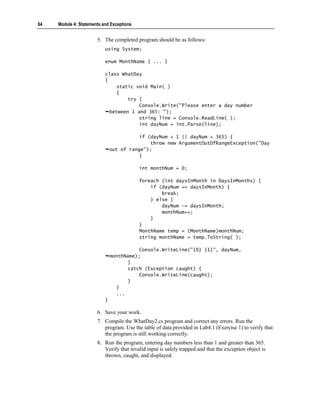
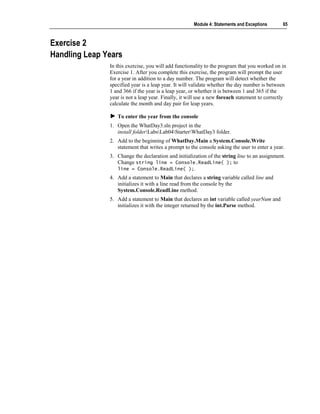
                             and Exceptions

Contents

Overview                      1
Introduction to Statements    2
Using Selection Statements    6
Using Iteration Statements   17
Using Jump Statements        29
Lab 4.1: Using Statements    32
Handling Basic Exceptions    42
Raising Exceptions           52
Lab 4.2: Using Exceptions    62
Review                       72
Information in this document, including URL and other Internet Web site references, is subject to
change without notice. Unless otherwise noted, the example companies, organizations, products,
domain names, e-mail addresses, logos, people, places, and events depicted herein are fictitious,
and no association with any real company, organization, product, domain name, e-mail address,
logo, person, places or events is intended or should be inferred. Complying with all applicable
copyright laws is the responsibility of the user. Without limiting the rights under copyright, no
part of this document may be reproduced, stored in or introduced into a retrieval system, or
transmitted in any form or by any means (electronic, mechanical, photocopying, recording, or
otherwise), or for any purpose, without the express written permission of Microsoft Corporation.

Microsoft may have patents, patent applications, trademarks, copyrights, or other intellectual
property rights covering subject matter in this document. Except as expressly provided in any
written license agreement from Microsoft, the furnishing of this document does not give you any
license to these patents, trademarks, copyrights, or other intellectual property.

 2001−2002 Microsoft Corporation. All rights reserved.

Microsoft, MS-DOS, Windows, Windows NT, ActiveX, BizTalk, IntelliSense, JScript, MSDN,
PowerPoint, SQL Server, Visual Basic, Visual C++, Visual C#, Visual J#, Visual Studio, and
Win32 are either registered trademarks or trademarks of Microsoft Corporation in the U.S.A.
and/or other countries.

The names of actual companies and products mentioned herein may be the trademarks of their
respective owners.
Module 4: Statements and Exceptions          1


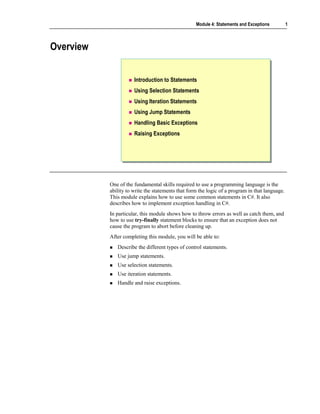
Overview


                      Introduction to Statements
                      Using Selection Statements
                      Using Iteration Statements
                      Using Jump Statements
                      Handling Basic Exceptions
                      Raising Exceptions


           One of the fundamental skills required to use a programming language is the
           ability to write the statements that form the logic of a program in that language.
           This module explains how to use some common statements in C#. It also
           describes how to implement exception handling in C#.
           In particular, this module shows how to throw errors as well as catch them, and
           how to use try-finally statement blocks to ensure that an exception does not
           cause the program to abort before cleaning up.
           After completing this module, you will be able to:
              Describe the different types of control statements.
              Use jump statements.
              Use selection statements.
              Use iteration statements.
              Handle and raise exceptions.
2   Module 4: Statements and Exceptions


    Introduction to Statements


                                   Statement Blocks
                                   Types of Statements


                       A program consists of a sequence of statements. At run time, these statements
                       are executed one after the other, as they appear in the program, from left to right
                       and from top to bottom.
                       After completing this lesson, you will be able to:
                           Group a set of statements together in C#.
                           Use the different types of statements available in C#.
Module 4: Statements and Exceptions     3


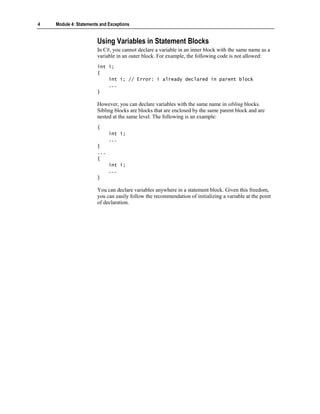
Statement Blocks

                          Use braces As
                          block delimiters       A block and its
                                                 parent block                 Sibling blocks
                          {{                     cannot have a                can have
                               // code
                                // code          variable with                variables with
                          }}                     the same name                the same name
                                                   {{
                                                                               {{
                                                        int i;
                                                         int i;                     int i;
                                                                                     int i;
                                                        ...
                                                         ...                        ...
                                                                                     ...
                                                        {{
                                                                               }}
                                                             int i;
                                                              int i;           ...
                                                                                ...
                                                             ...
                                                              ...              {{
                                                        }}
                                                                                    int i;
                                                                                     int i;
                                                   }}
                                                                                    ...
                                                                                     ...
                                                                               }}


               When developing C# applications, you need to group statements together just as
               you do in other programming languages. To do so, you use the syntax of
               languages such as C, C++, and Java, which means that you enclose groups of
               statements in braces: { and }. You do not use keyword matched delimiters such
               as the If ... End If of Microsoft® Visual Basic® for grouping statements.

               Grouping Statements into Blocks
               A group of statements enclosed between braces is referred to as a block. A
               block can contain a single statement or another block that is nested within it.
               Each block defines a scope. A variable that is declared in a block is called a
               local variable. The scope of a local variable extends from its declaration to the
               right brace that ends its enclosing block. It is good practice to declare a variable
               in the innermost block possible because the restricted visibility of the variable
               helps to make the program clearer.
4   Module 4: Statements and Exceptions


                       Using Variables in Statement Blocks
                       In C#, you cannot declare a variable in an inner block with the same name as a
                       variable in an outer block. For example, the following code is not allowed:
                       int i;
                       {
                           int i; // Error: i already declared in parent block
                           ...
                       }

                       However, you can declare variables with the same name in sibling blocks.
                       Sibling blocks are blocks that are enclosed by the same parent block and are
                       nested at the same level. The following is an example:
                       {
                             int i;
                             ...
                       }
                       ...
                       {
                             int i;
                             ...
                       }

                       You can declare variables anywhere in a statement block. Given this freedom,
                       you can easily follow the recommendation of initializing a variable at the point
                       of declaration.
Module 4: Statements and Exceptions         5


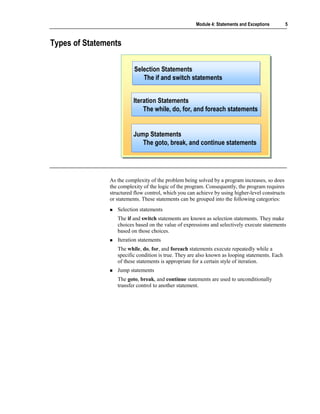
Types of Statements

                          Selection Statements
                          Selection Statements
                             The if and switch statements
                              The if and switch statements


                         Iteration Statements
                         Iteration Statements
                             The while, do, for, and foreach statements
                             The while, do, for, and foreach statements


                         Jump Statements
                         Jump Statements
                            The goto, break, and continue statements
                            The goto, break, and continue statements


               As the complexity of the problem being solved by a program increases, so does
               the complexity of the logic of the program. Consequently, the program requires
               structured flow control, which you can achieve by using higher-level constructs
               or statements. These statements can be grouped into the following categories:
                  Selection statements
                  The if and switch statements are known as selection statements. They make
                  choices based on the value of expressions and selectively execute statements
                  based on those choices.
                  Iteration statements
                  The while, do, for, and foreach statements execute repeatedly while a
                  specific condition is true. They are also known as looping statements. Each
                  of these statements is appropriate for a certain style of iteration.
                  Jump statements
                  The goto, break, and continue statements are used to unconditionally
                  transfer control to another statement.
6   Module 4: Statements and Exceptions


    Using Selection Statements


                                   The if Statement
                                   Cascading if Statements
                                   The switch Statement
                                   Quiz: Spot the Bugs


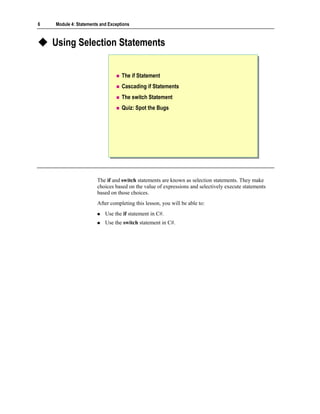
                       The if and switch statements are known as selection statements. They make
                       choices based on the value of expressions and selectively execute statements
                       based on those choices.
                       After completing this lesson, you will be able to:
                           Use the if statement in C#.
                           Use the switch statement in C#.
Module 4: Statements and Exceptions         7


The if Statement

                              Syntax:
                    if ( Boolean-expression )
                    if ( Boolean-expression )
                      first-embedded-statement
                       first-embedded-statement
                    else
                    else
                      second-embedded-statement
                       second-embedded-statement

                              No implicit conversion from int to bool
                    int x;
                    int x;
                    ...
                    ...
                    if (x) ...
                    if (x) ...     // Must be if (x != 0) in C#
                                   // Must be if (x != 0) in C#
                    if (x = 0) ... // Must be if (x == 0) in C#
                    if (x = 0) ... // Must be if (x == 0) in C#


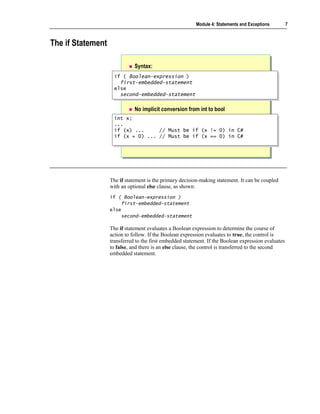
                   The if statement is the primary decision-making statement. It can be coupled
                   with an optional else clause, as shown:
                   if ( Boolean-expression )
                       first-embedded-statement
                   else
                       second-embedded-statement

                   The if statement evaluates a Boolean expression to determine the course of
                   action to follow. If the Boolean expression evaluates to true, the control is
                   transferred to the first embedded statement. If the Boolean expression evaluates
                   to false, and there is an else clause, the control is transferred to the second
                   embedded statement.
8   Module 4: Statements and Exceptions


                       Examples
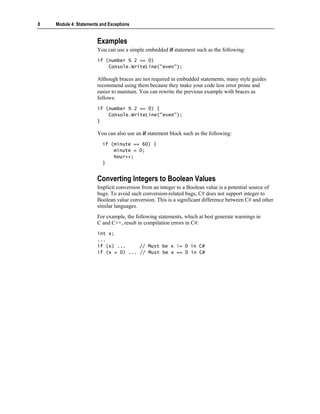
                       You can use a simple embedded if statement such as the following:
                       if (number % 2 == 0)
                           Console.WriteLine("even");

                       Although braces are not required in embedded statements, many style guides
                       recommend using them because they make your code less error prone and
                       easier to maintain. You can rewrite the previous example with braces as
                       follows:
                       if (number % 2 == 0) {
                           Console.WriteLine("even");
                       }

                       You can also use an if statement block such as the following:
                          if (minute == 60) {
                              minute = 0;
                              hour++;
                          }


                       Converting Integers to Boolean Values
                       Implicit conversion from an integer to a Boolean value is a potential source of
                       bugs. To avoid such conversion-related bugs, C# does not support integer to
                       Boolean value conversion. This is a significant difference between C# and other
                       similar languages.
                       For example, the following statements, which at best generate warnings in
                       C and C++, result in compilation errors in C#:
                       int x;
                       ...
                       if (x) ...     // Must be x != 0 in C#
                       if (x = 0) ... // Must be x == 0 in C#
Module 4: Statements and Exceptions        9


Cascading if Statements


                  enum Suit { Clubs, Hearts, Diamonds, Spades }
                  enum Suit { Clubs, Hearts, Diamonds, Spades }
                  Suit trumps = Suit.Hearts;
                  Suit trumps = Suit.Hearts;
                  if (trumps == Suit.Clubs)
                  if (trumps == Suit.Clubs)
                       color = "Black";
                        color = "Black";
                  else if (trumps == Suit.Hearts)
                  else if (trumps == Suit.Hearts)
                       color = "Red";
                        color = "Red";
                  else if (trumps == Suit.Diamonds)
                  else if (trumps == Suit.Diamonds)
                       color = "Red";
                        color = "Red";
                  else
                  else
                       color = "Black";
                        color = "Black";


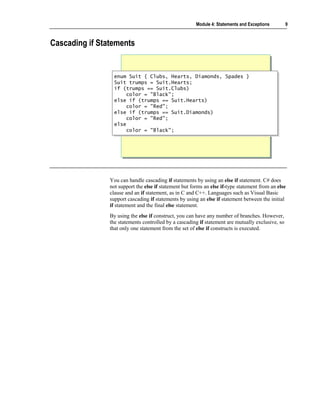
                You can handle cascading if statements by using an else if statement. C# does
                not support the else if statement but forms an else if-type statement from an else
                clause and an if statement, as in C and C++. Languages such as Visual Basic
                support cascading if statements by using an else if statement between the initial
                if statement and the final else statement.
                By using the else if construct, you can have any number of branches. However,
                the statements controlled by a cascading if statement are mutually exclusive, so
                that only one statement from the set of else if constructs is executed.
10   Module 4: Statements and Exceptions


                       Nesting if Statements
                       Nesting one if statement within another if statement creates a potential
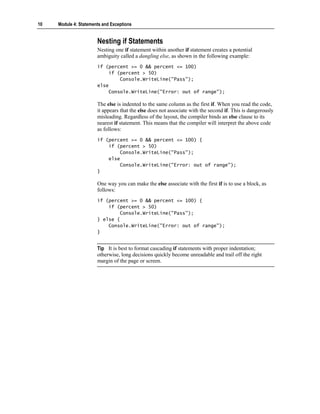
                       ambiguity called a dangling else, as shown in the following example:
                       if (percent >= 0 && percent <= 100)
                           if (percent > 50)
                               Console.WriteLine("Pass");
                       else
                           Console.WriteLine("Error: out of range");

                       The else is indented to the same column as the first if. When you read the code,
                       it appears that the else does not associate with the second if. This is dangerously
                       misleading. Regardless of the layout, the compiler binds an else clause to its
                       nearest if statement. This means that the compiler will interpret the above code
                       as follows:
                       if (percent >= 0 && percent <= 100) {
                           if (percent > 50)
                               Console.WriteLine("Pass");
                           else
                               Console.WriteLine("Error: out of range");
                       }

                       One way you can make the else associate with the first if is to use a block, as
                       follows:
                       if (percent >= 0 && percent <= 100) {
                           if (percent > 50)
                               Console.WriteLine("Pass");
                       } else {
                           Console.WriteLine("Error: out of range");
                       }


                       Tip It is best to format cascading if statements with proper indentation;
                       otherwise, long decisions quickly become unreadable and trail off the right
                       margin of the page or screen.
Module 4: Statements and Exceptions          11


The switch Statement

                          Use switch statements for multiple case blocks
                          Use break statements to ensure that no fall
                          through occurs
                 switch (trumps) {
                  switch (trumps) {
                 case Suit.Clubs :
                  case Suit.Clubs :
                 case Suit.Spades :
                  case Suit.Spades :
                      color = "Black"; break;
                       color = "Black"; break;
                 case Suit.Hearts :
                  case Suit.Hearts :
                 case Suit.Diamonds :
                  case Suit.Diamonds :
                      color = "Red"; break;
                       color = "Red"; break;
                 default:
                  default:
                      color = "ERROR"; break;
                       color = "ERROR"; break;
                 }}


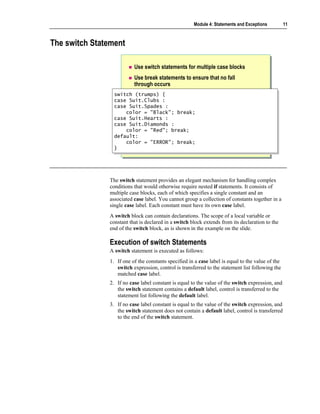
               The switch statement provides an elegant mechanism for handling complex
               conditions that would otherwise require nested if statements. It consists of
               multiple case blocks, each of which specifies a single constant and an
               associated case label. You cannot group a collection of constants together in a
               single case label. Each constant must have its own case label.
               A switch block can contain declarations. The scope of a local variable or
               constant that is declared in a switch block extends from its declaration to the
               end of the switch block, as is shown in the example on the slide.

               Execution of switch Statements
               A switch statement is executed as follows:
               1. If one of the constants specified in a case label is equal to the value of the
                  switch expression, control is transferred to the statement list following the
                  matched case label.
               2. If no case label constant is equal to the value of the switch expression, and
                  the switch statement contains a default label, control is transferred to the
                  statement list following the default label.
               3. If no case label constant is equal to the value of the switch expression, and
                  the switch statement does not contain a default label, control is transferred
                  to the end of the switch statement.
12   Module 4: Statements and Exceptions


                       You can use a switch statement to evaluate only the following types of
                       expressions: any integer type, a char, an enum, or a string. You can also
                       evaluate other expression types by using the switch statement, as long as there
                       is exactly one user-defined implicit conversion from the disallowed type to one
                       of the allowed types.

                       Note Unlike in Java, C, or C++, the governing type of a switch statement in
                       C# can be a string. With a string expression, the value null is permitted as a
                       case label constant.

                       For more information about conversion operators, search for “conversion
                       operators” in the Microsoft .NET Framework SDK Help documents.

                       Grouping Constants
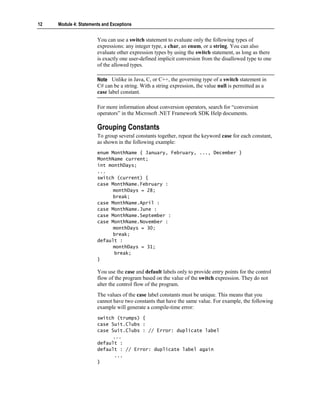
                       To group several constants together, repeat the keyword case for each constant,
                       as shown in the following example:
                       enum MonthName { January, February, ..., December }
                       MonthName current;
                       int monthDays;
                       ...
                       switch (current) {
                       case MonthName.February :
                             monthDays = 28;
                             break;
                       case MonthName.April :
                       case MonthName.June :
                       case MonthName.September :
                       case MonthName.November :
                             monthDays = 30;
                             break;
                       default :
                             monthDays = 31;
                             break;
                       }

                       You use the case and default labels only to provide entry points for the control
                       flow of the program based on the value of the switch expression. They do not
                       alter the control flow of the program.
                       The values of the case label constants must be unique. This means that you
                       cannot have two constants that have the same value. For example, the following
                       example will generate a compile-time error:
                       switch (trumps) {
                       case Suit.Clubs :
                       case Suit.Clubs : // Error: duplicate label
                             ...
                       default :
                       default : // Error: duplicate label again
                             ...
                       }
Module 4: Statements and Exceptions        13


Using break in switch Statements
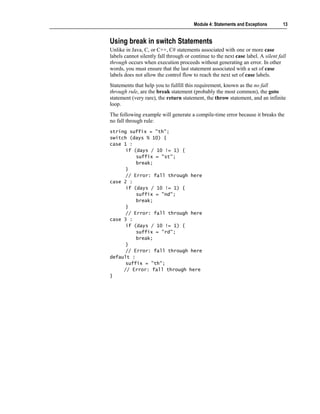
Unlike in Java, C, or C++, C# statements associated with one or more case
labels cannot silently fall through or continue to the next case label. A silent fall
through occurs when execution proceeds without generating an error. In other
words, you must ensure that the last statement associated with a set of case
labels does not allow the control flow to reach the next set of case labels.
Statements that help you to fulfill this requirement, known as the no fall
through rule, are the break statement (probably the most common), the goto
statement (very rare), the return statement, the throw statement, and an infinite
loop.
The following example will generate a compile-time error because it breaks the
no fall through rule:
string suffix = "th";
switch (days % 10) {
case 1 :
      if (days / 10 != 1) {
          suffix = "st";
          break;
      }
      // Error: fall through here
case 2 :
      if (days / 10 != 1) {
          suffix = "nd";
          break;
      }
      // Error: fall through here
case 3 :
      if (days / 10 != 1) {
          suffix = "rd";
          break;
      }
      // Error: fall through here
default :
      suffix = "th";
     // Error: fall through here
}
14   Module 4: Statements and Exceptions


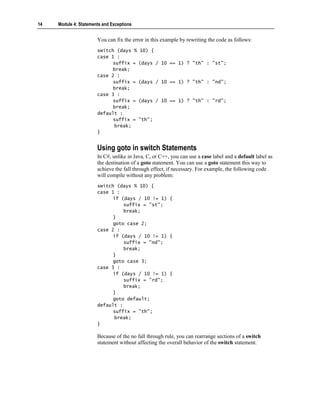
                       You can fix the error in this example by rewriting the code as follows:
                       switch (days        % 10) {
                       case 1 :
                             suffix        = (days / 10 == 1) ? "th" : "st";
                             break;
                       case 2 :
                             suffix        = (days / 10 == 1) ? "th" : "nd";
                             break;
                       case 3 :
                             suffix        = (days / 10 == 1) ? "th" : "rd";
                             break;
                       default :
                             suffix        = "th";
                             break;
                       }


                       Using goto in switch Statements
                       In C#, unlike in Java, C, or C++, you can use a case label and a default label as
                       the destination of a goto statement. You can use a goto statement this way to
                       achieve the fall through effect, if necessary. For example, the following code
                       will compile without any problem:
                       switch (days % 10) {
                       case 1 :
                             if (days / 10 != 1) {
                                 suffix = "st";
                                 break;
                             }
                             goto case 2;
                       case 2 :
                             if (days / 10 != 1) {
                                 suffix = "nd";
                                 break;
                             }
                             goto case 3;
                       case 3 :
                             if (days / 10 != 1) {
                                 suffix = "rd";
                                 break;
                             }
                             goto default;
                       default :
                             suffix = "th";
                             break;
                       }

                       Because of the no fall through rule, you can rearrange sections of a switch
                       statement without affecting the overall behavior of the switch statement.
Module 4: Statements and Exceptions      15


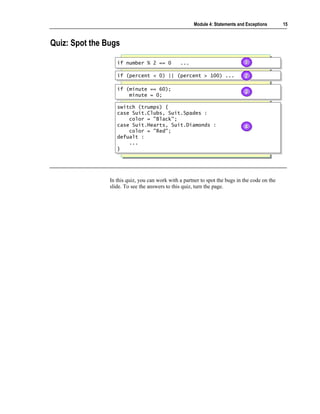
Quiz: Spot the Bugs

                   if number % 2 == 0
                   if number % 2 == 0           ...
                                                ...                            1
                                                                               1

                   if (percent < 0) || (percent > 100) ...
                   if (percent < 0) || (percent > 100) ...                     2
                                                                               2

                   if (minute == 60);
                   if (minute == 60);
                       minute = 0;
                                                                               3
                                                                               3
                       minute = 0;

                   switch (trumps) {
                    switch (trumps) {
                   case Suit.Clubs, Suit.Spades :
                    case Suit.Clubs, Suit.Spades :
                       color = "Black";
                        color = "Black";
                   case Suit.Hearts, Suit.Diamonds :
                    case Suit.Hearts, Suit.Diamonds :                          4
                                                                               4
                       color = "Red";
                        color = "Red";
                   defualt :
                    defualt :
                       ...
                        ...
                   }}


                In this quiz, you can work with a partner to spot the bugs in the code on the
                slide. To see the answers to this quiz, turn the page.
16   Module 4: Statements and Exceptions


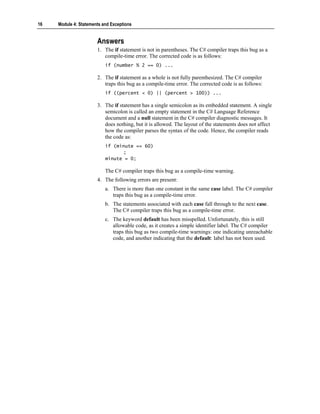
                       Answers
                       1. The if statement is not in parentheses. The C# compiler traps this bug as a
                          compile-time error. The corrected code is as follows:
                           if (number % 2 == 0) ...

                       2. The if statement as a whole is not fully parenthesized. The C# compiler
                          traps this bug as a compile-time error. The corrected code is as follows:
                           if ((percent < 0) || (percent > 100)) ...

                       3. The if statement has a single semicolon as its embedded statement. A single
                          semicolon is called an empty statement in the C# Language Reference
                          document and a null statement in the C# compiler diagnostic messages. It
                          does nothing, but it is allowed. The layout of the statements does not affect
                          how the compiler parses the syntax of the code. Hence, the compiler reads
                          the code as:
                           if (minute == 60)
                                 ;
                           minute = 0;

                           The C# compiler traps this bug as a compile-time warning.
                       4. The following errors are present:
                           a. There is more than one constant in the same case label. The C# compiler
                              traps this bug as a compile-time error.
                           b. The statements associated with each case fall through to the next case.
                              The C# compiler traps this bug as a compile-time error.
                           c. The keyword default has been misspelled. Unfortunately, this is still
                              allowable code, as it creates a simple identifier label. The C# compiler
                              traps this bug as two compile-time warnings: one indicating unreachable
                              code, and another indicating that the default: label has not been used.
Module 4: Statements and Exceptions      17


Using Iteration Statements


                     The while Statement
                     The do Statement
                     The for Statement
                     The foreach Statement
                     Quiz: Spot the Bugs


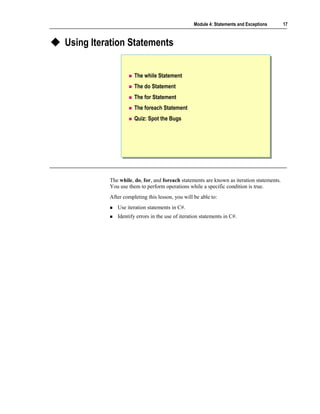
          The while, do, for, and foreach statements are known as iteration statements.
          You use them to perform operations while a specific condition is true.
          After completing this lesson, you will be able to:
             Use iteration statements in C#.
             Identify errors in the use of iteration statements in C#.
18   Module 4: Statements and Exceptions


The while Statement


                                   Execute embedded statements based on Boolean value
                                   Evaluate Boolean expression at beginning of loop
                                   Execute embedded statements while Boolean value
                                   Is True

                           int i = 0;
                            int i = 0;
                           while (i < 10) {
                            while (i < 10) {
                                Console.WriteLine(i);
                                Console.WriteLine(i);
                                i++;
                                i++;
                           }}

                                               0 1 2 3 4 5 6 7 8 9


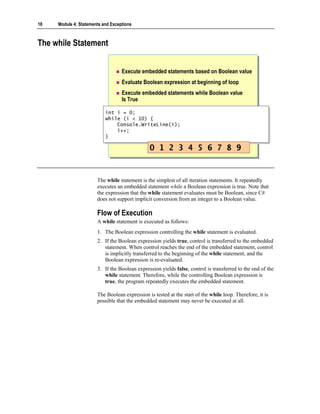
                       The while statement is the simplest of all iteration statements. It repeatedly
                       executes an embedded statement while a Boolean expression is true. Note that
                       the expression that the while statement evaluates must be Boolean, since C#
                       does not support implicit conversion from an integer to a Boolean value.

                       Flow of Execution
                       A while statement is executed as follows:
                       1. The Boolean expression controlling the while statement is evaluated.
                       2. If the Boolean expression yields true, control is transferred to the embedded
                          statement. When control reaches the end of the embedded statement, control
                          is implicitly transferred to the beginning of the while statement, and the
                          Boolean expression is re-evaluated.
                       3. If the Boolean expression yields false, control is transferred to the end of the
                          while statement. Therefore, while the controlling Boolean expression is
                          true, the program repeatedly executes the embedded statement.

                       The Boolean expression is tested at the start of the while loop. Therefore, it is
                       possible that the embedded statement may never be executed at all.
Module 4: Statements and Exceptions      19


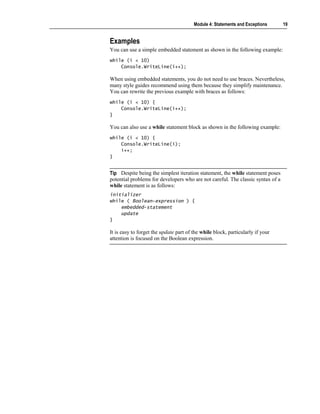
Examples
You can use a simple embedded statement as shown in the following example:
while (i < 10)
    Console.WriteLine(i++);

When using embedded statements, you do not need to use braces. Nevertheless,
many style guides recommend using them because they simplify maintenance.
You can rewrite the previous example with braces as follows:
while (i < 10) {
    Console.WriteLine(i++);
}

You can also use a while statement block as shown in the following example:
while (i < 10) {
    Console.WriteLine(i);
    i++;
}


Tip Despite being the simplest iteration statement, the while statement poses
potential problems for developers who are not careful. The classic syntax of a
while statement is as follows:
initializer
while ( Boolean-expression ) {
    embedded-statement
    update
}

It is easy to forget the update part of the while block, particularly if your
attention is focused on the Boolean expression.
20   Module 4: Statements and Exceptions


The do Statement

                                  Execute embedded statements based on Boolean value
                                  Evaluate Boolean expression at end of loop
                                  Execute embedded statements while Boolean value
                                  Is True

                           int i = 0;
                            int i = 0;
                           do {
                            do {
                                Console.WriteLine(i);
                                 Console.WriteLine(i);
                                i++;
                                 i++;
                           } while (i < 10);
                            } while (i < 10);

                                               0 1 2 3 4 5 6 7 8 9


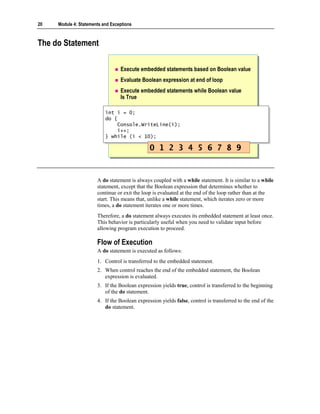
                       A do statement is always coupled with a while statement. It is similar to a while
                       statement, except that the Boolean expression that determines whether to
                       continue or exit the loop is evaluated at the end of the loop rather than at the
                       start. This means that, unlike a while statement, which iterates zero or more
                       times, a do statement iterates one or more times.
                       Therefore, a do statement always executes its embedded statement at least once.
                       This behavior is particularly useful when you need to validate input before
                       allowing program execution to proceed.

                       Flow of Execution
                       A do statement is executed as follows:
                       1. Control is transferred to the embedded statement.
                       2. When control reaches the end of the embedded statement, the Boolean
                          expression is evaluated.
                       3. If the Boolean expression yields true, control is transferred to the beginning
                          of the do statement.
                       4. If the Boolean expression yields false, control is transferred to the end of the
                          do statement.
Module 4: Statements and Exceptions    21


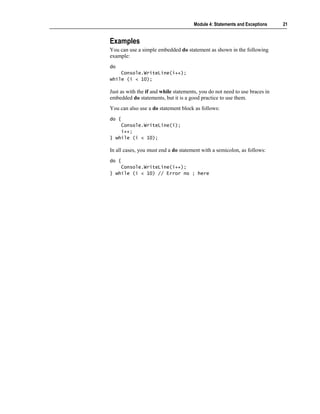
Examples
You can use a simple embedded do statement as shown in the following
example:
do
    Console.WriteLine(i++);
while (i < 10);

Just as with the if and while statements, you do not need to use braces in
embedded do statements, but it is a good practice to use them.
You can also use a do statement block as follows:
do {
    Console.WriteLine(i);
    i++;
} while (i < 10);

In all cases, you must end a do statement with a semicolon, as follows:
do {
    Console.WriteLine(i++);
} while (i < 10) // Error no ; here
22   Module 4: Statements and Exceptions


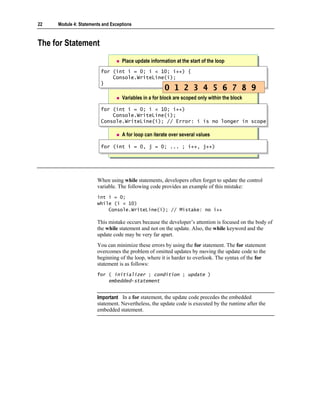
The for Statement
                                   Place update information at the start of the loop
                         for (int i = 0; i < 10; i++) {
                          for (int i = 0; i < 10; i++) {
                              Console.WriteLine(i);
                              Console.WriteLine(i);
                         }}
                                                       0 1 2 3 4 5 6 7 8 9
                                   Variables in a for block are scoped only within the block

                         for (int i = 0; i < 10; i++)
                         for (int i = 0; i < 10; i++)
                             Console.WriteLine(i);
                             Console.WriteLine(i);
                         Console.WriteLine(i); // Error: i is no longer in scope
                         Console.WriteLine(i); // Error: i is no longer in scope

                                   A for loop can iterate over several values

                         for (int i = 0, j = 0; ... ; i++, j++)
                         for (int i = 0, j = 0; ... ; i++, j++)


                       When using while statements, developers often forget to update the control
                       variable. The following code provides an example of this mistake:
                       int i = 0;
                       while (i < 10)
                           Console.WriteLine(i); // Mistake: no i++

                       This mistake occurs because the developer’s attention is focused on the body of
                       the while statement and not on the update. Also, the while keyword and the
                       update code may be very far apart.
                       You can minimize these errors by using the for statement. The for statement
                       overcomes the problem of omitted updates by moving the update code to the
                       beginning of the loop, where it is harder to overlook. The syntax of the for
                       statement is as follows:
                       for ( initializer ; condition ; update )
                           embedded-statement


                       Important In a for statement, the update code precedes the embedded
                       statement. Nevertheless, the update code is executed by the runtime after the
                       embedded statement.
Module 4: Statements and Exceptions      23


The syntax of the for statement is essentially identical to that of the while
statement, as shown in the following example:
initializer
while ( condition ) {
    embedded-statement
    update
}

As with all iteration statements, the condition in a for block must be a Boolean
expression that serves as a continuation condition and not a termination
condition.

Examples
The initializer, condition, and update components of a for statement are
optional. However, an empty condition is considered implicitly true and can
easily cause an infinite loop. The following code provides an example:
for (;;) {
    Console.WriteLine("Help ");
    ...
}

As with the while and do statements, you can use a simple embedded statement
or a block statement as shown in the following examples:
for (int i = 0; i < 10; i++)
    Console.WriteLine(i);

for (int i = 0; i < 10; i++) {
    Console.WriteLine(i);
    Console.WriteLine(10 – i);
}
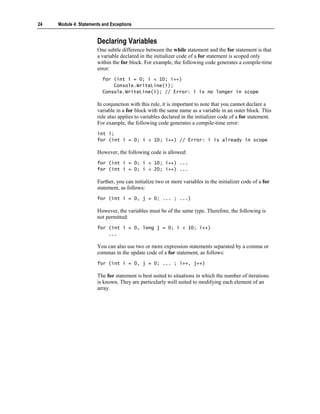
24   Module 4: Statements and Exceptions


                       Declaring Variables
                       One subtle difference between the while statement and the for statement is that
                       a variable declared in the initializer code of a for statement is scoped only
                       within the for block. For example, the following code generates a compile-time
                       error:
                          for (int i = 0; i < 10; i++)
                              Console.WriteLine(i);
                          Console.WriteLine(i); // Error: i is no longer in scope

                       In conjunction with this rule, it is important to note that you cannot declare a
                       variable in a for block with the same name as a variable in an outer block. This
                       rule also applies to variables declared in the initializer code of a for statement.
                       For example, the following code generates a compile-time error:
                       int i;
                       for (int i = 0; i < 10; i++) // Error: i is already in scope

                       However, the following code is allowed:
                       for (int i = 0; i < 10; i++) ...
                       for (int i = 0; i < 20; i++) ...

                       Further, you can initialize two or more variables in the initializer code of a for
                       statement, as follows:
                       for (int i = 0, j = 0; ... ; ...)

                       However, the variables must be of the same type. Therefore, the following is
                       not permitted:
                       for (int i = 0, long j = 0; i < 10; i++)
                           ...

                       You can also use two or more expression statements separated by a comma or
                       commas in the update code of a for statement, as follows:
                       for (int i = 0, j = 0; ... ; i++, j++)

                       The for statement is best suited to situations in which the number of iterations
                       is known. They are particularly well suited to modifying each element of an
                       array.
Module 4: Statements and Exceptions       25


The foreach Statement

                         Choose the type and name of the iteration variable
                         Execute embedded statements for each element of the
                         collection class

                  ArrayList numbers =
                   ArrayList numbers =        new ArrayList( );
                                              new ArrayList( );
                  for (int i = 0; i <
                   for (int i = 0; i <        10; i++ ) {
                                               10; i++ ) {
                       numbers.Add(i);
                       numbers.Add(i);
                  }}

                  foreach (int number in numbers) {
                   foreach (int number in numbers) {
                      Console.WriteLine(number);
                       Console.WriteLine(number);
                  }}

                                        0 1 2 3 4 5 6 7 8 9


               Collections are software entities whose purpose is to collect other software
               entities, much as a ledger can be thought of as a collection of bank accounts or a
               house as a collection of rooms.
               The Microsoft .NET Framework provides a simple collection class called
               ArrayList. You can use ArrayList to create a collection variable and add
               elements to the collection. For example, consider the following code:
               using System.Collections;
               ...
               ArrayList numbers = new ArrayList( );
               for (int i = 0; i < 10; i++) {
                   numbers.Add(i);
               }

               You can write a for statement that accesses and prints each collection element
               from this collection class in turn:
               for (int i = 0; i < numbers.Count; i++) {
                   int number = (int)numbers[i];
                   Console.WriteLine(number);
               }

               This for statement contains many individual statements that in combination
               implement the mechanism used to iterate through each collection element of
               numbers. However, this solution is not easy to implement and is prone to error.
               To address this problem, C# provides the foreach statement, which allows you
               to iterate through a collection without using multiple statements. Rather than
               explicitly extracting each element from a collection by using syntax specific to
               the particular collection, you use the foreach statement to approach the problem
               in the opposite way. You effectively instruct the collection to present its
               elements one at a time. Instead of taking the embedded statement to the
               collection, the collection is taken to the embedded statement.
26   Module 4: Statements and Exceptions


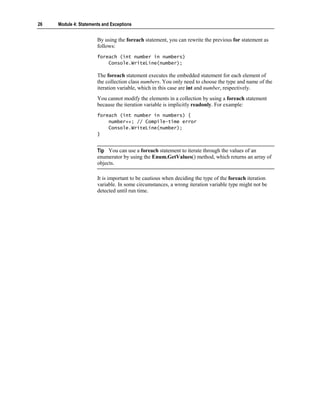
                       By using the foreach statement, you can rewrite the previous for statement as
                       follows:
                       foreach (int number in numbers)
                           Console.WriteLine(number);

                       The foreach statement executes the embedded statement for each element of
                       the collection class numbers. You only need to choose the type and name of the
                       iteration variable, which in this case are int and number, respectively.
                       You cannot modify the elements in a collection by using a foreach statement
                       because the iteration variable is implicitly readonly. For example:
                       foreach (int number in numbers) {
                           number++; // Compile-time error
                           Console.WriteLine(number);
                       }


                       Tip You can use a foreach statement to iterate through the values of an
                       enumerator by using the Enum.GetValues() method, which returns an array of
                       objects.

                       It is important to be cautious when deciding the type of the foreach iteration
                       variable. In some circumstances, a wrong iteration variable type might not be
                       detected until run time.
Module 4: Statements and Exceptions      27


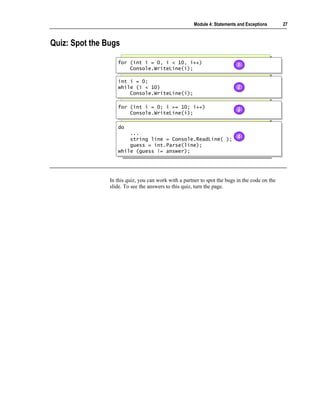
Quiz: Spot the Bugs

                   for (int i = 0, i < 10, i++)
                   for (int i = 0, i < 10, i++)                            1
                                                                           1
                       Console.WriteLine(i);
                       Console.WriteLine(i);

                   int i = 0;
                   int i = 0;
                   while (i < 10)
                   while (i < 10)                                          2
                                                                           2
                       Console.WriteLine(i);
                        Console.WriteLine(i);

                   for (int i = 0; i >= 10; i++)
                   for (int i = 0; i >= 10; i++)
                       Console.WriteLine(i);
                                                                           3
                                                                           3
                       Console.WriteLine(i);

                   do
                   do
                       ...
                        ...
                       string line = Console.ReadLine( );                  4
                                                                           4
                        string line = Console.ReadLine( );
                       guess = int.Parse(line);
                        guess = int.Parse(line);
                   while (guess != answer);
                   while (guess != answer);


                In this quiz, you can work with a partner to spot the bugs in the code on the
                slide. To see the answers to this quiz, turn the page.
28   Module 4: Statements and Exceptions


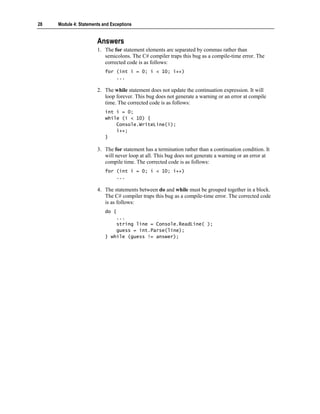
                       Answers
                       1. The for statement elements are separated by commas rather than
                          semicolons. The C# compiler traps this bug as a compile-time error. The
                          corrected code is as follows:
                           for (int i = 0; i < 10; i++)
                               ...

                       2. The while statement does not update the continuation expression. It will
                          loop forever. This bug does not generate a warning or an error at compile
                          time. The corrected code is as follows:
                           int i = 0;
                           while (i < 10) {
                               Console.WriteLine(i);
                               i++;
                           }

                       3. The for statement has a termination rather than a continuation condition. It
                          will never loop at all. This bug does not generate a warning or an error at
                          compile time. The corrected code is as follows:
                           for (int i = 0; i < 10; i++)
                               ...

                       4. The statements between do and while must be grouped together in a block.
                          The C# compiler traps this bug as a compile-time error. The corrected code
                          is as follows:
                           do {
                               ...
                               string line = Console.ReadLine( );
                               guess = int.Parse(line);
                           } while (guess != answer);
Module 4: Statements and Exceptions     29


Using Jump Statements


                    The goto Statement
                    The break and continue Statements


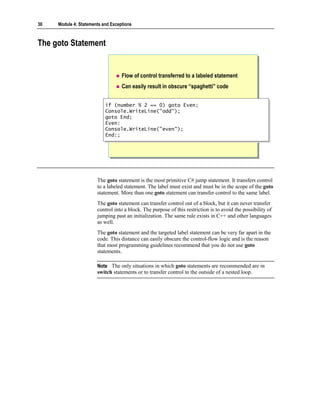
         The goto, break, and continue statements are known as jump statements. You
         use them to transfer control from one point in the program to another, at any
         time. In this section, you will learn how to use jump statements in C# programs.
30   Module 4: Statements and Exceptions


The goto Statement


                                   Flow of control transferred to a labeled statement
                                   Can easily result in obscure “spaghetti” code


                           if (number % 2 == 0) goto Even;
                            if (number % 2 == 0) goto Even;
                           Console.WriteLine("odd");
                            Console.WriteLine("odd");
                           goto End;
                            goto End;
                           Even:
                            Even:
                           Console.WriteLine("even");
                            Console.WriteLine("even");
                           End:;
                            End:;


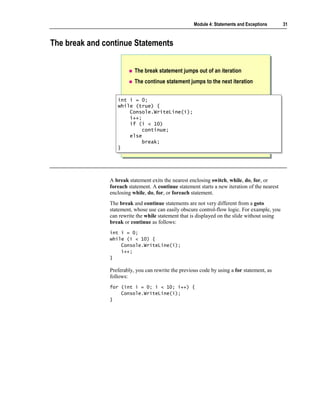
                       The goto statement is the most primitive C# jump statement. It transfers control
                       to a labeled statement. The label must exist and must be in the scope of the goto
                       statement. More than one goto statement can transfer control to the same label.
                       The goto statement can transfer control out of a block, but it can never transfer
                       control into a block. The purpose of this restriction is to avoid the possibility of
                       jumping past an initialization. The same rule exists in C++ and other languages
                       as well.
                       The goto statement and the targeted label statement can be very far apart in the
                       code. This distance can easily obscure the control-flow logic and is the reason
                       that most programming guidelines recommend that you do not use goto
                       statements.

                       Note The only situations in which goto statements are recommended are in
                       switch statements or to transfer control to the outside of a nested loop.
Module 4: Statements and Exceptions       31


The break and continue Statements


                          The break statement jumps out of an iteration
                          The continue statement jumps to the next iteration


                  int i = 0;
                   int i = 0;
                  while (true) {
                   while (true) {
                       Console.WriteLine(i);
                       Console.WriteLine(i);
                       i++;
                       i++;
                       if (i < 10)
                       if (i < 10)
                           continue;
                            continue;
                       else
                       else
                           break;
                            break;
                  }}


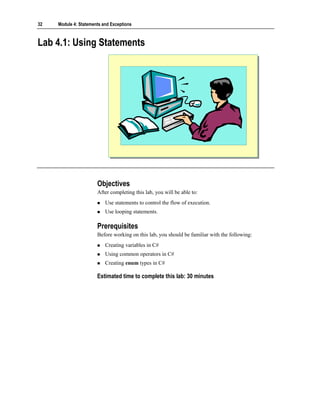
               A break statement exits the nearest enclosing switch, while, do, for, or
               foreach statement. A continue statement starts a new iteration of the nearest
               enclosing while, do, for, or foreach statement.
               The break and continue statements are not very different from a goto
               statement, whose use can easily obscure control-flow logic. For example, you
               can rewrite the while statement that is displayed on the slide without using
               break or continue as follows:
               int i = 0;
               while (i < 10) {
                   Console.WriteLine(i);
                   i++;
               }

               Preferably, you can rewrite the previous code by using a for statement, as
               follows:
               for (int i = 0; i < 10; i++) {
                   Console.WriteLine(i);
               }
32   Module 4: Statements and Exceptions


Lab 4.1: Using Statements


                       Objectives
                       After completing this lab, you will be able to:
                           Use statements to control the flow of execution.
                           Use looping statements.

                       Prerequisites
                       Before working on this lab, you should be familiar with the following:
                           Creating variables in C#
                           Using common operators in C#
                           Creating enum types in C#

                       Estimated time to complete this lab: 30 minutes
Module 4: Statements and Exceptions      33


Exercise 1
Converting a Day of the Year into a Month and Day Pair
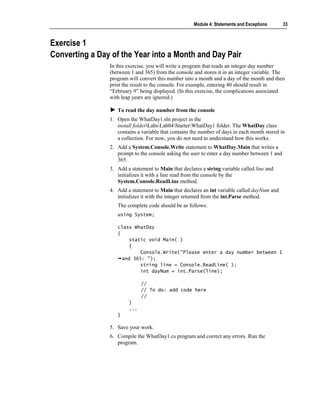
                In this exercise, you will write a program that reads an integer day number
                (between 1 and 365) from the console and stores it in an integer variable. The
                program will convert this number into a month and a day of the month and then
                print the result to the console. For example, entering 40 should result in
                “February 9” being displayed. (In this exercise, the complications associated
                with leap years are ignored.)

                   To read the day number from the console
                1. Open the WhatDay1.sln project in the
                   install folderLabsLab04StarterWhatDay1 folder. The WhatDay class
                   contains a variable that contains the number of days in each month stored in
                   a collection. For now, you do not need to understand how this works.
                2. Add a System.Console.Write statement to WhatDay.Main that writes a
                   prompt to the console asking the user to enter a day number between 1 and
                   365.
                3. Add a statement to Main that declares a string variable called line and
                   initializes it with a line read from the console by the
                   System.Console.ReadLine method.
                4. Add a statement to Main that declares an int variable called dayNum and
                   initializes it with the integer returned from the int.Parse method.
                   The complete code should be as follows:
                   using System;

                   class WhatDay
                   {
                        static void Main( )
                        {
                            Console.Write("Please enter a day number between 1
                     and 365: ");
                            string line = Console.ReadLine( );
                            int dayNum = int.Parse(line);

                              //
                              // To do: add code here
                              //
                        }
                        ...
                   }

                5. Save your work.
                6. Compile the WhatDay1.cs program and correct any errors. Run the
                   program.
34   Module 4: Statements and Exceptions


                           To calculate the month and day pair from a day number
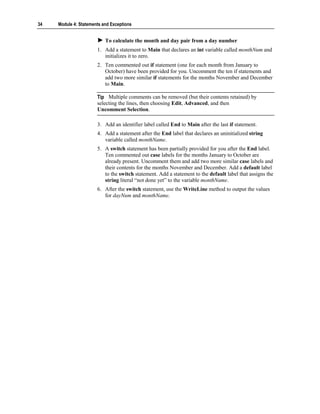
                       1. Add a statement to Main that declares an int variable called monthNum and
                          initializes it to zero.
                       2. Ten commented out if statement (one for each month from January to
                          October) have been provided for you. Uncomment the ten if statements and
                          add two more similar if statements for the months November and December
                          to Main.

                       Tip Multiple comments can be removed (but their contents retained) by
                       selecting the lines, then choosing Edit, Advanced, and then
                       Uncomment Selection.

                       3. Add an identifier label called End to Main after the last if statement.
                       4. Add a statement after the End label that declares an uninitialized string
                          variable called monthName.
                       5. A switch statement has been partially provided for you after the End label.
                          Ten commented out case labels for the months January to October are
                          already present. Uncomment them and add two more similar case labels and
                          their contents for the months November and December. Add a default label
                          to the switch statement. Add a statement to the default label that assigns the
                          string literal “not done yet” to the variable monthName.
                       6. After the switch statement, use the WriteLine method to output the values
                          for dayNum and monthName.
Module 4: Statements and Exceptions   35


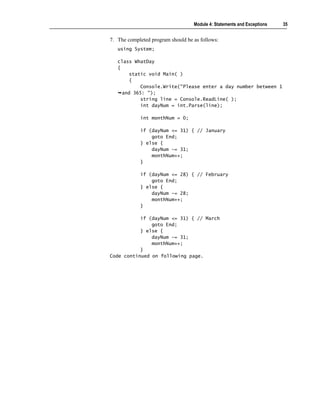
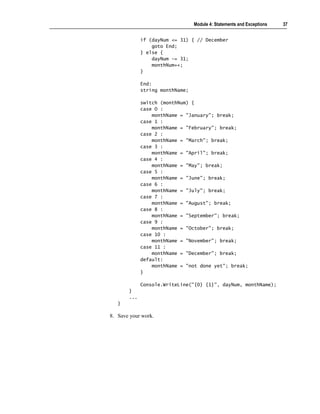
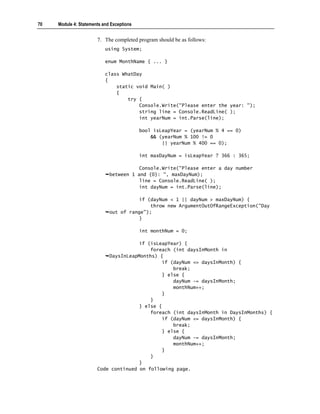
7. The completed program should be as follows:
   using System;

   class WhatDay
   {
        static void Main( )
        {
            Console.Write("Please enter a day number between 1
     and 365: ");
            string line = Console.ReadLine( );
            int dayNum = int.Parse(line);

            int monthNum = 0;

            if (dayNum <= 31) { // January
                goto End;
            } else {
                dayNum -= 31;
                monthNum++;
            }

            if (dayNum <= 28) { // February
                goto End;
            } else {
                dayNum -= 28;
                monthNum++;
            }

           if (dayNum <= 31) { // March
               goto End;
           } else {
               dayNum -= 31;
               monthNum++;
           }
Code continued on following page.
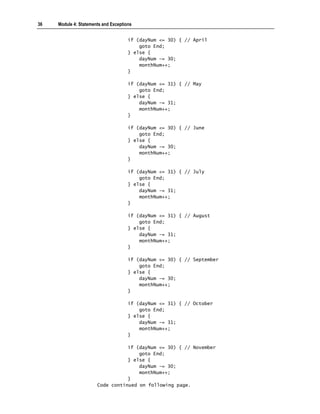
36   Module 4: Statements and Exceptions


                                      if (dayNum <= 30) { // April
                                          goto End;
                                      } else {
                                          dayNum -= 30;
                                          monthNum++;
                                      }

                                      if (dayNum <= 31) { // May
                                          goto End;
                                      } else {
                                          dayNum -= 31;
                                          monthNum++;
                                      }

                                      if (dayNum <= 30) { // June
                                          goto End;
                                      } else {
                                          dayNum -= 30;
                                          monthNum++;
                                      }

                                      if (dayNum <= 31) { // July
                                          goto End;
                                      } else {
                                          dayNum -= 31;
                                          monthNum++;
                                      }

                                      if (dayNum <= 31) { // August
                                          goto End;
                                      } else {
                                          dayNum -= 31;
                                          monthNum++;
                                      }

                                      if (dayNum <= 30) { // September
                                          goto End;
                                      } else {
                                          dayNum -= 30;
                                          monthNum++;
                                      }

                                      if (dayNum <= 31) { // October
                                          goto End;
                                      } else {
                                          dayNum -= 31;
                                          monthNum++;
                                      }

                                  if (dayNum <= 30) { // November
                                      goto End;
                                  } else {
                                      dayNum -= 30;
                                      monthNum++;
                                  }
                       Code continued on following page.
Module 4: Statements and Exceptions   37


             if (dayNum <= 31) { // December
                 goto End;
             } else {
                 dayNum -= 31;
                 monthNum++;
             }

             End:
             string monthName;

             switch (monthNum) {
             case O :
                 monthName = "January"; break;
             case 1 :
                 monthName = "February"; break;
             case 2 :
                 monthName = "March"; break;
             case 3 :
                 monthName = "April"; break;
             case 4 :
                 monthName = "May"; break;
             case 5 :
                 monthName = "June"; break;
             case 6 :
                 monthName = "July"; break;
             case 7 :
                 monthName = "August"; break;
             case 8 :
                 monthName = "September"; break;
             case 9 :
                 monthName = "October"; break;
             case 10 :
                 monthName = "November"; break;
             case 11 :
                 monthName = "December"; break;
             default:
                 monthName = "not done yet"; break;
             }

             Console.WriteLine("{0} {1}", dayNum, monthName);
       }
       ...
   }

8. Save your work.
38   Module 4: Statements and Exceptions


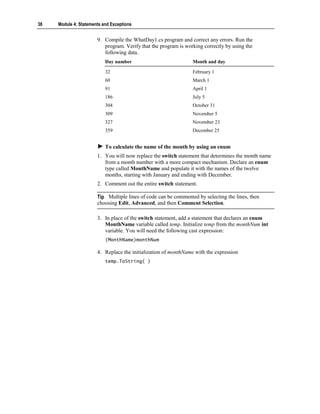
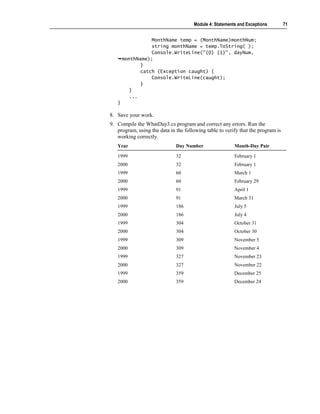
                       9. Compile the WhatDay1.cs program and correct any errors. Run the
                          program. Verify that the program is working correctly by using the
                          following data.
                           Day number                            Month and day

                           32                                    February 1
                           60                                    March 1
                           91                                    April 1
                           186                                   July 5
                           304                                   October 31
                           309                                   November 5
                           327                                   November 23
                           359                                   December 25


                           To calculate the name of the month by using an enum
                       1. You will now replace the switch statement that determines the month name
                          from a month number with a more compact mechanism. Declare an enum
                          type called MonthName and populate it with the names of the twelve
                          months, starting with January and ending with December.
                       2. Comment out the entire switch statement.

                       Tip Multiple lines of code can be commented by selecting the lines, then
                       choosing Edit, Advanced, and then Comment Selection.

                       3. In place of the switch statement, add a statement that declares an enum
                          MonthName variable called temp. Initialize temp from the monthNum int
                          variable. You will need the following cast expression:
                           (MonthName)monthNum

                       4. Replace the initialization of monthName with the expression
                           temp.ToString( )
Module 4: Statements and Exceptions        39


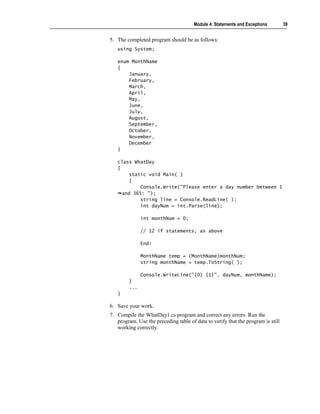
5. The completed program should be as follows:
   using System;

   enum MonthName
   {
       January,
       February,
       March,
       April,
       May,
       June,
       July,
       August,
       September,
       October,
       November,
       December
   }

   class WhatDay
   {
        static void Main( )
        {
            Console.Write("Please enter a day number between 1
     and 365: ");
            string line = Console.ReadLine( );
            int dayNum = int.Parse(line);

              int monthNum = 0;

              // 12 if statements, as above

              End:

              MonthName temp = (MonthName)monthNum;
              string monthName = temp.ToString( );

              Console.WriteLine("{0} {1}", dayNum, monthName);
        }
        ...
   }

6. Save your work.
7. Compile the WhatDay1.cs program and correct any errors. Run the
   program. Use the preceding table of data to verify that the program is still
   working correctly.
40   Module 4: Statements and Exceptions


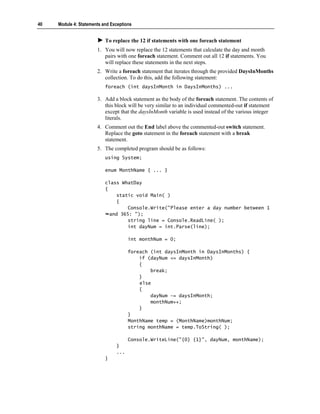
                           To replace the 12 if statements with one foreach statement
                       1. You will now replace the 12 statements that calculate the day and month
                          pairs with one foreach statement. Comment out all 12 if statements. You
                          will replace these statements in the next steps.
                       2. Write a foreach statement that iterates through the provided DaysInMonths
                          collection. To do this, add the following statement:
                           foreach (int daysInMonth in DaysInMonths) ...

                       3. Add a block statement as the body of the foreach statement. The contents of
                          this block will be very similar to an individual commented-out if statement
                          except that the daysInMonth variable is used instead of the various integer
                          literals.
                       4. Comment out the End label above the commented-out switch statement.
                          Replace the goto statement in the foreach statement with a break
                          statement.
                       5. The completed program should be as follows:
                           using System;

                           enum MonthName { ... }

                           class WhatDay
                           {
                                static void Main( )
                                {
                                    Console.Write("Please enter a day number between 1
                             and 365: ");
                                    string line = Console.ReadLine( );
                                    int dayNum = int.Parse(line);

                                      int monthNum = 0;

                                      foreach (int daysInMonth in DaysInMonths) {
                                          if (dayNum <= daysInMonth)
                                          {
                                              break;
                                          }
                                          else
                                          {
                                              dayNum -= daysInMonth;
                                              monthNum++;
                                          }
                                      }
                                      MonthName temp = (MonthName)monthNum;
                                      string monthName = temp.ToString( );

                                      Console.WriteLine("{0} {1}", dayNum, monthName);
                                }
                                ...
                           }
Module 4: Statements and Exceptions        41


6. Save your work.
7. Compile the WhatDay1.cs program and correct any errors. Run the
   program. Use the preceding table of data to verify that the program is still
   working correctly.
8. Run the program, entering day numbers less than 1 and greater than 365, to
   see what happens.
42    Module 4: Statements and Exceptions


     Handling Basic Exceptions


                                    Why Use Exceptions?
                                    Exception Objects
                                    Using try and catch Blocks
                                    Multiple catch Blocks


                        As a developer, you sometimes seem to spend more time checking for errors
                        and handling them than you do on the core logic of the actual program. You can
                        address this issue by using exceptions. Exceptions are designed to handle
                        errors. In this section, you will learn how to catch and handle exceptions in C#.
Module 4: Statements and Exceptions         43


Why Use Exceptions?


                         Traditional procedural error handling is cumbersome
                                                                           Core program logic
                                                                           Core program logic

                 int errorCode = 0;
                  int errorCode = 0;
                 FileInfo source = new FileInfo("code.cs");
                  FileInfo source = new FileInfo("code.cs");
                 if (errorCode == -1) goto Failed;
                  if (errorCode == -1) goto Failed;
                 int length = (int)source.Length;
                  int length = (int)source.Length;
                 if (errorCode == -2) goto Failed;
                  if (errorCode == -2) goto Failed;
                 char[] contents = new char[length];
                  char[] contents = new char[length];
                 if (errorCode == -3) goto Failed;
                  if (errorCode == -3) goto Failed;
                 // Succeeded ...
                  // Succeeded ...
                 Failed: ...
                  Failed: ...                                Error handling
                                                             Error handling


              Planning for the unexpected, and recovering if it does happen, is the mark of a
              good, robust program. Errors can happen at almost any time during the
              compilation or execution of a program.
              The core program logic from the slide is as follows:
              FileInfo source = new FileInfo("code.cs");
              int length = (int)source.Length;
              char[ ] contents = new char[length];
              ...

              Unfortunately, these core statements are lost in a confusing mass of intrusive
              error-handling code. This error-handling code obscures the logic of the program
              in a number of ways:
                 Program logic and error-handling code become intermixed.
                 The core program statements lose their conceptual wholeness as they
                 become intermixed with alternating error-handling code. The program is
                 then difficult to understand.
                 All error code looks alike.
                 All of the error-checking statements are similar. All of them test the same
                 error code by using if statements. Also, there is a lot of duplicate code,
                 which is always a warning sign.
                 Error codes are not inherently meaningful.
                 In this code, a number such as –1 does not have an explicit meaning. It
                 could represent “Security error: no read permission,” but only the
                 documentation can tell you what –1 represents. Therefore, integer error
                 codes are very “programmatic”; they do not describe the errors they
                 represent.
44   Module 4: Statements and Exceptions


                           Error codes are defined at the method level.
                           Every method reports its error by setting the error code to a specific value
                           unique to it. No two methods can use the same value. This means that every
                           method is coupled to every other method. You can clearly see this coupling
                           in effect when the integer error codes are replaced by an enumeration, as in
                           the following code:
                           enum ErrorCode {
                               SecurityError = -1,
                               IOError = -2,
                               OutOfMemoryError = -3,
                               ...
                           }

                           This code is better: An identifier such as FileNotFound is certainly more
                           descriptive than –1. However, when a new named error is added to the
                           enum, every method that names its errors in the enum will be affected and
                           require recompiling.
                           Simple integers have limited descriptive power.
                           For example, –1 might be documented to mean “Security error: no read
                           permission,” but –1 cannot also provide the name of the file that you do not
                           have permission to read.
                           Error codes are too easy to ignore.
                           For example, C programmers almost never check the int returned by the
                           printf function. A printf is unlikely to fail, but if it does, it returns a
                           negative integer value (usually –1).

                       As you can see, you need an alternative to the traditional approach of handling
                       errors. Exceptions provide an alternative that is more flexible, requires less
                       overhead, and produces meaningful error messages.
Module 4: Statements and Exceptions        45


Exception Objects


                                Exception
                                Exception

                                           SystemException
                                           SystemException

                                                   OutOfMemoryException
                                                   OutOfMemoryException

                                                   IOException
                                                   IOException
                                                   NullReferenceException
                                                   NullReferenceException

                                           ApplicationException
                                           ApplicationException


               The programmatic error codes used in procedural error-handling code look
               similar to the following:
               enum ErrorCode {
                   SecurityError = -1,
                   IOError = -2,
                   OutOfMemoryError = -3,
                   ...
               }

               The use of such error codes makes it difficult to supply information that you
               can use to recover from the error. For example, if an IOError is generated, you
               do not get information about what kind of error it is. Is it an attempt to write to
               a read-only file or a non-existent file, or is it a corrupt disk? Additionally, what
               file is being read from or written to?
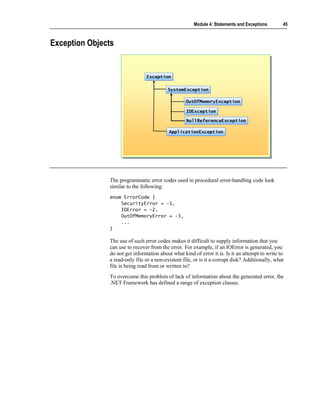
               To overcome this problem of lack of information about the generated error, the
               .NET Framework has defined a range of exception classes.
46   Module 4: Statements and Exceptions


                       All exceptions derive from the class named Exception, which is a part of the
                       common language runtime. The hierarchy between these exceptions is
                       displayed on the slide. The exception classes provide the following benefits:
                           Error messages are no longer represented by integer values or enums.
                           The programmatic integer values such as -3 disappear. In their place, you
                           use specific exception classes such as OutOfMemoryException. Each
                           exception class can reside inside its own source file and is decoupled from
                           all other exception classes.
                           Meaningful error messages are generated.
                           Each exception class is descriptive, clearly and obviously representing a
                           specific error. Instead of a –3, you use a class called
                           OutOfMemoryException. Each exception class can also contain
                           information specific to itself. For example, a FileNotFoundException class
                           could contain the name of the file that was not found.


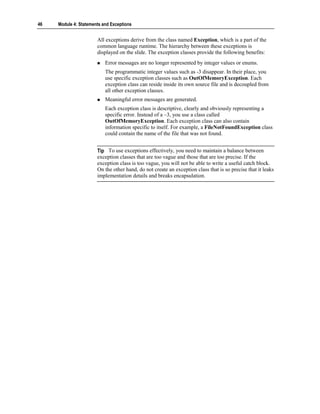
                       Tip To use exceptions effectively, you need to maintain a balance between
                       exception classes that are too vague and those that are too precise. If the
                       exception class is too vague, you will not be able to write a useful catch block.
                       On the other hand, do not create an exception class that is so precise that it leaks
                       implementation details and breaks encapsulation.
Module 4: Statements and Exceptions       47


Using try and catch Blocks

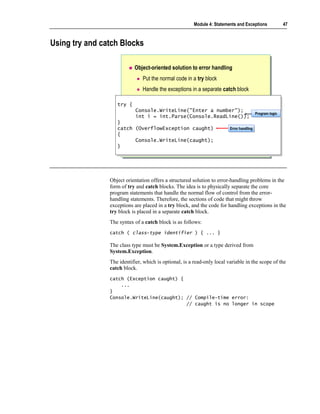
                           Object-oriented solution to error handling
                               Put the normal code in a try block
                               Handle the exceptions in a separate catch block

                   try {
                   try {
                            Console.WriteLine("Enter a number");
                            Console.WriteLine("Enter a number");   Program logic
                            int i = int.Parse(Console.ReadLine()); Program logic
                            int i = int.Parse(Console.ReadLine());
                   }}
                   catch (OverflowException caught)
                    catch (OverflowException caught)                     Error handling
                                                                         Error handling
                   {{
                          Console.WriteLine(caught);
                          Console.WriteLine(caught);
                   }}


                Object orientation offers a structured solution to error-handling problems in the
                form of try and catch blocks. The idea is to physically separate the core
                program statements that handle the normal flow of control from the error-
                handling statements. Therefore, the sections of code that might throw
                exceptions are placed in a try block, and the code for handling exceptions in the
                try block is placed in a separate catch block.
                The syntax of a catch block is as follows:
                catch ( class-type identifier ) { ... }

                The class type must be System.Exception or a type derived from
                System.Exception.
                The identifier, which is optional, is a read-only local variable in the scope of the
                catch block.
                catch (Exception caught) {
                    ...
                }
                Console.WriteLine(caught); // Compile-time error:
                                           // caught is no longer in scope
48   Module 4: Statements and Exceptions


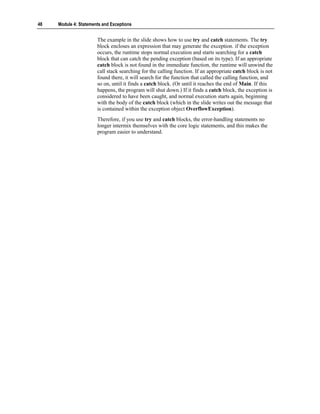
                       The example in the slide shows how to use try and catch statements. The try
                       block encloses an expression that may generate the exception. if the exception
                       occurs, the runtime stops normal execution and starts searching for a catch
                       block that can catch the pending exception (based on its type). If an appropriate
                       catch block is not found in the immediate function, the runtime will unwind the
                       call stack searching for the calling function. If an appropriate catch block is not
                       found there, it will search for the function that called the calling function, and
                       so on, until it finds a catch block. (Or until it reaches the end of Main. If this
                       happens, the program will shut down.) If it finds a catch block, the exception is
                       considered to have been caught, and normal execution starts again, beginning
                       with the body of the catch block (which in the slide writes out the message that
                       is contained within the exception object OverflowException).
                       Therefore, if you use try and catch blocks, the error-handling statements no
                       longer intermix themselves with the core logic statements, and this makes the
                       program easier to understand.
Module 4: Statements and Exceptions          49


Multiple catch Blocks

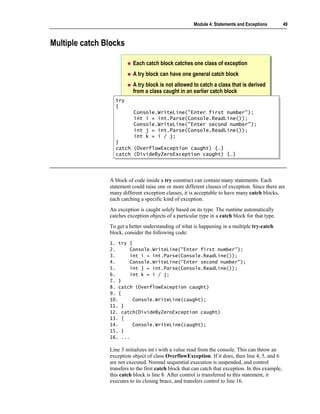
                           Each catch block catches one class of exception
                           A try block can have one general catch block
                           A try block is not allowed to catch a class that is derived
                           from a class caught in an earlier catch block
                  try
                   try
                  {{
                           Console.WriteLine("Enter first number");
                           Console.WriteLine("Enter first number");
                           int i = int.Parse(Console.ReadLine());
                           int i = int.Parse(Console.ReadLine());
                           Console.WriteLine("Enter second number");
                           Console.WriteLine("Enter second number");
                           int j = int.Parse(Console.ReadLine());
                           int j = int.Parse(Console.ReadLine());
                           int k = i / j;
                           int k = i / j;
                  }}
                  catch
                   catch   (OverflowException caught) {…}
                           (OverflowException caught) {…}
                  catch
                   catch   (DivideByZeroException caught) {…}
                           (DivideByZeroException caught) {…}


                A block of code inside a try construct can contain many statements. Each
                statement could raise one or more different classes of exception. Since there are
                many different exception classes, it is acceptable to have many catch blocks,
                each catching a specific kind of exception.
                An exception is caught solely based on its type. The runtime automatically
                catches exception objects of a particular type in a catch block for that type.
                To get a better understanding of what is happening in a multiple try-catch
                block, consider the following code:
                1. try {
                2.      Console.WriteLine("Enter first number");
                3.      int i = int.Parse(Console.ReadLine());
                4.      Console.WriteLine("Enter second number");
                5.      int j = int.Parse(Console.ReadLine());
                6.      int k = i / j;
                7. }
                8. catch (OverflowException caught)
                9. {
                10.      Console.WriteLine(caught);
                11. }
                12. catch(DivideByZeroException caught)
                13. {
                14.      Console.WriteLine(caught);
                15. }
                16. ...

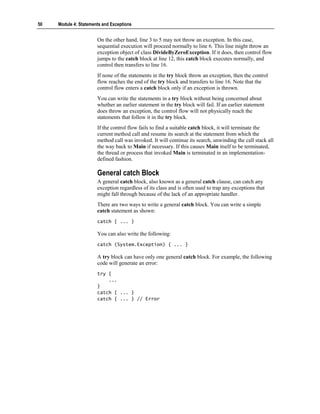
                Line 3 initializes int i with a value read from the console. This can throw an
                exception object of class OverflowException. If it does, then line 4, 5, and 6
                are not executed. Normal sequential execution is suspended, and control
                transfers to the first catch block that can catch that exception. In this example,
                this catch block is line 8. After control is transferred to this statement, it
                executes to its closing brace, and transfers control to line 16.
50   Module 4: Statements and Exceptions


                       On the other hand, line 3 to 5 may not throw an exception. In this case,
                       sequential execution will proceed normally to line 6. This line might throw an
                       exception object of class DivideByZeroException. If it does, then control flow
                       jumps to the catch block at line 12, this catch block executes normally, and
                       control then transfers to line 16.
                       If none of the statements in the try block throw an exception, then the control
                       flow reaches the end of the try block and transfers to line 16. Note that the
                       control flow enters a catch block only if an exception is thrown.
                       You can write the statements in a try block without being concerned about
                       whether an earlier statement in the try block will fail. If an earlier statement
                       does throw an exception, the control flow will not physically reach the
                       statements that follow it in the try block.
                       If the control flow fails to find a suitable catch block, it will terminate the
                       current method call and resume its search at the statement from which the
                       method call was invoked. It will continue its search, unwinding the call stack all
                       the way back to Main if necessary. If this causes Main itself to be terminated,
                       the thread or process that invoked Main is terminated in an implementation-
                       defined fashion.

                       General catch Block
                       A general catch block, also known as a general catch clause, can catch any
                       exception regardless of its class and is often used to trap any exceptions that
                       might fall through because of the lack of an appropriate handler.
                       There are two ways to write a general catch block. You can write a simple
                       catch statement as shown:
                       catch { ... }

                       You can also write the following:
                       catch (System.Exception) { ... }

                       A try block can have only one general catch block. For example, the following
                       code will generate an error:
                       try {
                           ...
                       }
                       catch { ... }
                       catch { ... } // Error
Module 4: Statements and Exceptions       51


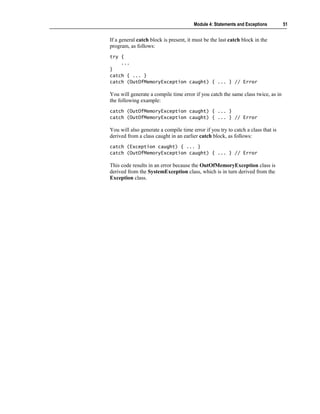
If a general catch block is present, it must be the last catch block in the
program, as follows:
try {
    ...
}
catch { ... }
catch (OutOfMemoryException caught) { ... } // Error

You will generate a compile time error if you catch the same class twice, as in
the following example:
catch (OutOfMemoryException caught) { ... }
catch (OutOfMemoryException caught) { ... } // Error

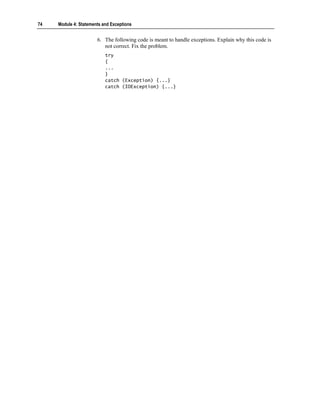
You will also generate a compile time error if you try to catch a class that is
derived from a class caught in an earlier catch block, as follows:
catch (Exception caught) { ... }
catch (OutOfMemoryException caught) { ... } // Error

This code results in an error because the OutOfMemoryException class is
derived from the SystemException class, which is in turn derived from the
Exception class.
52    Module 4: Statements and Exceptions


     Raising Exceptions


                                    The throw Statement
                                    The finally Clause
                                    Checking for Arithmetic Overflow
                                    Guidelines for Handling Exceptions


                        C# provides the throw statement and the finally clause so that programmers
                        can raise exceptions if required and handle them as appropriate.
                        After completing this lesson, you will be able to:
                            Raise your own exceptions.
                            Enable checking for arithmetic overflow.
Module 4: Statements and Exceptions      53


The throw Statement


                          Throw an appropriate exception
                          Give the exception a meaningful message


                 throw expression ;
                 throw expression ;


                 if (minute < 1 || minute >= 60) {
                  if (minute < 1 || minute >= 60) {
                    throw new InvalidTimeException(minute +
                    throw new InvalidTimeException(minute +
                                               " is not a valid minute");
                                                " is not a valid minute");
                    // !! Not reached !!
                    // !! Not reached !!
                 }}


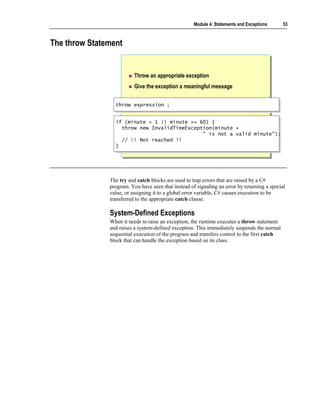
               The try and catch blocks are used to trap errors that are raised by a C#
               program. You have seen that instead of signaling an error by returning a special
               value, or assigning it to a global error variable, C# causes execution to be
               transferred to the appropriate catch clause.

               System-Defined Exceptions
               When it needs to raise an exception, the runtime executes a throw statement
               and raises a system-defined exception. This immediately suspends the normal
               sequential execution of the program and transfers control to the first catch
               block that can handle the exception based on its class.
54   Module 4: Statements and Exceptions


                       Raising Your Own Exceptions
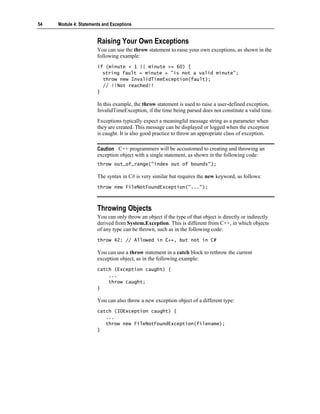
                       You can use the throw statement to raise your own exceptions, as shown in the
                       following example:
                       if (minute < 1 || minute >= 60) {
                         string fault = minute + "is not a valid minute";
                         throw new InvalidTimeException(fault);
                         // !!Not reached!!
                       }

                       In this example, the throw statement is used to raise a user-defined exception,
                       InvalidTimeException, if the time being parsed does not constitute a valid time.
                       Exceptions typically expect a meaningful message string as a parameter when
                       they are created. This message can be displayed or logged when the exception
                       is caught. It is also good practice to throw an appropriate class of exception.

                       Caution C++ programmers will be accustomed to creating and throwing an
                       exception object with a single statement, as shown in the following code:
                       throw out_of_range("index out of bounds");

                       The syntax in C# is very similar but requires the new keyword, as follows:
                       throw new FileNotFoundException("...");


                       Throwing Objects
                       You can only throw an object if the type of that object is directly or indirectly
                       derived from System.Exception. This is different from C++, in which objects
                       of any type can be thrown, such as in the following code:
                       throw 42; // Allowed in C++, but not in C#

                       You can use a throw statement in a catch block to rethrow the current
                       exception object, as in the following example:
                       catch (Exception caught) {
                           ...
                           throw caught;
                       }

                       You can also throw a new exception object of a different type:
                       catch (IOException caught) {
                          ...
                          throw new FileNotFoundException(filename);
                       }
Module 4: Statements and Exceptions         55


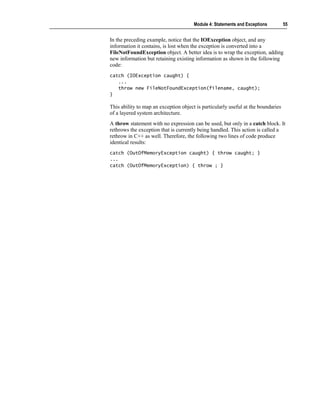
In the preceding example, notice that the IOException object, and any
information it contains, is lost when the exception is converted into a
FileNotFoundException object. A better idea is to wrap the exception, adding
new information but retaining existing information as shown in the following
code:
catch (IOException caught) {
   ...
   throw new FileNotFoundException(filename, caught);
}

This ability to map an exception object is particularly useful at the boundaries
of a layered system architecture.
A throw statement with no expression can be used, but only in a catch block. It
rethrows the exception that is currently being handled. This action is called a
rethrow in C++ as well. Therefore, the following two lines of code produce
identical results:
catch (OutOfMemoryException caught) { throw caught; }
...
catch (OutOfMemoryException) { throw ; }
56   Module 4: Statements and Exceptions


The finally Clause


                                   All of the statements in a finally block are always
                                   executed


                           Monitor.Enter(x);
                            Monitor.Enter(x);
                           try {
                            try {
                                ...
                                ...                                    Any catch blocks are optional
                                                                       Any catch blocks are optional
                           }}
                           finally {
                            finally {
                                Monitor.Exit(x);
                                Monitor.Exit(x);
                           }}


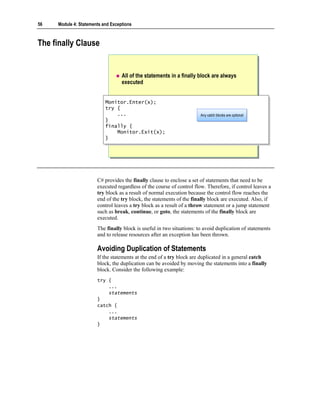
                       C# provides the finally clause to enclose a set of statements that need to be
                       executed regardless of the course of control flow. Therefore, if control leaves a
                       try block as a result of normal execution because the control flow reaches the
                       end of the try block, the statements of the finally block are executed. Also, if
                       control leaves a try block as a result of a throw statement or a jump statement
                       such as break, continue, or goto, the statements of the finally block are
                       executed.
                       The finally block is useful in two situations: to avoid duplication of statements
                       and to release resources after an exception has been thrown.

                       Avoiding Duplication of Statements
                       If the statements at the end of a try block are duplicated in a general catch
                       block, the duplication can be avoided by moving the statements into a finally
                       block. Consider the following example:
                       try {
                           ...
                           statements
                       }
                       catch {
                           ...
                           statements
                       }
Module 4: Statements and Exceptions        57


You can simplify the preceding code by rewriting it as follows:
try {
    ...
}
catch {
    ...
}
finally {
    statements
}

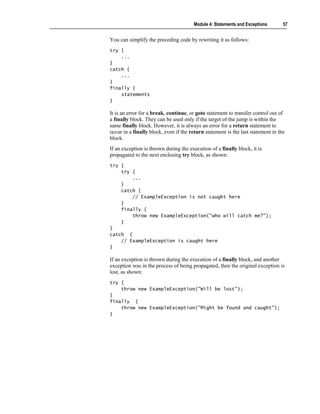
It is an error for a break, continue, or goto statement to transfer control out of
a finally block. They can be used only if the target of the jump is within the
same finally block. However, it is always an error for a return statement to
occur in a finally block, even if the return statement is the last statement in the
block.
If an exception is thrown during the execution of a finally block, it is
propagated to the next enclosing try block, as shown:
try {
    try {
        ...
    }
    catch {
        // ExampleException is not caught here
    }
    finally {
        throw new ExampleException("who will catch me?");
    }
}
catch {
    // ExampleException is caught here
}

If an exception is thrown during the execution of a finally block, and another
exception was in the process of being propagated, then the original exception is
lost, as shown:
try {
    throw new ExampleException("Will be lost");
}
finally {
    throw new ExampleException("Might be found and caught");
}
58   Module 4: Statements and Exceptions


Checking for Arithmetic Overflow

                                    By default, arithmetic overflow is not checked
                                           A checked statement turns overflow checking on

                           checked {
                            checked {                                          OverflowException
                                                                               OverflowException
                               int number = int.MaxValue;
                                int number = int.MaxValue;
                               Console.WriteLine(++number);
                                Console.WriteLine(++number);                      Exception object is thrown.
                           }}                                                     WriteLine is not executed.


                           unchecked {
                            unchecked {
                               int number = int.MaxValue;
                                int number = int.MaxValue;                         MaxValue + 1 is negative?
                               Console.WriteLine(++number);
                                Console.WriteLine(++number);
                           }}                                                  -2147483648


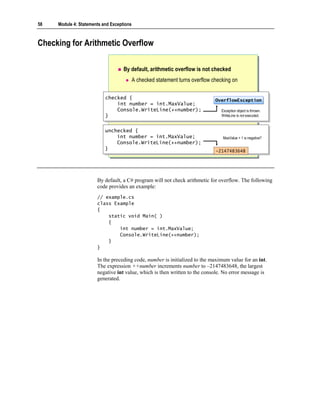
                       By default, a C# program will not check arithmetic for overflow. The following
                       code provides an example:
                       // example.cs
                       class Example
                       {
                           static void Main( )
                           {
                               int number = int.MaxValue;
                               Console.WriteLine(++number);
                           }
                       }

                       In the preceding code, number is initialized to the maximum value for an int.
                       The expression ++number increments number to –2147483648, the largest
                       negative int value, which is then written to the console. No error message is
                       generated.
Module 4: Statements and Exceptions       59


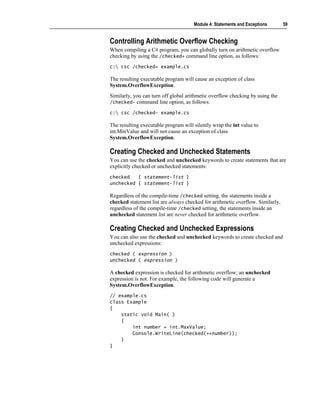
Controlling Arithmetic Overflow Checking
When compiling a C# program, you can globally turn on arithmetic overflow
checking by using the /checked+ command line option, as follows:
c: csc /checked+ example.cs

The resulting executable program will cause an exception of class
System.OverflowException.
Similarly, you can turn off global arithmetic overflow checking by using the
/checked- command line option, as follows:

c: csc /checked- example.cs

The resulting executable program will silently wrap the int value to
int.MinValue and will not cause an exception of class
System.OverflowException.

Creating Checked and Unchecked Statements
You can use the checked and unchecked keywords to create statements that are
explicitly checked or unchecked statements:
checked   { statement-list }
unchecked { statement-list }

Regardless of the compile-time /checked setting, the statements inside a
checked statement list are always checked for arithmetic overflow. Similarly,
regardless of the compile-time /checked setting, the statements inside an
unchecked statement list are never checked for arithmetic overflow.

Creating Checked and Unchecked Expressions
You can also use the checked and unchecked keywords to create checked and
unchecked expressions:
checked ( expression )
unchecked ( expression )

A checked expression is checked for arithmetic overflow; an unchecked
expression is not. For example, the following code will generate a
System.OverflowException.
// example.cs
class Example
{
    static void Main( )
    {
        int number = int.MaxValue;
        Console.WriteLine(checked(++number));
    }
}
60   Module 4: Statements and Exceptions


Guidelines for Handling Exceptions

                                   Throwing
                                       Avoid exceptions for normal or expected cases
                                       Never create and throw objects of class Exception
                                       Include a description string in an Exception object
                                       Throw objects of the most specific class possible
                                   Catching
                                       Arrange catch blocks from specific to general
                                       Do not let exceptions drop off Main


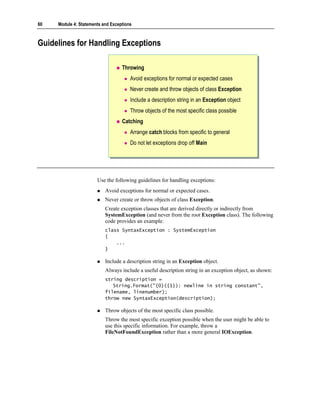
                       Use the following guidelines for handling exceptions:
                           Avoid exceptions for normal or expected cases.
                           Never create or throw objects of class Exception.
                           Create exception classes that are derived directly or indirectly from
                           SystemException (and never from the root Exception class). The following
                           code provides an example:
                           class SyntaxException : SystemException
                           {
                               ...
                           }

                           Include a description string in an Exception object.
                           Always include a useful description string in an exception object, as shown:
                           string description =
                              String.Format("{0}({1}): newline in string constant",
                           filename, linenumber);
                           throw new SyntaxException(description);

                           Throw objects of the most specific class possible.
                           Throw the most specific exception possible when the user might be able to
                           use this specific information. For example, throw a
                           FileNotFoundException rather than a more general IOException.
Module 4: Statements and Exceptions     61


Arrange catch blocks from specific to general.
Arrange your catch blocks from the most specific exception to the most
general exception, as shown:
catch (SyntaxException caught) { ... } // Do this
catch (Exception caught) { ... }

Do not let exceptions drop off Main.
Put a general catch clause in Main to ensure that exceptions never drop off
the end of the program.
static void Main( )
{
    try {
        ...
    }
    catch (Exception caught) {
        ...
    }
}
62   Module 4: Statements and Exceptions


Lab 4.2: Using Exceptions


                       Objectives
                       After completing this lab, you will be able to:
                           Throw and catch exceptions.
                           Display error messages.

                       Prerequisites
                       Before working on this lab, you should be familiar with the following:
                           Creating variables in C#
                           Using common operators in C#
                           Creating enum types in C#

                       Estimated time to complete this lab: 30 minutes
Module 4: Statements and Exceptions         63


Exercise 1
Validating the Day Number
                In this exercise, you will add functionality to the program that you created in
                Exercise 1. The program will examine the initial day number that is entered by
                the user. If it is less than 1 or greater than 365, the program will throw an
                InvalidArgument exception (“Day out of range”). The program will trap this
                exception in a catch clause and display a diagnostic message on the console.

                   To validate the day number
                1. Open the project WhatDay2.sln in the
                   install folderLabsLab04StarterWhatDay2 folder.
                2. Enclose the entire contents of WhatDay.Main in a try block.
                3. After the try block, add a catch clause that catches exceptions of type
                   System.Exception and name them caught. In the catch block, add a
                   WriteLine statement to write the exception caught to the console.
                4. Add an if statement after the declaration of the dayNum variable. The if
                   statement will throw a new exception object of type
                   System.ArgumentOutOfRangeException if dayNum is less than 1 or
                   greater than 365. Use the string literal “Day out of range” to create the
                   exception object.
64   Module 4: Statements and Exceptions


                       5. The completed program should be as follows:
                           using System;

                           enum MonthName { ... }

                           class WhatDay
                           {
                                static void Main( )
                                {
                                    try {
                                        Console.Write("Please enter a day number
                             between 1 and 365: ");
                                        string line = Console.ReadLine( );
                                        int dayNum = int.Parse(line);

                                          if (dayNum < 1 || dayNum > 365) {
                                              throw new ArgumentOutOfRangeException("Day
                               out of range");
                                          }

                                           int monthNum = 0;

                                           foreach (int daysInMonth in DaysInMonths) {
                                               if (dayNum <= daysInMonth) {
                                                   break;
                                               } else {
                                                   dayNum -= daysInMonth;
                                                   monthNum++;
                                               }
                                           }
                                           MonthName temp = (MonthName)monthNum;
                                           string monthName = temp.ToString( );

                                          Console.WriteLine("{0} {1}", dayNum,
                               monthName);
                                      }
                                      catch (Exception caught) {
                                          Console.WriteLine(caught);
                                      }
                                  }
                                  ...
                           }

                       6. Save your work.
                       7. Compile the WhatDay2.cs program and correct any errors. Run the
                          program. Use the table of data provided in Lab4.1 (Exercise 1) to verify that
                          the program is still working correctly.
                       8. Run the program, entering day numbers less than 1 and greater than 365.
                          Verify that invalid input is safely trapped and that the exception object is
                          thrown, caught, and displayed.
Module 4: Statements and Exceptions      65


Exercise 2
Handling Leap Years
               In this exercise, you will add functionality to the program that you worked on in
               Exercise 1. After you complete this exercise, the program will prompt the user
               for a year in addition to a day number. The program will detect whether the
               specified year is a leap year. It will validate whether the day number is between
               1 and 366 if the year is a leap year, or whether it is between 1 and 365 if the
               year is not a leap year. Finally, it will use a new foreach statement to correctly
               calculate the month and day pair for leap years.

                  To enter the year from the console
               1. Open the WhatDay3.sln project in the
                  install folderLabsLab04StarterWhatDay3 folder.
               2. Add to the beginning of WhatDay.Main a System.Console.Write
                  statement that writes a prompt to the console asking the user to enter a year.
               3. Change the declaration and initialization of the string line to an assignment.
                  Change string line = Console.ReadLine( ); to
                  line = Console.ReadLine( );.
               4. Add a statement to Main that declares a string variable called line and
                  initializes it with a line read from the console by the
                  System.Console.ReadLine method.
               5. Add a statement to Main that declares an int variable called yearNum and
                  initializes it with the integer returned by the int.Parse method.
66   Module 4: Statements and Exceptions


                       6. The completed program should be as follows:
                           using System;

                           enum MonthName { ... }

                           class WhatDay
                           {
                               static void Main( )
                               {
                                   try {
                                       Console.Write("Please enter the year: ");
                                       string line = Console.ReadLine( );
                                       int yearNum = int.Parse(line);

                                          Console.Write("Please enter a day number
                               between 1 and 365: ");
                                          line = Console.ReadLine( );
                                          int dayNum = int.Parse(line);

                                           // As before....
                                       }
                                       catch (Exception caught) {
                                           Console.WriteLine(caught);
                                       }
                                 }
                                 ...
                           }

                       7. Save your work.
                       8. Compile the WhatDay3.cs program and correct any errors.

                           To determine whether the year is a leap year
                       1. Add a statement immediately after the declaration of yearNum that declares
                          a bool variable called isLeapYear. Initialize this variable with a Boolean
                          expression that determines whether yearNum is a leap year. A year is a leap
                          year if the following two statements are both true:
                           • It is divisible by 4.
                           • It is either not divisible by 100, or it is divisible by 400.
                       2. Add an if statement immediately after the declaration of isLeapYear. In the
                          if statement, write the string “ IS a leap year” or “ is NOT a leap year” to the
                          console, depending on the value of isLeapyear. You will use this if
                          statement to verify that the Boolean leap year determination is correct.
Module 4: Statements and Exceptions       67


3. The completed program should be as follows:
   using System;

   enum MonthName { ... }

   class WhatDay
   {
       static void Main( )
       {
           try
           {
               Console.Write("Please enter the year: ");
               string line = Console.ReadLine( );
               int yearNum = int.Parse(line);

                    bool isLeapYear = (yearNum % 4 == 0)
                       && (yearNum % 100 != 0
                           || yearNum % 400 == 0);

                    if (isLeapYear)
                    {
                        Console.WriteLine(" IS a leap year");
                    } else
                    {
                        Console.WriteLine(" is NOT a leap year");
                    }

                  Console.Write("Please enter a day number
       between 1 and 365: ");
                  line = Console.ReadLine( );
                  int dayNum = int.Parse(line);

                    // As before...
                }
                catch (Exception caught)
                {
                    Console.WriteLine(caught);
                }
          }
          ...
   }

4. Save your work.
5. Compile the WhatDay3.cs program and correct any errors. Use the
   following table to verify that the Boolean leap year determination is correct.
   A leap year                              Not a leap year

   1996                                     1999
   2000                                     1900
   2004                                     2001

6. Comment out the if statement that you added in step 2.
68   Module 4: Statements and Exceptions


                           To validate the day number against 365 or 366
                       1. Immediately after the declaration of isLeapYear, add a declaration of an int
                          variable called maxDayNum. Initialize maxDayNum with either 366 or 365,
                          depending on whether isLeapYear is true or false, respectively.
                       2. Change the WriteLine statement that prompts the user for the day number.
                          It should display the range 1 to 366 if a leap year was entered and 1 to 365 if
                          a non–leap year was entered.
                       3. Compile the WhatDay3.cs program and correct any errors. Run the program
                          and verify that you have implemented the previous step correctly.
                       4. Change the if statement that validates the value of dayNum to use the
                          variable maxDayNum instead of the literal 365.
                       5. The completed program should be as follows:
                           using System;

                           enum MonthName { ... }

                           class WhatDay
                           {
                               static void Main( )
                               {
                                   try
                                   {
                                       Console.Write("Please enter the year: ");
                                       string line = Console.ReadLine( );
                                       int yearNum = int.Parse(line);

                                           bool isLeapYear = (yearNum % 4 == 0)
                                               && (yearNum % 100 != 0
                                                   || yearNum % 400 == 0);

                                           int maxDayNum = isLeapYear ? 366 : 365;

                                          Console.Write("Please enter a day number
                               between 1 and {0}: ", maxDayNum);
                                          line = Console.ReadLine( );
                                          int dayNum = int.Parse(line);

                                          if (dayNum < 1 || dayNum > maxDayNum) {
                                              throw new ArgumentOutOfRangeException("Day
                               out of range");
                                          }
                                          // As before....
                                      }
                                      catch (Exception caught)
                                      {
                                          Console.WriteLine(caught);
                                      }
                                  }
                                  ...
                           }
Module 4: Statements and Exceptions       69


6. Save your work.
7. Compile the WhatDay3.cs program and correct any errors. Run the program
   and verify that you have implemented the previous step correctly.

   To correctly calculate the month and day pair for leap years
1. After the if statement that validates the day number and the declaration of
   the monthNum integer, add an if-else statement. The Boolean expression
   used in this if-else statement will be the variable isLeapYear.
2. Move the foreach statement so it becomes the embedded statement in the if-
   else statement in both the true and the false cases. After this step, your code
   should be as follows:
   if (isLeapYear)
   {
       foreach (int daysInMonth in DaysInMonths) {
           ...
       }
   } else
   {
       foreach (int daysInMonth in DaysInMonths) {
           ...
       }
   }

3. Save your work.
4. Compile the WhatDay3.cs program and correct any errors. Run the program
   and verify that day numbers in non–leap years are still handled correctly.
5. The next step will use the DaysInLeapMonths collection that has been
   provided. This is a collection of int values like DaysInMonths, except that
   the second value in the collection (the number of days in February) is 29
   rather than 28.
6. Use DaysInLeapMonths instead of DaysInMonth in the true part of the
   if-else statement.
70   Module 4: Statements and Exceptions


                       7. The completed program should be as follows:
                           using System;

                           enum MonthName { ... }

                           class WhatDay
                           {
                               static void Main( )
                               {
                                   try {
                                       Console.Write("Please enter the year: ");
                                       string line = Console.ReadLine( );
                                       int yearNum = int.Parse(line);

                                           bool isLeapYear = (yearNum % 4 == 0)
                                               && (yearNum % 100 != 0
                                                   || yearNum % 400 == 0);

                                           int maxDayNum = isLeapYear ? 366 : 365;

                                        Console.Write("Please enter a day number
                             between 1 and {0}: ", maxDayNum);
                                        line = Console.ReadLine( );
                                        int dayNum = int.Parse(line);

                                        if (dayNum < 1 || dayNum > maxDayNum) {
                                            throw new ArgumentOutOfRangeException("Day
                             out of range");
                                        }

                                           int monthNum = 0;

                                      if (isLeapYear) {
                                          foreach (int daysInMonth in
                           DaysInLeapMonths) {
                                              if (dayNum <= daysInMonth) {
                                                  break;
                                              } else {
                                                  dayNum -= daysInMonth;
                                                  monthNum++;
                                              }
                                          }
                                      } else {
                                          foreach (int daysInMonth in DaysInMonths) {
                                              if (dayNum <= daysInMonth) {
                                                  break;
                                              } else {
                                                  dayNum -= daysInMonth;
                                                  monthNum++;
                                              }
                                          }
                                      }
                       Code continued on following page.
Module 4: Statements and Exceptions         71


                  MonthName temp = (MonthName)monthNum;
                  string monthName = temp.ToString( );
                  Console.WriteLine("{0} {1}", dayNum,
       monthName);
              }
              catch (Exception caught) {
                  Console.WriteLine(caught);
              }
          }
          ...
   }

8. Save your work.
9. Compile the WhatDay3.cs program and correct any errors. Run the
   program, using the data in the following table to verify that the program is
   working correctly.
   Year                       Day Number                 Month-Day Pair

   1999                       32                         February 1
   2000                       32                         February 1
   1999                       60                         March 1
   2000                       60                         February 29
   1999                       91                         April 1
   2000                       91                         March 31
   1999                       186                        July 5
   2000                       186                        July 4
   1999                       304                        October 31
   2000                       304                        October 30
   1999                       309                        November 5
   2000                       309                        November 4
   1999                       327                        November 23
   2000                       327                        November 22
   1999                       359                        December 25
   2000                       359                        December 24
72   Module 4: Statements and Exceptions


Review


                                   Introduction to Statements
                                   Using Selection Statements
                                   Using Iteration Statements
                                   Using Jump Statements
                                   Handling Basic Exceptions
                                   Raising Exceptions


                       1. Write an if statement that tests whether an int variable called hour is greater
                          than or equal to zero and less than 24. If it is not, reset hour to zero.


                       2. Write a do-while statement, the body of which reads an integer from the
                          console and stores it in an int called hour. Write the loop so that the loop
                          will exit only when hour has a value between 1 and 23 (inclusive).
Module 4: Statements and Exceptions       73


3. Write a for statement that meets all of the conditions of the preceding
   question and only allows five attempts to input a valid value for hour. Do
   not use break or continue statements.


4. Rewrite the code that you wrote for question 3, but this time use a break
   statement.


5. Write a statement that throws an exception of type
   ArgumentOutOfRangeException if the variable percent is less than zero
   or greater than 100.
74   Module 4: Statements and Exceptions


                       6. The following code is meant to handle exceptions. Explain why this code is
                          not correct. Fix the problem.
                           try
                           {
                           ...
                           }
                           catch (Exception) {...}
                           catch (IOException) {...}

7494604

  • 1.
    Module 4: Statements and Exceptions Contents Overview 1 Introduction to Statements 2 Using Selection Statements 6 Using Iteration Statements 17 Using Jump Statements 29 Lab 4.1: Using Statements 32 Handling Basic Exceptions 42 Raising Exceptions 52 Lab 4.2: Using Exceptions 62 Review 72
  • 2.
    Information in thisdocument, including URL and other Internet Web site references, is subject to change without notice. Unless otherwise noted, the example companies, organizations, products, domain names, e-mail addresses, logos, people, places, and events depicted herein are fictitious, and no association with any real company, organization, product, domain name, e-mail address, logo, person, places or events is intended or should be inferred. Complying with all applicable copyright laws is the responsibility of the user. Without limiting the rights under copyright, no part of this document may be reproduced, stored in or introduced into a retrieval system, or transmitted in any form or by any means (electronic, mechanical, photocopying, recording, or otherwise), or for any purpose, without the express written permission of Microsoft Corporation. Microsoft may have patents, patent applications, trademarks, copyrights, or other intellectual property rights covering subject matter in this document. Except as expressly provided in any written license agreement from Microsoft, the furnishing of this document does not give you any license to these patents, trademarks, copyrights, or other intellectual property.  2001−2002 Microsoft Corporation. All rights reserved. Microsoft, MS-DOS, Windows, Windows NT, ActiveX, BizTalk, IntelliSense, JScript, MSDN, PowerPoint, SQL Server, Visual Basic, Visual C++, Visual C#, Visual J#, Visual Studio, and Win32 are either registered trademarks or trademarks of Microsoft Corporation in the U.S.A. and/or other countries. The names of actual companies and products mentioned herein may be the trademarks of their respective owners.
  • 3.
    Module 4: Statementsand Exceptions 1 Overview Introduction to Statements Using Selection Statements Using Iteration Statements Using Jump Statements Handling Basic Exceptions Raising Exceptions One of the fundamental skills required to use a programming language is the ability to write the statements that form the logic of a program in that language. This module explains how to use some common statements in C#. It also describes how to implement exception handling in C#. In particular, this module shows how to throw errors as well as catch them, and how to use try-finally statement blocks to ensure that an exception does not cause the program to abort before cleaning up. After completing this module, you will be able to: Describe the different types of control statements. Use jump statements. Use selection statements. Use iteration statements. Handle and raise exceptions.
  • 4.
    2 Module 4: Statements and Exceptions Introduction to Statements Statement Blocks Types of Statements A program consists of a sequence of statements. At run time, these statements are executed one after the other, as they appear in the program, from left to right and from top to bottom. After completing this lesson, you will be able to: Group a set of statements together in C#. Use the different types of statements available in C#.
  • 5.
    Module 4: Statementsand Exceptions 3 Statement Blocks Use braces As block delimiters A block and its parent block Sibling blocks {{ cannot have a can have // code // code variable with variables with }} the same name the same name {{ {{ int i; int i; int i; int i; ... ... ... ... {{ }} int i; int i; ... ... ... ... {{ }} int i; int i; }} ... ... }} When developing C# applications, you need to group statements together just as you do in other programming languages. To do so, you use the syntax of languages such as C, C++, and Java, which means that you enclose groups of statements in braces: { and }. You do not use keyword matched delimiters such as the If ... End If of Microsoft® Visual Basic® for grouping statements. Grouping Statements into Blocks A group of statements enclosed between braces is referred to as a block. A block can contain a single statement or another block that is nested within it. Each block defines a scope. A variable that is declared in a block is called a local variable. The scope of a local variable extends from its declaration to the right brace that ends its enclosing block. It is good practice to declare a variable in the innermost block possible because the restricted visibility of the variable helps to make the program clearer.
  • 6.
    4 Module 4: Statements and Exceptions Using Variables in Statement Blocks In C#, you cannot declare a variable in an inner block with the same name as a variable in an outer block. For example, the following code is not allowed: int i; { int i; // Error: i already declared in parent block ... } However, you can declare variables with the same name in sibling blocks. Sibling blocks are blocks that are enclosed by the same parent block and are nested at the same level. The following is an example: { int i; ... } ... { int i; ... } You can declare variables anywhere in a statement block. Given this freedom, you can easily follow the recommendation of initializing a variable at the point of declaration.
  • 7.
    Module 4: Statementsand Exceptions 5 Types of Statements Selection Statements Selection Statements The if and switch statements The if and switch statements Iteration Statements Iteration Statements The while, do, for, and foreach statements The while, do, for, and foreach statements Jump Statements Jump Statements The goto, break, and continue statements The goto, break, and continue statements As the complexity of the problem being solved by a program increases, so does the complexity of the logic of the program. Consequently, the program requires structured flow control, which you can achieve by using higher-level constructs or statements. These statements can be grouped into the following categories: Selection statements The if and switch statements are known as selection statements. They make choices based on the value of expressions and selectively execute statements based on those choices. Iteration statements The while, do, for, and foreach statements execute repeatedly while a specific condition is true. They are also known as looping statements. Each of these statements is appropriate for a certain style of iteration. Jump statements The goto, break, and continue statements are used to unconditionally transfer control to another statement.
  • 8.
    6 Module 4: Statements and Exceptions Using Selection Statements The if Statement Cascading if Statements The switch Statement Quiz: Spot the Bugs The if and switch statements are known as selection statements. They make choices based on the value of expressions and selectively execute statements based on those choices. After completing this lesson, you will be able to: Use the if statement in C#. Use the switch statement in C#.
  • 9.
    Module 4: Statementsand Exceptions 7 The if Statement Syntax: if ( Boolean-expression ) if ( Boolean-expression ) first-embedded-statement first-embedded-statement else else second-embedded-statement second-embedded-statement No implicit conversion from int to bool int x; int x; ... ... if (x) ... if (x) ... // Must be if (x != 0) in C# // Must be if (x != 0) in C# if (x = 0) ... // Must be if (x == 0) in C# if (x = 0) ... // Must be if (x == 0) in C# The if statement is the primary decision-making statement. It can be coupled with an optional else clause, as shown: if ( Boolean-expression ) first-embedded-statement else second-embedded-statement The if statement evaluates a Boolean expression to determine the course of action to follow. If the Boolean expression evaluates to true, the control is transferred to the first embedded statement. If the Boolean expression evaluates to false, and there is an else clause, the control is transferred to the second embedded statement.
  • 10.
    8 Module 4: Statements and Exceptions Examples You can use a simple embedded if statement such as the following: if (number % 2 == 0) Console.WriteLine("even"); Although braces are not required in embedded statements, many style guides recommend using them because they make your code less error prone and easier to maintain. You can rewrite the previous example with braces as follows: if (number % 2 == 0) { Console.WriteLine("even"); } You can also use an if statement block such as the following: if (minute == 60) { minute = 0; hour++; } Converting Integers to Boolean Values Implicit conversion from an integer to a Boolean value is a potential source of bugs. To avoid such conversion-related bugs, C# does not support integer to Boolean value conversion. This is a significant difference between C# and other similar languages. For example, the following statements, which at best generate warnings in C and C++, result in compilation errors in C#: int x; ... if (x) ... // Must be x != 0 in C# if (x = 0) ... // Must be x == 0 in C#
  • 11.
    Module 4: Statementsand Exceptions 9 Cascading if Statements enum Suit { Clubs, Hearts, Diamonds, Spades } enum Suit { Clubs, Hearts, Diamonds, Spades } Suit trumps = Suit.Hearts; Suit trumps = Suit.Hearts; if (trumps == Suit.Clubs) if (trumps == Suit.Clubs) color = "Black"; color = "Black"; else if (trumps == Suit.Hearts) else if (trumps == Suit.Hearts) color = "Red"; color = "Red"; else if (trumps == Suit.Diamonds) else if (trumps == Suit.Diamonds) color = "Red"; color = "Red"; else else color = "Black"; color = "Black"; You can handle cascading if statements by using an else if statement. C# does not support the else if statement but forms an else if-type statement from an else clause and an if statement, as in C and C++. Languages such as Visual Basic support cascading if statements by using an else if statement between the initial if statement and the final else statement. By using the else if construct, you can have any number of branches. However, the statements controlled by a cascading if statement are mutually exclusive, so that only one statement from the set of else if constructs is executed.
  • 12.
    10 Module 4: Statements and Exceptions Nesting if Statements Nesting one if statement within another if statement creates a potential ambiguity called a dangling else, as shown in the following example: if (percent >= 0 && percent <= 100) if (percent > 50) Console.WriteLine("Pass"); else Console.WriteLine("Error: out of range"); The else is indented to the same column as the first if. When you read the code, it appears that the else does not associate with the second if. This is dangerously misleading. Regardless of the layout, the compiler binds an else clause to its nearest if statement. This means that the compiler will interpret the above code as follows: if (percent >= 0 && percent <= 100) { if (percent > 50) Console.WriteLine("Pass"); else Console.WriteLine("Error: out of range"); } One way you can make the else associate with the first if is to use a block, as follows: if (percent >= 0 && percent <= 100) { if (percent > 50) Console.WriteLine("Pass"); } else { Console.WriteLine("Error: out of range"); } Tip It is best to format cascading if statements with proper indentation; otherwise, long decisions quickly become unreadable and trail off the right margin of the page or screen.
  • 13.
    Module 4: Statementsand Exceptions 11 The switch Statement Use switch statements for multiple case blocks Use break statements to ensure that no fall through occurs switch (trumps) { switch (trumps) { case Suit.Clubs : case Suit.Clubs : case Suit.Spades : case Suit.Spades : color = "Black"; break; color = "Black"; break; case Suit.Hearts : case Suit.Hearts : case Suit.Diamonds : case Suit.Diamonds : color = "Red"; break; color = "Red"; break; default: default: color = "ERROR"; break; color = "ERROR"; break; }} The switch statement provides an elegant mechanism for handling complex conditions that would otherwise require nested if statements. It consists of multiple case blocks, each of which specifies a single constant and an associated case label. You cannot group a collection of constants together in a single case label. Each constant must have its own case label. A switch block can contain declarations. The scope of a local variable or constant that is declared in a switch block extends from its declaration to the end of the switch block, as is shown in the example on the slide. Execution of switch Statements A switch statement is executed as follows: 1. If one of the constants specified in a case label is equal to the value of the switch expression, control is transferred to the statement list following the matched case label. 2. If no case label constant is equal to the value of the switch expression, and the switch statement contains a default label, control is transferred to the statement list following the default label. 3. If no case label constant is equal to the value of the switch expression, and the switch statement does not contain a default label, control is transferred to the end of the switch statement.
  • 14.
    12 Module 4: Statements and Exceptions You can use a switch statement to evaluate only the following types of expressions: any integer type, a char, an enum, or a string. You can also evaluate other expression types by using the switch statement, as long as there is exactly one user-defined implicit conversion from the disallowed type to one of the allowed types. Note Unlike in Java, C, or C++, the governing type of a switch statement in C# can be a string. With a string expression, the value null is permitted as a case label constant. For more information about conversion operators, search for “conversion operators” in the Microsoft .NET Framework SDK Help documents. Grouping Constants To group several constants together, repeat the keyword case for each constant, as shown in the following example: enum MonthName { January, February, ..., December } MonthName current; int monthDays; ... switch (current) { case MonthName.February : monthDays = 28; break; case MonthName.April : case MonthName.June : case MonthName.September : case MonthName.November : monthDays = 30; break; default : monthDays = 31; break; } You use the case and default labels only to provide entry points for the control flow of the program based on the value of the switch expression. They do not alter the control flow of the program. The values of the case label constants must be unique. This means that you cannot have two constants that have the same value. For example, the following example will generate a compile-time error: switch (trumps) { case Suit.Clubs : case Suit.Clubs : // Error: duplicate label ... default : default : // Error: duplicate label again ... }
  • 15.
    Module 4: Statementsand Exceptions 13 Using break in switch Statements Unlike in Java, C, or C++, C# statements associated with one or more case labels cannot silently fall through or continue to the next case label. A silent fall through occurs when execution proceeds without generating an error. In other words, you must ensure that the last statement associated with a set of case labels does not allow the control flow to reach the next set of case labels. Statements that help you to fulfill this requirement, known as the no fall through rule, are the break statement (probably the most common), the goto statement (very rare), the return statement, the throw statement, and an infinite loop. The following example will generate a compile-time error because it breaks the no fall through rule: string suffix = "th"; switch (days % 10) { case 1 : if (days / 10 != 1) { suffix = "st"; break; } // Error: fall through here case 2 : if (days / 10 != 1) { suffix = "nd"; break; } // Error: fall through here case 3 : if (days / 10 != 1) { suffix = "rd"; break; } // Error: fall through here default : suffix = "th"; // Error: fall through here }
  • 16.
    14 Module 4: Statements and Exceptions You can fix the error in this example by rewriting the code as follows: switch (days % 10) { case 1 : suffix = (days / 10 == 1) ? "th" : "st"; break; case 2 : suffix = (days / 10 == 1) ? "th" : "nd"; break; case 3 : suffix = (days / 10 == 1) ? "th" : "rd"; break; default : suffix = "th"; break; } Using goto in switch Statements In C#, unlike in Java, C, or C++, you can use a case label and a default label as the destination of a goto statement. You can use a goto statement this way to achieve the fall through effect, if necessary. For example, the following code will compile without any problem: switch (days % 10) { case 1 : if (days / 10 != 1) { suffix = "st"; break; } goto case 2; case 2 : if (days / 10 != 1) { suffix = "nd"; break; } goto case 3; case 3 : if (days / 10 != 1) { suffix = "rd"; break; } goto default; default : suffix = "th"; break; } Because of the no fall through rule, you can rearrange sections of a switch statement without affecting the overall behavior of the switch statement.
  • 17.
    Module 4: Statementsand Exceptions 15 Quiz: Spot the Bugs if number % 2 == 0 if number % 2 == 0 ... ... 1 1 if (percent < 0) || (percent > 100) ... if (percent < 0) || (percent > 100) ... 2 2 if (minute == 60); if (minute == 60); minute = 0; 3 3 minute = 0; switch (trumps) { switch (trumps) { case Suit.Clubs, Suit.Spades : case Suit.Clubs, Suit.Spades : color = "Black"; color = "Black"; case Suit.Hearts, Suit.Diamonds : case Suit.Hearts, Suit.Diamonds : 4 4 color = "Red"; color = "Red"; defualt : defualt : ... ... }} In this quiz, you can work with a partner to spot the bugs in the code on the slide. To see the answers to this quiz, turn the page.
  • 18.
    16 Module 4: Statements and Exceptions Answers 1. The if statement is not in parentheses. The C# compiler traps this bug as a compile-time error. The corrected code is as follows: if (number % 2 == 0) ... 2. The if statement as a whole is not fully parenthesized. The C# compiler traps this bug as a compile-time error. The corrected code is as follows: if ((percent < 0) || (percent > 100)) ... 3. The if statement has a single semicolon as its embedded statement. A single semicolon is called an empty statement in the C# Language Reference document and a null statement in the C# compiler diagnostic messages. It does nothing, but it is allowed. The layout of the statements does not affect how the compiler parses the syntax of the code. Hence, the compiler reads the code as: if (minute == 60) ; minute = 0; The C# compiler traps this bug as a compile-time warning. 4. The following errors are present: a. There is more than one constant in the same case label. The C# compiler traps this bug as a compile-time error. b. The statements associated with each case fall through to the next case. The C# compiler traps this bug as a compile-time error. c. The keyword default has been misspelled. Unfortunately, this is still allowable code, as it creates a simple identifier label. The C# compiler traps this bug as two compile-time warnings: one indicating unreachable code, and another indicating that the default: label has not been used.
  • 19.
    Module 4: Statementsand Exceptions 17 Using Iteration Statements The while Statement The do Statement The for Statement The foreach Statement Quiz: Spot the Bugs The while, do, for, and foreach statements are known as iteration statements. You use them to perform operations while a specific condition is true. After completing this lesson, you will be able to: Use iteration statements in C#. Identify errors in the use of iteration statements in C#.
  • 20.
    18 Module 4: Statements and Exceptions The while Statement Execute embedded statements based on Boolean value Evaluate Boolean expression at beginning of loop Execute embedded statements while Boolean value Is True int i = 0; int i = 0; while (i < 10) { while (i < 10) { Console.WriteLine(i); Console.WriteLine(i); i++; i++; }} 0 1 2 3 4 5 6 7 8 9 The while statement is the simplest of all iteration statements. It repeatedly executes an embedded statement while a Boolean expression is true. Note that the expression that the while statement evaluates must be Boolean, since C# does not support implicit conversion from an integer to a Boolean value. Flow of Execution A while statement is executed as follows: 1. The Boolean expression controlling the while statement is evaluated. 2. If the Boolean expression yields true, control is transferred to the embedded statement. When control reaches the end of the embedded statement, control is implicitly transferred to the beginning of the while statement, and the Boolean expression is re-evaluated. 3. If the Boolean expression yields false, control is transferred to the end of the while statement. Therefore, while the controlling Boolean expression is true, the program repeatedly executes the embedded statement. The Boolean expression is tested at the start of the while loop. Therefore, it is possible that the embedded statement may never be executed at all.
  • 21.
    Module 4: Statementsand Exceptions 19 Examples You can use a simple embedded statement as shown in the following example: while (i < 10) Console.WriteLine(i++); When using embedded statements, you do not need to use braces. Nevertheless, many style guides recommend using them because they simplify maintenance. You can rewrite the previous example with braces as follows: while (i < 10) { Console.WriteLine(i++); } You can also use a while statement block as shown in the following example: while (i < 10) { Console.WriteLine(i); i++; } Tip Despite being the simplest iteration statement, the while statement poses potential problems for developers who are not careful. The classic syntax of a while statement is as follows: initializer while ( Boolean-expression ) { embedded-statement update } It is easy to forget the update part of the while block, particularly if your attention is focused on the Boolean expression.
  • 22.
    20 Module 4: Statements and Exceptions The do Statement Execute embedded statements based on Boolean value Evaluate Boolean expression at end of loop Execute embedded statements while Boolean value Is True int i = 0; int i = 0; do { do { Console.WriteLine(i); Console.WriteLine(i); i++; i++; } while (i < 10); } while (i < 10); 0 1 2 3 4 5 6 7 8 9 A do statement is always coupled with a while statement. It is similar to a while statement, except that the Boolean expression that determines whether to continue or exit the loop is evaluated at the end of the loop rather than at the start. This means that, unlike a while statement, which iterates zero or more times, a do statement iterates one or more times. Therefore, a do statement always executes its embedded statement at least once. This behavior is particularly useful when you need to validate input before allowing program execution to proceed. Flow of Execution A do statement is executed as follows: 1. Control is transferred to the embedded statement. 2. When control reaches the end of the embedded statement, the Boolean expression is evaluated. 3. If the Boolean expression yields true, control is transferred to the beginning of the do statement. 4. If the Boolean expression yields false, control is transferred to the end of the do statement.
  • 23.
    Module 4: Statementsand Exceptions 21 Examples You can use a simple embedded do statement as shown in the following example: do Console.WriteLine(i++); while (i < 10); Just as with the if and while statements, you do not need to use braces in embedded do statements, but it is a good practice to use them. You can also use a do statement block as follows: do { Console.WriteLine(i); i++; } while (i < 10); In all cases, you must end a do statement with a semicolon, as follows: do { Console.WriteLine(i++); } while (i < 10) // Error no ; here
  • 24.
    22 Module 4: Statements and Exceptions The for Statement Place update information at the start of the loop for (int i = 0; i < 10; i++) { for (int i = 0; i < 10; i++) { Console.WriteLine(i); Console.WriteLine(i); }} 0 1 2 3 4 5 6 7 8 9 Variables in a for block are scoped only within the block for (int i = 0; i < 10; i++) for (int i = 0; i < 10; i++) Console.WriteLine(i); Console.WriteLine(i); Console.WriteLine(i); // Error: i is no longer in scope Console.WriteLine(i); // Error: i is no longer in scope A for loop can iterate over several values for (int i = 0, j = 0; ... ; i++, j++) for (int i = 0, j = 0; ... ; i++, j++) When using while statements, developers often forget to update the control variable. The following code provides an example of this mistake: int i = 0; while (i < 10) Console.WriteLine(i); // Mistake: no i++ This mistake occurs because the developer’s attention is focused on the body of the while statement and not on the update. Also, the while keyword and the update code may be very far apart. You can minimize these errors by using the for statement. The for statement overcomes the problem of omitted updates by moving the update code to the beginning of the loop, where it is harder to overlook. The syntax of the for statement is as follows: for ( initializer ; condition ; update ) embedded-statement Important In a for statement, the update code precedes the embedded statement. Nevertheless, the update code is executed by the runtime after the embedded statement.
  • 25.
    Module 4: Statementsand Exceptions 23 The syntax of the for statement is essentially identical to that of the while statement, as shown in the following example: initializer while ( condition ) { embedded-statement update } As with all iteration statements, the condition in a for block must be a Boolean expression that serves as a continuation condition and not a termination condition. Examples The initializer, condition, and update components of a for statement are optional. However, an empty condition is considered implicitly true and can easily cause an infinite loop. The following code provides an example: for (;;) { Console.WriteLine("Help "); ... } As with the while and do statements, you can use a simple embedded statement or a block statement as shown in the following examples: for (int i = 0; i < 10; i++) Console.WriteLine(i); for (int i = 0; i < 10; i++) { Console.WriteLine(i); Console.WriteLine(10 – i); }
  • 26.
    24 Module 4: Statements and Exceptions Declaring Variables One subtle difference between the while statement and the for statement is that a variable declared in the initializer code of a for statement is scoped only within the for block. For example, the following code generates a compile-time error: for (int i = 0; i < 10; i++) Console.WriteLine(i); Console.WriteLine(i); // Error: i is no longer in scope In conjunction with this rule, it is important to note that you cannot declare a variable in a for block with the same name as a variable in an outer block. This rule also applies to variables declared in the initializer code of a for statement. For example, the following code generates a compile-time error: int i; for (int i = 0; i < 10; i++) // Error: i is already in scope However, the following code is allowed: for (int i = 0; i < 10; i++) ... for (int i = 0; i < 20; i++) ... Further, you can initialize two or more variables in the initializer code of a for statement, as follows: for (int i = 0, j = 0; ... ; ...) However, the variables must be of the same type. Therefore, the following is not permitted: for (int i = 0, long j = 0; i < 10; i++) ... You can also use two or more expression statements separated by a comma or commas in the update code of a for statement, as follows: for (int i = 0, j = 0; ... ; i++, j++) The for statement is best suited to situations in which the number of iterations is known. They are particularly well suited to modifying each element of an array.
  • 27.
    Module 4: Statementsand Exceptions 25 The foreach Statement Choose the type and name of the iteration variable Execute embedded statements for each element of the collection class ArrayList numbers = ArrayList numbers = new ArrayList( ); new ArrayList( ); for (int i = 0; i < for (int i = 0; i < 10; i++ ) { 10; i++ ) { numbers.Add(i); numbers.Add(i); }} foreach (int number in numbers) { foreach (int number in numbers) { Console.WriteLine(number); Console.WriteLine(number); }} 0 1 2 3 4 5 6 7 8 9 Collections are software entities whose purpose is to collect other software entities, much as a ledger can be thought of as a collection of bank accounts or a house as a collection of rooms. The Microsoft .NET Framework provides a simple collection class called ArrayList. You can use ArrayList to create a collection variable and add elements to the collection. For example, consider the following code: using System.Collections; ... ArrayList numbers = new ArrayList( ); for (int i = 0; i < 10; i++) { numbers.Add(i); } You can write a for statement that accesses and prints each collection element from this collection class in turn: for (int i = 0; i < numbers.Count; i++) { int number = (int)numbers[i]; Console.WriteLine(number); } This for statement contains many individual statements that in combination implement the mechanism used to iterate through each collection element of numbers. However, this solution is not easy to implement and is prone to error. To address this problem, C# provides the foreach statement, which allows you to iterate through a collection without using multiple statements. Rather than explicitly extracting each element from a collection by using syntax specific to the particular collection, you use the foreach statement to approach the problem in the opposite way. You effectively instruct the collection to present its elements one at a time. Instead of taking the embedded statement to the collection, the collection is taken to the embedded statement.
  • 28.
    26 Module 4: Statements and Exceptions By using the foreach statement, you can rewrite the previous for statement as follows: foreach (int number in numbers) Console.WriteLine(number); The foreach statement executes the embedded statement for each element of the collection class numbers. You only need to choose the type and name of the iteration variable, which in this case are int and number, respectively. You cannot modify the elements in a collection by using a foreach statement because the iteration variable is implicitly readonly. For example: foreach (int number in numbers) { number++; // Compile-time error Console.WriteLine(number); } Tip You can use a foreach statement to iterate through the values of an enumerator by using the Enum.GetValues() method, which returns an array of objects. It is important to be cautious when deciding the type of the foreach iteration variable. In some circumstances, a wrong iteration variable type might not be detected until run time.
  • 29.
    Module 4: Statementsand Exceptions 27 Quiz: Spot the Bugs for (int i = 0, i < 10, i++) for (int i = 0, i < 10, i++) 1 1 Console.WriteLine(i); Console.WriteLine(i); int i = 0; int i = 0; while (i < 10) while (i < 10) 2 2 Console.WriteLine(i); Console.WriteLine(i); for (int i = 0; i >= 10; i++) for (int i = 0; i >= 10; i++) Console.WriteLine(i); 3 3 Console.WriteLine(i); do do ... ... string line = Console.ReadLine( ); 4 4 string line = Console.ReadLine( ); guess = int.Parse(line); guess = int.Parse(line); while (guess != answer); while (guess != answer); In this quiz, you can work with a partner to spot the bugs in the code on the slide. To see the answers to this quiz, turn the page.
  • 30.
    28 Module 4: Statements and Exceptions Answers 1. The for statement elements are separated by commas rather than semicolons. The C# compiler traps this bug as a compile-time error. The corrected code is as follows: for (int i = 0; i < 10; i++) ... 2. The while statement does not update the continuation expression. It will loop forever. This bug does not generate a warning or an error at compile time. The corrected code is as follows: int i = 0; while (i < 10) { Console.WriteLine(i); i++; } 3. The for statement has a termination rather than a continuation condition. It will never loop at all. This bug does not generate a warning or an error at compile time. The corrected code is as follows: for (int i = 0; i < 10; i++) ... 4. The statements between do and while must be grouped together in a block. The C# compiler traps this bug as a compile-time error. The corrected code is as follows: do { ... string line = Console.ReadLine( ); guess = int.Parse(line); } while (guess != answer);
  • 31.
    Module 4: Statementsand Exceptions 29 Using Jump Statements The goto Statement The break and continue Statements The goto, break, and continue statements are known as jump statements. You use them to transfer control from one point in the program to another, at any time. In this section, you will learn how to use jump statements in C# programs.
  • 32.
    30 Module 4: Statements and Exceptions The goto Statement Flow of control transferred to a labeled statement Can easily result in obscure “spaghetti” code if (number % 2 == 0) goto Even; if (number % 2 == 0) goto Even; Console.WriteLine("odd"); Console.WriteLine("odd"); goto End; goto End; Even: Even: Console.WriteLine("even"); Console.WriteLine("even"); End:; End:; The goto statement is the most primitive C# jump statement. It transfers control to a labeled statement. The label must exist and must be in the scope of the goto statement. More than one goto statement can transfer control to the same label. The goto statement can transfer control out of a block, but it can never transfer control into a block. The purpose of this restriction is to avoid the possibility of jumping past an initialization. The same rule exists in C++ and other languages as well. The goto statement and the targeted label statement can be very far apart in the code. This distance can easily obscure the control-flow logic and is the reason that most programming guidelines recommend that you do not use goto statements. Note The only situations in which goto statements are recommended are in switch statements or to transfer control to the outside of a nested loop.
  • 33.
    Module 4: Statementsand Exceptions 31 The break and continue Statements The break statement jumps out of an iteration The continue statement jumps to the next iteration int i = 0; int i = 0; while (true) { while (true) { Console.WriteLine(i); Console.WriteLine(i); i++; i++; if (i < 10) if (i < 10) continue; continue; else else break; break; }} A break statement exits the nearest enclosing switch, while, do, for, or foreach statement. A continue statement starts a new iteration of the nearest enclosing while, do, for, or foreach statement. The break and continue statements are not very different from a goto statement, whose use can easily obscure control-flow logic. For example, you can rewrite the while statement that is displayed on the slide without using break or continue as follows: int i = 0; while (i < 10) { Console.WriteLine(i); i++; } Preferably, you can rewrite the previous code by using a for statement, as follows: for (int i = 0; i < 10; i++) { Console.WriteLine(i); }
  • 34.
    32 Module 4: Statements and Exceptions Lab 4.1: Using Statements Objectives After completing this lab, you will be able to: Use statements to control the flow of execution. Use looping statements. Prerequisites Before working on this lab, you should be familiar with the following: Creating variables in C# Using common operators in C# Creating enum types in C# Estimated time to complete this lab: 30 minutes
  • 35.
    Module 4: Statementsand Exceptions 33 Exercise 1 Converting a Day of the Year into a Month and Day Pair In this exercise, you will write a program that reads an integer day number (between 1 and 365) from the console and stores it in an integer variable. The program will convert this number into a month and a day of the month and then print the result to the console. For example, entering 40 should result in “February 9” being displayed. (In this exercise, the complications associated with leap years are ignored.) To read the day number from the console 1. Open the WhatDay1.sln project in the install folderLabsLab04StarterWhatDay1 folder. The WhatDay class contains a variable that contains the number of days in each month stored in a collection. For now, you do not need to understand how this works. 2. Add a System.Console.Write statement to WhatDay.Main that writes a prompt to the console asking the user to enter a day number between 1 and 365. 3. Add a statement to Main that declares a string variable called line and initializes it with a line read from the console by the System.Console.ReadLine method. 4. Add a statement to Main that declares an int variable called dayNum and initializes it with the integer returned from the int.Parse method. The complete code should be as follows: using System; class WhatDay { static void Main( ) { Console.Write("Please enter a day number between 1 and 365: "); string line = Console.ReadLine( ); int dayNum = int.Parse(line); // // To do: add code here // } ... } 5. Save your work. 6. Compile the WhatDay1.cs program and correct any errors. Run the program.
  • 36.
    34 Module 4: Statements and Exceptions To calculate the month and day pair from a day number 1. Add a statement to Main that declares an int variable called monthNum and initializes it to zero. 2. Ten commented out if statement (one for each month from January to October) have been provided for you. Uncomment the ten if statements and add two more similar if statements for the months November and December to Main. Tip Multiple comments can be removed (but their contents retained) by selecting the lines, then choosing Edit, Advanced, and then Uncomment Selection. 3. Add an identifier label called End to Main after the last if statement. 4. Add a statement after the End label that declares an uninitialized string variable called monthName. 5. A switch statement has been partially provided for you after the End label. Ten commented out case labels for the months January to October are already present. Uncomment them and add two more similar case labels and their contents for the months November and December. Add a default label to the switch statement. Add a statement to the default label that assigns the string literal “not done yet” to the variable monthName. 6. After the switch statement, use the WriteLine method to output the values for dayNum and monthName.
  • 37.
    Module 4: Statementsand Exceptions 35 7. The completed program should be as follows: using System; class WhatDay { static void Main( ) { Console.Write("Please enter a day number between 1 and 365: "); string line = Console.ReadLine( ); int dayNum = int.Parse(line); int monthNum = 0; if (dayNum <= 31) { // January goto End; } else { dayNum -= 31; monthNum++; } if (dayNum <= 28) { // February goto End; } else { dayNum -= 28; monthNum++; } if (dayNum <= 31) { // March goto End; } else { dayNum -= 31; monthNum++; } Code continued on following page.
  • 38.
    36 Module 4: Statements and Exceptions if (dayNum <= 30) { // April goto End; } else { dayNum -= 30; monthNum++; } if (dayNum <= 31) { // May goto End; } else { dayNum -= 31; monthNum++; } if (dayNum <= 30) { // June goto End; } else { dayNum -= 30; monthNum++; } if (dayNum <= 31) { // July goto End; } else { dayNum -= 31; monthNum++; } if (dayNum <= 31) { // August goto End; } else { dayNum -= 31; monthNum++; } if (dayNum <= 30) { // September goto End; } else { dayNum -= 30; monthNum++; } if (dayNum <= 31) { // October goto End; } else { dayNum -= 31; monthNum++; } if (dayNum <= 30) { // November goto End; } else { dayNum -= 30; monthNum++; } Code continued on following page.
  • 39.
    Module 4: Statementsand Exceptions 37 if (dayNum <= 31) { // December goto End; } else { dayNum -= 31; monthNum++; } End: string monthName; switch (monthNum) { case O : monthName = "January"; break; case 1 : monthName = "February"; break; case 2 : monthName = "March"; break; case 3 : monthName = "April"; break; case 4 : monthName = "May"; break; case 5 : monthName = "June"; break; case 6 : monthName = "July"; break; case 7 : monthName = "August"; break; case 8 : monthName = "September"; break; case 9 : monthName = "October"; break; case 10 : monthName = "November"; break; case 11 : monthName = "December"; break; default: monthName = "not done yet"; break; } Console.WriteLine("{0} {1}", dayNum, monthName); } ... } 8. Save your work.
  • 40.
    38 Module 4: Statements and Exceptions 9. Compile the WhatDay1.cs program and correct any errors. Run the program. Verify that the program is working correctly by using the following data. Day number Month and day 32 February 1 60 March 1 91 April 1 186 July 5 304 October 31 309 November 5 327 November 23 359 December 25 To calculate the name of the month by using an enum 1. You will now replace the switch statement that determines the month name from a month number with a more compact mechanism. Declare an enum type called MonthName and populate it with the names of the twelve months, starting with January and ending with December. 2. Comment out the entire switch statement. Tip Multiple lines of code can be commented by selecting the lines, then choosing Edit, Advanced, and then Comment Selection. 3. In place of the switch statement, add a statement that declares an enum MonthName variable called temp. Initialize temp from the monthNum int variable. You will need the following cast expression: (MonthName)monthNum 4. Replace the initialization of monthName with the expression temp.ToString( )
  • 41.
    Module 4: Statementsand Exceptions 39 5. The completed program should be as follows: using System; enum MonthName { January, February, March, April, May, June, July, August, September, October, November, December } class WhatDay { static void Main( ) { Console.Write("Please enter a day number between 1 and 365: "); string line = Console.ReadLine( ); int dayNum = int.Parse(line); int monthNum = 0; // 12 if statements, as above End: MonthName temp = (MonthName)monthNum; string monthName = temp.ToString( ); Console.WriteLine("{0} {1}", dayNum, monthName); } ... } 6. Save your work. 7. Compile the WhatDay1.cs program and correct any errors. Run the program. Use the preceding table of data to verify that the program is still working correctly.
  • 42.
    40 Module 4: Statements and Exceptions To replace the 12 if statements with one foreach statement 1. You will now replace the 12 statements that calculate the day and month pairs with one foreach statement. Comment out all 12 if statements. You will replace these statements in the next steps. 2. Write a foreach statement that iterates through the provided DaysInMonths collection. To do this, add the following statement: foreach (int daysInMonth in DaysInMonths) ... 3. Add a block statement as the body of the foreach statement. The contents of this block will be very similar to an individual commented-out if statement except that the daysInMonth variable is used instead of the various integer literals. 4. Comment out the End label above the commented-out switch statement. Replace the goto statement in the foreach statement with a break statement. 5. The completed program should be as follows: using System; enum MonthName { ... } class WhatDay { static void Main( ) { Console.Write("Please enter a day number between 1 and 365: "); string line = Console.ReadLine( ); int dayNum = int.Parse(line); int monthNum = 0; foreach (int daysInMonth in DaysInMonths) { if (dayNum <= daysInMonth) { break; } else { dayNum -= daysInMonth; monthNum++; } } MonthName temp = (MonthName)monthNum; string monthName = temp.ToString( ); Console.WriteLine("{0} {1}", dayNum, monthName); } ... }
  • 43.
    Module 4: Statementsand Exceptions 41 6. Save your work. 7. Compile the WhatDay1.cs program and correct any errors. Run the program. Use the preceding table of data to verify that the program is still working correctly. 8. Run the program, entering day numbers less than 1 and greater than 365, to see what happens.
  • 44.
    42 Module 4: Statements and Exceptions Handling Basic Exceptions Why Use Exceptions? Exception Objects Using try and catch Blocks Multiple catch Blocks As a developer, you sometimes seem to spend more time checking for errors and handling them than you do on the core logic of the actual program. You can address this issue by using exceptions. Exceptions are designed to handle errors. In this section, you will learn how to catch and handle exceptions in C#.
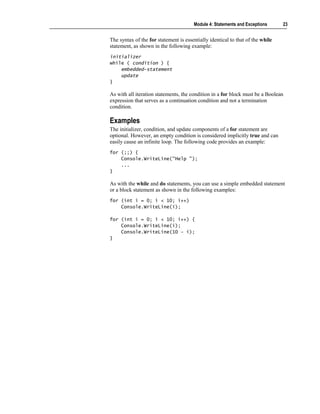
  • 45.
    Module 4: Statementsand Exceptions 43 Why Use Exceptions? Traditional procedural error handling is cumbersome Core program logic Core program logic int errorCode = 0; int errorCode = 0; FileInfo source = new FileInfo("code.cs"); FileInfo source = new FileInfo("code.cs"); if (errorCode == -1) goto Failed; if (errorCode == -1) goto Failed; int length = (int)source.Length; int length = (int)source.Length; if (errorCode == -2) goto Failed; if (errorCode == -2) goto Failed; char[] contents = new char[length]; char[] contents = new char[length]; if (errorCode == -3) goto Failed; if (errorCode == -3) goto Failed; // Succeeded ... // Succeeded ... Failed: ... Failed: ... Error handling Error handling Planning for the unexpected, and recovering if it does happen, is the mark of a good, robust program. Errors can happen at almost any time during the compilation or execution of a program. The core program logic from the slide is as follows: FileInfo source = new FileInfo("code.cs"); int length = (int)source.Length; char[ ] contents = new char[length]; ... Unfortunately, these core statements are lost in a confusing mass of intrusive error-handling code. This error-handling code obscures the logic of the program in a number of ways: Program logic and error-handling code become intermixed. The core program statements lose their conceptual wholeness as they become intermixed with alternating error-handling code. The program is then difficult to understand. All error code looks alike. All of the error-checking statements are similar. All of them test the same error code by using if statements. Also, there is a lot of duplicate code, which is always a warning sign. Error codes are not inherently meaningful. In this code, a number such as –1 does not have an explicit meaning. It could represent “Security error: no read permission,” but only the documentation can tell you what –1 represents. Therefore, integer error codes are very “programmatic”; they do not describe the errors they represent.
  • 46.
    44 Module 4: Statements and Exceptions Error codes are defined at the method level. Every method reports its error by setting the error code to a specific value unique to it. No two methods can use the same value. This means that every method is coupled to every other method. You can clearly see this coupling in effect when the integer error codes are replaced by an enumeration, as in the following code: enum ErrorCode { SecurityError = -1, IOError = -2, OutOfMemoryError = -3, ... } This code is better: An identifier such as FileNotFound is certainly more descriptive than –1. However, when a new named error is added to the enum, every method that names its errors in the enum will be affected and require recompiling. Simple integers have limited descriptive power. For example, –1 might be documented to mean “Security error: no read permission,” but –1 cannot also provide the name of the file that you do not have permission to read. Error codes are too easy to ignore. For example, C programmers almost never check the int returned by the printf function. A printf is unlikely to fail, but if it does, it returns a negative integer value (usually –1). As you can see, you need an alternative to the traditional approach of handling errors. Exceptions provide an alternative that is more flexible, requires less overhead, and produces meaningful error messages.
  • 47.
    Module 4: Statementsand Exceptions 45 Exception Objects Exception Exception SystemException SystemException OutOfMemoryException OutOfMemoryException IOException IOException NullReferenceException NullReferenceException ApplicationException ApplicationException The programmatic error codes used in procedural error-handling code look similar to the following: enum ErrorCode { SecurityError = -1, IOError = -2, OutOfMemoryError = -3, ... } The use of such error codes makes it difficult to supply information that you can use to recover from the error. For example, if an IOError is generated, you do not get information about what kind of error it is. Is it an attempt to write to a read-only file or a non-existent file, or is it a corrupt disk? Additionally, what file is being read from or written to? To overcome this problem of lack of information about the generated error, the .NET Framework has defined a range of exception classes.
  • 48.
    46 Module 4: Statements and Exceptions All exceptions derive from the class named Exception, which is a part of the common language runtime. The hierarchy between these exceptions is displayed on the slide. The exception classes provide the following benefits: Error messages are no longer represented by integer values or enums. The programmatic integer values such as -3 disappear. In their place, you use specific exception classes such as OutOfMemoryException. Each exception class can reside inside its own source file and is decoupled from all other exception classes. Meaningful error messages are generated. Each exception class is descriptive, clearly and obviously representing a specific error. Instead of a –3, you use a class called OutOfMemoryException. Each exception class can also contain information specific to itself. For example, a FileNotFoundException class could contain the name of the file that was not found. Tip To use exceptions effectively, you need to maintain a balance between exception classes that are too vague and those that are too precise. If the exception class is too vague, you will not be able to write a useful catch block. On the other hand, do not create an exception class that is so precise that it leaks implementation details and breaks encapsulation.
  • 49.
    Module 4: Statementsand Exceptions 47 Using try and catch Blocks Object-oriented solution to error handling Put the normal code in a try block Handle the exceptions in a separate catch block try { try { Console.WriteLine("Enter a number"); Console.WriteLine("Enter a number"); Program logic int i = int.Parse(Console.ReadLine()); Program logic int i = int.Parse(Console.ReadLine()); }} catch (OverflowException caught) catch (OverflowException caught) Error handling Error handling {{ Console.WriteLine(caught); Console.WriteLine(caught); }} Object orientation offers a structured solution to error-handling problems in the form of try and catch blocks. The idea is to physically separate the core program statements that handle the normal flow of control from the error- handling statements. Therefore, the sections of code that might throw exceptions are placed in a try block, and the code for handling exceptions in the try block is placed in a separate catch block. The syntax of a catch block is as follows: catch ( class-type identifier ) { ... } The class type must be System.Exception or a type derived from System.Exception. The identifier, which is optional, is a read-only local variable in the scope of the catch block. catch (Exception caught) { ... } Console.WriteLine(caught); // Compile-time error: // caught is no longer in scope
  • 50.
    48 Module 4: Statements and Exceptions The example in the slide shows how to use try and catch statements. The try block encloses an expression that may generate the exception. if the exception occurs, the runtime stops normal execution and starts searching for a catch block that can catch the pending exception (based on its type). If an appropriate catch block is not found in the immediate function, the runtime will unwind the call stack searching for the calling function. If an appropriate catch block is not found there, it will search for the function that called the calling function, and so on, until it finds a catch block. (Or until it reaches the end of Main. If this happens, the program will shut down.) If it finds a catch block, the exception is considered to have been caught, and normal execution starts again, beginning with the body of the catch block (which in the slide writes out the message that is contained within the exception object OverflowException). Therefore, if you use try and catch blocks, the error-handling statements no longer intermix themselves with the core logic statements, and this makes the program easier to understand.
  • 51.
    Module 4: Statementsand Exceptions 49 Multiple catch Blocks Each catch block catches one class of exception A try block can have one general catch block A try block is not allowed to catch a class that is derived from a class caught in an earlier catch block try try {{ Console.WriteLine("Enter first number"); Console.WriteLine("Enter first number"); int i = int.Parse(Console.ReadLine()); int i = int.Parse(Console.ReadLine()); Console.WriteLine("Enter second number"); Console.WriteLine("Enter second number"); int j = int.Parse(Console.ReadLine()); int j = int.Parse(Console.ReadLine()); int k = i / j; int k = i / j; }} catch catch (OverflowException caught) {…} (OverflowException caught) {…} catch catch (DivideByZeroException caught) {…} (DivideByZeroException caught) {…} A block of code inside a try construct can contain many statements. Each statement could raise one or more different classes of exception. Since there are many different exception classes, it is acceptable to have many catch blocks, each catching a specific kind of exception. An exception is caught solely based on its type. The runtime automatically catches exception objects of a particular type in a catch block for that type. To get a better understanding of what is happening in a multiple try-catch block, consider the following code: 1. try { 2. Console.WriteLine("Enter first number"); 3. int i = int.Parse(Console.ReadLine()); 4. Console.WriteLine("Enter second number"); 5. int j = int.Parse(Console.ReadLine()); 6. int k = i / j; 7. } 8. catch (OverflowException caught) 9. { 10. Console.WriteLine(caught); 11. } 12. catch(DivideByZeroException caught) 13. { 14. Console.WriteLine(caught); 15. } 16. ... Line 3 initializes int i with a value read from the console. This can throw an exception object of class OverflowException. If it does, then line 4, 5, and 6 are not executed. Normal sequential execution is suspended, and control transfers to the first catch block that can catch that exception. In this example, this catch block is line 8. After control is transferred to this statement, it executes to its closing brace, and transfers control to line 16.
  • 52.
    50 Module 4: Statements and Exceptions On the other hand, line 3 to 5 may not throw an exception. In this case, sequential execution will proceed normally to line 6. This line might throw an exception object of class DivideByZeroException. If it does, then control flow jumps to the catch block at line 12, this catch block executes normally, and control then transfers to line 16. If none of the statements in the try block throw an exception, then the control flow reaches the end of the try block and transfers to line 16. Note that the control flow enters a catch block only if an exception is thrown. You can write the statements in a try block without being concerned about whether an earlier statement in the try block will fail. If an earlier statement does throw an exception, the control flow will not physically reach the statements that follow it in the try block. If the control flow fails to find a suitable catch block, it will terminate the current method call and resume its search at the statement from which the method call was invoked. It will continue its search, unwinding the call stack all the way back to Main if necessary. If this causes Main itself to be terminated, the thread or process that invoked Main is terminated in an implementation- defined fashion. General catch Block A general catch block, also known as a general catch clause, can catch any exception regardless of its class and is often used to trap any exceptions that might fall through because of the lack of an appropriate handler. There are two ways to write a general catch block. You can write a simple catch statement as shown: catch { ... } You can also write the following: catch (System.Exception) { ... } A try block can have only one general catch block. For example, the following code will generate an error: try { ... } catch { ... } catch { ... } // Error
  • 53.
    Module 4: Statementsand Exceptions 51 If a general catch block is present, it must be the last catch block in the program, as follows: try { ... } catch { ... } catch (OutOfMemoryException caught) { ... } // Error You will generate a compile time error if you catch the same class twice, as in the following example: catch (OutOfMemoryException caught) { ... } catch (OutOfMemoryException caught) { ... } // Error You will also generate a compile time error if you try to catch a class that is derived from a class caught in an earlier catch block, as follows: catch (Exception caught) { ... } catch (OutOfMemoryException caught) { ... } // Error This code results in an error because the OutOfMemoryException class is derived from the SystemException class, which is in turn derived from the Exception class.
  • 54.
    52 Module 4: Statements and Exceptions Raising Exceptions The throw Statement The finally Clause Checking for Arithmetic Overflow Guidelines for Handling Exceptions C# provides the throw statement and the finally clause so that programmers can raise exceptions if required and handle them as appropriate. After completing this lesson, you will be able to: Raise your own exceptions. Enable checking for arithmetic overflow.
  • 55.
    Module 4: Statementsand Exceptions 53 The throw Statement Throw an appropriate exception Give the exception a meaningful message throw expression ; throw expression ; if (minute < 1 || minute >= 60) { if (minute < 1 || minute >= 60) { throw new InvalidTimeException(minute + throw new InvalidTimeException(minute + " is not a valid minute"); " is not a valid minute"); // !! Not reached !! // !! Not reached !! }} The try and catch blocks are used to trap errors that are raised by a C# program. You have seen that instead of signaling an error by returning a special value, or assigning it to a global error variable, C# causes execution to be transferred to the appropriate catch clause. System-Defined Exceptions When it needs to raise an exception, the runtime executes a throw statement and raises a system-defined exception. This immediately suspends the normal sequential execution of the program and transfers control to the first catch block that can handle the exception based on its class.
  • 56.
    54 Module 4: Statements and Exceptions Raising Your Own Exceptions You can use the throw statement to raise your own exceptions, as shown in the following example: if (minute < 1 || minute >= 60) { string fault = minute + "is not a valid minute"; throw new InvalidTimeException(fault); // !!Not reached!! } In this example, the throw statement is used to raise a user-defined exception, InvalidTimeException, if the time being parsed does not constitute a valid time. Exceptions typically expect a meaningful message string as a parameter when they are created. This message can be displayed or logged when the exception is caught. It is also good practice to throw an appropriate class of exception. Caution C++ programmers will be accustomed to creating and throwing an exception object with a single statement, as shown in the following code: throw out_of_range("index out of bounds"); The syntax in C# is very similar but requires the new keyword, as follows: throw new FileNotFoundException("..."); Throwing Objects You can only throw an object if the type of that object is directly or indirectly derived from System.Exception. This is different from C++, in which objects of any type can be thrown, such as in the following code: throw 42; // Allowed in C++, but not in C# You can use a throw statement in a catch block to rethrow the current exception object, as in the following example: catch (Exception caught) { ... throw caught; } You can also throw a new exception object of a different type: catch (IOException caught) { ... throw new FileNotFoundException(filename); }
  • 57.
    Module 4: Statementsand Exceptions 55 In the preceding example, notice that the IOException object, and any information it contains, is lost when the exception is converted into a FileNotFoundException object. A better idea is to wrap the exception, adding new information but retaining existing information as shown in the following code: catch (IOException caught) { ... throw new FileNotFoundException(filename, caught); } This ability to map an exception object is particularly useful at the boundaries of a layered system architecture. A throw statement with no expression can be used, but only in a catch block. It rethrows the exception that is currently being handled. This action is called a rethrow in C++ as well. Therefore, the following two lines of code produce identical results: catch (OutOfMemoryException caught) { throw caught; } ... catch (OutOfMemoryException) { throw ; }
  • 58.
    56 Module 4: Statements and Exceptions The finally Clause All of the statements in a finally block are always executed Monitor.Enter(x); Monitor.Enter(x); try { try { ... ... Any catch blocks are optional Any catch blocks are optional }} finally { finally { Monitor.Exit(x); Monitor.Exit(x); }} C# provides the finally clause to enclose a set of statements that need to be executed regardless of the course of control flow. Therefore, if control leaves a try block as a result of normal execution because the control flow reaches the end of the try block, the statements of the finally block are executed. Also, if control leaves a try block as a result of a throw statement or a jump statement such as break, continue, or goto, the statements of the finally block are executed. The finally block is useful in two situations: to avoid duplication of statements and to release resources after an exception has been thrown. Avoiding Duplication of Statements If the statements at the end of a try block are duplicated in a general catch block, the duplication can be avoided by moving the statements into a finally block. Consider the following example: try { ... statements } catch { ... statements }
  • 59.
    Module 4: Statementsand Exceptions 57 You can simplify the preceding code by rewriting it as follows: try { ... } catch { ... } finally { statements } It is an error for a break, continue, or goto statement to transfer control out of a finally block. They can be used only if the target of the jump is within the same finally block. However, it is always an error for a return statement to occur in a finally block, even if the return statement is the last statement in the block. If an exception is thrown during the execution of a finally block, it is propagated to the next enclosing try block, as shown: try { try { ... } catch { // ExampleException is not caught here } finally { throw new ExampleException("who will catch me?"); } } catch { // ExampleException is caught here } If an exception is thrown during the execution of a finally block, and another exception was in the process of being propagated, then the original exception is lost, as shown: try { throw new ExampleException("Will be lost"); } finally { throw new ExampleException("Might be found and caught"); }
  • 60.
    58 Module 4: Statements and Exceptions Checking for Arithmetic Overflow By default, arithmetic overflow is not checked A checked statement turns overflow checking on checked { checked { OverflowException OverflowException int number = int.MaxValue; int number = int.MaxValue; Console.WriteLine(++number); Console.WriteLine(++number); Exception object is thrown. }} WriteLine is not executed. unchecked { unchecked { int number = int.MaxValue; int number = int.MaxValue; MaxValue + 1 is negative? Console.WriteLine(++number); Console.WriteLine(++number); }} -2147483648 By default, a C# program will not check arithmetic for overflow. The following code provides an example: // example.cs class Example { static void Main( ) { int number = int.MaxValue; Console.WriteLine(++number); } } In the preceding code, number is initialized to the maximum value for an int. The expression ++number increments number to –2147483648, the largest negative int value, which is then written to the console. No error message is generated.
  • 61.
    Module 4: Statementsand Exceptions 59 Controlling Arithmetic Overflow Checking When compiling a C# program, you can globally turn on arithmetic overflow checking by using the /checked+ command line option, as follows: c: csc /checked+ example.cs The resulting executable program will cause an exception of class System.OverflowException. Similarly, you can turn off global arithmetic overflow checking by using the /checked- command line option, as follows: c: csc /checked- example.cs The resulting executable program will silently wrap the int value to int.MinValue and will not cause an exception of class System.OverflowException. Creating Checked and Unchecked Statements You can use the checked and unchecked keywords to create statements that are explicitly checked or unchecked statements: checked { statement-list } unchecked { statement-list } Regardless of the compile-time /checked setting, the statements inside a checked statement list are always checked for arithmetic overflow. Similarly, regardless of the compile-time /checked setting, the statements inside an unchecked statement list are never checked for arithmetic overflow. Creating Checked and Unchecked Expressions You can also use the checked and unchecked keywords to create checked and unchecked expressions: checked ( expression ) unchecked ( expression ) A checked expression is checked for arithmetic overflow; an unchecked expression is not. For example, the following code will generate a System.OverflowException. // example.cs class Example { static void Main( ) { int number = int.MaxValue; Console.WriteLine(checked(++number)); } }
  • 62.
    60 Module 4: Statements and Exceptions Guidelines for Handling Exceptions Throwing Avoid exceptions for normal or expected cases Never create and throw objects of class Exception Include a description string in an Exception object Throw objects of the most specific class possible Catching Arrange catch blocks from specific to general Do not let exceptions drop off Main Use the following guidelines for handling exceptions: Avoid exceptions for normal or expected cases. Never create or throw objects of class Exception. Create exception classes that are derived directly or indirectly from SystemException (and never from the root Exception class). The following code provides an example: class SyntaxException : SystemException { ... } Include a description string in an Exception object. Always include a useful description string in an exception object, as shown: string description = String.Format("{0}({1}): newline in string constant", filename, linenumber); throw new SyntaxException(description); Throw objects of the most specific class possible. Throw the most specific exception possible when the user might be able to use this specific information. For example, throw a FileNotFoundException rather than a more general IOException.
  • 63.
    Module 4: Statementsand Exceptions 61 Arrange catch blocks from specific to general. Arrange your catch blocks from the most specific exception to the most general exception, as shown: catch (SyntaxException caught) { ... } // Do this catch (Exception caught) { ... } Do not let exceptions drop off Main. Put a general catch clause in Main to ensure that exceptions never drop off the end of the program. static void Main( ) { try { ... } catch (Exception caught) { ... } }
  • 64.
    62 Module 4: Statements and Exceptions Lab 4.2: Using Exceptions Objectives After completing this lab, you will be able to: Throw and catch exceptions. Display error messages. Prerequisites Before working on this lab, you should be familiar with the following: Creating variables in C# Using common operators in C# Creating enum types in C# Estimated time to complete this lab: 30 minutes
  • 65.
    Module 4: Statementsand Exceptions 63 Exercise 1 Validating the Day Number In this exercise, you will add functionality to the program that you created in Exercise 1. The program will examine the initial day number that is entered by the user. If it is less than 1 or greater than 365, the program will throw an InvalidArgument exception (“Day out of range”). The program will trap this exception in a catch clause and display a diagnostic message on the console. To validate the day number 1. Open the project WhatDay2.sln in the install folderLabsLab04StarterWhatDay2 folder. 2. Enclose the entire contents of WhatDay.Main in a try block. 3. After the try block, add a catch clause that catches exceptions of type System.Exception and name them caught. In the catch block, add a WriteLine statement to write the exception caught to the console. 4. Add an if statement after the declaration of the dayNum variable. The if statement will throw a new exception object of type System.ArgumentOutOfRangeException if dayNum is less than 1 or greater than 365. Use the string literal “Day out of range” to create the exception object.
  • 66.
    64 Module 4: Statements and Exceptions 5. The completed program should be as follows: using System; enum MonthName { ... } class WhatDay { static void Main( ) { try { Console.Write("Please enter a day number between 1 and 365: "); string line = Console.ReadLine( ); int dayNum = int.Parse(line); if (dayNum < 1 || dayNum > 365) { throw new ArgumentOutOfRangeException("Day out of range"); } int monthNum = 0; foreach (int daysInMonth in DaysInMonths) { if (dayNum <= daysInMonth) { break; } else { dayNum -= daysInMonth; monthNum++; } } MonthName temp = (MonthName)monthNum; string monthName = temp.ToString( ); Console.WriteLine("{0} {1}", dayNum, monthName); } catch (Exception caught) { Console.WriteLine(caught); } } ... } 6. Save your work. 7. Compile the WhatDay2.cs program and correct any errors. Run the program. Use the table of data provided in Lab4.1 (Exercise 1) to verify that the program is still working correctly. 8. Run the program, entering day numbers less than 1 and greater than 365. Verify that invalid input is safely trapped and that the exception object is thrown, caught, and displayed.
  • 67.
    Module 4: Statementsand Exceptions 65 Exercise 2 Handling Leap Years In this exercise, you will add functionality to the program that you worked on in Exercise 1. After you complete this exercise, the program will prompt the user for a year in addition to a day number. The program will detect whether the specified year is a leap year. It will validate whether the day number is between 1 and 366 if the year is a leap year, or whether it is between 1 and 365 if the year is not a leap year. Finally, it will use a new foreach statement to correctly calculate the month and day pair for leap years. To enter the year from the console 1. Open the WhatDay3.sln project in the install folderLabsLab04StarterWhatDay3 folder. 2. Add to the beginning of WhatDay.Main a System.Console.Write statement that writes a prompt to the console asking the user to enter a year. 3. Change the declaration and initialization of the string line to an assignment. Change string line = Console.ReadLine( ); to line = Console.ReadLine( );. 4. Add a statement to Main that declares a string variable called line and initializes it with a line read from the console by the System.Console.ReadLine method. 5. Add a statement to Main that declares an int variable called yearNum and initializes it with the integer returned by the int.Parse method.
  • 68.
    66 Module 4: Statements and Exceptions 6. The completed program should be as follows: using System; enum MonthName { ... } class WhatDay { static void Main( ) { try { Console.Write("Please enter the year: "); string line = Console.ReadLine( ); int yearNum = int.Parse(line); Console.Write("Please enter a day number between 1 and 365: "); line = Console.ReadLine( ); int dayNum = int.Parse(line); // As before.... } catch (Exception caught) { Console.WriteLine(caught); } } ... } 7. Save your work. 8. Compile the WhatDay3.cs program and correct any errors. To determine whether the year is a leap year 1. Add a statement immediately after the declaration of yearNum that declares a bool variable called isLeapYear. Initialize this variable with a Boolean expression that determines whether yearNum is a leap year. A year is a leap year if the following two statements are both true: • It is divisible by 4. • It is either not divisible by 100, or it is divisible by 400. 2. Add an if statement immediately after the declaration of isLeapYear. In the if statement, write the string “ IS a leap year” or “ is NOT a leap year” to the console, depending on the value of isLeapyear. You will use this if statement to verify that the Boolean leap year determination is correct.
  • 69.
    Module 4: Statementsand Exceptions 67 3. The completed program should be as follows: using System; enum MonthName { ... } class WhatDay { static void Main( ) { try { Console.Write("Please enter the year: "); string line = Console.ReadLine( ); int yearNum = int.Parse(line); bool isLeapYear = (yearNum % 4 == 0) && (yearNum % 100 != 0 || yearNum % 400 == 0); if (isLeapYear) { Console.WriteLine(" IS a leap year"); } else { Console.WriteLine(" is NOT a leap year"); } Console.Write("Please enter a day number between 1 and 365: "); line = Console.ReadLine( ); int dayNum = int.Parse(line); // As before... } catch (Exception caught) { Console.WriteLine(caught); } } ... } 4. Save your work. 5. Compile the WhatDay3.cs program and correct any errors. Use the following table to verify that the Boolean leap year determination is correct. A leap year Not a leap year 1996 1999 2000 1900 2004 2001 6. Comment out the if statement that you added in step 2.
  • 70.
    68 Module 4: Statements and Exceptions To validate the day number against 365 or 366 1. Immediately after the declaration of isLeapYear, add a declaration of an int variable called maxDayNum. Initialize maxDayNum with either 366 or 365, depending on whether isLeapYear is true or false, respectively. 2. Change the WriteLine statement that prompts the user for the day number. It should display the range 1 to 366 if a leap year was entered and 1 to 365 if a non–leap year was entered. 3. Compile the WhatDay3.cs program and correct any errors. Run the program and verify that you have implemented the previous step correctly. 4. Change the if statement that validates the value of dayNum to use the variable maxDayNum instead of the literal 365. 5. The completed program should be as follows: using System; enum MonthName { ... } class WhatDay { static void Main( ) { try { Console.Write("Please enter the year: "); string line = Console.ReadLine( ); int yearNum = int.Parse(line); bool isLeapYear = (yearNum % 4 == 0) && (yearNum % 100 != 0 || yearNum % 400 == 0); int maxDayNum = isLeapYear ? 366 : 365; Console.Write("Please enter a day number between 1 and {0}: ", maxDayNum); line = Console.ReadLine( ); int dayNum = int.Parse(line); if (dayNum < 1 || dayNum > maxDayNum) { throw new ArgumentOutOfRangeException("Day out of range"); } // As before.... } catch (Exception caught) { Console.WriteLine(caught); } } ... }
  • 71.
    Module 4: Statementsand Exceptions 69 6. Save your work. 7. Compile the WhatDay3.cs program and correct any errors. Run the program and verify that you have implemented the previous step correctly. To correctly calculate the month and day pair for leap years 1. After the if statement that validates the day number and the declaration of the monthNum integer, add an if-else statement. The Boolean expression used in this if-else statement will be the variable isLeapYear. 2. Move the foreach statement so it becomes the embedded statement in the if- else statement in both the true and the false cases. After this step, your code should be as follows: if (isLeapYear) { foreach (int daysInMonth in DaysInMonths) { ... } } else { foreach (int daysInMonth in DaysInMonths) { ... } } 3. Save your work. 4. Compile the WhatDay3.cs program and correct any errors. Run the program and verify that day numbers in non–leap years are still handled correctly. 5. The next step will use the DaysInLeapMonths collection that has been provided. This is a collection of int values like DaysInMonths, except that the second value in the collection (the number of days in February) is 29 rather than 28. 6. Use DaysInLeapMonths instead of DaysInMonth in the true part of the if-else statement.
  • 72.
    70 Module 4: Statements and Exceptions 7. The completed program should be as follows: using System; enum MonthName { ... } class WhatDay { static void Main( ) { try { Console.Write("Please enter the year: "); string line = Console.ReadLine( ); int yearNum = int.Parse(line); bool isLeapYear = (yearNum % 4 == 0) && (yearNum % 100 != 0 || yearNum % 400 == 0); int maxDayNum = isLeapYear ? 366 : 365; Console.Write("Please enter a day number between 1 and {0}: ", maxDayNum); line = Console.ReadLine( ); int dayNum = int.Parse(line); if (dayNum < 1 || dayNum > maxDayNum) { throw new ArgumentOutOfRangeException("Day out of range"); } int monthNum = 0; if (isLeapYear) { foreach (int daysInMonth in DaysInLeapMonths) { if (dayNum <= daysInMonth) { break; } else { dayNum -= daysInMonth; monthNum++; } } } else { foreach (int daysInMonth in DaysInMonths) { if (dayNum <= daysInMonth) { break; } else { dayNum -= daysInMonth; monthNum++; } } } Code continued on following page.
  • 73.
    Module 4: Statementsand Exceptions 71 MonthName temp = (MonthName)monthNum; string monthName = temp.ToString( ); Console.WriteLine("{0} {1}", dayNum, monthName); } catch (Exception caught) { Console.WriteLine(caught); } } ... } 8. Save your work. 9. Compile the WhatDay3.cs program and correct any errors. Run the program, using the data in the following table to verify that the program is working correctly. Year Day Number Month-Day Pair 1999 32 February 1 2000 32 February 1 1999 60 March 1 2000 60 February 29 1999 91 April 1 2000 91 March 31 1999 186 July 5 2000 186 July 4 1999 304 October 31 2000 304 October 30 1999 309 November 5 2000 309 November 4 1999 327 November 23 2000 327 November 22 1999 359 December 25 2000 359 December 24
  • 74.
    72 Module 4: Statements and Exceptions Review Introduction to Statements Using Selection Statements Using Iteration Statements Using Jump Statements Handling Basic Exceptions Raising Exceptions 1. Write an if statement that tests whether an int variable called hour is greater than or equal to zero and less than 24. If it is not, reset hour to zero. 2. Write a do-while statement, the body of which reads an integer from the console and stores it in an int called hour. Write the loop so that the loop will exit only when hour has a value between 1 and 23 (inclusive).
  • 75.
    Module 4: Statementsand Exceptions 73 3. Write a for statement that meets all of the conditions of the preceding question and only allows five attempts to input a valid value for hour. Do not use break or continue statements. 4. Rewrite the code that you wrote for question 3, but this time use a break statement. 5. Write a statement that throws an exception of type ArgumentOutOfRangeException if the variable percent is less than zero or greater than 100.
  • 76.
    74 Module 4: Statements and Exceptions 6. The following code is meant to handle exceptions. Explain why this code is not correct. Fix the problem. try { ... } catch (Exception) {...} catch (IOException) {...}