7 Automated Visual Testing
Tools For You
Index
● Introduction
● The key is to…
● what to Expect?
● Challenges with Automated Testing
● 7 tools that fit the Bill
● Conclusion
On the other hand, Automated Visual Testing System focuses on the correctness of
content and layout being positioned properly on screen in respect to size and
shape. It also checks for overlaps, hiding elements or visual mismatching contents
along with correct font, colour and image.
Introduction
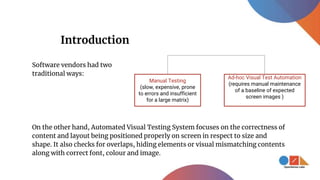
Manual Testing
(slow, expensive, prone
to errors and insufficient
for a large matrix)
Ad-hoc Visual Test Automation
(requires manual maintenance
of a baseline of expected
screen images )
Software vendors had two
traditional ways:
The Key is to...
Determine what and how much to automate the testing. Too much can
become bothersome from the maintenance perspective, and too little can
suffer the quality of the website in question.
So, what can we expect from a practical visual test automation tool?
Cognitive Ability
The testing tools must automatically categorise the content, layout or
appearance defect to pinpoint the defect causing specific UI elements.
Baseline Management
The ability to collect and partition expected UI images for each distinct
execution environment of the application (browser, device, screen form-
factor) automatically.
What to Expect?
Footprint
The tool must preserve both, the expected baseline image and the
actual image showing the defect.
Scalability
The size of the enterprise or project should not hinder the number of
tests running in parallel and there should be a seamless process to fit
all needs.
Challenges with Automated Visual Testing
● The basic difference in terms of visual testing between humans and machines
is that they perceive pixels differently. While the machine has a different
graphic card than the testing server and other developers, they are trained to
‘’see’’ as we do and move beyond the pixel level.
● Another issue is posed by the speed of the tests. Often the tests are compared
to more lightweight unit tests that don’t require a full browser.
7 tools that fit the Bill
Selenium
Pros:
● Massive support and an active
community.
● Runs simultaneous tests on
different browsers at different
machines, reducing the
testing time for valuable and
big projects.
● Utilise the skills to test mobile
web, hybrid or native apps
using Appium with the same
API as Selenium WebDriver.
Cons:
● Beginners might face issues
with writing scripts that
require a technical capability.
● There’s no provision to check
for images being displayed or
loaded correctly. Developers
have to do it manually or
using another library.
Gemini
Built to run via either Selenium or PhantomJS server, Gemini packages an
interface that isn't too complicated. It provides for ‘test suites’ that can provide
organised codes and ease the whole process of testing for you. It has a very nice
documentation and is built entirely in NodeJS requiring its own config file.
WebdriverCSS
Similar to Gemini, WebdriverCSS depends on Selenium for its functionality.
Being a part of WebdriverIO ecosystem, it hooks benefits from the main
framework and provides a better experience. It can also integrate well with other
software like Mocha, Jasmine and Cucumber.js.
Watir
Pros:
● One of the very few that allows
writing scripts in Ruby
programming language.
However, if Ruby is not your
language of choice, you can
script with Java or .NET too.
Cons:
● Basic and simple, can only be
used in combination with
other tools.
● The Watir community is
smaller in size that leads to
find folks who develop,
document and contribute
content to Watir on its
website.
Nightwatch
An end-to-end testing solution for browser based apps and websites,
Nightwatch.js is written on Node.js. It is a simple yet powerful syntax
that can enable you to write tests quickly, using only Javascript
(Node.js) and CSS or Xpath selectors. A provision for flexible command
and assertion framework makes it easy for developers to implement
your application custom commands and assertions. It runs the tests in
various combinations including sequentially and in parallel by group,
tags or single.
Storybook
An easy to use tool for building a visual component library, Storybook allows
you to browse a component library, view the different states of each
component, and interactively develop and test those components.
Jest
Easy to configure and set up, this tool is a great fit for your developer folks
when working on unit-level automated tests. Jest offers features like
interactive watch mode which you can use for improving workflows.
Conclusion
This seems to be enough as a list for you to get an idea about tools that
you might want to introduce to your development team. Choose the
best tools with OpenSense Labs and make sure your site is quality
checked.
Talk to Drupal experts, ping us at
hello@opensenselabs.com to get the best of
Drupal and augmented reality for your future
businesses.
THANK YOU

7 automated visual testing tools for you

  • 1.
    7 Automated VisualTesting Tools For You
  • 2.
    Index ● Introduction ● Thekey is to… ● what to Expect? ● Challenges with Automated Testing ● 7 tools that fit the Bill ● Conclusion
  • 3.
    On the otherhand, Automated Visual Testing System focuses on the correctness of content and layout being positioned properly on screen in respect to size and shape. It also checks for overlaps, hiding elements or visual mismatching contents along with correct font, colour and image. Introduction Manual Testing (slow, expensive, prone to errors and insufficient for a large matrix) Ad-hoc Visual Test Automation (requires manual maintenance of a baseline of expected screen images ) Software vendors had two traditional ways:
  • 4.
    The Key isto... Determine what and how much to automate the testing. Too much can become bothersome from the maintenance perspective, and too little can suffer the quality of the website in question. So, what can we expect from a practical visual test automation tool?
  • 5.
    Cognitive Ability The testingtools must automatically categorise the content, layout or appearance defect to pinpoint the defect causing specific UI elements. Baseline Management The ability to collect and partition expected UI images for each distinct execution environment of the application (browser, device, screen form- factor) automatically. What to Expect?
  • 6.
    Footprint The tool mustpreserve both, the expected baseline image and the actual image showing the defect. Scalability The size of the enterprise or project should not hinder the number of tests running in parallel and there should be a seamless process to fit all needs.
  • 7.
    Challenges with AutomatedVisual Testing ● The basic difference in terms of visual testing between humans and machines is that they perceive pixels differently. While the machine has a different graphic card than the testing server and other developers, they are trained to ‘’see’’ as we do and move beyond the pixel level. ● Another issue is posed by the speed of the tests. Often the tests are compared to more lightweight unit tests that don’t require a full browser.
  • 8.
    7 tools thatfit the Bill
  • 9.
    Selenium Pros: ● Massive supportand an active community. ● Runs simultaneous tests on different browsers at different machines, reducing the testing time for valuable and big projects. ● Utilise the skills to test mobile web, hybrid or native apps using Appium with the same API as Selenium WebDriver. Cons: ● Beginners might face issues with writing scripts that require a technical capability. ● There’s no provision to check for images being displayed or loaded correctly. Developers have to do it manually or using another library.
  • 10.
    Gemini Built to runvia either Selenium or PhantomJS server, Gemini packages an interface that isn't too complicated. It provides for ‘test suites’ that can provide organised codes and ease the whole process of testing for you. It has a very nice documentation and is built entirely in NodeJS requiring its own config file. WebdriverCSS Similar to Gemini, WebdriverCSS depends on Selenium for its functionality. Being a part of WebdriverIO ecosystem, it hooks benefits from the main framework and provides a better experience. It can also integrate well with other software like Mocha, Jasmine and Cucumber.js.
  • 11.
    Watir Pros: ● One ofthe very few that allows writing scripts in Ruby programming language. However, if Ruby is not your language of choice, you can script with Java or .NET too. Cons: ● Basic and simple, can only be used in combination with other tools. ● The Watir community is smaller in size that leads to find folks who develop, document and contribute content to Watir on its website.
  • 12.
    Nightwatch An end-to-end testingsolution for browser based apps and websites, Nightwatch.js is written on Node.js. It is a simple yet powerful syntax that can enable you to write tests quickly, using only Javascript (Node.js) and CSS or Xpath selectors. A provision for flexible command and assertion framework makes it easy for developers to implement your application custom commands and assertions. It runs the tests in various combinations including sequentially and in parallel by group, tags or single.
  • 13.
    Storybook An easy touse tool for building a visual component library, Storybook allows you to browse a component library, view the different states of each component, and interactively develop and test those components. Jest Easy to configure and set up, this tool is a great fit for your developer folks when working on unit-level automated tests. Jest offers features like interactive watch mode which you can use for improving workflows.
  • 14.
    Conclusion This seems tobe enough as a list for you to get an idea about tools that you might want to introduce to your development team. Choose the best tools with OpenSense Labs and make sure your site is quality checked.
  • 15.
    Talk to Drupalexperts, ping us at hello@opensenselabs.com to get the best of Drupal and augmented reality for your future businesses.
  • 16.