Check Sheet Problem
How to capture data for
analysis?
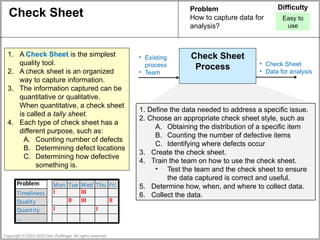
1. Define the data needed to address a specific issue.
2. Choose an appropriate check sheet style, such as
A. Obtaining the distribution of a specific item
B. Counting the number of defective items
C. Identifying where defects occur
3. Create the check sheet.
4. Train the team on how to use the check sheet.
• Test the team and the check sheet to ensure
the data captured is correct and useful.
5. Determine how, when, and where to collect data.
6. Collect the data.
Check Sheet
Process
• Existing
process
• Team
• Check Sheet
• Data for analysis
Difficulty
Easy to
use
Copyright © 2022-2023 Dan Zwillinger. All rights reserved.
1. A Check Sheet is the simplest
quality tool.
2. A check sheet is an organized
way to capture information.
3. The information captured can be
quantitative or qualitative.
When quantitative, a check sheet
is called a tally sheet.
4. Each type of check sheet has a
different purpose, such as:
A. Counting number of defects
B. Determining defect locations
C. Determining how defective
something is.
Problem Mon Tue Wed Thu Fri
Timeliness I III
Quality II III II
Quantity I I
…
Check Sheet – Several Examples
Copyright © 2022-2023 Dan Zwillinger. All rights reserved.
Obtaining the distribution of an item
https://commons.wikimedia.org/wiki/File:GAZ-24_Volga.svg
Counting defective items
Defect location
Date 6/1/2023
Inspector Charles
Vehicle stock #8347
Icon Defect type Count
dent II
scratched paint I
Monday Tuesday Wednesday Thursday Friday
Alan III II
Betty II II
Carol III
Dan I I
Eric I II III
Frank II
George I I
Harry II II
Defects observed
6/1/2023
widget #2
B34
2
A
B
Shift Machine Operator
Date
Product
Batch
A
1
B
Specified
weight
(grams)
Measured
difference
< -5 x x x x x x
(-3, -5] x x x x x x x x x
[-0.1, -3] x x x x x x x x x x x
0 x x x x x x x x x x x x
[0.1, 3] x x x x x x
(3, 5] x x x x
> 5 x x x
6/1/2023
widget #1
Bob
A23
139
Date
Product
Inspector
Batch
Observations
Check Sheet – Notes
Slide 1 Slide 2
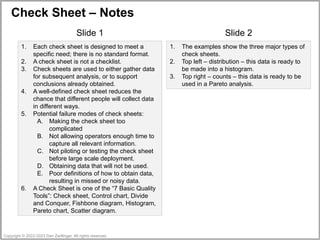
1. Each check sheet is designed to meet a
specific need; there is no standard format.
2. A check sheet is not a checklist.
3. Check sheets are used to either gather data
for subsequent analysis, or to support
conclusions already obtained.
4. A well-defined check sheet reduces the
chance that different people will collect data
in different ways.
5. Potential failure modes of check sheets:
A. Making the check sheet too
complicated
B. Not allowing operators enough time to
capture all relevant information.
C. Not piloting or testing the check sheet
before large scale deployment.
D. Obtaining data that will not be used.
E. Poor definitions of how to obtain data,
resulting in missed or noisy data.
6. A Check Sheet is one of the “7 Basic Quality
Tools”: Check sheet, Control chart, Divide
and Conquer, Fishbone diagram, Histogram,
Pareto chart, Scatter diagram.
1. The examples show the three major types of
check sheets.
2. Top left – distribution – this data is ready to
be made into a histogram.
3. Top right – counts – this data is ready to be
used in a Pareto analysis.
Copyright © 2022-2023 Dan Zwillinger. All rights reserved.

6in6 _ CheckSheet .pptx

  • 1.
    Check Sheet Problem Howto capture data for analysis? 1. Define the data needed to address a specific issue. 2. Choose an appropriate check sheet style, such as A. Obtaining the distribution of a specific item B. Counting the number of defective items C. Identifying where defects occur 3. Create the check sheet. 4. Train the team on how to use the check sheet. • Test the team and the check sheet to ensure the data captured is correct and useful. 5. Determine how, when, and where to collect data. 6. Collect the data. Check Sheet Process • Existing process • Team • Check Sheet • Data for analysis Difficulty Easy to use Copyright © 2022-2023 Dan Zwillinger. All rights reserved. 1. A Check Sheet is the simplest quality tool. 2. A check sheet is an organized way to capture information. 3. The information captured can be quantitative or qualitative. When quantitative, a check sheet is called a tally sheet. 4. Each type of check sheet has a different purpose, such as: A. Counting number of defects B. Determining defect locations C. Determining how defective something is. Problem Mon Tue Wed Thu Fri Timeliness I III Quality II III II Quantity I I …
  • 2.
    Check Sheet –Several Examples Copyright © 2022-2023 Dan Zwillinger. All rights reserved. Obtaining the distribution of an item https://commons.wikimedia.org/wiki/File:GAZ-24_Volga.svg Counting defective items Defect location Date 6/1/2023 Inspector Charles Vehicle stock #8347 Icon Defect type Count dent II scratched paint I Monday Tuesday Wednesday Thursday Friday Alan III II Betty II II Carol III Dan I I Eric I II III Frank II George I I Harry II II Defects observed 6/1/2023 widget #2 B34 2 A B Shift Machine Operator Date Product Batch A 1 B Specified weight (grams) Measured difference < -5 x x x x x x (-3, -5] x x x x x x x x x [-0.1, -3] x x x x x x x x x x x 0 x x x x x x x x x x x x [0.1, 3] x x x x x x (3, 5] x x x x > 5 x x x 6/1/2023 widget #1 Bob A23 139 Date Product Inspector Batch Observations
  • 3.
    Check Sheet –Notes Slide 1 Slide 2 1. Each check sheet is designed to meet a specific need; there is no standard format. 2. A check sheet is not a checklist. 3. Check sheets are used to either gather data for subsequent analysis, or to support conclusions already obtained. 4. A well-defined check sheet reduces the chance that different people will collect data in different ways. 5. Potential failure modes of check sheets: A. Making the check sheet too complicated B. Not allowing operators enough time to capture all relevant information. C. Not piloting or testing the check sheet before large scale deployment. D. Obtaining data that will not be used. E. Poor definitions of how to obtain data, resulting in missed or noisy data. 6. A Check Sheet is one of the “7 Basic Quality Tools”: Check sheet, Control chart, Divide and Conquer, Fishbone diagram, Histogram, Pareto chart, Scatter diagram. 1. The examples show the three major types of check sheets. 2. Top left – distribution – this data is ready to be made into a histogram. 3. Top right – counts – this data is ready to be used in a Pareto analysis. Copyright © 2022-2023 Dan Zwillinger. All rights reserved.