Operation
manual
2
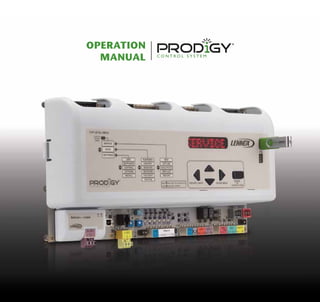
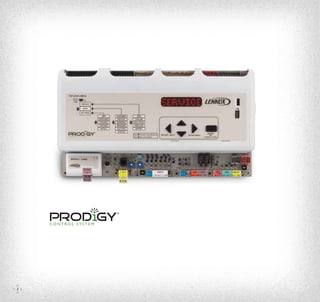
The Prodigy®
control system is the latest example of Lennox’ commitment
to advanced HVAC technology. Standard on every Energence®
rooftop unit,
the Prodigy control system makes setup, troubleshooting and servicing
easier than ever.
The Prodigy control system includes:
• Prodigy unit controller
• SmartWire™
system
• Optional Prodigy BACnet module (BTL certified)
• Optional Prodigy LonTalk®
module (LonTalk certified)
3
www.lennoxcommercial.com
Navigation
4
1
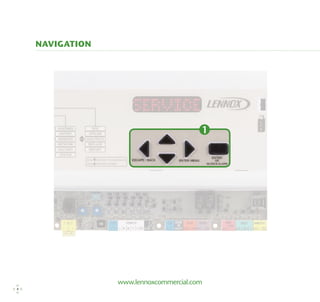
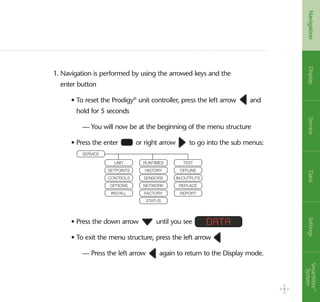
1. Navigation is performed by using the arrowed keys and the
enter button
	 • To reset the Prodigy®
unit controller, press the left arrow and
hold for 5 seconds
		 — You will now be at the beginning of the menu structure
	 • Press the enter or right arrow to go into the sub menus:
	
	 • Press the down arrow until you see
	 • To exit the menu structure, press the left arrow
		 — Press the left arrow again to return to the Display mode.
Data
5
Navigation
5
DisplayServiceDataSettingsSmartWire™
System
UNIT
SETPOINTS
CONTROLS
OPTIONS
INSTALL
RUNTIMES
HISTORY
SENSORS
NETWORK
FACTORY
STATUS
Test
Offline
in/outputs
Replace
Report
Service
www.lennoxcommercial.com
Display
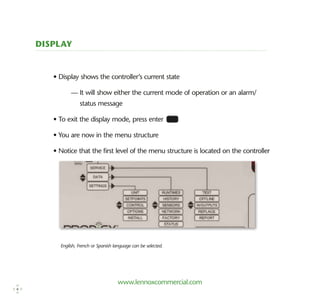
• Display shows the controller’s current state
	 — It will show either the current mode of operation or an alarm/
status message
• To exit the display mode, press enter
• You are now in the menu structure
• Notice that the first level of the menu structure is located on the controller
English, French or Spanish language can be selected.
6
Alarms
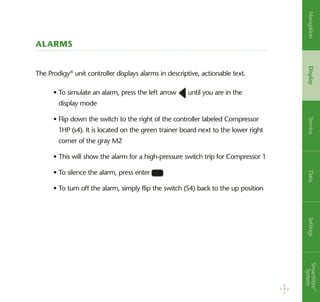
The Prodigy®
unit controller displays alarms in descriptive, actionable text.
• To simulate an alarm, press the left arrow until you are in the
display mode
• Flip down the switch to the right of the controller labeled Compressor
1HP (s4). It is located on the green trainer board next to the lower right
corner of the gray M2
• This will show the alarm for a high-pressure switch trip for Compressor 1
• To silence the alarm, press enter
• To turn off the alarm, simply flip the switch (S4) back to the up position
7
NavigationDisplayServiceDataSettingsSmartWire™
System
www.lennoxcommercial.com
USB Service Reports
8
1
1. The Prodigy®
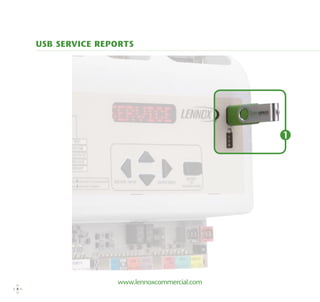
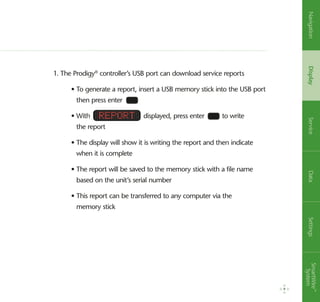
controller’s USB port can download service reports
	 • To generate a report, insert a USB memory stick into the USB port
then press enter
	 • With displayed, press enter to write
the report
	 • The display will show it is writing the report and then indicate
when it is complete
	 • The report will be saved to the memory stick with a file name
based on the unit’s serial number
	 • This report can be transferred to any computer via the
memory stick
Report
9
NavigationDisplayServiceDataSettingsSmartWire™
System
www.lennoxcommercial.com
10
2
1
=========================================================================================
USB SERVICE REPORT
=========================================================================================
Service Date	
7/4/2010
Service Time	
3:15:00
Serial No.	
5609K00002
M2 Version	
7.06.00
DB1 Version	
1.06.00
Unit No.	
2
Sbus Address	
2
BACnet Address	
2
CAT No.	
36L87
MODEL NO.	
LGH036H4ES1Y
Status	
COOLING
=========================================================================================
Runtime Data
Total Power On		
1832 HRS	
79 CYCLES
Before Install		
286 HRS	
---------
Filter		
2040 HRS	
---------
Belt		
1063 HRS	
---------
Blower		
1162 HRS	
131 CYCLES
Compressor 1		
46 HRS	
66 CYCLES
Compressor 2		
0 HRS	
---------
Compressor 3		
0 HRS	
0 CYCLES
Compressor 4		
0 HRS	
0 CYCLES
Outdoor Fan 1		
14 HRS	
32 CYCLES
Outdoor Fan 2		
0 HRS	
2 CYCLES
Outdoor Fan 3		
0 HRS	
0 CYCLES
Outdoor Fan 4		
0 HRS	
0 CYCLES
Outdoor Fan 5		
0 HRS	
0 CYCLES
Outdoor Fan 6		
0 HRS	
0 CYCLES
Heat Stage 1		
5 HRS	
17 CYCLES
Heat Stage 2		
0 HRS	
16 CYCLES
Reheat		
2 HRS	
13 CYCLES
Free Cooling		
15 HRS	
1608 CYCLES
UV Lamp		
0 HRS	
---------
=========================================================================================
Sensor Data
OAT :	100 degF
RAT :	 85 degF
DAT :	 86 degF
ZAT :	 83 degF
RH : 60 %
CO2 : 415 ppm
=========================================================================================
Alarm/Status Log
			
23 ALARM(23) STRIKE 3 ON COMP 1 S87 COMP LOCKOUT.
			
CHECK CHECK CHARGE, FILTER, AIR FLOW, COIL, USE SERVICE
( 23) 7.04.2010 1:05:00	 MENU TO CLEAR LOCKOUTS.
			
22 ALARM(22) COMP 1 LOW PRESS S87 COMP OFF. CHECK
( 22) 7.04.2010 1:00:00	 CHARGE, FILTERS, AIR FLOW. COIL
				
ALARM(5) FILTER S27 REPLACE FILTER OR CHECK FILTER
( 5) 6.30.2010 21:05:00	 SWITCH S27
=========================================================================================
END OF REPORT
=========================================================================================
USB SERVICE REPORT
=========================================================================================
Service Date	
Service Time	 4:23:00Serial No.	 5609K00002M2 Version	
DB1 Version	
Unit No.	
Sbus Address	
BACnet Address	
CAT No.	
MODEL NO.	
Status	
COOLING=========================================================================================
Runtime Data
Total Power On		 1832 HRS	 80 CYCLES
Before Install		 286 HRS	 ---------
Filter
		 0 HRS	 ---------
Belt
		 1063 HRS	 ---------
Blower
		 1162 HRS	 131 CYCLES
Compressor 1		 0 HRS	 0 CYCLES
Compressor 2		 0 HRS	 ---------
Compressor 3		 0 HRS	 0 CYCLES
Compressor 4		 0 HRS	 0 CYCLES
Outdoor Fan 1		 14 HRS	 32 CYCLES
Outdoor Fan 2		 0 HRS	 2 CYCLES
Outdoor Fan 3		 0 HRS	 0 CYCLES
Outdoor Fan 4		 0 HRS	 0 CYCLES
Outdoor Fan 5		 0 HRS	 0 CYCLES
Outdoor Fan 6		 0 HRS	 0 CYCLES
Heat Stage 1		 5 HRS	 17 CYCLES
Heat Stage 2		 0 HRS	 16 CYCLES
Reheat
		 2 HRS	 13 CYCLES
Free Cooling		 15 HRS	 1608 CYCLES
UV Lamp		 0 HRS	 ---------
=========================================================================================
Sensor Data
OAT :	100 degF
RAT :	 76 degF
DAT :	 57 degF
ZAT :	 77 degF
RH : 50 %
CO2 : 415 ppm
=========================================================================================
Alarm/Status Log
			 23 ALARM(23) STRIKE 3 ON COMP 1 S87 COMP LOCKOUT.
			 CHECK CHECK CHARGE, FILTER, AIR FLOW, COIL, USE SERVICE
( 23) 7.04.2010 1:05:00	 MENU TO CLEAR LOCKOUTS.			 22 ALARM(22) COMP 1 LOW PRESS S87 COMP OFF. CHECK
( 22) 7.04.2010 1:00:00	 CHARGE, FILTERS, AIR FLOW. COIL				 ALARM(5) FILTER S27 REPLACE FILTER OR CHECK FILTER
( 5) 6.30.2010 21:05:00	 SWITCH S27=========================================================================================
END OF REPORT
USB Service Reports
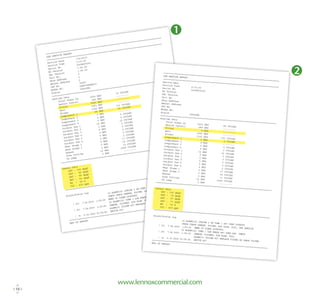
The reports at left are an example of a service call.
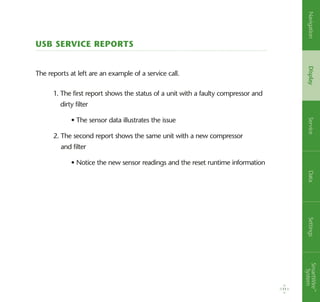
1. The first report shows the status of a unit with a faulty compressor and
dirty filter
	 • The sensor data illustrates the issue
2. The second report shows the same unit with a new compressor
and filter
	 • Notice the new sensor readings and the reset runtime information
11
NavigationDisplayServiceDataSettingsSmartWire™
System
www.lennoxcommercial.com
USB profiles
12
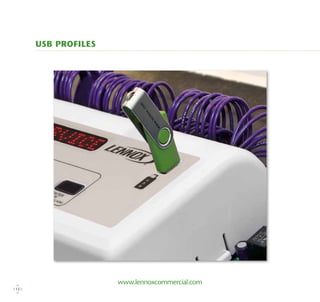
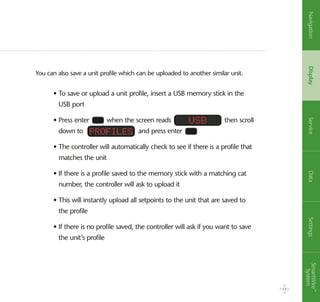
You can also save a unit profile which can be uploaded to another similar unit.
• To save or upload a unit profile, insert a USB memory stick in the
USB port
• Press enter when the screen reads then scroll
down to and press enter
• The controller will automatically check to see if there is a profile that
matches the unit
• If there is a profile saved to the memory stick with a matching cat
number, the controller will ask to upload it
• This will instantly upload all setpoints to the unit that are saved to
the profile
• If there is no profile saved, the controller will ask if you want to save
the unit’s profile
usb
Profiles
13
NavigationDisplayServiceDataSettingsSmartWire™
System
www.lennoxcommercial.com
Self-test
The Prodigy®
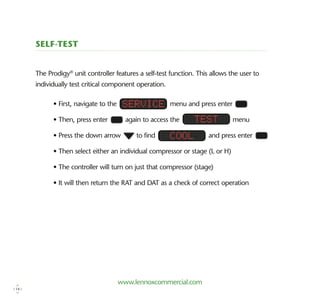
unit controller features a self-test function. This allows the user to
­individually test critical component operation.
• First, navigate to the menu and press enter
• Then, press enter again to access the menu
• Press the down arrow to find and press enter
• Then select either an individual compressor or stage (L or H)
• The controller will turn on just that compressor (stage)
• It will then return the RAT and DAT as a check of correct operation
Service
Test
Cool
14
Replace
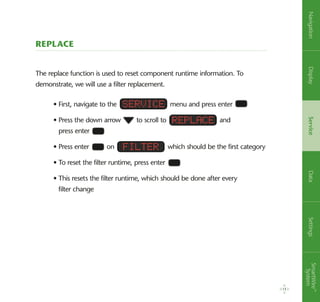
The replace function is used to reset component runtime information. To
demonstrate, we will use a filter replacement.
• First, navigate to the menu and press enter
• Press the down arrow to scroll to and
press enter
• Press enter on which should be the first category
• To reset the filter runtime, press enter
• This resets the filter runtime, which should be done after every
filter change
Service
Replace
Filter
15
NavigationDisplayServiceDataSettingsSmartWire™
System
www.lennoxcommercial.com
Runtimes
16
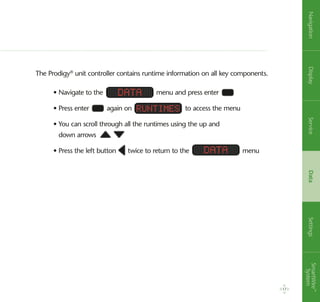
The Prodigy®
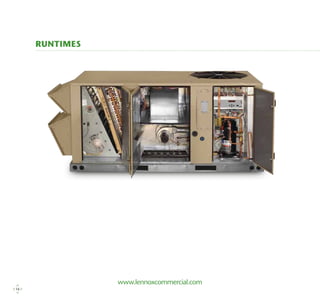
unit controller contains runtime information on all key components.
• Navigate to the menu and press enter
• Press enter again on to access the menu
• You can scroll through all the runtimes using the up and
down arrows
• Press the left button twice to return to the menu
Data
Data
Runtimes
17
NavigationDisplayServiceDataSettingsSmartWire™
System
www.lennoxcommercial.com
History
You can also view the history of alarm and status messages.
• From the screen, press enter and scroll
to and press enter
• Press enter on the screen
• The Prodigy®
unit controller will display the last five alarms
• Press the left button three times to return to
the screen
History
Alarms
Data
Data
18
Sensor Data
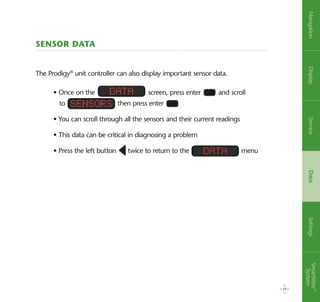
The Prodigy®
unit controller can also display important sensor data.
19
• Once on the screen, press enter and scroll
to then press enter
• You can scroll through all the sensors and their current readings
• This data can be critical in diagnosing a problem
• Press the left button twice to return to the menu
Data
Sensors
Data
NavigationDisplayServiceDataSettingsSmartWire™
System
www.lennoxcommercial.com
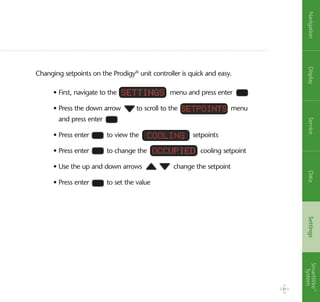
SetPoints
20
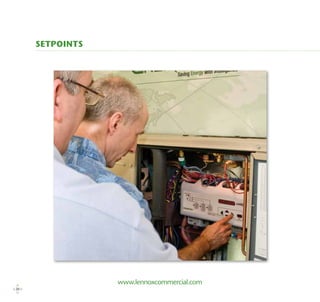
Changing setpoints on the Prodigy®
unit controller is quick and easy.
• First, navigate to the menu and press enter
• Press the down arrow to scroll to the menu
and press enter
• Press enter to view the setpoints
• Press enter to change the cooling setpoint
• Use the up and down arrows change the setpoint
• Press enter to set the value
Settings
Cooling
Occupied
SetPoints
21
NavigationDisplayServiceDataSettingsSmartWire™
System
22
www.lennoxcommercial.com
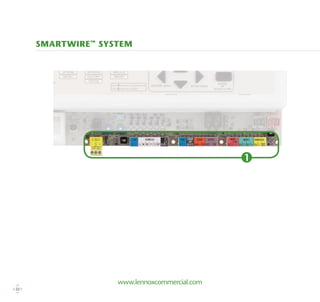
Smartwire™
system
1
23
The SmartWire™
system is designed to simplify field wiring and sensor installation.
1. Advanced connectors are color-coded, labeled and keyed to prevent
miswiring and ensure units are installed and set up correctly
	 • The wire-coloring scheme is standard across all units
	 • Each connection is intuitively labeled to simplify troubleshooting
NavigationDisplayServiceDataSettingsSmartWire™
System
Don’t just choose a Lennox®
product…choose a Lennox Commercial Comfort System. These complete
packages of HVAC solutions provide tools to create a healthy and comfortable environment.
Packaged Units
•	Strategos®
Rooftop Units
•	Energence®
Rooftop Units
•	Landmark®
Rooftop Units
Split Systems
•	S-Class™
Air Conditioners/
Heat Pumps
•	T-Class™
Air Conditioners/
	 Heat Pumps
•	Air Handlers
•	Indoor Coils
Heating
•	T-Class Unit Heaters
•	Unit Heaters
•	Duct Furnaces
•	Furnaces
Commercial Controls
•	Prodigy®
Control System
•	L Connection®
Network
•	Systems Integration Solutions
•	Commercial Thermostats
Indoor Air Quality
•	Humiditrol®
Dehumidification System
•	Demand Control Ventilation
•	Energy Recovery Systems
•	Air Filters
•	UVC Germicidal Lights
PC67865
(64W34)-01/12 Litho U.S.A.
For a complete list of the registered and common law trademarks owned by Lennox Industries Inc., please visit www.lennox.com.
© 2011 Lennox Industries Inc.
Visit us at www.lennox.com, or contact us at 1-877-726-0024
Solutions for customized comfort

Prodigy Control System Operation Manual

  • 1.
  • 2.
  • 3.
    The Prodigy® control systemis the latest example of Lennox’ commitment to advanced HVAC technology. Standard on every Energence® rooftop unit, the Prodigy control system makes setup, troubleshooting and servicing easier than ever. The Prodigy control system includes: • Prodigy unit controller • SmartWire™ system • Optional Prodigy BACnet module (BTL certified) • Optional Prodigy LonTalk® module (LonTalk certified) 3
  • 4.
  • 5.
    1. Navigation isperformed by using the arrowed keys and the enter button • To reset the Prodigy® unit controller, press the left arrow and hold for 5 seconds — You will now be at the beginning of the menu structure • Press the enter or right arrow to go into the sub menus: • Press the down arrow until you see • To exit the menu structure, press the left arrow — Press the left arrow again to return to the Display mode. Data 5 Navigation 5 DisplayServiceDataSettingsSmartWire™ System UNIT SETPOINTS CONTROLS OPTIONS INSTALL RUNTIMES HISTORY SENSORS NETWORK FACTORY STATUS Test Offline in/outputs Replace Report Service
  • 6.
    www.lennoxcommercial.com Display • Display showsthe controller’s current state — It will show either the current mode of operation or an alarm/ status message • To exit the display mode, press enter • You are now in the menu structure • Notice that the first level of the menu structure is located on the controller English, French or Spanish language can be selected. 6
  • 7.
    Alarms The Prodigy® unit controllerdisplays alarms in descriptive, actionable text. • To simulate an alarm, press the left arrow until you are in the display mode • Flip down the switch to the right of the controller labeled Compressor 1HP (s4). It is located on the green trainer board next to the lower right corner of the gray M2 • This will show the alarm for a high-pressure switch trip for Compressor 1 • To silence the alarm, press enter • To turn off the alarm, simply flip the switch (S4) back to the up position 7 NavigationDisplayServiceDataSettingsSmartWire™ System
  • 8.
  • 9.
    1. The Prodigy® controller’sUSB port can download service reports • To generate a report, insert a USB memory stick into the USB port then press enter • With displayed, press enter to write the report • The display will show it is writing the report and then indicate when it is complete • The report will be saved to the memory stick with a file name based on the unit’s serial number • This report can be transferred to any computer via the memory stick Report 9 NavigationDisplayServiceDataSettingsSmartWire™ System
  • 10.
    www.lennoxcommercial.com 10 2 1 ========================================================================================= USB SERVICE REPORT ========================================================================================= ServiceDate 7/4/2010 Service Time 3:15:00 Serial No. 5609K00002 M2 Version 7.06.00 DB1 Version 1.06.00 Unit No. 2 Sbus Address 2 BACnet Address 2 CAT No. 36L87 MODEL NO. LGH036H4ES1Y Status COOLING ========================================================================================= Runtime Data Total Power On 1832 HRS 79 CYCLES Before Install 286 HRS --------- Filter 2040 HRS --------- Belt 1063 HRS --------- Blower 1162 HRS 131 CYCLES Compressor 1 46 HRS 66 CYCLES Compressor 2 0 HRS --------- Compressor 3 0 HRS 0 CYCLES Compressor 4 0 HRS 0 CYCLES Outdoor Fan 1 14 HRS 32 CYCLES Outdoor Fan 2 0 HRS 2 CYCLES Outdoor Fan 3 0 HRS 0 CYCLES Outdoor Fan 4 0 HRS 0 CYCLES Outdoor Fan 5 0 HRS 0 CYCLES Outdoor Fan 6 0 HRS 0 CYCLES Heat Stage 1 5 HRS 17 CYCLES Heat Stage 2 0 HRS 16 CYCLES Reheat 2 HRS 13 CYCLES Free Cooling 15 HRS 1608 CYCLES UV Lamp 0 HRS --------- ========================================================================================= Sensor Data OAT : 100 degF RAT : 85 degF DAT : 86 degF ZAT : 83 degF RH : 60 % CO2 : 415 ppm ========================================================================================= Alarm/Status Log 23 ALARM(23) STRIKE 3 ON COMP 1 S87 COMP LOCKOUT. CHECK CHECK CHARGE, FILTER, AIR FLOW, COIL, USE SERVICE ( 23) 7.04.2010 1:05:00 MENU TO CLEAR LOCKOUTS. 22 ALARM(22) COMP 1 LOW PRESS S87 COMP OFF. CHECK ( 22) 7.04.2010 1:00:00 CHARGE, FILTERS, AIR FLOW. COIL ALARM(5) FILTER S27 REPLACE FILTER OR CHECK FILTER ( 5) 6.30.2010 21:05:00 SWITCH S27 ========================================================================================= END OF REPORT ========================================================================================= USB SERVICE REPORT ========================================================================================= Service Date Service Time 4:23:00Serial No. 5609K00002M2 Version DB1 Version Unit No. Sbus Address BACnet Address CAT No. MODEL NO. Status COOLING========================================================================================= Runtime Data Total Power On 1832 HRS 80 CYCLES Before Install 286 HRS --------- Filter 0 HRS --------- Belt 1063 HRS --------- Blower 1162 HRS 131 CYCLES Compressor 1 0 HRS 0 CYCLES Compressor 2 0 HRS --------- Compressor 3 0 HRS 0 CYCLES Compressor 4 0 HRS 0 CYCLES Outdoor Fan 1 14 HRS 32 CYCLES Outdoor Fan 2 0 HRS 2 CYCLES Outdoor Fan 3 0 HRS 0 CYCLES Outdoor Fan 4 0 HRS 0 CYCLES Outdoor Fan 5 0 HRS 0 CYCLES Outdoor Fan 6 0 HRS 0 CYCLES Heat Stage 1 5 HRS 17 CYCLES Heat Stage 2 0 HRS 16 CYCLES Reheat 2 HRS 13 CYCLES Free Cooling 15 HRS 1608 CYCLES UV Lamp 0 HRS --------- ========================================================================================= Sensor Data OAT : 100 degF RAT : 76 degF DAT : 57 degF ZAT : 77 degF RH : 50 % CO2 : 415 ppm ========================================================================================= Alarm/Status Log 23 ALARM(23) STRIKE 3 ON COMP 1 S87 COMP LOCKOUT. CHECK CHECK CHARGE, FILTER, AIR FLOW, COIL, USE SERVICE ( 23) 7.04.2010 1:05:00 MENU TO CLEAR LOCKOUTS. 22 ALARM(22) COMP 1 LOW PRESS S87 COMP OFF. CHECK ( 22) 7.04.2010 1:00:00 CHARGE, FILTERS, AIR FLOW. COIL ALARM(5) FILTER S27 REPLACE FILTER OR CHECK FILTER ( 5) 6.30.2010 21:05:00 SWITCH S27========================================================================================= END OF REPORT
  • 11.
    USB Service Reports Thereports at left are an example of a service call. 1. The first report shows the status of a unit with a faulty compressor and dirty filter • The sensor data illustrates the issue 2. The second report shows the same unit with a new compressor and filter • Notice the new sensor readings and the reset runtime information 11 NavigationDisplayServiceDataSettingsSmartWire™ System
  • 12.
  • 13.
    You can alsosave a unit profile which can be uploaded to another similar unit. • To save or upload a unit profile, insert a USB memory stick in the USB port • Press enter when the screen reads then scroll down to and press enter • The controller will automatically check to see if there is a profile that matches the unit • If there is a profile saved to the memory stick with a matching cat number, the controller will ask to upload it • This will instantly upload all setpoints to the unit that are saved to the profile • If there is no profile saved, the controller will ask if you want to save the unit’s profile usb Profiles 13 NavigationDisplayServiceDataSettingsSmartWire™ System
  • 14.
    www.lennoxcommercial.com Self-test The Prodigy® unit controllerfeatures a self-test function. This allows the user to ­individually test critical component operation. • First, navigate to the menu and press enter • Then, press enter again to access the menu • Press the down arrow to find and press enter • Then select either an individual compressor or stage (L or H) • The controller will turn on just that compressor (stage) • It will then return the RAT and DAT as a check of correct operation Service Test Cool 14
  • 15.
    Replace The replace functionis used to reset component runtime information. To demonstrate, we will use a filter replacement. • First, navigate to the menu and press enter • Press the down arrow to scroll to and press enter • Press enter on which should be the first category • To reset the filter runtime, press enter • This resets the filter runtime, which should be done after every filter change Service Replace Filter 15 NavigationDisplayServiceDataSettingsSmartWire™ System
  • 16.
  • 17.
    The Prodigy® unit controllercontains runtime information on all key components. • Navigate to the menu and press enter • Press enter again on to access the menu • You can scroll through all the runtimes using the up and down arrows • Press the left button twice to return to the menu Data Data Runtimes 17 NavigationDisplayServiceDataSettingsSmartWire™ System
  • 18.
    www.lennoxcommercial.com History You can alsoview the history of alarm and status messages. • From the screen, press enter and scroll to and press enter • Press enter on the screen • The Prodigy® unit controller will display the last five alarms • Press the left button three times to return to the screen History Alarms Data Data 18
  • 19.
    Sensor Data The Prodigy® unitcontroller can also display important sensor data. 19 • Once on the screen, press enter and scroll to then press enter • You can scroll through all the sensors and their current readings • This data can be critical in diagnosing a problem • Press the left button twice to return to the menu Data Sensors Data NavigationDisplayServiceDataSettingsSmartWire™ System
  • 20.
  • 21.
    Changing setpoints onthe Prodigy® unit controller is quick and easy. • First, navigate to the menu and press enter • Press the down arrow to scroll to the menu and press enter • Press enter to view the setpoints • Press enter to change the cooling setpoint • Use the up and down arrows change the setpoint • Press enter to set the value Settings Cooling Occupied SetPoints 21 NavigationDisplayServiceDataSettingsSmartWire™ System
  • 22.
  • 23.
    23 The SmartWire™ system isdesigned to simplify field wiring and sensor installation. 1. Advanced connectors are color-coded, labeled and keyed to prevent miswiring and ensure units are installed and set up correctly • The wire-coloring scheme is standard across all units • Each connection is intuitively labeled to simplify troubleshooting NavigationDisplayServiceDataSettingsSmartWire™ System
  • 24.
    Don’t just choosea Lennox® product…choose a Lennox Commercial Comfort System. These complete packages of HVAC solutions provide tools to create a healthy and comfortable environment. Packaged Units • Strategos® Rooftop Units • Energence® Rooftop Units • Landmark® Rooftop Units Split Systems • S-Class™ Air Conditioners/ Heat Pumps • T-Class™ Air Conditioners/ Heat Pumps • Air Handlers • Indoor Coils Heating • T-Class Unit Heaters • Unit Heaters • Duct Furnaces • Furnaces Commercial Controls • Prodigy® Control System • L Connection® Network • Systems Integration Solutions • Commercial Thermostats Indoor Air Quality • Humiditrol® Dehumidification System • Demand Control Ventilation • Energy Recovery Systems • Air Filters • UVC Germicidal Lights PC67865 (64W34)-01/12 Litho U.S.A. For a complete list of the registered and common law trademarks owned by Lennox Industries Inc., please visit www.lennox.com. © 2011 Lennox Industries Inc. Visit us at www.lennox.com, or contact us at 1-877-726-0024 Solutions for customized comfort