Contents
1. Introduction toNSA Call Drops
2. Forward Locating NSA Call Drops
3. Reverse Locating and Cases of NSA Call Drops
4. NSA KPI Call Drop Analysis
5. Introduction to SA Call Drops
3.
HUAWEI TECHNOLOGIES CO.,LTD. Page 3
Huawei confidential. No spreading without permission.
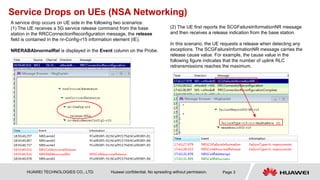
Service Drops on UEs (NSA Networking)
A service drop occurs on UE side in the following two scenarios:
(1) The UE receives a 5G service release command from the base
station in the RRCConnectionReconfiguration message, the release
field is contained in the nr-Config-r15 information element (IE).
NRERABAbnormalRel is displayed in the Event column on the Probe.
(2) The UE first reports the SCGFailureInformationNR message
and then receives a release indication from the base station.
In this scenario, the UE requests a release when detecting any
exceptions. The SCGFailureInformationNR message carries the
release cause value. For example, the cause value in the
following figure indicates that the number of uplink RLC
retransmissions reaches the maximum.
4.
HUAWEI TECHNOLOGIES CO.,LTD. Page 4
Huawei confidential. No spreading without permission.
Service Drops on the Network (NSA Networking)
The UE unexpectedly receives a release indication from either the 5G
base station (which sends an SGNB_REL_REQUIRED message to the
LTE base station over the X2 interface) or LTE base station (which
sends an SGNB_REL_REQ message to the 5G base station over the
X2 interface).
If the UE reports an SCGFailure message, the LTE
base station receives an RRC_SCG_FAIL_INFO_NR
signaling message over the Uu interface and then sends an
SGNB_REL_REQ message carrying the cause value of
"failure-in-the-radio-procedure" to the 5G base station over
the X2 interface.
5.
Contents
1. Introduction toNSA Call Drops
2. Forward Locating NSA Call Drops
3. Reverse Locating and Cases of NSA Call Drops
4. NSA KPI Call Drop Analysis
5. Introduction to SA Call Drops
6.
HUAWEI TECHNOLOGIES CO.,LTD. Page 6
Huawei confidential. No spreading without permission.
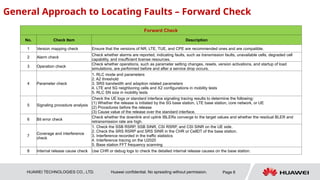
General Approach to Locating Faults – Forward Check
Forward Check
No. Check Item Description
1 Version mapping check Ensure that the versions of NR, LTE, TUE, and CPE are recommended ones and are compatible.
2 Alarm check
Check whether alarms are reported, indicating faults, such as transmission faults, unavailable cells, degraded cell
capability, and insufficient license resources.
3 Operation check
Check whether operations, such as parameter setting changes, resets, version activations, and startup of load
simulations, are performed before and after a service drop occurs.
4 Parameter check
1. RLC mode and parameters
2. A2 threshold
3. SRS bandwidth and adaption related parameters
4. LTE and 5G neighboring cells and X2 configurations in mobility tests
5. RLC SN size in mobility tests
5 Signaling procedure analysis
Check the UE logs or standard interface signaling tracing results to determine the following:
(1) Whether the release is initiated by the 5G base station, LTE base station, core network, or UE
(2) Procedures before the release
(3) Cause value of the release over the standard interface.
6 Bit error check
Check whether the downlink and uplink IBLERs converge to the target values and whether the residual BLER and
retransmission rate are high.
7
Coverage and interference
check
1. Check the SSB RSRP, SSB SINR, CSI RSRP, and CSI SINR on the UE side.
2. Check the SRS RSRP and SRS SINR in the CHR or CellDT of the base station.
3. Interference recorded in the traffic statistics
4. Interference tracing on the U2020
5. Base station FFT frequency scanning
8 Internal release cause check Use CHR or debug logs to check the detailed internal release causes on the base station.
7.
HUAWEI TECHNOLOGIES CO.,LTD. Page 7
Huawei confidential. No spreading without permission.
Forward Check - Action 1: Version Mapping Check
Entry conditions: Unconditional entry.
The latest version is recommended because 5G protocols are frequently updated and the version iteration is fast.
1. If the UE is a Huawei TUE,CPE or Commercial terminal, check the corresponding UE version.
2. The protocol versions on the eNodeB and UE sides must be consistent.
8.
HUAWEI TECHNOLOGIES CO.,LTD. Page 8
Huawei confidential. No spreading without permission.
Forward Check- Action2 – Alarm Check
Alarm ID Alarm Name Impact
ALM-29800 gNodeB X2 Interface Fault Service drops occur due to transmission faults in NSA networking.
ALM-29840 gNodeB Out of Service The base station releases all online UEs.
ALM-29841 NR Cell Unavailable All online UEs in the cell are released.
ALM-29842 NR Cell Blocked Manual blocking causes the release of all online UEs in the cell.
ALM-29843 NR DU Cell Simulated Load Startup
The interference and bit error rate over the air interface are high, causing service drops over the air
interface.
ALM-29844 NR DU Cell Unavailable All online UEs in the cell are released.
ALM-29870 NR DU Cell TRP Unavailable All online UEs in the cell are released.
ALM-29871 NR DU Cell TRP Capability Degraded
The air interface capability decreases and service drops are apt to occur in weak coverage areas,
such as cell edges.
ALM-26521 RF Unit RX Channel RTWP/RSSI Too Low
The cell demodulation performance deteriorates and service drops are apt to occur in weak coverage
areas, such as cell edges.
ALM-26520 RF Unit TX Channel Gain Out of Range
A high transmit power causes overshoot coverage, thereby causing interference. A low transmit power
causes coverage holes.
ALM-26529 RF Unit VSWR Threshold Crossed
A high VSWR causes cell coverage shrinkage. In severe cases, the base station may automatically
shut down its TX channel.
ALM-26527 RF Unit Input Power Out of Range
The quality of services carried on the RF unit deteriorates, and UEs may experience service drops at
the coverage edge of the RF unit.
ALM-26260 System Clock Failure
The base station has such exceptions in processing services as interference with surrounding sites,
causing faults, such as bit errors and handover failures.
Entry condition: none. The following alarms are common alarms that may cause service drops. Check whether the
following alarms are generated before and after a service drop occurs. Note that the alarm generation time may be later
than the service drop time because of the alarm smooth mechanism. If alarms that are not listed in the following table
are generated, contact the headquarters to check whether these alarms affect service drops.
9.
HUAWEI TECHNOLOGIES CO.,LTD. Page 9
Huawei confidential. No spreading without permission.
Forward Check – Action3 – Operation Check
Entry condition: This check applies to scenarios where KPIs deteriorate from their normal levels. For example, network-level traffic
KPIs suddenly deteriorate, or KPIs were tested normal but then service drops occur. If this scenario does not apply, skip this step
and check parameters. You can query operation logs on line by using the LST OPTLOG command, or use the FMA to open the
operation logs in the one-click logs of the main control board.
Data
Source
Tool Analysis Method Closed-Loop Action
Operation
logs
Online
query or
FMA
1. Check whether any modification, addition, deletion, blocking, activation, or
deactivation operation is performed before normal KPIs deteriorate.
2. In MOCN scenarios, check whether operations affecting multiple operators,
such as transmission and license modification, are performed.
3. Use the FMA tool to associate alarm logs, fault logs, and operation logs.
1. Check whether operations can be rolled
back and whether the KPIs are improved after
the rollback.
2. Analyze the impact of alarms and
equipment faults on the service drop rate, and
clear the alarms based on the fault and alarm
handling guide.
3. Check whether service drops are caused
by external events. Observe the capacity and
load status .
4. Check whether the issue has been
resolved.
External
event
analysis
None
1. Check whether operations are performed on peripheral NEs and whether the
customer has any changes, such as new UE/number releases, package
changes, and network architecture changes, when service drops occur.
2. Check whether there are important events near the turning point of the
service drop trend, such as festivals, ball games, and parades, when service
drops occur.
10.
HUAWEI TECHNOLOGIES CO.,LTD. Page 10
Huawei confidential. No spreading without permission.
Forward Check – Action4 – Parameter Check
MO Parameter ID Parameter Name Recommended Value Impact
NRDUCELLQC
IBEARER
UeInactivityTimer UE Inactivity Timer 20
The smaller the value of this parameter, the lower the service
drop rate. In the single-point demonstration test scenario, it is
recommended that this parameter be set to 0 to prevent the
base station from releasing UEs when there is no service in a
short time.
NRCellNsaDcC
onfig
PscellA2RsrpThld
PSCell A2 RSRP
Threshold
–121
If this parameter is set to a large value, the gNodeB normally
releases UEs when the RSRP is lower than the value of this
parameter. In this case, the test engineer mistakenly
considers that a service drop occurs.
NRDUCellUlTa
Config
UlTimeAlignmentTim
er
Uplink Time
Alignment Timer
INFINITY(Infinity)
Indicates the length of the uplink time alignment timer for UEs
in the cell. A UE is considered not time-aligned in the uplink if
the timer expires. In NSA networking, an NRSCGFailure
message is reported, leading to service drops. Setting this
parameter to INFINITY(Infinity) prevents service drops
caused by TA timeout and does not affect the TA
synchronization performance.
NRDuCellRsvd
Param
RsvdU16Param9 TA Sending Interval 3
If the UE moves at a high speed, only a small value of this
parameter can ensure the timing performance. If this
parameter is set to a large value, service drops may occur
and more air interface resources are consumed.
NRDUCellRsvd
OptParam
Param1WithParamId
128
Periodic SRS
Bandwidth
Switchover Threshold
45
If this parameter is set to a small value, for example, less
than 30, the UE does not reduce the SRS bandwidth at the
cell edge. The base station detects poor SRS signal quality
and the TA cannot be accurately measured or timely
adjusted. As a result, service drops are apt to occur in mobile
scenarios.
The following table lists the common causes that affect call drops. For details, see the parameter check table.
http://3ms.huawei.com/hi/group/3402967/thread_7283421.html?mapId=9040103&for_statistic_from=all_group_forum
11.
HUAWEI TECHNOLOGIES CO.,LTD. Page 11
Huawei confidential. No spreading without permission.
Forward Check – Action5 – Signaling Procedure Analysis
Data Source Tool Analysis Method Closed-Loop Action
Probe log
GENEX
Probe,
GENEX
Assistant
1. Open the L3 Message, Event, and Key Event List windows to replay logs.
2. Check the abnormal events highlighted in red in the Event window. After a service drop
event is detected, click the event. Information of the event time will be displayed in other
windows. Then, you can view the specific L3 signaling procedure message and the cause
value in the message. You can also view more detailed internal information in the Key
Event List window.
1. After the signaling procedure and
release cause value are confirmed, you
can preliminarily determine that the
service drop is caused by problems
such as LTE air interface problems, 5G
air interface problems, core network
problems, or transmission faults.
2. If the release is initiated by the core
network, contact core network
engineers for analysis. If the service
drop or reestablishment occurs on the
LTE side, analyze the problem by
referring to LTE Integration and
Optimization Guide. If the service drop
is caused by transmission faults,
analyze the problem by referring to
Transmission Integration and
Optimization Guide. If the service drop
is caused by air interface problems,
check for bit errors.
Uu/S1/X2/
Ng/Xn
interface
signaling
trace or virtual
UE trace
FMA
1. In NSA networking, filter the SGNB_REL_REQ and SGNB_REL_REQUIRED messages
over the X2 interface on either the LTE or 5G base station to determine whether the release
is initiated by the LTE or 5G base station.
2. If the release is initiated on the 5G side, check the cause value carried in the messages
and the signaling procedures before the release. For example, check whether handovers
are initiated and complete, whether to reconfigure the air interface parameters, and whether
a reconfiguration completion message is received from the LTE side.
3. If the release is initiated on the LTE side, check the procedures before the release. For
example, check whether a release message is received from the core network, whether a
service drop or reestablishment occurs on the LTE side, or whether the UE returns an
SCGFailure message.
CHR FMA
1. Open the 5G CHR on the FMA, filter the L3_EventUserCommInfo event, and find the
corresponding service drop record in the CallID, eNB_UE_X2APID, or gNB_UE_X2APID
based on the problem time.
2. View the L3 signaling before the service drop occurs in the union_sig_info IE in
L3_EventChrRecordCu of the CHR.
The analysis of the signaling procedure is to confirm the following three questions: 1. What has triggered the service drop? 2. What is the release cause value
contained in the signaling message? 3. What signaling procedure is in progress before a service drop occurs?
For a single-point test, use Probe logs, virtual UE trace, and standard interface signaling trace to confirm the signaling procedure before a service drop occurs.
For a network KPI-related problem, confirm the signaling procedure using the SigInfo recorded in the CHR.
12.
HUAWEI TECHNOLOGIES CO.,LTD. Page 12
Huawei confidential. No spreading without permission.
Forward Check-Action5 – Signaling Procedure Analysis
(Confirming the Release Cause in NSA Networking)
Released By Release Cause Value Possible Cause & Troubleshooting Method
5G base
station
Radio-connection-with-
UE-lost
The number of downlink RLC retransmissions reaches the maximum. Check the signal quality, air interface bit errors, and RLC parameter
settings.
No-radio-resources-
available
Check the internal release cause value and debug information in the CHR to check which resources fail to be allocated.
transport-resource-
unavailable
The transmission over the S1-U interface is faulty. Rectify the faults using the transmission problem troubleshooting method.
Scg-mobility The UE is normally released because event A2 is reported. Check whether the configured 5G A2 threshold is too high.
LTE base
station
failure-in-the-radio-
procedure
The UE reports an SCGFailure message over the air interface. Refer to the troubleshooting method for UE releases or LTE RRC connection
reestablishment.
transport-resource-
unavailable
The transmission over the S1-U or X2-U interface is faulty. Rectify the faults using the transmission problem troubleshooting method.
rrm-purpose Signaling procedures on the LTE side are abnormal. For example, after the NR is added, the LTE base station sends a bearer modification
request to the core network and does not receive a response from the core network within the specified time. Find out what's abnormal in the
signaling procedures before the release on the LTE side.
Mcg-mobility During an inter-eNodeB handover, the UE is normally released from the source eNodeB. This is not a service drop.
Unspecified The release is initiated by the core network.
UE randomAccessProblem The random access fails during a handover; the uplink resynchronization random access fails after the number of SR retransmissions
reaches the upper limit (the RAR is not received. The number of Msg3 retransmission reaches the maximum. The Msg4 is not received); the
TA Timer expires. -----Check the signal quality and air interface bit errors.
rlc-MaxNumRetx The number of uplink RLC retransmissions reaches the maximum. Check the air interface bit errors and RLC parameter settings.
scg-reconfigFailure An internal procedure conflict occurs on the UE side or an IE fails to be verified. Contact UE engineers for analysis.
synchReconfigFailure-SCG The UE fails to search for cells (synchronization failure, failure to receive SSB). Check for cell status and interference.
13.
HUAWEI TECHNOLOGIES CO.,LTD. Page 13
Huawei confidential. No spreading without permission.
Forward Check – Action6 – Bit Error Check
Data Source Tool Analysis Method Closed-Loop Action
Probe log
GENEX Probe,
GENEX Assistant
In the Radio Measurement window on the Probe, check whether the uplink and
downlink IBLERs converge to the target value (10% or configurable using parameters),
whether the residual BLER is less than 1%, and whether the retransmission rate is
greater than 30%.
If the BLER is high, check the
signal quality and interference on
the air interface.
CHR FMA
1. Calculate the BLER using the following formula: BLER = (Number of NACKs +
Number of DTXs)/Scheduling times.
2. Check the downlink BLER indicated by downlink MAC scheduling times and the
number of ACKs/NACKs/DTXs recorded in L2_EVENT_ID_USER_INN_CHR >
DLSCH_L2_USERCHR_HISTORY_SLOT_INFO_INN_UNION within the last period before
the service drop occurs.
3. Check the uplink BLER indicated by uplink MAC scheduling times and the number of
ACKs/NACKs/DTXs recorded in L2_EVENT_ID_USER_INN_CHR >
ULSCH_USERCHR_HISTORY_PUSCH_SLOT_INFO_INN_UNION within the last period
before the service drop occurs.
Entry conditions: The release initiated by the 5G base station triggers the service drop and the cause value is "UE LOST", or the
cause value carried in the SCGFailure message reported by the UE is "rlc-MaxNumRetx" or "randomAccessProblem".
14.
HUAWEI TECHNOLOGIES CO.,LTD. Page 14
Huawei confidential. No spreading without permission.
Forward Check – Action7 – Coverage and Interference Check
Data
Source
Tool Analysis Method Closed-Loop Action
UE log
GENEX
Probe,
GENEX
Assista
nt
Check the SSB RSRP and CSI-RSRP in the Radio Measurement window on the Probe. If they are less than
–120, the coverage has deteriorated and therefore service drops are apt to occur. If the RSRP is greater than
–110 and the SINR is less than 0 dB, downlink interference exists.
In addition, you can view information, such as the signal strength and TA of the serving cell, signal strength of
neighboring cells, and frequency offset, in the Serving and Neighboring Cells window on the Probe. If there
are multiple neighboring cells of which the signal strength is equivalent to or slightly higher than that of the
serving cell but no handover is triggered, it is possible that interference from neighboring cells causes the
service drop.
1. If the RSRP is low, check the distance between the test
point and the antenna and check whether there is a
barrier between them. Move to another test point and
check whether service drop occurs again.
2. If interference is strong, check whether the signal
strength of any neighboring cell is stronger than that of
the serving cell and no handover is triggered.
If the signal strength of neighboring cells does not meet
the handover conditions but is equivalent to that of the
serving cell, check whether simulated loading is
performed for neighboring cells
3. If external interference is detected, start an FFT
frequency scan, observe the interference characteristics,
and rectify faults according to X Solutions for
Troubleshooting RF Channel Faults in the LTE Network.
OSS FMA
1. Measure the values returned by counters N.ChMeas.CQI.SingleCW.0 to N.ChMeas.CQI.SingleCW.15. If
the proportion of CQIs less than or equal to 4 exceeds 20%, downlink coverage is poor.
2. Check the uplink interference statistics by observing the values returned by the N.UL.NI.Avg,
N.UL.NI.Max, and N.UL.NI.Min counters. If the value returned by the N.UL.NI.Avg counter is greater than –
105 or the value returned by the N.UL.NI.Min counter is greater than –110 when the network is unloaded,
uplink interference may exist.
CHR FMA
Identify weak coverage in the uplink, sudden drop in signal strength, and uplink interference based on the
RSRPs and TTIs (L2_USER_L2RLCREX_SUSR_INN_UNION) of 32 groups of SRSs recorded in the CHR.
If MAX{UL Average RSRP} is less than or equal to –130 dBm, the coverage in the uplink is weak.
If the difference between two values of UL Average RSRP recorded in two adjacent groups is greater than 10
dB, the uplink signal strength suddenly drops.
If the RSRP is greater than –130 and the SINR is less than 0 dB, interference exists in the uplink.
U2020
interference
tracing
FMA
On the U2020, choose Monitor > Signaling Trace > Signaling Trace Management > NR > Cell
Performance Monitoring > Interference Detect Monitoring.
Monitor the uplink interference in seconds to check the interference at the position of each RB. When there is
no service in the cell, if the interference is greater than –100 dBm, interference exists in the uplink.
FFT
frequency
scanning
FMA
Choose Monitor > FFT Frequency Scanning on the WebLMT.
Check the uplink interference within a certain range on the frequency band and both edges of the frequency
band and find out the interference source using the interface waveform. For details, see X Solutions for
Troubleshooting RF Channel Faults .
Entry condition: The air interface BLER is high.
15.
HUAWEI TECHNOLOGIES CO.,LTD. Page 15
Huawei confidential. No spreading without permission.
Forward Check – Action8 – Internal Release Cause Check
Entry condition: The release is initiated on the 5G side or caused by the SCGFailure message reported by the UE. The cause value
carried in the signaling message over the standard interface cannot further confirm the problem or no UE logs or standard interface
logs are available.
Data
Source
Tool Analysis Method Closed-Loop Action
CHR FMA
Confirm the calling procedure, exception type, and specific cause value when the
service drop occurs based on the DCCallProcedureType, DCErrType, and
DCInnerCause IEs in the CHR.
Then, check whether such information as the L3 error log, L2 scheduling information,
and RLC retransmission information is normal.
1. Analyze the CHR to check
whether the service drop is
caused by air interface problems,
resource allocation problems, or
other internal exceptions.
2. If the root cause cannot be
located using the CHR, send
related logs to Huawei
headquarters for analysis.
Debug FMA
In case of internal resource allocation failures, internal process exceptions, or failures in
identifying exceptions based on DC values, check the error code at layer 2 and layer 3
at the time when the problem occurs.
CellDT MyLd
If no exception information is recorded in the CHR or information recorded in the CHR is
insufficient for analysis, reproduce the problem, collect the CellDT tracing information,
and analyze the internal micro processing procedure of the base station.
16.
Contents
1. Introduction toNSA Call Drops
2. Forward Locating NSA Call Drops
3. Reverse Locating and Cases of NSA Call Drops
4. NSA KPI Call Drop Analysis
5. Introduction to SA Call Drops
17.
HUAWEI TECHNOLOGIES CO.,LTD. Page 17
Huawei confidential. No spreading without permission.
General Approach to Locating Faults – Reverse Check
Reverse Check
No. Service Drop Category Common Cause
1 Service Drop Due to 5G Coverage Problems
1. The coverage is weak.
2. There is no primary coverage cell in the handover area and the signal strength is equivalent in a large number of cells,
resulting in handover failures.
2 Service Drop Due to 5G Interference
1. External interference causes service drops.
2. Neighboring cell interference causes service drops.
3
Service Drop Due to 5G Configuration
Problems
1. RLC parameters are incorrectly configured. As a result, the RLC status report cannot be sent in a timely manner and
the number of RLC retransmissions reaches the maximum, causing service drops.
2. The SRS adaptive threshold is incorrectly configured. As a result, the SRS bandwidth at the cell edge cannot be
changed to narrowband. The SRS detected on the base station is weak. TA values cannot be accurately measured,
causing service drops.
3. The configured A2 threshold is too high. As a result, the UE is normally released.
4. Missing neighboring cells cause handover failures, resulting in service drops.
4
Service Drop Due to LTE Configuration
Problems
Missing configuration of 5G neighboring cells or X2 interface on the LTE network causes 5G handover failures, resulting in
service drops.
5 Service Drop Due to Handover Failures
1. Random access fails on the target base station during a 5G handover.
2. 5G random access triggered by an LTE handover fails, resulting in service drops.
6 Service Drop Due to Transmission Faults
1. Transmission congestion causes a long signaling delay, resulting in service drops.
2. Transmission faults cause the base station to initiate a release.
7 Service Drop Due to Cell Faults
1. Insufficient power supply for the AAU causes cell faults.
2. Transmission faults cause cell faults.
8
Service Drop Due to SCG Reconfiguration
Failures
Check whether the downlink and uplink IBLERs converge to the target values and whether the residual BLER and
retransmission rate are high.
9 Service Drop Due to Core Network Problems
1. Bearer modification fails on the core network, resulting in service drops.
2. Abnormal releases from the core network cause service drops.
10
5G Service Drop Due to LTE Service Drop
and Reestablishment
In NSA networking, the LTE service drop and reestablishment cause the release on the 5G side.
18.
HUAWEI TECHNOLOGIES CO.,LTD. Page 18
Huawei confidential. No spreading without permission.
Reverse Check – Scenario 1: Service Drop Due to 5G Coverage
Problems
Check the signal quality in the serving cell and neighboring cells and the number of neighboring cells when the service drop occurs.
For example, the release shown in the figure on the right is
caused by event A2 reported by the UE. This is a normal
release. The RSRP of the serving cell is –122 which is lower
than the default A2 threshold –121. In this case, even if the A2
threshold is changed to a smaller value, service drops on
other air interfaces may also occur due to weak coverage.
In another service drop example, the UE has
not reported any measurement report and the
RSRP is not poor, but the UE suddenly receives
a release command from the network side. On
the UE side, the RSRPs of two neighboring
cells are higher than that of the serving cell. For
one of the two neighboring cells, the RSRP is 5
dB higher than that of the serving cell. In the
case of neighboring cell interference, the SSB
SINR is only –3. Therefore, this service drop is
caused by coverage problems.
19.
HUAWEI TECHNOLOGIES CO.,LTD. Page 19
Huawei confidential. No spreading without permission.
Reverse Check - Scenario 2 : Call Drops Caused by 5G Interference (1)
(1) The drive test shows that a service drop
occurred at 16:01:09 and the UE did not report the
SCGFailure message and was not in the handover
process either.
(2) The standard interface tracing result shows that the
release is initiated on the 5G side. The cause value is
"Radio-connection-with-UE-lost."
(3) The DC value
recorded in the CHR is
the maximum number of
downlink RLC
retransmissions
20.
HUAWEI TECHNOLOGIES CO.,LTD. Page 20
Huawei confidential. No spreading without permission.
Reverse Check - Scenario 2 : Call Drops Caused by 5G Interference (2)
(4) The number of RLC retransmissions reaches the
maximum (32). The time when the last status report
is received successfully is consistent with the time
when the status report is parsed successfully, which
is earlier than the retransmission start time. It
indicates that the base station has not received any
status report since the start of the first retransmission
(5) The uplink BLER is high, and most of the
feedback is NACK.
21.
HUAWEI TECHNOLOGIES CO.,LTD. Page 21
Huawei confidential. No spreading without permission.
Reverse Check – Scenario 2: Service Drop Due to 5G Interference (3)
(6) The uplink SRS RSRP recorded in the CHR is about
–101 dBm (the GUI value divided by 100), but the SRS
SINR is lower than –3 dB (the GUI value divided by
100), indicating that interference exists in the uplink.
(7) The FFT frequency scanning shows that there is strong external interference with a
bandwidth of about 7 MHz in the working frequency band of the cell. A professional frequency
scanner detected on site an interference device in a nearby building.
22.
HUAWEI TECHNOLOGIES CO.,LTD. Page 22
Huawei confidential. No spreading without permission.
Reverse Check – Scenario 3: Service Drop Due to 5G Configuration
Problems
(1) A frontline engineer reported that service drops occurred shortly
after the downlink packet injection test was performed at the cell
center.
(2) In the single-cell scenario, the signal quality is good. Therefore, neighboring cell interference or external
interference is not the cause.
(3) The air interface BLER is not high.
(4) According to the signaling of the base station, the release is initiated by the 5G base station with the
cause value of "UE LOST." In the current version, the only possible cause is that the number of downlink
RLC retransmissions reaches the maximum.
(5) According to the parameter check, RLC parameter group 2 is used, containing inappropriate parameters marked in red in the following
figure. Thresholds for triggering downlink polling are set to Infinity. In this case, the polling is triggered for the UE to report a status report only
when downlink RLC packets are incorrectly parsed or the buffer is empty.
Packet injection is performed at the cell center, so incorrect parsing and empty buffer may not occur. As a result, the base station cannot
receive any status report in a long time, and the transmit window cannot slide normally. The size of a downlink RLC sequence number is only
12 bits, which will cause the transmit window to be quickly full when the downlink traffic is heavy. As a result, the RLC status is identified as
abnormal and the release is initiated.
23.
HUAWEI TECHNOLOGIES CO.,LTD. Page 23
Huawei confidential. No spreading without permission.
Reverse Check – Scenario 4: Service Drop Due to LTE Configuration
Problems
The most common scenario is that no X2 interface is configured for LTE sites and surrounding 5G sites and the X2 self-setup switch is
not turned on. As a result, service drops occur due to handover failures during the 5G mobile drive test.
(1) The UE continuously reports 5G measurement reports and does not
receive any handover command.
(2) The signaling tracing result on the base station side shows that the 5G base
station has sent a Change Required message to the LTE base station, but the
LTE base station responds with a rejection message containing the cause value
indicating unavailable transport resources.
(3) According to a check on the configuration of LTE and 5G sites using an NSA association check tool, no neighboring cell, external cell, or X2 interface of the
5G target site is configured on the LTE side, and the X2 self-setup switch is not turned on.
24.
HUAWEI TECHNOLOGIES CO.,LTD. Page 24
Huawei confidential. No spreading without permission.
Reverse Check – Scenario 5: Service Drop Due to Handover Failures
(1) UE random access fails on the
target base station during a
handover.
(2) Events in Key Event List on the
Probe show that the random access
failure is caused by failures to
receive the RAR. After the preamble
fails to be sent for 10 consecutive
times (default configuration), the UE
reports the NRSCGFailure
message, resulting in a service
drop.
(3) There are multiple neighboring cells that have
equivalent signal strength as the serving cell. As
shown in the figure above, ping-pong handovers
occur before the service drop occurs, indicating that
signals are garbled at the UE location and there is
no primary serving cell. With neighboring cell
interference, random access failures are apt to
occur, requiring a coverage optimization.
25.
HUAWEI TECHNOLOGIES CO.,LTD. Page 25
Huawei confidential. No spreading without permission.
Reverse Check – Scenario 6: Service Drop Due to Transmission
Faults (1)
(1) In the process of adding an NR after an LTE handover, the UE
receives a release command from the base station, resulting in a
service drop.
(2) According to the signaling tracing result on the LTE side, after sending an SGNB_ADD_REQ
message to the 5G base station, the LTE base station waits 6s before receiving an
SGNB_ADD_REQ_ACK message. In normal cases, the LTE base station needs only to wait
dozens of milliseconds.
(3) According to the signaling tracing result on the 5G side, the 5G base station replies with the
SGNB_ADD_REQ_ACK message immediately after receiving the SGNB_ADD_REQ message to
the LTE base station. The time interval between receiving and sending is only 12 ms. Therefore,
the service drop may be caused by a fault in the transmission from the 5G base station to the
LTE base station.
26.
HUAWEI TECHNOLOGIES CO.,LTD. Page 26
Huawei confidential. No spreading without permission.
Reverse Check – Scenario 6: Service Drop Due to Transmission
Faults (2)
(4) The VS.SctpLnk.RePkts counter
(Number of packets retransmitted by SCTP
links) of the 5G base station shows that there
are many retransmissions on SCTP link=
70000 to the LTE base station. This indicates
that the peer LTE base station does not
receive any SCTP packet. The transmission
needs to be further checked.
(5) After the IPPM detection function is
activated for statistics collection for a period of
time, X2 links of multiple LTE and 5G sites on
the live network experience packet loss and
long delay.
An analysis shows that large-volume packet
injection on the server during the test, limited
bandwidth of the transmission equipment, and
absence of signaling QoS guarantee cause
transmission congestion on the X2 link,
thereby causing signaling transmission delay.
5G Base
Station
LTE base station BJ690005 BJ690007 BJ690010 BJ690008 BJ690013
10.101.154.34 4-Normal
10.101.111.162 1-A small number of
packets lost
1-A small number
of packets lost
0-A small number of
packets lost
1-A small number of
packets lost
10.101.154.170 4-Normal 3-Normal 2-No packet lost 2-No packet lost
10.101.131.74 0-Normal 0-Normal 4-Packets lost, large
delay
0-Packets lost, large
delay
10.101.111.250 3-Packets lost, large
delay
1-Packets lost, large
delay
1-Packets lost, large
delay
10.101.154.234 2-Packets lost 3-Packets lost 3-Packets lost
10.105.44.114 3-No packet lost,
large delay
4-A small number of
packets lost, large
delay
10.103.83.66 2-Large delay 2-Large delay 0-A small number of
packets lost, large
delay
10.101.168.170 5-Normal
27.
HUAWEI TECHNOLOGIES CO.,LTD. Page 27
Huawei confidential. No spreading without permission.
Reverse Check – Scenario 7: Service Drop Due to Cell Faults (1)
(1) The UE can access the network and is performing services
at the cell center in stationary state, but service drops occur as
long as the UE performs downlink packet injection. When
packet injection stops, service drops no longer occur. The
Probe shows that service drops are caused by an SCGFailure
message reported by the UE. The cause value carried in the
message is "RandomAccessProblem."
Cell faults can be caused by different types of faults, such as transmission, power supply, and hardware faults. Service drops caused by cell faults can be
confirmed by viewing alarms.
(2) A coverage check shows that the UE is tested at the cell center and the
SSB RSRP is stable at about –71. However, the last record before service
drops occur shows that the SSB RSRP dramatically decreases to –117; at
the same time, the transmit power of the UE dramatically increases by
dozens of decibels.
28.
HUAWEI TECHNOLOGIES CO.,LTD. Page 28
Huawei confidential. No spreading without permission.
Reverse Check – Scenario 7: Service Drop Due to Cell Faults (2)
(3) According to an alarm check on the logs of the main control
board, alarms are frequently reported in the tested cell, indicating
that RF units are powered off, and therefore the cell becomes
unavailable.
Each of these alarms is automatically cleared one minute after being
reported. Based on the alarm generation time and clearance time,
these alarms are closely related to the downlink packet injection by
frontline engineers.
Based on the preceding analysis, it is determined that power supply
specifications of the AAU do not meet the requirements. Once
downlink packet injection starts, the AAU transmits signals at its full
power and therefore is powered off, and the cell becomes
unavailable. As a result, the UE experiences a service drop. After the
service drop occurs, packet injection automatically stops; the power
supply for the AAU restores; and the alarm is cleared.
This service drop issue has been resolved after frontline engineers
rectify the AAU power fault.
29.
HUAWEI TECHNOLOGIES CO.,LTD. Page 29
Huawei confidential. No spreading without permission.
Reverse Check – Scenario 8: Service Drop Due to SCG
Reconfiguration Failures (1)
In the SCGFailure message reported by the UE, cause value "scg-reconfigFailure" indicates that an IE in the message is
invalid or a procedure conflict occurs on the UE side.
(1) During a mobility test, the UE reports the SCGFailure
message with the cause value of "scg-reconfigFailure" one
second after an LTE handover.
(2) As shown in Key Event List, the LTE handover is complete.
After receiving the reconfiguration message, the 5G base station
performs reconfigurations and then reports the "scg mod error"
event.
30.
HUAWEI TECHNOLOGIES CO.,LTD. Page 30
Huawei confidential. No spreading without permission.
Reverse Check – Scenario 8: Service Drop Due to SCG
Reconfiguration Failures (2)
(3) As shown in L3 Message, two RRC connection reconfigurations
are performed before the UE reports the SCGFailure message. In the
first reconfiguration, the original SRS resource set and resource
(ResourceSetID=1, ResourceID=1) are deleted and a new resource
(ResourceID=0) is configured.
(4) In the second reconfiguration, the newly configured SRS resource
(ResourceID=0) is deleted, and no new resource is configured. This
reconfiguration results in UE feedback failures.
(5) TUE R&D engineers confirmed that SRS resources must be configured for the TUE
and a check will be performed on the configuration. Therefore, when all SRS resources
are deleted, the SCGFailure message is reported.
The reason for the base station to delete SRS resources is that the SRS period is too
short. As a result, the SRS resource allocation fails because other UEs are in the same
cell.
31.
HUAWEI TECHNOLOGIES CO.,LTD. Page 31
Huawei confidential. No spreading without permission.
Reverse Check – Scenario 9: Service Drop Due to Core Network
Problems
(1) A message on the UE side indicates that the UE has accessed the
NR cell, but is released on the network side 20s later.
(2) According to the signaling tracing result of the base station,
after the 5G air interface is successfully set up, the LTE base
station initiates an E-RAB modification procedure. After
sending an ERAB_MOD_IND message to the core network,
the eNodeB does not receive any
ERAB_MODIFICATION_CONFIRM message from the core
network. 5G connections are released over the S1 interface
after the 20s timer expires, and the cause value is "rrm-
purpose."
The core side needs to be analyzed to check why no response
is returned.
32.
HUAWEI TECHNOLOGIES CO.,LTD. Page 32
Huawei confidential. No spreading without permission.
Reverse Check – Scenario 10: Service Drop Due to LTE Service
Drops
The analysis on the 5G side only needs to identify that the cause is LTE service
drops during LTE reestablishment. For details about how to locate and analyze
LTE reestablishment and service drops, see related LTE guides.
(1) RRC connections are reestablished for the UE before 5G
connections are released. (This example shows that the
reestablishment is caused by an LTE handover failure.)
(2) According to the signaling tracing result on the base station side, the LTE base station
receives an RRC connection reestablishment request from the UE before releasing 5G
connections.
(Note: The following figure only shows how to observe the signaling on the base station side. It is
not meant to indicate the same problem indicated by UE logs shown in the figure on the left.)
33.
Contents
1. Introduction toNSA Call Drops
2. Forward Locating NSA Call Drops
3. Reverse Locating and Cases of NSA Call Drops
4. NSA KPI Call Drop Analysis
5. Introduction to SA Call Drops
34.
HUAWEI TECHNOLOGIES CO.,LTD. Page 34
HUAWEI Confidential
NSA Call Drop KPI Definitions and Counters
N.NsaDc.SgNB.AbnormR
el
N.NsaDc.SgNB.AbnormRel.Radio
N.NsaDc.SgNB.AbnormRel.Radio.UeLost
N.NsaDc.SgNB.AbnormRel.Radio.ULSyncFail
N.NsaDc.SgNB.AbnormRel.Trans
N.NsaDc.SgNB.AbnormRel.NoReply
N.NsaDc.SgNB.AbnormRel.Radio: total number of abnormal SgNB releases in LTE-NR NSA DC scenarios caused by the radio layer;
N.NsaDc.SgNB.AbnormRel.Trans: total number of abnormal LTE-NR NSA DC SgNB releases due to the transport layer
Number of abnormal SgNB releases triggered by SgNB due to no response to N.NsaDc.SgNB.AbnormRel.NoReply: messages
Number of SgNB-triggered abnormal SgNB releases due to N.NsaDc.SgNB.AbnormRel.Radio.UeLost: UE LOST;
Number of abnormal SgNB releases in LTE-NR NSA DC scenarios due to N.NsaDc.SgNB.Rel.MeNBTrigger.NormalRel: uplink resynchronization failures;
SGNB-initiated Abnormal
Release Rate
LTE-initiated Abnormal Release Rate Including LTE-initiated abnormal release rate
SCG call
drop rate
(N.NsaDc.SgNB.Abnorm
Rel/ N.NsaDc.SgNB.Rel)
*100%
[(N.NsaDc.SgNB.Rel - N.NsaDc.SgNB.Rel.SgNBTrigger -
N.NsaDc.SgNB.Rel.MeNBTrigger.NormalRel)/
N.NsaDc.SgNB.Rel]*100%
[(N.NsaDc.SgNB.Rel - N.NsaDc.SgNB.Rel.SgNBTrigger -
N.NsaDc.SgNB.Rel.MeNBTrigger.NormalRel
+N.NsaDc.SgNB.AbnormRel)/ N.NsaDc.SgNB.Rel]*100%
35.
HUAWEI TECHNOLOGIES CO.,LTD. Page 35
HUAWEI Confidential
Analysis of Abnormal Releases Initiated by the Sgnb-Radio
Releases caused by radio faults include:
1. When the gNodeB sends an SgNB Release Required message to the eNodeB, if the value of CAUSE in the SgNB Release Required message is
Failure in the Radio Interface and the release is caused by uplink resynchronization failure. Currently, this problem rarely occurs.
2. When the gNodeB sends an SgNB Release Required message to the eNodeB, the N.NsaDc.SgNB.AbnormRel.Radio.UeLost increases if the Cause
IE in the SgNB Release Required message is Radio Connection With UE Lost. In the current version, the maximum number of retransmissions in the
downlink RLC layer is reached.
1. Analysis of associated counters(FMA )
• Handover success rate: If the handover success rate of the
corresponding top sites decreases, the deterioration of the call drop rate
is closely related to handovers. In this case, the handover problem
needs to be solved first.
• Average uplink interference: If N.UL.NI.Avg is greater than -106 dBm,
interference exists.
• CCE aggregation level: If the CCE aggregation level is high, the PDCCH
coverage is poor or UEs are far away.
• PRB usage: If the PRB usage is high, inter-cell interference increases.
2. Parameter check
3. Check alarms or operation.
36.
HUAWEI TECHNOLOGIES CO.,LTD. Page 36
HUAWEI Confidential
Analysis of Abnormal Releases Initiated by the Sgnb - Radio
(Maximum Downlink RLC Retransmission)
The number of X2 release request messages carrying the "Radio" field is measured for N.NsaDc.SgNB.AbnormRel.Radio.UeLost.
Connection With UE Lost occurs when the number of downlink RLC retransmissions on the 5G network reaches the maximum.
(1) If the maximum RLC retransmission is caused by polling and the status report is invalid, the RLC layer is faulty. In this case, the terminal data needs
to further analyze why the terminal sends the invalid status report. It's usually terminal problems.
2) If the maximum RLC retransmission is caused by polling and the status report is not received, there are two cases:
B. If the status report has been received but the status report cannot be received from a certain time, the status report cannot be received due to
uplink bit errors.
A) If no status report is received after the UE accesses the network, for example, if the frame number of the status report is 0 and the uplink and
downlink bit errors are normal (for details, see). In this case, analyze the UE logs and gNodeB logs to analyze why the UE does not respond to the
status report.
Common cause: include coverage problems, interference problems, top UE problems, and RLC parameter configuration problems.
37.
HUAWEI TECHNOLOGIES CO.,LTD. Page 37
Huawei confidential. No spreading without permission.
Analysis of Abnormal Releases Initiated by the Sgnb-TNL
N.NsaDc.SgNB.AbnormRel.Trans: In the current NSA scenario, call drops due to TNL causes are reported when the gNodeB sends a message to the eNodeB
The value of N.NsaDc.SgNB.AbnormRel.Trans is incremented by 1 each time the eNodeB sends an SgNB Release Required message with Cause set to
Transport Resource Unavailable.
In the CHR logs, view the file in L3ChrCuAbnormalRel > body > DccRecordInfo > DCErrType = "TNL_TransportResourceAbnormal".
IP addresses associated with transmission exceptions are recorded in L3ChrCuAbnormalRel->body > TransportEvent. You can determine, according to the
configuration file, whether the address is specifically an address between X2 or S1. You can also check whether all abnormal IP addresses are one address.
Using the CHR diagnosis tool, you can diagnose the causes of transmission service drops, as shown in the following figure.
You can analyze the IP address of the peer end where the transmission problem occurs and obtain the LTE anchor site ID and cell ID of the corresponding
anchor site, check whether the IP address is the IP address of the S1 or X2 interface based on the configuration file.
38.
HUAWEI TECHNOLOGIES CO.,LTD. Page 38
HUAWEI Confidential
Analysis of Abnormal Releases Initiated by the Sgnb - NoReply
N.NsaDc.SgNB.AbnormRel.NoReply corresponds to the scenario where the X2 release request carries the TDCoverall Expiry field.
The gNodeB does not receive either an SgNB Modification Confirm message or an SgNB Modification Refuse message after sending an SGNB Modification
Required message to the LTE network over the X2 interface.
The eNodeB initiates an X2 release until the timer for waiting for an X2 response expires (20 seconds is not configurable in the current version).
This problem is rarely seen.
LTE cellid =MOD(eutraCellid, 256), LTE enodebid= =INT(H7/256)
1. Find the top sites with the call drop cause and check whether there
are top anchors based on CHRs.
2. Obtain X2 signaling tracing results of top eNodeBs.
3. Check whether the LTE does not respond to the NR message or
the LTE does not receive the response from the UE.
4. Analyze the problem together with the LTE network and determine whether the
problem occurs on the NR side.
Check whether the reconfiguration content is the same each time the NR initiates
an SGNB Modification Required message and the SGNB Modification Required
message times out.
If they are consistent, check whether the eNodeB can be prevented from initiating
reconfiguration attempts by using a switch.
39.
Contents
1. Introduction toNSA Call Drops
2. Forward Locating NSA Call Drops
3. Reverse Locating and Cases of NSA Call Drops
4. NSA KPI Call Drop Analysis
5. SA Call Drops and Locating Process
40.
HUAWEI TECHNOLOGIES CO.,LTD. Page 40
HUAWEI Confidential
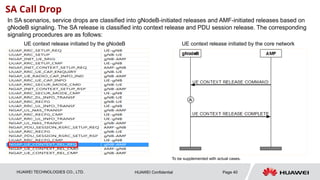
SA Call Drop
In SA scenarios, service drops are classified into gNodeB-initiated releases and AMF-initiated releases based on
gNodeB signaling. The SA release is classified into context release and PDU session release. The corresponding
signaling procedures are as follows:
UE context release initiated by the gNodeB UE context release initiated by the core network
To be supplemented with actual cases.
41.
HUAWEI TECHNOLOGIES CO.,LTD. Page 41
HUAWEI Confidential
SA Call Drop Symptom
CN-initiated PDU session release
PDU session release initiated by the base station
42.
HUAWEI TECHNOLOGIES CO.,LTD. Page 42
HUAWEI Confidential
Common SA Drop Scenarios
• The gNodeB collects service drop statistics based on different cause values, helping identify service drop types and locate problems.
• Major causes of service drops are air interface faults and transmission faults. The corresponding measurement counters are
N.QosFlow.AbnormRel.RNL and N.QosFlow.AbnormRel.TNL, respectively.
43.
HUAWEI TECHNOLOGIES CO.,LTD. Page 43
HUAWEI Confidential
General Approach to Locating SA Drop Faults – Reverse Check
Reverse Check
No. Service Drop Category Common Cause and Check Item Cause Value
1
Service Drop Due to 5G
Coverage Problems
1. The coverage is weak.
2. There is no primary coverage cell in the handover area and the signal strength is equivalent in a large
number of cells, resulting in handover failures.
Radio connection with UE lost
2
Service Drop Due to 5G
Interference
1. External interference causes service drops.
2. Neighboring cell interference causes service drops.
Radio connection with UE lost
3
Service Drop Due to 5G
Configuration Problems
1. RLC parameters are incorrectly configured. As a result, the status report cannot be sent in a timely manner
and the number of RLC retransmissions reaches the maximum, causing service drops.
2. The SRS adaptive threshold is incorrectly configured. As a result, the SRS bandwidth at the cell edge cannot
be changed to narrowband. The SRS detected on the base station is weak. TA values cannot be accurately
measured, causing service drops.
3. Missing neighboring cells cause handover failures, resulting in service drops.
Radio connection with UE lost
4
Service Drop Due to
Transmission Faults
1. Transmission congestion causes a long signaling delay, resulting in service drops.
2. Transmission faults cause the base station to initiate a release.
Transport resource unavailable
5
Service Drop Due to Cell
Faults
1. Insufficient power supply for the AAU causes cell faults.
2. Transmission faults cause cell faults.
Cell not available
6
Service Drop Due to
Core Network Problems
1. Abnormal releases from the core network cause service drops.




![HUAWEI TECHNOLOGIES CO., LTD. Page 34
HUAWEI Confidential
NSA Call Drop KPI Definitions and Counters
N.NsaDc.SgNB.AbnormR
el
N.NsaDc.SgNB.AbnormRel.Radio
N.NsaDc.SgNB.AbnormRel.Radio.UeLost
N.NsaDc.SgNB.AbnormRel.Radio.ULSyncFail
N.NsaDc.SgNB.AbnormRel.Trans
N.NsaDc.SgNB.AbnormRel.NoReply
N.NsaDc.SgNB.AbnormRel.Radio: total number of abnormal SgNB releases in LTE-NR NSA DC scenarios caused by the radio layer;
N.NsaDc.SgNB.AbnormRel.Trans: total number of abnormal LTE-NR NSA DC SgNB releases due to the transport layer
Number of abnormal SgNB releases triggered by SgNB due to no response to N.NsaDc.SgNB.AbnormRel.NoReply: messages
Number of SgNB-triggered abnormal SgNB releases due to N.NsaDc.SgNB.AbnormRel.Radio.UeLost: UE LOST;
Number of abnormal SgNB releases in LTE-NR NSA DC scenarios due to N.NsaDc.SgNB.Rel.MeNBTrigger.NormalRel: uplink resynchronization failures;
SGNB-initiated Abnormal
Release Rate
LTE-initiated Abnormal Release Rate Including LTE-initiated abnormal release rate
SCG call
drop rate
(N.NsaDc.SgNB.Abnorm
Rel/ N.NsaDc.SgNB.Rel)
*100%
[(N.NsaDc.SgNB.Rel - N.NsaDc.SgNB.Rel.SgNBTrigger -
N.NsaDc.SgNB.Rel.MeNBTrigger.NormalRel)/
N.NsaDc.SgNB.Rel]*100%
[(N.NsaDc.SgNB.Rel - N.NsaDc.SgNB.Rel.SgNBTrigger -
N.NsaDc.SgNB.Rel.MeNBTrigger.NormalRel
+N.NsaDc.SgNB.AbnormRel)/ N.NsaDc.SgNB.Rel]*100%](https://image.slidesharecdn.com/5gcalldropproblemlocatingguide-250313093711-e97c0b60/85/5G-Call-Drop-Problem-Locating-Guide-pptx-34-320.jpg)