Binary file operations
• All binary files follow a specific format. We can open some binary files in the normal text
editor but we can’t read the content present inside the file. That’s because all the binary
files will be encoded in the binary format, which can be understood only by a computer
or a machine.
• In binary files, there is no delimiter to end a line. Since they are directly in the form of
binary, hence there is no need to translate them. That’s why these files are easy and fast
in working.
Maninder Singh 1
Binary file operations
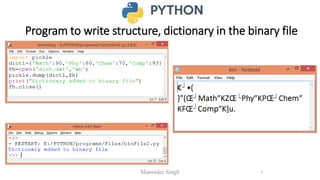
• If we want to write a structure such as list or dictionary to a file and read it
subsequently, we need to use the Python module pickle.
• Pickling is the process of converting structure to a byte stream before writing to a
file
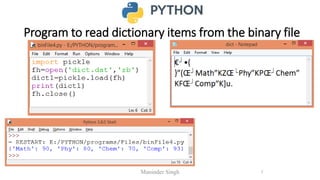
• While reading the content of file, a reverse process called Unpickling is used to
convert the byte stream back to the original format.
Maninder Singh 2
Steps to perform binary file operations
• First we need to import the module called pickle.
• This module provides 2 main functions:
• dump() : to write the object in file which is loaded in binary mode
• Syntax : dump(object_to_write, filehandle)
• load() : dumped data can be read from file using load() i.e. it is used to read
object from pickle file.
• Syntax: object = load(filehandle)
Maninder Singh 3
Program to write structure, list in the binary file
Maninder Singh 4
Program to write structure, dictionary in the binary file
Maninder Singh 5
Program to read list items from the binary file
Maninder Singh 6
Program to read dictionary items from the binary file
Maninder Singh 7
Insert/Append a Record in Binary File
Maninder Singh 8
Maninder Singh 9
As shown in the above program, inserting and adding
record in student file begins with importing pickle module.
Then, iterating for the number of records to be added is
done using while loop. Input is accepted from the user for
roll number, name and marks. These fetched values are
saved as a list to be appended. Once the record is created,
it is appended to the binary file “student” using the dump()
method, which writes the object into the opened file.
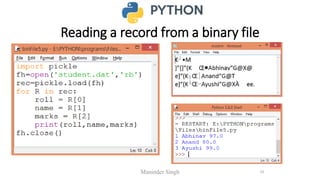
Reading a record from a binary file
Maninder Singh 10
Reading a record from a binary file
Maninder Singh 11
• The above program deals with reading the contents from binary file
student using load() method of pickle module. It is used to read the
object from the opened file. The syntax for this is given by the
statement—
object = pickle.load(file)
• Once the contents are read, it gets stored inside the object, rec. All
the data of the respective fields from this object is held in the
respective variables, roll, name and marks and are finally displayed as
the output.
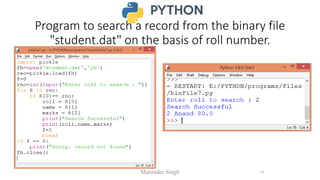
Program to search a record from the binary file
"student.dat" on the basis of roll number.
Maninder Singh 12
Updating a record in a binary file
• First we need to search the record from the binary file, which is to be updated.
• Once the record is found, the file pointer is moved to the beginning of the file
using seek(0) statement, and then the changed name is written to the file and the
record is updated.
• seek() method is used for random access to the file.
Maninder Singh 13
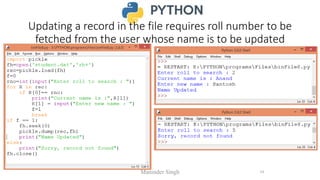
Updating a record in the file requires roll number to be
fetched from the user whose name is to be updated
Maninder Singh 14
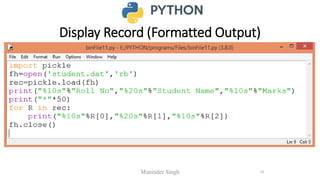
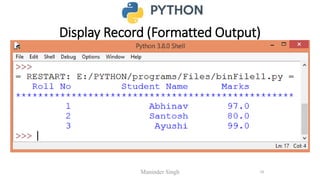
Display Record (Formatted Output)
Maninder Singh 15
Display Record (Formatted Output)
Maninder Singh 16
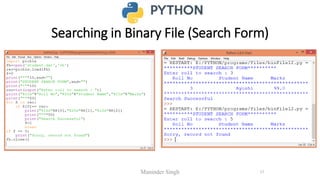
Searching in Binary File (Search Form)
Maninder Singh 17
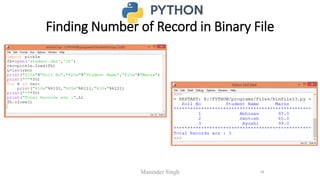
Finding Number of Record in Binary File
Maninder Singh 18
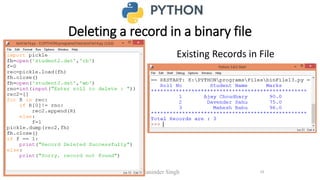
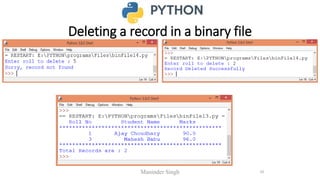
Deleting a record in a binary file
Maninder Singh 19
Existing Records in File
Deleting a record in a binary file
Maninder Singh 20
RANDOM ACCESS IN FILES
• Python allow random access of the data as well using built-in methods seek() and tell().
• seek()—seek() function is used to change the position of the file handle (file pointer) to
a given specific position.
seek() can be done in two ways:
• Absolute Positioning
• Relative Positioning
Maninder Singh 21
ABSOLUTE POSITIONING
• The syntax for seek() is—
• f.seek(file_location) #where f is the file pointer
• For example
• f.seek(20)
• This statement shall move the file pointer to 20th byte in the file no matter where
you are.
Maninder Singh 22
RELATIVE POSITIONING
• Relative referencing/positioning has two arguments, offset and the position from
which it has to traverse.
• The syntax for relative referencing is: f.seek(offset, from_what)
• The "from_what" argument can have any of the three values:
• 0: sets the reference point at the beginning of the file, which is by default.
• 1: sets the reference point at the current file position.
• 2: sets the reference point at the end of the file
Maninder Singh 23
RELATIVE POSITIONING
• For example,
• f.seek(–10,1) from current position, move 10 bytes backward
• f.seek(10,1) from current position, move 10 bytes forward
• f.seek(–20,1) from current position, move 20 bytes backward
• f.seek(10,0) from beginning of file, move 10 bytes forward
Maninder Singh 24
RANDOM ACCESS IN FILES
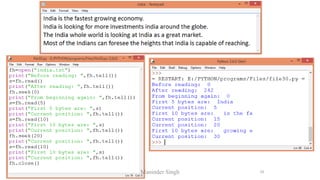
• tell()—tell() returns the current position of the file read/write pointer within the
file.
• Its syntax is:
f.tell() #where f is file pointer
• When you open a file in reading/writing mode, the file pointer rests at 0th byte.
• When you open a file in append mode, the file pointer rests at last byte.
Maninder Singh 25
Maninder Singh 26

5.1 Binary File Handling.pdf

  • 1.
    Binary file operations •All binary files follow a specific format. We can open some binary files in the normal text editor but we can’t read the content present inside the file. That’s because all the binary files will be encoded in the binary format, which can be understood only by a computer or a machine. • In binary files, there is no delimiter to end a line. Since they are directly in the form of binary, hence there is no need to translate them. That’s why these files are easy and fast in working. Maninder Singh 1
  • 2.
    Binary file operations •If we want to write a structure such as list or dictionary to a file and read it subsequently, we need to use the Python module pickle. • Pickling is the process of converting structure to a byte stream before writing to a file • While reading the content of file, a reverse process called Unpickling is used to convert the byte stream back to the original format. Maninder Singh 2
  • 3.
    Steps to performbinary file operations • First we need to import the module called pickle. • This module provides 2 main functions: • dump() : to write the object in file which is loaded in binary mode • Syntax : dump(object_to_write, filehandle) • load() : dumped data can be read from file using load() i.e. it is used to read object from pickle file. • Syntax: object = load(filehandle) Maninder Singh 3
  • 4.
    Program to writestructure, list in the binary file Maninder Singh 4
  • 5.
    Program to writestructure, dictionary in the binary file Maninder Singh 5
  • 6.
    Program to readlist items from the binary file Maninder Singh 6
  • 7.
    Program to readdictionary items from the binary file Maninder Singh 7
  • 8.
    Insert/Append a Recordin Binary File Maninder Singh 8
  • 9.
    Maninder Singh 9 Asshown in the above program, inserting and adding record in student file begins with importing pickle module. Then, iterating for the number of records to be added is done using while loop. Input is accepted from the user for roll number, name and marks. These fetched values are saved as a list to be appended. Once the record is created, it is appended to the binary file “student” using the dump() method, which writes the object into the opened file.
  • 10.
    Reading a recordfrom a binary file Maninder Singh 10
  • 11.
    Reading a recordfrom a binary file Maninder Singh 11 • The above program deals with reading the contents from binary file student using load() method of pickle module. It is used to read the object from the opened file. The syntax for this is given by the statement— object = pickle.load(file) • Once the contents are read, it gets stored inside the object, rec. All the data of the respective fields from this object is held in the respective variables, roll, name and marks and are finally displayed as the output.
  • 12.
    Program to searcha record from the binary file "student.dat" on the basis of roll number. Maninder Singh 12
  • 13.
    Updating a recordin a binary file • First we need to search the record from the binary file, which is to be updated. • Once the record is found, the file pointer is moved to the beginning of the file using seek(0) statement, and then the changed name is written to the file and the record is updated. • seek() method is used for random access to the file. Maninder Singh 13
  • 14.
    Updating a recordin the file requires roll number to be fetched from the user whose name is to be updated Maninder Singh 14
  • 15.
    Display Record (FormattedOutput) Maninder Singh 15
  • 16.
    Display Record (FormattedOutput) Maninder Singh 16
  • 17.
    Searching in BinaryFile (Search Form) Maninder Singh 17
  • 18.
    Finding Number ofRecord in Binary File Maninder Singh 18
  • 19.
    Deleting a recordin a binary file Maninder Singh 19 Existing Records in File
  • 20.
    Deleting a recordin a binary file Maninder Singh 20
  • 21.
    RANDOM ACCESS INFILES • Python allow random access of the data as well using built-in methods seek() and tell(). • seek()—seek() function is used to change the position of the file handle (file pointer) to a given specific position. seek() can be done in two ways: • Absolute Positioning • Relative Positioning Maninder Singh 21
  • 22.
    ABSOLUTE POSITIONING • Thesyntax for seek() is— • f.seek(file_location) #where f is the file pointer • For example • f.seek(20) • This statement shall move the file pointer to 20th byte in the file no matter where you are. Maninder Singh 22
  • 23.
    RELATIVE POSITIONING • Relativereferencing/positioning has two arguments, offset and the position from which it has to traverse. • The syntax for relative referencing is: f.seek(offset, from_what) • The "from_what" argument can have any of the three values: • 0: sets the reference point at the beginning of the file, which is by default. • 1: sets the reference point at the current file position. • 2: sets the reference point at the end of the file Maninder Singh 23
  • 24.
    RELATIVE POSITIONING • Forexample, • f.seek(–10,1) from current position, move 10 bytes backward • f.seek(10,1) from current position, move 10 bytes forward • f.seek(–20,1) from current position, move 20 bytes backward • f.seek(10,0) from beginning of file, move 10 bytes forward Maninder Singh 24
  • 25.
    RANDOM ACCESS INFILES • tell()—tell() returns the current position of the file read/write pointer within the file. • Its syntax is: f.tell() #where f is file pointer • When you open a file in reading/writing mode, the file pointer rests at 0th byte. • When you open a file in append mode, the file pointer rests at last byte. Maninder Singh 25
  • 26.